

Repository
CoLLMLight
CoLLMLight: Cooperative Large Language Model Agents for Network-Wide Traffic Signal Control Official implementation for , accepted by ICLR 2026. This repository provides the offici · License unknown · Install via pip · Maintenance unknown
- License
- Unknown
README
CoLLMLight: Cooperative Large Language Model Agents for Network-Wide Traffic Signal Control
Official implementation for CoLLMLight, accepted by ICLR 2026.
Table of Contents
<a id="overview"></a>
1. Overview
This repository provides the official implementation for CoLLMLight: Cooperative Large Language Model Agents for Network-Wide Traffic Signal Control.
Network-wide optimization in traffic signal control (TSC) requires agents to cooperate across intersections. However, recent Large Language Model (LLM)-based TSC agents are designed as independent agents without inter-intersection cooperation, which limits their effectiveness at the network level. To address this gap, we propose CoLLMLight, a cooperative LLM agent framework for network-wide traffic signal control. CoLLMLight introduces a spatiotemporal-aware cooperative reasoning module to analyze interactions with neighboring agents and produce cooperative suggestions. This reasoning process is implemented within an asynchronous decision architecture to support multi-step reasoning without compromising real-time responsiveness. To further improve both cooperation effectiveness and reasoning efficiency, we propose a cost-aware cooperation optimization strategy. It first applies adaptive reasoning optimization to equip the LLM with the capability to generate concise yet effective cooperative reasoning across varied traffic conditions. Then, it refines the policy using reward signals that encourage both effective decision-making and efficient reasoning. Extensive experiments on four real-world traffic networks demonstrate that CoLLMLight significantly outperforms existing methods by enabling more effective and generalizable cooperation, while ensuring low decision latency and efficient token usage.
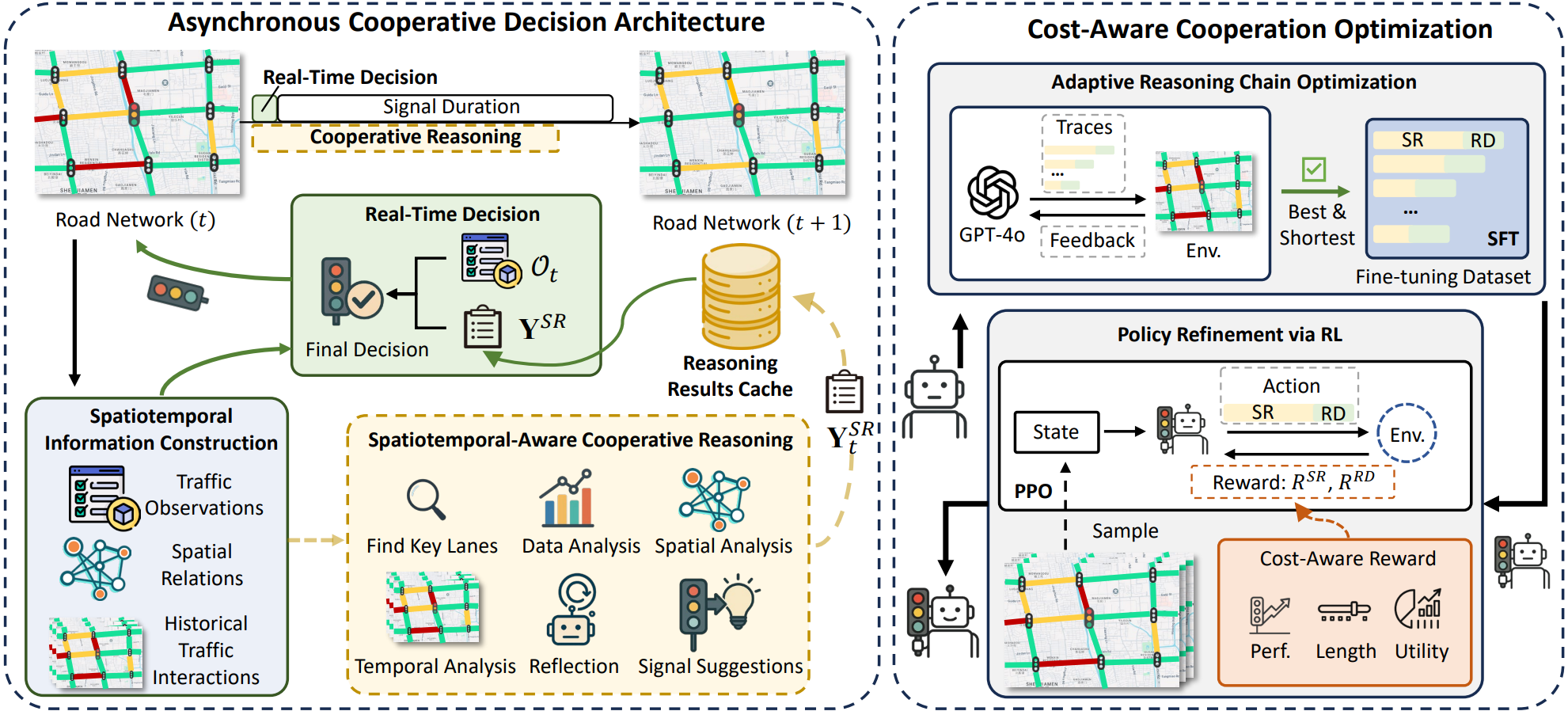
<a id="requirements"></a>
2. Requirements
python>=3.9cityflow(Requires a Linux environment; tested on Ubuntu)tensorflow-cpu==2.8.0ortensorflow-gpu==2.8.0torch==2.2.2transformers==4.48.2trl==0.9.2vllmlmdeploy
You can install the required Python packages using:
pip install -r requirements.txt<a id="data"></a>
3. Data
The repository follows the CityFlow data layout. Each traffic network contains a roadnet file and one or more traffic flow files:
data/
├── Hangzhou/4_4/
├── Jinan/3_4/
├── NewYork/28_7/
├── Synthetic/4_4/
└── FinetuneData/
For example, the New York benchmark uses:
- Roadnet:
data/NewYork/28_7/roadnet_28_7.json - Traffic flow:
data/NewYork/28_7/anon_28_7_newyork_real_double.json
<a id="quick-start"></a>
4. Quick Start
To run inference with a trained model, follow these steps.
Step 1: Deploy the LLM Inference Server
Deploy your chosen LLM with an OpenAI-compatible local inference service such as lmdeploy or vllm. The model_path should be a local path or Hugging Face-compatible model identifier.
# Example using lmdeploy
lmdeploy serve api_server /path/to/your/llm --tp <num_gpus>
Step 2: Run the Simulation
Execute the main script to run the agent in the CityFlow simulation environment.
python run_CoLLMlight.py \
    --model_path /path/to/your/llm \
    --dataset 'newyork_28x7' \
    --traffic_file 'anon_28_7_newyork_real_double.json'
<a id="training-workflow"></a>
5. Training Workflow
The training process consists of three main stages.
Stage 1: Simulation Data Sampling
First, sample simulation data from the CityFlow environment. This data will serve as the basis for the subsequent training steps.
python run_fts.pyThe sampled data will be saved to ./data/FinetuneData/SynTrain_sample.json.
Stage 2: Adaptive Reasoning Chain Generation
Next, generate synthetic reasoning chains using a powerful teacher model (e.g., GPT-4o) and the data sampled in the previous step.
1. Configure API access:
Set your API credentials through environment variables. The code reads OPENAI_API_KEY by default and supports OpenAI-compatible endpoints through OPENAI_BASE_URL or OPENAI_API_URL.
export OPENAI_API_KEY="your_api_key"

# Optional: use a custom OpenAI-compatible endpoint.
export OPENAI_BASE_URL="https://api.openai.com/v1"
2. Generate Data:
Run the generation script.
python reasoning_tuning_data_synth.pyThe output, saved in ./data/FinetuneData/syn_rt_data.json, contains the reasoning data for fine-tuning a base LLM. You can use standard fine-tuning libraries like a LLaMA Factory for this purpose.
Stage 3: Policy Refinement
Finally, use the fine-tuned LLM from Stage 2 to perform policy refinement via Proximal Policy Optimization (PPO).
1. Configure Model Path:
In config/ppo_config.yaml, set the model_name parameter to the path of your fine-tuned LLM from Stage 2.
2. Run PPO Training:
Execute the PPO training script.
python ppo_ft.py<a id="api-configuration"></a>
6. API Configuration
utils/LLMs.py uses the following environment variables for teacher-model calls:
OPENAI_API_KEY: API key for the chat completion service.OPENAI_BASE_URL: Base URL for an OpenAI-compatible API. Defaults tohttps://api.openai.com/v1.OPENAI_API_URL: Full chat completions URL. If set, this takes priority overOPENAI_BASE_URL.
Examples:
# Official OpenAI endpoint
export OPENAI_API_KEY="your_api_key"

# Custom OpenAI-compatible endpoint
export OPENAI_API_KEY="your_api_key"
export OPENAI_BASE_URL="https://your-endpoint.example.com/v1"
<a id="citation"></a>
7. Citation
If you find this repository useful, please consider citing our paper:
@inproceedings{yuan2026collmlight,
  title={Co{LLML}ight: Cooperative Large Language Model Agents for Network-Wide Traffic Signal Control},
  author={Yuan, Zirui and Lai, Siqi and Liu, Hao},
  booktitle={The Fourteenth International Conference on Learning Representations},
  year={2026},
  url={https://openreview.net/forum?id=KeJqoEVOeY}
}