

Repository
Router-R1
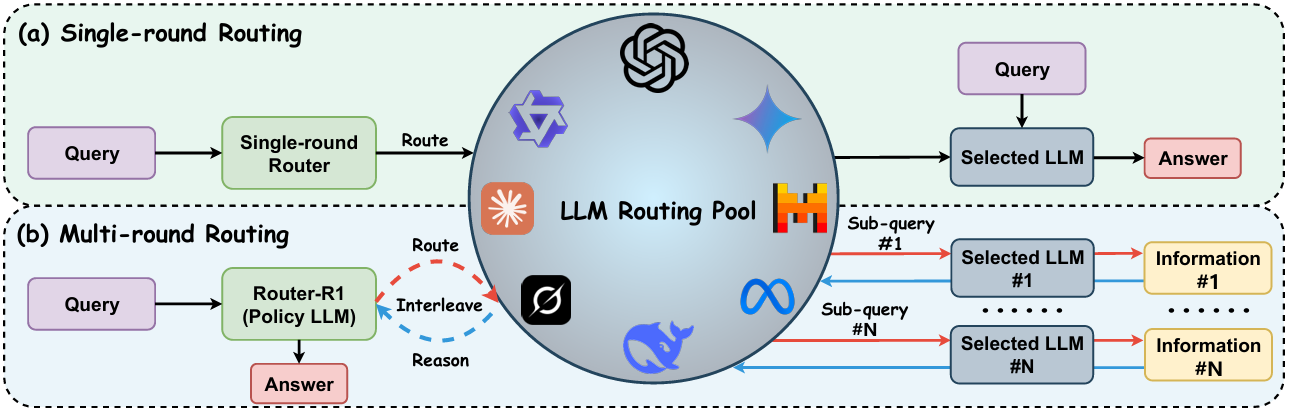
Official implementation of NeurIPS'25 Poster: Router-R1: Teaching LLMs Multi-Round Routing and Aggregation via Reinforcement Learning <a href="https://ulab-uiuc.github.io/Router-R1 · License unknown · Install via pip · Maintenance unknown
- License
- Unknown
README
Router-R1
Official implementation of NeurIPS'25 Poster: Router-R1: Teaching LLMs Multi-Round Routing and Aggregation via Reinforcement Learning







<p align="center">
<a href="https://ulab-uiuc.github.io/Router-R1/">🌐 Project Page</a> |
<a href="https://arxiv.org/abs/2506.09033">📜 arXiv</a> |
<a href="https://huggingface.co/collections/ulab-ai/router-r1-6851bbe099c7a56914b5db03">🤗 Models & Datasets</a> |
<a href="https://x.com/haozhen_ntu/status/1933897400302948843">📮 Twitter Post</a>
<p>
News
[2025.12] 🚀 We open-sourced LLMRouter, a unified and extensible framework for training and evaluating single-round / multi-round / agentic / personalized LLM routers. LLMRouter aims to reduce duplicated engineering effort and enable fair comparison across different routing methods. We warmly welcome the community to integrate and benchmark their own routers!
[2025.09] 🎉 Router-R1 was accepted by NeurIPS'25!
[2025.06] 📢 We’ve open-sourced the Router-R1 model weights along with the dataset collected for training LLM routers on Hugging Face: Router-R1 Collection. We hope this release will support and accelerate research on LLM routers within the community. For more updates, check out our latest Twitter post. Also, don't miss GraphRouter from U Lab — if you're interested in graph-based LLM Routers.
[2025.06] 🌟 Router-R1 was released.
🛠️Environment Setup
conda create -n router-r1 python=3.9
conda activate router-r1
pip install torch==2.4.0 --index-url https://download.pytorch.org/whl/cu121
pip3 install vllm==0.6.3 # or you can install 0.5.4, 0.4.2 and 0.3.1

# verl
pip install -e .

# flash attention 2
pip3 install flash-attn --no-build-isolation
pip install wandb
📊Experiments
(1) Data Preparation
The following scripts generate mixed training and testing datasets for Router-R1 by sampling from multiple QA datasets. By default, 7K examples are randomly selected from each of NQ and HotpotQA.
# DATASET Choices: nq, triviaqa, popqa, hotpotqa, 2wikimultihopqa, musique, bamboogle
# MODEL Choices: qwen, llama

# Generate training set (default: 7K from nq + 7K from hotpotqa)
python data_process/qa_train_merge.py --data_sources nq,hotpotqa --model qwen

# Generate validation set
python data_process/qa_test_merge.py --data_sources nq,hotpotqa --model qwen

# Generate test set
python data_process/qa_test_gen.py --data_sources nq --model qwen
(2) Training
Start training Router-R1 with the following command:
# You can also set parameters such as cost_coe=0.9 in train.sh
# to adjust the trade-off between performance and cost (default is 0.0)

# Additionally, you can customize the reward_metric to train Router-R1
# based on different final outcome rewards.
# Currently supported options are "em" (exact match) and "f1" (f1-score).

bash train.sh
[!IMPORTANT]
Make sure to set your own API KEY in the
train.shscript before running.
Despite the use of a hierarchical reward function, we strongly recommend increasing the batch size if GPU resources permit, as it leads to more stable training.
(3) Evaluation
You can evaluate Router-R1 on the previously generated test set with:
bash test.shMake sure the test data has been generated beforehand using qa_test_gen.py.
(4) Inference
You can conduct inference with:
# NCCL_P2P_DISABLE=1 NCCL_IB_DISABLE=1
CUDA_VISIBLE_DEVICES=2,3,4,5 python infer_vllm.py \
--question [YOUR_QUESTION] \
--model_path [YOUR_MODEL_PATH] \
--api_base [YOUR_API_BASE] \
--api_key [YOUR_API_KEY]
🎯Configure Your Own LLM Routing Pool
-
Step-1
-
Set up your candidate LLM model descriptors in
data_process/prompt_pool.py. -
💡 You can write your own LLM descriptors manually, or use advanced models (e.g., GPT-4o) to generate them automatically. These descriptors capture the strengths, capabilities, or specialization areas of each candidate model, and are used during routing to inform model selection.
-
-
Step-2
- Run
data_process/qa_train_merge.py,data_process/qa_test_merge.py, ordata_process/qa_test_gen.pyas needed to generate new training or test data.
- Run
-
Step-3
-
Modify the
check_llm_namefunction inrouter_r1/llm_agent/route_service.pyto configure your own LLM routing pool parser. -
You should also update the
API_PRICE_1M_TOKENSdictionary in the same file based on the API pricing of your selected models (see Together API Pricing for reference).
-
-
LAST
- Remember to set your own API KEY in the
train.shscript
- Remember to set your own API KEY in the
Useful Resources from Other Awesome Works
-
FusionFactory: Fusing LLM Capabilities with Routing Data.
-
CARROT: CARROT: A Cost Aware Rate Optimal Router.
![[code]](https://img.shields.io/github/stars/ulab-uiuc/FusionFactory)
![[code]](https://img.shields.io/github/stars/somerstep/CARROT)
Acknowledgement
We sincerely acknowledge the contributions of Deepseek-R1 and Search-R1, whose work has been a valuable source of inspiration. This project builds upon the foundations laid by veRL, and we are deeply grateful for the open-source efforts and advancements made by these communities.
Citation
@article{Router-R1,
  title={Router-R1: Teaching LLMs Multi-Round Routing and Aggregation via Reinforcement Learning},
  author={Haozhen Zhang and Tao Feng and Jiaxuan You},
  journal={arXiv preprint arXiv:2506.09033},
  year={2025}
}
News
4
🛠️Environment Setup
1
-
conda create -n router-r1 python=3.9 conda activate router-r1 pip install torch==2.4.0 --index-url https://download.pytorch.org/whl/cu121 pip3 install vllm==0.6.3 # or you can install 0.5.4, 0.4.2 and 0.3.1 # verl pip install -e . # flash attention 2 pip3 install flash-attn --no-build-isolation pip install wandb
📊Experiments
1
-
(1) Data Preparation
🎯Configure Your Own LLM Routing Pool
1
Useful Resources from Other Awesome Works
2
Acknowledgement
3
Citation
1
-
@article{Router-R1, title={Router-R1: Teaching LLMs Multi-Round Routing and Aggregation via Reinforcement Learning}, author={Haozhen Zhang and Tao Feng and Jiaxuan You}, journal={arXiv preprint arXiv:2506.09033}, year={2025} }