

Repository
The-Gargantuas-Video-Editor
The-Gargantuas-Video-Editor AI-Powered Video Editing Suite - 100% Free! A Python-based video editing application with AI upscaling and lip-sync capabilities. : Enhance images and v · License Apache 2.0 · Install via pip · Maintenance unknown
- License
- Apache 2.0
- Model
- Description
Specs
- ModelDescription
- ModelDescription
- ModelDescription
README
The-Gargantuas-Video-Editor
AI-Powered Video Editing Suite - 100% Free!
A Python-based video editing application with AI upscaling and lip-sync capabilities.
✨ Features
- 🎨 AI Upscaling: Enhance images and videos using RealESRGAN models
- 👄 AI Lip Sync: Synchronize lips with audio using 6 advanced models (Wav2Lip, Wav2Lip GAN, SadTalker, Video-Retalking, LivePortrait, The Gargantuas Hybrid)
- 📝 AI Subtitles: Generate accurate subtitles with Whisper + GPT/Groq/Gemini, multi-agent validation, and real-time editing
- 🖼️ Background Removal: Remove backgrounds from images with AI (transparent or custom color)
- ✨ Face Enhancement: Restore and enhance face details with GFPGAN and other advanced models
- 🎬 Image to Video: Animate static images using Stable Video Diffusion
- 🌐 Multi-language: Full internationalization support (English, Italian, more coming)
- 💯 100% Free: No login, no subscriptions, no locked features (Groq & Gemini APIs are 100% free!)
- 🖥️ Multi-device Support: CPU, GPU (CUDA), and MPS (Apple Silicon) acceleration
- 🌍 Cross-platform: Compatible with macOS, Windows, and Linux
- 😊 Easy to Use: Simple interface with powerful features
- 🔓 Open Source: Free software you can trust
🚀 Try it on Google Colab (No PC Required!)
Don't have a powerful PC? No problem! Run the app directly on Google Colab with FREE GPU T4 acceleration.

📚 Complete Setup Guide:
- Quick Copy-Paste Script: colab/colab_notebook_setup.py - Copy entire content to a Colab cell
- Detailed Guide: colab/COLAB_SETUP.md - Full documentation with troubleshooting
- Quick Fix: colab/COLAB_FIX.md - If you're getting cryptography errors
Quick Start Guide (3 Simple Steps):
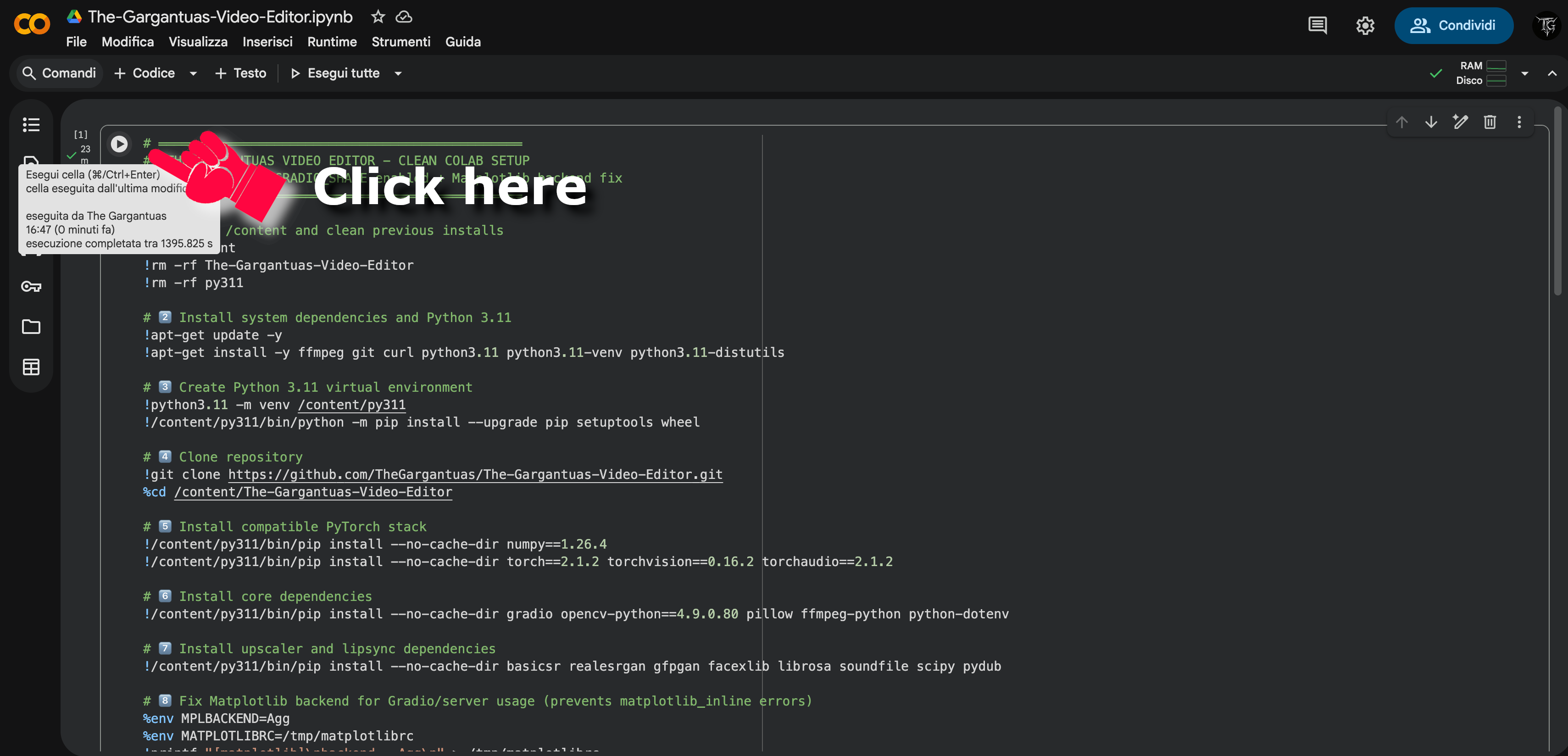
Step 1: Run the Setup Cell
Click the play button on the notebook cell to start downloading the repository and installing dependencies with GPU T4 support.
⚠️ IMPORTANT: The setup automatically installs cryptography FIRST to avoid import errors. This takes ~5-10 minutes.
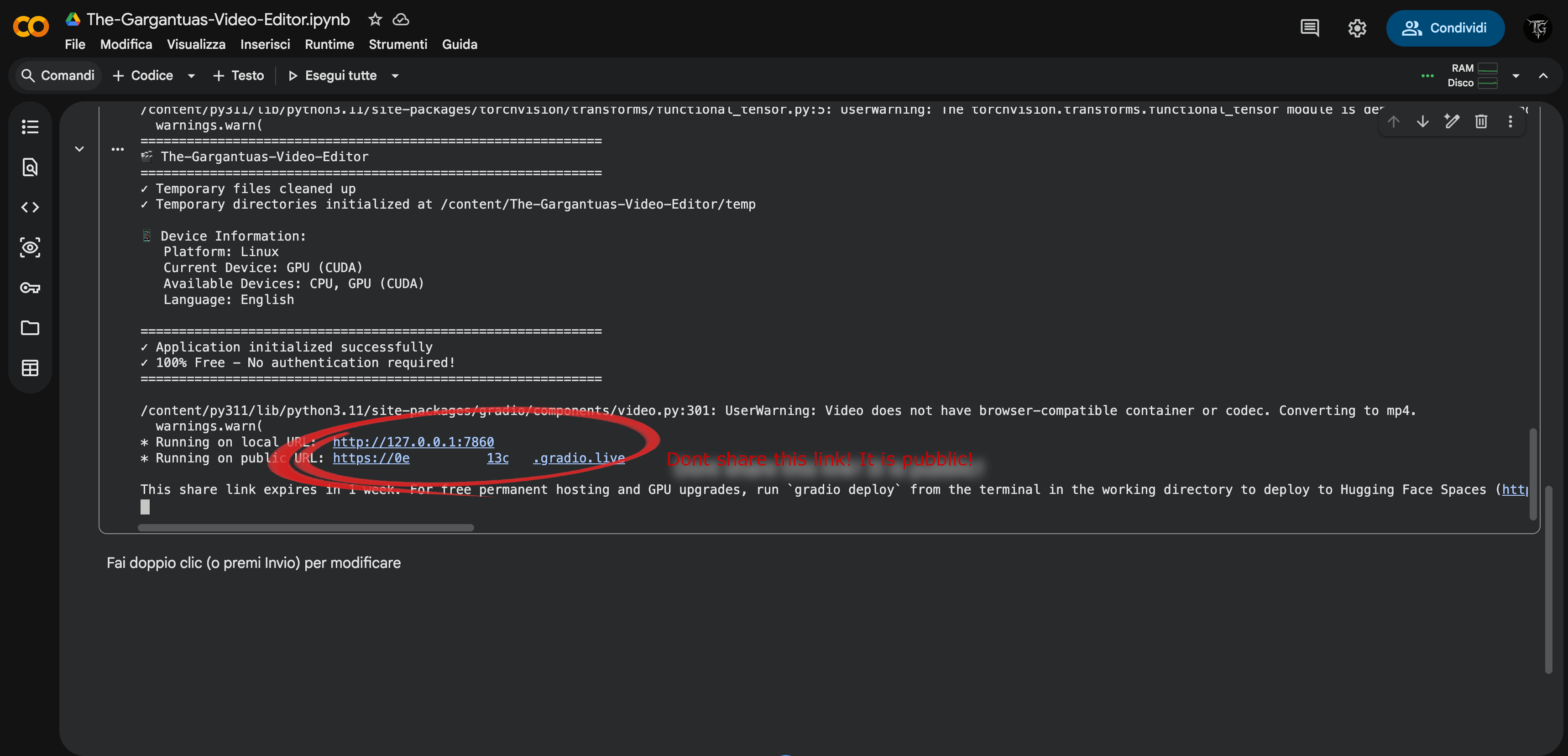
Step 2: Launch the App
After installation completes, you'll see two links. Click the second link (the one that does NOT start with 127.0.0.1).
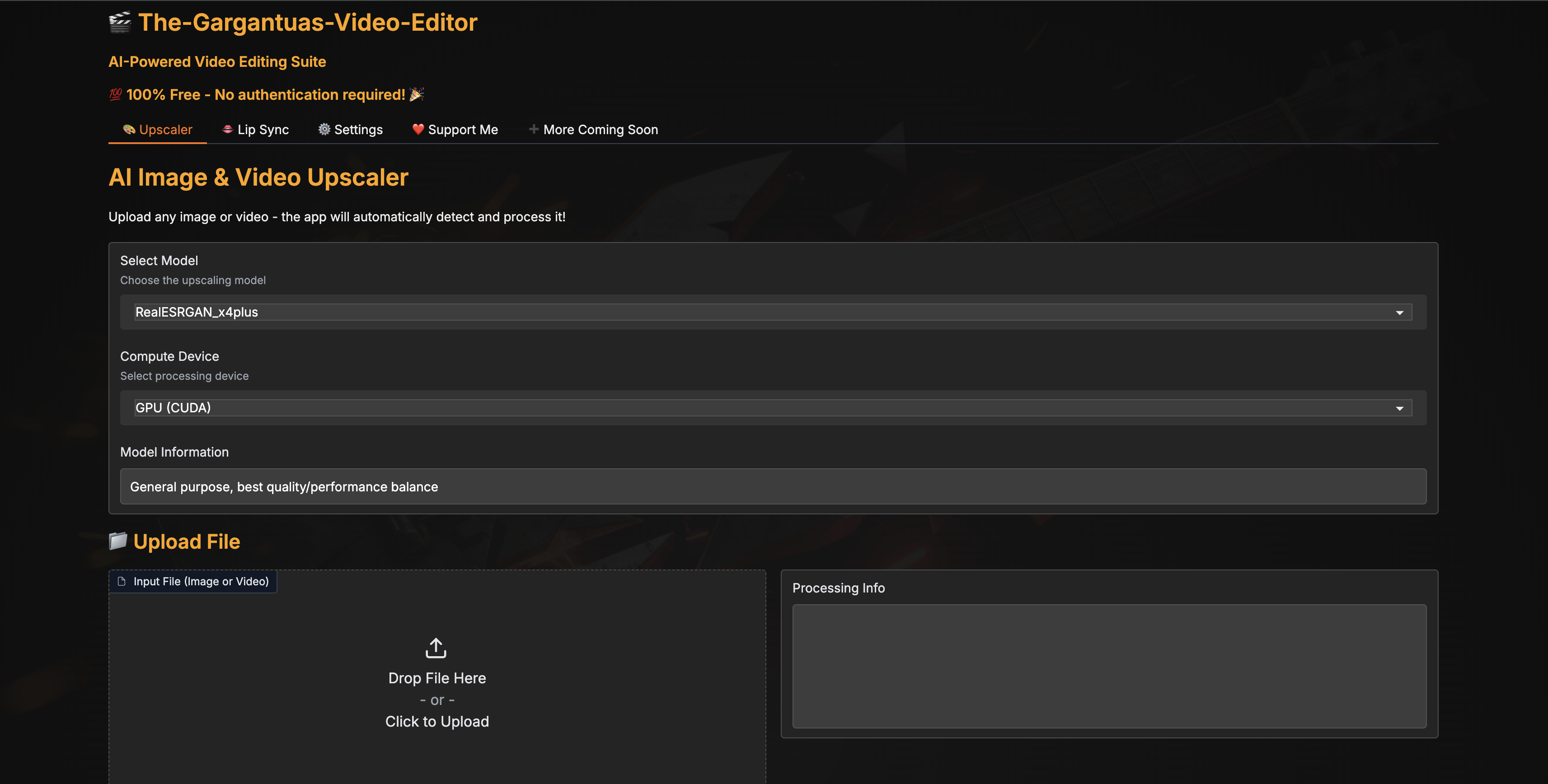
Step 3: Start Editing!
The Gradio interface will open in a new browser tab. You're ready to use all the features!
💡 Pro Tips:
- Use Groq API (100k tokens/day FREE) instead of Gemini (20 req/day)
- Enable Single Pass validation mode to save API quota
- For best performance on Colab, use videos shorter than 30 seconds to avoid timeouts
- Check Colab Setup Guide if you get errors
Setup
Quick Setup (Recommended)
macOS/Linux:
chmod +x setup.sh
./setup.sh
Windows:
setup.batThe setup script will automatically:
- Check/install Python 3.11.0 (via pyenv)
- Create virtual environment (
.venv) - Install all dependencies
Manual Installation
If you prefer to install manually:
-
Install Python 3.11.0:
pyenv install 3.11.0 pyenv local 3.11.0 -
Create and activate virtual environment:
python -m venv .venv source .venv/bin/activate # macOS/Linux # OR .venv\Scripts\activate.bat # Windows -
Install dependencies:
pip install --upgrade pip
pip install -r requirements.txt
Running the Application
Quick Start (Easiest Method)
For users who have already run the setup script, you can start the app with a single command:
macOS/Linux:
./run.shWindows:
run.batThese scripts automatically:
- Activate the virtual environment
- Start the application
- No need to remember Python commands!
Manual Start
If you prefer to run manually:
-
Activate virtual environment (if not already active):
source .venv/bin/activate # macOS/Linux # OR .venv\Scripts\activate.bat # Windows -
Run the app:
python main.py
The app will open in your browser at http://localhost:7860
Usage
- Launch the application:
- macOS/Linux:
./run.sh - Windows:
run.bat
- macOS/Linux:
- Choose your workflow:
- Upscaler tab: Enhance images and videos with AI upscaling
- Lip Sync tab: Synchronize lips with audio using 6 AI models
- Audio to Subtitles tab: Generate accurate subtitles with Whisper + GPT/Groq/Gemini
- Background Remover tab: Remove backgrounds from images with AI
- Face Enhance tab: Restore and enhance face details with advanced models
- Image to Video tab: Animate static images using Stable Video Diffusion
- Settings tab: Configure API keys for OpenAI, Groq, and Gemini (Groq & Gemini are FREE!)
- Open the 🔍 Video Comparison Modal to see examples of different models
- Check out the ❤️ Support Me tab if you find the app useful!
The app is completely free and works without any login or registration!
Interface Overview
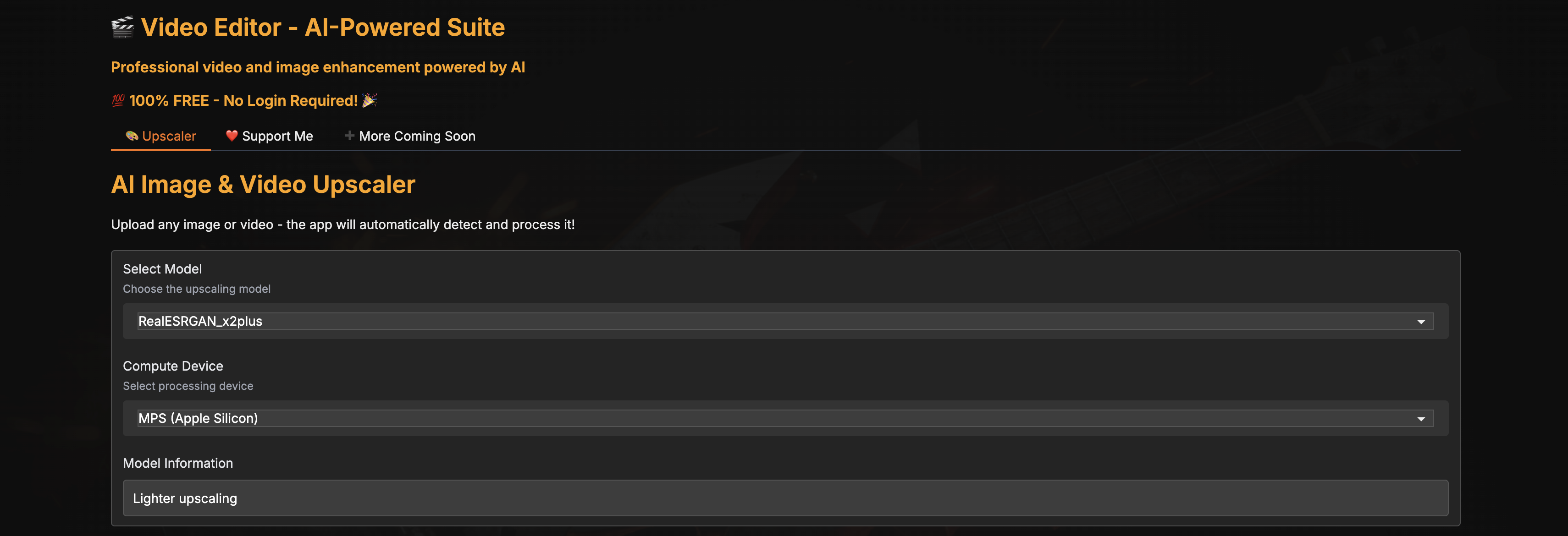
1. Model Selection
Select your preferred upscaling model and the compute device (CPU, CUDA, or MPS) based on your hardware.
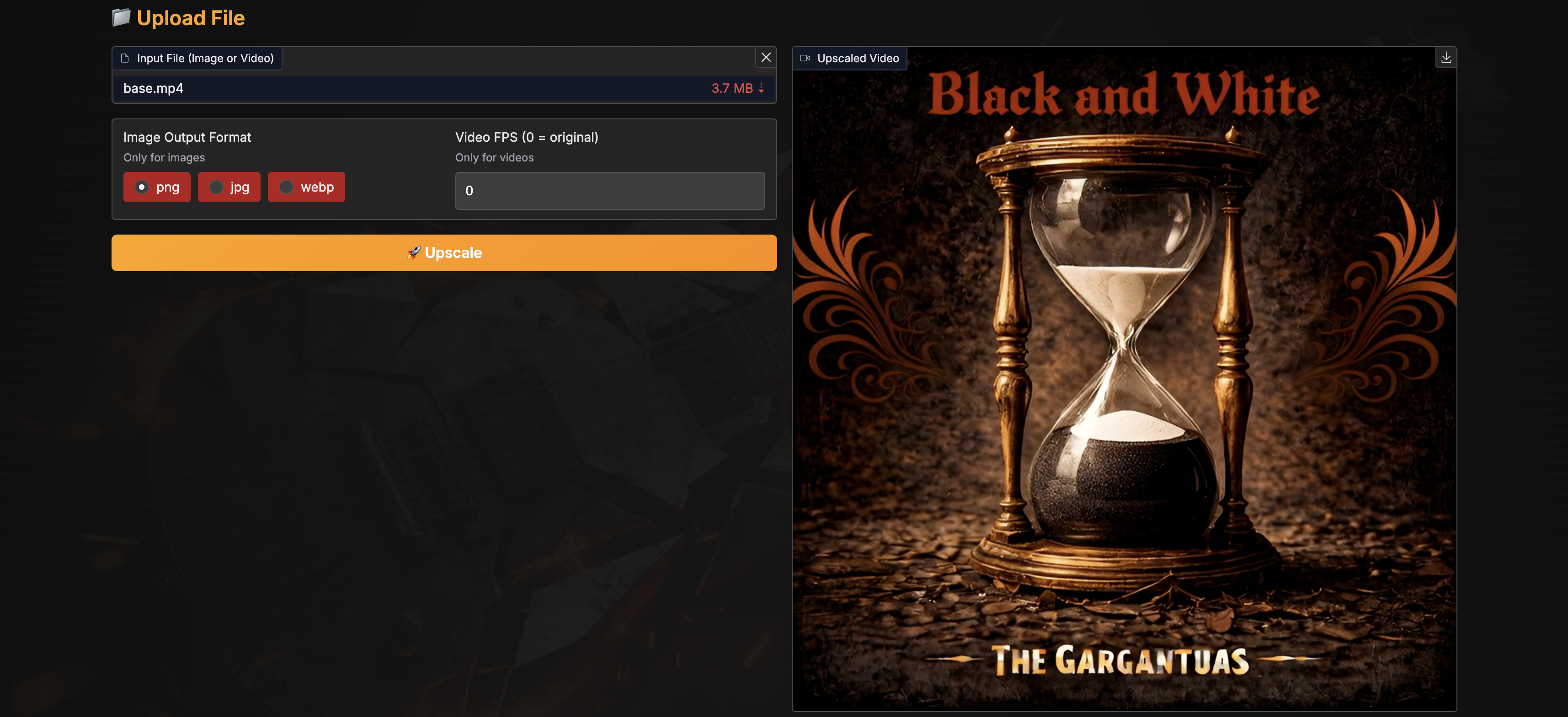
2. Upload and Processing
Upload your image or video file, set the FPS for videos (0 keeps the original FPS - recommended), and click the Upscale button. The progress bar will show:
- Processing progress
- Average time per frame
- Estimated time remaining
The upscaled result will appear on the right once processing is complete.
3. Video Comparison Modal
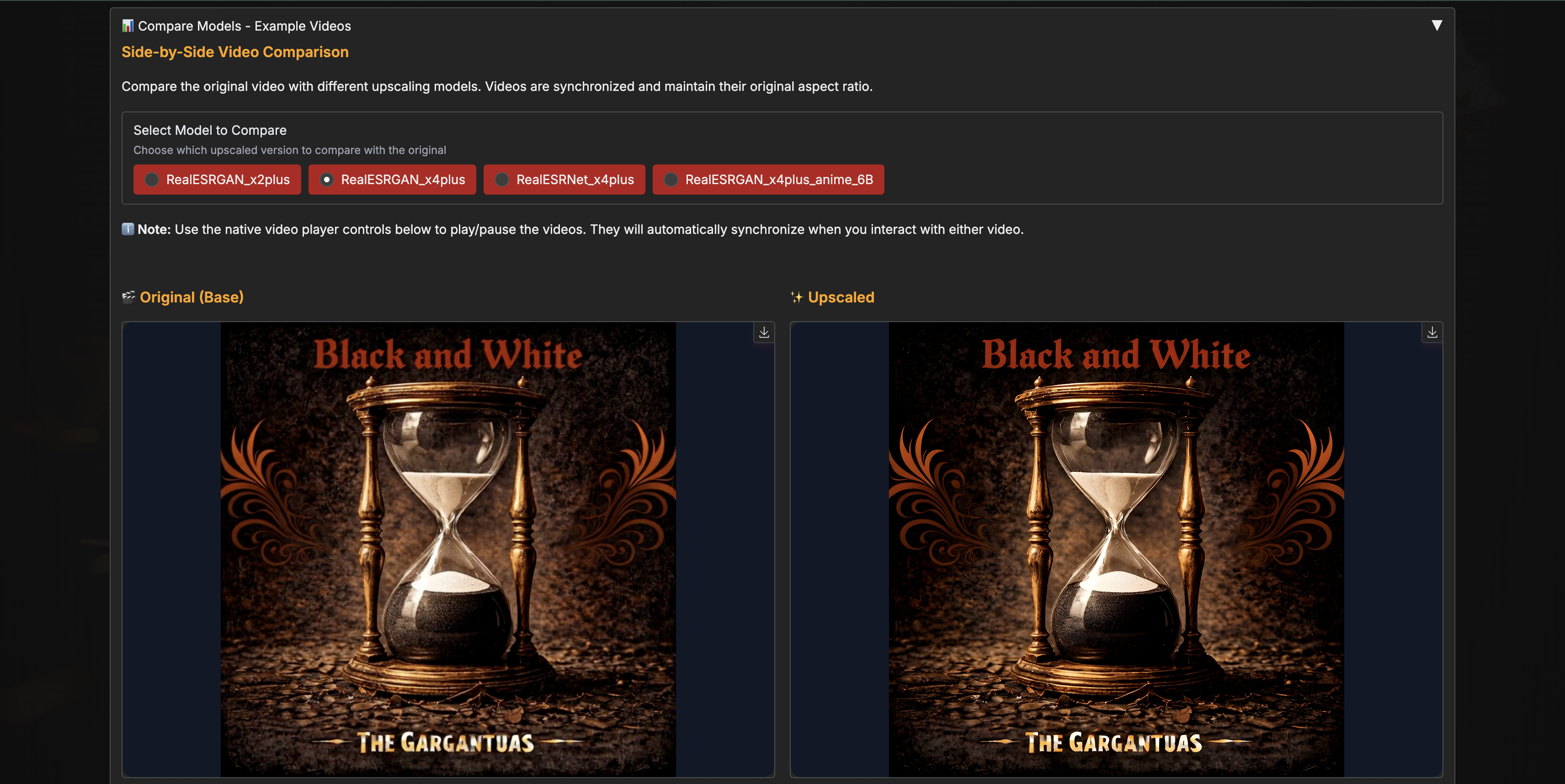
Compare all models side-by-side! This modal displays 4 pairs of videos:
- Left side: Original base video
- Right side: Upscaled result for each of the 4 models
Perfect for choosing the best model for your content!
Supported Upscaling Models
| Model | Description | Base Video | Example Video |
|---|---|---|---|
| RealESRGAN_x4plus (default) | 4x scale, general purpose | ▶️ Base | ▶️ Upscaled |
| RealESRGAN_x2plus | 2x scale, lighter upscaling | ▶️ Base | ▶️ Upscaled |
| RealESRNet_x4plus | 4x scale, cleaner output | ▶️ Base | ▶️ Upscaled |
| RealESRGAN_x4plus_anime_6B | 4x scale, optimized for anime/cartoon content | ▶️ Base | ▶️ Upscaled |
💡 Tip: Download the repository to view the example videos locally and compare the quality differences between models.
Features in Detail
AI Upscaling
- Automatic detection of image vs video files
- Audio preservation for videos (automatically extracted and re-added)
- Progress tracking with performance metrics (seconds/frame, ETA)
- Multiple AI models optimized for different content types
Performance Monitoring
- Real-time progress updates in Gradio interface
- Terminal output with timing information per frame
- Final statistics: total time, average s/frame, processing speed
Video Comparison Modal
- Side-by-side comparison of original vs upscaled videos
- Example videos for all models included
- Synchronized playback controls
- Loop functionality for continuous comparison
- Native aspect ratio preservation
AI Lip Sync
The Lip Sync tab provides powerful AI-driven lip synchronization using multiple state-of-the-art models.
Lip Sync Examples Gallery
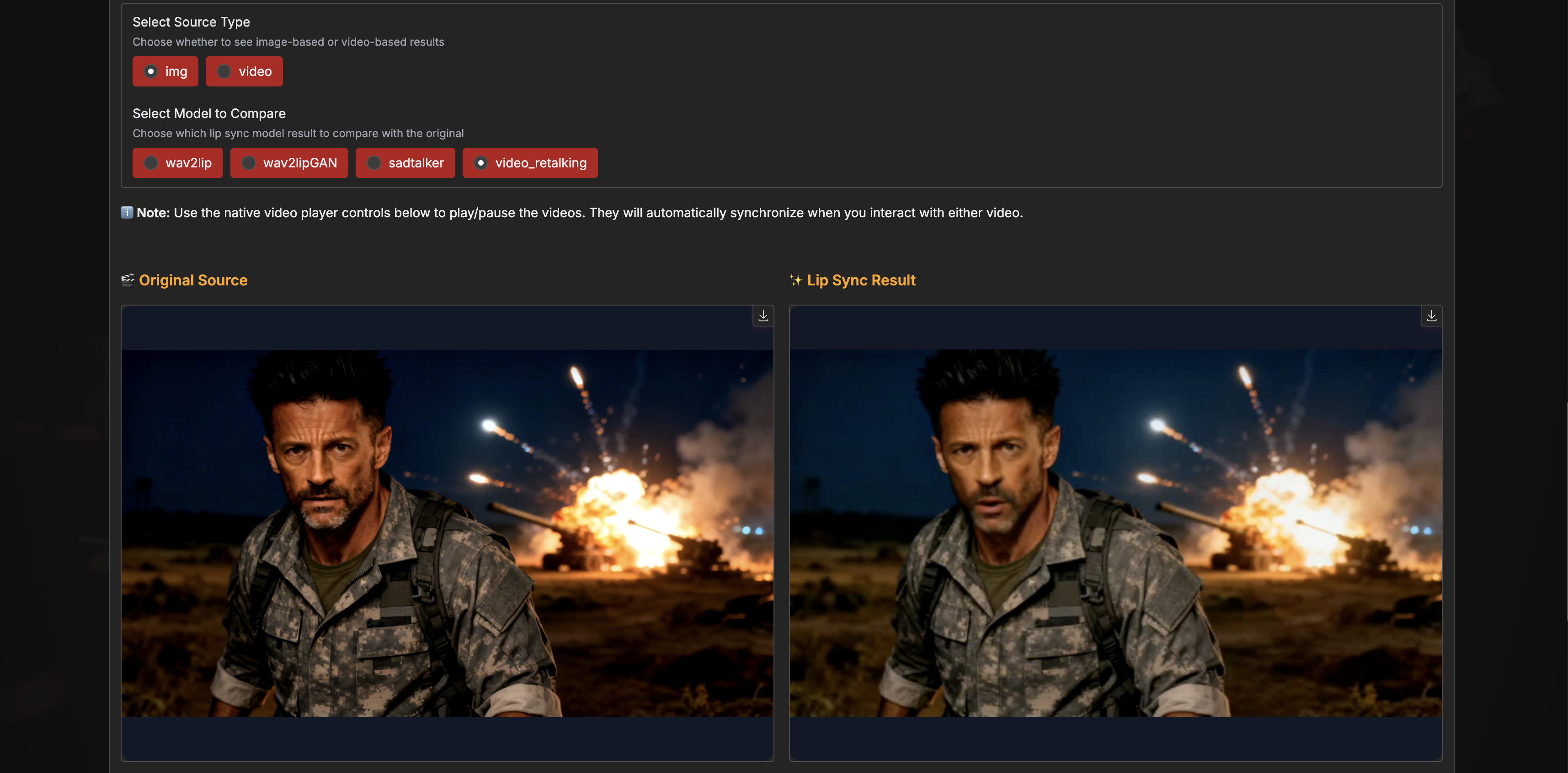
The tab includes an interactive gallery to compare different AI lip-sync models:
Features:
- Source Selection: Switch between image and video sources
- Model Comparison: Compare results from Wav2Lip, Wav2Lip GAN, SadTalker, Video-Retalking, LivePortrait, and The Gargantuas Hybrid
- Side-by-Side View: See original source next to processed result
- Synchronized Playback: Videos automatically sync when playing/pausing/seeking
- Easy Navigation: Select different models to instantly see quality differences
Supported Lip Sync Models
| Model | Description | Best For | Processing Speed |
|---|---|---|---|
| Wav2Lip | Base model - Fast and reliable | Quick previews and testing | ⚡⚡⚡⚡⚡ |
| Wav2Lip GAN | Enhanced version with better quality | Balanced quality/speed production | ⚡⚡⚡⚡ |
| SadTalker | Full facial animation with expressions | Static portrait animation | ⚡⚡ |
| Video-Retalking | Maximum quality with face enhancement | Professional productions | ⚡ |
| LivePortrait | Face + upper torso animation | Portrait with body movement | ⚡⚡⚡ |
| The Gargantuas Hybrid 🔥 | Wav2Lip GAN + GFPGAN face restoration | Best quality lip-sync + face enhancement | ⚡⚡⚡ |
💡 Tip: All lip sync models are downloaded automatically on first use. Try the examples gallery to compare quality before processing your own content!
� AI Subtitles Generation
The Audio to Subtitles tab provides a complete AI-powered subtitle generation workflow with advanced validation.
5-Step Workflow
Step 1: Paste & Clean Lyrics
- Paste your song lyrics or reference text
- AI-powered cleaning removes timestamps, sections, and formatting
- Supports OpenAI, Groq, and Gemini (100% FREE with 1M tokens/min!)
Step 2: Upload Audio
- Upload your audio file (MP3, WAV, M4A, etc.)
- Supported formats: any audio format supported by FFmpeg
Step 3: Transcribe Audio
- Uses Whisper (faster-whisper) for word-level transcription
- Extracts both:
- Segments: Standard subtitle grouping (phrases/sentences)
- Words: Word-by-word timing (precise karaoke-style)
- Automatic language detection
- Full audio transcription (no 30s limit!)
Step 4: Generate Subtitles
- AI generation using GPT (OpenAI), Llama (Groq), or Gemini (Google)
- 3 Ultra-Detailed Modes:
- Disabled: Standard subtitles (natural grouping)
- Basic: New subtitle on pauses (customizable threshold)
- Word-by-Word: One word per subtitle (karaoke-style)
- Multi-Agent Validation (optional, enabled by default):
- 🤖 Agent 1: Timing Validator (overlaps, gaps, durations)
- 🤖 Agent 2: Lyrics Matcher (accuracy vs ground truth)
- 🤖 Agent 3: Format Validator (SRT/VTT/ASS compliance)
- 🤖 Agent 4: Text Corrector (applies fixes)
- 🧠 Coordinator: Decides when to stop (max 10 iterations)
- Real-time validation log: See agent conversations and decisions
- Song-aware: Agents understand long gaps in songs are normal (instrumental sections)
Step 5: Preview & Edit
- Audio player with waveform visualization
- Interactive subtitle editor: Click subtitle to jump to timestamp
- Real-time editing: Modify text, timing, or delete subtitles
- DataTable interface: Edit timestamps and text directly
Export Formats
- SRT (SubRip): Universal format, works everywhere
- VTT (WebVTT): Web standard, supports styling
- ASS (Advanced SubStation Alpha): Professional format with effects
API Provider Options
| Provider | Cost | Models | Limits | Speed | Best For |
|---|---|---|---|---|---|
| Gemini | 100% FREE | Gemini 1.5 Pro/Flash, 2.0 Flash | 1M tokens/min | ⚡⚡⚡⚡⚡ | Everyone! Best free tier |
| Groq | 100% FREE | Llama 3.3 70B, Llama 3.1 8B | 100k tokens/day | ⚡⚡⚡⚡⚡ | Fast alternative |
| OpenAI | Paid ($) | GPT-4o, GPT-4o-mini | Pay per use | ⚡⚡⚡ | High accuracy needs |
💡 Tip: Start with Gemini (free + highest limits!) for the best experience. The multi-agent validation works with all providers!
Advanced Settings
- Max Characters per Line: 20-60 (default: 42)
- Max Lines per Subtitle: 1-3 (default: 2)
- Pause Threshold: 0.5-3.0s (for basic ultra mode)
- Multi-Agent Validation: Toggle 4-agent validation system
Example Use Cases
- Music Videos: Use word-by-word mode for karaoke-style subtitles
- Podcasts: Standard mode for natural speech grouping
- Language Learning: Multi-agent validation ensures perfect accuracy
- Professional Projects: Export to ASS format with custom styling
🎵 Song Mode: The system automatically detects songs and tells agents that long gaps (30-60s) are normal for instrumental breaks. No more incorrectly merged subtitles!
🎨 AI Background Removal
Remove backgrounds from images automatically using AI models.
Features
- AI-Powered Removal: Uses rembg with U2-Net models for accurate background detection
- Transparent Background: Export PNG with transparent background
- Custom Background Color: Replace with solid color (color picker or RGB values)
- Alpha Matting: Enable for better edge quality (slower but more accurate)
- Preview & Download: Instant preview with download option
Supported Formats
- Input: PNG, JPG, JPEG, WebP
- Output: PNG (with transparency support)
Use Cases
- Product photography (white/transparent backgrounds)
- Profile pictures and avatars
- Social media content
- Design assets and mockups
✨ Face Enhancement
Enhance face and image details without upscaling using advanced AI models.
Available Models
| Model | Description | Quality | Speed |
|---|---|---|---|
| GFPGANv1.3 (default) | Latest version, best quality | ⭐⭐⭐⭐⭐ | ⚡⚡⚡ |
| GFPGANv1.2 | Previous version, balanced | ⭐⭐⭐⭐ | ⚡⚡⚡⚡ |
| GFPGANv1 | First version, faster | ⭐⭐⭐ | ⚡⚡⚡⚡⚡ |
| RestoreFormer | Alternative approach | ⭐⭐⭐⭐ | ⚡⚡⚡ |
| CodeFormer | Fidelity control | ⭐⭐⭐⭐⭐ | ⚡⚡⚡ |
Features
- Face Restoration: Repair old, blurry, or low-quality faces
- Detail Enhancement: Improve skin texture, eyes, and facial features
- Multi-device Support: CPU, CUDA (NVIDIA), and MPS (Apple Silicon)
- No Upscaling: Maintains original resolution while enhancing details
- Batch Processing: Process multiple images
Use Cases
- Restore old family photos
- Enhance video call screenshots
- Improve AI-generated faces
- Touch up portrait photography
🎬 AI Image to Video
Generate realistic video animations from static images using Stable Video Diffusion.
Features
- Stable Video Diffusion: Uses Stability AI's img2vid-xt model
- Configurable Parameters:
- Frames: 14-25 frames (default: 25)
- FPS: 6-30 fps (default: 7)
- Motion Bucket: 1-255 (controls motion intensity, default: 127)
- Noise Augmentation: 0.0-1.0 (adds variation, default: 0.02)
- Decode Chunk Size: 2-8 (memory optimization, default: 5)
- Auto-resize: Automatically resizes images to optimal dimensions (1024x576)
- GPU Acceleration: CUDA support (CPU fallback available)
- MP4 Export: H.264 encoded video output
Technical Details
- Model: stabilityai/stable-video-diffusion-img2vid-xt
- Memory: ~6GB VRAM (GPU) or ~8GB RAM (CPU)
- Processing Time: 2-5 minutes per video (depending on hardware)
- Input: Any image format (PNG, JPG, WebP)
- Output: MP4 video (H.264, configurable FPS)
Use Cases
- Animate still photos and artwork
- Create dynamic social media content
- Product demonstrations and showcases
- Creative video projects
⚠️ Note: Image to Video requires significant computational resources. GPU recommended for faster processing.
�📚 Documentation
Comprehensive guides and documentation:
Local Installation:
- Quick Start Guide - Fast setup and first run
- LipSync Guide - Complete guide for AI lip-sync feature
- I18N Guide - Internationalization and translations
- OpenCV Patch - Compatibility fix details
- Project Structure - Codebase organization
- Changelog - Version history and updates
Google Colab:
- Colab Documentation - Complete guide for running on Google Colab with free GPU
📦 AI Models
All AI models are downloaded automatically on first use - you don't need to download anything manually!
- RealESRGAN models (~60-100MB each) - Downloaded when using Upscaler
- LipSync models (150MB - 2GB) - Downloaded when using each model for the first time
- GFPGAN models (~300MB) - Downloaded when using Face Enhancement
- Stable Video Diffusion (~3.5GB) - Downloaded when using Image to Video
- rembg models (~170MB) - Downloaded when using Background Removal
- Models are cached in
models/folder (not included in git due to size)
First Run: Expect longer processing time as models download. Subsequent runs will be much faster!
Dependencies & Credits
This project is built with amazing open source technologies:
Core Technologies
- Gradio (Apache 2.0) - Web interface framework
- PyTorch (BSD-style) - Deep learning framework
- RealESRGAN (BSD 3-Clause) - AI upscaling models
- BasicSR (Apache 2.0) - Super-resolution framework
- GFPGAN (MIT) - Face restoration models
AI Features
- rembg (MIT) - Background removal with U2-Net
- Stable Diffusion (CreativeML) - Image to video generation
- Diffusers (Apache 2.0) - Diffusion models library
- Wav2Lip - Lip sync models
- SadTalker - Audio-driven talking head generation
- Video-Retalking - Face enhancement lip sync
Subtitle Generation
- faster-whisper (MIT) - Fast speech recognition
- OpenAI API - GPT models for subtitle refinement
- Groq API - Fast Llama inference
- Gemini API - Google's language models
Additional Libraries
- OpenCV - Image/video processing
- FFmpeg - Video encoding/decoding
- Pillow - Image manipulation
- NumPy - Numerical computing
Special thanks to all contributors and maintainers of these projects!
📧 Contact
For issues, suggestions, or questions, feel free to contact me at:
License
This project is licensed under the MIT License - see the LICENSE file for details.