

Repository
CubeSandbox
<h1 align="center">CubeSandbox</h1> Instant, Concurrent, Secure & Lightweight Sandbox Service for AI Agents Cube Sandbox is a high-performance, out-of-the-box secure sandbox servic · License unknown · Maintenance unknown
- License
- Unknown
- Metric
- Docker Container
- Component
- Responsibility
- CubeAPI
- CubeAPI
Specs
- MetricDocker Container
- ComponentResponsibility
- CubeAPICubeAPI
- CubeMasterCubeMaster
- CubeProxyCubeProxy
- CubeletCubelet
- CubeVSCubeVS
- CubeEgressCubeEgress
- CubeHypervisor & CubeShimCubeHypervisor & CubeShim
- FeatureDescription
- Kubernetes-Native DeploymentKubernetes-Native Deployment
- Volume SupportVolume Support
- Cross-Node Pause & ResumeCross-Node Pause & Resume
- E2B API CompatibilityE2B API Compatibility
- Control Plane / Data Plane SeparationControl Plane / Data Plane Separation
- Sandbox Fault RecoverySandbox Fault Recovery
- Scheduling & Operations EnhancementsScheduling & Operations Enhancements
README

<h1 align="center">CubeSandbox</h1>
Instant, Concurrent, Secure & Lightweight Sandbox Service for AI Agents










中文文档 · Quick Start · Documentation · Changelog · X(Twitter) · Top Contributor Program · Submit Use Case
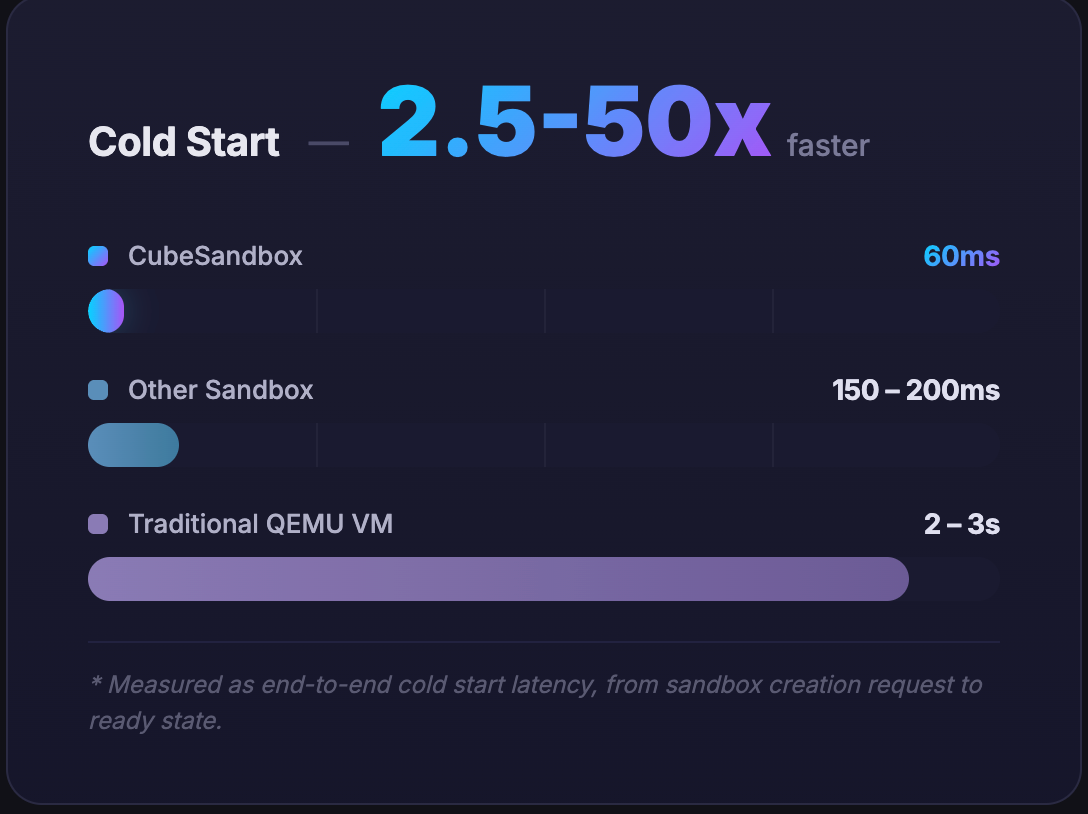
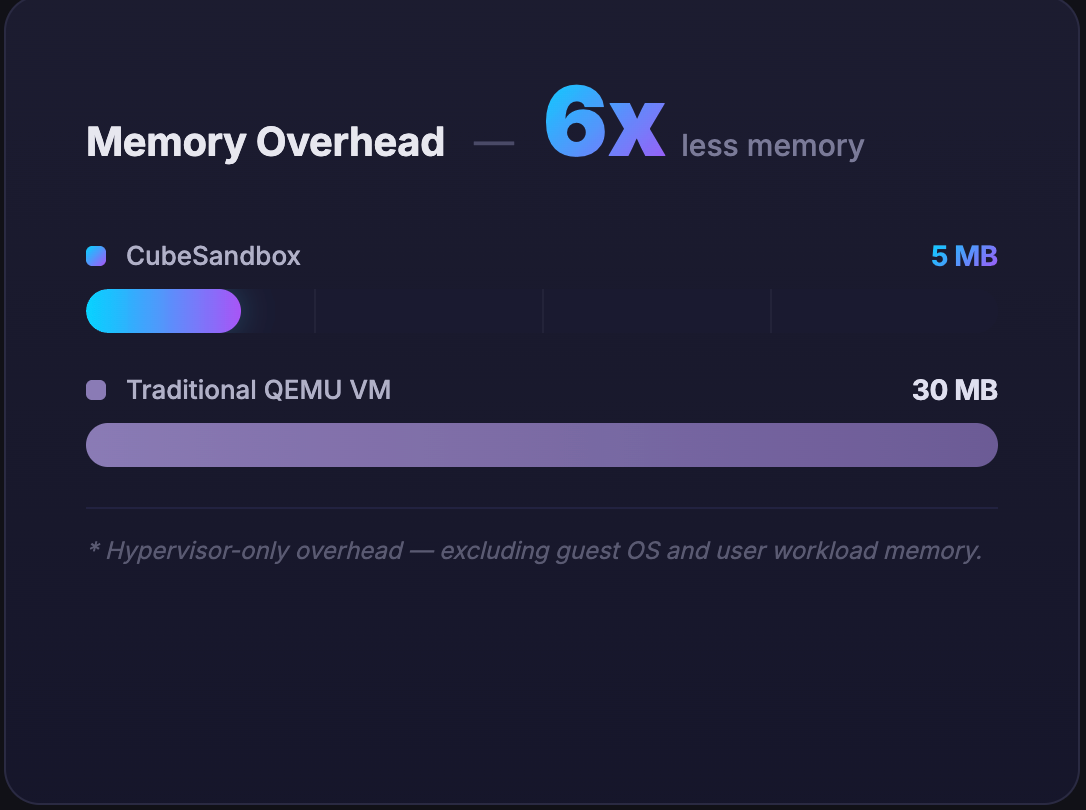
Cube Sandbox is a high-performance, out-of-the-box secure sandbox service built on RustVMM and KVM. It supports both single-node deployment and easy scaling to multi-node clusters. It is compatible with the E2B SDK and can create a hardware-isolated, fully serviceable sandbox in under 60ms with less than 5MB of memory overhead.
📰 News
<table>
<tr>
<td align="right" valign="top" width="100">
<a href="./docs/changelog/v0.5.0.md">
<img src="https://img.shields.io/badge/v0.5.0-2026.07.03-dc3545?style=flat-square" alt="v0.5.0" />
</a>
</td>
<td valign="top">
<strong>v0.5: AutoPause, Terraform deployer, ARM64 & network policy hardening</strong><br/>
<b>AutoPause/AutoResume</b> — idle sandboxes auto-suspend and wake on the next request. <b>Terraform one-click cluster deploy</b> <b>ARM64</b> native full-stack support <b>network policy hardening</b> — per-sandbox traffic tokens, policy-routing egress.<br/>
<a href="./docs/changelog/v0.5.0.md">Changelog →</a> ·
<a href="./docs/guide/tencentcloud-terraform-deploy.md">Terraform deploy →</a>
</td>
</tr>
<tr>
<td align="right" valign="top" width="100">
<a href="./docs/changelog/v0.4.0.md">
<img src="https://img.shields.io/badge/v0.4.0-2026.06.14-6f42c1?style=flat-square" alt="v0.4.0" />
</a>
</td>
<td valign="top">
<strong>v0.4: Safer egress, easier ops</strong><br/>
<b>Credential vault</b> — Agents call external APIs as usual; keys never enter the sandbox. <b>Dashboard</b> — version matrix and template health checks; see at a glance whether templates need rebuilding after upgrades.<br/>
<a href="./docs/changelog/v0.4.0.md">Changelog →</a> ·
<a href="./docs/guide/security-proxy.md">Security proxy guide →</a> ·
<a href="./docs/guide/webui.md">WebUI guide →</a>
</td>
</tr>
<tr>
<td align="right" valign="top" width="100">
<a href="./docs/changelog/v0.3.0.md">
<img src="https://img.shields.io/badge/v0.3.0-2026.06.02-007bff?style=flat-square" alt="v0.3.0" />
</a>
</td>
<td valign="top">
<strong>Snapshot, Clone & Rollback at hundred-millisecond granularity</strong><br/>
CubeSandbox 0.3.0 introduces the <b>CubeCoW</b> Copy-on-Write snapshot engine, enabling event-level snapshots, instant cloning, and rollback to any saved state.
<a href="./docs/changelog/v0.3.0.md">Changelog →</a>
</td>
</tr>
<tr>
<td align="right" valign="top" width="100">
<a href="./docs/changelog/v0.1.0.md">
<img src="https://img.shields.io/badge/v0.1.0-2026.04.20-28a745?style=flat-square" alt="v0.1.0" />
</a>
</td>
<td valign="top">
<strong>🎉 Initial open-source release</strong><br/>
Cube Sandbox is now open source! Millisecond boot, hardware-level isolation, E2B-compatible sandbox for AI Agents.
<a href="./docs/changelog/v0.1.0.md">Changelog →</a>
</td>
</tr>
</table>
Product Highlights
<table align="center">
<tr align="center" valign="top">
<td width="33%">
<strong>⚡ Sub-60ms boot · High density · Auto pause/resume</strong><br/><br/>
Average <60ms cold start, <5MB overhead per instance — run thousands of Agents on one node. Supports automatic sandbox pause and resume for cost optimization<br/><br/>
<a href="./docs/guide/quickstart.md">Quick start →</a>
</td>
<td width="33%">
<strong>🔒 Hardware-level isolation</strong><br/><br/>
Each sandbox gets its own Guest OS kernel — no Docker shared-kernel escapes; run untrusted LLM-generated code safely<br/><br/>
<a href="./docs/architecture/overview.md">Architecture →</a>
</td>
<td width="33%">
<strong>🔌 Seamless E2B migration</strong><br/><br/>
Native E2B SDK compatibility — swap one URL env var, zero business code changes<br/><br/>
<a href="./docs/guide/tutorials/examples.md">Examples →</a>
</td>
</tr>
<tr align="center" valign="top">
<td width="33%">
<strong>🖥️ Web console</strong><br/><br/>
Manage sandboxes, templates, nodes, and version matrix in the browser — open <code>:12088</code> right after install<br/><br/>
<a href="./docs/guide/webui.md">WebUI guide →</a>
</td>
<td width="33%">
<strong>🔐 Credential vault</strong><br/><br/>
Agents call LLMs and external APIs as usual — keys never enter the sandbox, model context, or logs<br/><br/>
<a href="./docs/guide/security-proxy.md">Security proxy guide →</a>
</td>
<td width="33%">
<strong>🛡️ Egress control</strong><br/><br/>
Domain allowlists, instant block on unauthorized egress, full audit logs for compliance<br/><br/>
<a href="./docs/guide/security-proxy.md">Security proxy guide →</a>
</td>
</tr>
<tr align="center" valign="top">
<td width="33%">
<strong>📸 Snapshot · Clone · Rollback</strong><br/><br/>
Hundred-millisecond checkpoints on running sandboxes — roll back or fork from any saved state<br/><br/>
<a href="./docs/changelog/v0.3.0.md">v0.3 changelog →</a>
</td>
<td width="33%">
<strong>📦 Template system</strong><br/><br/>
Turn OCI images into templates in one step, install official presets from the Template Store, auto-distribute across nodes<br/><br/>
<a href="./docs/guide/templates.md">Templates guide →</a>
</td>
<td width="33%">
<strong>🤖 AgentHub digital assistants</strong><br/><br/>
Spin up OpenClaw assistants in one click — snapshots, rollback, and assistant template publishing<br/><br/>
<a href="./docs/guide/digital-assistant.md">Digital assistant →</a>
</td>
</tr>
</table>
Demos
<table align="center">
<tr align="center" valign="middle">
<td width="25%" valign="middle">
<video src="https://github.com/user-attachments/assets/f87c409e-29fc-4e86-9eac-dbeaff2aca18" controls="controls" muted="muted" style="max-width: 100%;"></video>
</td>
<td width="25%" valign="middle">
<video src="https://github.com/user-attachments/assets/50e7126e-bb73-4abc-aa85-677fdf2e8c67" controls="controls" muted="muted" style="max-width: 100%;"></video>
</td>
<td width="25%" valign="middle">
<video src="https://github.com/user-attachments/assets/052e0e77-e2d9-409e-90b8-d13c28b80495" controls="controls" muted="muted" style="max-width: 100%;"></video>
</td>
<td width="25%" valign="middle">
<video src="https://github.com/user-attachments/assets/c8845a84-5792-4062-ae9d-4787c24f5a58" controls="controls" muted="muted" style="max-width: 100%;"></video>
</td>
</tr>
<tr align="center" valign="top">
<td>
<em>Installation & Demo</em>
</td>
<td>
<em>Performance Test</em>
</td>
<td>
<em>RL (SWE-Bench)</em>
</td>
<td>
<em>Snapshot · Clone · Rollback</em>
</td>
</tr>
</table>
Benchmarks
In the context of AI Agent code execution, CubeSandbox achieves the perfect balance of security and performance:
| Metric | Docker Container | Traditional VM | CubeSandbox |
|---|---|---|---|
| Isolation Level | Low (Shared Kernel Namespaces) | High (Dedicated Kernel) | Extreme (Dedicated Kernel + eBPF) |
| Boot Speed <br>*Full-OS boot duration | 200ms | Seconds | Sub-millisecond (<60ms) |
| Memory Overhead | Low (Shared Kernel) | High (Full OS) | Ultra-low (Aggressively stripped, <5MB) |
| Deployment Density | High | Low | Extreme (Thousands per node) |
| E2B SDK Compatible | / | / | ✅ Drop-in |
- Cold start benchmarked on bare-metal. 60ms at single concurrency; under 50 concurrent creations, avg 67ms, P95 90ms, P99 137ms — consistently sub-150ms.
- Memory overhead measured with sandbox specs ≤ 32GB. Larger configurations may see a marginal increase.
For detailed metrics on startup latency and resource overhead, see the Core Operations Performance Benchmark Report (bare metal) and the PVM Cloud Server Benchmark Report.
<table align="center">
<tr align="center" valign="middle">
<td width="33%" valign="middle">
<img src="./docs/assets/1-concurrency-create.png" />
</td>
<td width="33%" valign="middle">
<img src="./docs/assets/50-concurrency-create.png" />
</td>
<td width="33%" valign="middle">
<img src="./docs/assets/cube-sandbox-mem-overhead.png" />
</td>
</tr>
<tr align="center" valign="top">
<td colspan="2">
<em>Sub-150ms sandbox delivery under both single and high-concurrency workloads</em>
</td>
<td>
<em>CubeSandbox base memory footprint across various instance sizes</em><br>
<sup>(*Blue: Sandbox specifications; Orange: Base memory overhead). Note that memory consumption increases only marginally as instance sizes scale up.
</sup>
</td>
</tr>
</table>
Quick Start
</br>
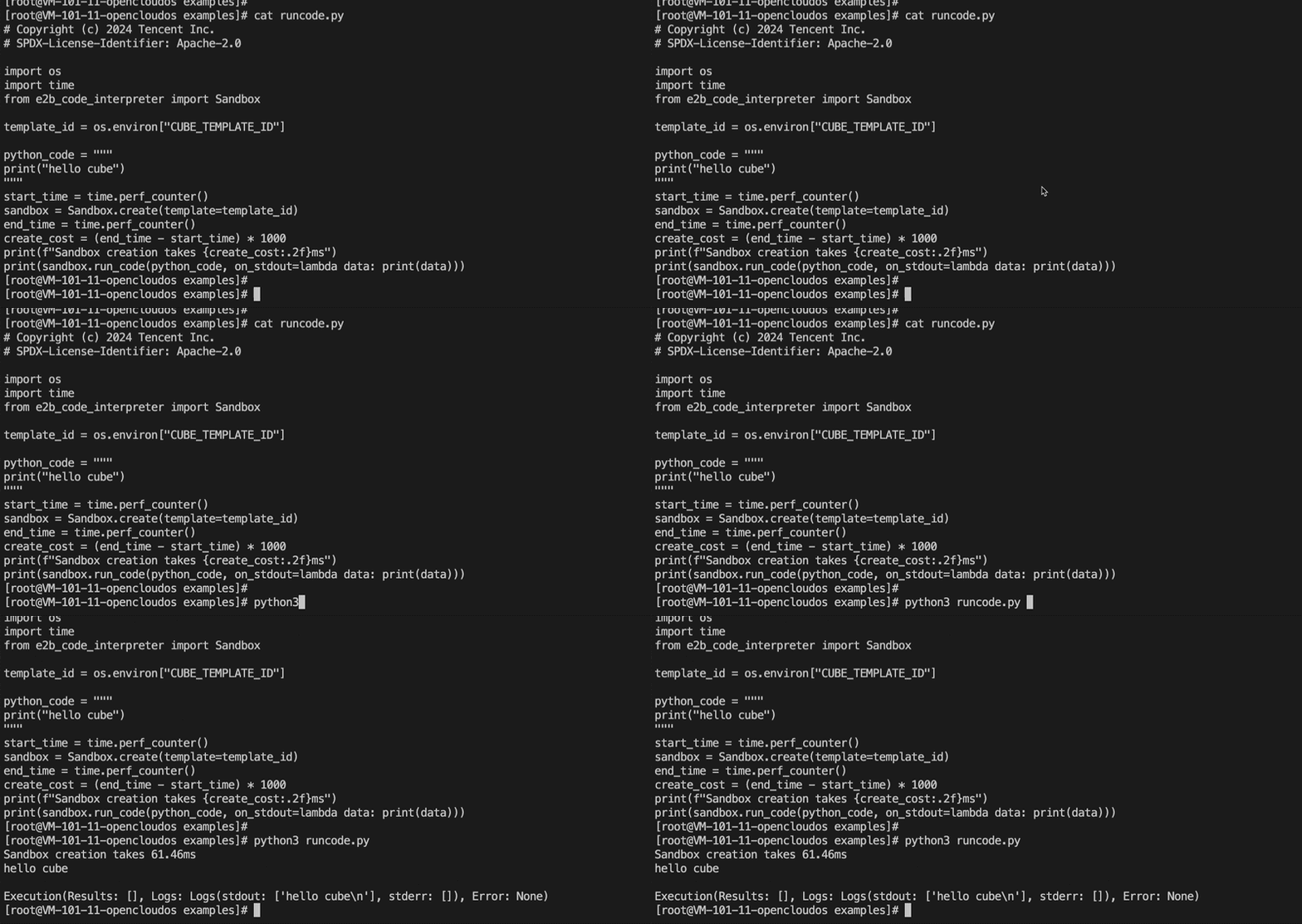
⚡ Millisecond-level startup — watch the fast-start flow above.
Cube Sandbox requires an x86_64 Linux environment with KVM support.
The guide walks you through everything in four steps — provisioning a server, installing Cube Sandbox, creating a sandbox template, and running your first agent code. No source build needed, up and running in minutes.
Choose your deployment path:
<table align="center">
<tr align="center">
<td align="center">
<a href="./docs/guide/pvm-deploy.md" style="
display: inline-block;
background: #28a745;
color: white;
padding: 12px 28px;
border-radius: 8px;
font-size: 15px;
font-weight: bold;
text-decoration: none;
white-space: nowrap;
font-family: -apple-system, BlinkMacSystemFont, 'Segoe UI', Helvetica, Arial, sans-serif;
">
🖥 PVM · Cloud VM →
</a>
<br/>
<sup><b>🏆 Recommended</b></sup>
</td>
<td align="center">
<a href="./docs/guide/bare-metal-deploy.md" style="
display: inline-block;
background: #007bff;
color: white;
padding: 12px 28px;
border-radius: 8px;
font-size: 15px;
font-weight: bold;
text-decoration: none;
white-space: nowrap;
font-family: -apple-system, BlinkMacSystemFont, 'Segoe UI', Helvetica, Arial, sans-serif;
">
🏗 Bare Metal →
</a>
</td>
<td align="center">
<a href="./docs/guide/dev-environment.md" style="
display: inline-block;
background: #6c757d;
color: white;
padding: 12px 28px;
border-radius: 8px;
font-size: 15px;
font-weight: bold;
text-decoration: none;
white-space: nowrap;
font-family: -apple-system, BlinkMacSystemFont, 'Segoe UI', Helvetica, Arial, sans-serif;
">
💻 Dev-Env →
</a>
<br/>
<sup>⚠️ <b>Not recommended — poor performance</b></sup>
</td>
</tr>
</table>
First thing after install: open the Web console

🖥️ Visual management — from overview to creating a sandbox and streaming logs, all in your browser.
After one-click deployment, open in your browser:
http://<control-node IP>:12088Recommended three steps:
- Check overview — Open Overview, confirm nodes are Ready and capacity looks healthy
- Prepare a template — Install an official preset from Template Store; skip if you already have a
READYtemplate under Templates - Create a sandbox — Sandboxes → + New sandbox, pick a
READYtemplate, and view live logs on the detail page within seconds
See the full WebUI console guide.
Deep Dive
- Documentation Home — complete guide navigation
- ☁️ PVM Deployment — deploy on ordinary cloud VMs without bare metal or nested virtualization
- Template Concepts — image-to-template concepts and workflows
- Example Projects — hands-on examples (code execution, browser automation, OpenClaw integration, RL training, and more)
- 🖥️ WebUI Console — visual management right after install (
:12088) - 🔐 Security Proxy & Credential Vault — CubeEgress domain filtering, injection, and auditing
- 🤖 Digital Assistant AgentHub — create and manage OpenClaw assistants (Preview)
- 💻 Development Environment (QEMU VM) — no KVM access? Try Cube Sandbox inside a disposable OpenCloudOS 9 VM
Architecture
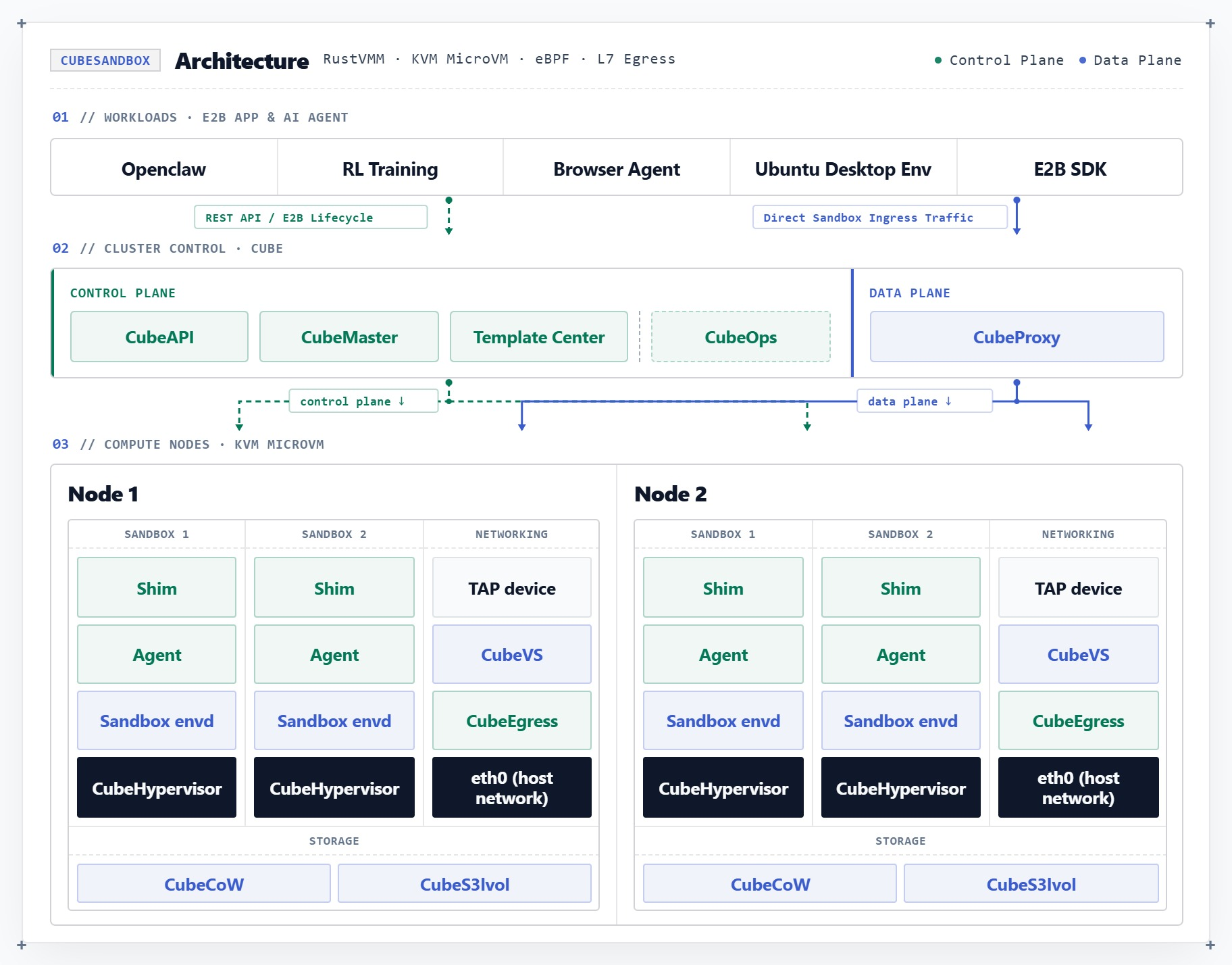
| Component | Responsibility |
|---|---|
| CubeAPI | High-concurrency REST API Gateway (Rust), compatible with E2B. Swap the URL for seamless migration. |
| CubeMaster | Cluster orchestrator. Receives API requests and dispatches them to corresponding Cubelets. Manages resource scheduling and cluster state. |
| CubeProxy | Reverse proxy, compatible with the E2B protocol, routing requests to the appropriate sandbox instances. |
| Cubelet | Compute node local scheduling component. Manages the complete lifecycle of all sandbox instances on the node. |
| CubeVS | eBPF-based virtual switch, providing kernel-level network isolation and security policy enforcement. |
| CubeEgress | OpenResty-based egress security gateway: L7 domain filtering, credential injection, and access auditing; works with CubeVS kernel policies so sandbox traffic cannot bypass inspection. |
| CubeHypervisor & CubeShim | Virtualization layer — CubeHypervisor manages KVM MicroVMs, CubeShim implements the containerd Shim v2 API to integrate sandboxes into the container runtime. |
👉 For more details, please read the Architecture Design Document and CubeVS Network Model.
Community & Contributing
We welcome contributions of all kinds—whether it's a bug report, feature suggestion, documentation improvement, or code submission!
- 🐞 Found a Bug or have questions? Submit an issue on <a href="https://github.com/tencentcloud/CubeSandbox/issues" target="_blank">GitHub Issues</a>.
- 💡 Have an Idea? Join the conversation in <a href="https://github.com/tencentcloud/CubeSandbox/discussions" target="_blank">GitHub Discussions</a>.
- 🛠️ Want to Code? Check out our <a href="./CONTRIBUTING.md" target="_blank">CONTRIBUTING.md</a> to learn how to submit a Pull Request.
- 📝 Want to contribute docs? Submit bilingual PRs to our community doc channels: <a href="./docs/guide/troubleshooting/index.md" target="_blank">Troubleshooting</a>, <a href="./docs/guide/usecases/index.md" target="_blank">Use Cases</a>, and <a href="./docs/guide/integrations/index.md" target="_blank">Integrations</a>. Additionally, the <strong>Cube 100 Program</strong> is now open — we're looking for the first 100 teams running AI agents in production with Cube. Limited to 100 seats. <a href="./docs/guide/cube100.md"><strong>Learn more & apply →</strong></a>
- 💬 Want to Chat? Join our <a href="https://discord.gg/kkapzDXShb" target="_blank">Discord</a>.
Roadmap
Coming soon — see the full roadmap for details.
| Feature | Description |
|---|---|
| Kubernetes-Native Deployment | Deploy and operate CubeSandbox entirely within a K8s cluster using CRDs, operators, and native scheduling — no out-of-band orchestration |
| Volume Support | Persistent and shared volume support compatible with the E2B volume protocol |
| Cross-Node Pause & Resume | Suspend a sandbox on one node and resume it on another with full memory and filesystem state preserved |
| E2B API Compatibility | Close remaining gaps with the E2B specification for full drop-in compatibility |
| Control Plane / Data Plane Separation | Decouple the control plane from the data plane so control plane upgrades or failures never affect sandboxes already in flight |
| Sandbox Fault Recovery | Automatic detection and recovery of crashed VMs, stuck shim processes, and network partitions with configurable recovery policies |
| Scheduling & Operations Enhancements | Resource-aware placement, affinity rules, live rebalancing, and node drain with sandbox migration |
License
CubeSandbox is released under the Apache License 2.0.
The birth of CubeSandbox stands on the shoulders of open-source giants. Special thanks to Cloud Hypervisor, Kata Containers, virtiofsd, containerd-shim-rs, ttrpc-rust, and others. We have made tailored modifications to some components to fit the CubeSandbox execution model, and the original in-file copyright notices are preserved.

Cube Sandbox is listed in the CNCF Landscape.