

Repository
Sculpt4D
Sculpt4D: Generating 4D Shapes via Sparse-Attention Diffusion Transformers Minghao Yin1, Wenbo Hu2†, Jiale Xu2, Ying Shan2, Kai Han1‡ · License mit · Install via pip · Maintenance unknown
- License
- mit
- Argument
- Description
- --config
- Training config YAML
- --ckpt_path
- Sharded checkpoint directory
Specs
- ArgumentDescription
- --configTraining config YAML
- --ckpt_pathSharded checkpoint directory
- --input_dirFolder with the object's image sequence (one image per frame)
- --output_dirOutput directory for .obj meshes
- --num_stepsDenoising steps
- --guidance_scaleCFG scale
- --noise_share_alphaNoise sharing across frames (0=independent, 1=shared)
- --mc_algoMesh extraction: mc , dmc , or fc
- --dtypeData type: bf16 or fp32
- VariantConfig
- Radial sparse attentionconfigs/4d_config_radialattn.yaml
- FramePackconfigs/4d_config_framepack.yaml
- RoPEconfigs/4d_config_rope.yaml
- ModeRest pose source
- renderframe_0000/mesh.ply (simplest, no Blender)
- hybridBlender exports the rest pose; frames reuse render_cond meshes
- exportFull Blender export of the rest pose and all frames
README
Sculpt4D: Generating 4D Shapes via Sparse-Attention Diffusion Transformers
Minghao Yin1, Wenbo Hu2†, Jiale Xu2, Ying Shan2, Kai Han1‡ 1The University of Hong Kong 2ARC Lab, Tencent PCG †Project lead ‡Corresponding author [](https://visual-ai.github.io/sculpt4d/) [](https://arxiv.org/abs/2604.21592) [](https://arxiv.org/pdf/2604.21592) [](https://huggingface.co/TencentARC/Sculpt4D)Official code release for Sculpt4D, a native 4D generative framework that integrates efficient temporal modeling into a pretrained 3D Diffusion Transformer (Hunyuan3D-2.1). Given an image sequence of an animated object, Sculpt4D generates a temporally coherent sequence of 3D meshes — handling complex motions and topological changes while keeping object identity stable across time.
Abstract
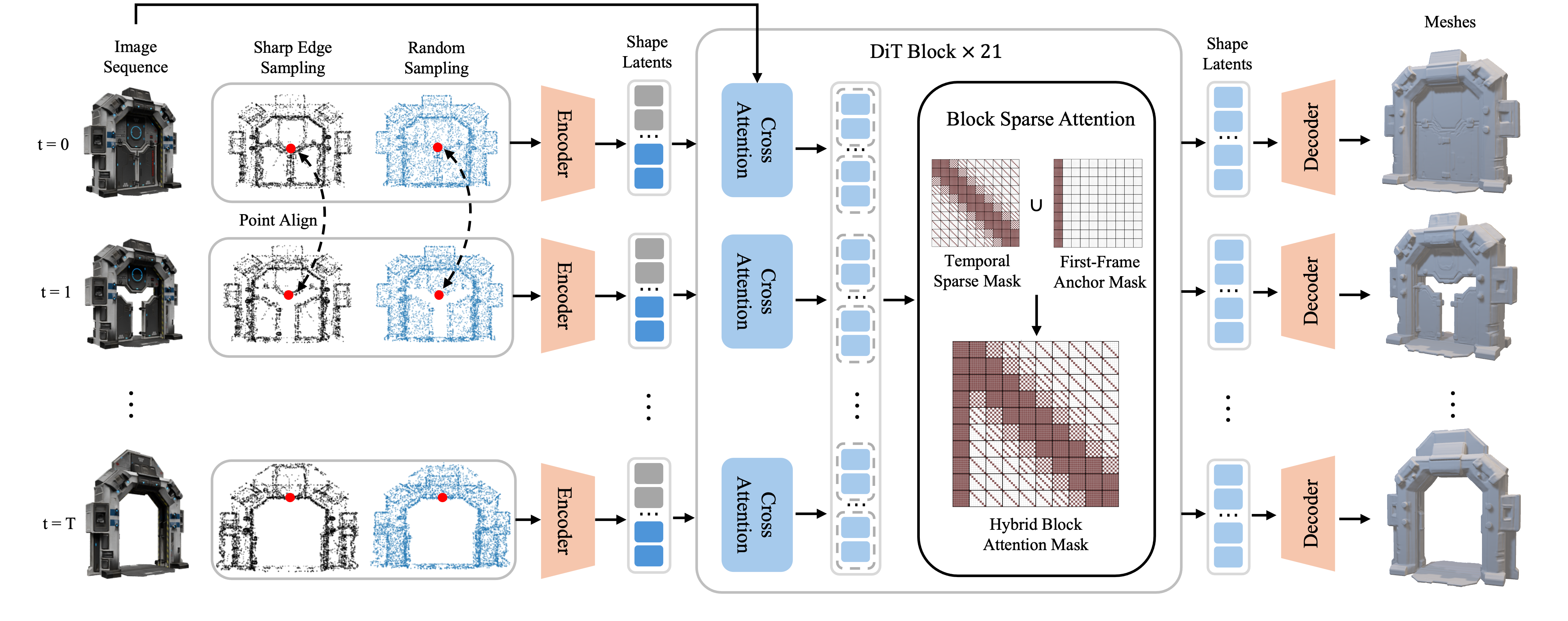
Recent breakthroughs in 3D generative modeling have yielded remarkable progress in static shape synthesis, yet high-fidelity dynamic 4D generation remains elusive, hindered by temporal artifacts and prohibitive computational demand. We present Sculpt4D, a native 4D generative framework that seamlessly integrates efficient temporal modeling into a pretrained 3D Diffusion Transformer (Hunyuan3D 2.1), thereby mitigating the scarcity of 4D training data. At its core lies a Block Sparse Attention mechanism that preserves object identity by anchoring to the initial frame while capturing rich motion dynamics via a time-decaying sparse mask. This design faithfully models complex spatiotemporal dependencies with high fidelity, while sidestepping the quadratic overhead of full attention and reducing network total computation by 56%.
Method Highlights
- Block Sparse Attention. A first-frame anchor locks object identity, and a time-decaying diagonal mask preserves spatial correspondence while pruning uncorrelated frame pairs — cutting ~56% of compute relative to full temporal attention. See
hy3dshape/models/denoisers/hunyuandit_4d_blockmask.py. - Consistent Surface Sampling. Barycentric propagation from a rest-pose canonical mapping, plus projection onto per-frame watertight meshes, yields temporally coherent point-cloud inputs to the VAE. See
tools/4dsampling/. - Shared-Noise VAE. A single noise vector is broadcast across frames, so latent dynamics are driven purely by deterministic per-frame statistics — eliminating temporal jitter in latent space. See
--noise_share_alphaininference_4d.py.
Pipeline
- Data Preparation — Render multi-view images from animated GLB assets and sample temporally consistent 4D surface point clouds (with normals).
- Training — Train a 4D diffusion transformer (DiT) on top of a frozen ShapeVAE encoder/decoder, using flow matching and block-mask temporal attention. Only the lightweight temporal adapter is trained; the 3D backbone stays frozen.
- Inference — Generate a mesh sequence from an input image sequence via iterative denoising.
Project Structure
sculpt4d/
├── configs/                          # Training configs
│   ├── 4d_config_8.yaml              # Default training config (block-mask attention)
│   ├── 4d_config_16.yaml             # Longer-sequence variant
│   ├── 4d_config_radialattn.yaml     # Reference: radial sparse attention variant
│   ├── 4d_config_framepack.yaml      # Reference: frame-packing variant
│   └── 4d_config_rope.yaml           # Reference: RoPE variant
├── demos/                            # Example image sequences (one folder per case)
│   └── door/  chilun10/  angle/  box/  fatman/   (32 frames each)
├── hy3dshape/                        # Core library
│   ├── data/                         # Data loading and preprocessing
│   ├── models/
│   │   ├── autoencoders/             # ShapeVAE (encoder, decoder, surface extraction)
│   │   ├── denoisers/                # HunYuanDiT-4D temporal attention variants
│   │   ├── diffusion/                # Flow matching training & transport
│   │   └── conditioner_4d.py         # Video-conditioned DINOv2 encoder
│   ├── pipelines.py                  # Mesh export utilities
│   ├── schedulers.py                 # Flow-match Euler scheduler
│   └── utils/                        # Training utilities, EMA, logging
├── scripts/                          # DeepSpeed launch scripts
├── tools/
│   ├── 4dsampling/                   # Consistent 4D point cloud sampling pipeline
│   ├── render/                       # Blender rendering scripts
│   ├── dataset/                      # Data verification & visualization
│   ├── watertight/                   # Watertight mesh processing
│   ├── mini_trainset/                # Minimal demo training data
│   └── pipeline.sh                   # End-to-end rendering pipeline
├── inference_4d.py                   # Inference script
├── main.py                           # Training entry point
└── run_train.sh                      # Launch training (config-driven)
Requirements
- Python 3.10+
- PyTorch 2.5.1+ with CUDA 12.4
- 8x GPUs with 80GB+ VRAM (e.g. H20, A100) for training
- Blender 4.4+ for data preparation
Installation
# 1. Install PyTorch (CUDA 12.4)
pip install torch==2.5.1 torchvision==0.20.1 torchaudio==2.5.1 --index-url https://download.pytorch.org/whl/cu124

# 2. Install Python dependencies
pip install -r requirements.txt

# 3. Install Block Sparse Attention (required for temporal attention)
#    See: https://github.com/mit-han-lab/Block-Sparse-Attention
git clone https://github.com/mit-han-lab/Block-Sparse-Attention.git
cd Block-Sparse-Attention
pip install packaging ninja
python setup.py install
cd ..
Pretrained models are downloaded automatically from HuggingFace (tencent/Hunyuan3D-2.1 and facebook/dinov2-large) on first run.
The reference
radialattnvariant additionally requiresflashinfer; it is optional and not needed for the default block-mask model.
Pretrained Checkpoint
The pretrained model is hosted on the Hugging Face Hub at TencentARC/Sculpt4D, under the blockmask_bf16/ subfolder. It is a sharded bf16 checkpoint (~8 GB) in the standard pytorch_model-*.bin + pytorch_model.bin.index.json format. Download it into a local folder:
huggingface-cli download TencentARC/Sculpt4D --include "blockmask_bf16/*" --local-dir checkpoints/sculpt4dor in Python:
from huggingface_hub import snapshot_download
snapshot_download("TencentARC/Sculpt4D", allow_patterns="blockmask_bf16/*", local_dir="checkpoints/sculpt4d")
Pass the downloaded subfolder (checkpoints/sculpt4d/blockmask_bf16) to --ckpt_path.
Inference
Each case under demos/ is an image sequence (one image per frame) of a single object. Foreground RGBA images are recommended (the alpha channel is used to segment the object). Generate a mesh sequence with:
python inference_4d.py \
    --config configs/4d_config_8.yaml \
    --ckpt_path checkpoints/sculpt4d/blockmask_bf16 \
    --input_dir demos/door \
    --output_dir ./inference_output/door \
    --num_steps 50 \
    --guidance_scale 5.0
The model reads the first sequence_length frames from the folder (each demo ships 32 frames). To try the other bundled cases, just change --input_dir to demos/chilun10, demos/angle, demos/box, or demos/fatman.
Arguments
| Argument | Description | Default |
|---|---|---|
--config |
Training config YAML | (required) |
--ckpt_path |
Sharded checkpoint directory | (required) |
--input_dir |
Folder with the object's image sequence (one image per frame) | (required) |
--output_dir |
Output directory for .obj meshes |
./inference_output |
--num_steps |
Denoising steps | 50 |
--guidance_scale |
CFG scale | 5.0 |
--noise_share_alpha |
Noise sharing across frames (0=independent, 1=shared) | 1.0 |
--mc_algo |
Mesh extraction: mc, dmc, or fc |
mc |
--dtype |
Data type: bf16 or fp32 |
bf16 |
Input Folder Convention
demos/door/
├── frame_0000.png
├── frame_0001.png
├── ...
└── frame_0031.png   # frames are read in sorted filename order
Output
One .obj mesh file per generated frame:
inference_output/door/
├── frame_0000.obj
├── frame_0001.obj
├── ...
└── frame_0007.obj
Training
Configuration
The default config is configs/4d_config_8.yaml, which uses block-mask temporal attention. To train on longer sequences, use configs/4d_config_16.yaml instead (it differs only in sequence_length).
Three additional reference configs implement alternative temporal-attention designs. They share the same VAE and diffusion settings and are provided for exploration:
| Variant | Config | Denoiser |
|---|---|---|
| Radial sparse attention | configs/4d_config_radialattn.yaml |
hunyuandit_4d_radial.py |
| FramePack | configs/4d_config_framepack.yaml |
hunyuandit_4d_framepack.py |
| RoPE | configs/4d_config_rope.yaml |
hunyuandit_4d_rope.py |
Key parameters in the config:
dataset.params.train_data_list/val_data_list— Path to your preprocessed datasetdataset.params.sequence_length— Number of frames per sequence (default: 8)dataset.params.pc_size— Point cloud size for VAE encoding (40960)training.steps— Total training steps (default: 20,000)training.base_lr— Learning rate (default: 5e-5)
Launch Training
- Edit
run_train.shto set your conda environment and working directory:
# In run_train.sh, uncomment and update:
# source /path/to/conda/bin/activate your_env
# cd /path/to/sculpt4d-
Update
dataset.params.train_data_listin the config to point to your dataset. -
Run (the config is the single source of truth — no separate scripts):
bash run_train.sh                              # default (configs/4d_config_8.yaml)
bash run_train.sh configs/4d_config_16.yaml    # or pass another config
Training uses 8 GPUs by default with DeepSpeed ZeRO. Checkpoints are written to output_folder/dit/<config_name>/.
Data Preparation
The pipeline takes animated GLB assets and produces, for each object, (1) per-frame multi-view renders used as image conditioning, and (2) temporally consistent surface point clouds used to train the model. Each animation is resampled to a fixed 32 frames.
Step 1: Render Multi-View Images
bash tools/pipeline.sh /path/to/blender /path/to/input.glb object_name [output_folder]This runs tools/render/render4d_32.py in Blender (geometry mode, 512×512). For each of the 32 frames it renders 24 views (random Hammersley camera placement) as RGBA images, exports the per-frame triangle mesh, and writes the camera parameters. Output base folder defaults to dataset/preprocessed.
Output structure (one folder per frame, frame_0000 … frame_0031):
dataset/preprocessed/object_name/
└── render_cond/
    ├── frame_0000/
    │   ├── 000.png  001.png  …  023.png   # 24 multi-view RGBA renders
    │   ├── mesh.ply                        # per-frame triangle mesh
    │   └── transforms.json                 # per-view camera parameters
    ├── frame_0001/
    └── …
Step 2: Sample 4D Point Clouds
parallel_process_v3.py scans a dataset root for object folders (each containing the render_cond/ from Step 1) and, for every object, writes geo_data/4d_sample_new.npz next to it. Internally it samples points once on a rest-pose mesh, propagates them to every frame via barycentric coordinates, and projects them onto each frame's watertight surface — giving point clouds whose ordering is consistent across time.
python tools/4dsampling/parallel_process_v3.py \
    --input_mode render \
    --output_root_1 ./dataset/preprocessed \
    --python_exec /path/to/python \
    --workers 8 \
--grid_res 256--output_root_1— dataset root to scan (the folder produced by Step 1).4d_sample_new.npzis written into each object'sgeo_data/.--python_exec— Python interpreter that hastorch,cubvh,pytorch3d, andtrimeshinstalled (used by the per-object worker).--workers— number of parallel workers (defaults to the GPU count);--grid_resis the marching-cubes resolution for watertighting (default 256).
Processing modes (--input_mode, default hybrid):
| Mode | Rest pose source | Requires Blender + GLB? |
|---|---|---|
render |
frame_0000/mesh.ply (simplest, no Blender) |
No |
hybrid |
Blender exports the rest pose; frames reuse render_cond meshes |
Yes |
export |
Full Blender export of the rest pose and all frames | Yes |
Output: geo_data/4d_sample_new.npz, keyed by frame. Each frame stores two surface point clouds as float16 arrays of shape (N, 6) — xyz coordinates plus surface normals: random_surface (uniformly sampled) and sharp_surface (concentrated near sharp edges).
Step 3: Verify Data
Sanity-check a processed object — writes a report and multi-view point-cloud snapshots, and checks that the points are centered and normalized into [-0.5, 0.5]:
python tools/dataset/verify_data.py \
    --data_path ./dataset/preprocessed/OBJECT_ID/geo_data/ \
    --output_dir ./verification_output/
Expected Dataset Layout
merged_dataset/
├── object_id_1/
│   ├── render_cond/
│   │   ├── frame_0000/
│   │   │   ├── 000.png … 023.png    # 24 views
│   │   │   ├── mesh.ply
│   │   │   └── transforms.json
│   │   └── …                         # frame_0001 … frame_0031
│   └── geo_data/
│       └── 4d_sample_new.npz
├── object_id_2/
└── …
Acknowledgments
This project builds upon:
- Hunyuan3D-2.1 — Base 3D generation framework
- Block-Sparse-Attention — Sparse attention kernels for temporal attention
- DINOv2 — Visual feature encoder
Citation
If you find this work useful, please cite:
@inproceedings{sculpt4d2026,
  title={Sculpt4D: Generating 4D Shapes via Sparse-Attention Diffusion Transformers},
  author={Yin, Minghao and Hu, Wenbo and Xu, Jiale and Shan, Ying and Han, Kai},
  booktitle={Proceedings of the IEEE/CVF Conference on Computer Vision and Pattern Recognition (CVPR)},
  year={2026}
}