

Repository
repo-asynctool
AsyncTool is a benchmark for evaluating the asynchronous function-calling capability of LLM-based agents in multi-task tool-use scenarios. Unlike conventional tool-use benchmarks t · License MIT · Install via pip · Maintenance unknown
- License
- MIT
README
AsyncTool
AsyncTool is a benchmark for evaluating the asynchronous function-calling capability of LLM-based agents in multi-task tool-use scenarios.
Unlike conventional tool-use benchmarks that assume immediate tool responses or single-task execution, AsyncTool simulates delayed tool feedback and requires agents to coordinate multiple tasks concurrently. The benchmark evaluates whether agents can call the correct tools, track task state, respect dependencies, switch between tasks, and finish tasks efficiently under tool latency.
Paper Overview
The paper introduces asynchronous tool calling as the ability of an agent to continue making progress on other tasks while waiting for delayed tool responses. AsyncTool evaluates this capability in interactive multi-task environments where each task may have intra-task dependencies and tool results can arrive later than the model's next decision point.
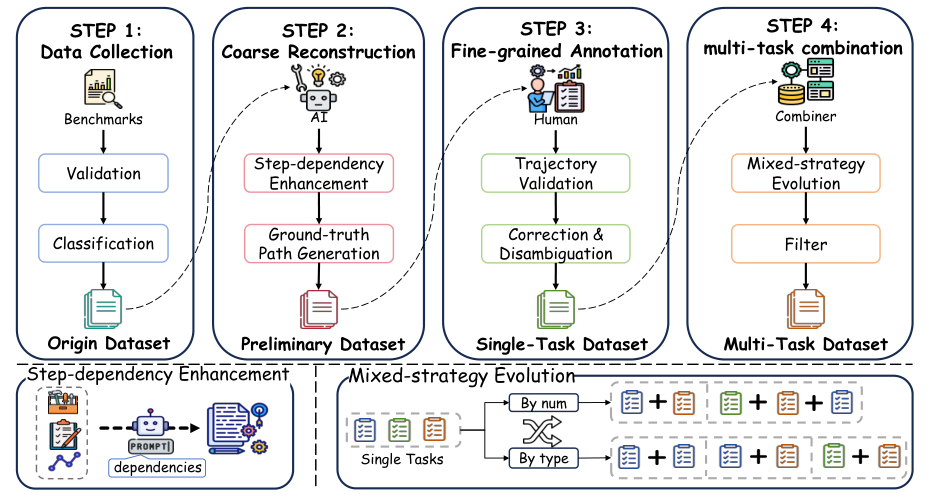
AsyncTool is built from validated single-task tool-use trajectories. The construction pipeline collects and validates raw tool-use data, reinforces step dependencies, reconstructs ground-truth execution paths, manually verifies trajectories, and combines single-task data into multi-task asynchronous scenarios.
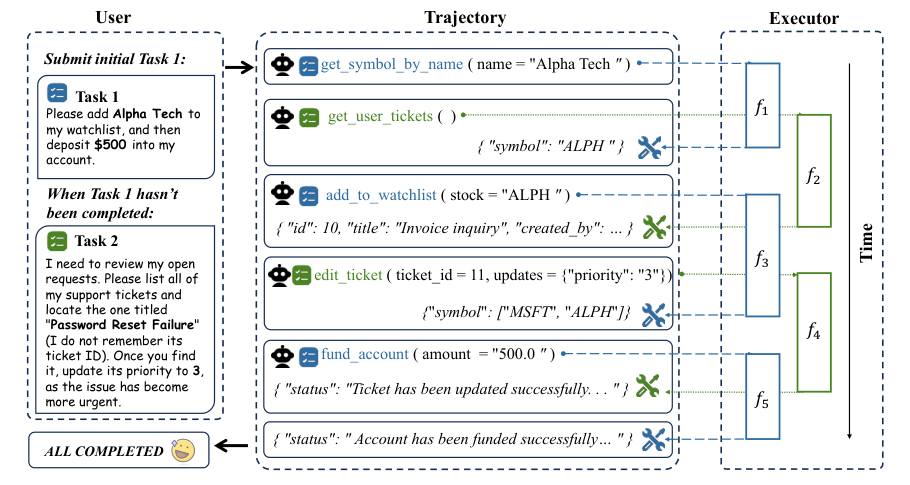
During evaluation, the agent receives multiple tasks at once. When a tool call is pending, a capable agent should switch to another independent task, then resume the original task when the delayed result becomes available.
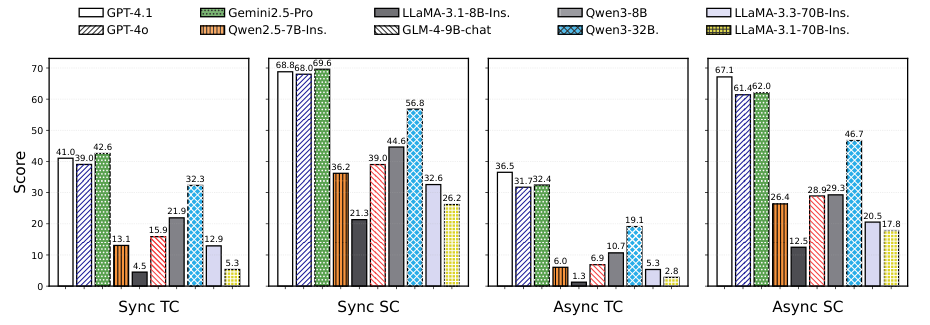
The paper reports evaluation at three levels: step-level tool-call correctness, sub-task-level completion, and task-level end-to-end success. Results show a clear gap between synchronous and asynchronous settings, especially for models that struggle with dependency tracking and task-state maintenance.
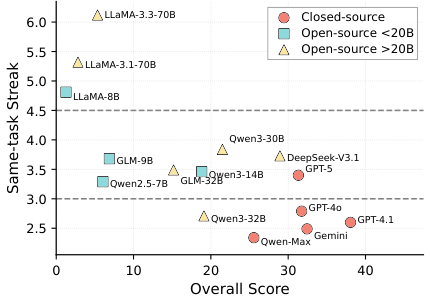
AsyncTool also measures scheduling behavior. The paper finds that effective asynchronous tool use is not simply frequent task switching: strong agents switch at the right time while preserving task correctness.
Repository Layout
.
├── assets/images/                     # Static figures used by README files
├── AsyncTool/                         # Source code, benchmark data, tool executors, and evaluation scripts
│   ├── data/bench/                    # Benchmark samples
│   ├── constants/func_doc/            # Tool/function schemas
│   ├── constants/func_doc/README.md   # JSON Lines format notice
│   ├── handler/                       # API and local model handlers
│   ├── executer/                      # Simulated tool execution environments
│   ├── runner.py                      # Main benchmark runner
│   └── evalResult.py                  # Result evaluation entry
├── .gitattributes                     # Text and line-ending normalization
├── .gitleaks.toml                     # Targeted allowlist for synthetic benchmark placeholders
├── LICENSE                            # MIT License
├── config_example.yaml                # Example runtime configuration
├── pyproject.toml                     # uv project configuration
├── .env.example                       # API key environment variable template
├── uv.lock                            # Locked dependency versions for reproducibility
Environment Setup with uv
Install uv first if it is not available:
curl -LsSf https://astral.sh/uv/install.sh | shCreate the environment and install dependencies:
uv syncThe repository includes uv.lock so benchmark dependencies are reproducible across machines.
Activate the virtual environment if needed:
source .venv/bin/activateAPI Keys
Copy the environment template and fill in the keys for the models you want to use:
cp .env.example .envSupported remote model handlers read keys from environment variables such as:
DEEPSEEK_API_KEYOPENROUTER_API_KEY
Model entries are configured in AsyncTool/constants/model_config.py.
The released configuration keeps one example for each model type:
- Closed-source API:
Deepseek-V3.1 - OpenRouter API:
deepseek/deepseek-chat-v3.1:free - Local vLLM endpoint:
Qwen/Qwen2.5-7B-Instruct
Closed-Source API Example
Set the API key in .env:
DEEPSEEK_API_KEY=your_deepseek_api_keyUse the closed-source API example in config.yaml:
runner:
  model_name: "Deepseek-V3.1"
  is_local: false
This entry is defined in MODEL_CONFIG_MAPPING_OFFICIAL and calls the DeepSeek OpenAI-compatible API endpoint.
OpenRouter API Example
Set the OpenRouter key in .env:
OPENROUTER_API_KEY=your_openrouter_api_keyUse the OpenRouter example in config.yaml:
runner:
  model_name: "deepseek/deepseek-chat-v3.1:free"
  is_local: false
This entry is defined in OPENROUTER_MODEL_CONFIG_MAPPING.
Local vLLM Example
Install vLLM in the environment where you will serve the model:
uv pip install vllmStart an OpenAI-compatible vLLM server:
vllm serve Qwen/Qwen2.5-7B-Instruct \
  --host 0.0.0.0 \
  --port 8000 \
  --dtype bfloat16
If the vLLM server is not running at http://localhost:8000/v1, set:
VLLM_BASE_URL=http://your-host:8000/v1Use the local model example in config.yaml:
runner:
  model_name: "Qwen/Qwen2.5-7B-Instruct"
  is_local: true
The local entry is defined in LOCAL_MODEL_CONFIG_MAPPING and uses the OpenAI-compatible /v1/completions endpoint.
Quick Start
Create a runnable config from the example:
cp config_example.yaml config.yamlEdit config.yaml and set:
runner.model_name: a model name defined inAsyncTool/constants/model_config.pyrunner.input_path: benchmark data pathrunner.task_nums: number of examples to run; use a small value such as2for a smoke testrunner.min_timeandrunner.max_time: simulated tool latency rangerunner.save_path_dir: output directory for logs and results
Run the benchmark:
uv run python AsyncTool/runner.pyFor a quick smoke test, keep the default task_nums: 2 in config_example.yaml.
Evaluation
After running the benchmark, outputs are written under runner.save_path_dir with a timestamped subdirectory. Model-specific history files are stored under a filesystem-safe model directory, for example deepseek_deepseek-chat-v3.1_free.
To evaluate a completed run, pass the timestamped run directory explicitly:
uv run python AsyncTool/evalResult.py --save-path results/bench_712/20260101_120000Evaluation produces CSV and JSON summaries including function-call accuracy, parameter accuracy, task-level completion, and final environment-state correctness.
License
This project is released under the MIT License. See LICENSE.
Citation
@misc{shi2026asynctool,
  title        = {AsyncTool: Evaluating the Asynchronous Function Calling Capability under Multi-Task Scenarios},
  author       = {Shi, Kou and Zhang, Ziao and Huang, Shiting and Nie, Avery and Fang, Zhen and Wang, Qiuchen and Chen, Lin and Chen, Huaian and Chen, Zehui and Zhao, Feng},
  year         = {2026},
  note         = {Preprint}
}