

Repository
i3bar.el
An Emacs package for displaying the output of an compatible command in the This package is primarily useful for EXWM users who wish to render a status-bar within Emacs itself: It c · License unknown · Maintenance unknown
- License
- Unknown
README
i3bar.el
An Emacs package for displaying the output of an i3status compatible command in the mode-line
or tab-bar.
This package is primarily useful for EXWM users who wish to render a status-bar within Emacs itself:
- It can be combined with the tab-bar to save vertical space.
- It can be themed by Emacs (see Theming).
Installation
i3bar is available on MELPA.
- Install and configure an i3status compatible status-bar generator.
- Install any required fonts (likely
ttf-font-awesome). - Install and configure this package.
(use-package i3bar
  :ensure t ; assumes you have enabled MELPA per https://melpa.org/#/getting-started
  ;; Or with straight:
  ;:straight (i3bar :type git :host github :repo "Stebalien/i3bar.el")
  :config
  (i3bar-mode 1))
Screenshot
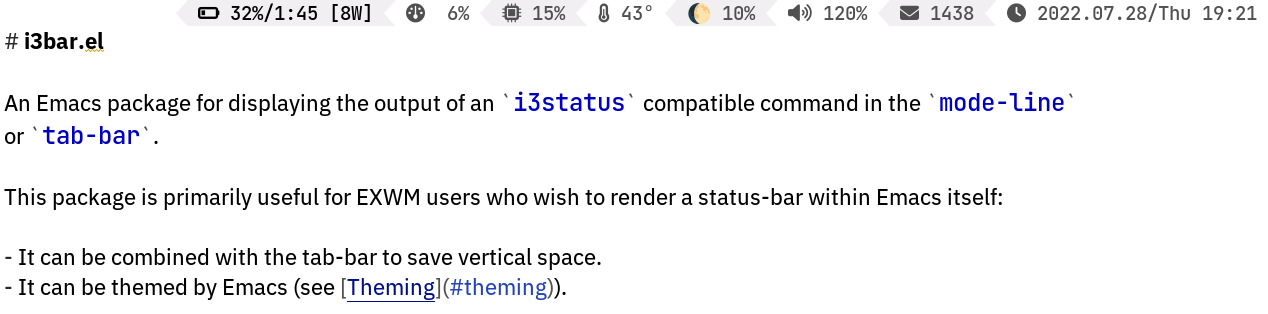
Tab Bar
You can place the i3bar in the tab-bar as follows:
(use-package tab-bar
  :custom
  (tab-bar-format '(tab-bar-format-tabs        ; Optional: Remove to _only_ display the bar.
                    tab-bar-format-align-right ; Optional: Remove to align left.
                    tab-bar-format-global))
  :config
  (tab-bar-mode 1))
Theming
By default, this package uses the colors specified by your i3status command. However, you can
define a custom i3bar-face-function to override this.
For example, I use the following theme with i3status-rust:
idle_bg = "#000000"
idle_fg = "#aaaaaa"
info_bg = "#000000"
info_fg = "#bbbbbb"
good_bg = "#000000"
good_fg = "#cccccc"
warning_bg = "#000000"
warning_fg = "#eeeeee"
critical_bg = "#000000"
critical_fg = "#ffffff"
separator = "\ue0b2"
alternating_tint_bg = "#111111"
separator_bg = "auto"
separator_fg = "auto"
Then I use the following "theme" function to make the status-bar's theme match my Emacs theme:
(defun i3bar-face-function-theme (foreground background)
  (list
   (pcase (and foreground (upcase foreground))
     ("#000000" `(:foreground ,(face-background 'tab-line nil 'default)))
     ("#111111" `(:foreground ,(face-background 'tool-bar nil 'default)))
     ("#AAAAAA" 'shadow)
     ("#BBBBBB" nil)
     ("#CCCCCC" 'success)
     ("#EEEEEE" 'warning)
     ("#FFFFFF" 'error))
   (pcase (and background (upcase background))
     ("#000000" nil)
     ("#111111" `(:background ,(face-background 'tool-bar nil 'default))))))

(custom-set-variables '(i3bar-face-function i3bar-face-function-theme))
I3status Configuration
i3status
You need to create a ~/.config/i3status/config file that explicitly sets the output format to "i3bar":
general {
        output_format = "i3bar"
        colors = true
        interval = 5
}

order += "battery all"
order += "memory"
order += "tztime local"

battery all {
        format = "%status %percentage %remaining"
}
memory {
        format = "%used | %available"
        threshold_degraded = "1G"
        format_degraded = "MEMORY < %available"
}

tztime local {
        format = "%Y-%m-%d %H:%M:%S"
}
Known Issues
This package is missing featuers and features and has some rough edges. I'm happy to accept patches
for any of these issues, assuming the patches don't introduce other issues.
Unimplemented Features
This package implements just enough of the i3status protocol to be useful, but not everything.
- Click Events
- Pixel Spacing
- Pango Markup
Fonts & Icons
This package makes no attempt to correctly configure fonts. Ideally it would create a special
font-set that would "do the right thing", but my understanding of such black arts are still quite
limited.