

Repository
unitree_g1_vibes
Geoff-Stack 🚀 — Unified Control & Perception for the Unitree G-1
- Thread
- Module/function
- RealSense RX
- _rx_realsense
- LiDAR SLAM
- live_slam.LiveSLAMDemo
- Battery monitor
- _rx_battery
Specs
- ThreadModule/function
- RealSense RX_rx_realsense
- LiDAR SLAMlive_slam.LiveSLAMDemo
- Battery monitor_rx_battery
README
Geoff-Stack 🚀 — Unified Control & Perception for the Unitree G-1
run_geoff_gui.py is the single entry-point that welds together all helper scripts in this repository into one cohesive, operator-friendly user interface. This README gives you the 30 000 ft view first, then dives into each building-block so you can tweak, extend or debug the stack with confidence.
TL;DR – Already have the Jetson streaming and the LiDAR plugged in?
python3 run_geoff_gui.py --iface enp68s0f1 # or the NIC that faces the robotA PySide6 window pops up showing RGB, depth, a 2-D occupancy preview and a fully interactive 3-D point-cloud. Drive with W A S D Q E (shift for turbo) and enjoy.
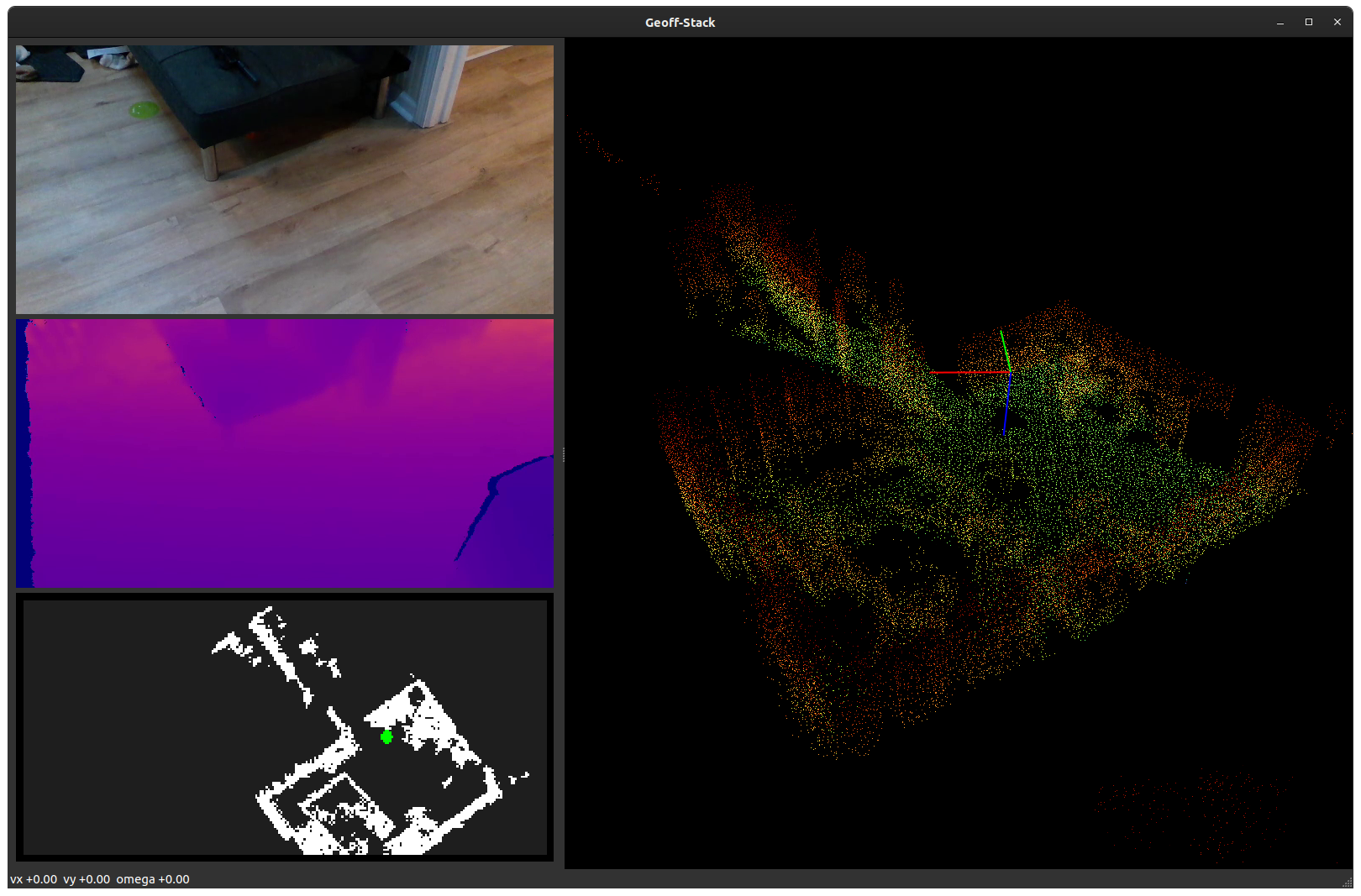
Human's note:
Aside from this lil blurb right here, this entire repo, readme, code...etc is all coded via Codex using o3. I have no relationship with Unitree or OpenAI, it's just what I'm doing and using.
While everything has been working as expected for me, please understand this is all LLM-generated code at my direction only. Have fun.
1. Bird-eye architecture
┌───────────────────────────── Sensors ───────────────────────────────┐
│  RealSense D435i        Livox MID-360           Unitree IMU/BMS     │
│        │ USB3               │ UDP                     │ DDS         │
└────┬───┴────────────────────┴─────────────────────────┴─────────────┘
     │ Jetson Xavier NX (on the robot)
     │   jetson_realsense_stream.py   livox2_python.py  unitree_sdk
     └───────────────┬──────────────────────────┬────────────────────┘
                     │ RTP/H264                 │ custom UDP & DDS
                     ▼                          ▼
               ┌──────────────────────────────────────────┐
               │           Laptop / Ground-station        │
               │                                          │
               │  _rx_realsense   live_slam   _rx_battery │
               │          ↘        ↙          ↙           │
               │            Shared State (thread-safe)    │
               │                     │                     │
               │              run_geoff_gui.py             │
               └──────────────────────────────────────────┘
Everything below runs without ROS – plain Python threads talk through a minimal dict guarded by a threading.Lock. Heavy lifting (RealSense decoding, SLAM ICP) happens off the GUI thread so the window stays smooth.
2. The main window (run_geoff_gui.py)
┌───────────────┐  ┌───────────────────────────────────────────────┐
│   RGB 640×480 │  │         3-D SLAM  (pyqtgraph.GLViewWidget)   │
├───────────────┤  │                                               │
│ Depth 640×480 │  │  – rotate / zoom / click-to-pick coming soon –│
├───────────────┤  └───────────────────────────────────────────────┘
│ 2-D occupancy │
└───────────────┘
The Qt event-loop lives in the main thread and is complemented by three background workers that continuously push data into shared memory:
| Thread | Module/function | Duties |
|---|---|---|
| RealSense RX | _rx_realsense |
Pull two RTP streams (RGB & colour-mapped depth) via GStreamer and expose a stacked 1280×480 BGR frame. |
| LiDAR SLAM | live_slam.LiveSLAMDemo |
Build a global point-cloud map with KISS-ICP and send the (xyz, pose) pair to the GUI. |
| Battery monitor | _rx_battery |
Subscribe to Unitree DDS topics and inject %SOC / voltage into the status bar. |
All rendering is handled with pyqtgraph, giving full 3-D interactivity without blocking the UI.
3. Input & motion control
3.1 Keyboard tele-operation (formerly keyboard_controller.py)
The original curses/pynput tele-op code was inlined into the GUI so that key-down / key-up events are handled natively by Qt, guaranteeing cross-platform reliability. Behaviour is 100 % identical:
W / S   – forward / backward        Q / E – strafe left / right
A / D   – rotate (yaw ±)            Shift  – doubles all speed limits
Space   – immediate stop            Z     – graceful exit (Damp)
Esc     – emergency e-stop (ZeroTorque)
Velocity targets are recomputed at 10 Hz and sent to the robot via the Unitree Loco API. A small HUD in the status-bar shows the current vx vy ω plus battery percentage.
3.2 Hanger boot routine (hanger_boot_sequence.py)
Power-on leaves a G-1 hanging in Damp. The helper:
- Extends the legs until both feet are loaded (it retries if the hanger height was off).
- Transitions to Balance Stand and finally FSM-200.
- Returns a ready-to-use
LocoClientso callers can immediately issueMove()commands.
If it detects that the robot is already standing balanced it simply skips the routine for a <1 s startup.
4. Perception pipeline details
4.1 RealSense RGB + Depth
On-board jetson_realsense_stream.py encodes the two 640×480@30 FPS streams as H.264 (RGB) and H.264 + false-colour LUT (depth) and multicasts them via RTP. A typical crontab entry on the Jetson looks like:
@reboot /usr/bin/python3 ~/jetson_realsense_stream.py \
        --client-ip 192.168.123.222  --width 640 --height 480 --fps 30
The laptop side builds two small GStreamer pipelines (see receive_realsense_gst.py) and converts the buffers into NumPy arrays.
4.2 Livox MID-360 → SLAM
livox2_python.py is a thin ctypes wrapper around the official SDK 2 which feeds packets into KISS-ICP (live_slam.py). The result is a high-fidelity point-cloud plus a 4 × 4 pose matrix pushed ~20 Hz into the viewer. Environment presets allow quick indoor/outdoor tuning (voxel size, ICP thresholds, etc.).
5. Repository map
run_geoff_gui.py          ← YOU ARE HERE – operator GUI (Qt)
run_geoff_stack.py        ← Legacy OpenCV mosaic (no Qt) – kept for CLI usage
keyboard_controller.py    ← Stand-alone WASD tele-op (CLI)
hanger_boot_sequence.py   ← Power-on → Balance helper

jetson_realsense_stream.py  / receive_realsense_gst.py  – RTP encoder/decoder
livox*_python.py            – LiDAR SDK bindings  (SDK 1 & 2 supported)
live_slam.py                – Real-time KISS-ICP SLAM demo

docs/                      – MkDocs site with deep-dives & tutorials
6. Installation & quick start
The project is intentionally light on dependencies – everything is on PyPI:
# 1. Python deps (GUI, numpy stack, LiDAR SLAM)
pip install -r requirements.txt  pyside6  pyqtgraph  pynput

# 2. Build vendor SDKs once per machine (examples for Ubuntu)
#     – RealSense: https://github.com/IntelRealSense/librealsense
#     – Livox:     see Livox-SDK2/README

# 3. Run the GUI (laptop / ground-station)
python3 run_geoff_gui.py --iface <your_ethernet_nic>

# 4. Start streaming on the Jetson (robot)
python3 jetson_realsense_stream.py --client-ip <laptop_ip>
Tip – Most scripts print a helpful usage banner when invoked with
-h; check them out for knobs like resolution, FPS, LiDAR presets …
7. Contributing & roadmap
- route planning
- arm control, probably direct the "hand" in space and attempt to abstract the motor movements for hand fwd,back,left,right, up and down.
2. The main window ( run_geoff_gui.py )
1
-
┌───────────────┐ ┌───────────────────────────────────────────────┐ │ RGB 640×480 │ │ 3-D SLAM (pyqtgraph.GLViewWidget) │ ├───────────────┤ │ │ │ Depth 640×480 │ │ – rotate / zoom / click-to-pick coming soon –│ ├───────────────┤ └───────────────────────────────────────────────┘ │ 2-D occupancy │ └───────────────┘
3.1 Keyboard tele-operation (formerly keyboard_controller.py )
1
-
The original curses/pynput tele-op code was inlined into the GUI so that key-down / key-up events are handled natively by Qt, guaranteeing cross-platform reliability. Behaviour is 100 % identical:
3.2 Hanger boot routine ( hanger_boot_sequence.py )
1
-
Power-on leaves a G-1 hanging in Damp . The helper: