

Repository
YOLOv11-Hailo-Tracker
Real-time object detection, speed estimation, and loitering detection system powered by YOLOv11 and accelerated with Hailo-8 NPU.
- Purchase Now
- Purchase Now
Specs
- Purchase NowPurchase Now
- Purchase NowPurchase Now
- Purchase NowPurchase Now
- Purchase NowPurchase Now
README
YOLOv11 Hailo Tracker
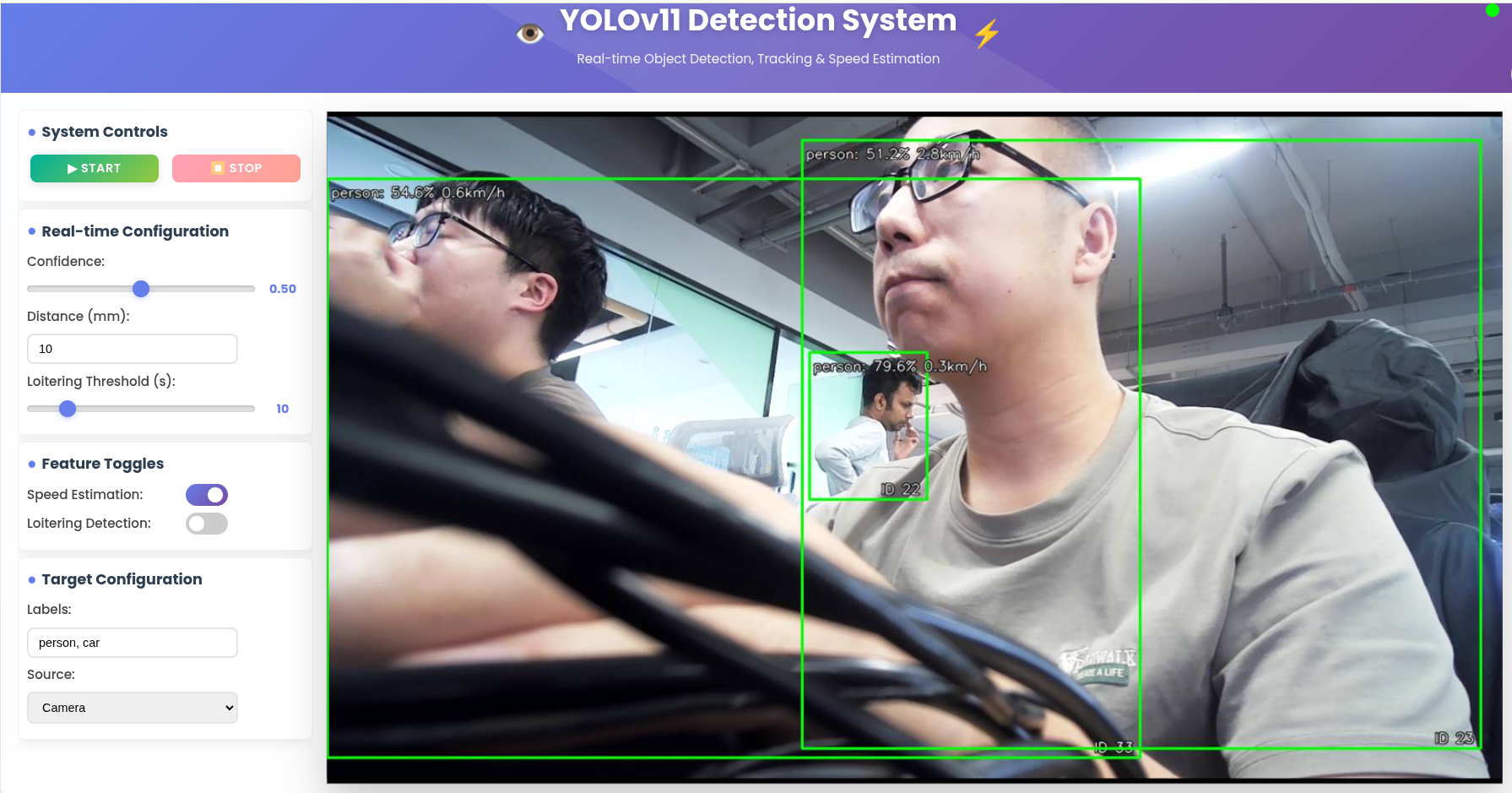
YOLOv11-Hailo-Tracker is a comprehensive real-time object detection, tracking, and speed estimation system optimized for Hailo AI accelerators. This project enables efficient detection of objects (with focus on persons and vehicles) with simultaneous tracking and speed calculation capabilities.
✨ Features
- Real-time Object Detection: Using optimized YOLOv11 models for fast inference
- Multi-Object Tracking: BYTE (ByteTrack) tracking algorithm for consistent object identification across frames
- Speed Estimation: Advanced speed calculation for tracked objects using pixel-to-real-world distance conversion
- Flexible Input Support: Images, videos, and camera streams
- Configurable Labels: Support for detecting specific object classes (default: person, car)
🛠️ Requirements
Hardware
| reComputer AI R2130 |
|---|
 |
| Purchase Now |
| reComputer AI Industrial R2135 |
|---|
 |
| Purchase Now |
| reComputer Industrial R2045-12 |
|---|
 |
| Purchase Now |
| reComputer Industrial R2045-12 |
|---|
 |
| Purchase Now |
- Camera or video input (for streaming applications)
Software
- Python: 3.8 or higher
- HailoRT: Version 4.23.0
- Dependencies: Listed in
requirements.txt
System Dependencies
- Linux operating system (tested on Ubuntu)
- OpenCV-compatible camera drivers (for camera input)
- Graphics acceleration (for visualization)
📦 Installation
Prerequisites
- Install Hailo PCIe driver and PyHailoRT from the Hailo website
- Ensure your system has a compatible Hailo accelerator installed
Option 1: Local Installation
-
Clone the repository:
git clone https://github.com/Seeed-Projects/YOLOv11-Hailo-Tracker.git cd YOLOv11-Hailo-Tracker -
Create a virtual environment (recommended):
python -m venv venv --system-site-packages source venv/bin/activate # On Windows: venv\Scripts\activate -
Install Python dependencies:
pip install -r requirements.txt -
Run the project
python run_api.py- Access
localhost:8000to reach the frontend and configure settings.
Option 2: Docker Deployment
Build and Run with Docker
# Build the Docker image with Hailo support
docker build --build-arg HAILO_VERSION=4.23.0 -t yolov11-hailo-tracker .

# Run the container
docker run -it --rm   -p 8000:8000   --privileged   --device /dev/hailo0:/dev/hailo0   -v /dev:/dev   yolov11-hailo-tracker
Using Pre-built Images
Pre-built Docker images with Hailo support are available as GitHub Releases and on GitHub Container Registry:
# Pull from GitHub Container Registry
docker pull ghcr.io/seeed-projects/yolov11-hailo-tracker-hailo:latest

# Run the container
docker run -it --rm   -p 8000:8000   --privileged   --device /dev/hailo0:/dev/hailo0   -v /dev:/dev   ghcr.io/seeed-projects/yolov11-hailo-tracker-hailo:latest
Build and Deploy with Docker Compose
Create a docker-compose.yml file:
services:
  yolov11-hailo-tracker:
    image: ghcr.io/seeed-projects/yolov11-hailo-tracker-hailo:latest
    container_name: yolov11-hailo-tracker
    privileged: true
    ports:
      - "8000:8000"
    devices:
      - "/dev/hailo0:/dev/hailo0"
      - "/dev/video0:/dev/video0"
    environment:
      - PYTHONUNBUFFERED=1
    command: python3 run_api.py
    restart: unless-stopped
Then run:
docker-compose up -d🤝 Contributing
- Fork the repository
- Create a feature branch (
git checkout -b feature/amazing-feature) - Commit your changes (
git commit -m 'Add amazing feature') - Push to the branch (
git push origin feature/amazing-feature) - Open a Pull Request
📄 License
This project is licensed under the MIT License - see the LICENSE file for details.
🙏 Acknowledgments
- YOLOv11 object detection models
- BYTE (ByteTrack) multi-object tracking algorithm
- Hailo Technologies for AI acceleration
- OpenCV for computer vision operations
💞 Top contributors:
<a href="https://github.com/Seeed-Projects/YOLOv11-Hailo-Tracker/graphs/contributors">
<img src="https://contrib.rocks/image?repo=Seeed-Projects/YOLOv11-Hailo-Tracker" alt="contrib.rocks image" />
</a>