

README
<h1>Yacht</h1>
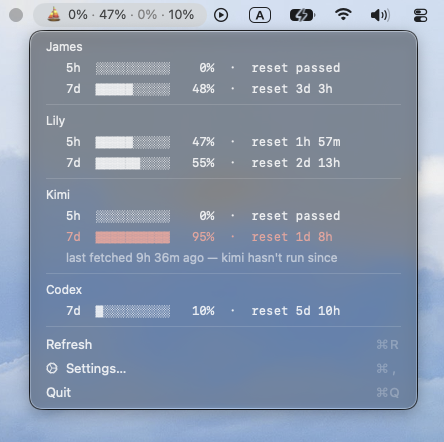
A macOS menu bar app that shows rate-limit usage for coding agents.
Multi-account friendly.

Features
- Three providers side by side — Claude Code, Kimi Code, and Codex CLI
- Multiple accounts per provider, each pointed at its own config or
home directory (Claude folders are auto-discovered; any folder can be added by hand) - Per-account usage bars with reset countdowns. The bar shows the window that provider calls
primary — 5-hour for Claude and Kimi, weekly for Codex — and the dropdown carries a second
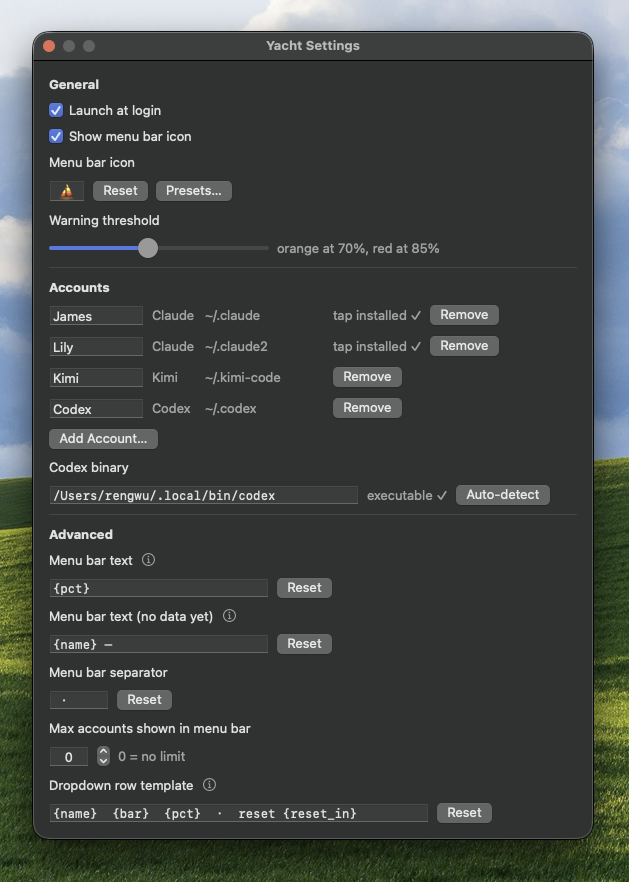
window when the provider reports one - Configurable warning/critical color thresholds
- Customizable menu bar text, dropdown row text, separators
- Customizable menu bar icon (with a preset picker)
- Launch at login
Requirements
- macOS 13+
- Xcode Command Line Tools (no full Xcode install needed) — Swift 5.9+
- For Codex accounts: the
codexCLI installed and logged in. Yacht runs it read-only and never
touches its credentials.
Build
./build.shBuilds a release binary and assembles an ad-hoc-signed build/Yacht.app.
Move it to /Applications (or run it in place) and launch it like any other
app.
To build with a specific version stamped into the bundle:
./build.sh 1.2.0Usage
- Launch the app — it lives entirely in the menu bar (no Dock icon).
- Click the menu bar item → Settings….
- Under Accounts, click Add Account…, choose the provider, then pick that account's
folder. Registration is always explicit: finding a provider's files on disk never creates an
account on its own. Discovered Claude folders are also offered as one-click Add rows. - Finish the provider-specific step below.
All settings persist to
~/Library/Application Support/Yacht/config.json.
Claude
Click Install Tap next to the account. This writes the tap script to
~/Library/Application Support/Yacht/ and points that account's settings.json
statusLine at it, preserving every other key already in the file. If another status
line command is already installed, the app tells you rather than overwriting it
silently. Usage data appears after Claude Code's next turn for that account.
Kimi
Nothing to install — register the Kimi Code home folder (~/.kimi-code by default) and Yacht
polls Kimi for that account. It reads the existing session's access token and nothing else; if
that token has expired, the dropdown says so and the fix is to use kimi again.
Codex
Nothing to install per account. Yacht finds the codex binary itself, and Settings → Codex
binary shows what it resolved; type a path there if you keep codex somewhere unusual, or hit
Auto-detect to go back to discovery. One executable serves every Codex account. If the field
reads can't find codex, no Codex figure can be fetched until it resolves.
Running multiple accounts
Create another ~/.claude-style folder and point CLAUDE_CONFIG_DIR at it —
Claude Code treats it as a separate account, prompting a fresh login on first
run:
CLAUDE_CONFIG_DIR=~/.claude-work claudeName it .claude<anything> and Yacht's account discovery picks it up
automatically. For convenience, alias it in ~/.zshrc:
alias claude-work="CLAUDE_CONFIG_DIR=~/.claude-work claude"Kimi and Codex split accounts the same way, via KIMI_CODE_HOME and CODEX_HOME. Those homes are
not auto-discovered — register each one through Add Account….
How usage collection works
Each provider is a separate adapter, and one failing provider never disturbs another's numbers.
Claude — a tap it pushes to
For Claude Code, Yacht installs a small script (the "tap") as the statusLine
command for each account you register. Claude Code can run that command on
every turn. The tap reads the status line's JSON payload from stdin and,
whenever it carries rate_limits, writes a snapshot to usage-snapshot.json
inside that account's Claude config directory. The app polls those snapshot
files and renders them in the menu bar and dropdown. This Claude adapter never
talks to the network.
The tap is deliberately inert: it prints nothing (so it never appears as a
visible status line), always exits 0, and writes atomically, so it can
never break the Claude Code session hosting it.
Kimi — a read-only poll
Kimi has no status-line hook, so Yacht pulls instead: it reads the access token already sitting in
that account's credentials/kimi-code.json and asks Kimi's usage endpoint. It never writes that
file and never refreshes the token — Kimi rotates refresh tokens itself, and a competing writer
could log you out. An expired token therefore shows as expired rather than being renewed.
Codex — its own binary, asked directly
Yacht runs codex app-server and makes one account/rateLimits/read request, so the figure comes
from the vendor's own code path rather than a re-implementation of it. Yacht never opens
auth.json; codex owns its own token. It also reads the modification time of the newest rollout
file under CODEX_HOME/sessions — never the contents — to tell an active session from an idle
one.
Both pulled providers poll about once a minute while the account looks live — an unexpired Kimi
token, a recently written Codex session — and back off to every 15 minutes when it doesn't.
Opening the dropdown bypasses that wait. When a poll can't be made, the last known figure is
carried forward and marked stale rather than blanked; a stale figure dims, unless it is at or above
the warning threshold, where it keeps its color because there is still an alarm to take.
Development
swift build
swift run UsageCoreTests
Tests are a plain executable, not an XCTest bundle — this repo targets a
Command Line Tools–only toolchain, and XCTest ships with Xcode.
Project layout:
Sources/UsageCore— model, config, the three provider adapters
(SnapshotReader/TapInstallerfor Claude,KimiProvider,CodexProvider), and view-model
rendering. No AppKit dependency, so it's testable headless.Sources/Yacht— the app: status item, settings window, launch-at-login.
A thin projection ofUsageCore's view model.Tests/UsageCoreTests— the test suite.tap/claude-usage-tap.sh— the Claude tap script, kept in sync with the copy
embedded inUsageCore(test-enforced). Its legacy filename is intentionally
stable because existingstatusLinesettings contain its absolute path.
Releasing
Push a tag matching v*.*.*:
git tag v1.0.0
git push origin v1.0.0
This triggers .github/workflows/release.yml, which builds the app, stamps
the version, packages it as a DMG, and publishes a GitHub Release with the
DMG attached. Every push and PR to main also runs
.github/workflows/ci.yml (build + test).
The app is ad-hoc signed, not notarized — anyone downloading the DMG will
need to right-click → Open the first time to get past Gatekeeper.