

Repository
ai-detector-from-scratch
End-to-end project training and building AI models / LLMs to detect AI-written text
- Stage
- Folder
- 01
- Human data
- 02
- AI data
- 03
- AI-assisted data
Specs
- StageFolder
- 01Human data
- 02AI data
- 03AI-assisted data
- 04Hugging Face dataset
- 05Logistic regression
- 06ChatGPT baseline
- 07DistilBERT
- 08DistilBERT LoRA and MiCA
- 09ModernBERT
- 10GPT-2
- 11Qwen3
- 12Length bias
- 13Learning curves
- 14Resource and latency
- 15Classifier API
- 16Substack case study
- 17Browser UI
- 18Reinforcement learning
README
Build an AI Text Detector From Scratch
This repository contains the code accompanying my article
Build an AI Text Detector From Scratch.
It starts with dataset construction, compares several classifier architectures,
and ends with experiments that use the detector as a verifier during
reinforcement learning.
The detector is a binary classifier. Given a text, it returns a score from 0
to 100, where larger values indicate that the model considers the text more
likely to be AI-generated. This score reflects the classifier and its training
distribution. It is not proof that a particular text was written by a human or
an AI system.
Repository guide
The numbered folders under scripts follow the order of the accompanying
project:
| Stage | Folder | Contents |
|---|---|---|
| 01 | Human data | Data gen 1: Licensed human-text collection |
| 02 | AI data | Data gen 2: AI-text generation and Pangram checks |
| 03 | AI-assisted data | Data gen 3: Light and moderate AI editing |
| 04 | Hugging Face dataset | Dataset conversion and grouped splits |
| 05 | Logistic regression | TF-IDF baseline, calibration, and export |
| 06 | ChatGPT baseline | API-based classification benchmark |
| 07 | DistilBERT | Full DistilBERT fine-tuning |
| 08 | DistilBERT LoRA and MiCA | Parameter-efficient fine-tuning |
| 09 | ModernBERT | ModernBERT fine-tuning |
| 10 | GPT-2 | GPT-2 fine-tuning |
| 11 | Qwen3 | Qwen3 fine-tuning |
| 12 | Length bias | Score and error analysis by text length |
| 13 | Learning curves | Training-set size experiments |
| 14 | Resource and latency | Throughput, latency, and memory benchmarks |
| 15 | Classifier API | Model downloads, CLI, and local server |
| 16 | Substack case study | Evaluation on labeled Substack notes |
| 17 | Browser UI | Local React and FastAPI interface |
| 18 | Reinforcement learning | Detector-as-verifier RLVR experiments |
The reusable inference code is in src/ai_detector, and
the repository checks are in tests. Stages with additional setup
or usage details include their own README.
Setup
The project uses Python 3.12 and uv. After
cloning the repository, install the minimal dependencies for downloading and
running the logistic regression detector with:
uv sync
uv run python environment_check.py
Install only the additional groups needed for the part of the project you
want to run:
# DistilBERT, ModernBERT, GPT-2, Qwen3, LoRA, and MiCA inference
uv sync --group transformer-inference

# Model training and dataset utilities
uv sync --group training

# Jupyter notebooks and plotting
uv sync --group notebooks

# FastAPI server and browser UI
uv sync --group browser-ui

# Complete contributor environment, including tests
uv sync --group dev
Groups are additive to the minimal environment. For example, use uv sync --group transformer-inference --group browser-ui to run the browser UI with
a transformer detector.
Some of the training notebooks require a CUDA GPU. The dataset-generation
scripts also use external APIs or a local Ollama server, depending on the
selected model. The individual stage READMEs list these requirements where
needed.
Quick start
The fastest way to try the detector is the logistic regression baseline.
First, download its trained artifact from the Hugging Face Hub:
uv run python scripts/15_classifier-api/download-models.py \
  --fetch \
  --model logreg
Then classify a text:
uv run python scripts/15_classifier-api/classify.py \
  --model logreg \
  --text "Paste the text to classify here."
The command returns a JSON payload such as:
{"score": 72.4138}The same interface supports the DistilBERT, ModernBERT, GPT-2, and Qwen3
classifiers after their model artifacts have been downloaded. See
scripts/15_classifier-api for the
complete model list and examples for files, standard input, and the local
server.
Browser UI
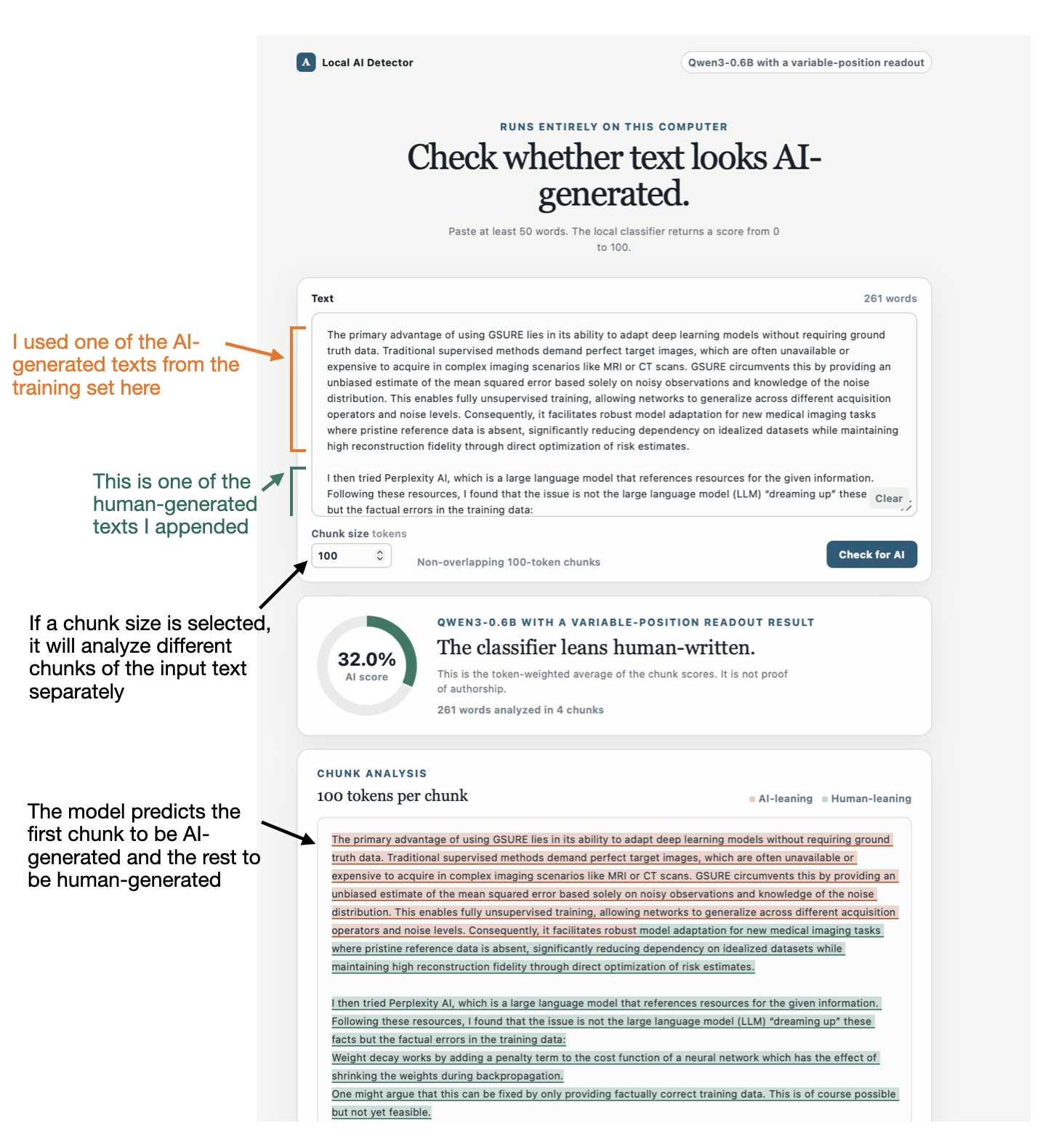
Stage 17 provides a local browser interface for the trained classifiers. The
selected model is loaded once when the server starts and kept in memory for
subsequent checks.
By default, the UI scores the complete input. You can also choose a chunk size,
such as 100 tokens, to analyze non-overlapping sections independently. This
makes it possible to inspect which parts of a longer text lean AI-generated or
human-written according to the selected classifier.
Install the browser UI and transformer inference dependencies:
uv sync --group browser-ui --group transformer-inferenceBuild the frontend once:
cd scripts/17_browser-ui/frontend
npm ci --ignore-scripts --audit=false --fund=false
npm run build
cd ../../..
See the scripts/17_browser-ui README if
the frontend build reports an esbuild installation problem.
Download the Qwen3 detector's trained artifact once before the first launch:
uv run python scripts/15_classifier-api/download-models.py \
  --fetch \
  --model qwen3-variable
Then start the interface:
uv run python scripts/17_browser-ui/app.py \
  --model qwen3-variable \
  --device auto
Then open http://127.0.0.1:8000.
Dataset
The experiments use the
rasbt/human-vs-ai-50k
dataset. It contains 25,355 human-written texts and 25,355 AI-generated texts
with grouped training, validation, and test splits. Source documents and AI
texts derived from them remain in the same split to reduce source leakage.
The raw text files and generated model weights are excluded from Git. The
numbered data stages document how to recreate the dataset, while the stage-15
download script retrieves the published model artifacts.
The reusable inference implementation lives in src/ai_detector. The
numbered folders keep the data collection, training, evaluation, and
application code aligned with the project stages.
Reproducing the experiments
For a complete reproduction, follow the numbered folders in order. You can
skip directly to an individual model or analysis when the Hugging Face dataset
and required model artifacts are already available.
The full data-generation and training pipeline is substantially more
expensive than the quick-start example. It uses several language models,
external API calls, and GPU training runs. For most readers, the published
dataset and model artifacts are the more practical starting point.
License
The code in this repository is available under the license in
LICENSE. The dataset combines material with several source
licenses. Its row-level metadata records the applicable source and license
information.