

Repository
qwench
A fully automated local fine tuning pipeline for Qwen3.8-27B — drop your data in a folder, run one command, get a Forge your own Qwen.
- File type
- Accepted record shapes
- .jsonl / .json (SFT)
- {"messages": [...]} · {"prompt", "completion"} · {"instruction", "input", "output"} · {"question", "answer"} · {"text"}
- .jsonl / .json (DPO)
- {"prompt", "chosen", "rejected"}
- .jsonl / .json (KTO)
- {"prompt", "completion", "label": true/false}
Specs
- File typeAccepted record shapes
- .jsonl / .json (SFT){"messages": [...]} · {"prompt", "completion"} · {"instruction", "input", "output"} · {"question", "answer"} · {"text"}
- .jsonl / .json (DPO){"prompt", "chosen", "rejected"}
- .jsonl / .json (KTO){"prompt", "completion", "label": true/false}
- .csvheaders matching any of the shapes above (e.g. question,answer or prompt,chosen,rejected )
- .txt / .mdchunked into plain-text records automatically
- MethodData
- sft (default)chat or plain text
- dpochosen/rejected pairs
- ktoper-response 👍/👎 labels
- orpochosen/rejected pairs
- StageCommand
- ingestqwench ingest
- validateqwench validate
- prepareqwench prepare
- trainqwench train
- evaluateqwench evaluate
- mergeqwench merge
- exportqwench export
- chatqwench chat
- uiqwench ui
- ResourceMinimum
- GPU VRAM24 GB (RTX 3090/4090) at max_seq_len≈2048–4096
- System RAM32 GB
- Disk~120 GB (HF cache + checkpoints + merged weights)
- SymptomFix
- CUDA out of memory during trainingLower data.max_seq_len (biggest lever), then train.lora.r ; keep per_device_train_batch_size: 1 and raise gradient_accumulation_steps instead
- bitsandbytes missing / won't installLinux + CUDA only; on other platforms Qwench logs a warning and trains unquantized — fine for --smoke , not for the 27B
- Training interrupted (crash, power, Ctrl-C)Just run qwench run again — it resumes from the last checkpoint of the same run; checkpoints from a different data/config are detected and cleared
- Merge runs out of GPU memorySet merge.device_map: cpu to merge in system RAM (~60 GB for the 27B)
- A stage keeps skipping but you want it re-runqwench run --force , or run the single stage: qwench train --force
- Want to see what state things are inqwench status shows every stage's cache state
README
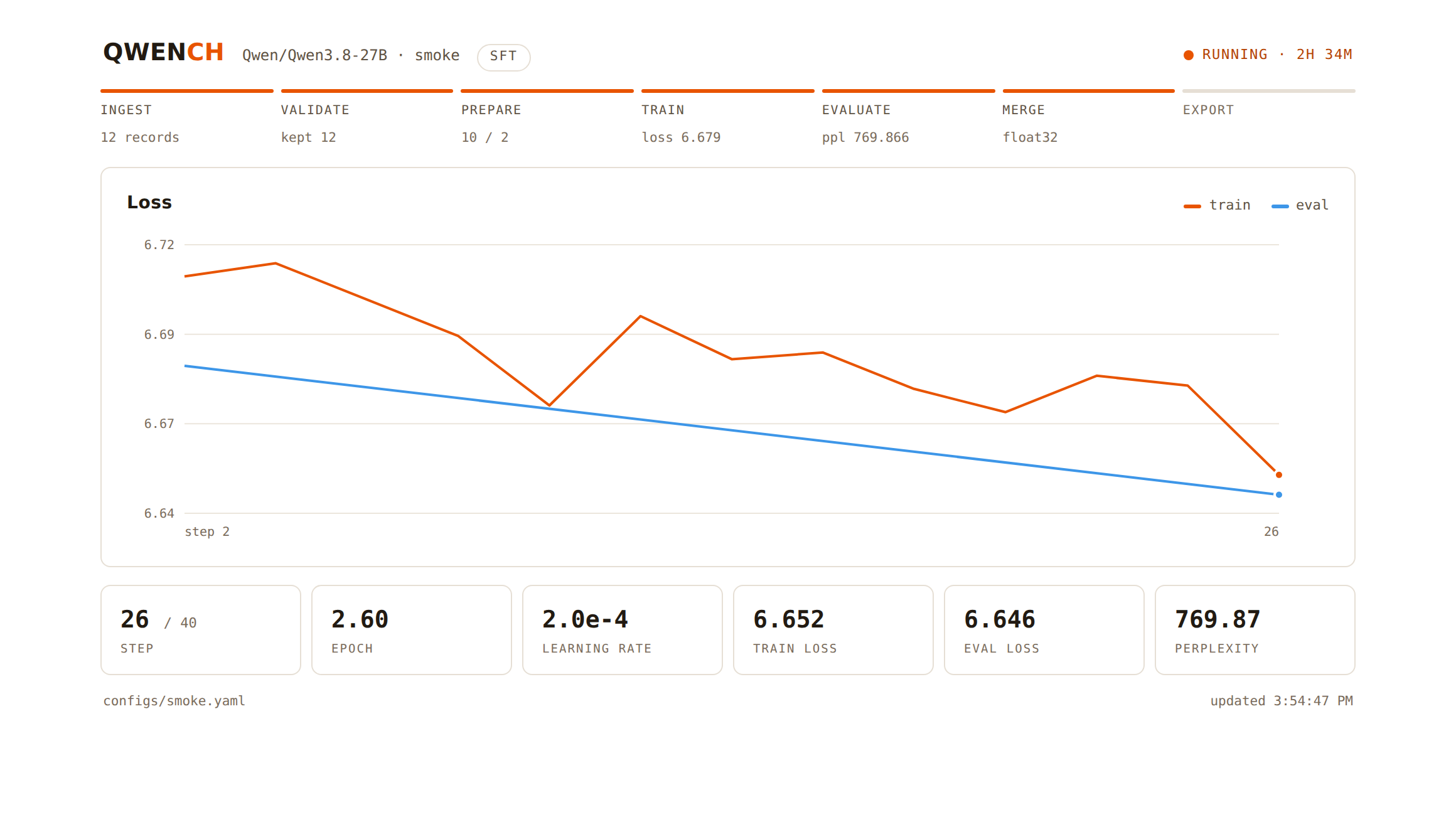 qwench ui — watch any run live in the browser: stage progress, loss curves, perplexity. Local only, read-only.
Qwench is a fully automated local fine-tuning pipeline for Qwen3.8-27B — drop your data in a folder, run one command, get a fine-tuned model you can chat with, merged weights, and (optionally) a quantized GGUF ready for Ollama. Your data never leaves your machine.
The name is Qwen + quench — in the forge, the quench is the step where hot steel is plunged and hardened into a usable tool, which is exactly what fine-tuning does to a base model.
data/raw/* ─► ingest ─► validate ─► prepare ─► train (QLoRA) ─► evaluate ─► merge ─► export ─► chatEvery stage is a separate, independently runnable component. The orchestrator caches completed stages by content signature — of the actual inputs, config, and model weights — so re-running the pipeline only redoes what changed, and a retrain automatically invalidates everything downstream of it.
Why QLoRA?
Qwen3.8-27B (released 2026-08-14, Apache-2.0) is a ~27.8B dense model designed to run on a single 24GB GPU. Full fine-tuning at that size needs hundreds of GB of GPU memory; QLoRA loads the frozen base in 4-bit NF4 and trains small low-rank adapters, which fits on one RTX 3090/4090-class card.
Quick start
# 1. Install  (provides the `qwench` command)
make setup-train            # full stack: torch, transformers, trl, peft, bitsandbytes

# 2. Verify the whole pipeline works on YOUR machine and YOUR data
#    (tiny 0.6B model, 5 optimizer steps, runs even on CPU)
make smoke

# 3. Drop your data in data/raw/ (see formats below), then run for real
make pipeline               # or: python -m qwench run

# 4. Talk to the result
make chat

# (optional) watch any run live in the browser — stage rail, loss chart, ETA
make ui                     # http://127.0.0.1:7861
No files in data/raw/? The pipeline falls back to the bundled sample dataset in data/sample/ so you can exercise it immediately.
Supported data formats
Put any mix of these in data/raw/ (nested folders are fine):
| File type | Accepted record shapes |
|---|---|
.jsonl / .json (SFT) |
{"messages": [...]} · {"prompt", "completion"} · {"instruction", "input", "output"} · {"question", "answer"} · {"text"} |
.jsonl / .json (DPO) |
{"prompt", "chosen", "rejected"} |
.jsonl / .json (KTO) |
{"prompt", "completion", "label": true/false} |
.csv |
headers matching any of the shapes above (e.g. question,answer or prompt,chosen,rejected) |
.txt / .md |
chunked into plain-text records automatically |
Everything is normalized to one schema; the pipeline picks the majority mode (chat / text / preference / kto) automatically, or force it with data.mode. A method/data mismatch fails fast with a clear error before any GPU time is spent.
Training methods
| Method | Data | When to use |
|---|---|---|
sft (default) |
chat or plain text | teach format, style, knowledge — the standard first pass |
dpo |
chosen/rejected pairs | teach preference between answers; run on top of an SFT adapter via train.init_adapter |
kto |
per-response 👍/👎 labels | like DPO but from binary feedback — much easier to collect from real usage logs |
orpo |
chosen/rejected pairs | SFT + preference in one pass with no reference model — requires trl<1.0 (removed upstream in TRL 1.0; use dpo on current TRL) |
Ready-made presets in configs/presets/:
qwench run -c configs/presets/dpo.yaml              # DPO on data/raw-dpo/
qwench run -c configs/presets/kto.yaml              # KTO on data/raw-kto/
qwench run -c configs/presets/qwen3.8-27b-48gb.yaml # 8-bit + DoRA on a 48GB card
qwench run -c configs/presets/qwen3-4b-full.yaml    # full fine-tune of a small Qwen
The typical arc: SFT → chat with it → collect preference/feedback data → DPO or KTO on top. Two ways to chain onto the SFT run:
train.init_adapter: outputs/adapter— continues training the SFT adapter directly. Note: the DPO/KTO reference policy is then the raw base model (TRL recovers it by disabling the adapter), which is looser than the textbook setup; the pipeline warns about this.- Recommended: run
qwench mergeafter SFT, then setmodel.base_model: outputs/mergedin the DPO/KTO preset — a fresh adapter trains on top of the SFT-merged weights, and the reference policy is the SFT model, as the DPO objective assumes.
The method presets (dpo, kto) and the full-FT preset each write to their own output tree (outputs/dpo/, outputs/kto/, outputs/full-ft/), so they never clobber your main SFT run. The 48gb preset is a hardware profile of the main run and intentionally shares its outputs.
The stages
| Stage | Command | What it does |
|---|---|---|
| ingest | qwench ingest |
discovers raw files, normalizes every format into one schema |
| validate | qwench validate |
schema checks, cleans whitespace, drops duplicates/short/broken records, writes a quality report |
| prepare | qwench prepare |
injects the system prompt, measures token lengths with the real tokenizer, drops overlong records, splits train/val |
| train | qwench train |
SFT / DPO / KTO via TRL: quantized base + LoRA/DoRA adapters (or full FT), gradient checkpointing, paged 8-bit AdamW, auto-resume from checkpoints |
| evaluate | qwench evaluate |
validation loss + perplexity, sample generations vs. references → outputs/eval/report.md |
| merge | qwench merge |
folds the adapter into full-precision weights → standalone model dir |
| export | qwench export |
GGUF conversion + quantization via llama.cpp, writes an Ollama Modelfile |
| chat | qwench chat |
streaming REPL against the fine-tuned model |
| ui | qwench ui |
live dashboard at http://127.0.0.1:7861 — stage progress, live loss chart, eval metrics; read-only, safe to leave open during training |
qwench status shows what has run; qwench run --force ignores caches; qwench run --stages train,evaluate runs a subset.
Configuration
Everything lives in configs/pipeline.yaml. Any value can be overridden per-run:
python -m qwench run --set train.learning_rate=2e-4 --set data.max_seq_len=8192
python -m qwench run --set train.lora.r=32 --set train.num_train_epochs=1
Key knobs:
model.quantization—4bit(NF4, the 24GB path) ·8bit(higher fidelity, ~2× memory) ·none(bf16)train.method—sft·dpo·kto(see Training methods)train.init_adapter— start from an existing adapter (DPO/KTO on top of SFT)train.lora.{enabled,r,alpha,dropout,use_dora,use_rslora}— adapter capacity;enabled: false= full fine-tuning (needsquantization: none)data.system_prompt— injected into every conversation that lacks onedata.max_seq_len— records longer than this (in tokens) are droppedtrain.gradient_accumulation_steps— effective batch = this × per-device batchmerge.device_map: cpu— merge in system RAM (~60GB) if your GPU is smallexport.enabled: true+export.llama_cpp_dir— turn on GGUF/Ollama export
Hardware guidance (27B run)
| Resource | Minimum | Comfortable |
|---|---|---|
| GPU VRAM | 24 GB (RTX 3090/4090) at max_seq_len≈2048–4096 |
48 GB+ for longer sequences / higher rank |
| System RAM | 32 GB | 64 GB+ (needed for merge.device_map: cpu) |
| Disk | ~120 GB (HF cache + checkpoints + merged weights) | more if exporting GGUF |
Training is interruption-safe: checkpoints are saved every epoch and qwench run resumes automatically.
Serving the result
- transformers:
qwench chat(uses merged weights if present, else base + adapter) - vLLM: point it at
outputs/merged - Ollama: enable export, then run the
ollama create ...command the export stage prints
Troubleshooting
| Symptom | Fix |
|---|---|
| CUDA out of memory during training | Lower data.max_seq_len (biggest lever), then train.lora.r; keep per_device_train_batch_size: 1 and raise gradient_accumulation_steps instead |
bitsandbytes missing / won't install |
Linux + CUDA only; on other platforms Qwench logs a warning and trains unquantized — fine for --smoke, not for the 27B |
| Training interrupted (crash, power, Ctrl-C) | Just run qwench run again — it resumes from the last checkpoint of the same run; checkpoints from a different data/config are detected and cleared |
| Merge runs out of GPU memory | Set merge.device_map: cpu to merge in system RAM (~60 GB for the 27B) |
| A stage keeps skipping but you want it re-run | qwench run --force, or run the single stage: qwench train --force |
| Want to see what state things are in | qwench status shows every stage's cache state |
Development
make setup   # package + pytest only (no torch needed)
make test    # unit tests for the data stages — run without GPU or network
Project layout:
qwench/
├── configs/            pipeline.yaml (real run) · smoke.yaml (rehearsal)
│   └── presets/        dpo · kto · 48gb · small-model full FT
├── data/
│   ├── raw/            ← your training data goes here (raw-dpo/, raw-kto/ for those methods)
│   └── sample*/        bundled sample datasets (chat, preference, feedback)
├── qwench/
│   ├── cli.py          orchestrator (run/status/per-stage commands)
│   ├── config.py       typed config + YAML + --set overrides
│   ├── manifest.py     content-signature stage caching
│   ├── modeling.py     shared model/tokenizer/quantization loading
│   └── stages/         ingest · validate · prepare · train · evaluate · merge · export · serve
└── tests/              unit tests (pure Python, CPU-only)