

Repository
Paper2Any
Turn paper/text/topic into editable research figures, technical route diagrams, and presentation slides.
README
 # Paper2Any
[](https://www.python.org/)
[](LICENSE)
[](https://github.com/OpenDCAI/Paper2Any)
[](https://github.com/OpenDCAI/Paper2Any/stargazers)
English | [中文](README_CN.md)
# Paper2Any
[](https://www.python.org/)
[](LICENSE)
[](https://github.com/OpenDCAI/Paper2Any)
[](https://github.com/OpenDCAI/Paper2Any/stargazers)
English | [中文](README_CN.md)





📑 Table of Contents
- 🔥 News
- ✨ Core Features
- 📸 Showcase
- 🧩 Drawio
- 🚀 Quick Start
- 📂 Project Structure
- 🗺️ Roadmap
- 🤝 Contributing
🔥 News
[!TIP]
🆕 <strong>2026-03-28 · Editable PPT Showcase Refresh</strong><br>
Added two new <strong>editable PPT</strong> showcase screenshots for the frontend-deck workflow:<br>
a generated multi-slide gallery view and the canvas editing workspace with deck theme lock.
[!TIP]
🆕 <strong>2026-03-26 · Workflow Showcase Update</strong><br>
Added showcase coverage for <strong>Paper2Video</strong>, <strong>Paper2Poster</strong>, and <strong>Paper2Citation</strong>.<br>
The README now includes a compressed video demo plus refreshed English/Chinese workflow previews.
[!TIP]
🆕 <strong>2026-02-02 · Paper2Rebuttal</strong><br>
Added rebuttal drafting support with structured response guidance and image-aware revision prompts.
[!TIP]
🆕 <strong>2026-01-28 · Drawio Update</strong><br>
Added Drawio support for visual diagram creation and showcase-ready outputs in the workflow.<br>
KB updates in one line: multi-file PPT generation with doc convert/merge, optional image injection, and embedding-assisted retrieval.
[!TIP]
🆕 <strong>2026-01-25 · New Features</strong><br>
Added AI-assisted outline editing, three-layer model configuration system for flexible model selection, and user points management with daily quota allocation.<br>
🌐 Online Demo: <a href="http://dcai-paper2any.nas.cpolar.cn/">http://dcai-paper2any.nas.cpolar.cn/</a>
[!TIP]
🆕 <strong>2026-01-20 · Bug Fixes</strong><br>
Fixed bugs in experimental plot generation (image/text) and resolved the missing historical files issue.<br>
🌐 Online Demo: <a href="http://dcai-paper2any.nas.cpolar.cn/">http://dcai-paper2any.nas.cpolar.cn/</a>
[!TIP]
🆕 <strong>2026-01-14 · Feature Updates & Backend Architecture Upgrade</strong><br>
- Feature Updates: Added Image2PPT, optimized Paper2Figure interaction, and improved PDF2PPT effects.<br>
- Standardized API: Refactored backend interfaces with RESTful
/api/v1/structure, removing obsolete endpoints for better maintainability.<br>- Dynamic Configuration: Supported dynamic model selection (e.g., GPT-4o, Qwen-VL) via API parameters, eliminating hardcoded model dependencies.<br>
🌐 Online Demo: <a href="http://dcai-paper2any.nas.cpolar.cn/">http://dcai-paper2any.nas.cpolar.cn/</a>
- 2025-12-12 · Paper2Figure Web public beta is live
- 2025-10-01 · Released the first version <code>0.1.0</code>
✨ Core Features
From paper PDFs / images / text to editable scientific figures, slide decks, video scripts, academic posters, and other multimodal content in one click.
Paper2Any currently includes the following sub-capabilities:
- 📊 Paper2Figure - Editable Scientific Figures: Model architecture diagrams, technical roadmaps (PPT + SVG), and experimental plots with editable PPTX output.
- 🧩 Paper2Diagram / Image2Drawio - Editable Diagrams: Generate draw.io diagrams from paper/text or images, with drawio/png/svg export and chat-based edits.
- 🎬 Paper2PPT - Editable Slide Decks: Paper/text/topic to PPT, long-doc support, and built-in table/figure extraction.
- 📝 Paper2Rebuttal: Draft structured rebuttals and revision responses with claims-to-evidence grounding.
- 🖼️ PDF2PPT - Layout-Preserving Conversion: Accurate layout retention for PDF → editable PPTX.
- 🖼️ Image2PPT - Image to Slides: Convert images or screenshots into structured slides.
- 🎨 PPTPolish - Smart Beautification: AI-based layout optimization and style transfer.
- 🎬 Paper2Video: Generate video scripts and narration assets.
- 🖼️ Paper2Poster - Academic Poster: Turn paper PDFs into poster-ready layouts with configurable sections, logos, and export assets.
- 🔎 Paper2Citation - Citation Explorer: Track citing authors, institutions, and notable downstream works from author names or DOI/paper URLs.
- 📝 Paper2Technical: Produce technical reports and method summaries.
- 📚 Knowledge Base (KB): Ingest/embedding, semantic search, and KB-driven PPT/podcast/mindmap generation.
📸 Showcase
🧩 Drawio
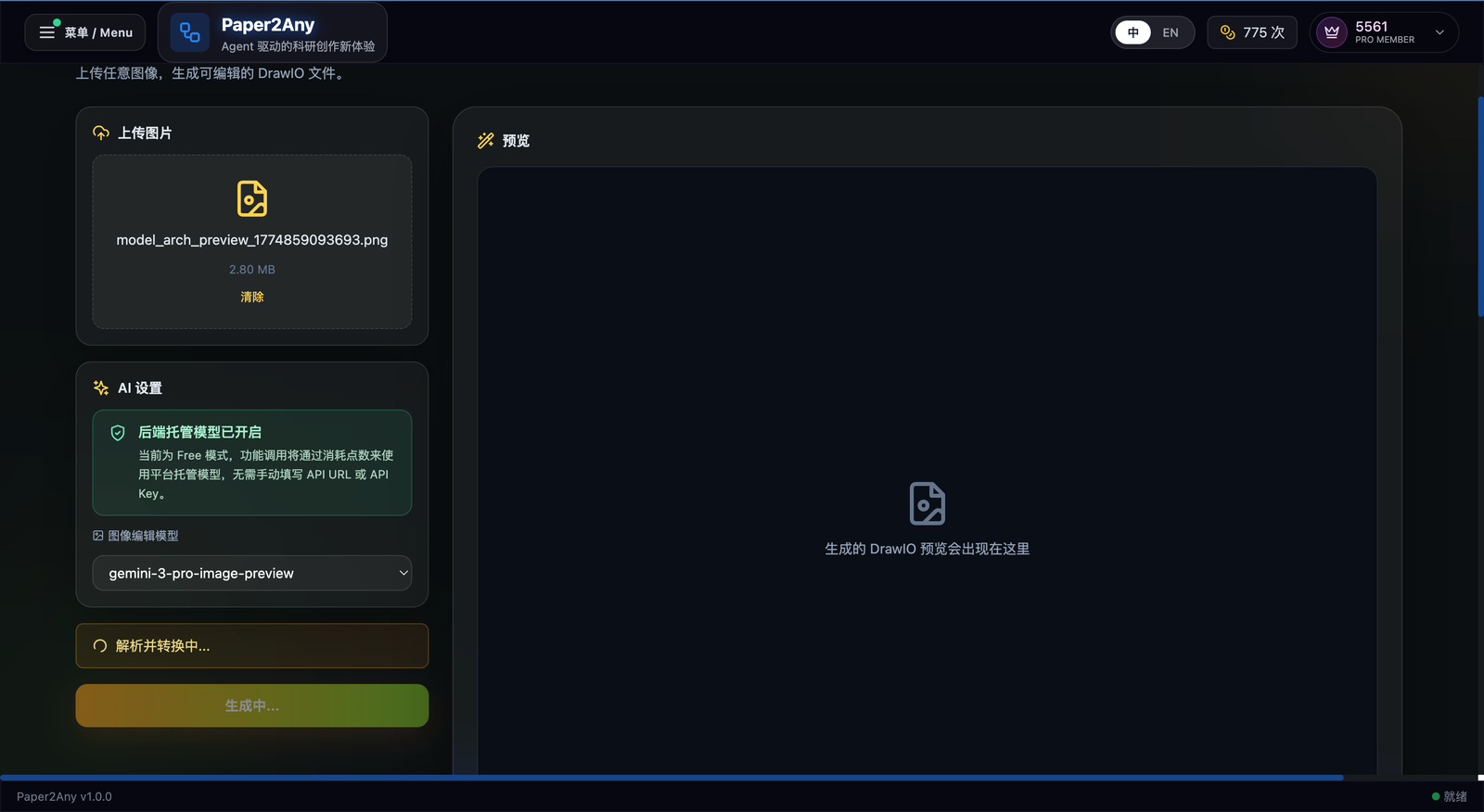 ✨ Upload a paper figure or screenshot as the starting point
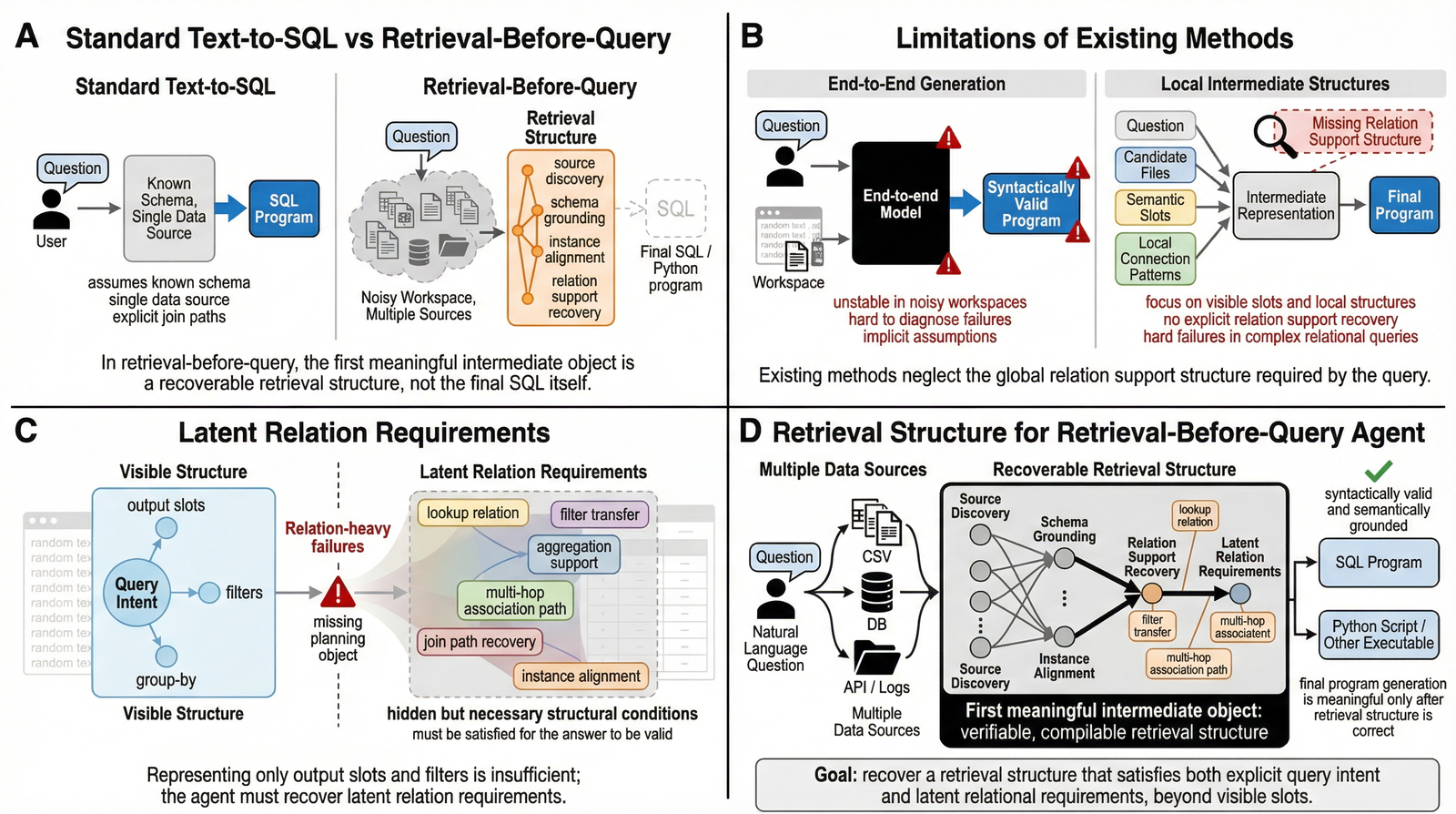 ✨ Keep the source structure visible before conversion
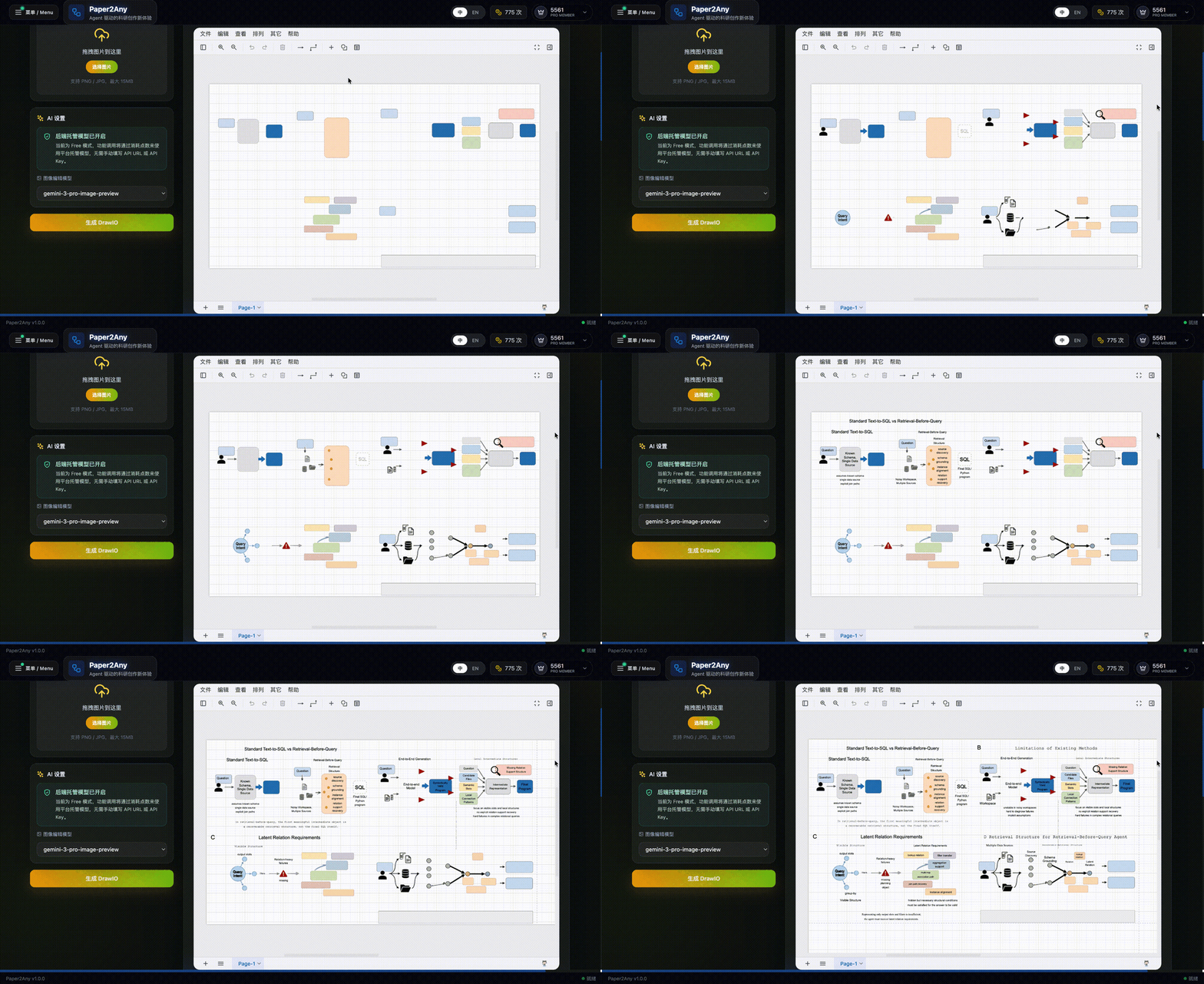 ✨ Convert the image into an editable DrawIO canvas
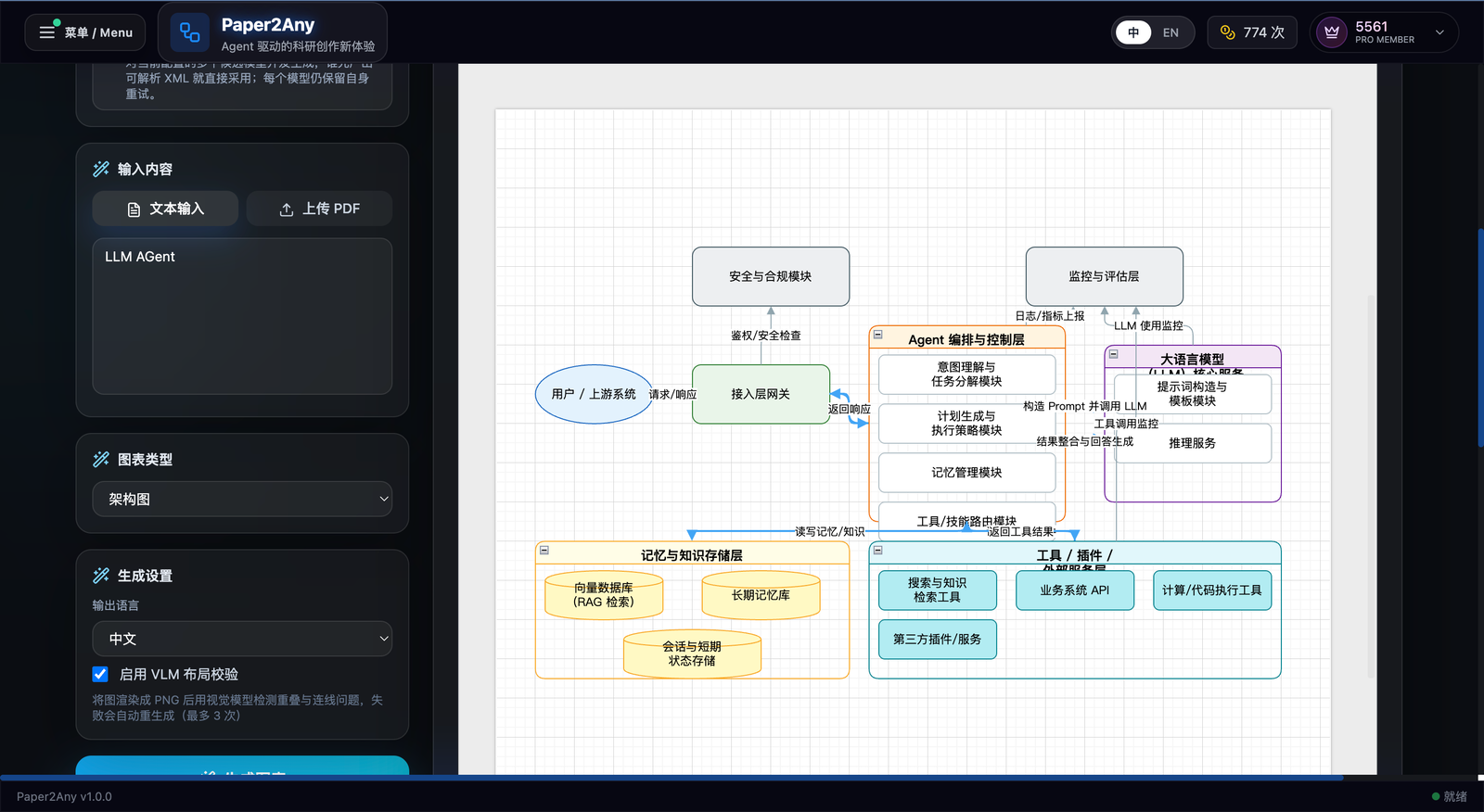 ✨ Generate a model or system diagram directly inside the DrawIO workbench
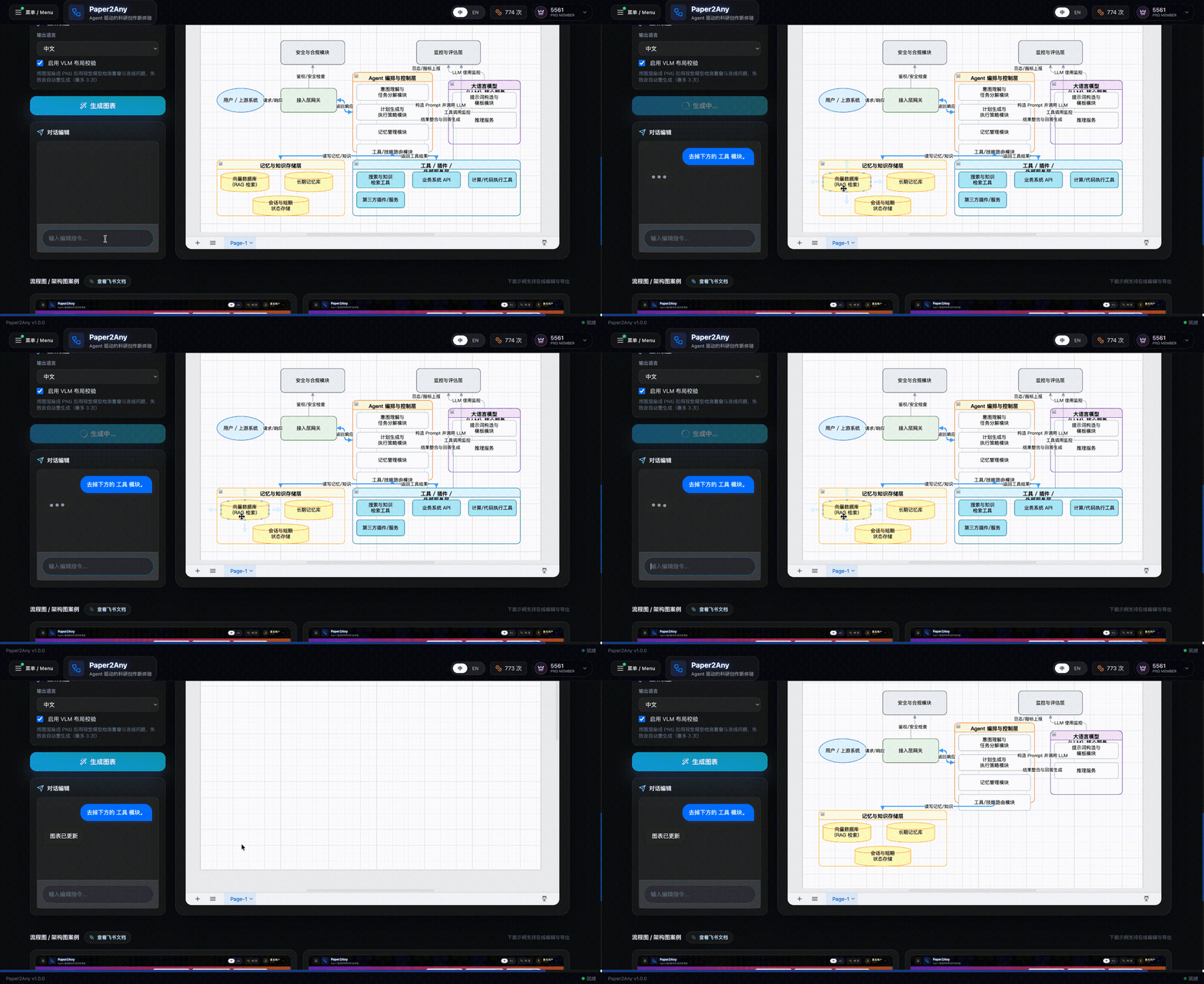 ✨ Refine the generated architecture with chat editing and export-ready layout
📝 Paper2Rebuttal: Rebuttal Drafting
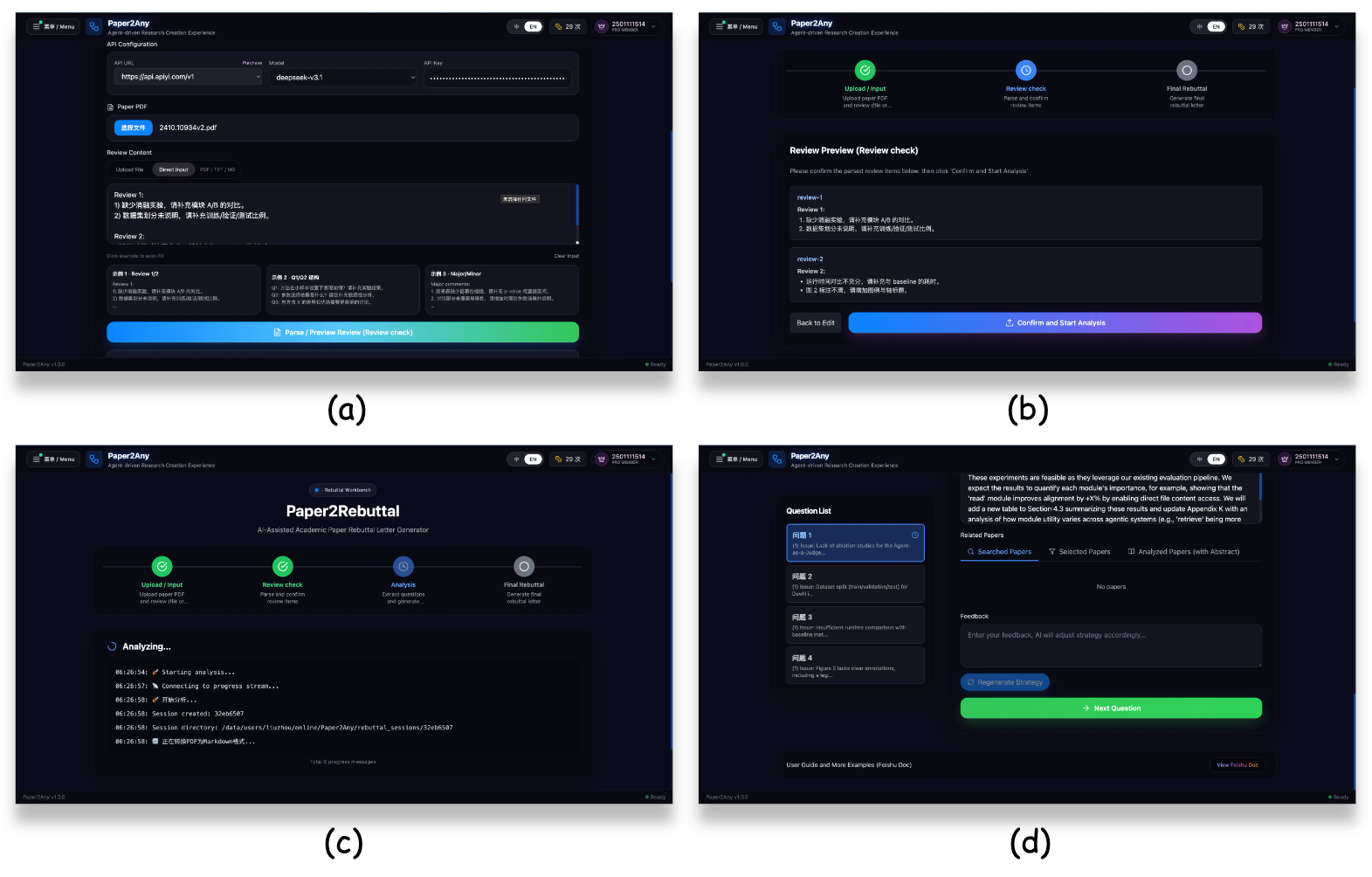 ✨ Rebuttal drafting and revision support
📊 Paper2Figure: Scientific Figure Generation
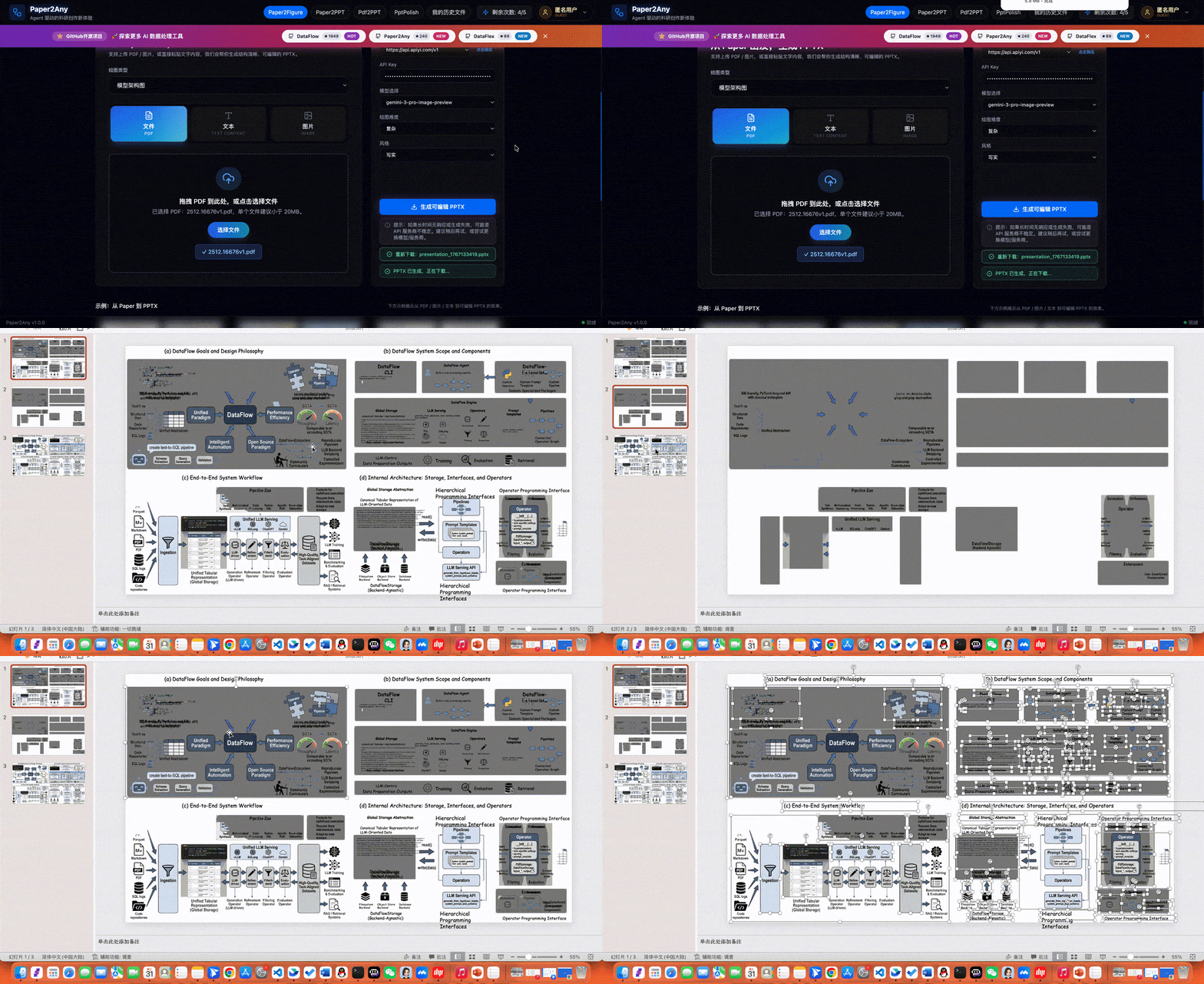 ✨ Model Architecture Diagram Generation
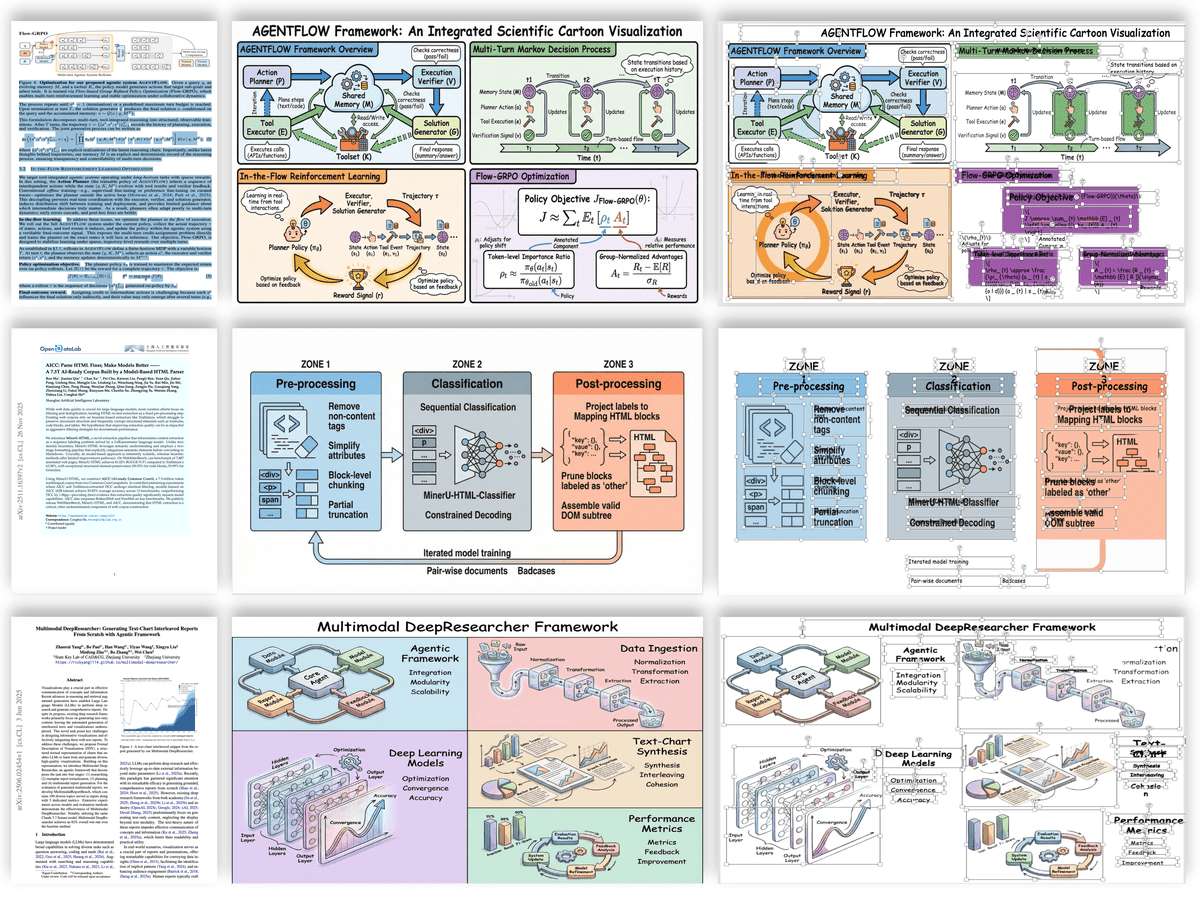 ✨ Model Architecture Diagram Generation
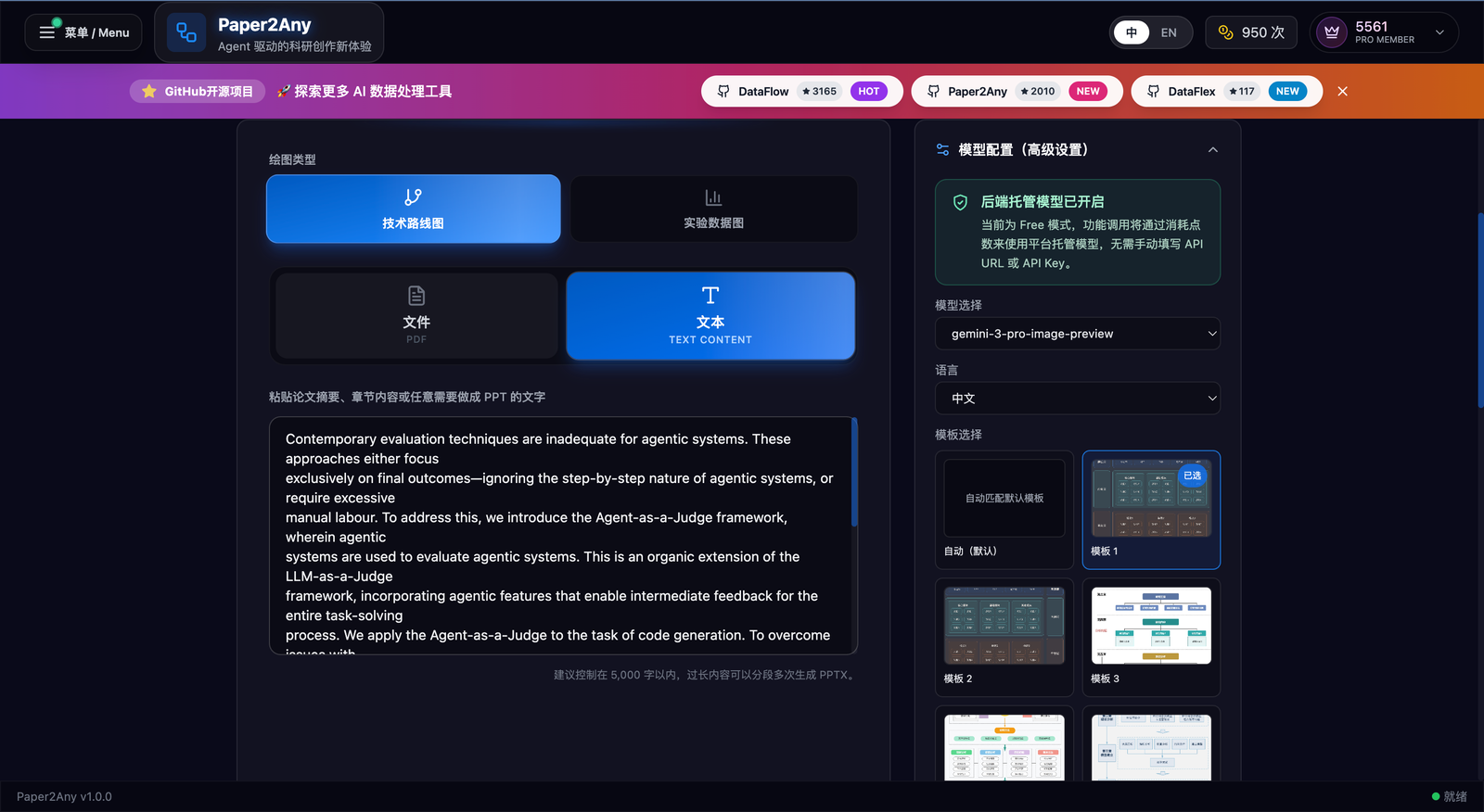 ✨ Technical roadmap workbench: choose route type, input source, model config, and visual template
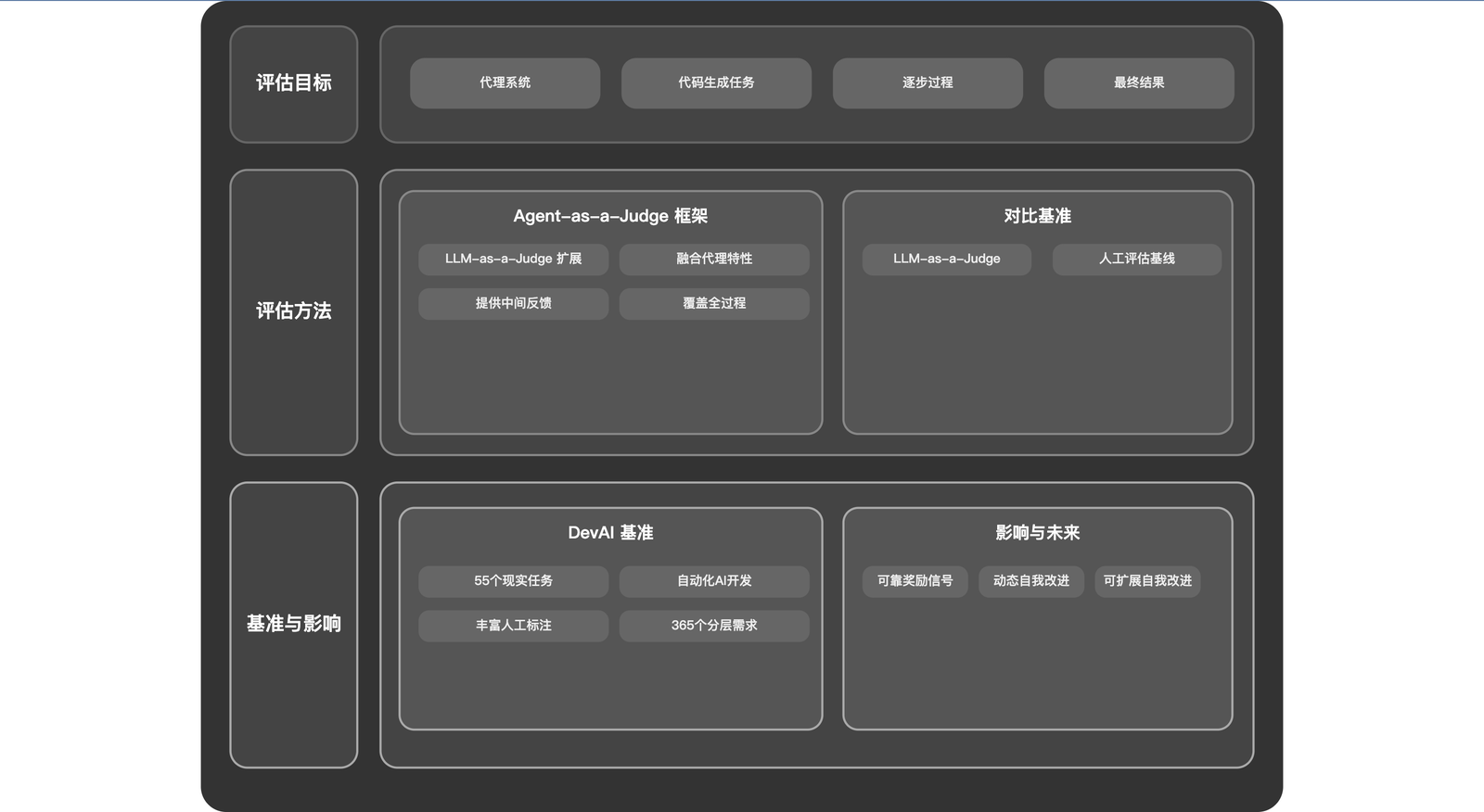 ✨ Generated technical roadmap figure with structured dual-column layout
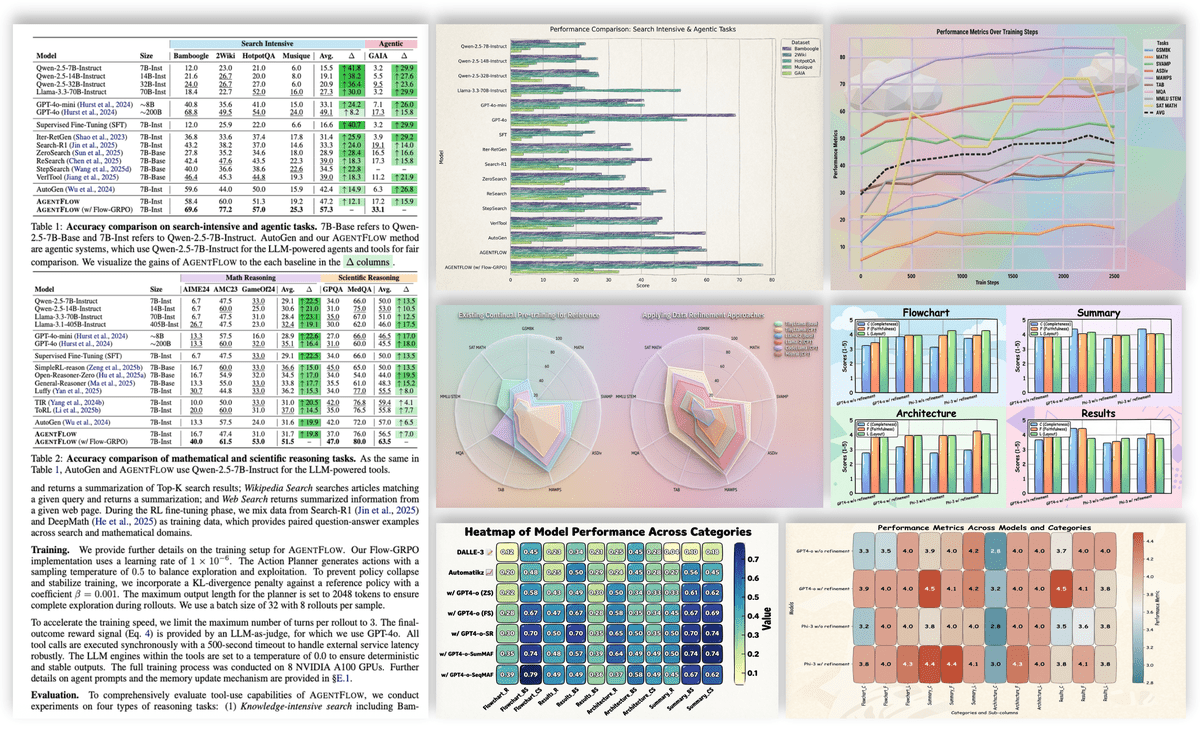 ✨ Experimental Plot Generation (Multiple Styles)
🎬 Paper2PPT: Paper to Presentation
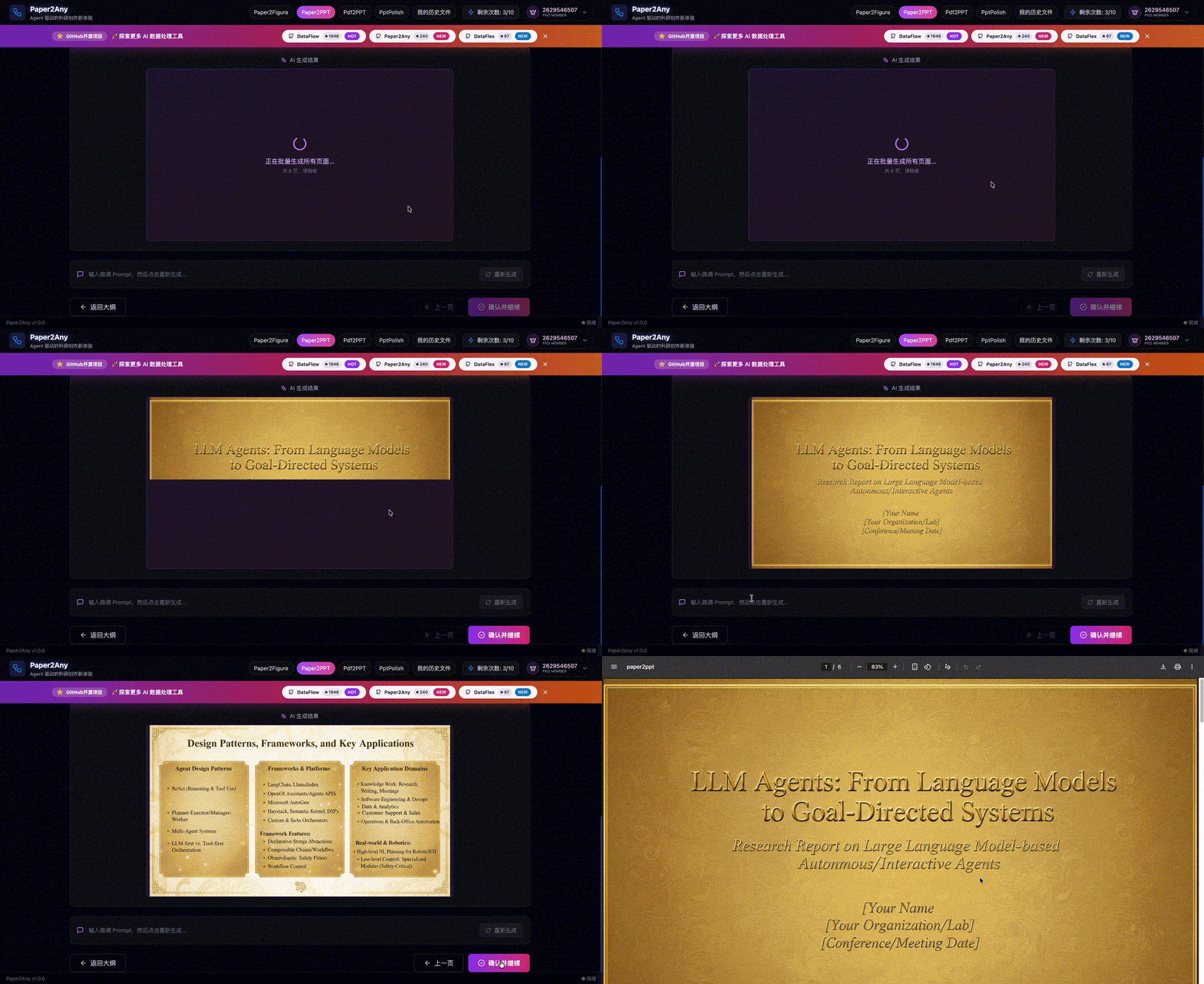 ✨ End-to-end PPT generation demo
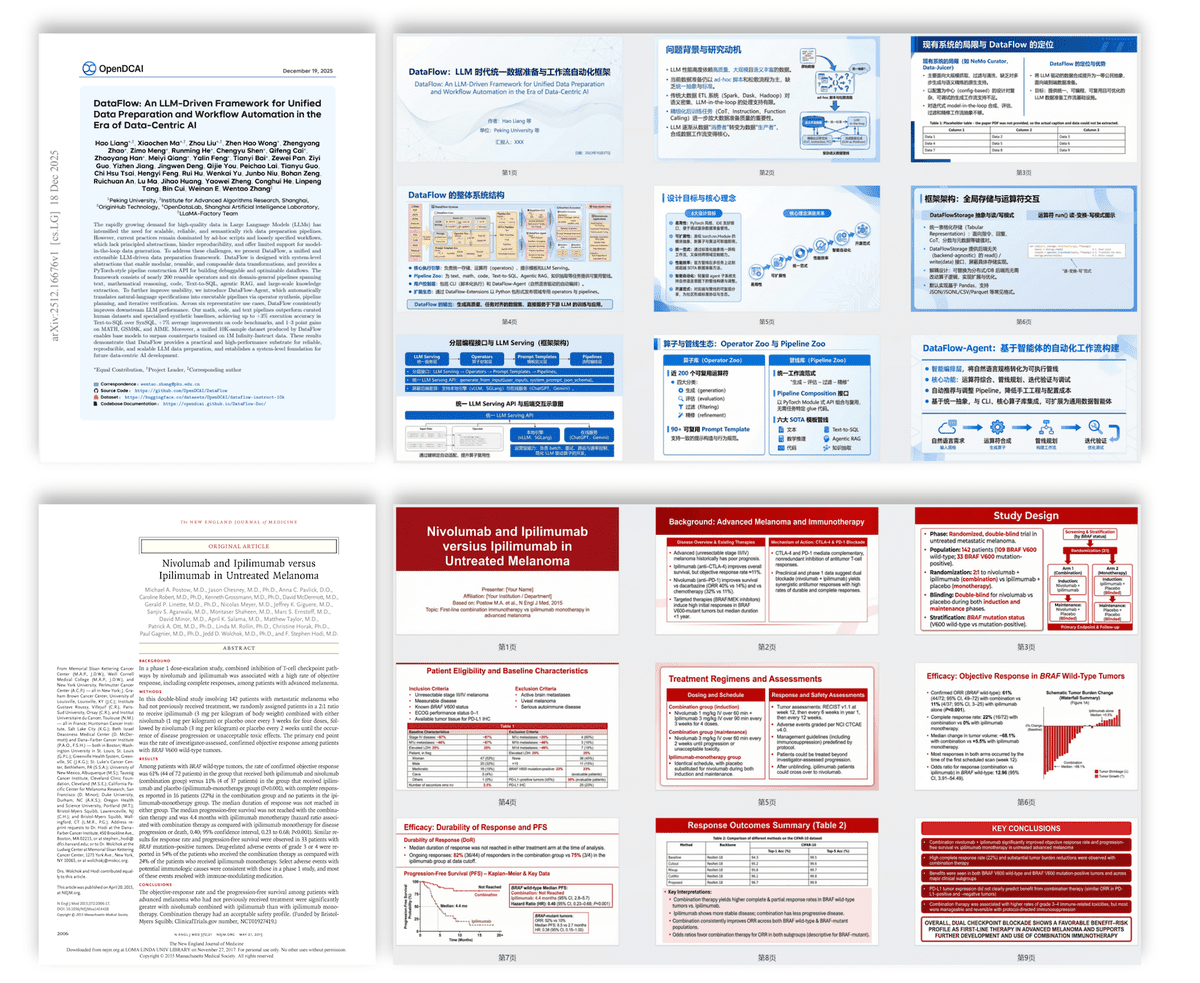 ✨ Paper / text / topic to polished slide deck
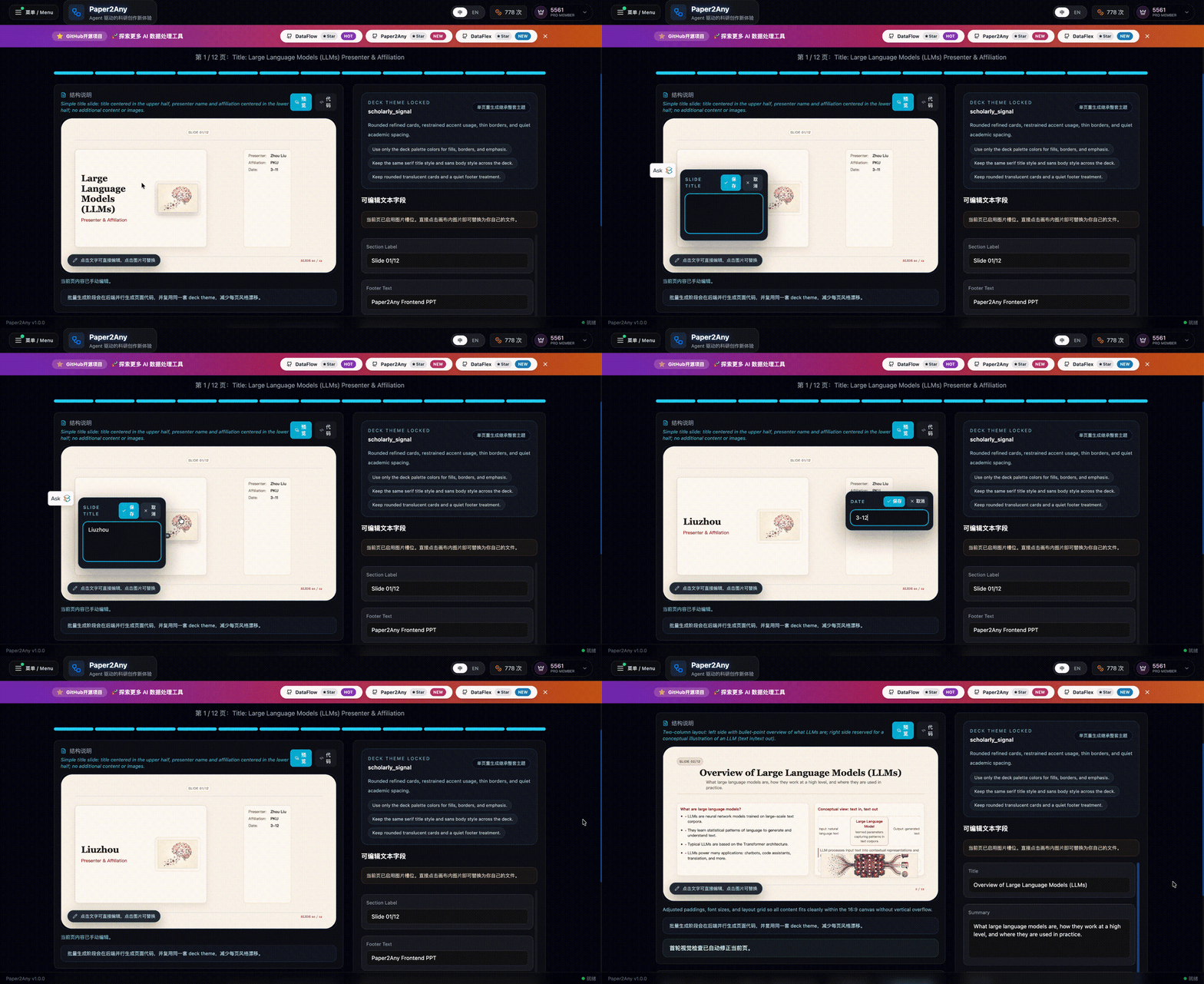 ✨ Edit slide text directly on canvas while keeping the deck theme locked
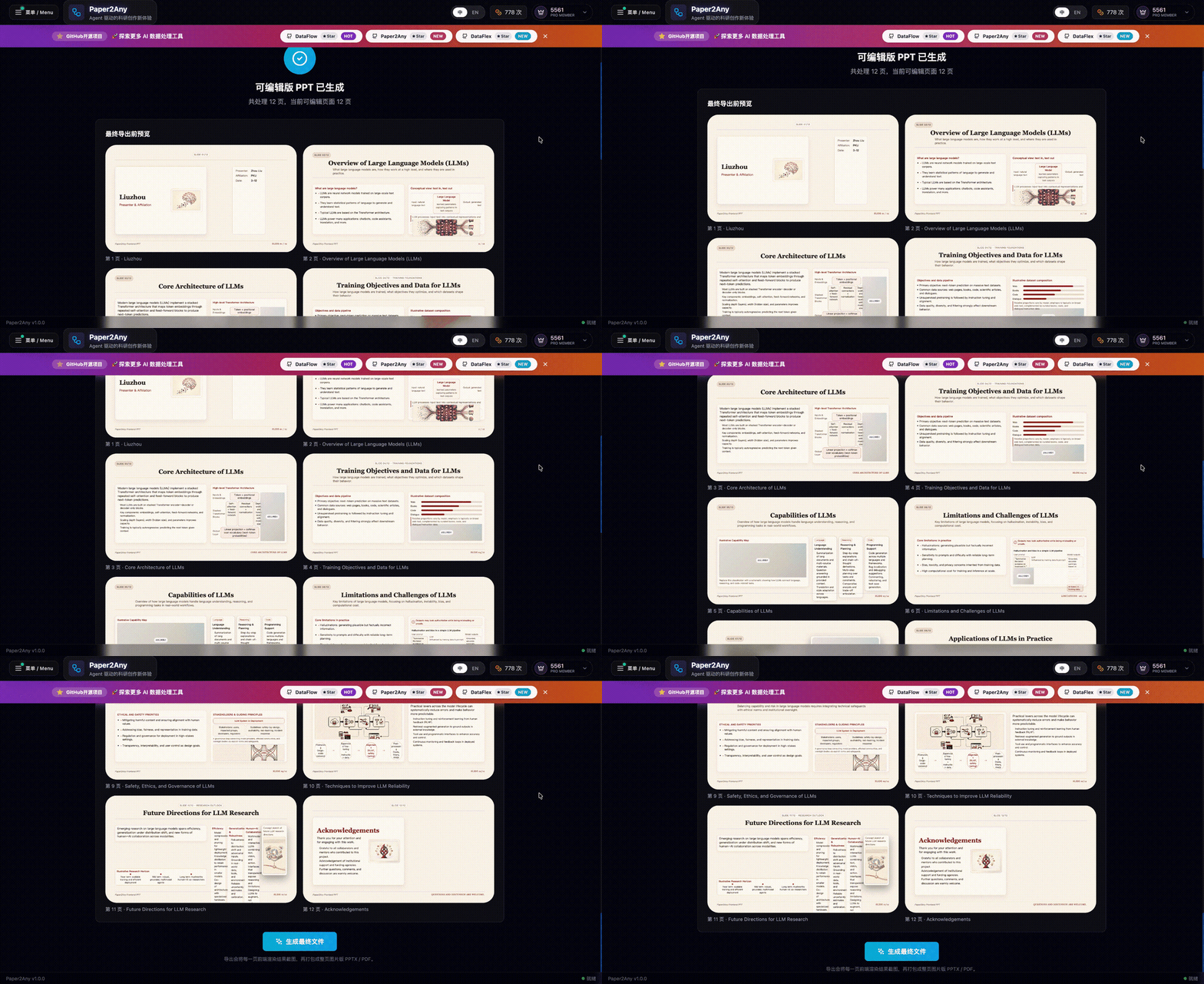 ✨ Review the generated multi-page gallery before export
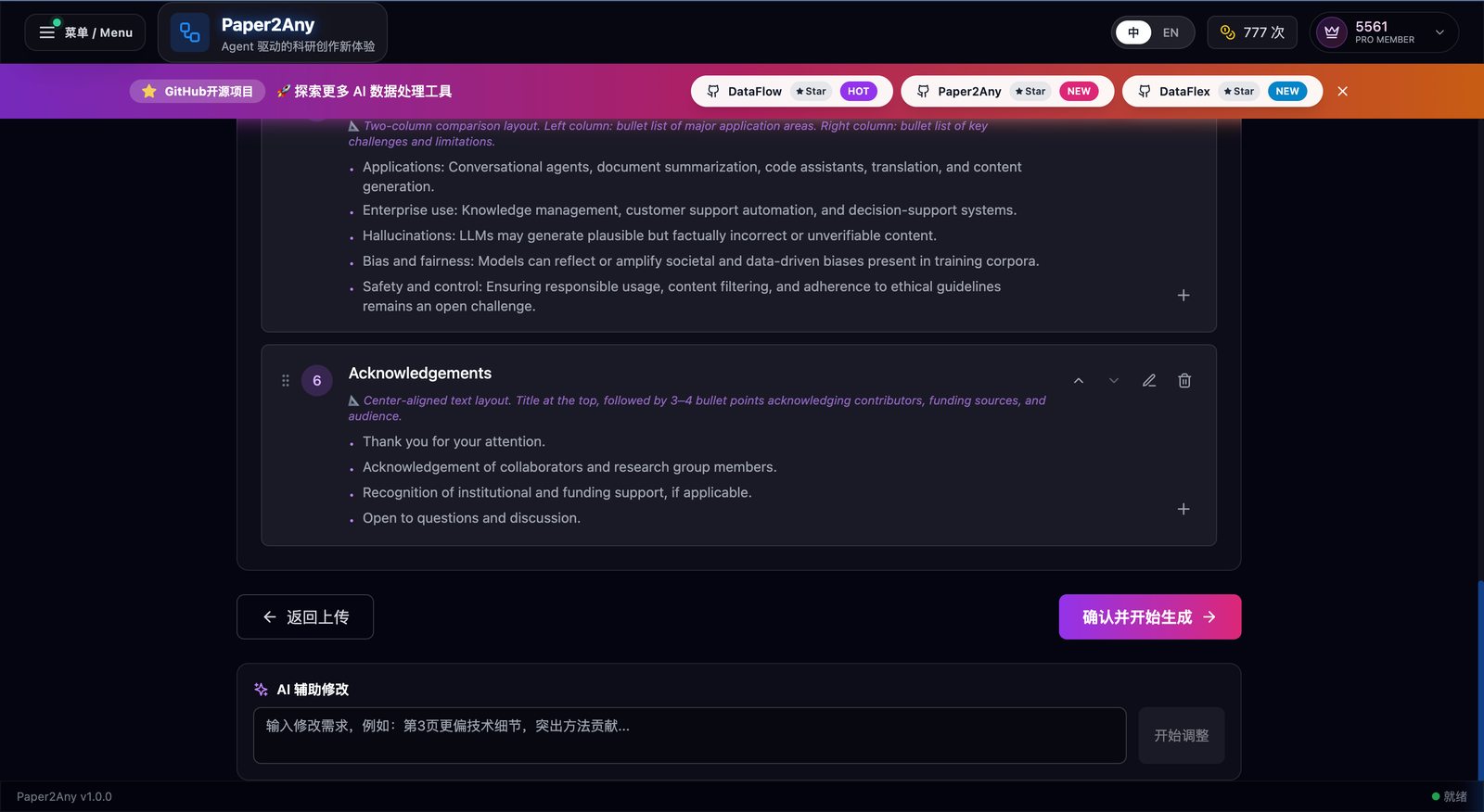 ✨ AI-assisted outline refinement with targeted rewrite prompts
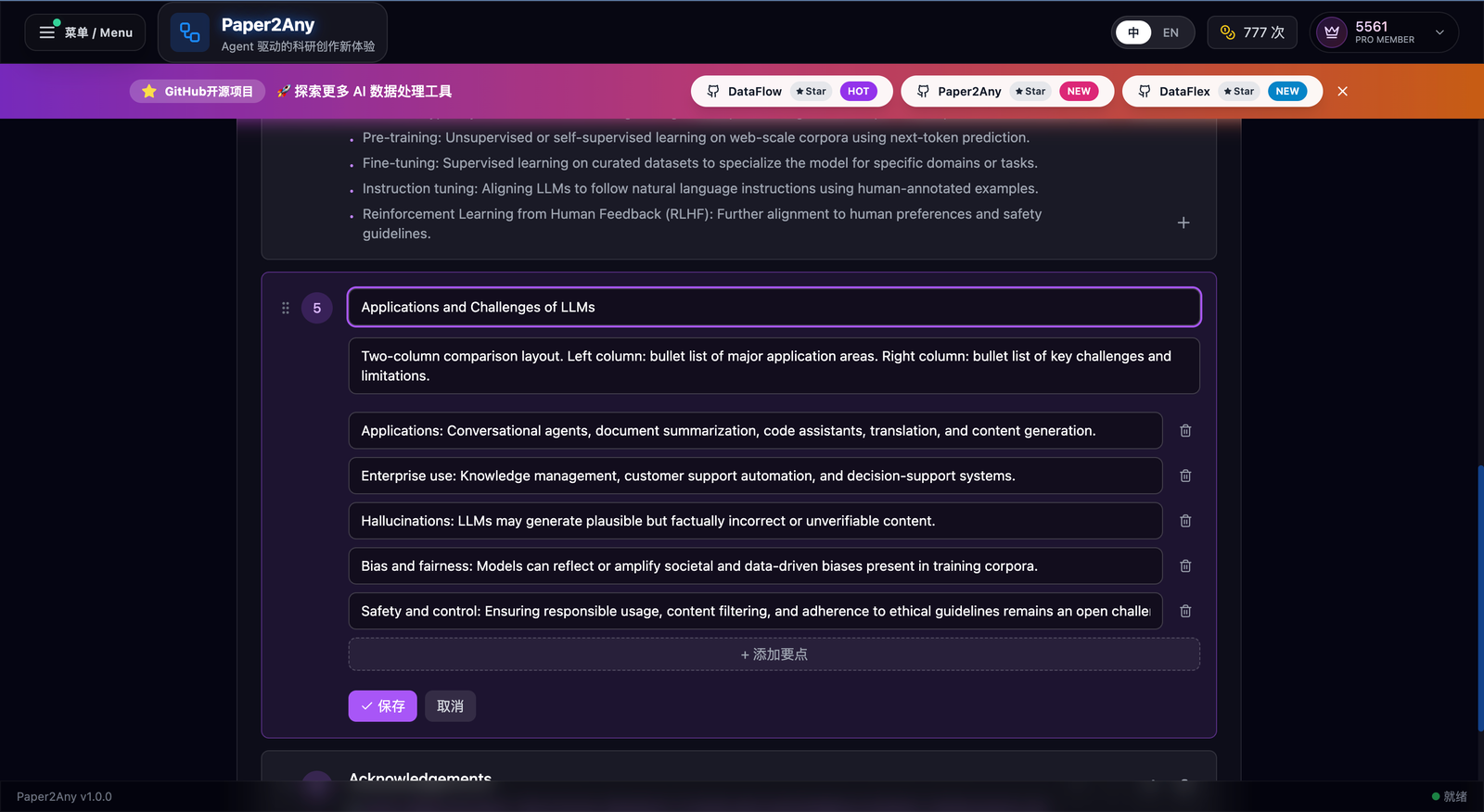 ✨ Structured outline editing down to section and bullet detail
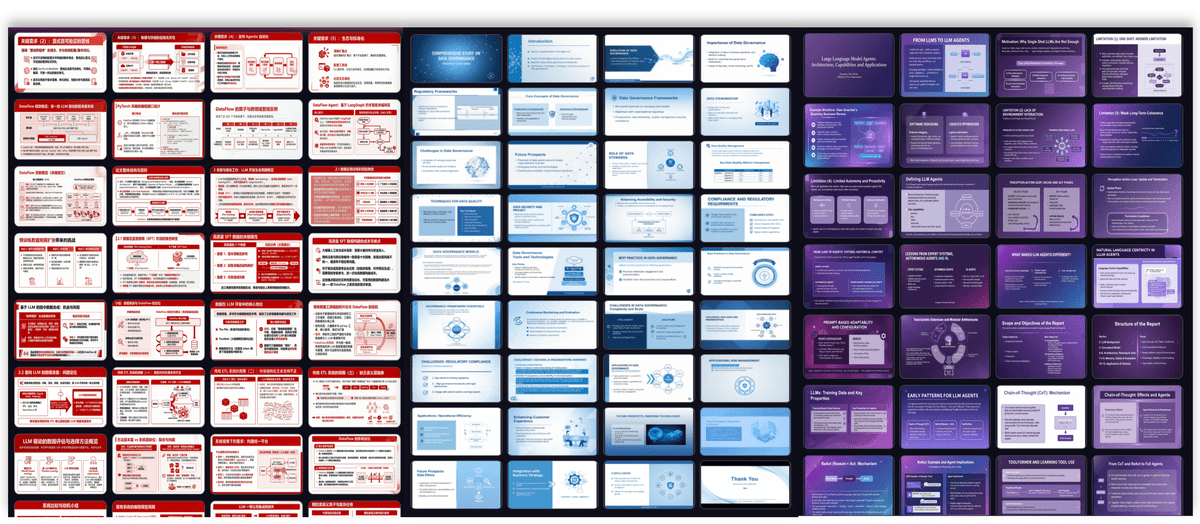
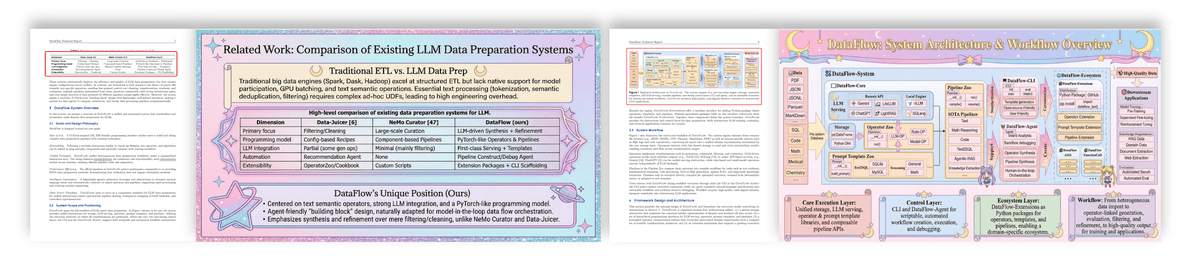
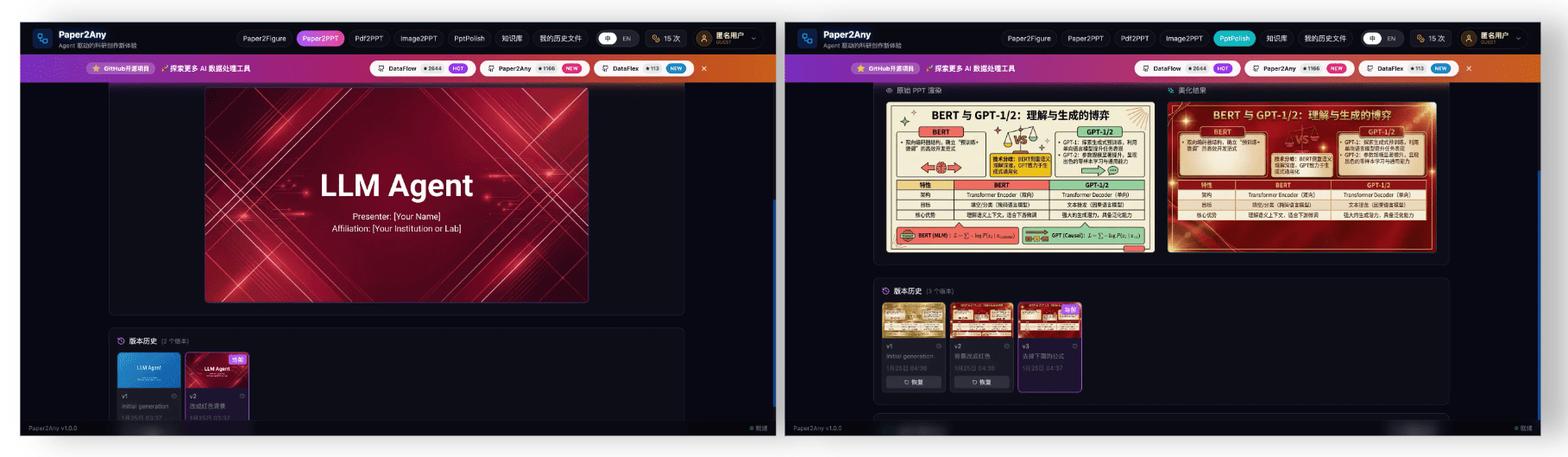 ✨ Long document support for 40+ slides · Intelligent table extraction and insertion · Version history and iterative deck management
🎬 Paper2Video: PPT to Narrated Video
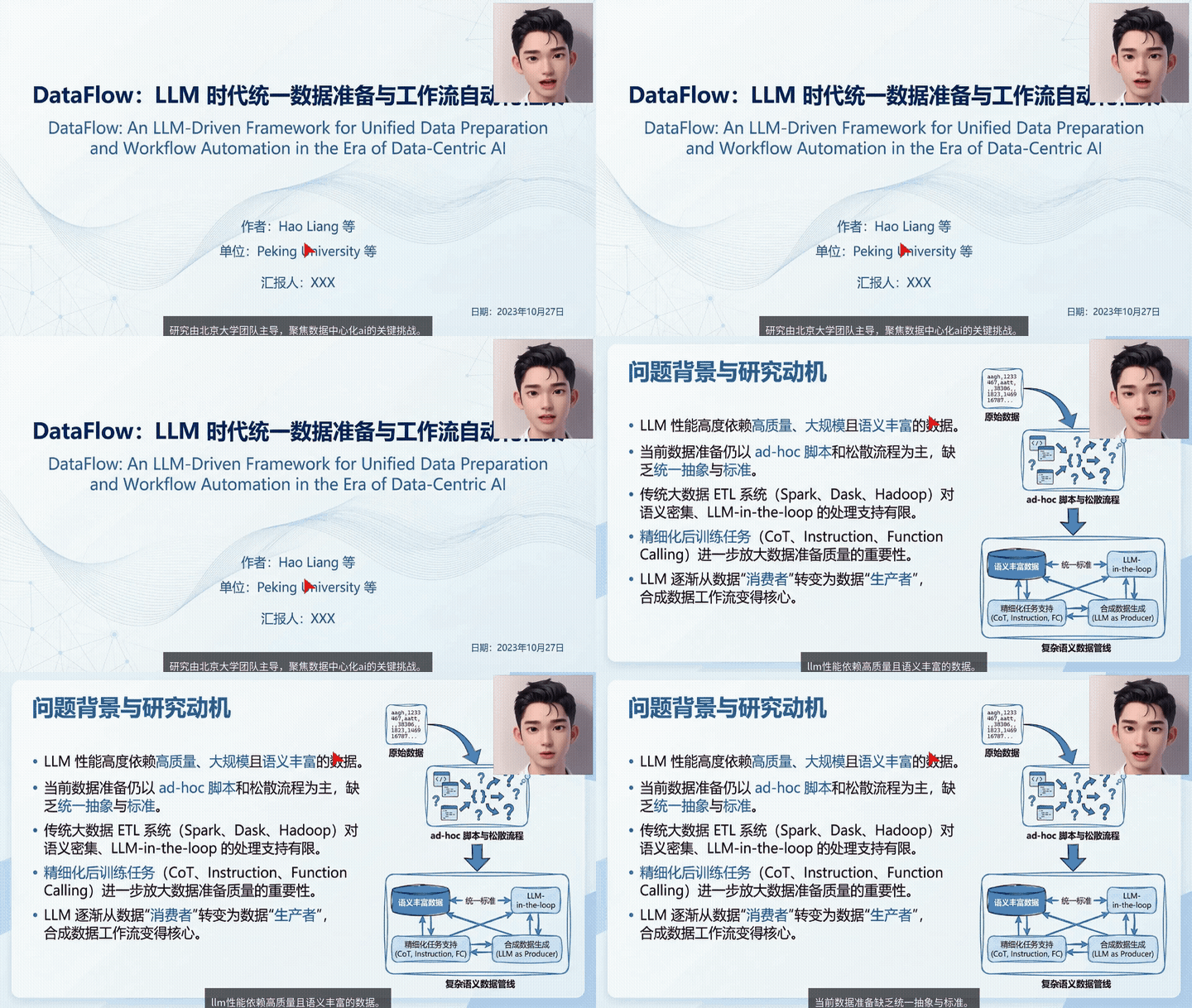 ✨ PPT / PDF to narrated video with script confirmation, Aliyun TTS voices, and downloadable output
🖼️ Paper2Poster: Paper to Poster
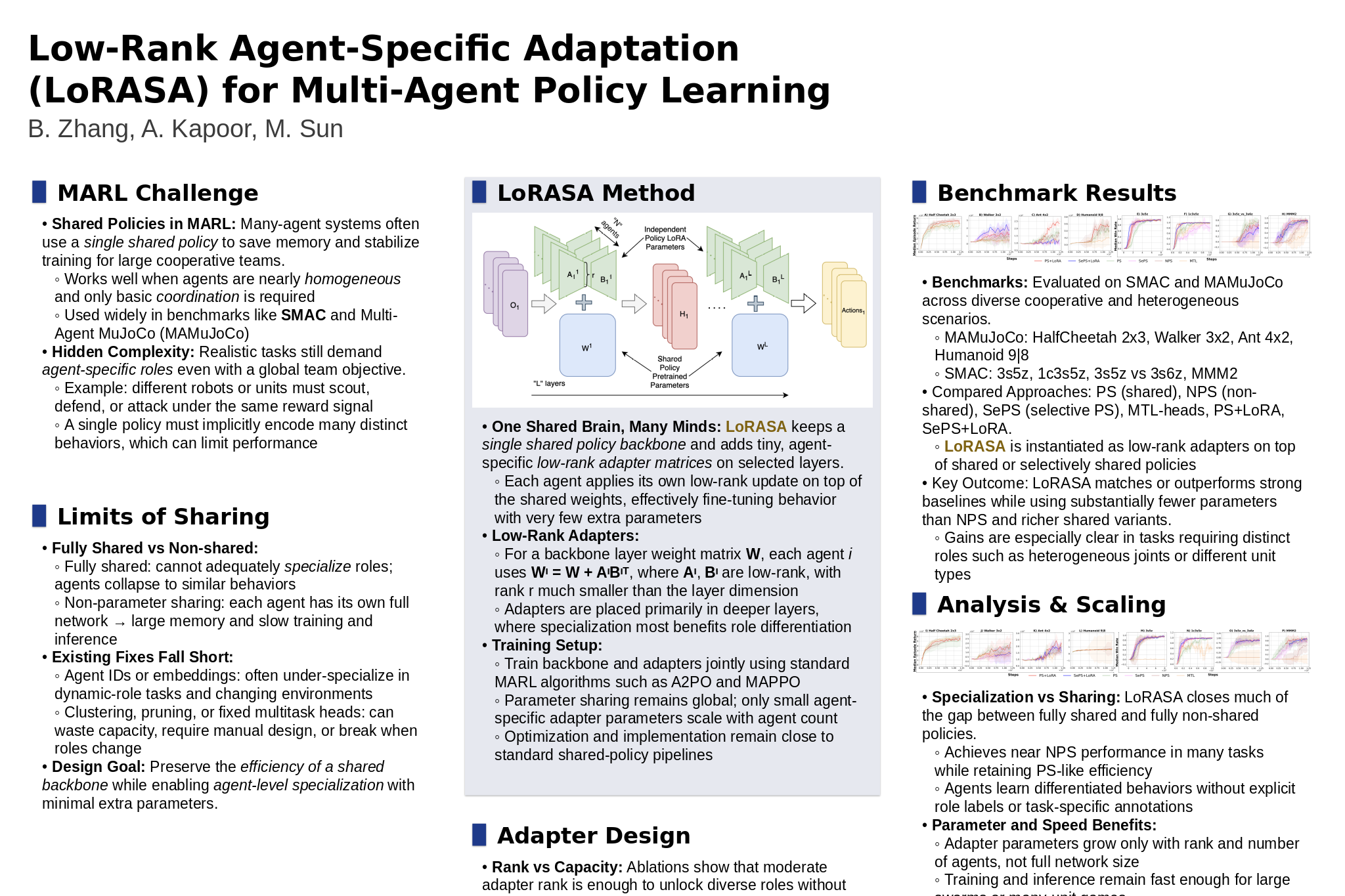 PNG poster result
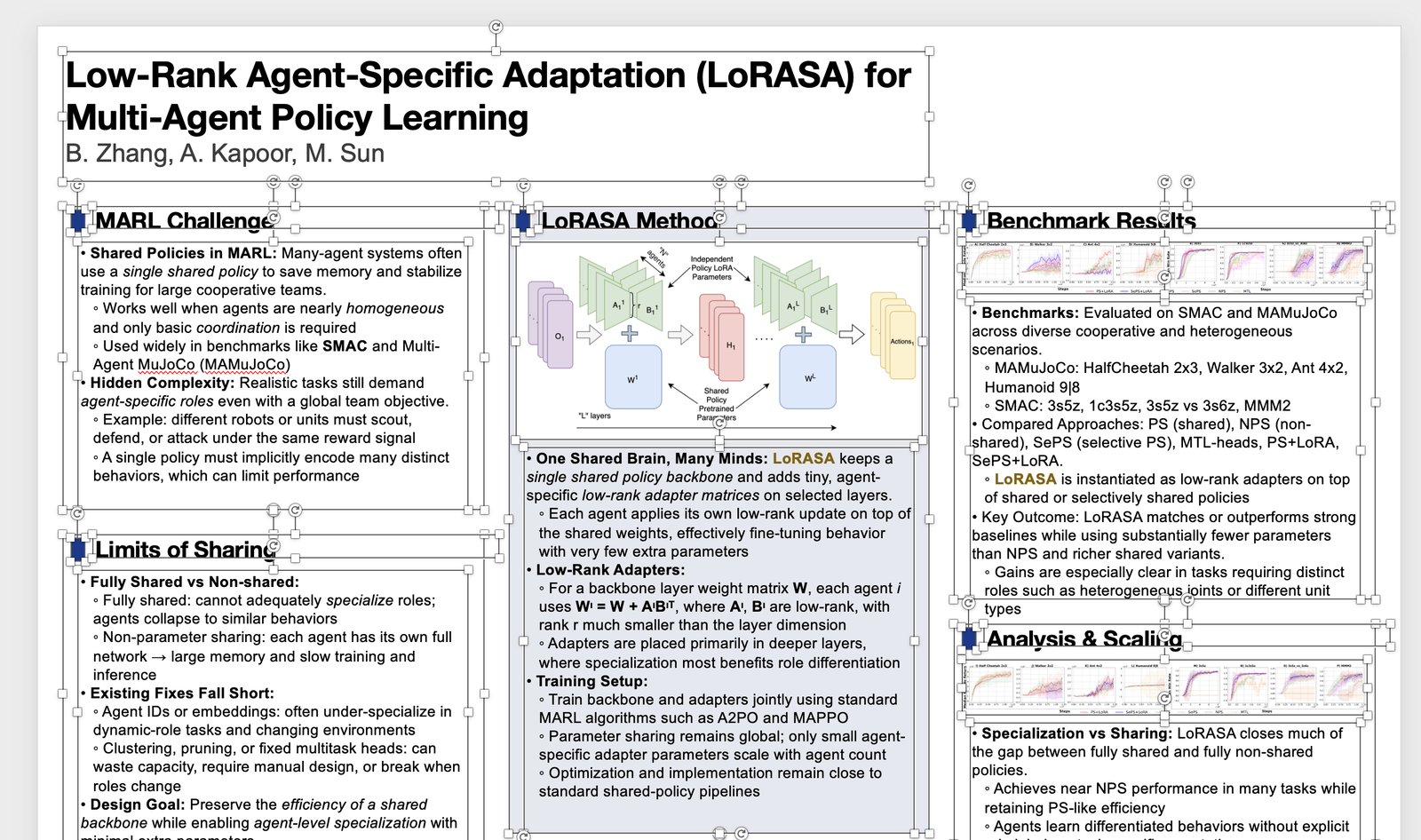 PPT poster result
✨ Paper PDF to academic poster with configurable layout, editable poster output, and one-click export
PPT poster result
✨ Paper PDF to academic poster with configurable layout, editable poster output, and one-click export
🔎 Paper2Citation: Citation Explorer
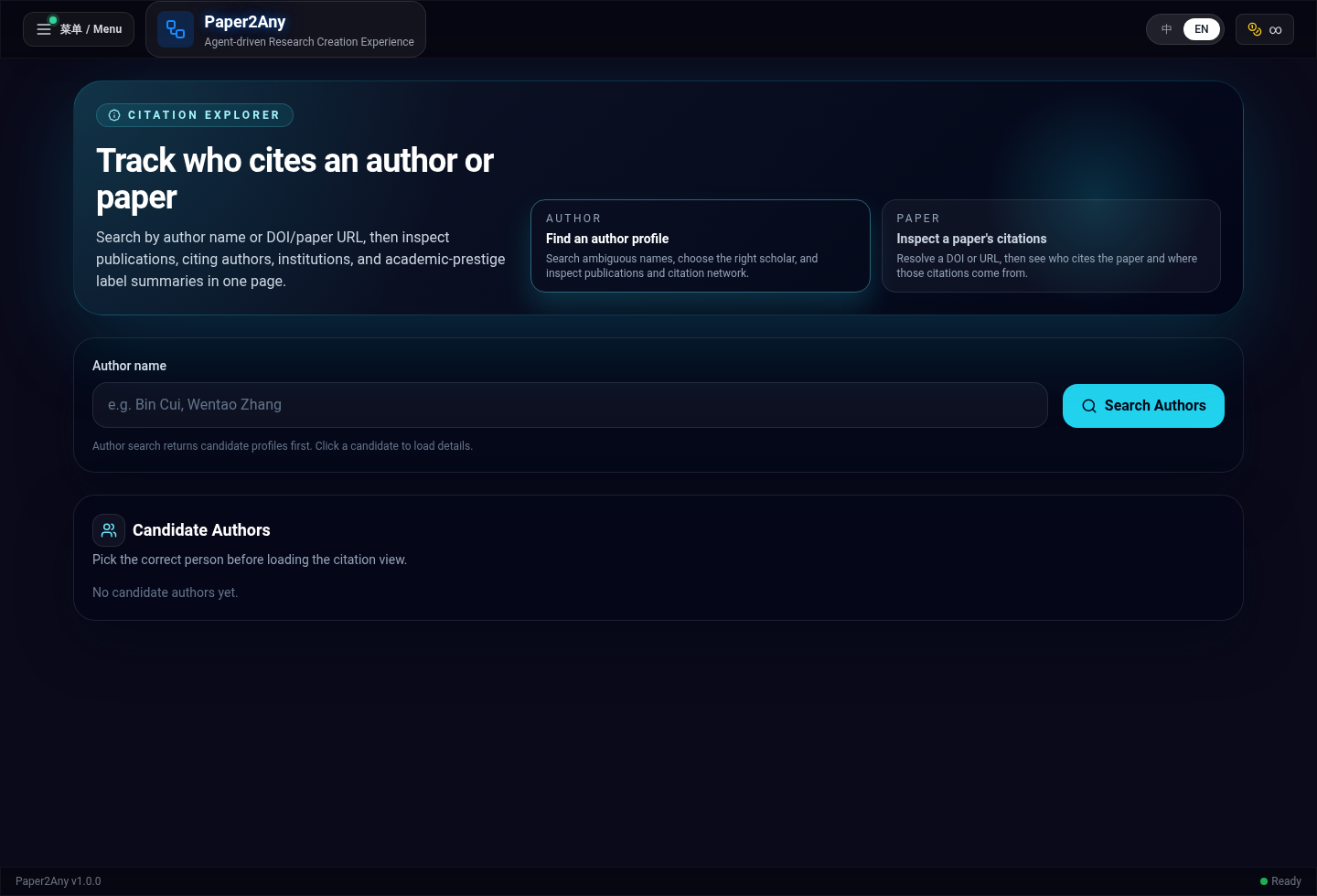 ✨ Search authors or papers to inspect citation candidates, institutions, and downstream citation context
🎨 PPT Smart Beautification
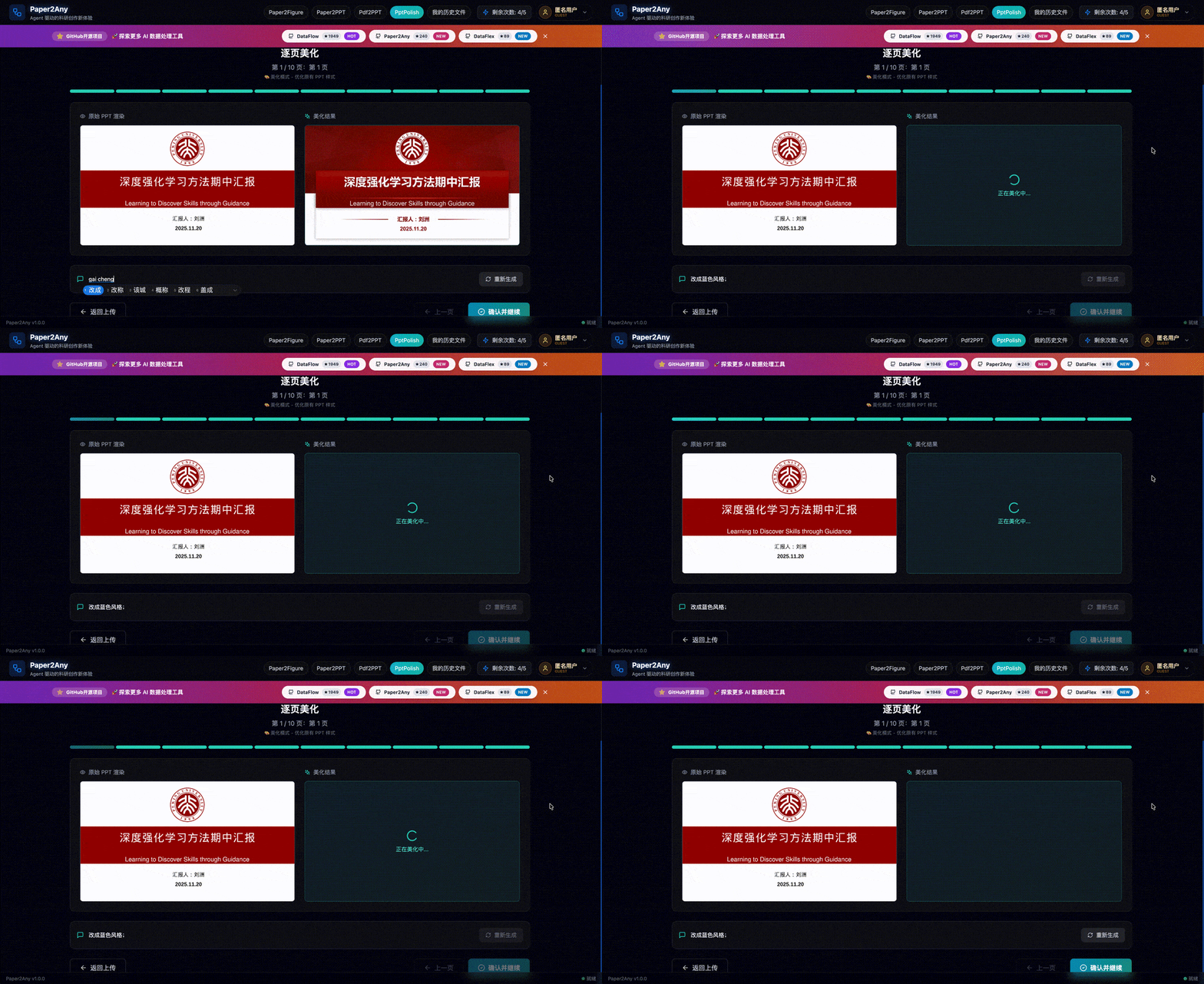 ✨ AI-based Layout Optimization
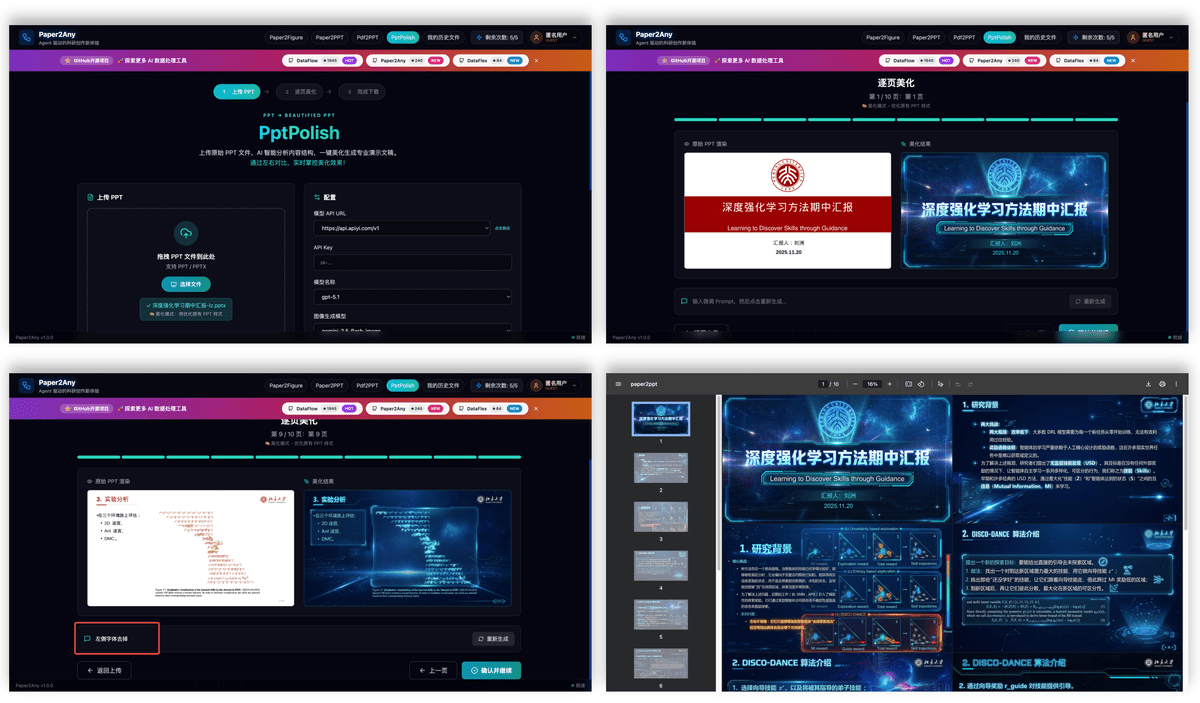 ✨ AI-based Layout Optimization & Style Transfer
🖼️ PDF2PPT: Layout-Preserving Conversion
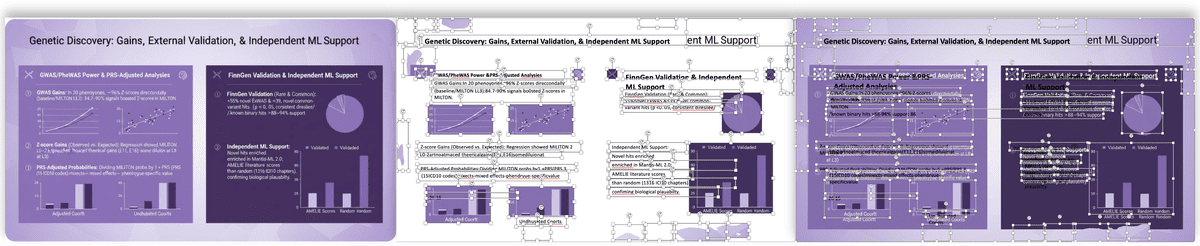 ✨ Intelligent Cutout & Layout Preservation
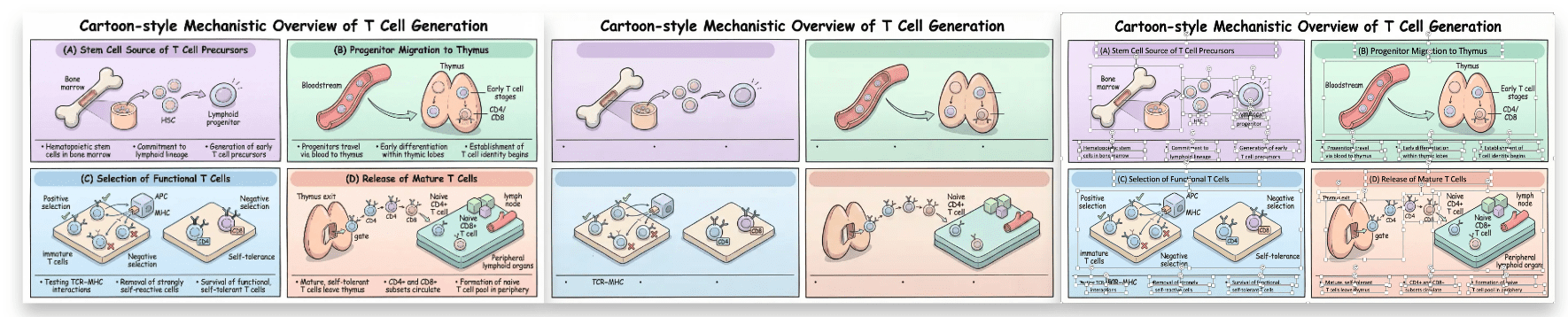 ✨ Image2PPT
🚀 Quick Start
Requirements


<details>
<summary><strong>🐳 Docker (Recommended) — Deployment & Updates</strong></summary>
# 1. Clone
git clone https://github.com/OpenDCAI/Paper2Any.git
cd Paper2Any

# 2. Configure environment variables
cp fastapi_app/.env.example fastapi_app/.env
cp frontend-workflow/.env.example frontend-workflow/.env
Required configuration:
fastapi_app/.env (backend):
# Internal API auth key. Must match frontend VITE_API_KEY.
BACKEND_API_KEY=your-backend-api-key

# Required: Your LLM API URL (replace with your own)
DEFAULT_LLM_API_URL=https://api.openai.com/v1/

# Optional: DrawIO OCR / VLM service
PAPER2DRAWIO_OCR_API_URL=https://dashscope.aliyuncs.com/compatible-mode/v1
PAPER2DRAWIO_OCR_API_KEY=your_dashscope_key

# Optional: MinerU official remote API
MINERU_API_BASE_URL=https://mineru.net/api/v4
MINERU_API_KEY=your_mineru_api_key

# Optional: SAM3 segmentation service for PDF2PPT / Image2PPT / Image2Drawio
# SAM3_SERVER_URLS=http://GPU_MACHINE_IP:8001
# SAM3_SERVER_URLS=http://GPU1:8021,http://GPU2:8022

# Optional: Supabase (skip for no auth — core features still work)
# SUPABASE_URL=https://your-project-id.supabase.co
# SUPABASE_ANON_KEY=your_supabase_anon_key
frontend-workflow/.env (frontend):
# Must match BACKEND_API_KEY in fastapi_app/.env
VITE_API_KEY=your-backend-api-key

# Required: LLM API URLs available in the UI dropdown (comma separated)
VITE_DEFAULT_LLM_API_URL=https://api.openai.com/v1
VITE_LLM_API_URLS=https://api.openai.com/v1

# Optional: DrawIO page model candidates shown in the UI
VITE_PAPER2DRAWIO_MODEL=claude-sonnet-4-5-20250929,gpt-5.2
# Optional: Supabase (keep consistent with backend)
# VITE_SUPABASE_URL=https://your-project-id.supabase.co
# VITE_SUPABASE_ANON_KEY=your_supabase_anon_key
# 3. Build + run
docker compose up -d --buildOpen:
- Frontend: http://localhost:3000
- Backend health: http://localhost:8000/health
GPU services note: Docker only starts the frontend and backend. No GPU model services are included.
- Paper2PPT, Paper2Figure, Knowledge Base, etc. only need LLM APIs and work out of the box.
- PDF2PPT, Image2PPT, Image2Drawio require the SAM3 segmentation service (needs GPU), deployed separately:
# On a machine with GPU
python -m dataflow_agent.toolkits.model_servers.sam3_server \
    --port 8001 --checkpoint models/sam3/sam3.pt \
    --bpe models/sam3/bpe_simple_vocab_16e6.txt.gz --device cuda
Then add to
fastapi_app/.env:SAM3_SERVER_URLS=http://GPU_MACHINE_IP:8001See the "Advanced: Local Model Server Load Balancing" section below for details.
Modify & update:
- After changing code or
.env, rebuild:docker compose up -d --build - Pull latest code and rebuild:
git pulldocker compose up -d --build
Common commands:
- View logs:
docker compose logs -f - Stop services:
docker compose down
Notes:
- The first build may take a while (system deps + Python deps).
- Frontend env is baked at build time (compose build args). If you change it, rebuild with
docker compose up -d --build. - Outputs/models are mounted to the host (
./outputs,./models) for persistence.
</details>
🐧 Linux Installation
We recommend using Conda to create an isolated environment (Python 3.11).
1. Create Environment & Install Base Dependencies
# 0. Create and activate a conda environment
conda create -n paper2any python=3.11 -y
conda activate paper2any

# 1. Clone repository
git clone https://github.com/OpenDCAI/Paper2Any.git
cd Paper2Any

# 2. Install base dependencies
pip install -r requirements-base.txt

# 3. Install in editable (dev) mode
pip install -e .
2. Install Paper2Any-specific Dependencies (Required)
Paper2Any involves LaTeX rendering, vector graphics processing as well as PPT/PDF conversion, which require extra dependencies:
# 1. Python dependencies
pip install -r requirements-paper.txt || pip install -r requirements-paper-backup.txt

# 2. LaTeX engine (tectonic) - recommended via conda
conda install -c conda-forge tectonic -y

# 3. Resolve doclayout_yolo dependency conflicts (Important)
pip install doclayout_yolo --no-deps

# 4. System dependencies (Ubuntu example)
sudo apt-get update
sudo apt-get install -y inkscape libreoffice poppler-utils wkhtmltopdf
3. Environment Variables
export DF_API_KEY=your_api_key_here
export DF_API_URL=xxx  # Optional: if you need a third-party API gateway
export MINERU_DEVICES="0,1,2,3" # Optional: MinerU task GPU resource pool
[!TIP]
📚 For detailed configuration guide, see Configuration Guide for step-by-step instructions on configuring models, environment variables, and starting services.
4. Configure Environment Files (Optional)
<details>
<summary><strong>📝 Click to expand: Detailed .env Configuration Guide</strong></summary>
Paper2Any uses two .env files for configuration. Both are optional - you can run the application without them using default settings.
Step 1: Copy Example Files
# Copy backend environment file
cp fastapi_app/.env.example fastapi_app/.env

# Copy frontend environment file
cp frontend-workflow/.env.example frontend-workflow/.env
Step 2: Backend Configuration (fastapi_app/.env)
Supabase (Optional) - Only needed if you want user authentication and cloud storage:
SUPABASE_URL=https://your-project-id.supabase.co
SUPABASE_ANON_KEY=your_supabase_anon_key
Model Configuration - Customize which models to use for different workflows:
# Default LLM API URL
DEFAULT_LLM_API_URL=http://123.129.219.111:3000/v1/

# Workflow-level defaults
PAPER2PPT_DEFAULT_MODEL=gpt-5.1
PAPER2PPT_DEFAULT_IMAGE_MODEL=gemini-3-pro-image-preview
PDF2PPT_DEFAULT_MODEL=gpt-4o
# ... see .env.example for full list
Service Integration Configuration - External or local services used by image/PDF workflows:
# DrawIO OCR / VLM
PAPER2DRAWIO_OCR_API_URL=https://dashscope.aliyuncs.com/compatible-mode/v1
PAPER2DRAWIO_OCR_API_KEY=your_dashscope_key

# MinerU official remote API; if MINERU_API_KEY is empty, backend falls back to local MINERU_PORT
MINERU_API_BASE_URL=https://mineru.net/api/v4
MINERU_API_KEY=your_mineru_api_key
MINERU_API_MODEL_VERSION=vlm

# SAM3 segmentation service for PDF2PPT / Image2PPT / Image2Drawio
# One endpoint:
SAM3_SERVER_URLS=http://127.0.0.1:8001
# Or multiple endpoints for load balancing:
# SAM3_SERVER_URLS=http://127.0.0.1:8021,http://127.0.0.1:8022
Step 3: Frontend Configuration (frontend-workflow/.env)
LLM Provider Configuration - Controls the API endpoint dropdown in the UI:
# Default API URL shown in the UI
VITE_DEFAULT_LLM_API_URL=https://api.apiyi.com/v1

# Available API URLs in the dropdown (comma-separated)
VITE_LLM_API_URLS=https://api.apiyi.com/v1,http://b.apiyi.com:16888/v1,http://123.129.219.111:3000/v1
What happens when you modify VITE_LLM_API_URLS:
- The frontend will display a dropdown menu with all URLs you specify
- Users can select different API endpoints without manually typing URLs
- Useful for switching between OpenAI, local models, or custom API gateways
Supabase (Optional) - Uncomment these lines if you want user authentication:
VITE_SUPABASE_URL=https://your-project.supabase.co
VITE_SUPABASE_ANON_KEY=your-anon-key
SUPABASE_SERVICE_ROLE_KEY=your-service-role-key
SUPABASE_JWT_SECRET=your-jwt-secret
Running Without Supabase
If you skip Supabase configuration:
- ✅ All core features work normally
- ✅ CLI scripts work without any configuration
- ❌ No user authentication or quotas
- ❌ No cloud file storage
</details>
[!NOTE]
Quick Start: You can skip the.envconfiguration entirely and use CLI scripts directly with--api-keyparameter. See CLI Scripts section below.
<details>
<summary><strong>Advanced Configuration: Local Model Service Load Balancing</strong></summary>
If you are deploying in a high-concurrency local environment, you can use script/start_model_servers.sh to start a local model service cluster (MinerU / SAM / OCR).
Script location: /DataFlow-Agent/script/start_model_servers.sh
Main configuration items:
-
MinerU (PDF Parsing)
MINERU_MODEL_PATH: Model path (defaultmodels/MinerU2.5-2509-1.2B)MINERU_GPU_UTIL: GPU memory utilization (default 0.85)- Instance configuration: By default, one instance is started on each configured GPU, ports 8011-8013.
- Load Balancer: Port 8010, automatically dispatches requests.
-
SAM3 (Segment Anything Model 3)
- Instance configuration: By default, one instance per configured GPU, ports 8021-8022.
- Model assets: default paths are
./models/sam3/sam3.ptand./models/sam3/bpe_simple_vocab_16e6.txt.gz. - Load Balancer: Port 8020.
-
OCR (PaddleOCR)
- Config: Runs on CPU, uses uvicorn's worker mechanism (4 workers by default).
- Port: 8003.
Before using, please modify
gpu_idand the number of instances in the script according to your actual GPU count and memory.
For local one-command development test on a single GPU (SAM3 + backend + frontend), run:
bash script/start_local_sam3_dev.sh</details>
🪟 Windows Installation
[!NOTE]
We currently recommend trying Paper2Any on Linux / WSL. If you need to deploy on native Windows, please follow the steps below.
1. Create Environment & Install Base Dependencies
# 0. Create and activate a conda environment
conda create -n paper2any python=3.12 -y
conda activate paper2any

# 1. Clone repository
git clone https://github.com/OpenDCAI/Paper2Any.git
cd Paper2Any

# 2. Install base dependencies
pip install -r requirements-win-base.txt

# 3. Install in editable (dev) mode
pip install -e .
2. Install Paper2Any-specific Dependencies (Recommended)
Paper2Any involves LaTeX rendering and vector graphics processing, which require extra dependencies (see requirements-paper.txt):
# Python dependencies
pip install -r requirements-paper.txt

# tectonic: LaTeX engine (recommended via conda)
conda install -c conda-forge tectonic -y
🎨 Install Inkscape (SVG/Vector Graphics Processing | Recommended/Required)
- Download and install (Windows 64-bit MSI): Inkscape Download
- Add the Inkscape executable directory to the system environment variable Path (example):
C:\Program Files\Inkscape\bin\
[!TIP]
After configuring the Path, it is recommended to reopen the terminal (or restart VS Code / PowerShell) to ensure the environment variables take effect.
⚡ Install Windows Build of vLLM (Optional | For Local Inference Acceleration)
Release page: vllm-windows releases
Recommended version: 0.11.0
pip install vllm-0.11.0+cu124-cp312-cp312-win_amd64.whl[!IMPORTANT]
Please make sure the.whlmatches your current environment:
- Python: cp312 (Python 3.12)
- Platform: win_amd64
- CUDA: cu124 (must match your local CUDA / driver)
Launch Application
Paper2Any - Paper Workflow Web Frontend (Recommended)
# Configure local backend runtime (single source of truth)
# Edit deploy/app_config.sh:
#   APP_PORT=8000
#   APP_WORKERS=2

# Start backend API
./deploy/start.sh

# Start frontend (new terminal)
cd frontend-workflow
npm install
npm run dev
Default local addresses:
- Frontend dev server: http://localhost:3000
- Backend health: http://127.0.0.1:8000/health
Useful local deploy commands:
- Start backend:
./deploy/start.sh - Stop backend:
./deploy/stop.sh - Restart backend:
./deploy/restart.sh
Notes:
deploy/start.shanddeploy/stop.shboth read the same runtime config fromdeploy/app_config.sh.- If you change
APP_PORT, update the frontend proxy target infrontend-workflow/vite.config.tsas well.
Configure Frontend Proxy
Modify server.proxy in frontend-workflow/vite.config.ts:
export default defineConfig({
  plugins: [react()],
  server: {
    port: 3000,
    open: true,
    allowedHosts: true,
    proxy: {
      '/api': {
        target: 'http://127.0.0.1:8000',  // FastAPI backend address
        changeOrigin: true,
      },
      '/outputs': {
        target: 'http://127.0.0.1:8000',
        changeOrigin: true,
      },
    },
  },
})
Visit http://localhost:3000.
Windows: Load MinerU Pre-trained Model
# Start in PowerShell
vllm serve opendatalab/MinerU2.5-2509-1.2B `
  --host 127.0.0.1 `
  --port 8010 `
  --logits-processors mineru_vl_utils:MinerULogitsProcessor `
  --gpu-memory-utilization 0.6 `
  --trust-remote-code `
  --enforce-eager
Launch Application
🎨 Web Frontend (Recommended)
# Configure deploy/app_config.sh first if you want to change the local port/workers

# Start backend API
./deploy/start.sh

# Start frontend (new terminal)
cd frontend-workflow
npm install
npm run dev
Visit http://localhost:3000.
Backend health is available at http://127.0.0.1:8000/health by default.
🖥️ CLI Scripts (Command-Line Interface)
Paper2Any provides standalone CLI scripts that accept command-line parameters for direct workflow execution without requiring the web frontend/backend.
Environment Variables
Configure API access via environment variables (optional):
export DF_API_URL=https://api.openai.com/v1  # LLM API URL
export DF_API_KEY=sk-xxx                      # API key
export DF_MODEL=gpt-4o                        # Default model
Available CLI Scripts
1. Paper2Figure CLI - Generate scientific figures (3 types)
# Generate model architecture diagram from PDF
python script/run_paper2figure_cli.py \
  --input paper.pdf \
  --graph-type model_arch \
  --api-key sk-xxx

# Generate technical roadmap from text
python script/run_paper2figure_cli.py \
  --input "Transformer architecture with attention mechanism" \
  --input-type TEXT \
  --graph-type tech_route

# Generate experimental data visualization
python script/run_paper2figure_cli.py \
  --input paper.pdf \
  --graph-type exp_data
Graph types: model_arch (model architecture), tech_route (technical roadmap), exp_data (experimental plots)
2. Paper2PPT CLI - Convert papers to PPT presentations
# Basic usage
python script/run_paper2ppt_cli.py \
  --input paper.pdf \
  --api-key sk-xxx \
  --page-count 15

# With custom style
python script/run_paper2ppt_cli.py \
  --input paper.pdf \
  --style "Academic style; English; Modern design" \
  --language en
3. PDF2PPT CLI - One-click PDF to editable PPT
# Basic conversion (no AI enhancement)
python script/run_pdf2ppt_cli.py --input slides.pdf

# With AI enhancement
python script/run_pdf2ppt_cli.py \
  --input slides.pdf \
  --use-ai-edit \
  --api-key sk-xxx
4. Image2PPT CLI - Convert images to editable PPT
# Basic conversion
python script/run_image2ppt_cli.py --input screenshot.png

# With AI enhancement
python script/run_image2ppt_cli.py \
  --input diagram.jpg \
  --use-ai-edit \
  --api-key sk-xxx
5. PPT2Polish CLI - Beautify existing PPT files
# Basic beautification
python script/run_ppt2polish_cli.py \
  --input old_presentation.pptx \
  --style "Academic style, clean and elegant" \
  --api-key sk-xxx

# With reference image for style consistency
python script/run_ppt2polish_cli.py \
  --input old_presentation.pptx \
  --style "Modern minimalist style" \
  --ref-img reference_style.png \
  --api-key sk-xxx
[!NOTE]
System Requirements for PPT2Polish:
- LibreOffice:
sudo apt-get install libreoffice(Ubuntu/Debian)- pdf2image:
pip install pdf2image- poppler-utils:
sudo apt-get install poppler-utils
Common Options
All CLI scripts support these common options:
--api-url URL- LLM API URL (default: fromDF_API_URLenv var)--api-key KEY- API key (default: fromDF_API_KEYenv var)--model NAME- Text model name (default: varies by script)--output-dir DIR- Custom output directory (default:outputs/cli/{script_name}/{timestamp})--help- Show detailed help message
For complete parameter documentation, run any script with --help:
python script/run_paper2figure_cli.py --help📂 Project Structure
Paper2Any/
├── dataflow_agent/          # Core codebase
│   ├── agentroles/         # Agent definitions
│   │   └── paper2any_agents/ # Paper2Any-specific agents
│   ├── workflow/           # Workflow definitions
│   ├── promptstemplates/   # Prompt templates
│   └── toolkits/           # Toolkits (drawing, PPT generation, etc.)
├── fastapi_app/            # Backend API service
├── frontend-workflow/      # Frontend web interface
├── static/                 # Static assets
├── script/                 # Script tools
└── tests/                  # Test cases
🗺️ Roadmap
<table>
<tr>
<th width="35%">Feature</th>
<th width="15%">Status</th>
<th width="50%">Sub-features</th>
</tr>
<tr>
<td><strong>📊 Paper2Figure</strong><br><sub>Editable Scientific Figures</sub></td>
<td>

</td>
<td>

<br>

<br>

<br>

</td>
</tr>
<tr>
<td><strong>🧩 Paper2Diagram</strong><br><sub>Drawio Diagrams</sub></td>
<td>

</td>
<td>

<br>

<br>

<br>

</td>
</tr>
<tr>
<td><strong>🎬 Paper2PPT</strong><br><sub>Editable Slide Decks</sub></td>
<td>

</td>
<td>

<br>

<br>

<br>

<br>

<br>

</td>
</tr>
<tr>
<td><strong>🖼️ PDF2PPT</strong><br><sub>Layout-Preserving Conversion</sub></td>
<td>

</td>
<td>

<br>

<br>

</td>
</tr>
<tr>
<td><strong>🖼️ Image2PPT</strong><br><sub>Image to Slides</sub></td>
<td>
</td>
<td>

<br>

</td>
</tr>
<tr>
<td><strong>🎨 PPTPolish</strong><br><sub>Smart Beautification</sub></td>
<td>

</td>
<td>

<br>

<br>

</td>
</tr>
<tr>
<td><strong>📚 Knowledge Base</strong><br><sub>KB Workflows</sub></td>
<td>

</td>
<td>

<br>

<br>

</td>
</tr>
<tr>
<td><strong>🎬 Paper2Video</strong><br><sub>Video Script Generation</sub></td>
<td>

</td>
<td>

<br>

</td>
</tr>
</table>
🤝 Contributing
We welcome all forms of contribution!



📄 License
This project is licensed under Apache License 2.0.
 Scan to join the community WeChat group
❤️ Made with by OpenDCAI Team