

Repository
cmux-sentinel
Opinionated cmux custom sidebar with live agent states and pluggable AI usage meters
- Integration
- Flag/config
- Claude states
- --with-bridge / WITH_BRIDGE=1
- Amp states
- --with-amp / WITH_AMP=1
- Zed
- --with-zed / WITH_ZED=1
Specs
- IntegrationFlag/config
- Claude states--with-bridge / WITH_BRIDGE=1
- Amp states--with-amp / WITH_AMP=1
- Zed--with-zed / WITH_ZED=1
- Usage providersUSAGE_PROVIDERS
README
cmux-sentinel
An opinionated cmux custom sidebar — a clean, monospace, Ayu-Mirage
workspaces list with live agent states and pluggable AI usage meters.
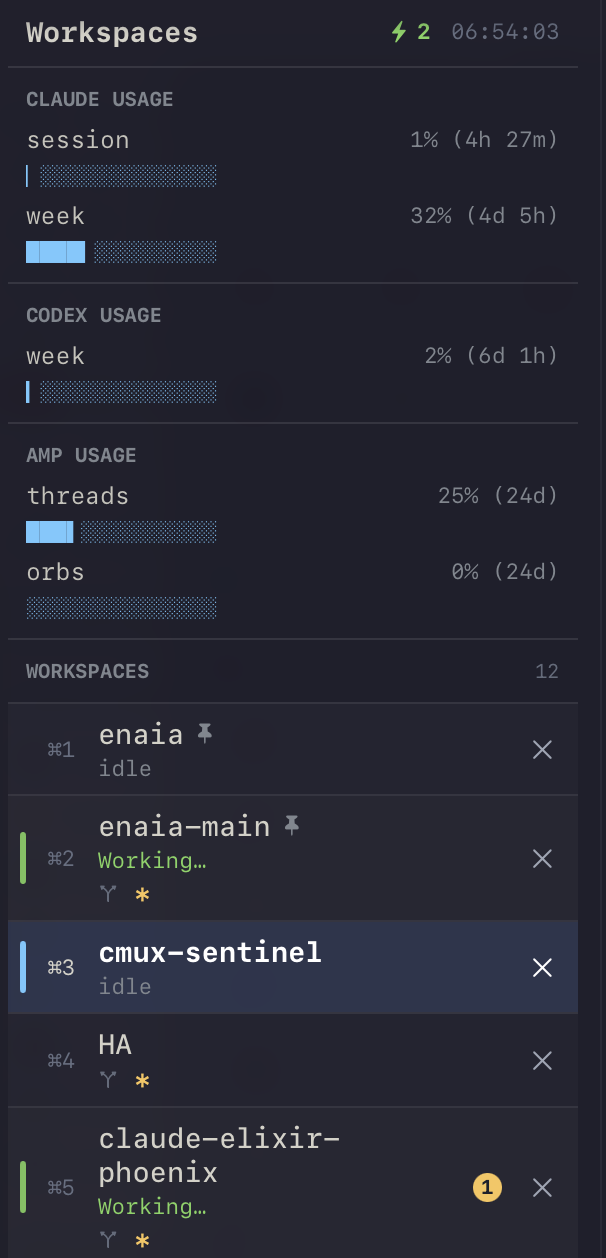
The top usage panels show live Claude, Codex, and Amp allowances with native progress bars (plus a
title fallback) and compact countdowns such as 28% (1h 54m). Workspace rows use a quiet state hierarchy: purple
(compacting), green (working), orange (needs you), selected blue, and neutral idle.
It's a vibe-coded custom sidebar (beta) plus small
background pollers. Batteries included, easy to fork and tweak.
Features
- Flat workspace list in your manual order, SF Mono, Ayu-Mirage palette.
- Live agent row states (via Claude Code hooks or the Amp plugin):
compacting(purple),working
(green),needs you(orange — unread, or the agent asked a question / hit a permission prompt),
andidle(dim). Idle repo rows omit redundantidle; active rows keep activity and repo state
separate. The header shows action-needed first, then working and compacting counts. - Inline actions: click to select, an always-visible high-contrast
×to close, pin indicators,
unread badges, and honest⌘Nhints that preserve cmux's real shortcut gaps. - Workspace-group names (opt-in) — cmux gives custom sidebars no group data, so a group shows
its anchor's generic "Group 2" instead of its real name. A small background sync
(GROUP_NAME_SYNC=1) keeps each group's anchor title in step with the group name (see "Workspace
group names" below). Off by default; a no-op if you don't use groups. - Usage meters — provider-labelled native progress bars fed by background pollers. Ships with
Claude Code (5-hour session + 7-day week), Codex (whatever short/weekly windows the account
currently reports), and Amp (monthly thread allowance plus opt-in orb allowance). The title
remains a restart-proof anchor and fallback. Providers are opt-in and self-gating: the default
provider set is Claude only, and an unavailable provider's poller exits cleanly. Panels are
controlled separately by sentinel presence (see "Usage meters" below).
Roadmap / help wanted: more usage-meter providers — anything else that exposes a usage signal.
The meter mechanism is provider-agnostic (see "Usage meters" below), so adding one is mostly a
small poller script.
How it works
cmux custom sidebars are runtime-interpreted SwiftUI-style files. The sidebar can only read a
fixed set of per-workspace fields — it cannot fetch URLs or read arbitrary data. Two
mechanisms feed it:
- Agent row states — Claude Code hooks or
hooks/amp-bridge.ts→hooks/cmux-bridge.sh→ a STATIC marker on the
active workspace's title (⚡working,⏳compacting,❓waiting-on-you — an agent that
asked a question or hit a permission prompt), reference-counted so multiple agents in one
workspace don't stomp it and dead sessions can't strand it. Precedence is compacting > waiting >
working. The sidebar detects the marker, colours the row, and strips the glyph for display.
Agent state stays in the title because it must survive app/process boundaries and be shared by
co-tenant agents; an animated marker would freeze cmux's title coalescer. - Usage meters — a poller (run by launchd every few minutes) computes each metric and writes
it into a dedicated idle "sentinel" workspace using bothset-progress(the native bar and
label) and a title rename (stable anchor + fallback). The sidebar matches sentinels by title
label, hides them from the workspace list, and humanizes those labels for display. cmux removed
stable workspace ids in 0.64.15, so every poll re-resolves the live title across all windows.
launchd ──► bin/cmux-claude-usage.sh --update
              ├─ read OAuth token ← Claude-owned Keychain item or credentials JSON
              ├─ GET api.anthropic.com/api/oauth/usage   (5h + 7d utilization + reset times)
              ├─ cmux rename-workspace <sentinel> "5h |24% (2h 18m)|███░…" (anchor/fallback)
              └─ cmux set-progress 0.24 --label "24% (2h 18m)" (native bar)
Install
Install with your AI agent (recommended)
Already running Claude Code, Codex, or Cursor? Paste this and let it do the whole setup —
including the steps people skip by hand (wiring the Claude Code hooks and creating the usage
sentinels):
Install cmux-sentinel (a custom cmux sidebar + Claude-Code agent-state bridge +
AI usage meters) on this Mac for me.

Fetch this guide and follow it exactly, top to bottom:
https://raw.githubusercontent.com/oliver-kriska/cmux-sentinel/main/docs/agent-install.md

Rules:
- It's idempotent and backs up anything it changes — do the file edits yourself
  (e.g. merging the hooks block into ~/.claude/settings.json), don't ask me to.
- When done, run ~/bin/cmux-sentinel-doctor.sh and show me the output. If a check
  isn't green, fix it per the guide and re-run the doctor until it's clean.
- Stop and ask me only if cmux isn't installed/running or a required dependency is missing.
- After registering hooks, remind me to fully restart Claude Code.
The agent follows docs/agent-install.md — read it first if you want
to see exactly what it will run. Prefer to do it by hand? Use the manual steps below.
Manual install
One-liner — clones to ~/.cache/cmux-sentinel and runs the installer:
curl -fsSL https://raw.githubusercontent.com/oliver-kriska/cmux-sentinel/main/install.sh | bash
# also install the working-state hooks AND auto-wire them into ~/.claude/settings.json:
curl -fsSL https://raw.githubusercontent.com/oliver-kriska/cmux-sentinel/main/install.sh | WITH_BRIDGE=1 bash
Or clone it yourself:
git clone https://github.com/oliver-kriska/cmux-sentinel.git
cd cmux-sentinel
./install.sh                 # add WITH_BRIDGE=1 to also install + wire the working-state hooks
# add --with-zed (or WITH_ZED=1) for the opt-in Zed integration| Integration | Flag/config | Effect |
|---|---|---|
| Claude states | --with-bridge / WITH_BRIDGE=1 |
Installs the shared bridge under ~/.claude/hooks and registers Claude Code events |
| Amp states | --with-amp / WITH_AMP=1 |
Installs the Amp plugin plus its neutral shared dependency under ~/.config/cmux-sentinel |
| Zed | --with-zed / WITH_ZED=1 |
Installs and registers the opt-in Zed helpers |
| Usage providers | USAGE_PROVIDERS |
Chooses claude, codex, and/or amp meter pollers; default is claude |
Amp-only installation does not register Claude hooks. If both agents are enabled, they still use
the same ref-counted state model so one agent ending cannot clear another agent's active marker.
install.sh copies the files into place (backing up anything it overwrites) and prints the
remaining manual steps. In short:
- Create the sentinel workspaces. Easiest — run
~/bin/cmux-sentinel-setup.sh: it creates the
meter workspaces for your enabled providers (idempotent, skips positively absent provider
windows, keeps Amp orbs opt-in, and warns if cmux's global auto-naming could rename them). Or by
hand: create idle workspaces and name them so
their titles start with the labels — no ids to copy (cmux 0.64.15 dropped stable workspace
UUIDs, so the poller + sidebar match by title):cmux rename-workspace --workspace workspace:<N> "5h"(one for5h, one for7d). To use different labels, setSENTINEL_5H_LABEL/
SENTINEL_7D_LABELin~/.config/cmux/usage-sentinels.envand the matchinghasPrefix()in the
sidebar'sisClaudeMeter(). (Sentinels can live in any window — the poller scans all windows —
but keep them in the window where the sidebar is shown, since the sidebar renders per-window.) - Test and paint enabled providers: run each enabled provider's poller with
--print, then
--update. The setup script prints the exact update commands for the configured provider set. - Load the sidebar:
cmux sidebar validate workspaces && cmux sidebar reload && cmux sidebar select workspaces. - Enable external socket access for auto-refresh — add
"automation": { "socketControlMode": "automation" }to~/.config/cmux/cmux.json, then run
cmux reload-config(applies live on current builds; if renames still get rejected, restart cmux). - Start auto-refresh: bootstrap the matching launchd plist for each enabled provider if it is
not already loaded:com.cmux-claude-usage.plist,com.cmux-codex-usage.plist, and/or
com.cmux-amp-usage.plistunder~/Library/LaunchAgents/. - Verify the pipeline:
make doctor(or~/bin/cmux-sentinel-doctor.sh) — a read-only check
that the bridge, hooks, launchd job, automation mode, and sentinels are all wired.
Working-state rows (the hooks bridge)
WITH_BRIDGE=1 ./install.sh installs the bridge and auto-wires the Claude Code hook events
into ~/.claude/settings.json (idempotent, backed up) — then restart Claude Code so the new
events register. Without the bridge, every row shows idle; with it you get ⚡ working /
⏳ compacting / ❓ waiting-on-you.
If the installer couldn't edit settings.json (no jq, or it wasn't valid JSON), add this under
"hooks" by hand (keep any existing hooks; all entries are fire-and-forget), then restart Claude
Code:
{
  "hooks": {
    "SessionStart":       [{ "matcher": "", "hooks": [{ "type": "command", "command": "~/.claude/hooks/cmux-bridge.sh", "async": true }] }],
    "UserPromptSubmit":   [{ "matcher": "", "hooks": [{ "type": "command", "command": "~/.claude/hooks/cmux-bridge.sh", "async": true }] }],
    "PreToolUse":         [{ "matcher": "", "hooks": [{ "type": "command", "command": "~/.claude/hooks/cmux-bridge.sh", "async": true }] }],
    "PreCompact":         [{ "matcher": "", "hooks": [{ "type": "command", "command": "~/.claude/hooks/cmux-bridge.sh", "async": true }] }],
    "PostCompact":        [{ "matcher": "", "hooks": [{ "type": "command", "command": "~/.claude/hooks/cmux-bridge.sh", "async": true }] }],
    "Stop":               [{ "matcher": "", "hooks": [{ "type": "command", "command": "~/.claude/hooks/cmux-bridge.sh", "async": true }] }],
    "StopFailure":        [{ "matcher": "", "hooks": [{ "type": "command", "command": "~/.claude/hooks/cmux-bridge.sh", "async": true }] }],
    "Notification":       [{ "matcher": "", "hooks": [{ "type": "command", "command": "~/.claude/hooks/cmux-bridge.sh", "async": true }] }],
    "PostToolUseFailure": [{ "matcher": "", "hooks": [{ "type": "command", "command": "~/.claude/hooks/cmux-bridge.sh", "async": true }] }],
    "SessionEnd":         [{ "matcher": "", "hooks": [{ "type": "command", "command": "~/.claude/hooks/cmux-bridge.sh", "async": true }] }]
  }
}
Notification drives ❓ waiting-on-you (permission prompts); UserPromptSubmit/PreToolUse
drive ⚡ working; PreCompact/PostCompact drive ⏳ compacting; Stop/SessionEnd clear it.
Amp working-state rows (opt-in)
./install.sh --with-amp installs ~/.config/amp/plugins/cmux-sentinel-amp.ts and the neutral
bridge dependency it calls. Amp provides working/idle state; it has no compaction event, and
waiting-on-you is off unless you explicitly set CMUX_SENTINEL_AMP_ASK=1 (which changes Amp to ask
before configured tools). Also run cmux hooks amp install for cmux's separate native-sidebar
integration; the two plugins coexist and serve different sidebars.
Using Zed alongside cmux (opt-in, off by default)
If you keep cmux for terminals/agents but reach for Zed as your editor + git UI,
install.sh --with-zed (or WITH_ZED=1 ./install.sh) adds three personal helpers: a cmux→Zed
worktree handoff (ze / Ctrl-O opens Zed on the current git worktree — no window-switching and
project/worktree re-picking), the same agent-state markers (⚡/⏳/❓) written to OSC-2
terminal metadata + a JSON status sink, and a usage-meter pane for Zed's terminal. Stock Zed's
native tab label remains process-derived; the JSON is the durable input for a future panel. It's wired
into nothing until you export ZED_SENTINEL=1, so a default install stays Zed-free and other users
of this repo are unaffected. Full setup and every toggle: docs/zed-integration.md.
Prereqs: macOS, cmux (custom sidebars / beta), jq, curl, and git. Provider-specific meters
also require that provider's CLI/account credentials.
Updating
There's no separate updater — re-run the installer. It re-deploys every file and backs up
what it replaces.
# curl install — the bootstrap git-pulls ~/.cache/cmux-sentinel, then re-installs:
curl -fsSL https://raw.githubusercontent.com/oliver-kriska/cmux-sentinel/main/install.sh | bash

# git clone:
git -C cmux-sentinel pull && cmux-sentinel/install.sh
Then cmux sidebar reload to repaint. Notes:
- An already-installed bridge updates automatically on a plain re-run — no
WITH_BRIDGE=1
needed (that flag is only for adding the bridge the first time). - The launchd poller picks up the new script on its next run; bridge script-body changes are
read live, so only a brand-new hook-event registration needs a Claude Code restart. make doctor(or~/bin/cmux-sentinel-doctor.sh) confirms everything is still wired afterward.
Usage meters (providers)
Each provider gets its own labelled section — CLAUDE USAGE, CODEX USAGE, and AMP USAGE —
using the same component. Internal title anchors (5h, cx7d, ampu) are displayed as human labels
such as session, week, and threads. A meter is an idle sentinel workspace whose poller writes
both a native progress value and a restart-safe title fallback.
Choosing which providers show (without crashing on a missing one)
The sidebar can't read a config file — it can only react to workspace data — so which providers
show is decided by which sentinels exist, and the sidebar auto-hides any provider with zero
sentinels (each panel is guarded by a count > 0). That makes provider selection a setup choice,
not a sidebar edit, and gives three robustness guarantees:
- A provider with no sentinels never appears. No Codex sentinels ⇒ no Codex panel. The default
provider set is Claude-only; running setup creates only its normal sentinels. - An uninstalled provider can't break anything. Each poller self-gates: if its provider
isn't installed here (e.g. no Claude credentials in the Keychain or~/.claude/.credentials.json)
it exits 0 silently, so there is no launchd error spam. It does not delete sentinels: an
existing panel remains until those workspaces are closed, and doctor calls that out. An expired
token is different — credentials still exist, so it is treated as transient⚠ offline. - You can disable a provider you do have installed. Set
USAGE_PROVIDERSin
~/.config/cmux/usage-sentinels.env(space-separated; defaultclaude). Drop a name to make that
poller a no-op without unloading launchd; thencmux workspace closeits sentinels to remove the
panel.~/bin/cmux-sentinel-doctor.shreports installed × enabled × sentinel-present and flags any
leftover panel.
Enable the Codex provider
Codex ships built-in but is off by default (out-of-the-box is Claude-only). To turn it on:
- Enable the poller: add
codextoUSAGE_PROVIDERSin~/.config/cmux/usage-sentinels.env,
e.g.USAGE_PROVIDERS="claude codex"(or just"codex"to disable Claude). With the name
absent the Codex poller is a no-op, so this is the on/off switch. - Create the sentinels: re-run
~/bin/cmux-sentinel-setup.sh(it now createscx5h/cx7d
only for windows the account positively reports; the poller fails open when it cannot tell), or by hand:
cmux rename-workspace --workspace workspace:<N> "cx5h"(one forcx5h, one forcx7d).
OverrideSENTINEL_CX5H_LABEL/SENTINEL_CX7D_LABELin the env file if you want different
labels (match them in the sidebar'sisCodexMeter()). - Test:
~/bin/cmux-codex-usage.sh --print, then--update. - Schedule it:
install.shalready deployed~/Library/LaunchAgents/com.cmux-codex-usage.plist
(dormant). Just load it:launchctl bootstrap gui/$(id -u) ~/Library/LaunchAgents/com.cmux-codex-usage.plist.
~/bin/cmux-sentinel-doctor.sh cross-checks installed × enabled × sentinel-present across every
cmux window. Codex requires a ChatGPT login in ~/.codex/auth.json; API-key logins are not covered
by this account-usage endpoint.
Enable the Amp provider
- Add
amptoUSAGE_PROVIDERS(for example"claude codex amp"). - Run
~/bin/cmux-sentinel-setup.sh; it createsampufor monthly thread usage. - Test with
~/bin/cmux-amp-usage.sh --print, then--update. - Load it if needed:
launchctl bootstrap gui/$(id -u) ~/Library/LaunchAgents/com.cmux-amp-usage.plist.
Amp's source is the prose output from amp usage (there is no JSON mode). The poller anchors on
the phrases other usage and orb usage, converts Amp's remaining percentages to used, and
marks unparseable output as no data rather than fabricating 0%. Orb metering is deliberately off by
default because its sentinel consumes a workspace shortcut slot; set AMP_ORB_METER=1 and re-run
setup only if you use orbs.
Add a NEW provider
The three built-in providers (Claude, Codex, Amp) are the template. To add a fourth:
- Create a sentinel workspace with a distinct label (a prefix that can't collide with the others).
Insidebars/workspaces.swift: add anisXMeter(w)predicate (copyisCodexMeter, swap the
hasPrefixlabel), addif isXMeter(w) { return true }toisUsageMeter, and add anX USAGE
section to the panel (copy theCODEX USAGEblock). - Write a small poller (copy
bin/cmux-codex-usage.shorcmux-claude-usage.sh) — keep the
self-gating pattern: aprovider_available()(detect the provider's creds/CLI/data) + a
PROVIDER_IDchecked againstUSAGE_PROVIDERS, so it exits cleanly when the provider is absent
or disabled. It computes usage, renames the title to
"<label> |<pct>% (<reset>)|<bar>"as the anchor/fallback, and callscmux set-progressfor the
native value bar and compact label. - Schedule it (launchd) like the others. Users who want it run its poller; users who don't, don't.
PRs adding providers are very welcome.
Codex provider — data source
Codex uses ChatGPT's wham/usage endpoint with the OAuth token and account id from
~/.codex/auth.json (the token is read fresh and never printed). This is the same account-server
source the Codex CLI polls; the older local rollout-file source no longer updates reliably for
codex exec sessions. Current Codex also exposes a structured account/rateLimits/read app-server
RPC, but adopting it here would add a daemon/protocol lifecycle around the same backend source;
the dependency-light shell poller therefore keeps the direct request and defensive validation.
See docs/usage-data-source-research.md for the source audit.
The response's primary_window/secondary_window positions are not stable. The poller routes only
windows with a numeric limit_window_seconds: under one day to cx5h, one day or more to cx7d.
Some plans currently have no short window, so setup skips that sentinel on a positive answer.
Malformed/unknown durations are never guessed as a 5-hour bucket.
Claude provider — data source
GET https://api.anthropic.com/api/oauth/usage
Authorization: Bearer <oauth_access_token>
anthropic-beta: oauth-2025-04-20
Unofficial / beta (the same endpoint ccusage statusline uses; header may change). Buckets
five_hour, seven_day, seven_day_opus, seven_day_sonnet, … each { utilization: 0-100, resets_at }. Use seven_day.resets_at for the weekly reset — Anthropic's 7-day window rolls,
so local calendar-week math (ccusage weekly) is wrong. Token is read fresh from the macOS
Keychain or ~/.claude/.credentials.json each run; never copied into this repo or printed.
Workspace group names
cmux workspace groups (collapsible groups in the sidebar) have a logical name, but a custom
sidebar can't see it: cmux passes the interpreter no group data at all — no groups list, no
per-workspace group field, nothing in extension.sidebar.snapshot (verified by probe). A group's
header is its anchor workspace's row, and the anchor's title is a separate field from the
group's name — they diverge the moment you rename the group. So the sidebar shows the anchor's
generic "Group 2" instead of "Payduct".
The fix uses the same title channel as everything else: bin/cmux-group-sync.sh reads
cmux workspace-group list and renames each group's anchor workspace to the group's name. It
preserves any ⚡/⏳ agent marker on the anchor and only writes when the name actually changed (so
it doesn't churn cmux's title coalescer). It's opt-in and a no-op until you enable it:
- Enable it: set
GROUP_NAME_SYNC=1in~/.config/cmux/usage-sentinels.env. - Try it (read-only):
~/bin/cmux-group-sync.sh --listshows each group, its anchor, and
whether a rename is pending;--updateperforms them. - Schedule it:
install.shalready deployed~/Library/LaunchAgents/com.cmux-group-sync.plist
(dormant). Load it:launchctl bootstrap gui/$(id -u) ~/Library/LaunchAgents/com.cmux-group-sync.plist.
It's multi-window aware (groups are window-scoped; launchd has no window context) and needs no
credentials or network. ~/bin/cmux-sentinel-doctor.sh reports whether it's enabled, loaded, and
whether any anchors are out of sync. If cmux exposes group data to custom sidebars later, the sync
bridge can retire.
Interpreter gotchas
The cmux sidebar runs an interpreted subset of SwiftUI, and parser success does not prove a live
render. The canonical, build-verified list of supported data channels, language traps, greedy
modifiers, and the blank-sidebar bisect method is
docs/cmux-custom-sidebar-cheatsheet.md. Keep README and
contributor notes concise; update that cheatsheet when a probe changes an interpreter fact. The
current validation ceiling and upstream implementation evidence are recorded in
docs/sidebar-render-validation.md.
Layout
bin/cmux-claude-usage.sh     Claude usage poller — OAuth usage endpoint (--print | --raw | --update)
bin/cmux-codex-usage.sh      Codex usage poller — ChatGPT wham/usage endpoint (--print | --raw | --update | --buckets | --status)
bin/cmux-amp-usage.sh        Amp monthly-allowance poller — `amp usage` parser (--print | --raw | --update | --buckets)
bin/cmux-sentinel-setup.sh   idempotently create the meter sentinel workspaces (+ auto-naming guard)
bin/cmux-group-sync.sh       workspace-group name → anchor-title sync (opt-in; --list | --raw | --update)
bin/cmux-sentinel-doctor.sh  read-only, multi-window health-check of the whole pipeline
sidebars/workspaces.swift    the sidebar (the opinionated design + USAGE panels)
hooks/cmux-bridge.sh         shared ref-counted agent-state bridge
hooks/amp-bridge.ts          Amp plugin adapter → shared bridge
tests/bridge-state.sh        offline bridge state-machine test (stubs cmux; `make test`)
tests/poller-gate.sh         offline Claude poller gating + clamping + bare-label + multi-window
tests/codex-poller.sh        offline Codex endpoint parsing + duration routing + multi-window
tests/amp-poller.sh          offline Amp prose parsing + remaining→used inversion + orb opt-in
tests/amp-bridge.sh          shared bridge behavior + Amp adapter contracts
tests/install-hooks.sh       offline install.sh hook-registration test
tests/sentinel-setup.sh      offline cmux-sentinel-setup.sh test
tests/sentinel-doctor.sh     offline multi-window health-check + provider diagnostics
tests/group-sync.sh          offline group-sync gating + rename + marker-preserve + multi-window
tests/zed-bridge.sh          offline OSC/JSON state bridge tests
tests/open-in-zed.sh         offline worktree-aware Zed handoff tests
tests/usage-tui.sh           offline provider/rendering tests for the Zed usage TUI
examples/                    usage-sentinels.env + launchd templates (Claude + Codex + Amp + group-sync)
install.sh                   file placement + next-steps
Security
OAuth tokens are read fresh from provider-owned local credential stores and sent only to their
provider usage endpoints; they are never printed or copied into this repo. Amp's --raw mode can
include the signed-in email and is explicitly local-only. Sentinels store no ids or secrets: they
are resolved from title labels every run.
Contributing
See CONTRIBUTING.md. New meter providers, theme variants, and gotcha additions
are all welcome. MIT licensed.