

Repository
cudnn-frontend
cuDNN Frontend is NVIDIA's modern, open-source entry point to the cuDNN library and a growing collection of high-performance open-source kernels.
README
cuDNN FrontEnd(FE)
cuDNN FE is the modern, open-source entry point to the NVIDIA cuDNN library and high performance open-source kernels. It provides a C++ header-only library and a Python interface to access the powerful cuDNN Graph API and open-source kernels.
Key Features
- Unified Graph API: Create reusable, persistent
cudnn_frontend::graph::Graphobjects to describe complex subgraphs. - Ease of Use: Simplified C++ and Python bindings (via
pybind11) that abstract away the boilerplate of the backend API. - Performance: Built-in autotuning and support for the latest NVIDIA GPU architectures.
Benchmarks
To run the sdpa benchmarks, refer to benchmarks/sdpa folder. Current results:
GB200 - Llama 3.1 Causal (top_left)
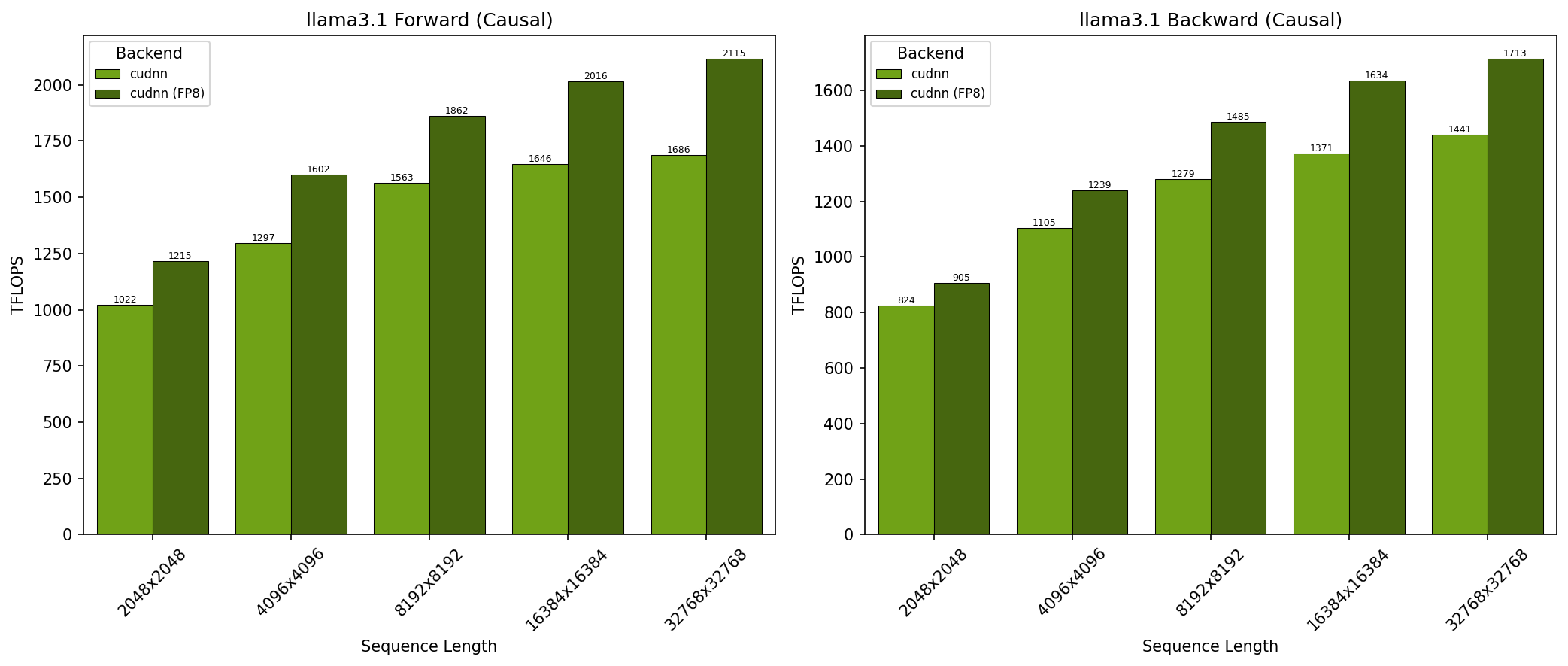
- SDPA parameters:
batch=1; num_q_heads=64; num_kv_heads=8; head_dim=128; is_causal=True - Sequence lengths shown on x-axis
- Results obtained on NVIDIA GB200 GPU
GB200 - Llama 3.1 Non-Causal (no_mask)
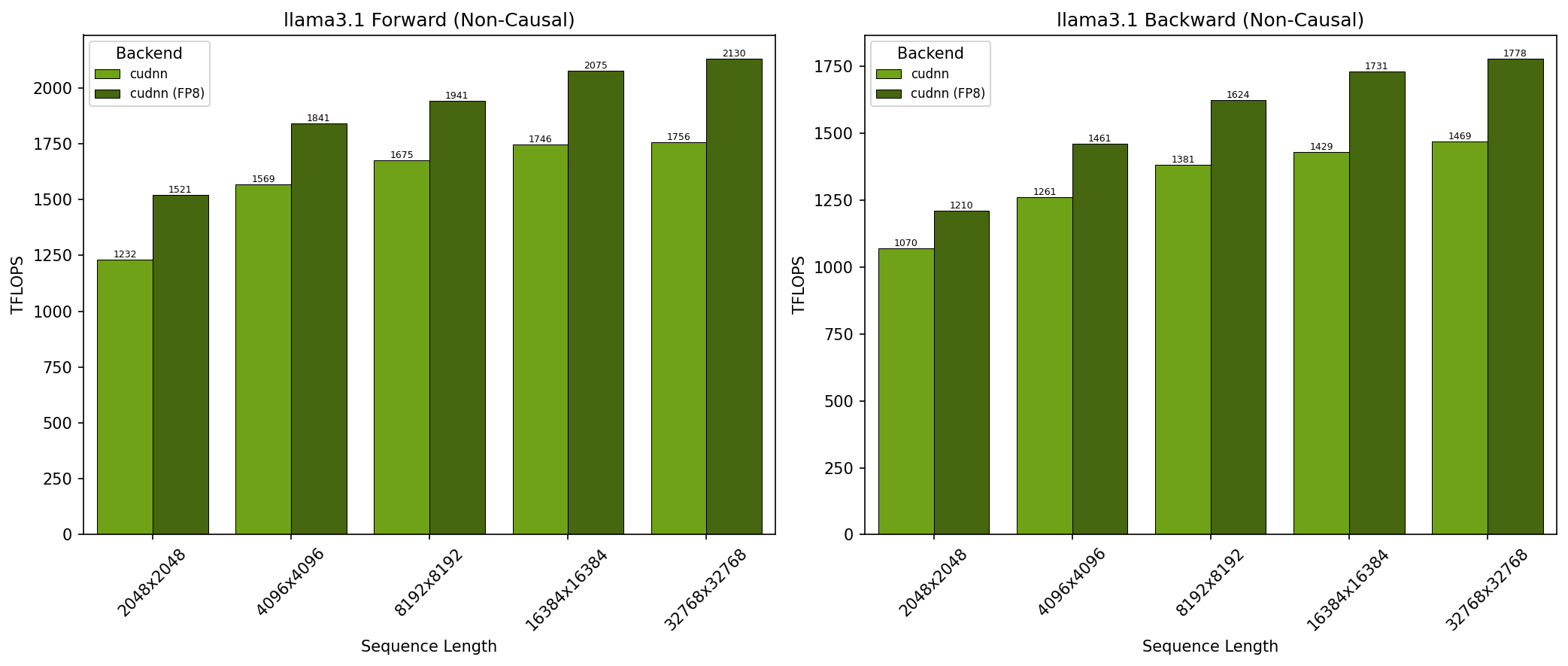
- SDPA parameters:
batch=1; num_q_heads=64; num_kv_heads=8; head_dim=128; is_causal=False - Sequence lengths shown on x-axis
- Results obtained on NVIDIA GB200 GPU
GB200 - DeepSeek V3 Causal (top_left)
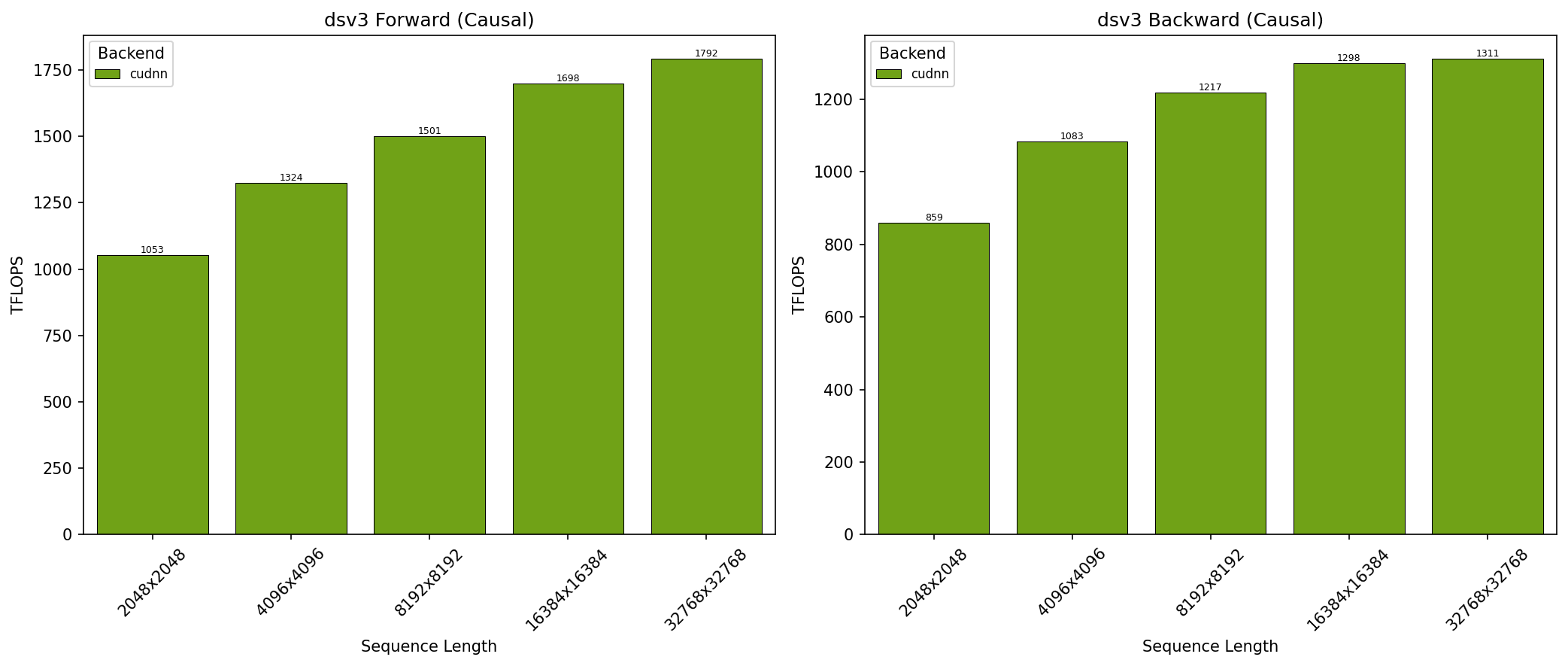
- SDPA parameters:
batch=1; num_q_heads=128; num_kv_heads=128; head_dim_qk=192; head_dim_vo=128; is_causal=True - Sequence lengths shown on x-axis
- Results obtained on NVIDIA GB200 GPU
GB300 - Llama 3.1 Causal (top_left)
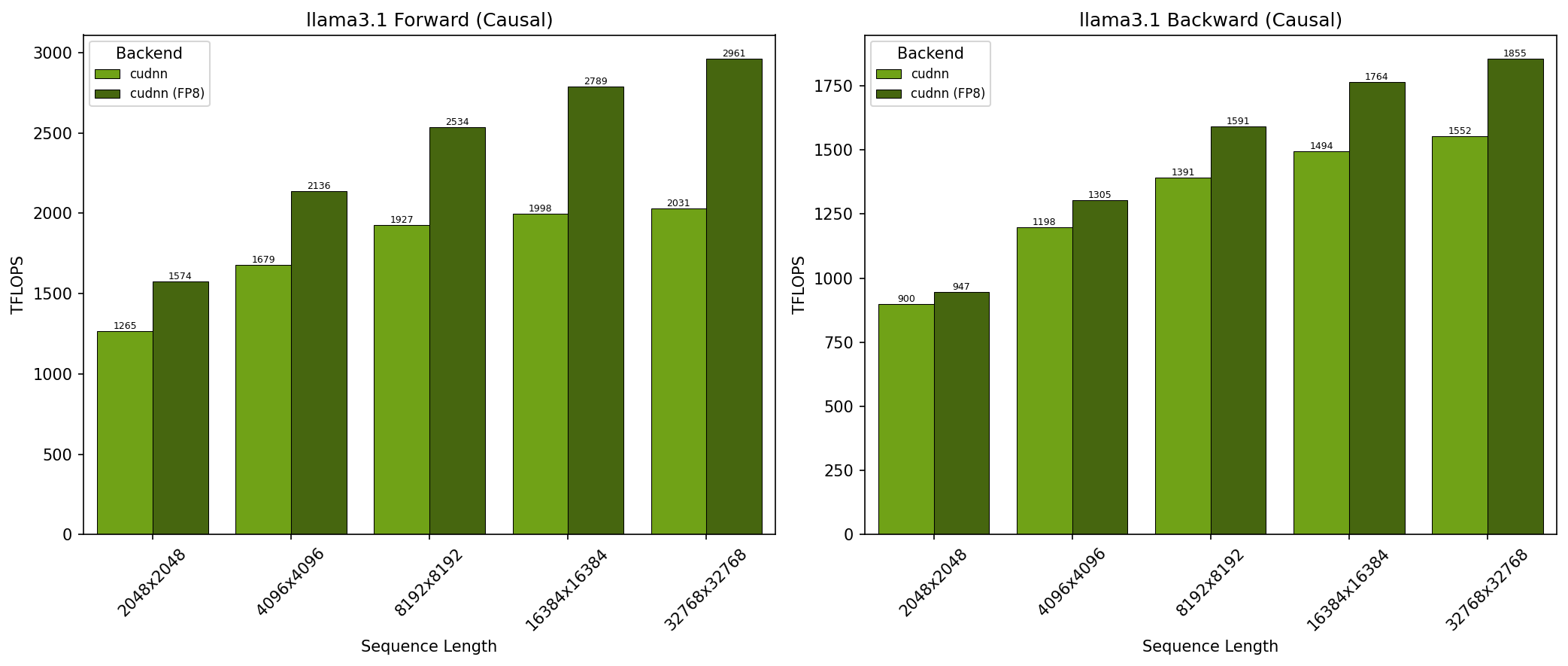
- SDPA parameters:
batch=1; num_q_heads=64; num_kv_heads=8; head_dim=128; is_causal=True - Sequence lengths shown on x-axis
- Results obtained on NVIDIA GB300 GPU
GB300 - Llama 3.1 Non-Causal (no_mask)
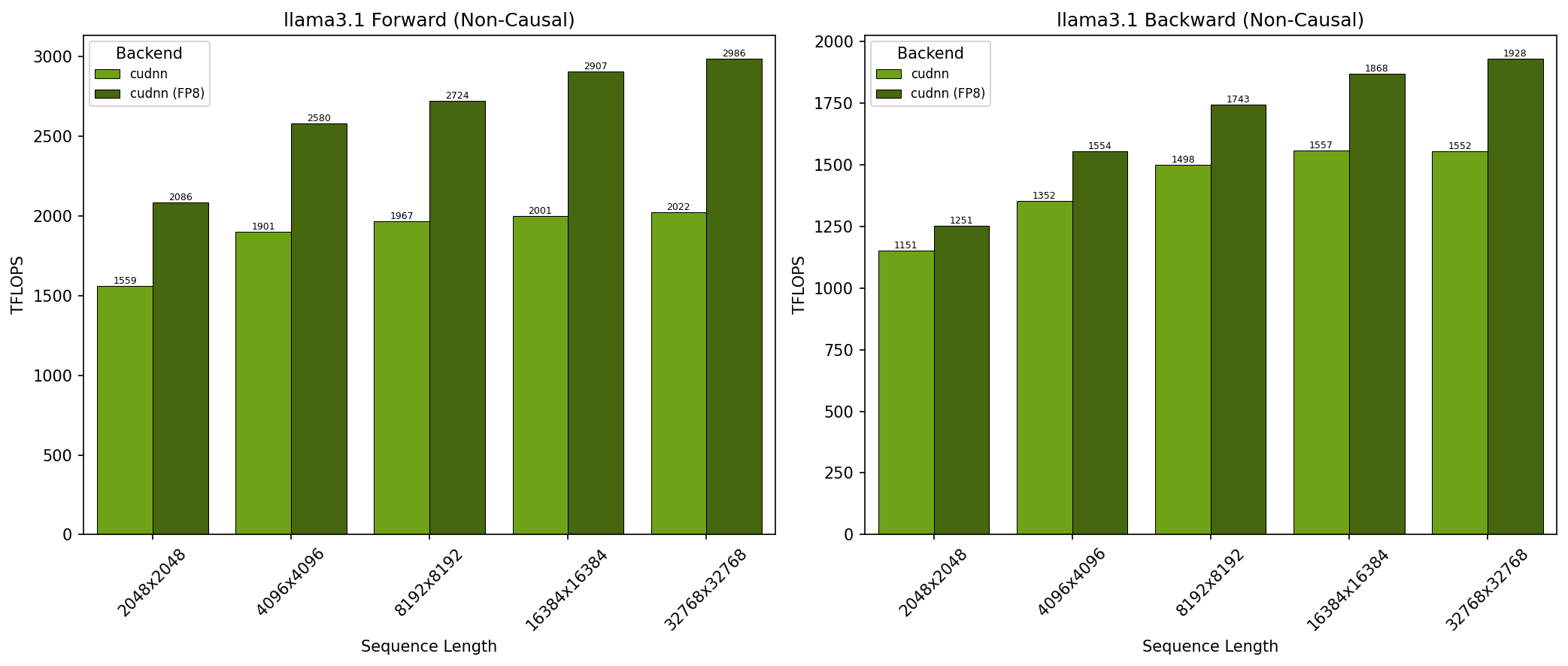
- SDPA parameters:
batch=1; num_q_heads=64; num_kv_heads=8; head_dim=128; is_causal=False - Sequence lengths shown on x-axis
- Results obtained on NVIDIA GB300 GPU
GB300 - DeepSeek V3 Causal (top_left)
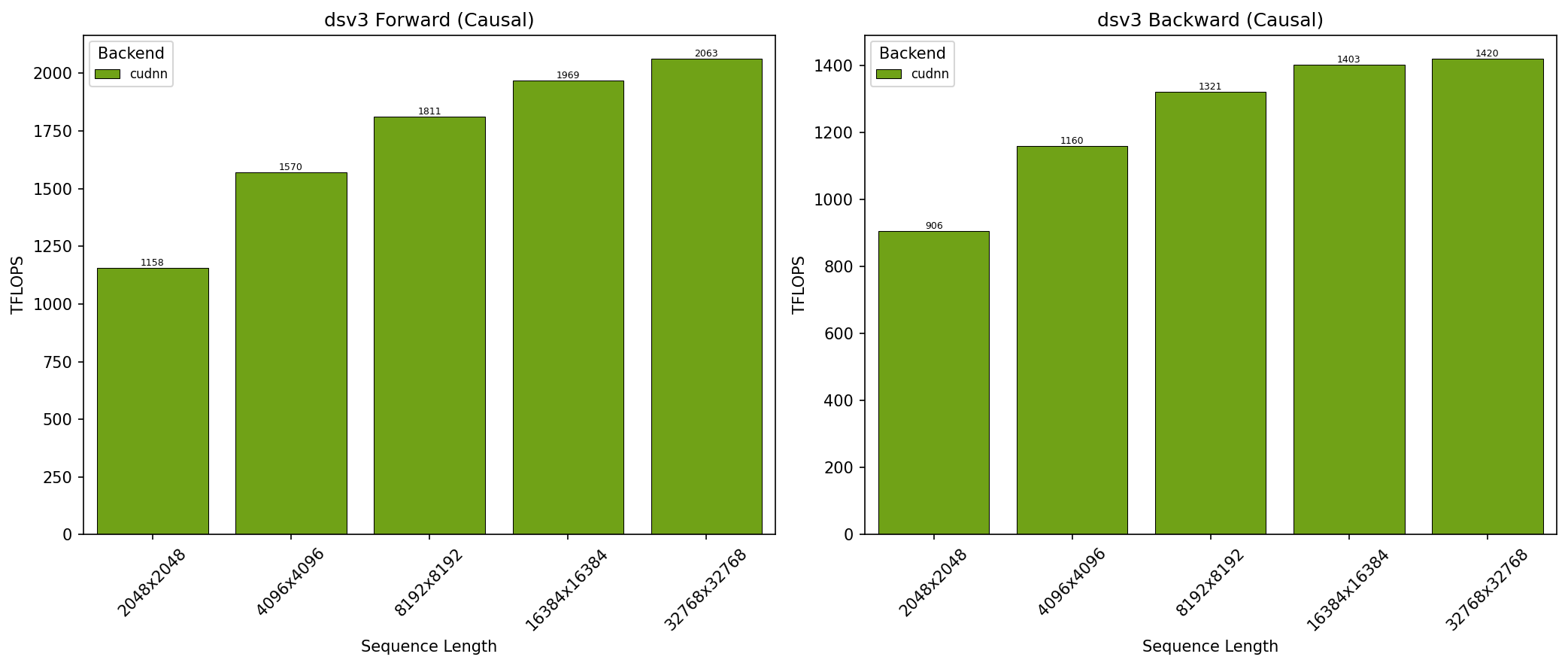
- SDPA parameters:
batch=1; num_q_heads=128; num_kv_heads=128; head_dim_qk=192; head_dim_vo=128; is_causal=True - Sequence lengths shown on x-axis
- Results obtained on NVIDIA GB300 GPU
Installation
🐍 Python
The easiest way to get started is via pip:
pip install nvidia_cudnn_frontendRequirements:
- Python 3.8+
- NVIDIA driver and CUDA Toolkit
⚙️ C++ (Header Only)
Since the C++ API is header-only, integration is seamless. Simply include the header in your compilation unit:
#include <cudnn_frontend.h>Ensure your include path points to the include/ directory of this repository.
Building from Source
If you want to build the Python bindings from source or run the C++ samples:
1. Dependencies
python-dev(e.g.,apt-get install python-dev)- Dependencies listed in
requirements.txt(pip install -r requirements.txt)
2. Python Source Build
pip install -v git+https://github.com/NVIDIA/cudnn-frontend.gitEnvironment variables CUDAToolkit_ROOT and CUDNN_PATH can be used to override default paths.
3. C++ Samples Build
mkdir build && cd build
cmake -DCUDNN_PATH=/path/to/cudnn -DCUDAToolkit_ROOT=/path/to/cuda ../
cmake --build . -j16
./bin/samples
Documentation & Examples
- Developer Guide: Official NVIDIA Documentation
- C++ Samples: See
samples/cppfor comprehensive usage examples. - Python Samples: See
samples/pythonfor pythonic implementations.
🤝 Contributing
We strictly welcome contributions! Whether you are fixing a bug, improving documentation, or optimizing one of our new OSS kernels, your help makes cuDNN better for everyone.
- Check the Contribution Guide for details.
- Fork the repo and create your branch.
- Submit a Pull Request.
Debugging
To view the execution flow and debug issues, you can enable logging via environment variables:
# Log to stdout
export CUDNN_FRONTEND_LOG_INFO=1
export CUDNN_FRONTEND_LOG_FILE=stdout

# Log to a file
export CUDNN_FRONTEND_LOG_INFO=1
export CUDNN_FRONTEND_LOG_FILE=execution_log.txt
Alternatively, you can control logging programmatically via cudnn_frontend::isLoggingEnabled()
License
This project is licensed under the MIT License.