

Repository
jikji
Non-destructive local file maps and instant search indexes for AI agents
README
<h1 align="center">Jikji</h1>
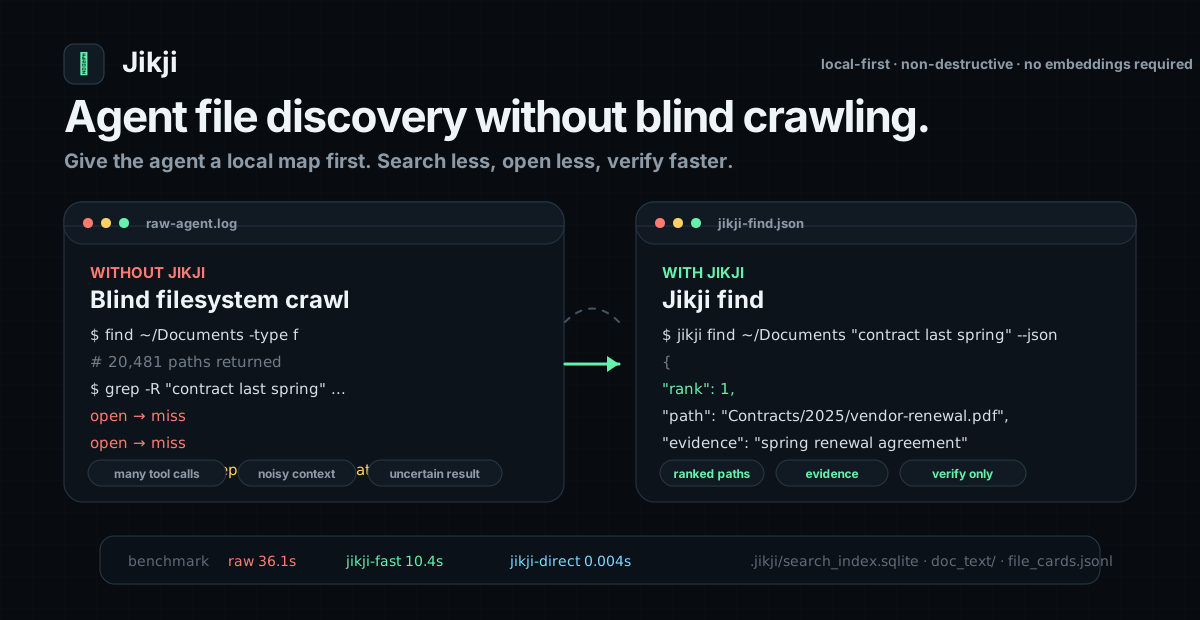
Jikji find: local file discovery for AI agents 파일 하나 찾을 때마다 38,650 토큰, 57초, 11.7회 LLM 호출을 쓰던 raw agent 탐색을 줄이는 비파괴 로컬 탐색 스킬 같은 551건에서 Jikji find는 파일 하나당 447 토큰, 2.1초, 1회 호출로 더 높은 Hit@1을 냈다.



Live intro · GitHub · Benchmarks · Agent install guide · Skill file
Public homepage: https://nomadamas.github.io/jikji/. It is a GitHub Pages
static site, so the public landing page is served through GitHub's CDN rather
than a local tunnel.
What is Jikji?
Jikji prepares an explicit local folder so AI agents can find files, folders,
metadata, and parsed document text without repeatedly crawling the original
filesystem.
Jikji does not move, rename, delete, or reorganize user files. It creates
generated maps and caches under .jikji/ plus .jikji_agent_map.md.
This repository is currently a monorepo during the Rust port. The Rust
workspace under crates/ is the active CLI implementation, while the Python
package under python/jikji/ remains as the reference implementation and
parity-test source until the port is fully retired.
The public agent command is:
jikji find ROOT "natural language file clue" --jsonjikji find builds a multi-query, multi-route candidate slate from metadata,
file maps, parser caches, graph routes, and local text indexes. The agent can
then use one bounded LLM judgment over the returned top-k slate instead of
spending many exploratory chat turns on ls, find, grep, document opening,
and query guessing.
Why It Saves Calls And Gets More Accurate
Jikji is faster because the expensive discovery work is done before the agent is
asked to find a file:
- No parse-at-search-time loop: PDF, HWP/HWPX, Office, text, subtitles, HTML,
archives, and opt-in media OCR/ASR are parsed into.jikji/doc_text/and
metadata caches duringprepare. - No repeated path wandering: folder profiles, file cards, duplicate hints,
route rows, and.jikji_agent_map.mdturn a messy tree into an agent-readable
file map. - Fielded local search: path, filename, folder, extension, body text,
metadata, and deterministic semantic terms are indexed separately, so obvious
path clues and body-only clues both rank well. - LLM Wiki for agents: each source gets a compact grounded wiki page, so the
agent can inspect a short source summary instead of opening large raw files. - Knowledge graph routes: source, folder, term, intent, and duplicate nodes
are prebuilt into.jikji/knowledge_graph.jsonand.jikji/graph_routes.jsonl
for low-token candidate routing. - Multi-route candidate slate:
jikji findgenerates query variants, gathers
top-k candidates from metadata, file-map, wiki/cache, graph, and text routes,
deduplicates by path, then returns one slate for bounded agent judgment. - Freshness without search-time prepare: Jikji find checks a source-tree
signature and reports when it is using the previous index. Refreshing is done
throughjikji prepare/jikji refresh, not by surprise work insidefind.
This is RAG-style retrieval context, not a mandatory vector DB or cloud RAG
stack. Jikji's default index is local and deterministic: no embeddings, cloud
parser, or LLM call is required to prepare or search. The LLM is used only by the
agent when it needs to choose from the returned candidate slate.
Quick Start
Tell your CLI agent this one sentence:
GitHub 저장소 https://github.com/NomaDamas/jikji 에서 Jikji를 설치하고, 내 CLI 에이전트들이 `jikji find`를 바로 쓰도록 Jikji skill까지 연결해줘.git clone https://github.com/nomadamas/jikji.git
cd jikji
cargo install --path crates/jikji-cli
jikji agent-skill-install --agent all --json
jikji prepare ~/Documents --json
jikji find ~/Documents "contract pdf from last spring" --jsonYou can also install a published binary from the GitHub Releases page and place
the jikji executable on PATH. crates.io publishing uses trusted publishing
from the main publish workflow; token-based publishing is only a manual
fallback for maintainers. Release and crates.io maintainer setup is documented
in docs/release-publishing.md.
Korean example:
jikji find ~/Documents "작년 봄 계약서 PDF" --jsonagent-skill-install queues a low-impact post-install prepare for common user
material folders and document-heavy folders it can safely discover under the
user home directory. That initial prepare focuses on document extensions such as
PDF, HWP/HWPX, Word, Excel, PowerPoint, and RTF. jikji find itself does not
prepare unindexed roots; it searches only existing Jikji indexes. For setup and
diagnostics:
jikji prepare ROOT --json
jikji refresh ROOT --json
jikji doctor ROOT --json
jikji map ROOT
jikji clean ROOT --dry-run --json
prepare writes the Jikji routing block in AGENTS.md, CLAUDE.md, and
.cursorrules by default. Use jikji prepare ROOT --no-agent-rules to skip
those block updates for a root.
Why Agents Need It
Raw local agents typically do this:
guess query -> list folders -> grep files -> open documents -> repeatJikji-equipped agents start here:
jikji find ROOT "query" --json -> read answer_paths/candidates -> verify only top evidenceUse Jikji as the first action whenever an explicit root is available. Raw
filesystem search is a fallback only after the returned handoff_action allows
it.
Measured Headline
HippoCamp Fullset, 551 local file-search cases, same Hermes task scope. The
table is the fullset total; the README headline above uses per-case averages.
mode         cases  Hit@1   Hit@10  calls  input tokens  output tokens  total tokens  seconds    est. cost
raw Hermes     551  0.6697  0.7786  6,420  19,799,362    1,496,916      21,296,278    31,231.9   13,361원
Jikji find     551  0.7949  0.7949    551     228,684       17,632         246,316     1,164.2      156원
Per file-search case, raw Hermes averaged 11.7 LLM calls, 38,650 total
tokens, 56.7s, and about 24원; Jikji find averaged 1 call, 447 total
tokens, 2.1s, and about 0.3원.
Fullset result: Hit@1 improves from 0.6697 to 0.7949, Hit@10 improves from
0.7786 to 0.7949, LLM calls drop 6,420 -> 551 (11.65x), wall time drops
31,231.9s -> 1,164.2s (26.83x), and total tokens drop
21,296,278 -> 246,316 (86.46x). This is why the public product is now
Jikji find.
Other benchmark examples are shown in
docs/jikji-benchmarks.html, including media
OCR/ASR, Korean public-data XLSX, hard KOGL document sets, Workspace-Bench-Lite,
MIRACL-VISION, EDiTh, and BEIR diagnostics.
Agent Protocol
Paste this behavior into Claude Code, Codex, Hermes, OpenCode/OpenClone-style
agents, or any CLI-capable local agent:
Use Jikji for local file discovery when an explicit root is available.
First call: jikji find ROOT "query" --json.
Prefer answer_paths[] first. Preserve order when agent_should_not_rerank is true.
When handoff_action is direct_use, accept answer_paths[] / paths[] and avoid broad crawling.
When handoff_action is jikji_retry, run exactly one sharper Jikji find retry before raw fallback.
When handoff_action is raw_fallback_after_retry, raw search is allowed only after that retry failed, stayed empty, or stayed clearly wrong.
Inspect evidence_pack[].next_read, candidates[].next_read, or original files only for final verification.
Never move, rename, delete, or reorganize user files.
Install the reusable skill instruction:
jikji agent-skill-install --agent all --json
jikji hermes-skill-install --json
jikji codex-skill-install --json
jikji skill-export --dest /path/to/that-agent/skills/jikji/SKILL.md --json
What Jikji Creates
.jikji_agent_map.md         root guide for humans and agents
AGENTS.md / CLAUDE.md / .cursorrules  routing block pointing agents to `jikji find`
.jikji/search_index.sqlite  instant lexical/content/metadata search index
.jikji/doc_text/            parsed PDF/HWP/HWPX/Office/etc. text cache
.jikji/file_cards.jsonl     per-file cards, tags, parse status, evidence
.jikji/folder_profile.jsonl folder roles and navigation context
.jikji/agent_routes.md      safe fallback route for autonomous agents
.jikji/wiki/index.md        deterministic local LLM Wiki entry point
.jikji/wiki/sources/*.md    compact grounded Markdown page per source
.jikji/knowledge_graph.json source/folder/term/intent/duplicate graph
.jikji/graph_routes.jsonl   low-token route rows
Repository Layout
This repository is intentionally structured as a Rust/Python monorepo:
crates/                    Rust workspace crates and the shipped CLI
python/jikji/              Python reference, benchmark, and media package
tests/parity/              Cross-stack contract tests
tests/golden/              Checked-in Python golden fixtures for Rust parity
tools/parity/              Python-vs-Rust parity and benchmark harnesses
skills/                    Local-agent skill assets
docs/                      Product, release, and benchmark documentation
The Rust CLI is the product distribution surface. The Python package remains
available for reference behavior, parity fixture capture, and legacy development.
Generated artifacts can be regenerated or removed with jikji clean. The routing
block in AGENTS.md / CLAUDE.md / .cursorrules is updated in place on each
prepare and can be skipped with jikji prepare ROOT --no-agent-rules; jikji clean removes the block while preserving any user-authored content.
The shipped Rust CLI command surface includes prepare, refresh, clean, map,
doctor, find, search, brief, discover, graph, gui, agent skill
installers, eval/benchmark commands, Hermes reports, public dataset adapters,
and native media metadata/OCR/ASR engine execution. These paths do not invoke
the Python package. The Python project.scripts command is a separately installed
reference alternative, not the release binary.
Media Text
PDF, HWP/HWPX, Office, text, subtitles, HTML, JSON/YAML, and coding files are
indexed within size and timeout limits. Image, audio, and video text extraction
is opt-in through explicitly configured Rust OCR/ASR engines; without one, the
Rust binary records metadata only. The split Rust crates can also be reused
directly: jikji-parser, jikji-index, jikji-search, and jikji-agent.
For Python reference development and parity tests only:
python3 -m venv .venv
.venv/bin/pip install -e python/jikji
.venv/bin/pip install pytest ruff
Development
python3 -m venv .venv
.venv/bin/pip install -e python/jikji
.venv/bin/pip install pytest ruff
.venv/bin/ruff check python/jikji/src python/jikji/tests tests/parity tools/parity
.venv/bin/pytest python/jikji/tests tests/parity -q
.venv/bin/python -m compileall -q python/jikji/src python/jikji/tests tests/parity tools/parity
License
MIT License. See LICENSE.