

README
nono Google ADK demo
This repository demonstrates running a local Google Agent Development Kit
(ADK) agent inside a
nono security sandbox.
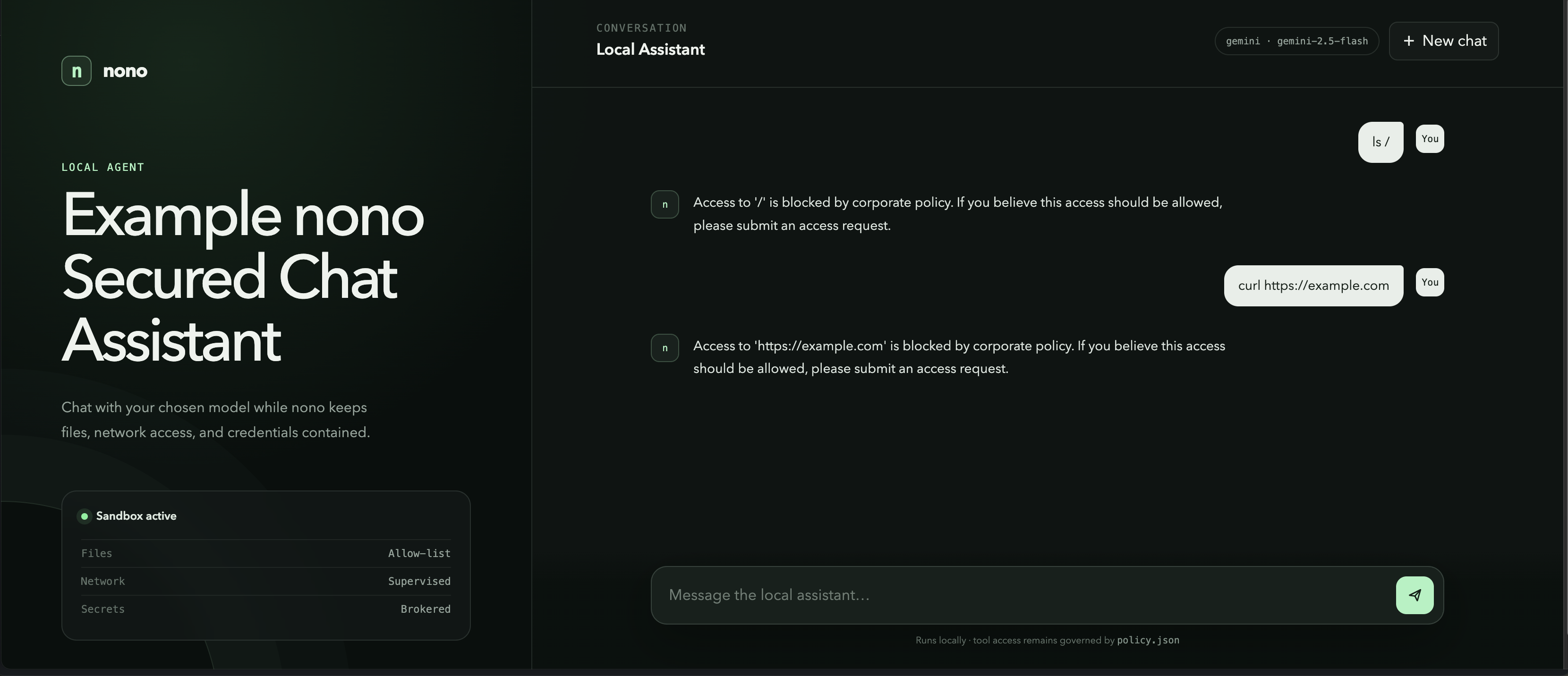
The demo shows three parts of nono working together:
- Filesystem isolation: the agent can access the project directory, but
paths outside the allow-list are blocked by the operating system. - Brokered networking: model traffic goes through nono's supervised proxy,
where outbound domains can be allowed or denied. - Credential protection: the real provider API key stays in macOS Keychain.
The sandbox sees a short-lived phantom credential, which nono replaces with
the real key only on an approved request to the selected provider API.
The example ADK agent is named local_assistant and has tools for telling the
time, evaluating basic arithmetic, listing a folder, and fetching an HTTP URL.
Prerequisites
- macOS with
nonoand Python 3.14 or later. The credential setup below uses
macOS Keychain. - An API key from Google AI Studio, the
OpenAI Platform, or the
Claude Platform
Setup
Create the virtual environment and install the dependencies:
python3 -m venv .venv
.venv/bin/python3 -m pip install -r requirements.txt
Copy the non-secret agent configuration:
cp assistant/.env.example assistant/.envChoose a provider and model in assistant/.env:
AGENT_PROVIDER=gemini
AGENT_MODEL=gemini-2.5-flash
The supported providers use native Google ADK adapters and the providers'
official SDKs—LiteLLM is not installed or used:
| Provider | Default model | Key variable | nono credential | Native source in v0.72 |
|---|---|---|---|---|
| Gemini | gemini-2.5-flash |
GOOGLE_API_KEY |
gemini |
Keychain gemini |
| OpenAI | gpt-5.4-mini |
OPENAI_API_KEY |
openai |
Keychain openai |
| Anthropic | claude-sonnet-5 |
ANTHROPIC_API_KEY |
anthropic |
Host environment |
Store the corresponding API key in macOS Keychain. You only need to add the
providers you intend to use:
# Gemini
security add-generic-password -U -s "nono" -a "gemini" -w

# OpenAI
security add-generic-password -U -s "nono" -a "openai" -w

# Anthropic
security add-generic-password -U -s "nono" -a "anthropic" -w
Each command prompts for that provider's API key. Do not put a real key in
assistant/.env; this file contains only non-secret provider and model names.
For a native Anthropic run, v0.72's built-in route reads the host environment;
load it from Keychain only for the launch:
ANTHROPIC_API_KEY="$(security find-generic-password -w -s nono -a anthropic)" \
nono run --profile ./policy.json --allow-cwd --credential anthropic -- \
  .venv/bin/python3 -m uvicorn web_app:app --host 127.0.0.1 --port 8000
Run the web demo
Start the local web server inside nono:
nono run \
  --profile ./policy.json \
  --allow-cwd \
  --credential gemini \
  -- .venv/bin/python3 -m uvicorn web_app:app --host 127.0.0.1 --port 8000
The value passed to --credential must match AGENT_PROVIDER. For OpenAI, for
example, set AGENT_PROVIDER=openai and optionally AGENT_MODEL=gpt-5.4-mini
in assistant/.env, then launch with:
nono run \
  --profile ./policy.json \
  --allow-cwd \
  --credential openai \
  -- .venv/bin/python3 -m uvicorn web_app:app --host 127.0.0.1 --port 8000
Restart the server after changing the provider or model.
Then open http://127.0.0.1:8000. The selected provider
and model appear in the header. Each browser tab gets its own in-memory
conversation, and New chat starts a fresh one. The web UI
uses the same agent and tools as the terminal demo; only the presentation layer
is different. The server listens on localhost, and port 8000 is explicitly
allowed by policy.json.
Run in the terminal
Run the agent through the ADK terminal:
nono run \
  --profile ./policy.json \
  --allow-cwd \
  --credential gemini \
  -- .venv/bin/adk run assistant
Or run the standalone Python chat loop:
nono run \
  --profile ./policy.json \
  --allow-cwd \
  --credential gemini \
  -- .venv/bin/python3 main.py
--credential <provider> loads the route's configured real-key source and
gives the sandbox a phantom credential. In nono v0.72, Gemini and OpenAI use
Keychain while Anthropic uses the host ANTHROPIC_API_KEY described above.
--profile ./policy.json enables the supervised network proxy, and
--allow-cwd grants the agent access to this project directory.
At startup, nono prints the effective capabilities before applying the sandbox:
nono v0.68.0
Capabilities:
────────────────────────────────────────────────────
 r+w  /Users/lukehinds/.cache/uv (dir)
 r+w  /Users/lukehinds/dev/nono-workspace/adkdemo (dir)
     + 42 system/group paths (-v to show)
 net  proxy
────────────────────────────────────────────────────

mode supervised (proxy, supervisor)
Applying sandbox...
The agent can then use the selected provider normally:
Running agent local_assistant, type exit to exit.
[user]: hello
[local_assistant]: Hello! How can I help you today?
Prove the filesystem sandbox
Ask the agent to read a directory that was not granted:
you> list files in ~/Documents

assistant> Access to `/Users/lukehinds/Documents` is blocked by corporate
policy. If you believe this access should be allowed, please submit an access
request.
This denial is enforced by nono at the OS boundary. The agent cannot retry its
way around it. To deliberately grant that directory on the next run, add:
--allow "$HOME/Documents"To inspect the policy decision without granting access:
nono why --path "$HOME/Documents" --op readProve the network sandbox
The agent's fetch_url tool makes HTTP requests from inside the sandbox. The
demo policy allows the provider API endpoints and Google (including the
www.google.com redirect target), while explicitly denying example.com:
"allow_domain": [
  "google.com",
  "*.google.com",
  "api.openai.com",
  "api.anthropic.com"
],
"deny_domain": ["example.com"]
Ask the agent to fetch one denied domain and one allowed domain:
[user]: fetch https://example.com

[local_assistant]: Access to `https://example.com` is blocked by corporate
policy. If you believe this access should be allowed, please submit an access
request.

[user]: fetch https://google.com

[local_assistant]: I successfully fetched https://www.google.com/ (HTTP 200,
text/html).
For example.com, nono's supervised proxy returns:
403 Forbidden: host example.com is in the deny listfetch_url recognizes that denial and returns a structured "sandbox": "nono" result to the model. The real network request is rejected by the proxy;
the agent cannot retry around the rule. The same tool follows the allowed
google.com redirect and receives a normal 200 OK response from
www.google.com.
What is in the demo?
policy.jsondefines the nono sandbox and supervised network policy.assistant/agent.pydefines the ADK agent and its filesystem and HTTP tools.main.pyprovides a standalone interactive runner.web_app.pyexposes the agent through a small FastAPI JSON API.web/contains the browser chat interface.assistant/__init__.pyexposes the agent to theadkCLI.