

Repository
NativeMindExtension
NativeMind: Your fully private, open-source, on-device AI assistant
README
NativeMind Private, On-device Al Assistant
 *NativeMind is a private, open-source alternative to ChatGPT — a fully local browser extension built on Ollama that brings local AI models into your workflow.*
[](https://chromewebstore.google.com/detail/nativemind-private-on-dev/mgchaojnijgpemdfhpnbeejnppigfllj)
[](https://addons.mozilla.org/en-US/firefox/addon/nativemind?utm_source=github)
[]()
[](https://nativemind.app)
[](https://discord.gg/b8p54DKhha)
[](https://x.com/NativeMindApp)
[]()
[]()
[]()
[](https://www.gnu.org/licenses/agpl-3.0)
[](https://github.com/ollama/ollama)
[](https://github.com/mlc-ai/web-llm)
---
**The Future of Private AI is Here, Running Entirely on Your Device**
*NativeMind delivers cutting-edge intelligence without cloud dependencies—**faster responses, zero tracking, unlimited usage**—all running quietly in your browser while you stay in **complete** control.*
*NativeMind is a private, open-source alternative to ChatGPT — a fully local browser extension built on Ollama that brings local AI models into your workflow.*
[](https://chromewebstore.google.com/detail/nativemind-private-on-dev/mgchaojnijgpemdfhpnbeejnppigfllj)
[](https://addons.mozilla.org/en-US/firefox/addon/nativemind?utm_source=github)
[]()
[](https://nativemind.app)
[](https://discord.gg/b8p54DKhha)
[](https://x.com/NativeMindApp)
[]()
[]()
[]()
[](https://www.gnu.org/licenses/agpl-3.0)
[](https://github.com/ollama/ollama)
[](https://github.com/mlc-ai/web-llm)
---
**The Future of Private AI is Here, Running Entirely on Your Device**
*NativeMind delivers cutting-edge intelligence without cloud dependencies—**faster responses, zero tracking, unlimited usage**—all running quietly in your browser while you stay in **complete** control.*
⭐ Getting Started & Stay Updated
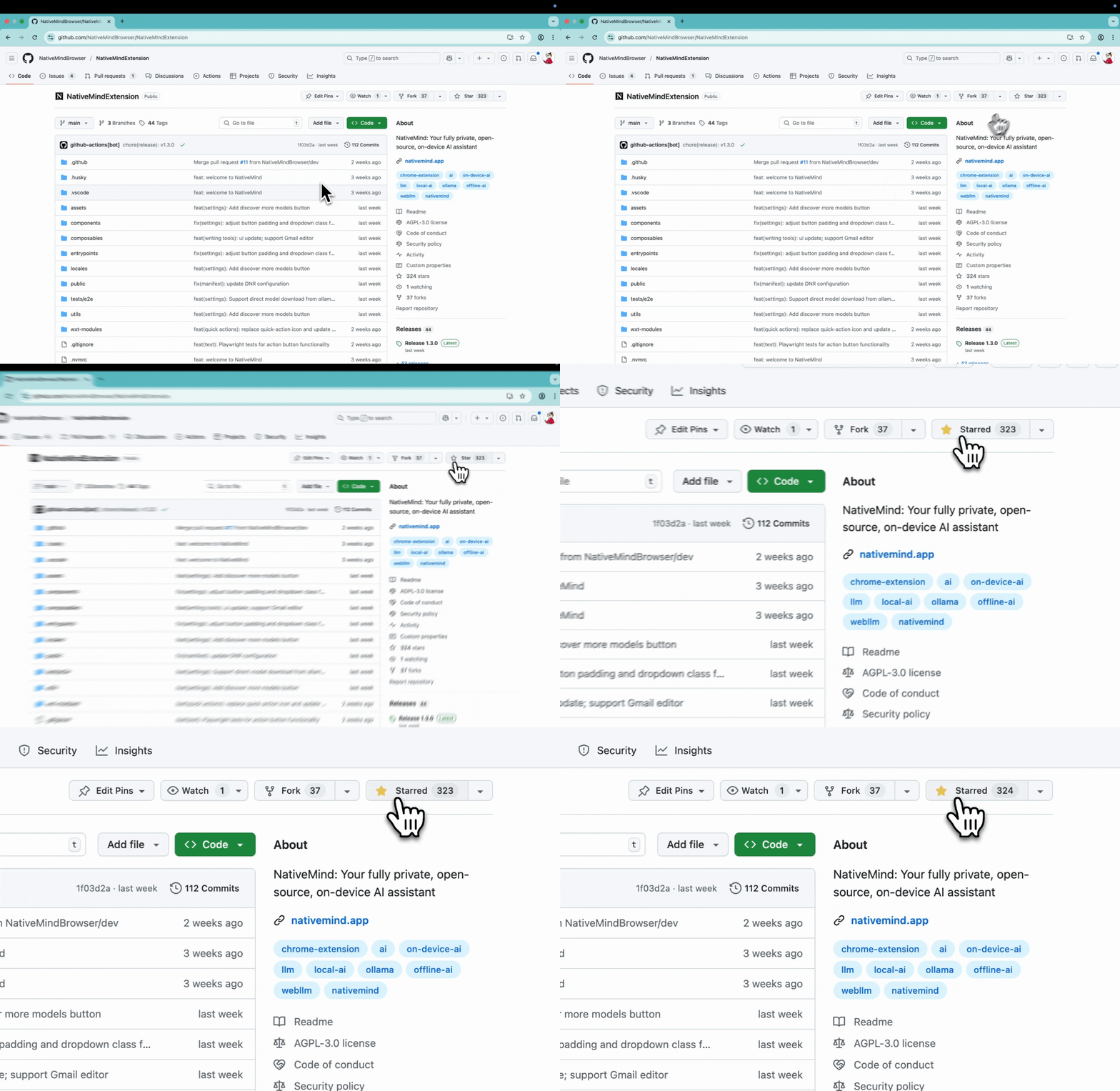
Star this project to get all the latest updates — you'll never miss a new release!
✨ Core Features
🤖 AI Agent - Your Intelligent Assistant
- Autonomous Task Execution: AI agents that can understand complex requests and break them down into actionable steps
- Multi-Step Problem Solving: Handle complex workflows that require multiple tools and reasoning steps
- Context-Aware Decision Making: Agents understand your current context and make intelligent decisions
- Tool Integration: Seamlessly use various tools and capabilities to accomplish your goals
💬 Browse Smarter with Local AI
-
Contextual Awareness Across Tabs: Seamlessly continue AI conversations with memory that spans across tabs
-
AI-Powered Local Search: Ask questions and search the web directly from your browser—no third-party APIs required
-
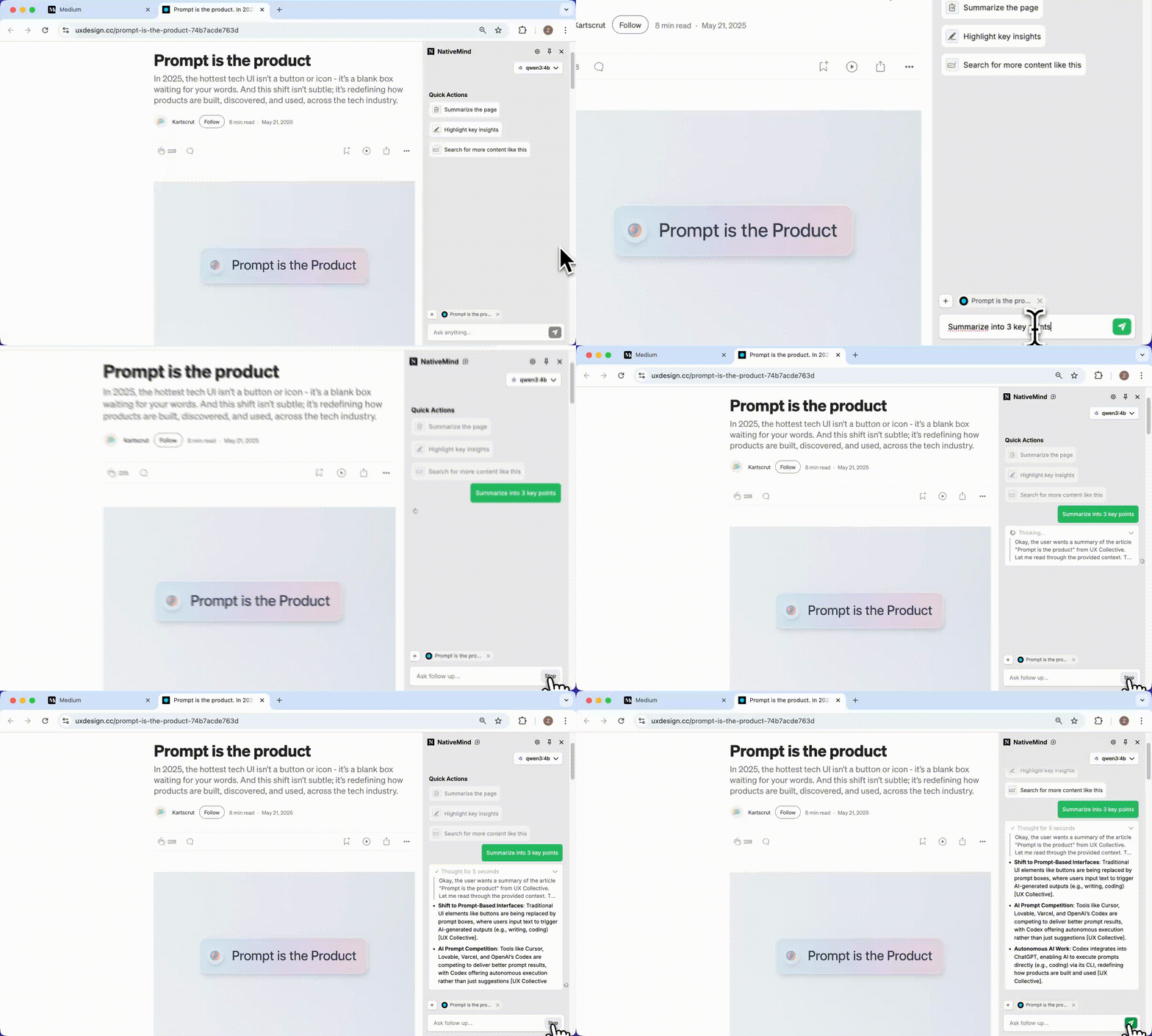
Smart Page Understanding: Instantly summarize and interpret any webpage content
-
Bilingual Translation: Translate full pages or selected text with side-by-side view (supports multiple languages)
-
Quick Actions: Custom Skills for any task, adapt NativeMind to match your workflow with local model capabilities
<div align="center">
<img src="https://nativemind.app/images/blog/quick-actions/img-1.webp" alt="Quick Actions Feature" width="400">
</div>
✍️ Boost Productivity with AI Tools
-
Chat with PDFs: Ask questions directly about PDF files with intelligent text extraction
-
Chat with Images: Understand and interact with visual content, including screenshots and uploaded images
<div align="center">
<img src="docs/images/image-support.gif" alt="Chat with Images Feature" width="800">
</div> -
Advanced Writing Tools: Comprehensive writing assistance including rewriting, proofreading, tone adjustment, and creative rephrasing
<div align="center">
<img src="https://nativemind.app/images/blog/writing-tool/img-3.webp" alt="Writing Tools Enhancement" width="500">
</div>
🧠 Run Your Own AI Models Locally
- Offline-First: Use all features without an internet connection after downloading a model—your data stays on your device
- Model Switching: Easily switch between models based on performance, speed, or privacy needs
📦 Installation
NativeMind supports Chrome, Firefox, Brave, and Edge browsers with full feature compatibility across all platforms.


🚀 Quick Start
⚡ First-Time Setup
 For more details, visit our official website: nativemind.app
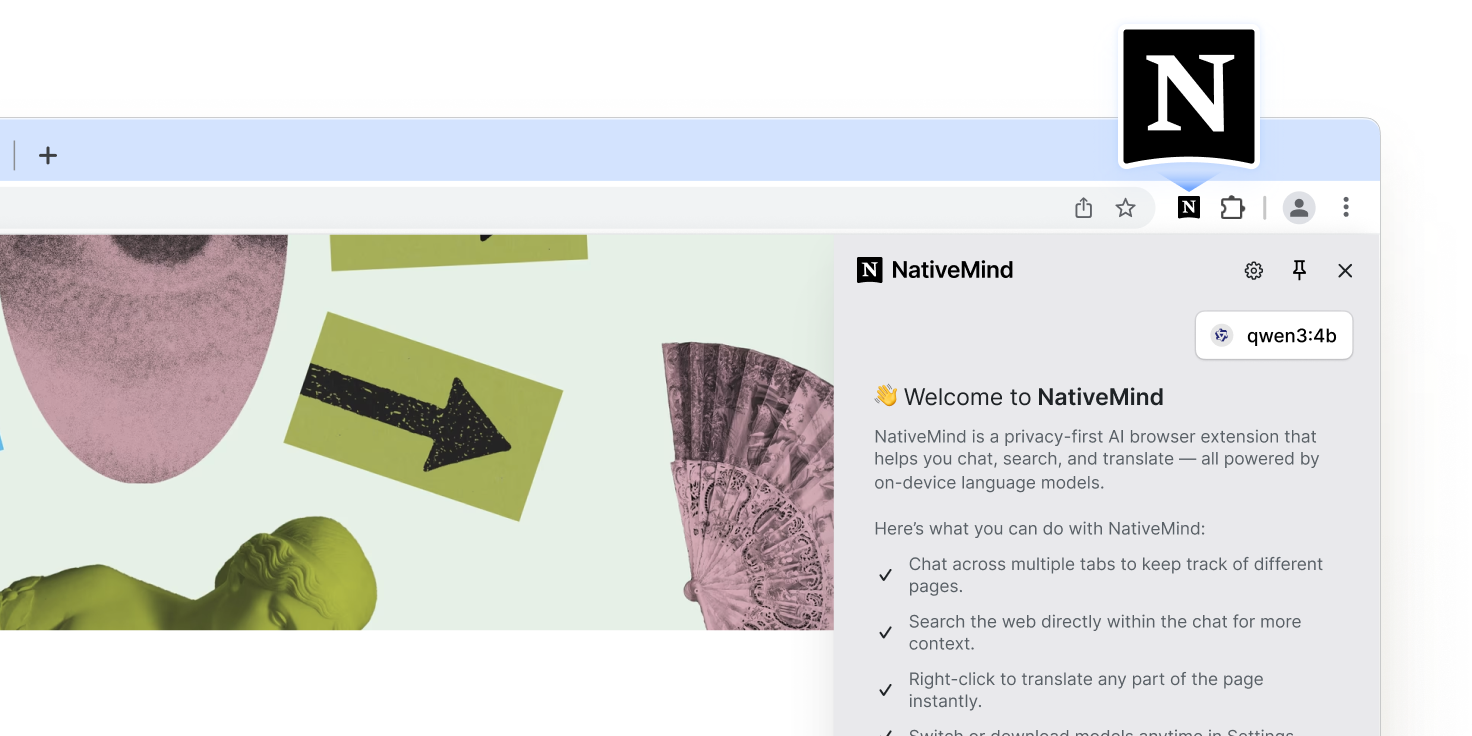
- Pin the Extension: Click the extension icon and pin it to your toolbar
- Setup Ollama: Follow the Ollama Setup Guide for full AI capabilities
- Start Using: Click the NativeMind icon in your browser toolbar
🤖 AI Model Options
🦙 Ollama (Recommended)
-
Advanced Models: Deepseek, Qwen, Llama, Gemma, Mistral, Phi and more
-
gpt-oss Support: Full compatibility with gpt-oss models for enhanced open-source AI capabilities
<div align="center">
<img src="https://nativemind.app/images/blog/gpt-oss/img-2.webp" alt="GPT-OSS Model Support" width="600">
</div> -
Superior Performance: Leverage full system resources
-
Model Flexibility: Download and switch between specialized models
-
Local Server: Self-hosted for maximum control
⚡ WebLLM (Quick Trial)
- Instant Demo: Try AI capabilities immediately with Qwen3-0.6B in your browser
- Zero Setup: No additional software installation required for quick testing
- WebAssembly-Powered: Runs directly in browser using WebAssembly
- Trial Experience: Perfect for evaluating the extension before setting up Ollama
🔮 Why On-Device AI?
⚠️ The Problem with Cloud AI
In an era where every keystroke can be monitored and every document potentially analyzed, cloud-based AI services represent a fundamental privacy risk. Your sensitive data—personal documents, business communications, creative work—becomes part of someone else's training data or surveillance apparatus.
🚀 Performance Revolution
Privacy no longer means compromise. Recent breakthroughs in model efficiency mean on-device AI now outperforms cloud alternatives:
- Qwen3-4B: Outperforms Qwen2.5-72B while being 18x smaller
- Gemma3-4B: Matches Gemma2-27B performance with 6.75x fewer parameters and exceptional image recognition capabilities
- Phi-4: Outperforms Gemini Pro 1.5 in mathematical reasoning and competition problems
- Zero Latency: No network delays mean instant responses
- Always Available: No API limits, rate limiting, or service outages
🔒 True Data Sovereignty
NativeMind puts you back in control. By running AI models entirely on your device, we eliminate the fundamental privacy risks of cloud AI:
- 100% On-Device Processing: Every keystroke, every document, every conversation stays on your device
- Zero Cloud Dependencies: No data ever transmitted to external servers
- No Corporate Surveillance: No tech giant can analyze your usage patterns or content
- No Government Access: No backdoors or potential government data requests
- No Data Breaches: If your data never leaves your device, it can't be stolen from servers
- No Account Required: Use all features without registration or login
- Open Source Transparency: Every line of code is publicly auditable
🧩 How Does NativeMind Compare?
Wondering how NativeMind compares to ChatGPT or Ollama?
Here’s a quick breakdown to help you see where it stands — and when it might be the better choice.
| Feature / Tool | NativeMind | ChatGPT | Ollama |
|---|---|---|---|
| Run Mode | Browser extension using local models | Cloud-based service | Local CLI for running models |
| Open Source | ✅ Yes | ❌ No | ✅ Yes |
| Offline Capable | ✅ Yes (all processing is local) | ❌ No | ✅ Yes |
| Model Source | Runs local models via Ollama | Cloud-based language models by OpenAI | Supports any Ollama-compatible open models |
| Use Cases | In-Browser AI with Agent capabilities, Reading, Research, and Advanced Productivity | Chat, Q&A, content generation | Model serving / backend integration |
| Browser Integration | ✅ Strong (in-page UI, sidebar, right-click) | 🔶 Limited (official / 3rd-party extensions) | 🔶 Basic (simple UI) |
| Privacy | ✅ High — no cloud, no data leaves your device | 🔶 Cloud processing; Enterprise offers data controls | ✅ High |
| Installation Complexity | 🟢 Very low (just install the extension) | 🟢 Low (use via website) | 🔶 Medium (requires CLI setup) |
| Workflow Convenience | 🟢 In-page actions—no copy-paste | 🔶 Mostly copy-paste between site & page (no built-in plug-in) | 🔶 CLI output—manual copy or custom integration |
🛠️ For Developers
Technology Stack
<table>
<tr>
<td><strong>Frontend</strong></td>
<td>Vue 3 + TypeScript</td>
</tr>
<tr>
<td><strong>Build Tools</strong></td>
<td>WXT (Web Extension Tools) + Vite</td>
</tr>
<tr>
<td><strong>Styling</strong></td>
<td>TailwindCSS</td>
</tr>
<tr>
<td><strong>AI Integration</strong></td>
<td>WebLLM + Ollama + AI SDK</td>
</tr>
<tr>
<td><strong>Package Manager</strong></td>
<td>PNPM</td>
</tr>
</table>
Prerequisites
Installation
-
Clone the repository
git clone https://github.com/NativeMindBrowser/NativeMindExtension.git cd NativeMindExtension -
Install dependencies
pnpm install -
Start development server
pnpm dev         # Chrome development (default)
pnpm dev:edge    # Edge development
Building for Production
# Development build
pnpm zip:beta

# Production build
pnpm zip:prod
The built extension will be in the .output/ directory.
Manual Installation (Development)
- Download: Get the latest release from GitHub Releases
- Install: Open
chrome://extensions/→ Enable "Developer mode" → Click "Load unpacked" - Setup: Pin the extension and choose your AI model
🔨 Troubleshooting
Common Issues
Extension Not Loading
- Ensure Developer mode is enabled in browser extensions page
- Check that all files were extracted/loaded correctly
- Try refreshing the extensions page and reloading
AI Models Not Working
- WebLLM: Ensure sufficient RAM (8GB+ recommended) and modern browser
- Ollama: Verify Ollama is running locally on port 11434
- Clear browser cache and restart extension
- Check browser console for error messages
Slow Performance
- WebLLM: Close other tabs to free up memory
- Ollama: Ensure sufficient system resources
- Try smaller AI models for faster response times
- Check if antivirus software is interfering
Translation/Summarization Not Working
- Verify AI model is properly loaded
- Check if page has restricted content policies
- Try refreshing the page and retrying
- Ensure page content is selectable text (not images)
Getting Help
- Check browser console (F12 → Console) for error messages
- Join our Discord community for support: https://discord.gg/b8p54DKhha
- Report issues on GitHub Issues
- Include browser version, OS, and error details in reports
🤝 Contributing
🚀 Quick Start for Contributors
- Fork the project
- Create your feature branch (
git checkout -b feature/amazing-feature) - Commit your changes (
git commit -m 'Add some amazing feature') - Push to the branch (
git push origin feature/amazing-feature) - Open a Pull Request
📋 Development Guidelines
- ✅ Follow the existing code style
- ✅ Add tests for new functionality
- ✅ Update documentation as needed
- ✅ Ensure privacy-first principles
📄 License
🙏 Acknowledgments
- 👥 Contributors: Thanks to all who have helped shape NativeMind
- 🛠️ WXT: Making browser extension development easier
- 🧠 WebLLM: Enabling in-browser AI capabilities
- 🦙 Ollama: Powering local LLM support
⭐ Getting Started & Stay Updated
1
-
Star this project to get all the latest updates — you'll never miss a new release!
🤖 AI Agent - Your Intelligent Assistant
1
-
Autonomous Task Execution : AI agents that can understand complex requests and break them down into actionable steps Multi-Step Problem Solving : Handle complex workflows that require multiple tools and reasoning steps Context-Aware Decision Making : Agents understand your current context and make intelligent decisions Tool Integration : Seamlessly use various tools and capabilities to accomplish your goals
💬 Browse Smarter with Local AI
1
-
Contextual Awareness Across Tabs : Seamlessly continue AI conversations with memory that spans across tabs AI-Powered Local Search : Ask questions and search the web directly from your browser—no third-party APIs required Smart Page Understanding : Instantly summarize and interpret any webpage content Bilingual Translation : Translate full pages or selected text with side-by-side view (supports multiple languages) Quick Actions : Custom Skills for any task, adapt NativeMind to match your workflow with local model capabilities <div align="center"> <img src="https://nativemind.app/images/blog/quick-actions/img-1.webp" alt="Quick Actions Feature" width="400"> </div>
✍️ Boost Productivity with AI Tools
1
-
Chat with PDFs : Ask questions directly about PDF files with intelligent text extraction Chat with Images : Understand and interact with visual content, including screenshots and uploaded images <div align="center"> <img src="docs/images/image-support.gif" alt="Chat with Images Feature" width="800"> </div> Advanced Writing Tools : Comprehensive writing assistance including rewriting, proofreading, tone adjustment, and creative rephrasing <div align="center"> <img src="https://nativemind.app/images/blog/writing-tool/img-3.webp" alt="Writing Tools Enhancement" width="500"> </div>
🧠 Run Your Own AI Models Locally
1
-
Offline-First : Use all features without an internet connection after downloading a model—your data stays on your device Model Switching : Easily switch between models based on performance, speed, or privacy needs
📦 Installation
1
-
NativeMind supports Chrome , Firefox , Brave , and Edge browsers with full feature compatibility across all platforms.
⚡ First-Time Setup
2
🦙 Ollama (Recommended)
1
-
Advanced Models : Deepseek, Qwen, Llama, Gemma, Mistral, Phi and more gpt-oss Support : Full compatibility with gpt-oss models for enhanced open-source AI capabilities <div align="center"> <img src="https://nativemind.app/images/blog/gpt-oss/img-2.webp" alt="GPT-OSS Model Support" width="600"> </div> Superior Performance : Leverage full system resources Model Flexibility : Download and switch between specialized models Local Server : Self-hosted for maximum control
⚡ WebLLM (Quick Trial)
1
-
Instant Demo : Try AI capabilities immediately with Qwen3-0.6B in your browser Zero Setup : No additional software installation required for quick testing WebAssembly-Powered : Runs directly in browser using WebAssembly Trial Experience : Perfect for evaluating the extension before setting up Ollama
⚠️ The Problem with Cloud AI
1
-
In an era where every keystroke can be monitored and every document potentially analyzed, cloud-based AI services represent a fundamental privacy risk . Your sensitive data—personal documents, business communications, creative work—becomes part of someone else's training data or surveillance apparatus.
🚀 Performance Revolution
1
-
Privacy no longer means compromise. Recent breakthroughs in model efficiency mean on-device AI now outperforms cloud alternatives :
🔒 True Data Sovereignty
1
-
NativeMind puts you back in control. By running AI models entirely on your device, we eliminate the fundamental privacy risks of cloud AI:
🧩 How Does NativeMind Compare?
1
-
Wondering how NativeMind compares to ChatGPT or Ollama? Here’s a quick breakdown to help you see where it stands — and when it might be the better choice.
Technology Stack
1
-
<table> <tr> <td><strong>Frontend</strong></td> <td>Vue 3 + TypeScript</td> </tr> <tr> <td><strong>Build Tools</strong></td> <td>WXT (Web Extension Tools) + Vite</td> </tr> <tr> <td><strong>Styling</strong></td> <td>TailwindCSS</td> </tr> <tr> <td><strong>AI Integration</strong></td> <td>WebLLM + Ollama + AI SDK</td> </tr> <tr> <td><strong>Package Manager</strong></td> <td>PNPM</td> </tr> </table>
Prerequisites
2
Installation
1
-
Clone the repository git clone https://github.com/NativeMindBrowser/NativeMindExtension.git cd NativeMindExtension Install dependencies pnpm install Start development server pnpm dev # Chrome development (default) pnpm dev:edge # Edge development
Building for Production
1
-
# Development build pnpm zip:beta # Production build pnpm zip:prod
Manual Installation (Development)
1
Common Issues
1
-
Extension Not Loading
Getting Help
1
🤝 Contributing
1
-
**Contributions are welcome! Help us build the future of private AI.** []() []()
🚀 Quick Start for Contributors
1
-
Fork the project Create your feature branch ( git checkout -b feature/amazing-feature ) Commit your changes ( git commit -m 'Add some amazing feature' ) Push to the branch ( git push origin feature/amazing-feature ) Open a Pull Request
📋 Development Guidelines
1
-
✅ Follow the existing code style ✅ Add tests for new functionality ✅ Update documentation as needed ✅ Ensure privacy-first principles
📄 License
1
-
**GNU Affero General Public License v3.0** *Ensuring this project remains open source and privacy-focused* See the [LICENSE](LICENSE) file for complete details.
🙏 Acknowledgments
4
-
*Standing on the shoulders of giants*