

README
Prefix Sliding for efficient test-time scaling
Simple method to enable LLMs to reason for ultra long-horizon tasks by solely paying attention to a prefix (task, tools, other metadata) & a sliding window
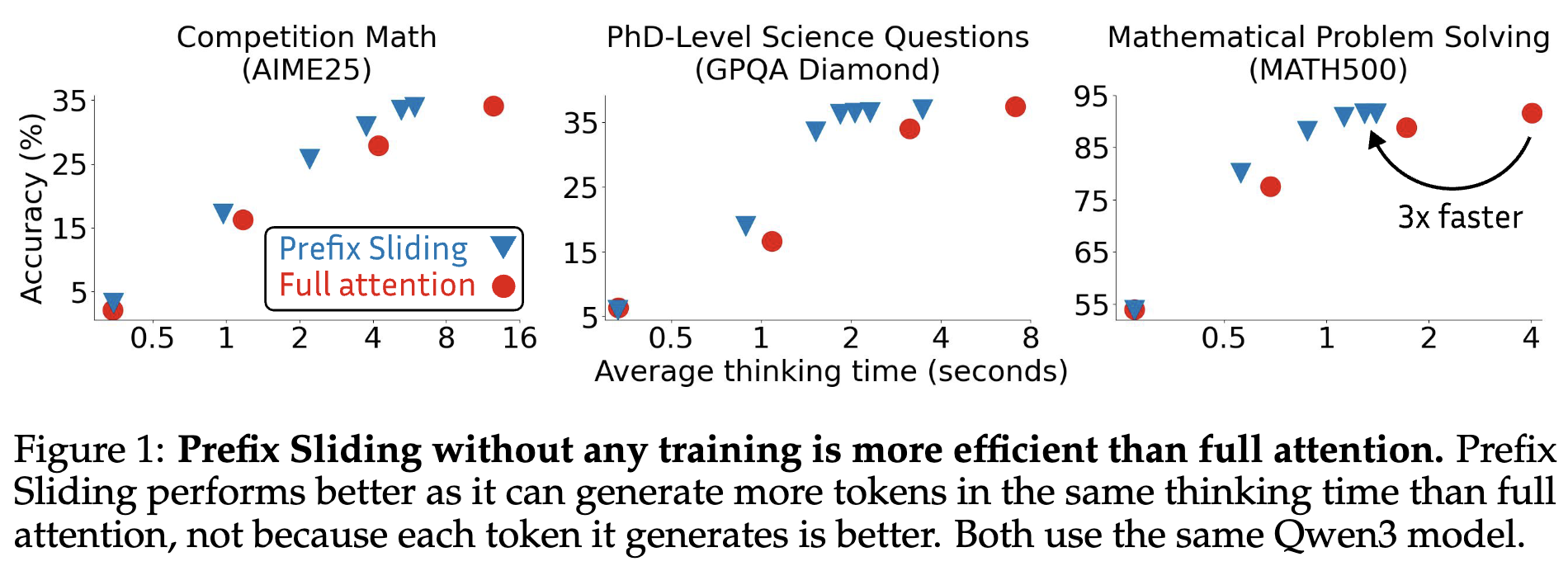
Updates:
- 2026-08: We released our paper announced via this tweet.
This repository provides an overview of all resources for the paper "Prefix Sliding for efficient test-time scaling".
The code uses older torch, vLLM, prime-rl, flash-attn versions. Prefix Sliding is a simple modification on the vLLM/flash-attn/RL side so it should be easy to port it to your preferred version. Let us know if you run any experiments with Prefix Sliding - we'd love to hear about it!
Inference
Build custom Flash-Attention & vLLM (takes ~10h, mostly on the uv pip install -e . step):
git clone -b st29 https://github.com/Muennighoff/vllm.git
git clone -b st29 https://github.com/Muennighoff/flash-attention.git
export VLLM_FLASH_ATTN_SRC_DIR="$(pwd)/flash-attention"
cd flash-attention
git submodule update --init --recursive
cd ../vllm/
uv pip install -e .
python tools/generate_cmake_presets.py
uvx cmake --preset release
uvx cmake --build --preset release --target install
import os
model="Qwen/Qwen3-1.7B"
length=32_000
w=4096
texts_per_batch=1
hf_overrides = {"use_sliding_window": True, "sliding_window": w, "max_position_embeddings": length*2}
os.environ.update({"SWF": str(w)})
from vllm import LLM, SamplingParams
from transformers import AutoTokenizer
tokenizer = AutoTokenizer.from_pretrained(model)
prompt = "Prime factorize 806912."
messages = [{"role": "user", "content": prompt}]
text = tokenizer.apply_chat_template(
messages,
tokenize=False,
add_generation_prompt=True,
enable_thinking=True,
)
text += "\n"
model = LLM(model, hf_overrides=hf_overrides)
texts = [text] * texts_per_batch
s = SamplingParams(temperature=1, top_p=0.95, max_tokens=length)
output = model.generate(texts,sampling_params=s)
print(output[0].outputs[0].text)Evaluation
For all evals involving Prefix Sliding build custom Flash-Attention & vLLM (takes ~10h, mostly on the uv pip install -e . step):
# Create your env first potentially
git clone -b st29 https://github.com/Muennighoff/vllm.git
git clone -b st29 https://github.com/Muennighoff/flash-attention.git
export VLLM_FLASH_ATTN_SRC_DIR="$(pwd)/flash-attention"
cd flash-attention
git submodule update --init --recursive
cd ../vllm/
uv pip install -e .
python tools/generate_cmake_presets.py
uvx cmake --preset release
uvx cmake --build --preset release --target install
AIME/GPQA/MATH500/HealthBench:
git clone -b prefix-sliding https://github.com/simplescaling/lm-evaluation-harness
cd lm-evaluation-harness; uv pip install -e .; cd ..

git clone https://github.com/Muennighoff/simpleverify
cd simpleverify; uv pip install -e .; cd ..

# Modify it as needed
bash scripts/eval.sh
LiveCodeBench:
git clone -b ps https://github.com/Muennighoff/LiveCodeBench
cd LiveCodeBench
# Follow ./LiveCodeBench/README.md for setup
# No Prefix sliding
python -m lcb_runner.runner.main --model Qwen/Qwen3-1.7B --scenario codegeneration --evaluate --release_version v4_v5 --max_tokens 262144
# Prefix sliding needs changing the config to add sliding window size
git clone https://huggingface.co/Qwen/Qwen3-1.7B
cd Qwen3-1.7B && git lfs pull && cd ..
python -c 'import json; p="Qwen3-1.7B/config.json"; x=json.load(open(p)); x.update({"use_sliding_window":True,"sliding_window":16384}); json.dump(x,open(p,"w"),indent=2)'
SWF=16384 python -m lcb_runner.runner.main --model ./Qwen3-1.7B --scenario codegeneration --evaluate --release_version v4_v5 --max_tokens 262144
Speed:
# Modify the file to comment/uncomment which parts you want to run
# Also modify the line that activates the env
cd scripts/speed
python submit_jobs.py --outdir ./job_results --jobsdir ./jobs --dryrun
Our eval result files are at https://hf.co/datasets/prefixsliding/evals
Summary/LastK
git clone -b tool-effc https://github.com/Muennighoff/trl-ps
cd trl-ps
uv pip install -e .
cd ..
# some older code uses these; alternatively comment out the code that uses it
uv pip install llama-index==0.14.24
uv pip install llama-index-readers-file==0.6.0
uv pip install llama-index-readers-web==0.6.0
# Modify it as needed
bash scripts/eval.sh
RL
You may have to change some things depending on your setup but this worked for us:
Prime Intellect:
/usr/local/cuda/bin/nvcc --version
apt-get update
apt-get install -y cuda-toolkit-12-8
ln -sfn /usr/local/cuda-12.8 /usr/local/cuda
/usr/local/cuda/bin/nvcc --version

wget -q https://repo.anaconda.com/miniconda/Miniconda3-latest-Linux-x86_64.sh -O miniconda.sh \
  && bash miniconda.sh -b -p $HOME/miniconda3 \
  && rm miniconda.sh \
  && $HOME/miniconda3/bin/conda init

source ~/.bashrc

conda tos accept --override-channels --channel https://repo.anaconda.com/pkgs/main
conda tos accept --override-channels --channel https://repo.anaconda.com/pkgs/r
conda create -y -n s python=3.12
conda activate s
pip install uv

git clone -b st29 https://github.com/Muennighoff/vllm.git
git clone -b st29 https://github.com/Muennighoff/flash-attention.git
export VLLM_FLASH_ATTN_SRC_DIR="$(pwd)/flash-attention"
cd flash-attention
git submodule update --init --recursive
cd ../vllm/
uv pip install -e .
python tools/generate_cmake_presets.py
uvx cmake --preset release
uvx cmake --build --preset release --target install

# Needs to be python 3.12 as flash-attn only has wheels for that for torch 2.9
uv pip install --no-build-isolation https://github.com/Dao-AILab/flash-attention/releases/download/v2.8.3/flash_attn-2.8.3+cu12torch2.9cxx11abiTRUE-cp312-cp312-linux_x86_64.whl

git clone -b s https://github.com/Muennighoff/prime-rl.git

uv pip install tomli_w
uv pip install pydantic-settings==2.12.0
uv pip install wandb
uv pip install loguru==0.7.3
uv pip install git+https://github.com/samsja/dion.git
uv pip install "jaxtyping>=0.3.2"
uv pip install "beartype>=0.21.0"
uv pip install "liger-kernel>=0.5.10"
uv pip install git+https://github.com/PrimeIntellect-ai/verifiers.git@cdbc417
uv pip install --upgrade "huggingface-hub>=0.34.0,=0.1.8"
uv pip install git+https://github.com/samsja/dion.git
uv pip install git+https://github.com/pytorch/torchtitan.git@dfd0a59f7dace5220c3670d7c6e1c70ba8fd4d73
uv pip install "prime-evals>=0.1.5"
uv pip install --index-url https://hub.primeintellect.ai/primeintellect/simple/ reverse-text
uv pip install --index-url https://pypi.org/simple --extra-index-url https://hub.primeintellect.ai/primeintellect/simple i3-math
uv pip install --index-url https://pypi.org/simple --extra-index-url https://hub.primeintellect.ai/primeintellect/simple acereason-math
uv pip install --index-url https://pypi.org/simple --extra-index-url https://hub.primeintellect.ai/primeintellect/simple math-env
uv pip install --index-url https://pypi.org/simple --extra-index-url https://hub.primeintellect.ai/primeintellect/simple math500
uv pip install --index-url https://pypi.org/simple --extra-index-url https://hub.primeintellect.ai/primeintellect/simple aime2024
uv pip install --index-url https://pypi.org/simple --extra-index-url https://hub.primeintellect.ai/primeintellect/simple aime2025

cd prime-rl
uv pip install --no-deps -e .

# Run sth like below; e.g. this is the prefix sliding run in Fig15
OPENAI_API_KEY=YOUR_KEY SWF=8192 WANDB_API_KEY=YOUR_KEY UV_NO_SYNC=1 UV_PROJECT_ENVIRONMENT=$CONDA_PREFIX python -m prime_rl.rl @ configs/acereason_math/stage1swlongnodiffnup.toml --wandb.project primerl --wandb.name ps
trl (synchronous RL like Figure 7):
git clone -b tool-effc https://github.com/Muennighoff/trl-ps
cd trl-ps
uv pip install -e .
cd ..
# some older code uses these; alternatively comment out the code that uses it
uv pip install llama-index==0.14.24
uv pip install llama-index-readers-file==0.6.0
uv pip install llama-index-readers-web==0.6.0

git clone -b g https://github.com/Muennighoff/open-r1-ps
cd open-r1-ps
# This is the run for PS in Fig7 but u need to adjust the slurm script
sbatch --nodes=1 slurm/train_example.slurm ps-1.5B grpo v83 zero2
Data
We created an RL dataset here. The various scripts that created it are in ./data/. The dataset is not important for the method so we don't provide an exact repro here, but the scripts should have everything needed.
Visuals
Figures are created via this colab equivalent to visuals/visuals.ipynb, except for Fig 2 created via scripts/plot.py. Some are further edited via the visuals/ps.fig file, which you can load in Figma. Output figures are in visuals/ in pdf or png format.
Citation
@misc{muennighoff2026prefixslidingefficienttesttime,
      title={Prefix Sliding for efficient test-time scaling},
      author={Niklas Muennighoff and Zhengyang Wang and Zeyi Chen and Weijia Shi and Binyuan Hui and John Yang and Dapeng Jiang and Mika Senghaas and Fares Obeid and Johannes Hagemann and Sami Jaghouar and Ludwig Schmidt and Percy Liang and Jason Wei and Andrew Y. Ng and Luke Zettlemoyer and Yejin Choi and Mike Lewis},
      year={2026},
      eprint={2608.26070},
      archivePrefix={arXiv},
      primaryClass={cs.CL},
      url={https://arxiv.org/abs/2608.26070},
}