

Repository
Docxtract
Open-source, self-hosted web application that extracts structured data from unstructured documents using LLMs. Define a schema visually, upload your documents, and let AI pull out exactly the fields you need — returned as clean JSON ready for downstream use.
- Service
- URL / Info
- Web
- Web
- Frontend
- Frontend
- Celery
- Celery
Specs
- ServiceURL / Info
- WebWeb
- FrontendFrontend
- CeleryCelery
- PostgresPostgres
- LayerTechnology
- BackendDjango 4.2+, Python 3.12
- FrontendReact 18, TypeScript, Vite, Tailwind CSS
- BridgeInertia.js (django-inertia + @inertiajs/react)
- AI/LLMPydantic AI (OpenAI, Anthropic, Google)
- Task QueueCelery (PostgreSQL as broker via SQLAlchemy)
- DatabasePostgreSQL 16
- UI Kitshadcn/ui (Radix UI primitives)
- RuntimeBun (frontend), Docker
- VariableDescription
- DJANGO_SECRET_KEYDjango secret key
- DJANGO_DEBUGEnable debug mode
- DJANGO_ALLOWED_HOSTSComma-separated allowed hosts
- DB_NAMEPostgreSQL database name
- DB_USERPostgreSQL user
- DB_PASSWORDPostgreSQL password
- DB_HOSTPostgreSQL host
- DB_PORTPostgreSQL port
- OPENAI_API_KEYOpenAI API key
- OPENAI_BASE_URLCustom OpenAI-compatible base URL
- ANTHROPIC_API_KEYAnthropic API key
- GOOGLE_API_KEYGoogle AI API key
README
Docxtract — AI-Powered Document Data Extraction
Docxtract is an open-source, self-hosted web application that extracts structured data from unstructured documents using LLMs. Define a schema visually, upload your documents, and let AI pull out exactly the fields you need — returned as clean JSON ready for downstream use.
Built with Django, React (Inertia.js), Celery, and Pydantic AI. Supports OpenAI, Anthropic, and Google models out of the box.
Features
- Visual Schema Builder — Design extraction schemas with a drag-and-drop field editor. Supports nested objects, arrays, and all JSON Schema types (
string,number,integer,boolean,object,array). - Multi-LLM Support — Use OpenAI (GPT-4o, etc.), Anthropic (Claude), or Google (Gemini) models. Swap providers per schema.
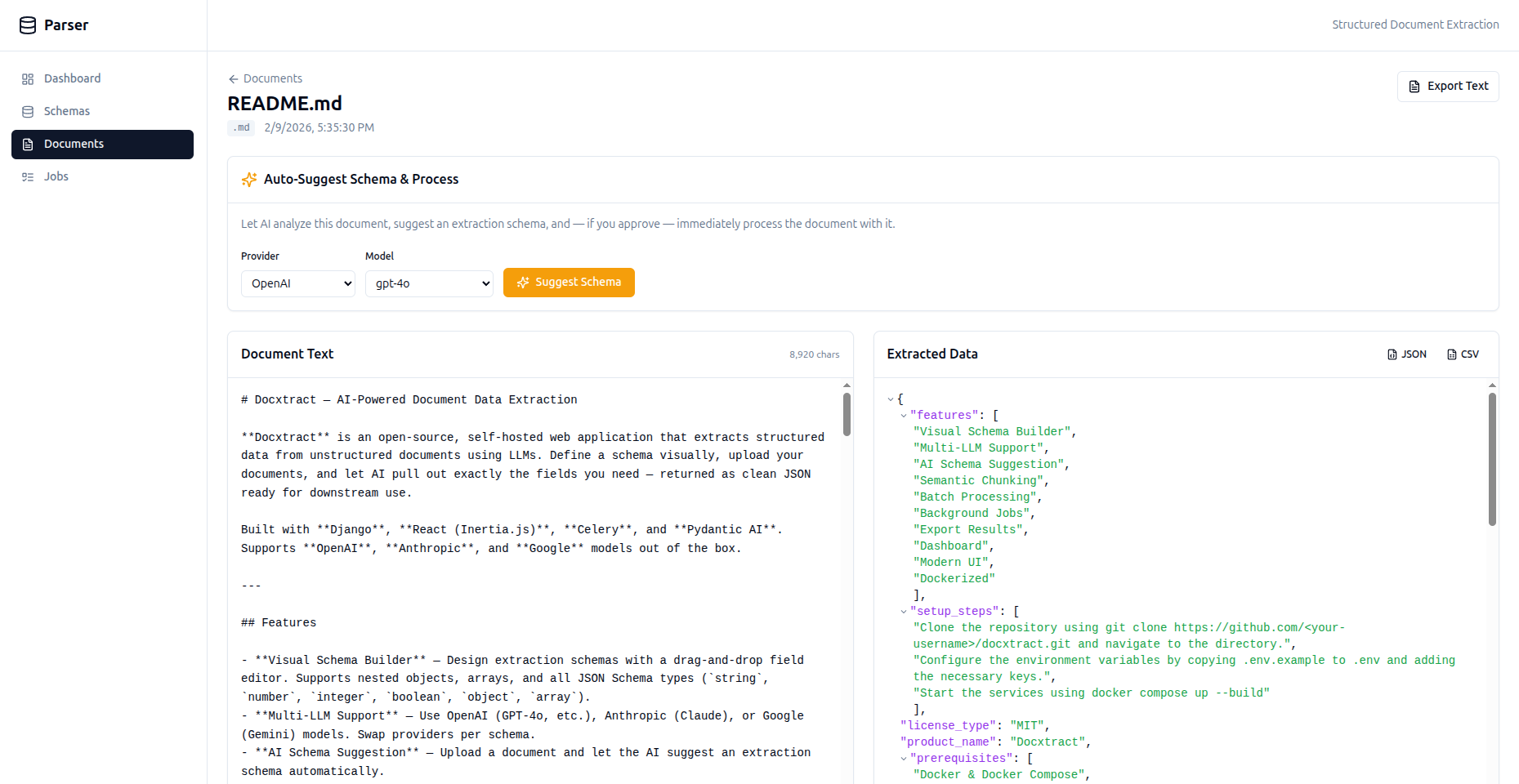
- AI Schema Suggestion — Upload a document and let the AI suggest an extraction schema automatically.
- Semantic Chunking — Large documents (>50K chars) are automatically split into overlapping chunks and processed iteratively, so you're never limited by context windows.
- Batch Processing — Process multiple documents against the same schema in one go.
- Background Jobs — All extraction runs asynchronously via Celery with automatic retries, exponential backoff, and real-time status tracking.
- Export Results — Download extracted data as JSON or CSV.
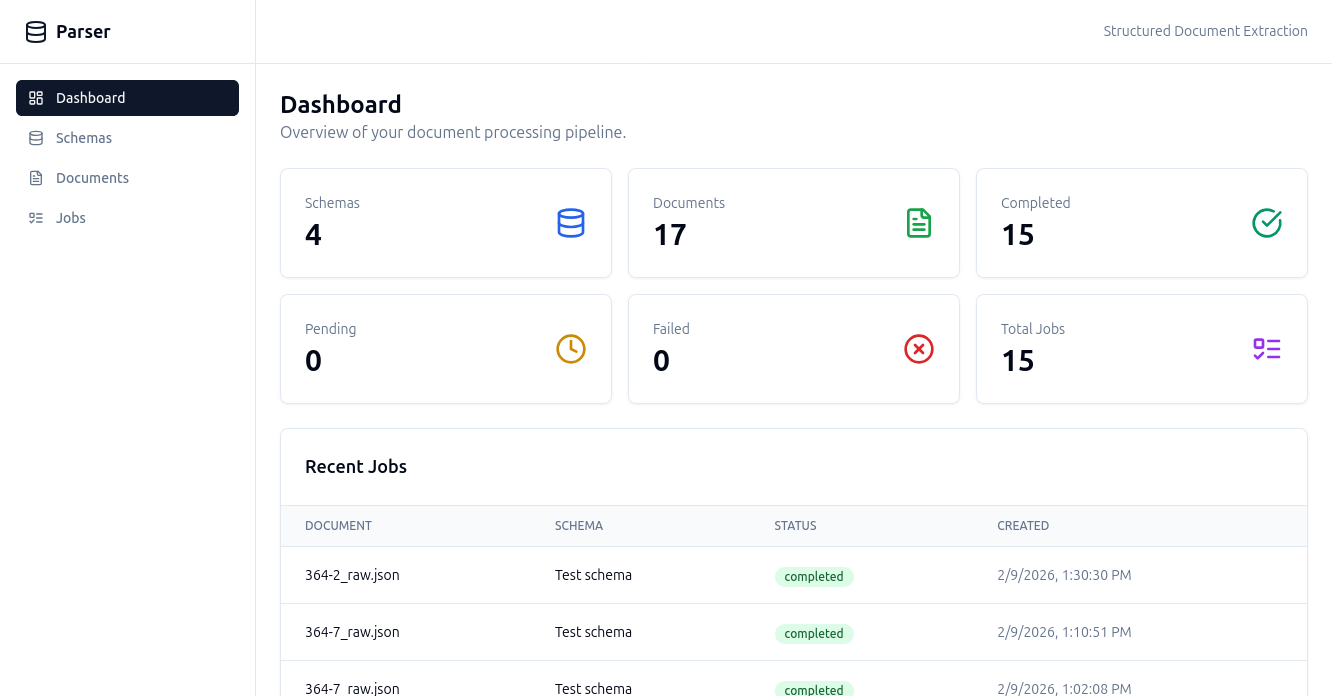
- Dashboard — At-a-glance stats for schemas, documents, and jobs (pending, completed, failed).
- Modern UI — React + Tailwind CSS + shadcn/ui components, served via Inertia.js for a SPA-like experience without building a separate API.
- Dockerized — Full
docker-composesetup with PostgreSQL, Django, Celery worker, and Vite dev server.
Screenshot
Architecture
┌────────────┐  Inertia  ┌──────────────┐
│  React UI  │◄──────────►│  Django      │
│  (Vite)    │            │  Views       │
└────────────┘            └──────┬───────┘
                                 │
                    ┌────────────┼────────────┐
                    │            │            │
              ┌─────▼────┐ ┌────▼─────┐ ┌────▼──────┐
              │ Postgres │ │  Celery  │ │ Pydantic  │
              │   (DB +  │ │  Worker  │ │    AI     │
              │  Broker) │ └────┬─────┘ │  Agents   │
              └──────────┘      │       └─────┬─────┘
                                │             │
                                └──────┬──────┘
                                       │
                              ┌────────▼────────┐
                              │  LLM Provider   │
                              │ OpenAI/Anthropic│
                              │    /Google      │
                              └─────────────────┘
Quick Start
Prerequisites
- Docker & Docker Compose (recommended), or
- Python 3.12+, PostgreSQL 16+, and Bun for local development
1. Clone the repository
git clone https://github.com/<your-username>/docxtract.git
cd docxtract
2. Configure environment variables
cp .env.example .envEdit .env and add your LLM API keys:
DJANGO_SECRET_KEY=change-me-to-a-random-string
DJANGO_DEBUG=True

# Database (defaults work with docker-compose)
DB_NAME=parser_db
DB_USER=postgres
DB_PASSWORD=postgres
DB_HOST=db
DB_PORT=5432

# LLM Providers (add at least one)
OPENAI_API_KEY=sk-...
OPENAI_BASE_URL=              # optional, for OpenAI-compatible APIs
ANTHROPIC_API_KEY=sk-ant-...
GOOGLE_API_KEY=AIza...
3. Start with Docker Compose
docker compose up --buildThis starts four services:
| Service | URL / Info |
|---|---|
| Web | http://localhost:8000 |
| Frontend | http://localhost:5173 (Vite dev server) |
| Celery | Background worker |
| Postgres | Port 5432 |
Open http://localhost:8000 in your browser.
Local Development (without Docker)
Backend
python -m venv .venv
source .venv/bin/activate
pip install -r requirements.txt

# Make sure PostgreSQL is running and the database exists
python manage.py migrate
python manage.py runserver
Celery Worker
celery -A config worker -l info --concurrency=2Frontend
cd frontend
bun install
bun run dev
Usage
1. Create a Schema
Navigate to Schemas → Create. Use the visual builder to define fields:
- Give each field a name, type, and description (the description guides the AI).
- Nest fields inside
objectorarraytypes. - Choose your LLM provider and model.
2. Upload Documents
Go to Documents → Upload. Supported formats: .txt, .md, and other plain-text files (up to 50 MB).
3. Process
From a document's page, select a schema and click Process. The job runs in the background — status updates in real time.
4. View & Export Results
Once completed, view the extracted JSON on the job detail page. Export as JSON or CSV.
AI Schema Suggestion
Don't want to build a schema from scratch? Upload a document and click Suggest Schema — the AI will analyze the document and propose a schema you can review and adopt.
Project Structure
├── config/              # Django project settings, urls, celery config
├── documents/           # Main Django app
│   ├── models.py        # ExtractionSchema, Document, ProcessingJob
│   ├── services.py      # Pydantic AI agents, chunking, schema conversion
│   ├── tasks.py         # Celery tasks with retry logic
│   ├── views.py         # Inertia views (server-side rendered props)
│   └── urls.py          # URL routing
├── frontend/            # React + TypeScript + Vite
│   └── src/
│       ├── pages/       # Inertia page components
│       ├── components/  # Schema builder, JSON viewer
│       ├── layouts/     # App shell layout
│       └── types/       # TypeScript interfaces
├── templates/           # Django base template (Inertia root)
├── docker-compose.yml   # Multi-service Docker setup
├── Dockerfile           # Python 3.12 slim image
├── manage.py
└── requirements.txt
Tech Stack
| Layer | Technology |
|---|---|
| Backend | Django 4.2+, Python 3.12 |
| Frontend | React 18, TypeScript, Vite, Tailwind CSS |
| Bridge | Inertia.js (django-inertia + @inertiajs/react) |
| AI/LLM | Pydantic AI (OpenAI, Anthropic, Google) |
| Task Queue | Celery (PostgreSQL as broker via SQLAlchemy) |
| Database | PostgreSQL 16 |
| UI Kit | shadcn/ui (Radix UI primitives) |
| Runtime | Bun (frontend), Docker |
Environment Variables
| Variable | Description | Default |
|---|---|---|
DJANGO_SECRET_KEY |
Django secret key | change-me-in-production |
DJANGO_DEBUG |
Enable debug mode | True |
DJANGO_ALLOWED_HOSTS |
Comma-separated allowed hosts | localhost,127.0.0.1 |
DB_NAME |
PostgreSQL database name | parser_db |
DB_USER |
PostgreSQL user | postgres |
DB_PASSWORD |
PostgreSQL password | postgres |
DB_HOST |
PostgreSQL host | localhost |
DB_PORT |
PostgreSQL port | 5432 |
OPENAI_API_KEY |
OpenAI API key | — |
OPENAI_BASE_URL |
Custom OpenAI-compatible base URL | — |
ANTHROPIC_API_KEY |
Anthropic API key | — |
GOOGLE_API_KEY |
Google AI API key | — |
Contributing
Contributions are welcome! Please open an issue first to discuss what you'd like to change.
- Fork the repository
- Create your feature branch (
git checkout -b feature/amazing-feature) - Commit your changes (
git commit -m 'Add amazing feature') - Push to the branch (
git push origin feature/amazing-feature) - Open a Pull Request
License
This project is licensed under the MIT License.
Acknowledgements
- Pydantic AI — LLM agent framework
- Inertia.js — Modern monolith SPA bridge
- shadcn/ui — Beautiful, accessible UI components
- Django — The web framework for perfectionists with deadlines