

Repository
tm1637-display-demo
A brief example to adapt TM1637 8-char digit display module with STM32F103 using embedded Rust
README
tm1637-display-demo
Example on operations for TM1637 8-char display module, STM32F103C8T6 with embedded Rust used.
I used software simulated I2C becaude TM1637 does not follow common I2C protocol as it does not
require an I2C address.
The final result should be like this:
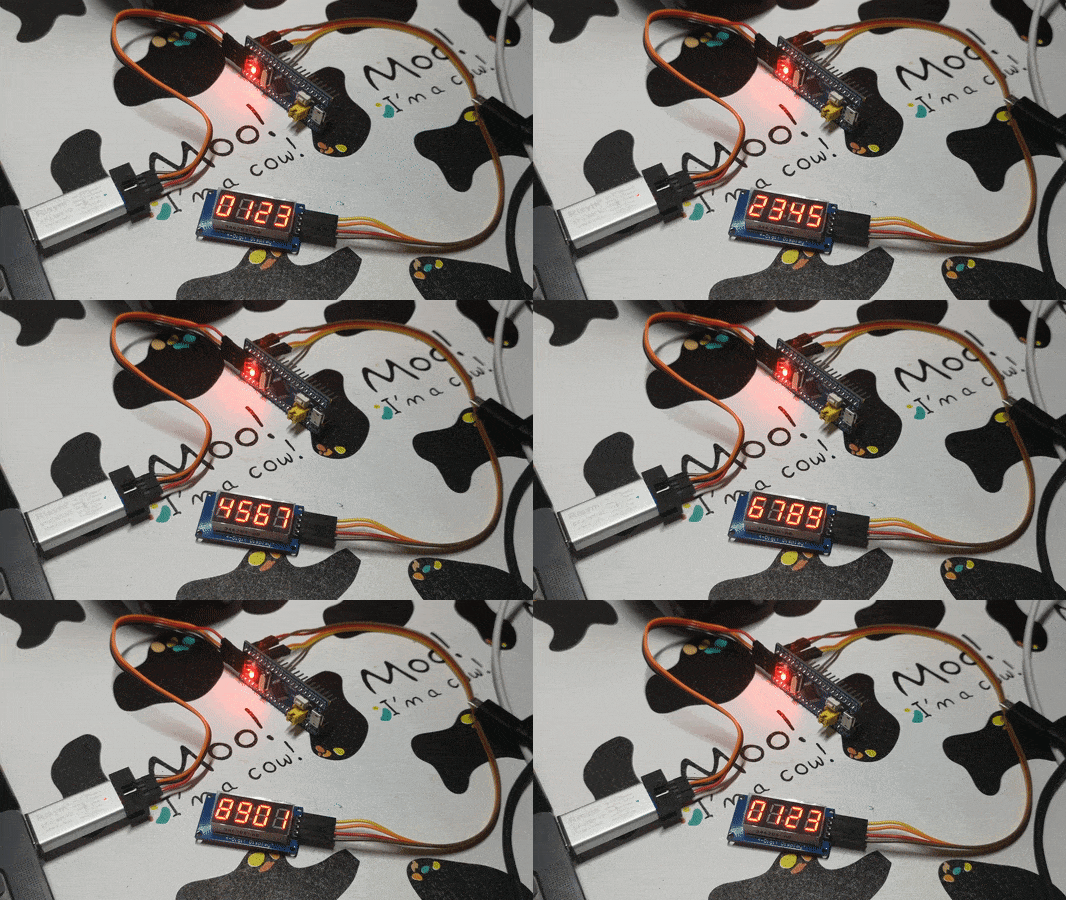
Build & Run
Before all the steps, you need to clone this repository to somewhere in your local storage.
We assume that all the terminals mentioned in follow text is opened in the local repository folder.
Hardware requirements
You need some simple hardware requirements:
- A STM32F103C8T6 'Blue Pill' module ('MCU board')
- A TM1637 8-char display module
- A ST-LINK v2 debugger
This won't cost much, and you may easily buy them at eBay, Taobao, Tmall, Alibaba, JD or Idlefish.
Software requirements
Some softwares are required to build this project. If you still do not know how to install after this
section, don't worry and try searching online. There are many documents that could solve your problem.
All installations require an Internet connection.
Install Rust
To build this project, you also need to have Rust compiler installed.
Follow instructions on install page, or run rustup update
if already installed. You may check your Rust version using rustc -V.
A special Rust target
Note that out Cortex-M3 chip requires a special Rust target being installed.
Just follow this command line:
rustup target add thumbv7m-none-eabiUsable Internet connection is required at this step. If you find the installation
being slow, you might need to search Google for a rustup mirror.
Install OpenOCD and GDB
By using openocd -v, you may check if you already have OpenOCD installed and configured
properly to PATH. As for GDB, you may need a special arm-none-eabi-gdb or gdb-multiarch
or simply gdb for embedded Cortex-M3 targets. You may consult Google for a tutorial to do so.
After a proper GDB installed, you may need to change the config cargo uses to debug this program.
Read the instruction after uncomment ONE of these three option to ... in .cargo/config file
to configure cargo to work well with your GDB.
Hardware connection
Connect ST-LINK debugger with STM32F103C8T6 board properly, and plug the debugger onto your
computer. Connect TM1637 module to proper 3.3-V or 5-V power supply pins of the MCU board
(the '3.3' and 'G'), its DIO to PB9 and its CLK to PB8.
You may change DIO and CLK connection along with Rust code in src/main.rs also being changed.
Execute on board
After hardware connection, we'll launch OpenOCD, and GDB follows using cargo.
We are half done, let's go!
Run OpenOCD
OpenOCD helps you connect to MCU board. Open a terminal and execute openocd.
You should see these lines in the output (the 'Target voltage' may vary):
Info : clock speed 1000 kHz
Info : STLINK V2J17S4 (API v2) VID:PID 0483:3748
Info : Target voltage: 3.206829
Info : stm32f1x.cpu: hardware has 6 breakpoints, 4 watchpoints
Info : Listening on port 3333 for gdb connections
If not or if with some errors, check the connections between debugger and MCU board, and run again.
Run using Cargo and GDB
After OpenOCD connection, leave this terminal alone as we need this connection in following steps.
Open another one and run this program as simple as:
cargo runYou'll see in the output that cargo is compiling this project, GDB is launched by cargo shortly after,
then GDB connects to OpenOCD and pauses for further instructions.
After this step, you'll see something like halted: PC: 0x0800638a in GDB terminal. Input GDB
command continue and press enter, the terminal blocks after a Continuing. line. And at
this time, you should see the final result similiar to what the first section shows. Congratulations!
If all these above are too easy to be a challenge for you, here comes some exercises. Good luck!
Exercises
- Modify the
src/main.rscode to modify three screens at the same time. (In one single loop.)
If possible, reuse the hardware timerTIM1for all three screens. - Modify code to use hardware I2C instead of software simulated I2C implemetation.
- Search the Internet to find out how to control the
:-shaped mark in the middle.
After that, present a HH:MM clock with symbol:blinking every second. - Write library allowing other chips to operate TM1637 screens.
You may consider relying on digitalInputPinandOutputPinin theembedded-halcrate.
Key for exercise 1 may be found at examples/three_screens.rs.
Contributing
All kinds of contributions are welcomed! You may fire an issue or open pull requests if there is a
mistake in code. Feature requests are welcomed and if you have one, just create an issue.
Author
Luo Jia [email protected], Wuhan, China
Special thanks
Some pieces of core are based on cortex-m-quickstart.
Thanks to Cortex-M Team at Group of Embedded Rust at The Rust Team for your wonderful framework!
Work here cannot be done without support from the community.
Thanks to everyone at rust.cc community for offering help, devices and love!
And thanks to /u/dakesew, /u/K900_
and /u/jechase at subreddit /r/rust
for advice and supports!
Special thanks to my group member WetABQ, HDJ
and PeratX for supportive ideas! Dalao TQL! Mobike, mobike!
Thanks to my girlfriend who has never appeared, emmm...