

- variable
- where it comes from
- OPENAI_API_KEY
- reference image generation — typically under $1 per scene
- MODAL_TOKEN_ID · MODAL_TOKEN_SECRET
- a free Modal account → modal.com/settings/tokens
- BLENDER_PATH
- your Blender install directory , not the binary
Specs
- variablewhere it comes from
- OPENAI_API_KEYreference image generation — typically under $1 per scene
- MODAL_TOKEN_ID · MODAL_TOKEN_SECRETa free Modal account → modal.com/settings/tokens
- BLENDER_PATHyour Blender install directory , not the binary
- LR_SCANS_DIRthe folder holding your scans
README
LiteReality-Agent
An Agentic System for Interactable 3D Indoor Scene Reconstruction
Website | Blog | LiteReality Scanner | Technical Report (coming soon)
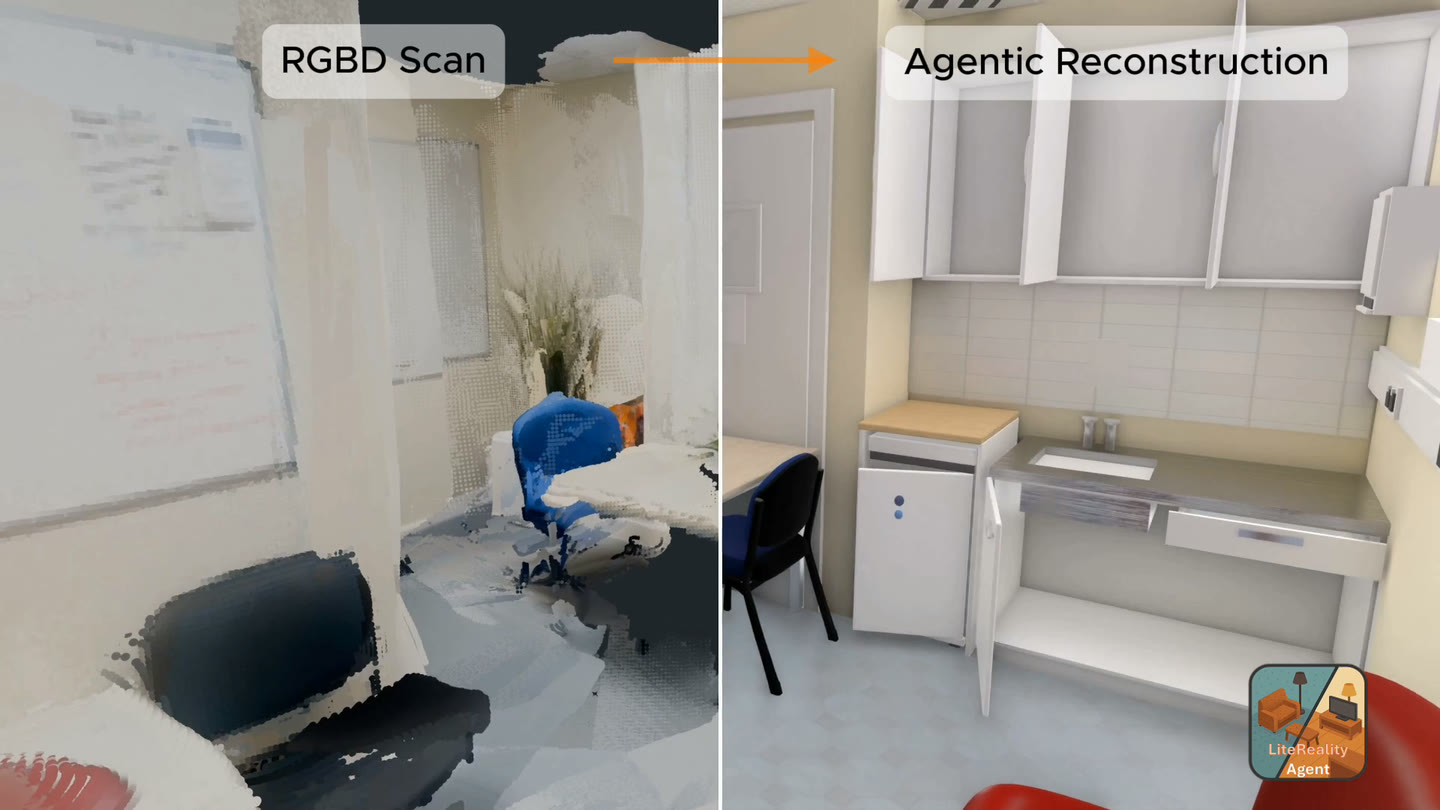
An open-source, end-to-end toolkit for reconstructing interactable indoor 3D scenes. Scan a room
with the LiteReality Scanner; the agent turns it into
a complete, graphics-ready scene with articulated assets.
How to use
- Get the scanner app — LiteReality Scanner on the App Store, free.
- Scan your room. One walkthrough captures the RGB frames, depth, and the RoomPlan
room.usdzthe pipeline needs. - Upload the scan to the machine you'll run on.
- Run LiteReality-Agent — for an articulated,
realistic room reconstruction.
Test scenes. Don't have a scan yet? Clone the example room scans and start from them:
git clone https://github.com/LiteReality/example-scans.git
uv run litereality run example-scans/<scan>
Requirements
Tested on macOS (Apple Silicon) and Linux (with a >=24 GB GPU).
uv- Blender 5.x (tested on 5.1).
BLENDER_PATHpoints at the install directory, not the binary. - OpenAI API key for reference image generation — typically under $1 per scene.
- A logged-in agent CLI on your
PATH— this drives all reasoning.claude
(Claude Code) is the default;codex(OpenAI Codex) is also supported, selected with
LR_AGENT_PROVIDERinmodels.env. - Somewhere to run TRELLIS and GroundingDINO — either a Modal account
(recommended; free tier, no local GPU, works on macOS) or a Linux box with a ≥24 GB NVIDIA GPU.
See Install — this is the one real choice in the setup.
Install
TRELLIS and GroundingDINO need a GPU. By default they run hosted on Modal, which is the
recommended path: nothing heavy runs on your machine, so an Apple Silicon Mac with no GPU is
enough, and detection fans out across several containers at once instead of queueing behind a
single card. Modal's free tier covers this workload comfortably. Got your own Linux GPU? See
deploy/local-gpu.md instead.
1. Install the environment.
uv sync --frozen --extra modal --group dev
cp .env.example .env
2. Fill in .env.
| variable | where it comes from |
|---|---|
OPENAI_API_KEY |
reference image generation — typically under $1 per scene |
MODAL_TOKEN_ID · MODAL_TOKEN_SECRET |
a free Modal account → modal.com/settings/tokens |
BLENDER_PATH |
your Blender install directory, not the binary |
LR_SCANS_DIR |
the folder holding your scans |
For example:
OPENAI_API_KEY=sk-...
MODAL_TOKEN_ID=ak-...
MODAL_TOKEN_SECRET=as-...
BLENDER_PATH=/Applications/Blender.app/Contents/MacOS
LR_SCANS_DIR=~/scans
3. Deploy the models.
uv run litereality setupOne-time per workspace. See deploy/modal/README.md for details.
4. Check you're ready to go.
SANITY_DEEP=1 uv run python sanity.pyRun
The installed CLI is the only supported pipeline entry point. One command runs everything:
uv run litereality run /path/to/captureThe stages
A reconstruction has two stages: scene init followed by authoring.
Scene init is deterministic.
Authoring is agentic: the agent looks at the seed room, compares it against the capture,
and edits it until it matches. Either half can be run on its own.
# scene init — capture to seed room
uv run litereality run /path/to/capture --through seed

# authoring — seed room to finished room, on a package scene init already produced
uv run litereality stage author run/my-room --force --polish --live
--polish adds object refinement, materials, and a model-driven quality pass on top of authoring.
--live shows how everything is built in real time, alongside the agent's trace.
See the results
uv run litereality view run/<scan>The room itself
In the formats you'd take elsewhere:
room_preview/Room.glb— materials baked and clips intact, for Blender / Unity / Unreal / the webroom_preview/Room.blend— the same room as a Blender sceneroom/— define the entire room here
Development
See ARCHITECTURE.md for package ownership, dependency direction, and the current
agent tool registry.
Safe local verification is limited to static checks, offline unit tests, CLI parsing, and package
builds:
uv run ruff check src tests sanity.py scripts
uv run pytest -q
uv build
Tests marked blender, scan, or live are excluded by default.
Citation
A technical report is coming. In the meantime:
@article{huang2026litereality-agent,
  title   = {{LiteReality-Agent}: An Agentic System for
             Interactable 3D Indoor Scene Reconstruction},
  author  = {Huang, Zhening and Li, Yueyan and Chiu, Johnathan and
             Lyu, Xiaoyang and Zhou, Matt and Yao, Yuxin and
             Lasenby, Joan and Wu, Shangzhe},
  year    = {2026}
}