

- Key
- Description
- + , >
- Zoom in
- - , <
- Zoom out
- 0
- Reset zoom
Specs
- KeyDescription
- + , >Zoom in
- - , <Zoom out
- 0Reset zoom
- [shift-]LeftScroll left
- [shift-]RightScroll right
- [shift-]UpScroll up
- [shift-]DownScroll down
- nToggle between showing group and node information
- ,Previous frame
- .Next frame
- xShow extended context: upstream/downstream links for selected node
- sMake screenshot
- BackSpaceGo to previous selection
README
6502 X-Ray
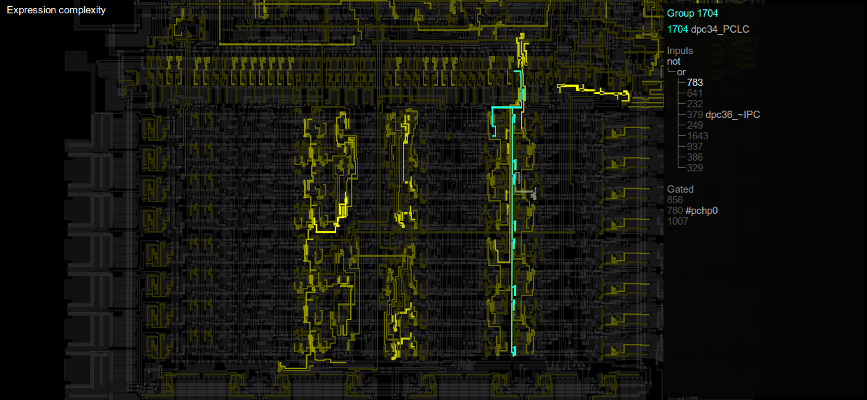
6502 X-Ray is a tool for visualizing the connectivity inside
the 6502 chip. It uses the data from the Visual 6502 project [1].
Support for other chips such as the 6800 may be added later.
[1] http://visual6502.org/
Dependencies
Requirements for running are Python 2.7, PyCairo and Gtk3 (through gi.repository).
In the case of Ubuntu or Debian-ish distros use:
apt-get install python-cairo python-gi python-gi-cairoStarting
usage: xray6502.py [-h] [-n NODE] [FILE [FILE ...]]

6502 chip visualization tool

positional arguments:
  FILE                  Overlay data files (JSON) to load

optional arguments:
  -h, --help            show this help message and exit
  -n NODE, --node NODE  Highlight a node at start
Usage
Hover over the chip overview to show information about nodes in the
infobox. To lock the selection, click with the left mouse button
(use right mouse button to unlock).
Further navigation can be done by clicking on node numbers in the infobox,
or selecting another node in the chip overview. Use backspace to go back
to the last selected node.
With x, the context of the selected node (those nodes connected through
transistors) will be shown as well.
The data shown in the infobox can be switched with 'n'. This will either
show per-node or per-group information. A group here is a group of nodes
connected through c1 and c2 of transistors.
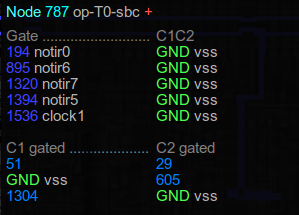
Node mode shows the connected transistors. The top table shows the transistors
connected to this node through C1 or C2, with the node connected to the gate
and the node connected to the other side of the transistor being shown. The bottom
table shows the C1 and C2s for transistors for which this node is connected to the gate.
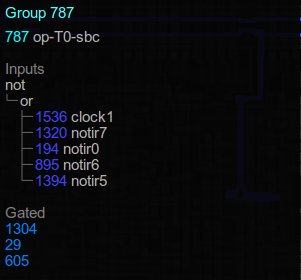
Group mode shows the nodes in the connected group. If there is one output and
this output can be interpreted as a boolean expression of the inputs, this
expression is shown.
Keyboard shortcuts
| Key | Description |
|---|---|
+, > |
Zoom in |
-, < |
Zoom out |
0 |
Reset zoom |
| [shift-]Left | Scroll left |
| [shift-]Right | Scroll right |
| [shift-]Up | Scroll up |
| [shift-]Down | Scroll down |
n |
Toggle between showing group and node information |
, |
Previous frame |
. |
Next frame |
x |
Show extended context: upstream/downstream links for selected node |
s |
Make screenshot |
| BackSpace | Go to previous selection |
Overlay files
Overlay files can be loaded to show more information on the chip map. These are simple
json files with the following format:
{
    "title": "Title of this overlay",
    "values": [1.0, 0.0, ...],
    "tags": [1, 0, 1, 0],
    "cycle": <half-cycle number>,
    "PC": <current PC address>
}titlespecifies a title for this overlay, this is shown to the uservaluesare scalar values from 0.0 to 1.0 per nodetagsare bitwise tags per nodecycleis the current half-cycle, this is shown to the userPCis the current instruction pointer address, this is shown to the user
All of the keys are optional. Multiple data files can be read, in which case
, and . can be used to browse between the frames.
Authors
- Wladimir J. van der Laan [email protected]