

Repository
optimizerDuck
Free, open-source Windows optimization tool for performance, privacy, and simplicity.
- Category
- What it covers
- Performance
- Performance
- Privacy
- Privacy
- GPU
- GPU
Specs
- CategoryWhat it covers
- PerformancePerformance
- PrivacyPrivacy
- GPUGPU
- PowerPower
- Bloatware & ServicesBloatware & Services
- User ExperienceUser Experience
- ToolWhat it does
- System DashboardSystem Dashboard
- Startup ManagerStartup Manager
- Scheduled TasksScheduled Tasks
- Disk CleanupDisk Cleanup
- Bloatware RemoverBloatware Remover
README
 # [optimizerDuck](https://optimizerduck.vercel.app/)
**optimizerDuck is a free, open-source Windows optimization tool built for performance, privacy, and simplicity.**
[](https://github.com/itsfatduck/optimizerDuck/releases/latest)
[](https://github.com/itsfatduck/optimizerDuck/releases)
[](https://github.com/itsfatduck/optimizerDuck/stargazers)
[](./LICENSE)
[](https://discord.gg/tDUBDCYw9Q)
[](https://github.com/itsfatduck/optimizerDuck/actions/workflows/ci.yml)
[](https://dotnet.microsoft.com/en-us/download)
[](https://www.microsoft.com/en-us/software-download/)
**[Getting Started](https://optimizerduck.vercel.app/docs/guides/getting-started) | [How It Works](https://optimizerduck.vercel.app/docs/guides/how-it-works) | [FAQ](https://optimizerduck.vercel.app/docs/faq/general)**
**English** | [Tiếng Việt](README.vi.md) | [繁體中文](README.zh-TW.md) | [简体中文](README.zh-CN.md)
⭐ Star History
If optimizerDuck helped improve your PC, consider giving the repo a ⭐ and sharing it with others.
Every star helps motivate future improvements.
# [optimizerDuck](https://optimizerduck.vercel.app/)
**optimizerDuck is a free, open-source Windows optimization tool built for performance, privacy, and simplicity.**
[](https://github.com/itsfatduck/optimizerDuck/releases/latest)
[](https://github.com/itsfatduck/optimizerDuck/releases)
[](https://github.com/itsfatduck/optimizerDuck/stargazers)
[](./LICENSE)
[](https://discord.gg/tDUBDCYw9Q)
[](https://github.com/itsfatduck/optimizerDuck/actions/workflows/ci.yml)
[](https://dotnet.microsoft.com/en-us/download)
[](https://www.microsoft.com/en-us/software-download/)
**[Getting Started](https://optimizerduck.vercel.app/docs/guides/getting-started) | [How It Works](https://optimizerduck.vercel.app/docs/guides/how-it-works) | [FAQ](https://optimizerduck.vercel.app/docs/faq/general)**
**English** | [Tiếng Việt](README.vi.md) | [繁體中文](README.zh-TW.md) | [简体中文](README.zh-CN.md)
⭐ Star History
If optimizerDuck helped improve your PC, consider giving the repo a ⭐ and sharing it with others.
Every star helps motivate future improvements.
Quick Start
- Download from GitHub Releases
- Run the
.exedirectly, no installation required - Choose the optimizations you want, apply them, and restart your PC when you're ready
[!TIP]
Always create a system restore point before making changes.
[!NOTE]
Available in English, Vietnamese, Traditional Chinese (contributed by @abc0922001), and Simplified Chinese (contributed by @wcxu21).
Want to add your language? See CONTRIBUTING.md.
What optimizerDuck Does
Windows ships with a lot of things you may not need: background services, telemetry, pre-installed apps, startup programs, and scheduled tasks that eat resources. optimizerDuck gives you a single interface to clean all of that up.
It applies targeted system tweaks to reduce overhead and block unwanted behavior, and bundles several management tools so you can see what is running, remove what you do not want, and revert any change if something goes wrong.
[!NOTE]
Every optimization can be applied manually. optimizerDuck just makes it easier for you to apply these optimizations.
System Optimizations
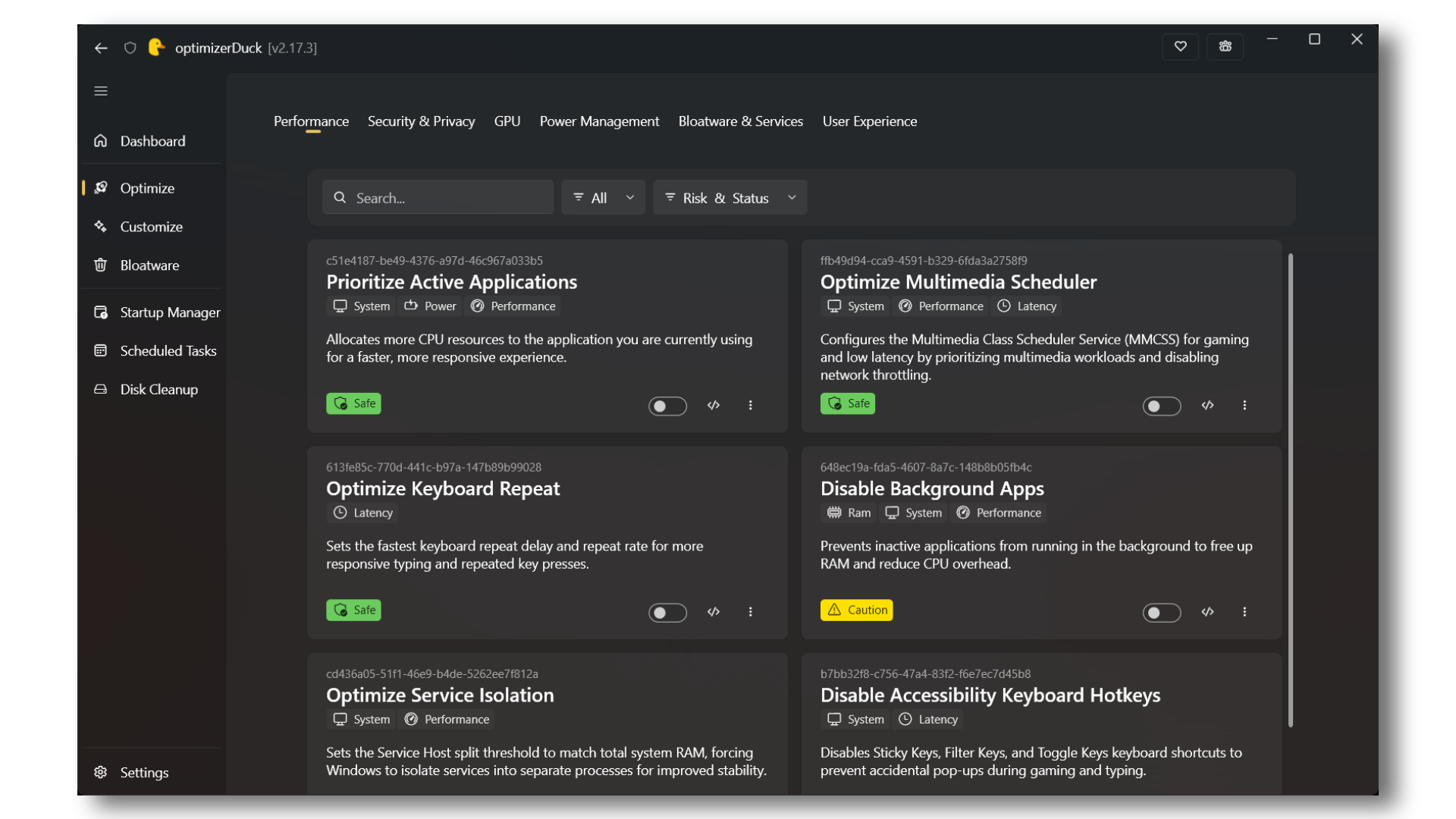
Over 30 tweaks across 6 categories, each with a clear description and risk rating so you know exactly what each change does before applying it.
| Category | What it covers |
|---|---|
| Performance | Service host tuning based on your RAM, process priority adjustments, keyboard latency reduction, and multimedia scheduler tweaks for smoother gaming |
| Privacy | Disable Windows telemetry, error reporting, advertising ID, location tracking, Cortana, Copilot, and content delivery suggestions |
| GPU | Vendor-specific registry tweaks for AMD, NVIDIA, and Intel GPUs, covering power states, clock gating, and display latency |
| Power | Disable hibernation and fast startup, turn off USB selective suspend, install a custom high-performance power plan, and disable power throttling |
| Bloatware & Services | Block OEM app reinstall behavior and fine-tune startup types for 200+ Windows services |
| User Experience | Remove menu show delays, disable visual effects like taskbar animations and transparency for a snappier feel |
[!IMPORTANT]
If you feel like there aren't many optimizations, don't assume they are ineffective or outdated. optimizerDuck focuses only on optimizations that have been tested, benchmarked, or widely trusted by the community. Some changes may not produce immediately noticeable differences, but they can still help your system run more smoothly and reliably over time.
Feature Toggles
Flip Windows settings on or off without digging through the registry or searching for guides online. Organized into four sections:
- Desktop: Show or hide icons (This PC, Recycle Bin, Network, User Files, Control Panel), remove shortcut arrow overlays
- Taskbar: Center or left alignment, toggle widgets, Task View button, End Task button, clock seconds, and Bing search in Start
- Explorer: File extensions, hidden files, clipboard history, compact view, snap assist, item checkboxes, classic context menu, and more
- Gaming: Game Mode, Game Bar, background recording, mouse acceleration, fullscreen optimizations, hardware-accelerated GPU scheduling
- System: Enable Num Lock on boot
Built-in Tools
| Tool | What it does |
|---|---|
| System Dashboard | View your CPU, RAM, GPU, storage drives, and OS details in one panel |
| Startup Manager | See every app and task that launches at boot, toggle them on or off, and open their file location |
| Scheduled Tasks | Browse, run, stop, enable, disable, or delete Windows scheduled tasks |
| Disk Cleanup | Scan and clear temp files, system cache, Windows Update leftovers, prefetch, thumbnails, recycle bin, crash dumps, and old Windows installations |
| Bloatware Remover | Lists all removable AppX packages with risk badges (Safe, Caution, Unknown), so you can pick what to remove |
Safety
We know changing system settings carries risk, so the tool is built around reversibility and user control.
See the Privacy Policy for details on our data practices.
- Automatic backups: Every change writes a revert file to a local folder. You can restore individual tweaks or roll back everything
- One-click revert: Undo any applied optimization from the UI with a single click
- Risk ratings: Each tweak is labeled Safe, Moderate, or Risky based on its potential impact
- No defaults applied: Nothing runs until you select it. The tool does not enable anything on its own
- Restore point prompt: Before your first optimization, the app suggests creating a Windows restore point
Technical Details
- Framework: WPF on .NET 10, using the WPF UI library for Fluent design
- Revert system: Four revert step types (Registry, Service, Scheduled Task, Shell) with JSON-persisted state and thread-safe file I/O
- Theming: Dark (default), Light, and High Contrast modes with Mica backdrop support
- No installer: Runs as a single .exe, no installation required
- Backup system: Local folder-based backup for every change, with one-click restore
- Discovery: Optimization and Feature categories are discovered automatically via reflection + custom attributes, no manual registration needed
- No telemetry: The app does not collect any user data
Documentation
Official Documentation
Step-by-step guides, detailed breakdowns of each optimization, and best practices for using optimizerDuck.
Contribute
We welcome contributions from the community! Whether you're fixing bugs, adding new optimizations or features, improving documentation, or helping translate the app into other languages, your support is greatly appreciated.
For more information, please see CONTRIBUTING.md.
Community
[!TIP]
Join our Discord server for support, tips, and discussions with other users and contributors.<a href="https://discord.gg/tDUBDCYw9Q">

</a>
If optimizerDuck helped your PC:
- ⭐ Star the repo
- 💬 Join Discord for support
- 🐞 Report bugs on GitHub
- 🎁 Support the project here
Links
- 🌐 Website
- 📖 Documentation
- 💬 Discord
- 🐞 Issues
Every contribution helps. Bug reports, feature suggestions, translations, and sharing your experience all matter.
Disclaimer
optimizerDuck is provided "as is", without warranty of any kind.
By using this tool, you agree that the authors are not liable for system instability, data loss, or issues caused by third-party software or user modifications.
Always create a restore point before applying changes.
[!NOTE]
optimizerDuck modifies system settings and the Windows registry. Use at your own risk. We recommend backing up important data and creating a restore point before making changes.See Terms of Service, Privacy Policy, and Disclaimer for more information.
License
 **[GPL v3 License](https://www.gnu.org/licenses/gpl-3.0.en.html)**See [LICENSE](./LICENSE).