

- Document
- Description
- docs/prompting.md
- How to write JSON prompts, color palette conditioning, aspect ratios
- docs/inference.md
- Sampler presets, parameter reference, resolutions, optimization tips
- docs/model_architecture.md
- Architecture diagram, DiT spec, component details
Specs
- DocumentDescription
- docs/prompting.mdHow to write JSON prompts, color palette conditioning, aspect ratios
- docs/inference.mdSampler presets, parameter reference, resolutions, optimization tips
- docs/model_architecture.mdArchitecture diagram, DiT spec, component details
- docs/pipeline.mdConceptual pipeline walkthrough — how all components fit together
- docs/development.mdDev setup, pre-commit hooks, contributing
- docs/safety.mdPre-training, post-training, and inference-time safety mitigations; how to report violations
README

Ideogram 4: Open image model at the forefront of design






Ideogram 4 is Ideogram's first open-weight text-to-image model. It is a state-of-the-art foundation model trained from scratch — not a fine-tune of any existing model. It introduces a new structured JSON prompting interface, with best-in-class multilingual text rendering, deep language understanding, explicit bounding-box layout and color-palette controls, and native 2k resolution images. The easiest way to try the model is online at ideogram.ai.
We believe openness drives innovation, and we invite the research community to innovate with us on the forefront of visual intelligence.
Table of Contents
News
- [2026-06-03] Ideogram 4 released! Inference code and weights
are now public, and our technical blog post is live. See the
Quick Start section to generate your first image, or try the
model online at ideogram.ai.
Model Zoo
| Model | Params | Weight Quantization | Supported Hardware | Diffusers Support | License |
|---|---|---|---|---|---|
| Ideogram 4 (nf4) | 9.3B | nf4 | CUDA | Yes | Ideogram 4 Non-Commercial |
| Ideogram 4 (fp8) | 9.3B | fp8 | All | No | Ideogram 4 Non-Commercial |
We plan to support more quantizations in the future.
Performance
We evaluate Ideogram 4 across third-party arenas and benchmarks, standard
open-source benchmarks, and our own internal human-preference benchmark. Across
all of them, Ideogram 4 is the best open-weight image model by far, and sits
at the frontier of design.
Design Arena
Design Arena is a third-party image Elo
leaderboard focused specifically on design-oriented generation. On the overall
board, Ideogram 4 is the top-ranked open-weight model, trailing only proprietary
GPT and Gemini models:
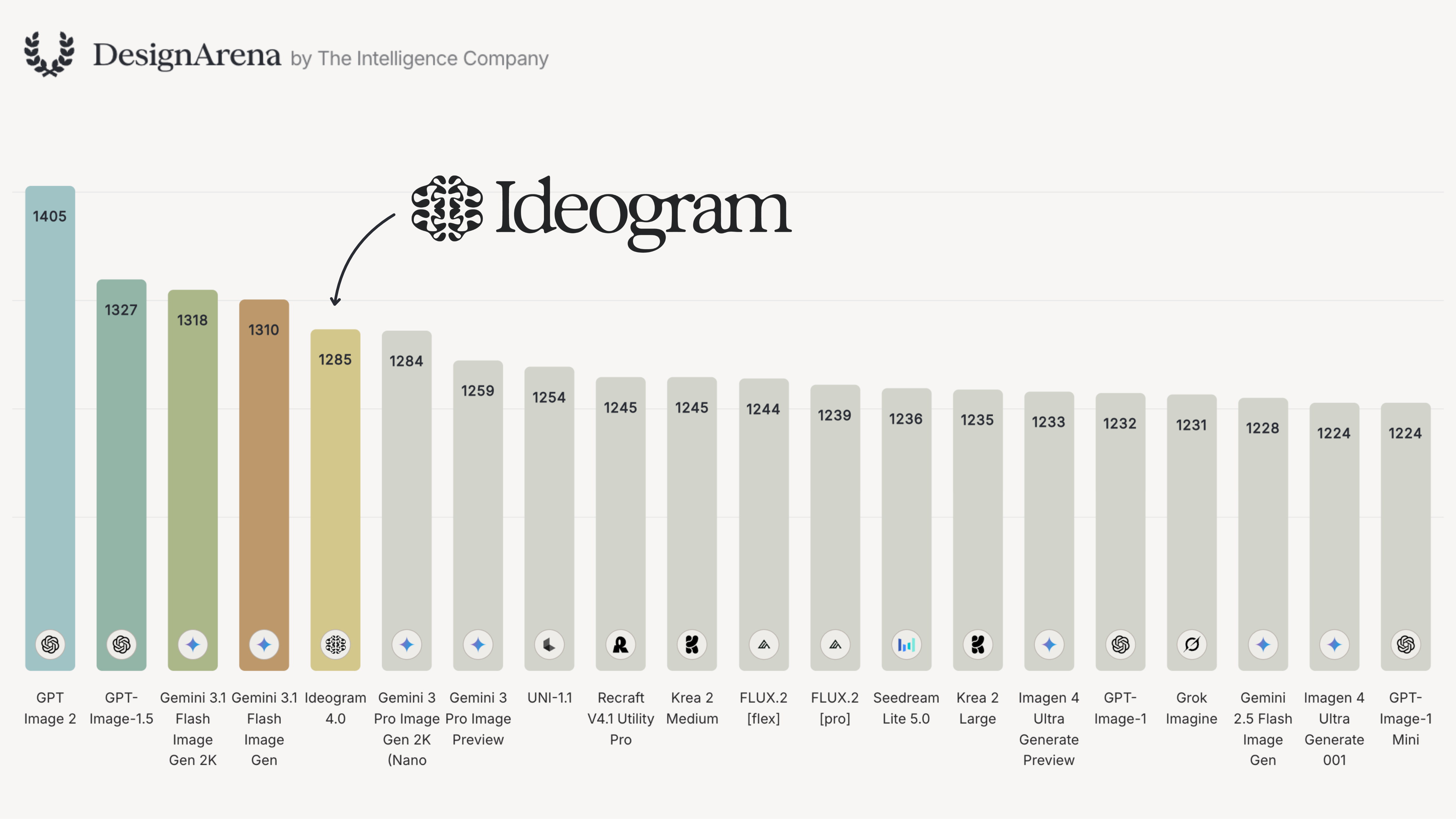
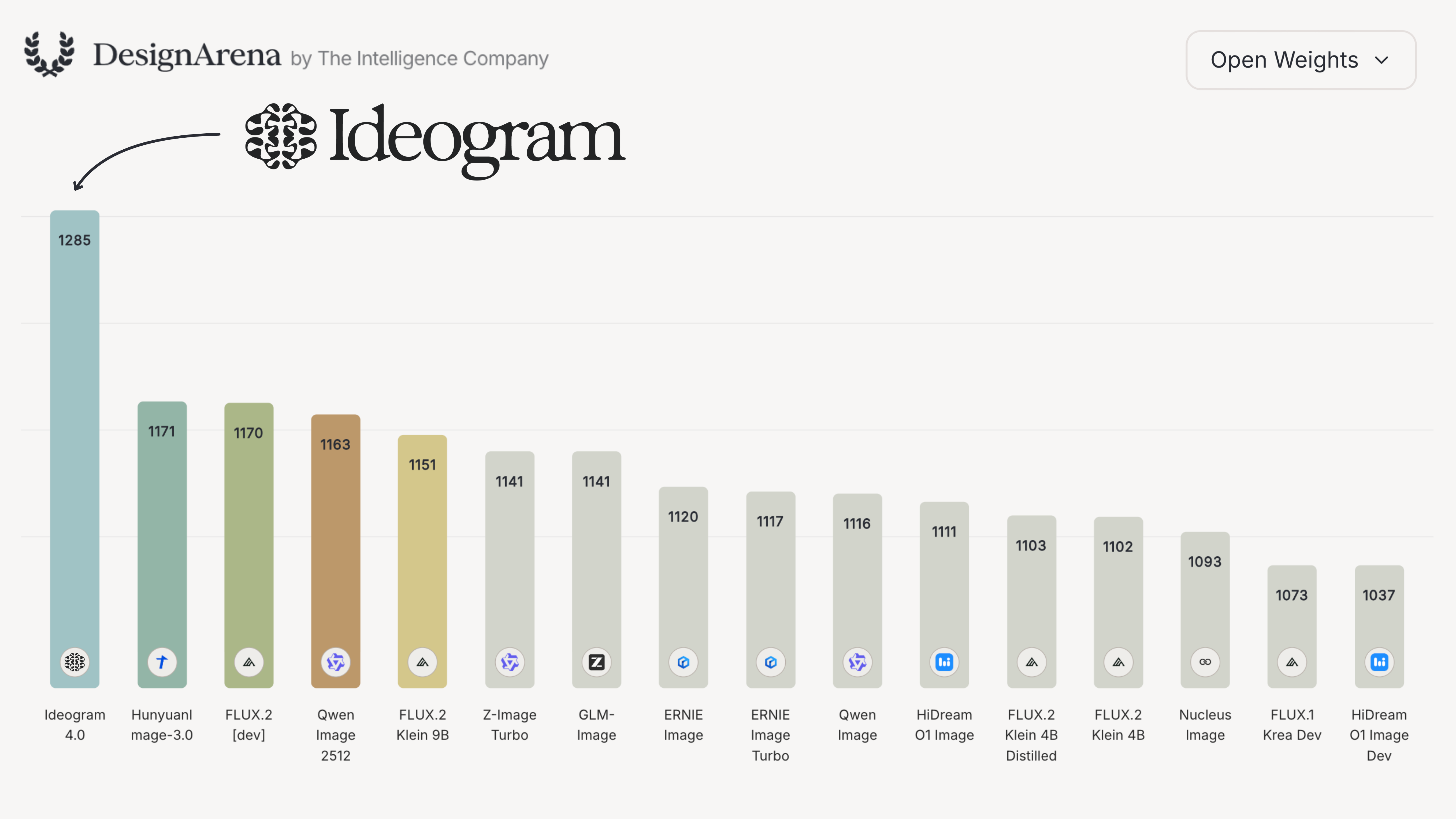
Filtered to open-weight models only, Ideogram 4 leads by a commanding margin,
well ahead of the next-best open model:
ContraLabs
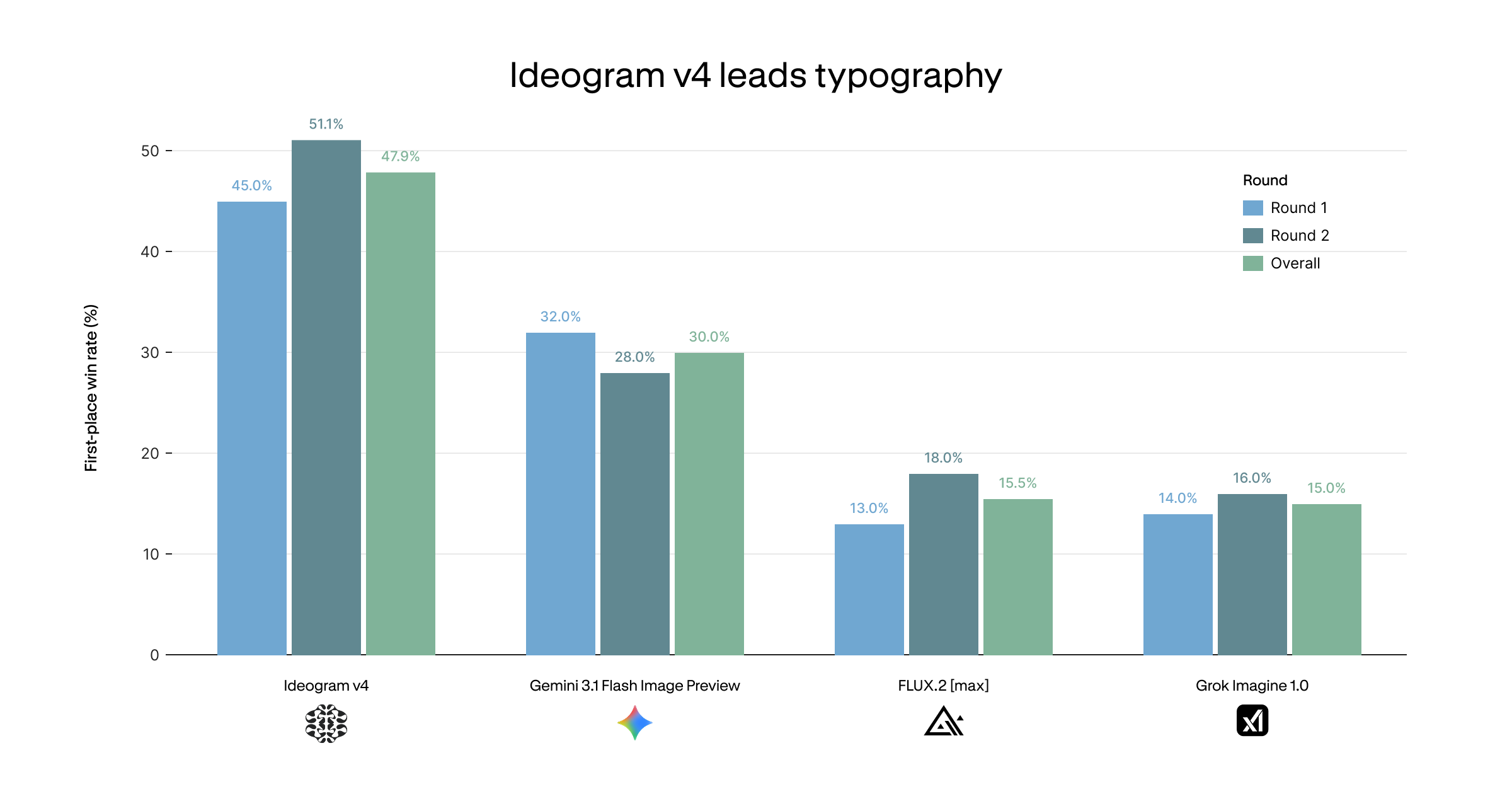
ContraLabs ran a blind typography evaluation judged by
ten professional designers from Contra's top-earning talent. Ideogram 4 leads on
first-place win rate, picked as the best of four models 47.9% of the time
overall — well ahead of Gemini 3.1 Flash Image Preview (Nano Banana 2) at 30.0%,
FLUX.2 [max] (15.5%), and Grok Imagine 1.0 (15.0%):
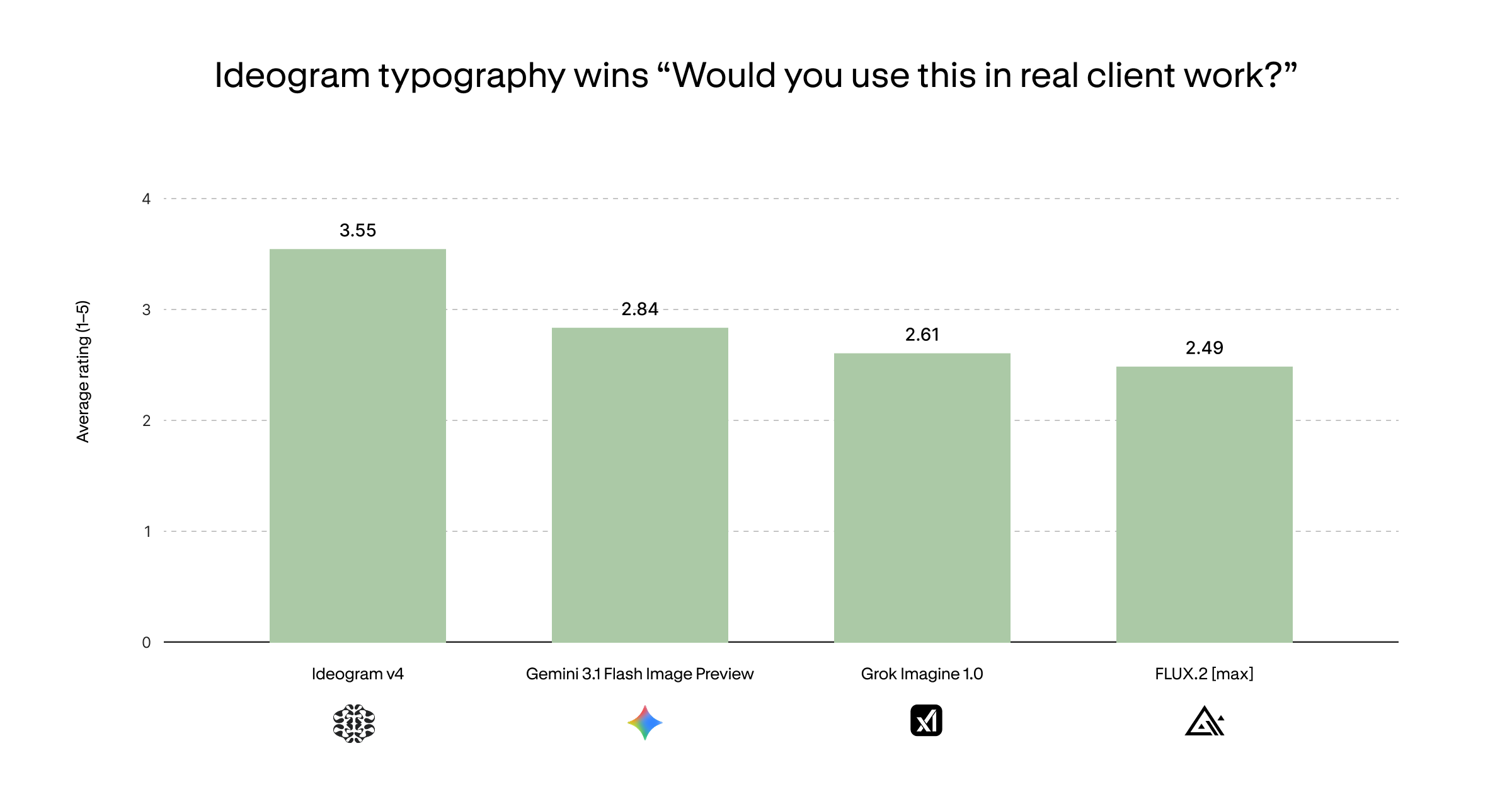
It also wins on practical usability: asked "Would you use this in real client
work?", the same designers rated Ideogram 4 highest at 3.55 / 5 — significantly
above Nano Banana 2 (2.84), Grok Imagine 1.0 (2.61), and FLUX.2 [max] (2.49):
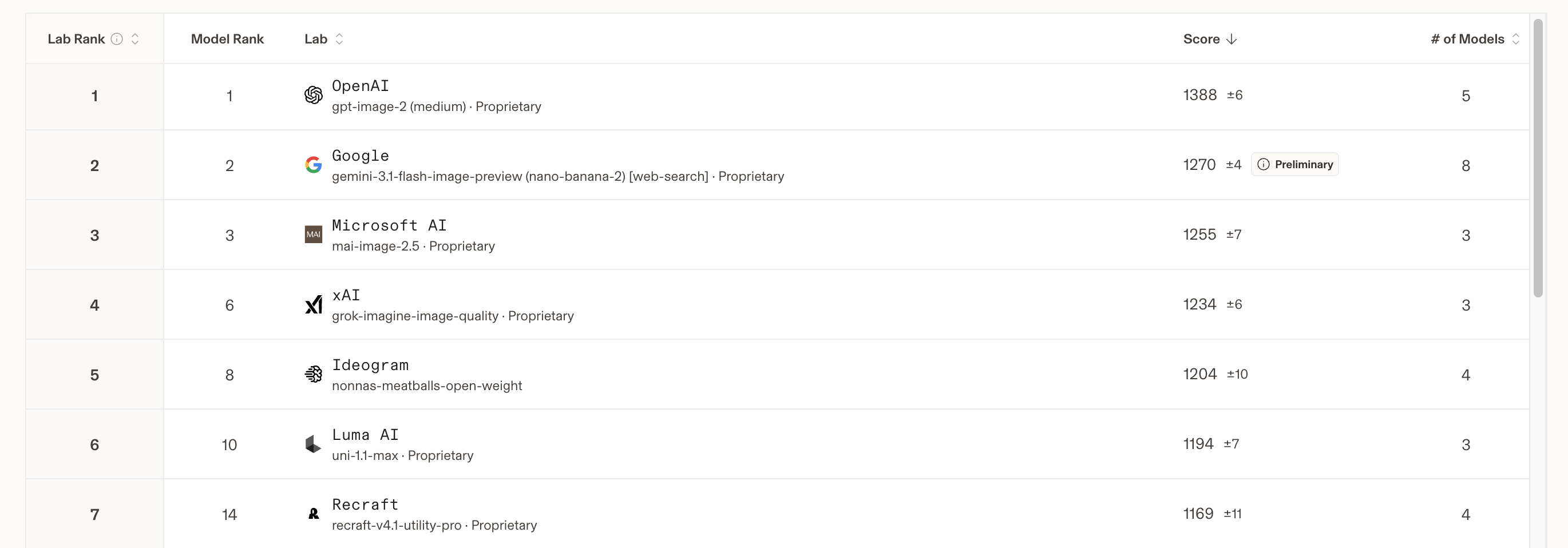
LMArena
On LMArena, a third-party text-to-image leaderboard that
measures general-purpose text-to-image use cases, Ideogram is the top-ranked
open-weight lab and a top-5 image generation lab overall — beaten only by giant
companies with vastly larger budgets and resources:
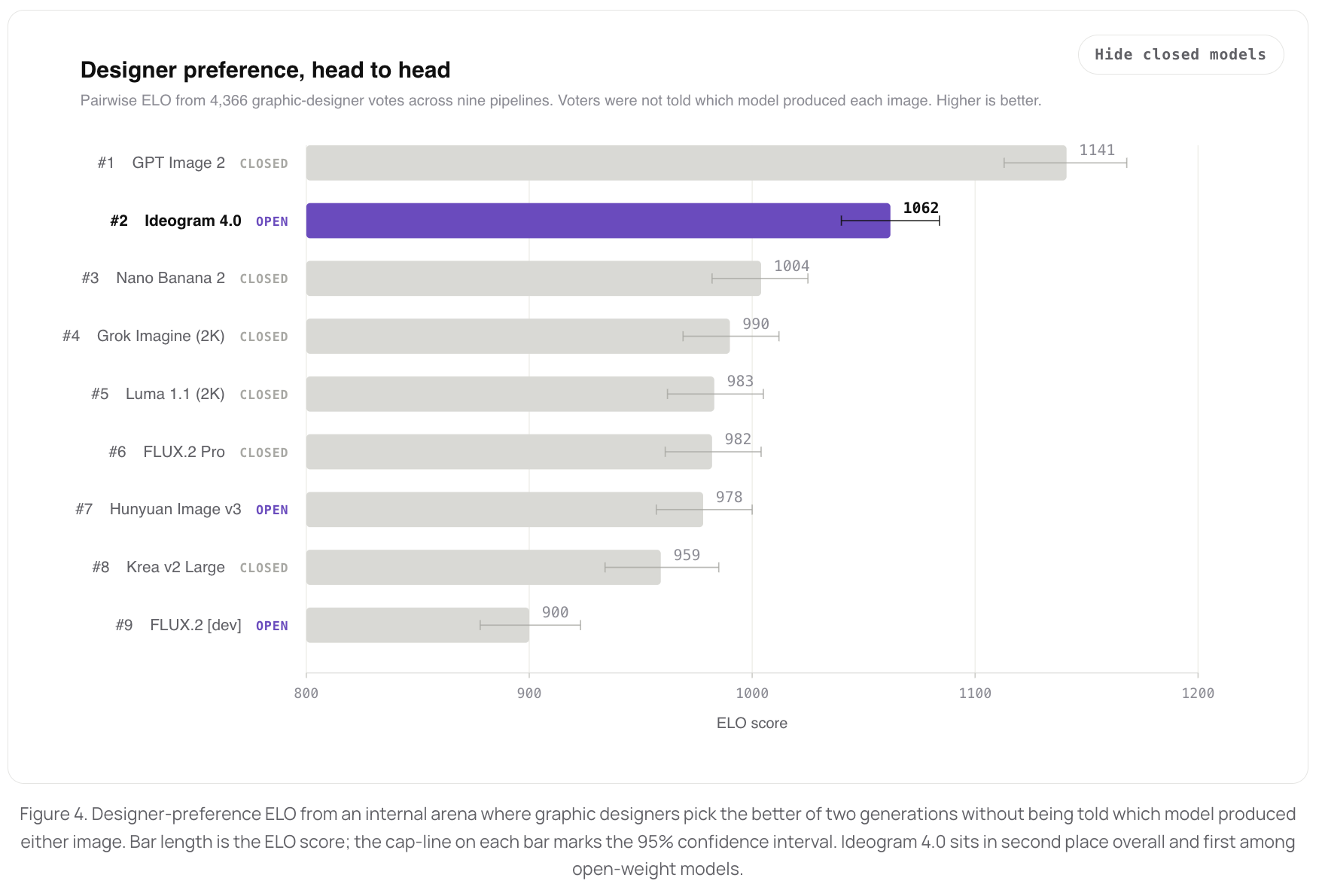
Ideogram internal eval
For our internal human-preference benchmark, focused on graphic design and
photography, we had graphic designers deeply familiar with professional design
work do the rating blind. Bradley-Terry scores rank Ideogram 4 #2 overall —
behind only GPT Image 2 medium — and the top open-weight model:
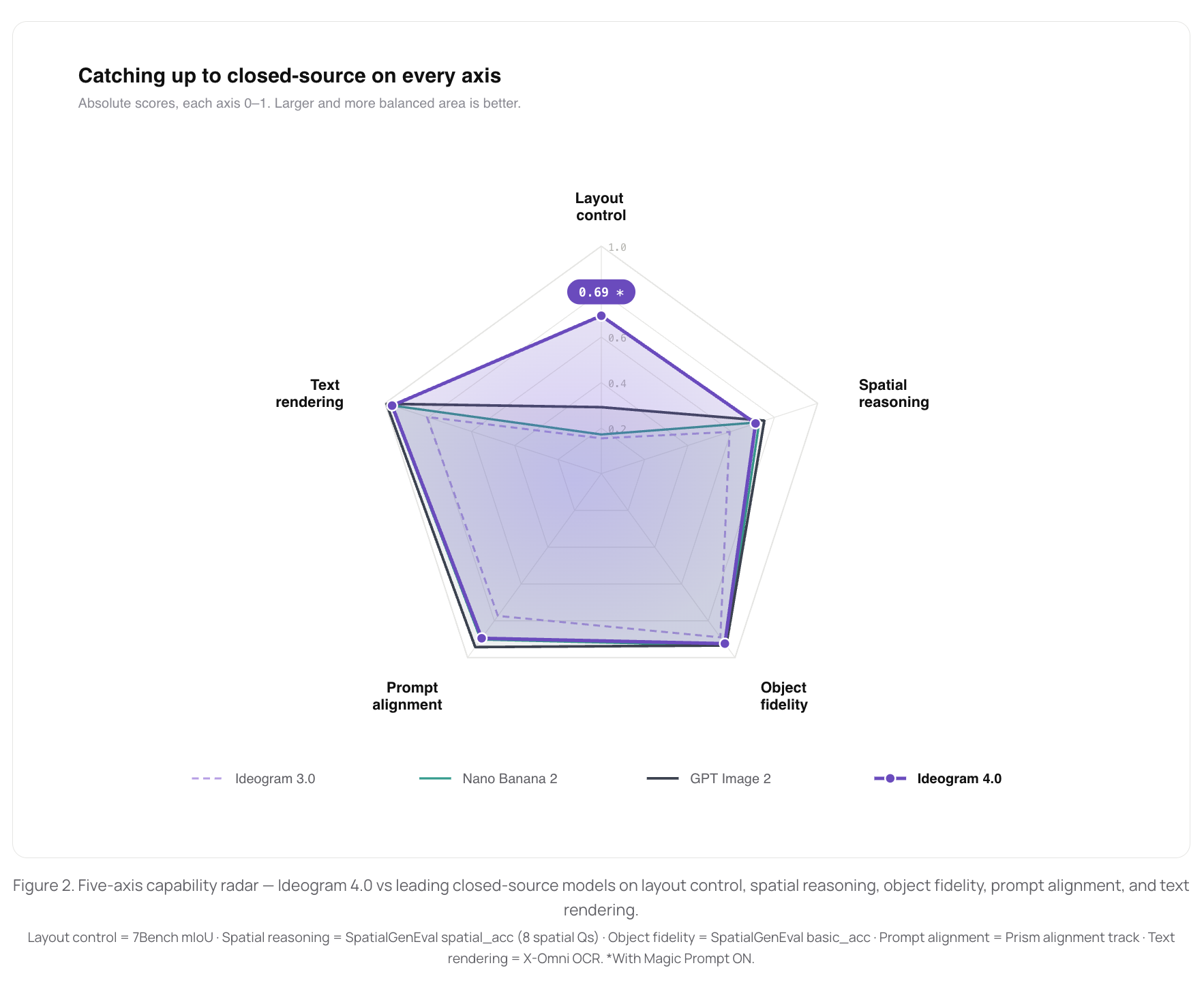
Open-source benchmarks
On standard open-source benchmarks measuring core capabilities — layout control
(7Bench), spatial reasoning and object fidelity (SpatialGenEval), text rendering
(X-Omni OCR), and prompt alignment (Prism) — Ideogram 4 closes the gap to the
leading closed-source models across every axis. On layout control (7Bench), it
is significantly better than all closed-source models:
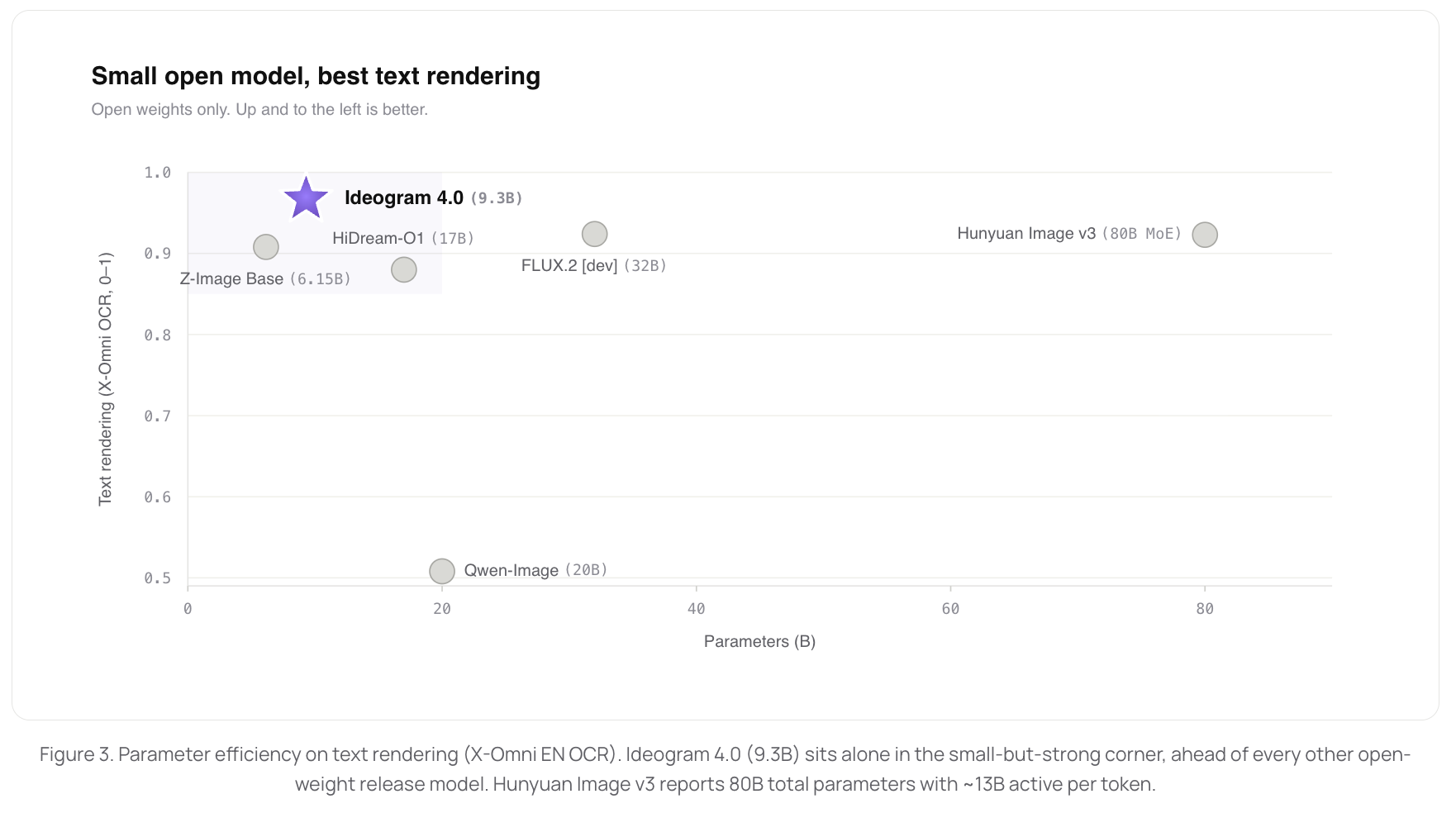
At 9.3B parameters, Ideogram 4 delivers the best text rendering of any open-weight
release we benchmarked — ahead of much larger models like Qwen-Image (20B),
FLUX.2 [dev] (32B), and HunyuanImage 3.0 (80B MoE):
Quick Start
Install
pip install .If you plan to modify the code, install in editable mode instead so changes
under src/ideogram4/ take effect without reinstalling:
pip install -e .Model access
The model weights are gated on Hugging Face, so you must accept the gate and
authenticate before the code can download them — otherwise the download fails
with a 404 / GatedRepoError.
-
Open the model page — ideogram-ai/ideogram-4-nf4
(or ideogram-ai/ideogram-4-fp8) — and click
Agree and access repository to accept the license gate. -
Create a Hugging Face access token at
huggingface.co/settings/tokens and log in so the
download is authenticated:hf auth loginAlternatively, export the token directly:
export HF_TOKEN="hf_...".
CLI
The plain --prompt is rewritten into the structured JSON caption the model
expects by a "magic prompt" LLM. By default this uses Ideogram's hosted
magic-prompt API, which is free and does the expansion server-side (no local
model or system prompt needed). It reads IDEOGRAM_API_KEY — get a key at
https://ideogram.ai/platform:
python run_inference.py \
  --prompt "a ginger cat wearing a tiny wizard hat reading a spellbook" \
  --output out.png \
  --quantization "nf4" \
  --magic-prompt-key "$IDEOGRAM_API_KEY"
You can also run the expansion through your own LLM provider — one of our magic-prompt
system prompt is open source. See the
Prompting Guide for details.
For the highest-quality images, set --height 2048 --width 2048 and
--sampler-preset V4_QUALITY_48.
Safety screening with Hive
Prompt and output safety screening is performed via Hive.
Sign up and create a Text Moderation key and a Visual Content Moderation key,
then export them as HIVE_TEXT_MODERATION_KEY and HIVE_VISUAL_MODERATION_KEY
(or pass them via --hive-text-key / --hive-visual-key).
python run_inference.py \
  --prompt "an isometric illustration of a tiny city floating in the clouds" \
  --output out.png \
  --quantization "nf4" \
  --magic-prompt-key "$MAGIC_PROMPT_API_KEY" \
  --hive-text-key "$HIVE_TEXT_MODERATION_KEY" \
  --hive-visual-key "$HIVE_VISUAL_MODERATION_KEY"
For sampler presets, parameter reference, and optimization tips, see
docs/inference.md.
Model Summary
Ideogram 4 is a foundation model trained entirely from scratch, not a
fine-tune or distillation of any existing checkpoint. It is a flow-matching
text-to-image model built on a fully single-stream Diffusion Transformer
(DiT) architecture.
Architecture:
- Fully single-stream DiT. Text and image tokens are concatenated into one
unified sequence and processed through the same 34-layer transformer, with no
separate text or image branches. This enables deep cross-modal interaction at
every layer. - Vision-language model as text encoder. Instead of a text-only encoder
like CLIP or T5, Ideogram 4 uses
Qwen3-VL-8B-Instruct,
a full vision-language model that provides far richer understanding of visual
concepts. Hidden states are extracted from 13 intermediate layers and
concatenated, giving the model multi-scale semantic features ranging from
surface-level token information to deep compositional understanding. - Dual-branch classifier-free guidance. The conditional (positive) and
unconditional (negative) branches can be independently refined, enabling
separate control over prompt adherence and image quality. - Flexible resolution. Native support for any resolution from 256 to 2048
(multiples of 16), with aspect ratios up to 6:1. A single model handles
everything from square thumbnails to ultrawide banners, with the noise
schedule auto-adjusting per resolution.
Key Capabilities:
- Extreme controllability. Ideogram 4 is trained on structured JSON
captions, giving users unprecedented control over composition, style,
lighting, color palette, typography, and spatial layout, all from a single
prompt. - State-of-the-art text rendering. Ideogram 4 delivers best-in-class
in-image text generation (signage, logos, captions, watermarks, multi-line
text) with high fidelity directly from the prompt. - Spatial layout control. Bounding-box coordinates in the prompt allow
explicit placement of subjects, text elements, and background regions. - Color palette conditioning. Specify hex colors in the prompt to steer the
image's dominant color scheme.
For full architecture details, see
docs/model_architecture.md. For a walkthrough of
how the pipeline components fit together, see
docs/pipeline.md.
Prompting Guide
Ideogram 4 is trained exclusively on structured JSON captions.
You must provide a JSON object that follows our caption schema. You can use
an LLM to turn a natural language prompt into a JSON object.
Key points:
- Use JSON prompts for maximum controllability — the model was trained on
them and understands the structure natively. - Color palette conditioning — specify a
colour_palettearray of hex
colors in the style description to steer the image's color scheme. - Aspect ratio flexibility — Ideogram 4 supports a wide range of aspect
ratios (any multiple-of-16 resolution from 256 to 2048 on each side). This
is a key advantage for practical use: portraits, landscapes, banners,
phone wallpapers, social media formats, etc. - Bounding-box layout — specify
bboxcoordinates in the prompt to
explicitly place subjects, text elements, and background regions. - Compositional control — use
compositional_deconstructionwith optional bounding
boxes and per-element descriptions for precise spatial layout.
Why JSON-only training? The training captions themselves are deliberately
extremely descriptive: each JSON exhaustively describes everything in
the image to maximize training efficiency. The more
text-to-image relationships each caption pins down, the more grounded
supervision the model extracts from a single training pair, rather than
having to infer those relationships across many sparsely-captioned samples.
Why JSON at inference time? Because the model was trained on captions
that name every object explicitly, the most reliable way to get every
requested object rendered is to mirror that pattern.
Don't want to write JSON by hand? That's what magic prompt is for: it uses
an LLM to expand a plain-text prompt into a full structured caption before
generation, so you get JSON-quality results from a casual prompt. It runs by
default in run_inference.py (see the CLI section).
See docs/prompting.md for a full guide.
Documentation
| Document | Description |
|---|---|
| docs/prompting.md | How to write JSON prompts, color palette conditioning, aspect ratios |
| docs/inference.md | Sampler presets, parameter reference, resolutions, optimization tips |
| docs/model_architecture.md | Architecture diagram, DiT spec, component details |
| docs/pipeline.md | Conceptual pipeline walkthrough — how all components fit together |
| docs/development.md | Dev setup, pre-commit hooks, contributing |
| docs/safety.md | Pre-training, post-training, and inference-time safety mitigations; how to report violations |
Citation
If you find the provided code or models useful for your research, consider citing them as:
@misc{ideogram-4-2026,
    author={Ideogram AI},
    title={{Ideogram 4}},
    year={2026},
    howpublished={\url{https://ideogram.ai/blog/ideogram-4.0/}},
}
We're Hiring!
We're looking for Research Scientists and Research Engineers to
work on next-generation generative models and the products built on top of
them. Interested candidates please apply https://jobs.ashbyhq.com/ideogram