

Repository
zphisher
An automated phishing tool with 30+ templates. This Tool is made for educational purpose only ! Author will not be responsible for any misuse of this toolkit !
README











A beginners friendly, Automated phishing tool with 30+ templates.
<h3>
Disclaimer
</h3>
<i>Any actions and or activities related to <b>Zphisher</b> is solely your responsibility. The misuse of this toolkit can result in <b>criminal charges</b> brought against the persons in question. <b>The contributors will not be held responsible</b> in the event any criminal charges be brought against any individuals misusing this toolkit to break the law.
<b>This toolkit contains materials that can be potentially damaging or dangerous for social media</b>. Refer to the laws in your province/country before accessing, using,or in any other way utilizing this in a wrong way.
<b>This Tool is made for educational purposes only</b>. Do not attempt to violate the law with anything contained here. <b>If this is your intention, then Get the hell out of here</b>!
It only demonstrates "how phishing works". <b>You shall not misuse the information to gain unauthorized access to someones social media</b>. However you may try out this at your own risk.</i>
Features
- Latest and updated login pages.
- Beginners friendly
- Multiple tunneling options
- Localhost
- Cloudflared
- LocalXpose
- Mask URL support
- Docker support
Installation
-
Just, Clone this repository -
git clone --depth=1 https://github.com/htr-tech/zphisher.git -
Now go to cloned directory and run
zphisher.sh-$ cd zphisher $ bash zphisher.sh -
On first launch, It'll install the dependencies and that's it. Zphisher is installed.
Installation (Termux)
You can easily install zphisher in Termux by using tur-repo
$ pkg install tur-repo
$ pkg install zphisher
$ zphisher
A Note :
Termux discourages hacking .. So never discuss anything related to zphisher in any of the termux discussion groups. For more check : wiki

Installation via ".deb" file
-
Download
.debfiles from the Latest Release -
If you are using termux then download the
*_termux.deb -
Install the
.debfile by executingapt install <your path to deb file>Or
$ dpkg -i <your path to deb file>
$ apt install -f
Run on Docker
-
Docker Image Mirror:
- DockerHub :
docker pull htrtech/zphisher - GHCR :
docker pull ghcr.io/htr-tech/zphisher:latest
- DockerHub :
-
By using the wrapper script run-docker.sh
$ curl -LO https://raw.githubusercontent.com/htr-tech/zphisher/master/run-docker.sh $ bash run-docker.sh -
Temporary Container
docker run --rm -ti htrtech/zphisher- Remember to mount the
authdirectory.
- Remember to mount the
<details>
<summary><h3>Dependencies</h3></summary>
<b>Zphisher</b> requires following programs to run properly -
gitcurlphp
All the dependencies will be installed automatically when you run Zphisher for the first time.
</details>
<details>
<summary><h3>Tested on</h3></summary>
- Ubuntu
- Debian
- Arch
- Manjaro
- Fedora
- Termux
</details>
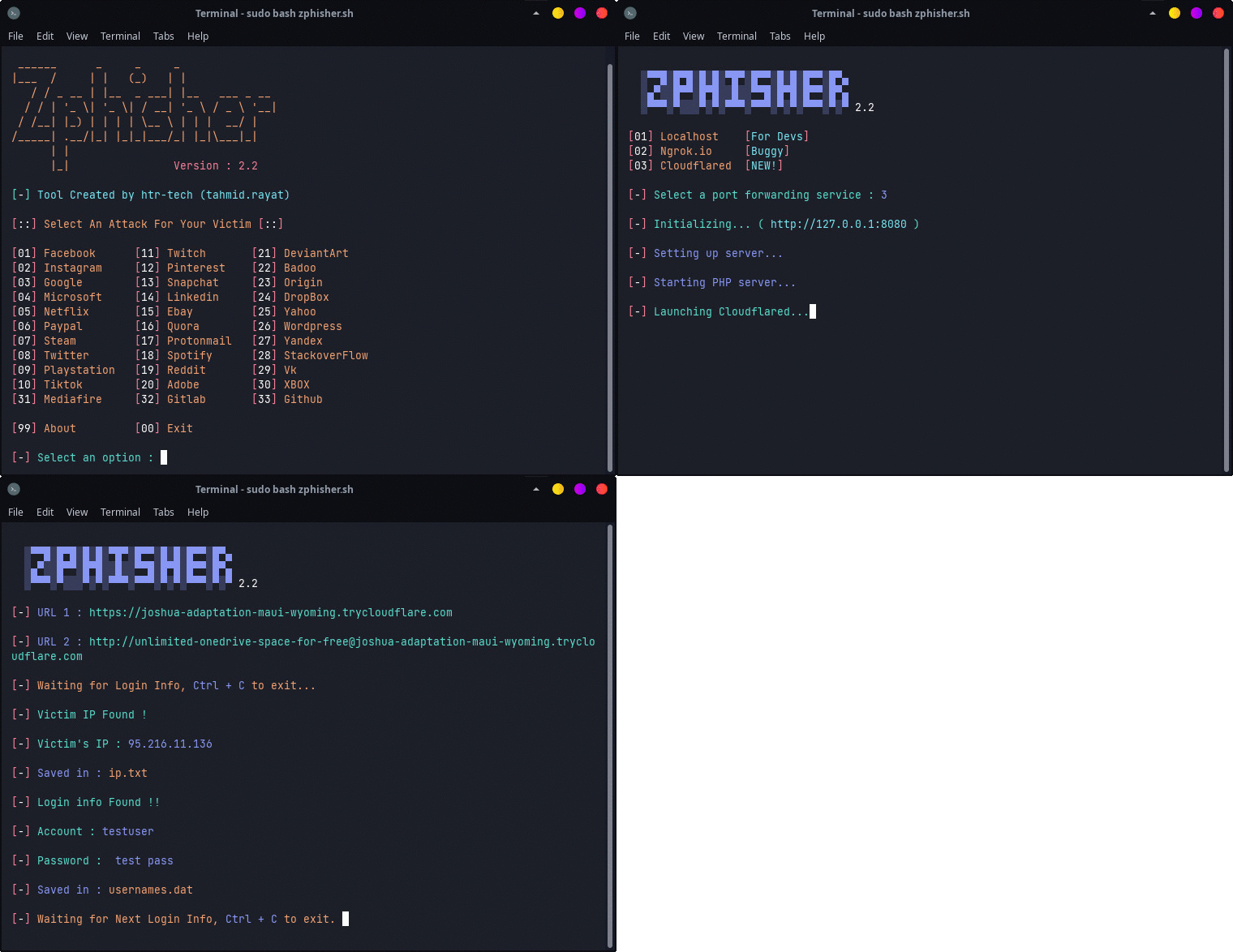
<h3 align="center"><i>:: Workflow ::</i></h3>
Find Me on:


Thanks to all contributors:
<table>
<tr align="center">
<td><a href="https://github.com/1RaY-1">

<br /><sub><b>1RaY-1</b></sub></a></td>
<td><a href="https://github.com/adi1090x">

<br /><sub><b>Aditya Shakya</b></sub></a></td>
<td><a href="https://github.com/AliMilani">

<br /><sub><b>Ali Milani</b></sub></a></td>
<td><a href="https://github.com/Meht-evaS">

<br /><sub><b>AmnesiA</b></sub></a></td>
<td><a href="https://github.com/KasRoudra">

<br /><sub><b>KasRoudra</b></sub></a></td>
<td><a href="https://github.com/MoisesTapia">

<br /><sub><b>Moises Tapia</b></sub></a></td>
</tr>
<tr align="center">
<td><a href="https://github.com/E343IO">

<br /><sub><b>Mr.Derek</b></sub></a></td>
<td><a href="https://github.com/BDhackers009">

<br /><sub><b>Mustakim Ahmed</b></sub></a></td>
<td><a href="https://github.com/sepp0">

<br /><sub><b>sepp0</b></sub></a></td>
<td><a href="https://github.com/TripleHat">

<br /><sub><b>TripleHat</b></sub></a></td>
<td><a href="https://github.com/Yisus7u7">

<br /><sub><b>Yisus7u7</b></sub></a></td>
</tr>
<table>
Thanks to all contributors :
1
-
<table> <tr align="center"> <td><a href="https://github.com/1RaY-1">