

Repository
chunky
Open-source toolkit for reliable RAG pipelines: convert PDFs to Markdown, clean documents, inspect chunks, compare chunking strategies, and enrich metadata for LLM applications.
- 📄 Document review workspace
- Document review workspace
- ✨ Multiple conversion engines
- Multiple conversion engines
- 📦 Batch processing
- Batch processing
- ✂️ Chunking strategy comparison
- Chunking strategy comparison
Specs
- 📄 Document review workspaceDocument review workspace
- ✨ Multiple conversion enginesMultiple conversion engines
- 📦 Batch processingBatch processing
- ✂️ Chunking strategy comparisonChunking strategy comparison
- 💾 Saved chunk versionsSaved chunk versions
- 🧠 Markdown enrichmentMarkdown enrichment
- ✨ Chunk enrichmentChunk enrichment
- 🔌 Pluggable backendPluggable backend
- ServiceURL
- Frontendhttp://localhost:5173
- Backendhttp://localhost:8000
- Swaggerhttp://localhost:8000/docs
- ConverterLibrary
- PyMuPDFPyMuPDF
- DoclingDocling
- MarkItDownMarkItDown
- LiteParseLiteParse
- VLMVLM
- Cloud APICloud API
- StrategyDescription
- TokenToken
- RecursiveRecursive
- CharacterCharacter
- MarkdownMarkdown
- StrategyDescription
- TokenToken
- FastFast
- SentenceSentence
- RecursiveRecursive
- TableTable
- CodeCode
- SemanticSemantic
- NeuralNeural
- StrategyDescription
- HybridHybrid
- Line-BasedLine-Based
- FieldDescription
- cleaned_chunkCleaned and normalized version of the original text
- titleShort descriptive title for the chunk
- contextOne sentence describing where the chunk fits within the broader document
README
<h1 align="center">Chunky – RAG Chunking & Markdown Processing Toolkit</h1>
Convert PDFs, clean Markdown, inspect chunks, and enrich metadata for reliable RAG pipelines.






If you like this project, a star ⭐️ would mean a lot :)
Overview
Chunky is a local, open-source workspace for preparing documents for Retrieval-Augmented Generation (RAG). It combines PDF-to-Markdown conversion, Markdown cleanup, chunk visualization, chunking strategy comparison, and LLM-powered enrichment in one workflow.
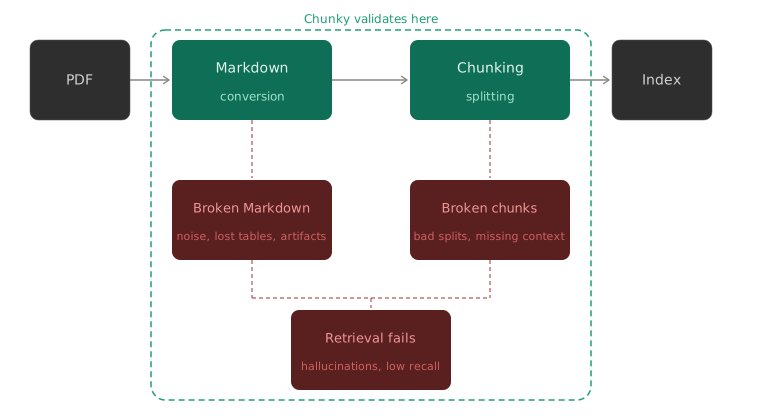
Most RAG failures start before retrieval: broken tables, scrambled layouts, noisy Markdown, or chunks that look fine in code but fail in context. Chunky makes those steps visible so you can inspect and fix the document before it reaches your vector store.
As NVIDIA's research shows, no chunking strategy wins universally. Chunky helps you compare strategies on the actual document instead of treating chunking as a hidden parameter.
New to RAG? Check out Agentic RAG for Dummies — a hands-on implementation of Agentic RAG.
Features
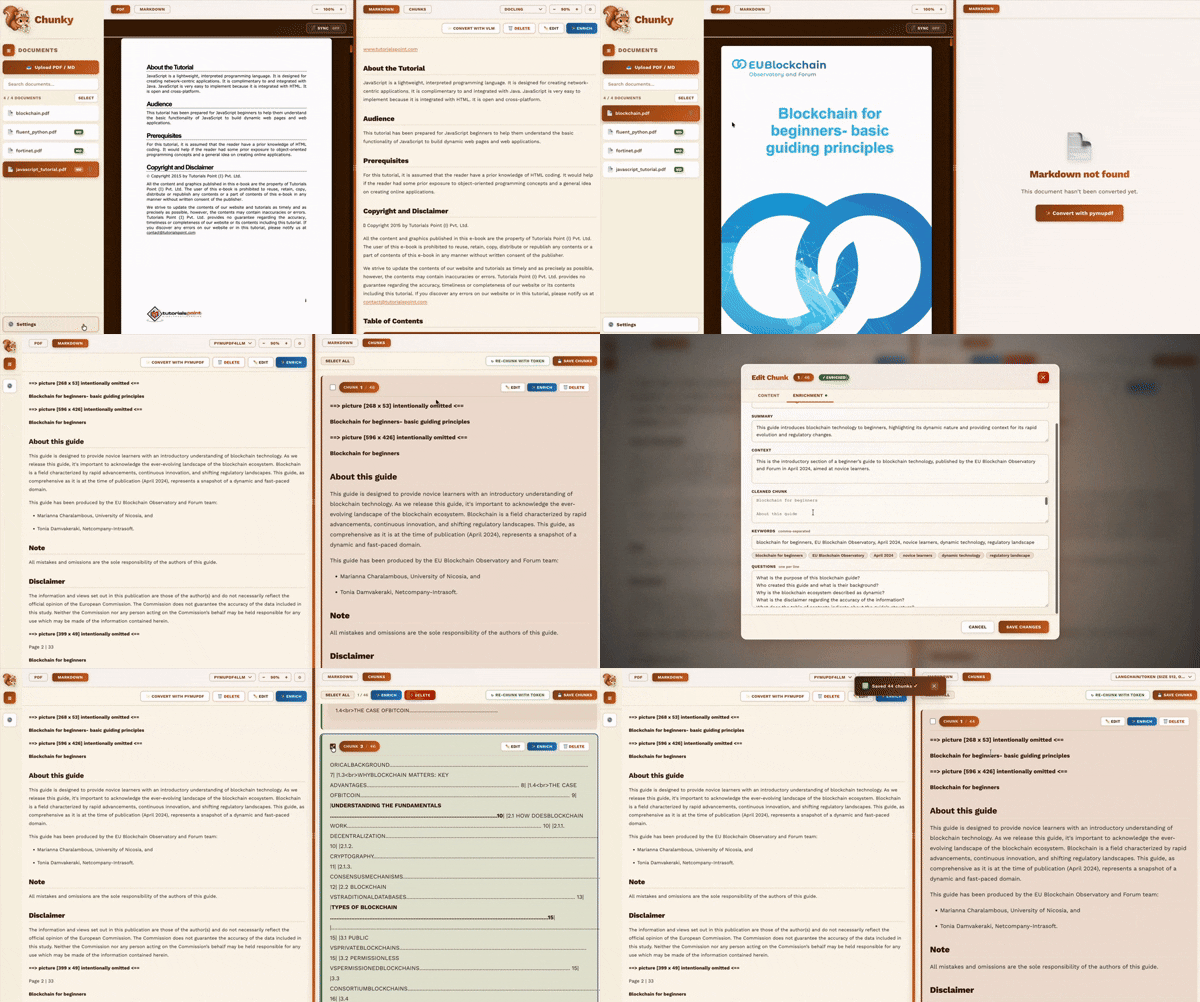
| 📄 Document review workspace | Compare PDF, Markdown, and chunks side by side before indexing |
| ✨ Multiple conversion engines | PyMuPDF, Docling, MarkItDown, LiteParse, VLM, and Cloud API support |
| 📦 Batch processing | Convert, enrich, and chunk multiple documents from the sidebar |
| ✂️ Chunking strategy comparison | Test LangChain, Chonkie, and Docling splitters with configurable size and overlap |
| 💾 Saved chunk versions | Persist and reload chunk sets by Markdown source and splitter configuration |
| 🧠 Markdown enrichment | Clean conversion artifacts with deterministic cleanup plus LLM correction |
| ✨ Chunk enrichment | Generate context-aware titles, summaries, keywords, and retrieval questions |
| 🔌 Pluggable backend | Add converters or splitters through the registry without frontend changes |
Saved chunks retain the SHA-256 revision of the Markdown that produced them.
If the Markdown changes, the saved set remains available for inspection but
must be regenerated before it can overwrite a current chunk version.
Getting Started
Two ways to run Chunky: locally or with Docker.
Option 1 — Local
macOS, Linux, or WSL:
git clone https://github.com/GiovanniPasq/chunky.git
cd chunky
./start_all.sh
Windows PowerShell:
git clone https://github.com/GiovanniPasq/chunky.git
cd chunky
.\start_all.ps1
Option 2 — Docker
git clone https://github.com/GiovanniPasq/chunky.git
cd chunky
docker compose up --build| Service | URL |
|---|---|
| Frontend | http://localhost:5173 |
| Backend | http://localhost:8000 |
| Swagger | http://localhost:8000/docs |
Development checks
Run the backend regression suite from the repository root:
./.venv/bin/python -m unittest discover -s testsRun frontend type checking and production build from frontend/:
npm test
npm run typecheck
npm run build
PDF to Markdown Converters
No single converter wins on every document type. Chunky ships with six — switch between them in the UI and re-convert whenever you want to replace a converter's existing output.
| Converter | Library | Best for |
|---|---|---|
| PyMuPDF | pymupdf4llm |
Fast conversion of standard digital PDFs with selectable text |
| Docling | docling |
Complex layouts: multi-column documents, tables, and figures |
| MarkItDown | markitdown[pdf] |
Simple, deterministic conversion of standard PDFs |
| LiteParse | liteparse |
Fast, model-free PDF-to-Markdown parsing by LlamaIndex |
| VLM | openai + any vision model |
Scanned PDFs, handwriting, diagrams — anything a human can read |
| Cloud API | httpx |
POSTs the PDF to a configurable external endpoint and returns the Markdown response body directly |
Standalone Markdown names that match the generated
{pdf_stem}_{converter}.md pattern are reserved when the corresponding PDF
exists. Chunky rejects that ambiguous upload instead of silently treating it
as converter output.
VLM converter
The VLM converter rasterises each page at 300 DPI by default and sends it to any OpenAI-compatible vision model. By default it targets a locally running Ollama instance — no API key, no internet access required.
Through the frontend, you can configure the model name, base URL, and API key directly in the UI before requesting a conversion — no code changes needed.
Note: Conversion speed with Docling or a locally running Ollama instance depends heavily on available hardware. On CPU-only machines, both can be significantly slower than on systems with a dedicated GPU.
Ollama configuration: when using a local Ollama instance, the most relevant environment variables are
OLLAMA_NUM_PARALLEL,OLLAMA_MAX_LOADED_MODELS,OLLAMA_KEEP_ALIVE, andOLLAMA_MAX_QUEUE. See the Ollama FAQ for setup instructions.
Chunking Strategies
Chunky supports three splitting libraries, each exposing multiple strategies. The library and strategy are selected independently in the UI; size and overlap controls apply where the selected strategy supports them.
LangChain (langchain-text-splitters)
| Strategy | Description |
|---|---|
| Token | Splits on token boundaries via tiktoken. Ideal for LLM context-window management. |
| Recursive | Tries paragraph → sentence → word boundaries in order. |
| Character | Splits on \n\n paragraphs, falls back to chunk_size characters. |
| Markdown | Two-phase split: H1/H2/H3 headers first, then optional size cap via RecursiveCharacterTextSplitter. |
Chonkie
| Strategy | Description |
|---|---|
| Token | Splits on GPT-2 token boundaries via tiktoken. |
| Fast | SIMD-accelerated byte-based chunking. Uses chunk_size as a byte target and does not support overlap. |
| Sentence | Splits at sentence boundaries. Preserves semantic completeness. |
| Recursive | Recursively splits using structural delimiters (paragraphs → sentences → words). Note: chunk_overlap is not supported. |
| Table | Splits Markdown tables using Chonkie's row-based defaults; size and overlap controls do not apply. |
| Code | Splits source code using AST structure and a size target; overlap does not apply. |
| Semantic | Groups content by embedding similarity with a size target; overlap does not apply. |
| Neural | Uses a fine-tuned BERT model to detect semantic shifts; size and overlap controls do not apply. |
Note: The Semantic and Neural strategies download ML models on first use and may be slow to initialise.
Docling (docling)
| Strategy | Description |
|---|---|
| Hybrid | Document-structure-aware chunking that respects headings, tables, and lists while enforcing a token limit. |
| Line-Based | Preserves line boundaries while enforcing a token limit. Best for tables, code, and logs where line integrity matters. |
Note: Both Docling strategies operate on
DoclingDocumentobjects and require thedoclinglibrary. The Hybrid strategy downloads a tokenizer model on first use.
Cancellation behavior
VLM, Cloud, and enrichment requests support cooperative interruption. CPU
conversion and chunking batches run in request-owned process pools. Pressing
Interrupt cancels queued jobs and terminates every running worker in that
batch; another request uses a different pool and is unaffected.
Enrichment
Chunky includes an LLM-powered enrichment layer that operates at two levels of the pipeline.
Markdown enrichment
Before chunking, you can run enrichment directly on the converted Markdown. The pipeline:
- Deterministic cleanup — removes likely pagination noise, repeated headers/footers, invisible characters, mojibake, and conservative line-wrap artifacts while preserving fenced code
- LLM correction — splits the document into pieces and sends each to an LLM for contextual cleanup, producing coherent, well-structured Markdown
- Summary (optional) — generates a document-level summary used as context during LLM correction
Markdown enrichment is available for both single files and bulk operations, so you can clean an entire batch of converted PDFs in one pass.
Chunk enrichment
After chunking, selected chunks can be enriched via LLM calls. Sidebar bulk enrichment can also enrich saved chunk sets, or chunk first when no matching saved set exists.
Each call analyzes the selected chunk itself and, when available, also receives:
- the cached document-level summary, generated by the Markdown enrichment flow
- a small read-only window of Markdown immediately before and after the chunk
Those extra inputs help the model disambiguate names, acronyms, headings, and section intent without copying neighboring text into the enriched chunk. The pipeline populates the following fields:
| Field | Description |
|---|---|
cleaned_chunk |
Cleaned and normalized version of the original text |
title |
Short descriptive title for the chunk |
context |
One sentence describing where the chunk fits within the broader document |
summary |
One sentence summary of the chunk content |
keywords |
Array of relevant keyword strings |
questions |
Array of questions this chunk could answer |
The context field is inspired by Anthropic's Contextual Retrieval technique, which shows that prepending a short chunk-specific context can reduce retrieval failure rates by up to 49%.
The questions field addresses a complementary problem: pre-generating the questions a chunk can answer produces embeddings much closer to real user queries at retrieval time, as highlighted in the Microsoft Azure RAG enrichment guide.
Extending Chunky
The converter and chunker layers use a decorator-based capability registry. After a backend implementation is added to the relevant enum and dispatch map, its decorator exposes it through /api/capabilities; no frontend changes are needed.
Adding a new converter
Every converter inherits from PDFConverter (backend/converters/base.py):
from abc import ABC, abstractmethod
from pathlib import Path

class PDFConverter(ABC):
    @abstractmethod
    def convert(self, pdf_path: Path, total_pages: int | None = None) -> str:
        """Convert a PDF to a Markdown string."""

    def validate_path(self, pdf_path: Path) -> None:
        if not pdf_path.exists():
            raise FileNotFoundError(f"PDF file not found: {pdf_path}")
1. Create a new file in backend/converters/ and decorate the class:
# backend/converters/my_converter.py
from pathlib import Path
from backend.registry import register_converter
from .base import PDFConverter

@register_converter(
    name="my_converter",
    label="My Converter",
    description="Short description shown in the UI.",
)
class MyConverter(PDFConverter):
    def __init__(self) -> None:
        from my_library import MyParser
        self._parser = MyParser()

    def convert(self, pdf_path: Path, total_pages: int | None = None) -> str:
        self.validate_path(pdf_path)
        return self._parser.to_markdown(str(pdf_path))
2. Add its wire name to ConverterType in backend/models/schemas.py and its class to _CONVERTER_MAP in backend/services/document_service.py.
3. Import it in capabilities_router.py:
import backend.converters.my_converter # noqa: F401 — side-effect importDone. The new converter appears automatically in /api/capabilities and the UI.
Adding a new chunker strategy
from backend.registry import register_chunker

@register_chunker(
    library="my_lib",
    library_label="My Library",
    strategy="my_strategy",
    label="My Strategy",
    description="Short description shown in the UI.",
)
def _chunk_my_strategy(self, request: ChunkRequest) -> list[ChunkItem]:
    splits = my_chunker.split(request.content, request.chunk_size)
    return self.build_chunks(request.content, splits, request.chunk_overlap)
Import the module in capabilities_router.py and add the strategy to the chunker's _DISPATCH table. The strategy appears in the UI automatically.
LangChain ( langchain-text-splitters )
1
-
Strategy Description Token Splits on token boundaries via tiktoken. Ideal for LLM context-window management. Recursive Tries paragraph → sentence → word boundaries in order. Character Splits on \n\n paragraphs, falls back to chunk_size characters. Markdown Two-phase split: H1/H2/H3 headers first, then optional size cap via RecursiveCharacterTextSplitter .
Docling ( docling )
1
-
Strategy Description Hybrid Document-structure-aware chunking that respects headings, tables, and lists while enforcing a token limit. Line-Based Preserves line boundaries while enforcing a token limit. Best for tables, code, and logs where line integrity matters.