

Repository
wild3r
Wild3R: Feed-Forward 3D Gaussian Splatting from Unconstrained Sparse Photo Collection
README
Wild3R: Feed-Forward 3D Gaussian Splatting from Unconstrained Sparse Photo Collection
<a href="https://furuschool.github.io/wild3r-page">

</a>



Yuto Furutani*, Takashi Otonari*, Kaede Shiohara*,
Toshihiko Yamasaki <br />
The University of Tokyo. *Co-first authors.
Overview
<p align="center">
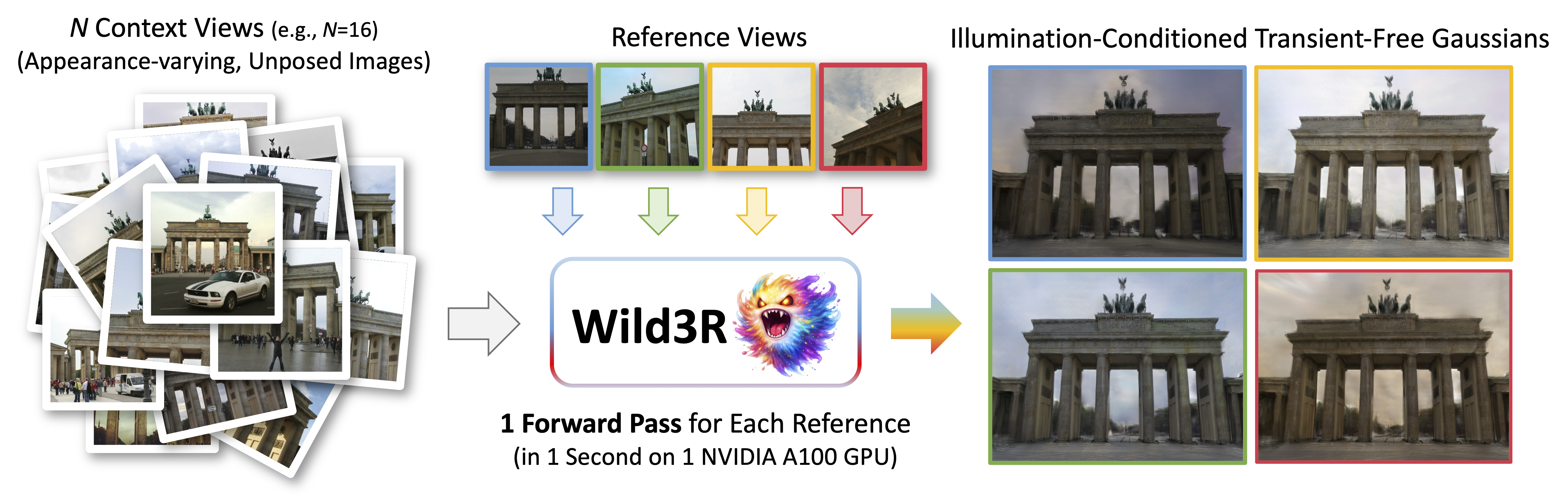
Feed-forward 3D Gaussian Splatting (3DGS) removes the need for time-consuming per-scene optimization required by traditional 3DGS.
However, existing feed-forward approaches struggle with real-world photo collections that include diverse lighting conditions and transient objects.
In this paper, we present Wild3R, a feed-forward approach for unconstrained sparse photo collections.
The main bottleneck is the lack of training data that provides multiple viewpoints, a variety of illuminations, and transient variations necessary for learning robust scene representations.
To address this, we introduce the WildCity dataset, which comprises 200 scenes, 170 lighting conditions, and transient objects, resulting in 337,500 images in total.
By leveraging the dataset, our model learns appearance consistency across viewpoints conditioned on reference views, while removing transient content.
Extensive experiments demonstrate that our method outperforms existing feed-forward approaches and achieves results competitive with prior per-scene optimization-based methods.
Installation
Our installation is the same as AnySplat.
-
Clone Wild3R.
git clone https://github.com/furuSchool/wild3r.git cd wild3r -
Create the environment, here we show an example using conda.
conda create -y -n wild3r python=3.10 conda activate wild3r pip install torch==2.2.0 torchvision==0.17.0 torchaudio==2.2.0 --index-url https://download.pytorch.org/whl/cu121 pip install --no-cache-dir torch_scatter==2.1.2 -f https://data.pyg.org/whl/torch-2.2.0+cu121.html pip install --no-build-isolation git+https://github.com/facebookresearch/pytorch3d.git pip install -r requirements.txt -
Download the pretrained weights from Hugging Face and place the file at
checkpoints/wild3r_weights.ckpt.
Quick Start
import torch
from inference import load_model_and_device
from src.utils.image import process_image
from src.misc.image_io import save_interpolated_video

# Load model
model, device = load_model_and_device(
    checkpoint_path="checkpoints/wild3r_weights.ckpt",
    config_path="config/config.yaml",
)

# Load images (replace with your own)
image_paths = ["path/to/imageA.png", "path/to/imageB.png", "path/to/imageC.png"]
images = torch.stack([process_image(p) for p in image_paths], dim=0).unsqueeze(0).to(device)
b, v, _, h, w = images.shape

# Run inference
gaussians, pred_context_pose = model.inference((images + 1) * 0.5)

# Render interpolated video
pred_extrinsic = pred_context_pose['extrinsic']
pred_intrinsic = pred_context_pose['intrinsic']
save_interpolated_video(pred_extrinsic, pred_intrinsic, b, h, w, gaussians, "outputs/", model.decoder)
Photo Tourism Benchmark
We evaluate on Brandenburg Gate, Sacre Coeur, and Trevi Fountain from the IMC-PT 2020 dataset.
Context sets are constructed with N ∈ {4, 16, 64} images randomly sampled from the official training split.
For evaluation, each test image is vertically split following the NeRF-W protocol: one half serves as the reference view for appearance conditioning, and the other half is the evaluation target.
All images are resized and cropped to 448×448 with bottom alignment.
-
Download the three scenes (
brandenburg_gate,sacre_coeur,trevi_fountain) from the IMC-PT 2020 dataset. -
Download the scene-split TSV files from NeRF-W and place each one inside the corresponding scene directory (e.g.
brandenburg_gate/brandenburg.tsv). -
Run the preprocessing script for each scene:
python preprocess.py path/to/brandenburg_gate input_images --assignments json/assignments.json
python preprocess.py path/to/sacre_coeur      input_images --assignments json/assignments.json
python preprocess.py path/to/trevi_fountain   input_images --assignments json/assignments.json
input_images/
└── {scene}/
└── {num_views}/ # e.g. 4, 16, 64
├── dense_train/
│ └── images/ # N context images from training split
├── dense_target/
│ └── images/ # Reference half-images (appearance conditioning)
└── dense_test/
└── images/ # Evaluation target half-images
outputs/
└── GT/
└── {scene}/
└── {num_views}/ # Evaluation target images (same as dense_test)Inference
python batch_inference.py --batch_json json/eval.jsonThe JSON file specifies the checkpoint, config, and a list of runs. You can add or modify runs following the format in json/eval.json. Predicted images are saved under output_path for each run.
Evaluation
After running inference, evaluate with PSNR / SSIM / LPIPS against the GT images:
python eval.py outputsThis compares every method folder under outputs/ (e.g. outputs/wild3r/) against outputs/GT/. Per-scene results are written to result.md files, and a summary table is written to outputs/summary_result.md.
To compare with other methods, place their predicted images under outputs/{method_name}/ following the same directory structure, then re-run eval.py. Each method will appear as a separate row in the summary table.
Citation
@article{furutani2026wild3r,
  title   = {Wild3R: Feed-Forward 3D Gaussian Splatting from Unconstrained Sparse Photo Collection},
  author  = {Furutani, Yuto and Otonari, Takashi and Shiohara, Kaede and Yamasaki, Toshihiko},
  journal = {arXiv preprint arXiv:2606.11894},
  year    = {2026}
}
Acknowledgements
We thank all authors behind these projects and repositories for their excellent work: AnySplat, LightCity, SceneCity, and Sketchfab.
The code in the src/ is adopted from AnySplat, which is distributed under the MIT License.