

Repository
vscode-acp
Agent Client Protocol client for VS Code — connect to any ACP-compatible AI coding agent (Claude, Codex, Copilot, Qwen, Gemini, OpenCode, Kiro, OpenClaw, Hermes and more)
- Agent
- Command
- GitHub Copilot
- npx @github/copilot-language-server@latest --acp
- Claude Code
- npx @agentclientprotocol/claude-agent-acp@latest
- Gemini CLI
- npx @google/gemini-cli@latest --experimental-acp
Specs
- AgentCommand
- GitHub Copilotnpx @github/copilot-language-server@latest --acp
- Claude Codenpx @agentclientprotocol/claude-agent-acp@latest
- Gemini CLInpx @google/gemini-cli@latest --experimental-acp
- Qwen Codenpx @qwen-code/qwen-code@latest --acp --experimental-skills
- Auggie CLInpx @augmentcode/auggie@latest --acp
- Qoder CLInpx @qoder-ai/qodercli@latest --acp
- Codex CLInpx @zed-industries/codex-acp@latest
- OpenCodenpx opencode-ai@latest acp
- OpenClawnpx openclaw acp
- Kiro CLIkiro-cli acp
- Hermes Agenthermes acp
- SettingDefault
- acp.agents(11 agents)
- acp.autoApprovePermissionsask
- acp.defaultWorkingDirectory""
- acp.logTraffictrue
- CommandDescription
- ACP: Connect to AgentConnect to an agent
- ACP: New ConversationStart a new conversation with the connected agent
- ACP: Send PromptSend a message to the agent
- ACP: Cancel Current TurnCancel the current agent turn
- ACP: Disconnect AgentDisconnect from the current agent
- ACP: Restart AgentRestart the current agent process
- ACP: Open Chat PanelFocus the chat webview
- ACP: Add Agent ConfigurationAdd a new agent to settings
- ACP: Remove AgentRemove an agent configuration
- ACP: Set Agent ModeChange the agent's operating mode
- ACP: Set Agent ModelChange the agent's model
- ACP: Refresh SessionsRe-fetch the session list for an agent (also on the agent's right-click menu)
- ACP: Show LogOpen the ACP Client log output channel
- ACP: Show Protocol TrafficOpen the ACP Traffic output channel
- ACP: Browse Agent RegistryBrowse the ACP agent registry
- ShortcutAction
- Ctrl+Shift+A ( Cmd+Shift+A on Mac)Open Chat Panel
- Escape (when turn in progress)Cancel Current Turn
README
ACP Client for VS Code
A Visual Studio Code extension that provides a client for the Agent Client Protocol (ACP) — connect to any ACP-compatible AI coding agent directly from your editor.
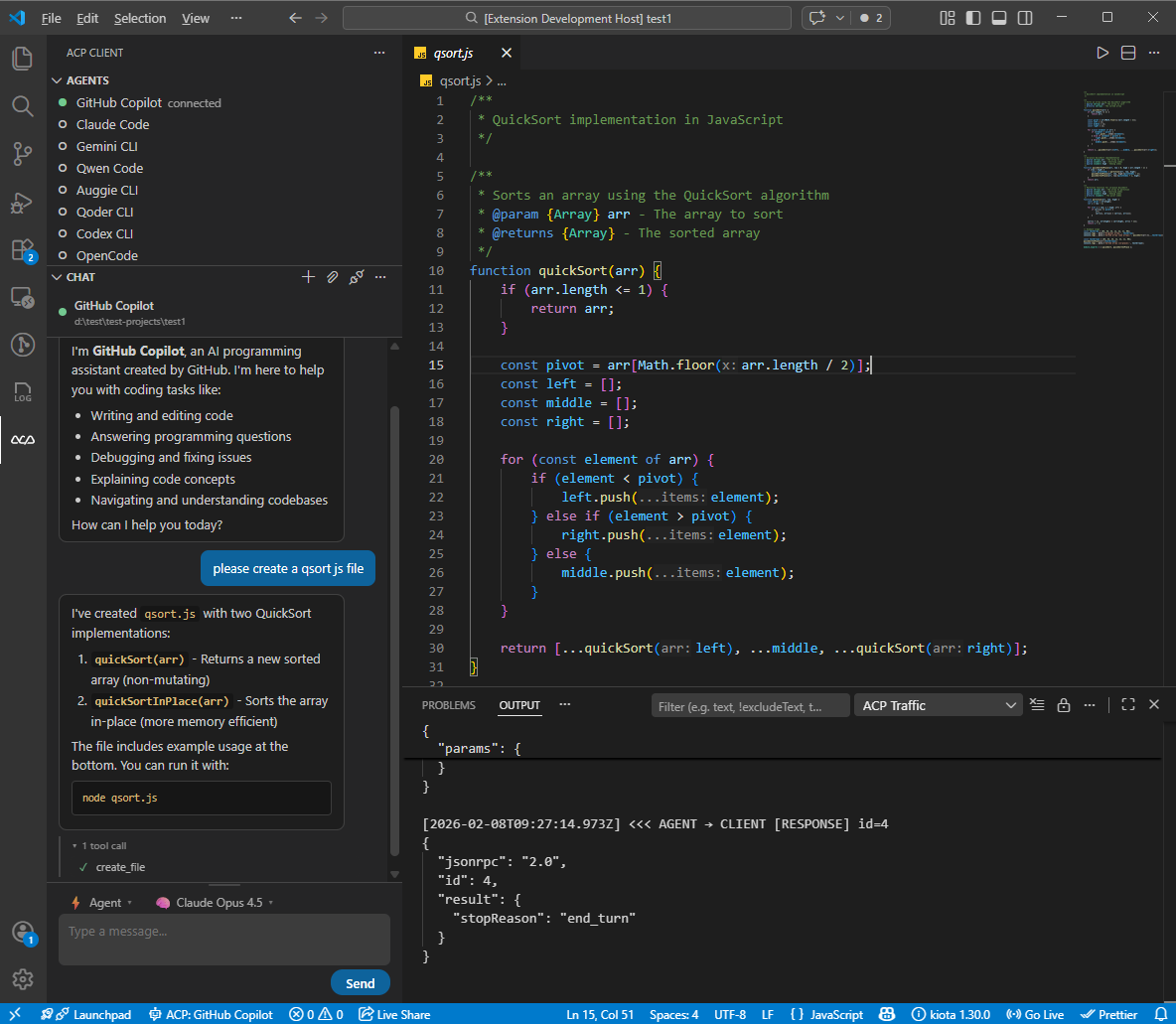
Features
- Multi-Agent Support: Connect to 11 pre-configured ACP agents or add your own
- Single-Agent Focus: One agent active at a time — seamlessly switch between agents
- Per-Agent Session List: Each agent in the Agents view is expandable into its previous sessions. Click a session to restore its history in the chat. Backed by
session/listwhen the agent supports it, or by a local per-workspace cache otherwise. - Session Config Options: Dynamic per-session selectors (mode, model, reasoning level, …) advertised by the agent are rendered automatically in the composer toolbar.
- Interactive Chat: Built-in chat panel with Markdown rendering, inline tool call display, and collapsible tool sections
- Thinking Display: See agent reasoning in a collapsible block with streaming animation and elapsed time
- Slash Commands: Autocomplete popup for agent-provided commands with keyboard navigation
- Mode & Model Picker: Switch agent modes and models directly from the chat toolbar (kept for agents that haven't migrated to Session Config Options yet)
- File System Integration: Agents can read and write files in your workspace
- Terminal Execution: Agents can run commands with terminal output display
- Permission Management: Configurable auto-approve policies for agent actions
- Protocol Traffic Logging: Inspect all ACP JSON-RPC messages with request/response/notification labels
- Agent Registry: Browse and discover available ACP agents
- Chat Persistence: Conversations are preserved when switching panels
Quick Start
- Install: Visual Studio Code Marketplace | Open in VS Code | Open VSX Marketplace
- Open the ACP Client panel from the Activity Bar (ACP icon)
- Click + to add an agent configuration, or use the defaults
- Click an agent to connect
- Start chatting!
Requirements
- Node.js 18+ (for spawning agent processes)
- An ACP-compatible agent installed or available via
npx
Pre-configured Agents
The extension comes with default configurations for:
| Agent | Command |
|---|---|
| GitHub Copilot | npx @github/copilot-language-server@latest --acp |
| Claude Code | npx @agentclientprotocol/claude-agent-acp@latest |
| Gemini CLI | npx @google/gemini-cli@latest --experimental-acp |
| Qwen Code | npx @qwen-code/qwen-code@latest --acp --experimental-skills |
| Auggie CLI | npx @augmentcode/auggie@latest --acp |
| Qoder CLI | npx @qoder-ai/qodercli@latest --acp |
| Codex CLI | npx @zed-industries/codex-acp@latest |
| OpenCode | npx opencode-ai@latest acp |
| OpenClaw | npx openclaw acp |
| Kiro CLI | kiro-cli acp |
| Hermes Agent | hermes acp |
You can add custom agent configurations in settings.
Note on Hermes Agent: Hermes is a Python package, not an npm package. Install it via the Hermes Quickstart (Linux/macOS/WSL2 only — Windows requires WSL2). Make sure
hermesis on yourPATHand launch VS Code from the same shell/venv. Configure credentials withhermes model.
Extension Settings
| Setting | Default | Description |
|---|---|---|
acp.agents |
(11 agents) | Agent configurations. Each key is the agent name, value has command, args, and env. |
acp.autoApprovePermissions |
ask |
How agent permission requests are handled: ask or allowAll. |
acp.defaultWorkingDirectory |
"" |
Default working directory for agent sessions. Empty uses current workspace. |
acp.logTraffic |
true |
Log all ACP protocol traffic to the ACP Traffic output channel. |
Commands
All commands are accessible via the Command Palette (Ctrl+Shift+P):
| Command | Description |
|---|---|
ACP: Connect to Agent |
Connect to an agent |
ACP: New Conversation |
Start a new conversation with the connected agent |
ACP: Send Prompt |
Send a message to the agent |
ACP: Cancel Current Turn |
Cancel the current agent turn |
ACP: Disconnect Agent |
Disconnect from the current agent |
ACP: Restart Agent |
Restart the current agent process |
ACP: Open Chat Panel |
Focus the chat webview |
ACP: Add Agent Configuration |
Add a new agent to settings |
ACP: Remove Agent |
Remove an agent configuration |
ACP: Set Agent Mode |
Change the agent's operating mode |
ACP: Set Agent Model |
Change the agent's model |
ACP: Refresh Sessions |
Re-fetch the session list for an agent (also on the agent's right-click menu) |
ACP: Show Log |
Open the ACP Client log output channel |
ACP: Show Protocol Traffic |
Open the ACP Traffic output channel |
ACP: Browse Agent Registry |
Browse the ACP agent registry |
Keyboard Shortcuts
| Shortcut | Action |
|---|---|
Ctrl+Shift+A (Cmd+Shift+A on Mac) |
Open Chat Panel |
Escape (when turn in progress) |
Cancel Current Turn |
Development
Prerequisites
- Node.js 18+
- VS Code 1.85+
Setup
git clone https://github.com/formulahendry/vscode-acp.git
cd vscode-acp
npm install
Build & Run
npm run compile    # One-time build
npm run watch      # Watch mode for development
Press F5 in VS Code to launch the Extension Development Host.
Testing
npm run pretest    # Compile tests + lint
npm test           # Run tests
Packaging
npm run package    # Production build
npx @vscode/vsce package   # Create .vsix
Architecture
The extension follows a modular architecture:
- Core:
AgentManager,ConnectionManager,SessionManager,AcpClientImpl - Handlers:
FileSystemHandler,TerminalHandler,PermissionHandler,SessionUpdateHandler - UI:
SessionTreeProvider,ChatWebviewProvider,StatusBarManager - Config:
AgentConfig,RegistryClient - Utils:
Logger,StreamAdapter
Communication with agents uses the ACP protocol (JSON-RPC 2.0 over stdio).
Known Issues
- Agents must be available via the system PATH or
npx - Some agents may require additional authentication setup
- File attachment feature is not yet functional
Links
Related Projects
- ACP UI — A modern, cross-platform desktop client for the Agent Client Protocol (ACP)
- WeChat ACP — Bridge WeChat chat messages to any ACP-compatible AI agent (Claude, Codex, Copilot, Qwen, Gemini, OpenCode and more)
License
MIT — see LICENSE for details.