

Repository
google-veo3-from-scratch
A Step-by-Step Implementation of Google Veo 3 Architecture from Scratch
README
Google Veo 3 Implemented from Scratch





Google Veo 3 is a state-of-the-art text-to-video generation system capable of producing high-quality, high-resolution videos with audio from text prompts. It currently surpasses OpenAI SORA and other similar models.
Google has published a Veo 3 technical report and a Model Card detailing the architecture, training process, and more. This notebook offers a modular, step-by-step implementation of the Veo 3 model based on these resources.
The workflow covered in this notebook includes:
- Data preprocessing and preparation
- Building the Veo 3 model architecture
- Model training
- Inference
- Model evaluation
- Safety and ethical considerations
This notebook is intended for students, researchers, and anyone interested in understanding and implementing the Veo 3 system from scratch.
Make sure you have the basic knowledge of Deep learning, PyTorch, and video processing before diving into this notebook. To install the required packages, run:
pip install -r requirements.txtTable of Contents
- What is JAX and Why it is Important?
- TPUs and ML Pathways
- Veo 3 High Level Overview
- Data Preprocessing
- Veo 3 Model Architecture
- Training Veo 3 Model
- Inferencing Veo 3 with Cascading Reverse Diffusion
- Evaluation Strategy
- Responsible AI \& Safety Integration (Synth ID)
- Conclusion
What is JAX and Why it is Important?
AI model training involves a lot of matrix multiplications, and as training progresses, more memory gets consumed. Google stated in their Veo 3 model card that they used JAX.
JAX is an open-source numerical computing library developed by Google. Its main purpose is high-performance numerical computation.
Let's see one of the benefits of JAX. We have this polynomial equation
$$x^2 + 3x + 2$$
For which we will compare the execution time of a function implemented in NumPy and JAX.
First, we import the necessary libraries and create two functions:
- using numpy, which is easy to understand and implement.
- and using JAX you can see that we use
@jax.jitwhich is used to compile the function for performance optimization.
# Import necessary libraries
import jax

# Define Numpy function
def f_np(x):
  return x**2 + 3*x + 2

# Define JAX function with JIT compilation
@jax.jit
def f_jax(x):
  return x**2 + 3*x + 2
Now we create a 10 Million element array and measure the execution time of both functions.
# Import additional libraries for performance measurement
import numpy as np
import time
import jax.numpy as jnp

# Create input arrays
x_np = np.arange(10_000_000, dtype=np.float32)     # Create a large array for Numpy
x_jax = jnp.arange(10_000_000, dtype=jnp.float32)  # Create a large array for JAX

# Measure performance of Numpy function
start_np = time.time()
result_np = f_np(x_np)
time_np = time.time() - start_np

# Measure performance of JAX function
start_jax_first = time.time()
result_jax_first = f_jax(x_jax)
time_jax_first = time.time() - start_jax_first

# Measure performance of JAX function again to see the effect of JIT compilation
start_jax_second = time.time()
result_jax_second = f_jax(x_jax)
time_jax_second = time.time() - start_jax_second

# Print timing results
print(f"Numpy time: {time_np:.4f} seconds")
print(f"JAX first call time: {time_jax_first:.4f} seconds")
print(f"JAX second call time: {time_jax_second:.4f} seconds")
Numpy time: 0.0493 seconds
JAX first call time: 0.1019 seconds
JAX second call time: 0.0148 secondsThe first call to the JAX function is slower due to JIT compilation, but subsequent calls are significantly faster. This is super important for performance in large-scale computations as it avoids the overhead of compilation after the first call.
Moreover, JAX also supports reverse-mode differentiation (a.k.a. backpropagation) via jax.grad and many other advanced features like automatic vectorization and parallelization, which can further enhance performance for complex computations.
JAX does support plenty of training components but for our implementation, we will use PyTorch tensors and NumPy arrays to keep the code clean and understandable.
Learn more in the JAX documentation.
TPUs and ML Pathways
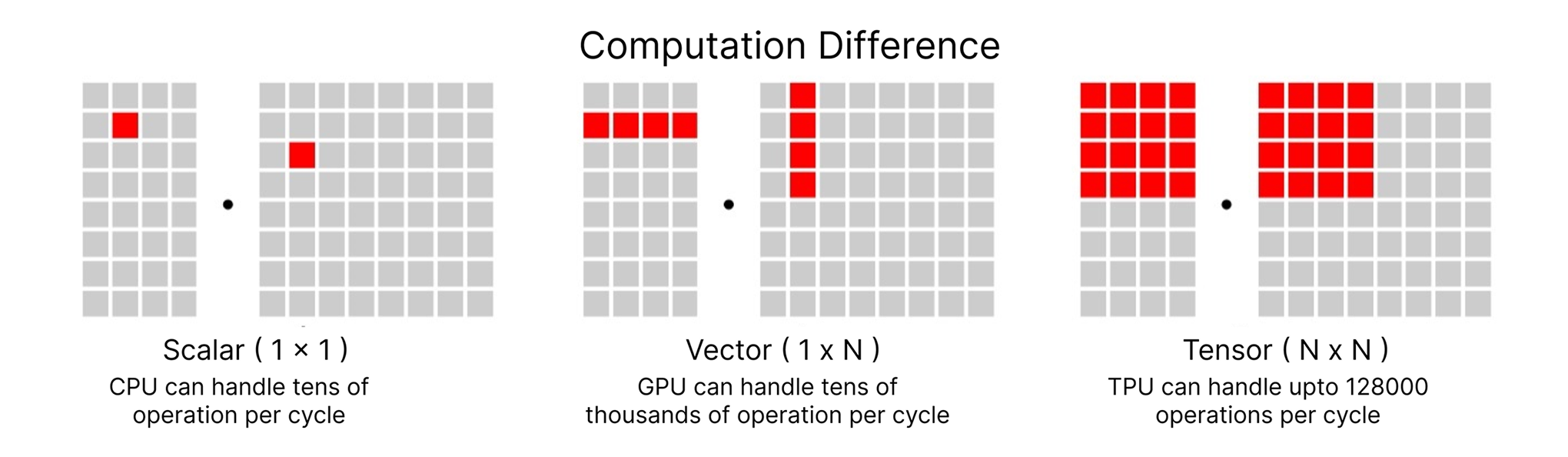
OpenAI and Meta typically use NVIDIA GPUs for training while Google always favors TPUs. They did the same for Veo 3 training and for many other models. By using TPUs, you cannot ignore ML Pathways, which is another Google project designed to scale across TPU Pods, thousands of TPU chips without massive coordination overhead. It supports both data parallelism and model parallelism.
In the upcoming section, we will definitely see why this combination of JAX, TPU, and ML Pathways is being used, as the Veo 3 architecture is sparse and involves other models and components, it is not just a single model training.
Learn more about TPUs in the TPU documentation and about ML Pathways in the Pathways blog post.
Veo 3 High Level Overview
Let's take a look at the Veo 3 high level architecture provided by Google:
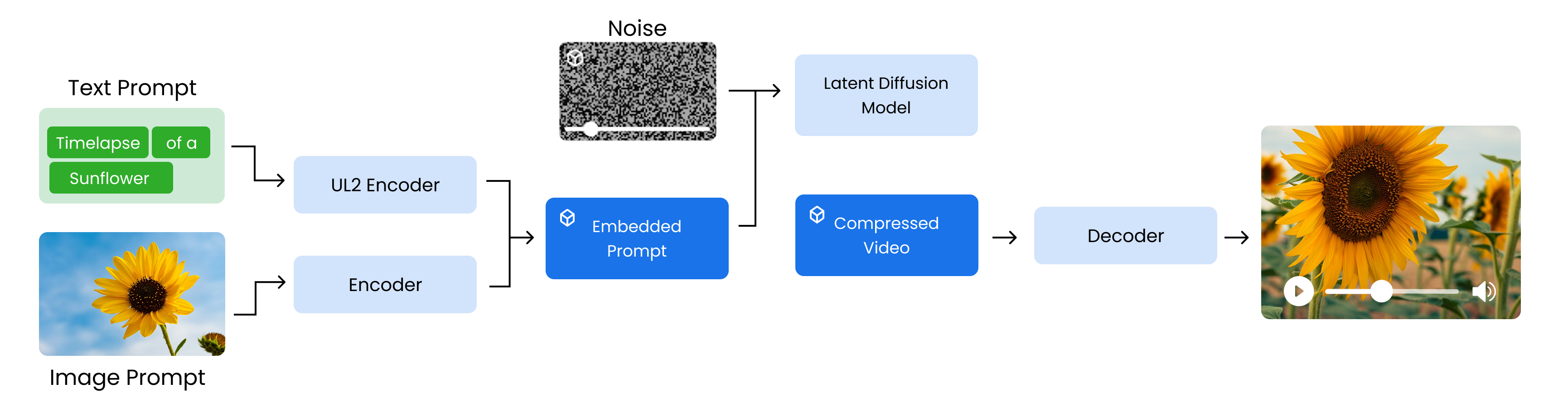
So the training process starts ...
-
from encoding the input prompts, starting with a text prompt that is processed by a
UL2 encoderto create a semantic embedding. Optionally, an image prompt can be included and encoded to enrich the input. -
These embeddings are combined into an embedded prompt, which serves as conditioning input. At the same time, a noisy compressed video is initialized to simulate the generation space for training the model.
-
Next, a latent diffusion model learns to denoise this compressed video using the embedded prompt as guidance, gradually producing a refined compressed video.
-
This output is then passed through a decoder that reconstructs the full resolution video, such as a clear 1080p timelapse of a sunflower blooming.
But this high level diagram is a bit less informative and hides the details of the components involved in the training, preprocessing and safety measures. We are going to create our own diagram to break down the Veo 3 architecture into its components using Model Card and Technical Report.
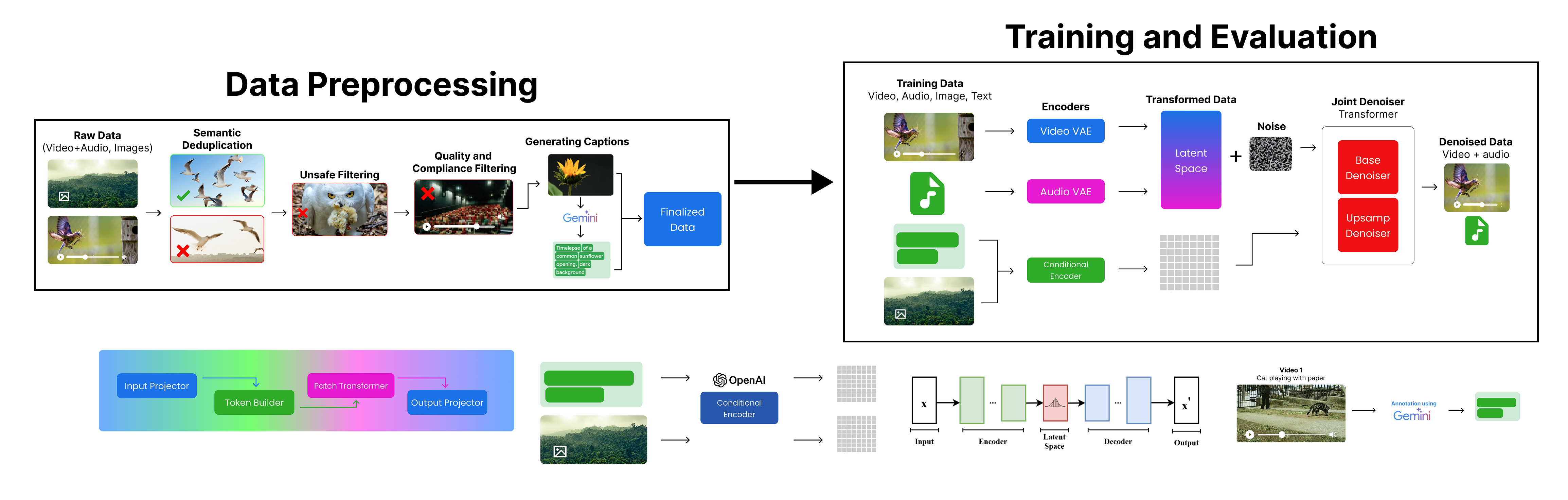
Let' break down the Veo 3 architecture into four phases:
- Preprocessing Phase: This phase involves preparation and preprocessing of the input data.
- Training Phase: This phase involves training the Veo 3 model using the preprocessed data.
- Evaluation Phase: This phase involves evaluating the trained model on various metrics.
We will look at each of these phases in detail.
Data Preprocessing
Phase 1 is our Data Preprocessing Phase, which is crucial for preparing the data before training the Veo 3 model. The goal is to create a high-quality, diverse, and safe dataset that can be used for training.
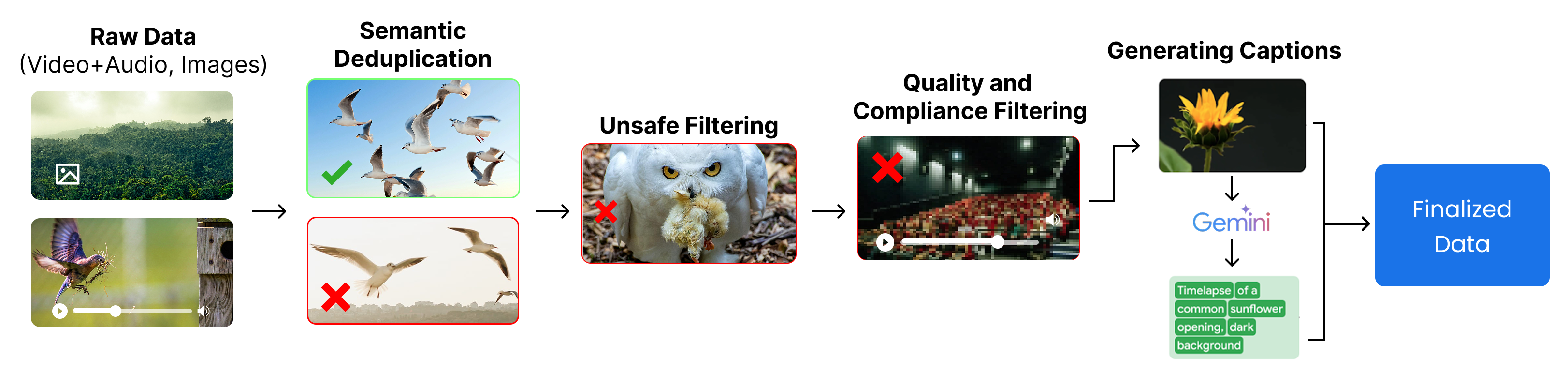
They start ...
- with collecting
raw datafrom various sources, including YouTube, Google Search, and other platforms (e.g., a video of a bird feeding). - Next, they perform
semantic deduplicationto remove near-duplicate content and keep only diverse examples (e.g., keeping one clear bird image and removing similar ones). - Then, they apply
unsafe filteringto eliminate harmful or inappropriate content (e.g., removing an image of an owl carrying prey). - After that,
quality and compliance filteringis done to discard low-quality, blurry, or non-compliant data (e.g., a dark, unclear theater video). - Once cleaned,
captionsare generated using Gemini to accurately describe the content (e.g., “Timelapse of a common sunflower opening”).
Finally, the result is a high-quality, safe, and labeled dataset ready for training the model.
Let's import all the necessary libraries that we will use in the data preprocessing phase.
# Google Generative AI SDK
import google.generativeai as genai

# Progress bar utility
from tqdm import tqdm

# File system operations
import os

# Plotting and image display
import matplotlib.pyplot as plt
import matplotlib.image as mpimg

# Pickle for loading/saving Python objects
import pickle

# Parallel processing utilities
from concurrent.futures import ThreadPoolExecutor, as_completed

# Encoding/decoding utilities
import base64

# OpenAI API
from openai import OpenAI

# Computer vision library
import cv2

# Request handling
import requests
Raw Data Collection
The very first step is to collect raw data, which includes videos and images. Though there are tons of large Hugging Face datasets available, we are creating a learning project. For that, we can focus on Pexels free content to randomly fetch videos and save them locally.
Veo 3 is trained on vast amounts of data, capturing a diverse range of objects and scenarios. For our case, we are targeting specific categories like nature, animals, and urban scenes. So, let’s define the categories we will use to fetch videos from Pexels.
search_queries = [
'cats', # 🐱 animals
'people walking', # 🚶♀️ humans / activity
'cars', # 🚗 vehicles / objects
'hunting', # 🏹 activity / nature
]We are targeting a limited set of queries. Next, we need to define certain parameters, as we are using the Pexels API to fetch raw data. You can get your own free API key (commercial use allowed) from Pexels and set it in the PEXELS_API_KEY variable.
PEXELS_API_KEY = 'YOUR_PEXELS_API_KEY'  # Replace with your Pexels API key
per_page = 10 # Number of results per query
orientation = 'landscape' # Preferred video orientation (laptop, desktop, etc.)
size = 'small' # HD quality videos
So, based on our search queries and other parameters, we should have around 40 videos in total (4 categories × 10 videos each). The orientation is landscape (focusing on laptop/desktop), and the size is small (HD quality).
We can now use a simple loop to iterate through the search queries, fetch videos from the Pexels API, and download them to a local directory.
# Create directory for downloaded videos and set up headers for API requests
os.makedirs('pexels_videos', exist_ok=True)
headers = {'Authorization': PEXELS_API_KEY}

total_videos_downloaded = 0  # Initialize counter for total videos downloaded

# Download videos for each search query
for q in search_queries:
    # Search for videos using Pexels API
    r = requests.get('https://api.pexels.com/videos/search',
                     headers=headers,
                     params={'query': q, 'per_page': per_page, 'orientation': orientation, 'size': size})

    # Download each video from search results
    for i, v in enumerate(r.json().get('videos', []), 1):

        # Get highest quality video file
        f = max(v['video_files'], key=lambda x: x['width'])
        out = f'pexels_videos/{q.replace(" ", "_")}_{i}.mp4'

        # Download and save video file
        with requests.get(f['link'], stream=True) as s, open(out, 'wb') as o:
            for chunk in s.iter_content(8192):
                o.write(chunk)

        total_videos_downloaded += 1  # Increment counter

print(f"Total videos downloaded: {total_videos_downloaded}")
Total videos downloaded: 40Yup, we now have our raw data (40 videos) ready. We can move on to the next step, which is semantic deduplication, just as Google performs after obtaining their raw data.
Semantic Deduplication
Semantic deduplication is the process of identifying and removing duplicate content from a dataset, ensuring that each piece of information is unique. This is especially important when working with petabyte-scale datasets, as it helps avoid wasting storage space. This is the first step that Google performs after collecting their raw data.
Though we only have 40 videos, deduplication is still important here. Let's visualize this approach first and then implement it.
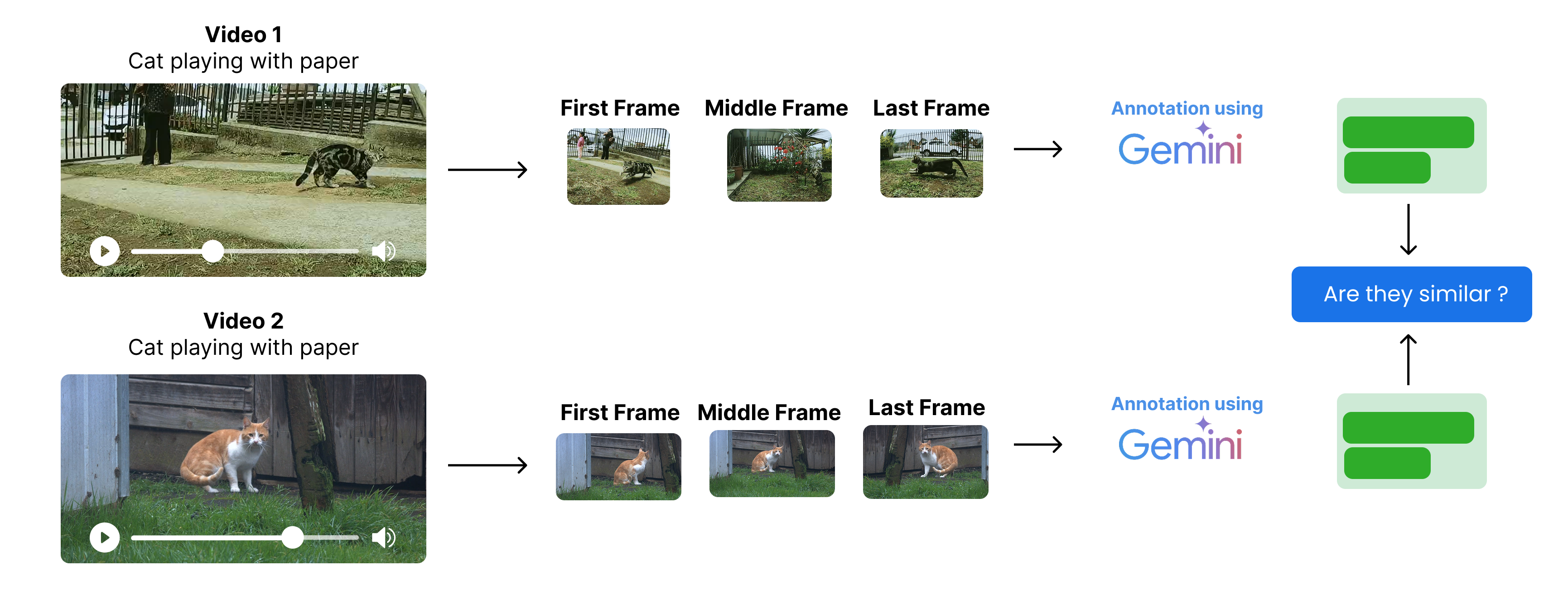
The process starts with ...
- Instead of looking at every frame of the video, we extract the first, middle, and last frames from each video.
- We annotate those frames using a multimodal model (Gemini, GPT, Claude, etc.) to get a description of each frame.
- Then, we compare the descriptions of the frames to identify duplicates.
Processing every frame of the video is a very expensive operation, especially when we have a large dataset. That's why we only extract three frames from each video.
We first need to extract frames from the videos. So let's create a function to extract the first, middle, and last frames from each video.
def extract_key_frames(video_path, output_dir):
    cap = cv2.VideoCapture(video_path)  # Open video file
    if not cap.isOpened():
        print(f"Failed to open {video_path}")
        return []

    frame_count = int(cap.get(cv2.CAP_PROP_FRAME_COUNT))  # Get total frame count
    indices = [0, frame_count // 2, frame_count - 1]  # Indices for key frames
    frame_paths = []

    for i, idx in enumerate(indices):
        cap.set(cv2.CAP_PROP_POS_FRAMES, idx)  # Set frame position
        ret, frame = cap.read()  # Read frame
        if ret:
            out_path = os.path.join(
                output_dir,
                f"{os.path.basename(video_path).split('.')[0]}_frame_{i+1}.png"
            )  # Output path for frame
            cv2.imwrite(out_path, frame)  # Save frame as PNG
            frame_paths.append(out_path)  # Add path to list

    cap.release()  # Release video capture
    return frame_paths  # Return list of saved frame paths
Let's run the function to extract key frames from downloaded videos
os.makedirs('pexels_frames', exist_ok=True)  # Create directory for frames if it doesn't exist

# Get list of all downloaded video files
video_files = [os.path.join('pexels_videos', f) for f in os.listdir('pexels_videos') if f.endswith('.mp4')]
all_frame_paths = {}  # Dictionary to store extracted frame paths for each video

# Use tqdm to show progress
for video in tqdm(video_files, desc="Extracting key frames"):
    frames = extract_key_frames(video, 'pexels_frames')  # Extract key frames from video
    all_frame_paths[video] = frames  # Store frame paths

print("Extracted key frames for all videos.")
Extracting key frames: 0%| | 0/40 [00:00<?, ?it/s]
Extracting key frames: 100%|██████████| 40/40 [01:42<00:00, 2.55s/it]
Extracted key frames for all videos.Now that our key frames are extracted, let's print one video and its key frames to verify the extraction process.
# Pick a sample video and its frames
sample_video = video_files[0]
sample_frames = all_frame_paths[sample_video]

print(f"Sample video: {sample_video}")
print("Extracted key frames:")

plt.figure(figsize=(15, 5))
for i, frame_path in enumerate(sample_frames):
    img = mpimg.imread(frame_path)
    plt.subplot(1, 3, i + 1)
    plt.imshow(img)
    plt.title(f"Frame {i + 1}")
    plt.axis('off')
plt.show()
Sample video: pexels_videos\cars_1.mp4
Extracted key frames:
Next, we need to transform these frames into meaningful text representations so they can be used for deduplication and similarity checks. I will use the open-source LLM under the OpenAI API module instead of Gemini to make it easier to replicate the code, as Ollama and many other providers support it.
I am using the Mistral-24B vision model for image processing.
client = OpenAI(
    base_url="https://api.studio.nebius.com/v1/",
    api_key="YOUR_LLM_PROVIDER_API_KEY"  # Replace with your OpenAI API key or any other API provider key (I am using Nebius AI)
)
# Encode image file to base64 string
def encode_image_to_base64(image_path):
with open(image_path, "rb") as img_file:
return base64.b64encode(img_file.read()).decode('utf-8')
# Get a concise scene description for a frame using Nebius API
def describe_frame(image_b64):
response = client.chat.completions.create(
model="mistralai/Mistral-Small-3.1-24B-Instruct-2503",
messages=[
{"role": "system", "content": "You generate concise scene descriptions for video frames."},
{
"role": "user",
"content": [
{"type": "text", "text": "Describe the scene in this frame in one line."},
{"type": "image_url", "image_url": {"url": f"data:image/png;base64,{image_b64}"}}
]
}
]
)
return response.choices[0].message.content.strip()Let's run the scene description and store it in a dictionary
# Generate scene descriptions for each video's key frames with progress bar
video_descriptions = {}

for video, frames in tqdm(all_frame_paths.items(), desc="Describing frames"):
    descriptions = []
    for frame in frames:
        img_b64 = encode_image_to_base64(frame)
        desc = describe_frame(img_b64)
        descriptions.append(desc)
    video_descriptions[video] = descriptions
Describing frames: 100%|██████████| 40/40 [10:30<00:00, 15.77s/it]Take a look at the descriptions for the first video
video_descriptions['pexels_videos\\cars_1.mp4']['A congested multi-lane highway filled with various vehicles traveling in both directions under dim lighting, perhaps during dawn or dusk.',
'Heavy traffic flows on a rainy highway at dusk with multiple cars and a truck.',
'A busy, multi-lane highway filled with various cars during dusk or dawn, with an "OTIS" mobile vehicle inspection sign prominently displayed in the foreground.']It's time to compare to perform the semantic deduplication of the video descriptions. We can futher embedd the descriptions using a embedding model and then use a cosine similarity metric to find duplicates based on a certain threshold.
But LLMs can also be used to perform semantic deduplication as they can understand the context and meaning of the descriptions in a human-like manner, so let's use a llm to perform the semantic deduplication of the video descriptions.
# Define the prompt template where two video descriptions are compared
compare_prompt_template = """
Compare the two videos based on their key frame descriptions.
Respond 'Yes' if they are near-duplicates, 'No' if different.

Video 1:
{desc1}

Video 2:
{desc2}

Is Video 2 a semantic duplicate of Video 1?
"""
Similar to previous LLM calls, we will use the LLaMA-3.3-70B model to perform semantic deduplication of the video descriptions using a comparison function.
# Use LLM to compare two videos' scene descriptions for semantic deduplication
def compare_descriptions(desc1, desc2):
    """
    Returns 'Yes' if videos are semantic duplicates, 'No' otherwise.
    """

    response = client.chat.completions.create(
        model="meta-llama/Llama-3.3-70B-Instruct",
        max_tokens=10,
        temperature=0,
        messages=[
            {"role": "system", "content": "Answer strictly Yes or No."},
            {"role": "user", "content": compare_prompt_template.format(
                desc1=desc1,
                desc2=desc2
            )}
        ]
    )
    return response.choices[0].message.content.strip()
We need to use parallel processing to speed up the pairwise comparison of video descriptions, otherwise it will take too long to compare all pairs sequentially. We'll use concurrent.futures for this purpose, along with tqdm for progress tracking.
# Prepare video list and names for pairwise comparison
video_list = list(video_descriptions.keys())
video_names = [os.path.basename(v) for v in video_list]
n = len(video_list)

# Build all unique video pairs (including self-pairs)
pairs = [(i, j) for i in range(n) for j in range(i, n)]

# Function to compare two videos using their scene descriptions
def compare_pair(i, j):
    vid1 = video_list[i]
    vid2 = video_list[j]
    if i == j:
        return (video_names[i], video_names[j], "Self")

    desc1_text = "\n".join([f"Frame {k+1}: {d}" for k, d in enumerate(video_descriptions[vid1])])
    desc2_text = "\n".join([f"Frame {k+1}: {d}" for k, d in enumerate(video_descriptions[vid2])])

    result = compare_descriptions(desc1_text, desc2_text)
    return (video_names[i], video_names[j], result)

# Run pairwise comparisons in parallel and collect results
results = []
with ThreadPoolExecutor(max_workers=10) as executor:  # adjust max_workers as needed
    futures = {executor.submit(compare_pair, i, j): (i, j) for i, j in pairs}
    for f in tqdm(as_completed(futures), total=len(futures), desc="Comparing pairs"):
        results.append(f.result())
Comparing pairs: 100%|██████████| 820/820 [00:40<00:00, 20.44it/s]Now that we have performed pairwise comparisons, we can analyze the results to identify duplicates.
# check if any pairs are duplicates
[r for r in results if r[2] == "Yes"][]So, we have successfully compared video pairs based on their scene descriptions using an LLM, identifying potential duplicates. The results show that there are no pairs considered semantic duplicates based on the descriptions provided. So no need to remove any videos at this stage.
Next, we need to move on to the next step, which is to create a harmful content filtering system.
Unsafe Filtering
Like in semantic deduplication, we divide the video into 3 key frames (First, Middle, Last) and merge their descriptions into a single text. This information gives us a high-level overview of what is happening in the video. It can be used to filter out harmful content.
Though we could further divide the videos into more key frames, such as 5 to 7, for better accuracy, this would increase the processing cost. The current approach is a good balance between cost and accuracy.
We are going to use this information to filter out harmful content. Let's visualize this first.
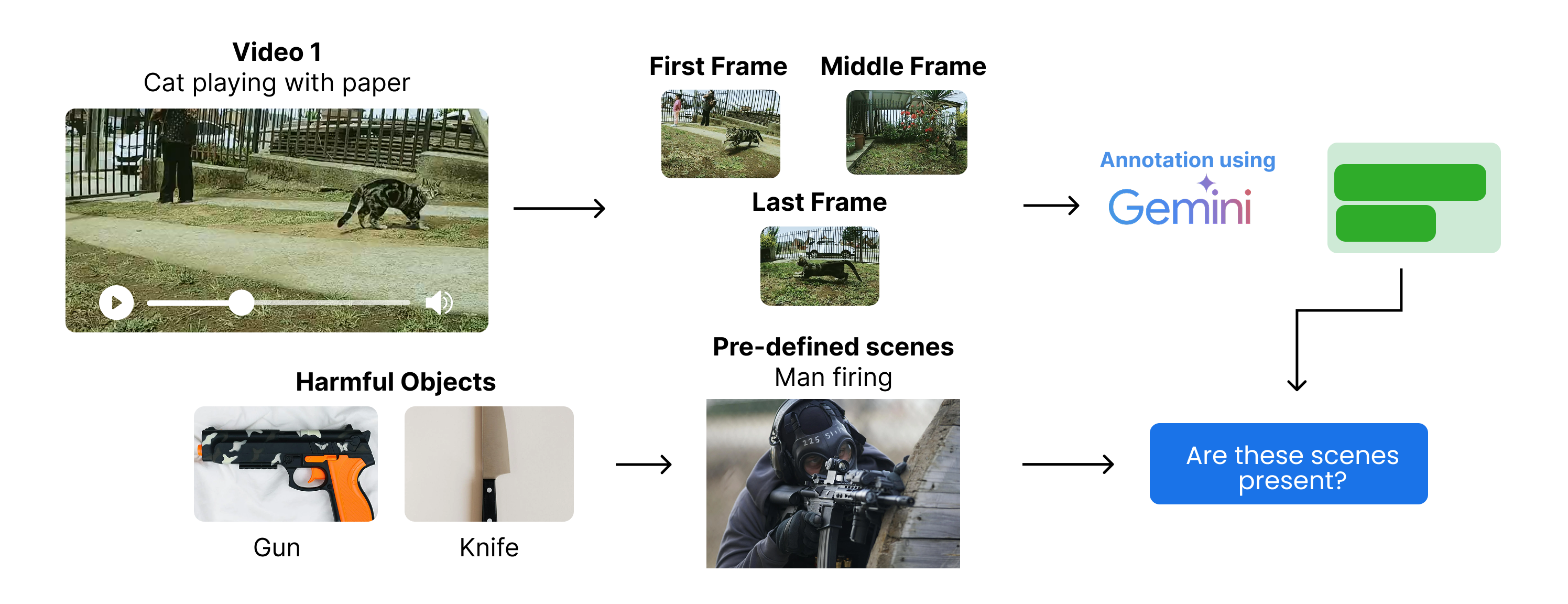
The process starts with ...
- Extracting the first, middle, and last frames from each video. (which we already did)
- Generating scene descriptions for each key frame using a multimodal model (which we already did).
- Identify predefined harmful content categories specific scenes based (e.g., weapons, blood, etc.) and check if the scene descriptions contain any of these pre-defined categories.
Let's define the harmful content categories based scene descriptions. We will use a simple list of categories for this example, but in a real-world scenario, you would want to use a more comprehensive list.
# Define harmful scenes to filter out
harmful_scenes = ["man holding a gun and pointing it somewhere", "blood on the ground", "people fighting"]

# Or if you are targeting only categories of harmful content
# harmful_categories = ["violence", "weapons", "blood", "fighting"]
So, we have defined our harmful content. We could also directly use a harmful objects-based unsafe filtering approach, but this might lead to removing non-harmful content.
For example, if a knife is used to cut a fruit, but you include "knife" in the harmful objects list, it will remove the video. Therefore, we will use the scene description-based approach to filter out harmful content, which is more accurate and less prone to false positives.
Let' create a function to filter out harmful content, We’ll merge the frame descriptions and check if any harmful keyword appears using LLM.
We are using the LLaMA-3.3-70B model to perform unsafe filtering of the video descriptions using a comparison function.
def classify_harmfulness(descriptions):
    prompt = f"""
    You are given descriptions of three key frames from a video.
    Check if any of the following harmful scenes (or anything very close to them) are present in the descriptions:

    Harmful scenes:
    {chr(10).join(f"- {scene}" for scene in harmful_scenes)}

    Frame descriptions:
    {chr(10).join([f"Frame {i+1}: {desc}" for i, desc in enumerate(descriptions)])}

    If any harmful scene or something very similar is present, respond strictly with 'Harmful'. Otherwise, respond strictly with 'Safe'.
    """
    response = client.chat.completions.create(
        model="meta-llama/Llama-3.3-70B-Instruct",
        max_tokens=10,
        temperature=0,
        messages=[
            {"role": "system", "content": "Answer strictly Safe or Harmful."},
            {"role": "user", "content": prompt}
        ]
    )
    return response.choices[0].message.content.strip()
Similar to the deduplication step, we can use parallel processing to classify harmful content in the video descriptions. Let's do that.
harmful_videos_llm = []

with ThreadPoolExecutor(max_workers=10) as executor:
    futures = {
        executor.submit(classify_harmfulness, descriptions): video
        for video, descriptions in video_descriptions.items()
    }
    for future in tqdm(as_completed(futures), total=len(futures), desc="Classifying harmful content"):
        video = futures[future]
        result = future.result()
        if result == "Harmful":
            harmful_videos_llm.append(video)

# Total harmful videos identified by LLM
print(f"Total harmful videos identified by LLM: {len(harmful_videos_llm)}")
Classifying harmful content: 100%|██████████| 40/40 [00:03<00:00, 11.18it/s]
Total harmful videos identified by LLM: 3So, we have identified 3 videos that contain harmful content based on the scene descriptions. Let's print their IDs
harmful_videos_llm['pexels_videos\\hunting_1.mp4',
'pexels_videos\\hunting_4.mp4',
'pexels_videos\\hunting_9.mp4']As expected, if you remember when we downloaded videos, we had a search query for "hunting". and there is a high chance that some of the videos contain hunting scenes, which can be considered harmful by some people. Let's print one of the harmful videos to see its description:
# Plot the first frame of each harmful video detected by the LLM
n = len(harmful_videos_llm)
fig, axes = plt.subplots(1, n, figsize=(5 * n, 5))

if n == 1:
    axes = [axes]

# Display the first frame for each harmful video
for ax, video in zip(axes, harmful_videos_llm):
    frames = all_frame_paths[video]
    if frames:
        img = mpimg.imread(frames[0])
        ax.imshow(img)
        ax.set_title(f"Harmful Video: {os.path.basename(video)}")
        ax.axis('off')
    else:
        ax.set_visible(False)

plt.tight_layout()
plt.show()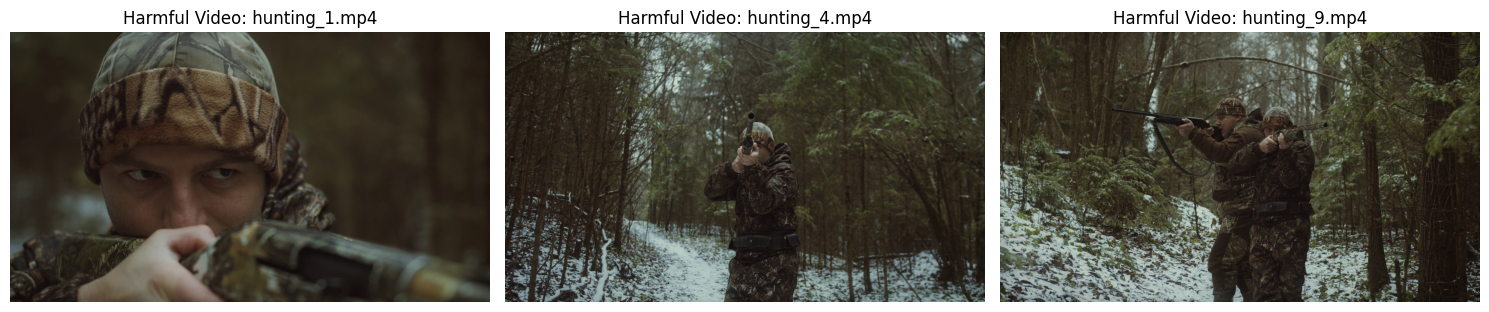
These videos are different, though they are from the same creators. Our LLM correctly identified them as harmful because our harmful scenes list does include man holding a gun and pointing it somewhere. Let's remove these videos from our dataset.
for video in harmful_videos_llm:
    try:
        os.remove(video)  # Remove the video file
        print(f"Removed harmful video: {video}")
    except Exception as e:
        print(f"Error removing {video}: {e}")  # Handle any errors during removal
Removed harmful video: pexels_videos\hunting_1.mp4
Removed harmful video: pexels_videos\hunting_4.mp4
Removed harmful video: pexels_videos\hunting_9.mp4Now that we have performed unsafe filtering, we can move on to the next step, which is quality and compliance filtering.
Quality and Compliance Filtering
Quality and compliance filtering is last second stage of the preprocessing phase, where we further anaylze and filter the data based on certain measures on our requirements. For example if we our target is to create a high-quality video dataset, we need to filter out low-quality videos based on certain criteria (eg. removing blurry videos, videos with low resolution, etc.).
Or if we are targeting a specific type of content, we need to filter out videos that do not comply with our requirements (eg. Famous people, celebrities, etc.).
Let's visualize this first.
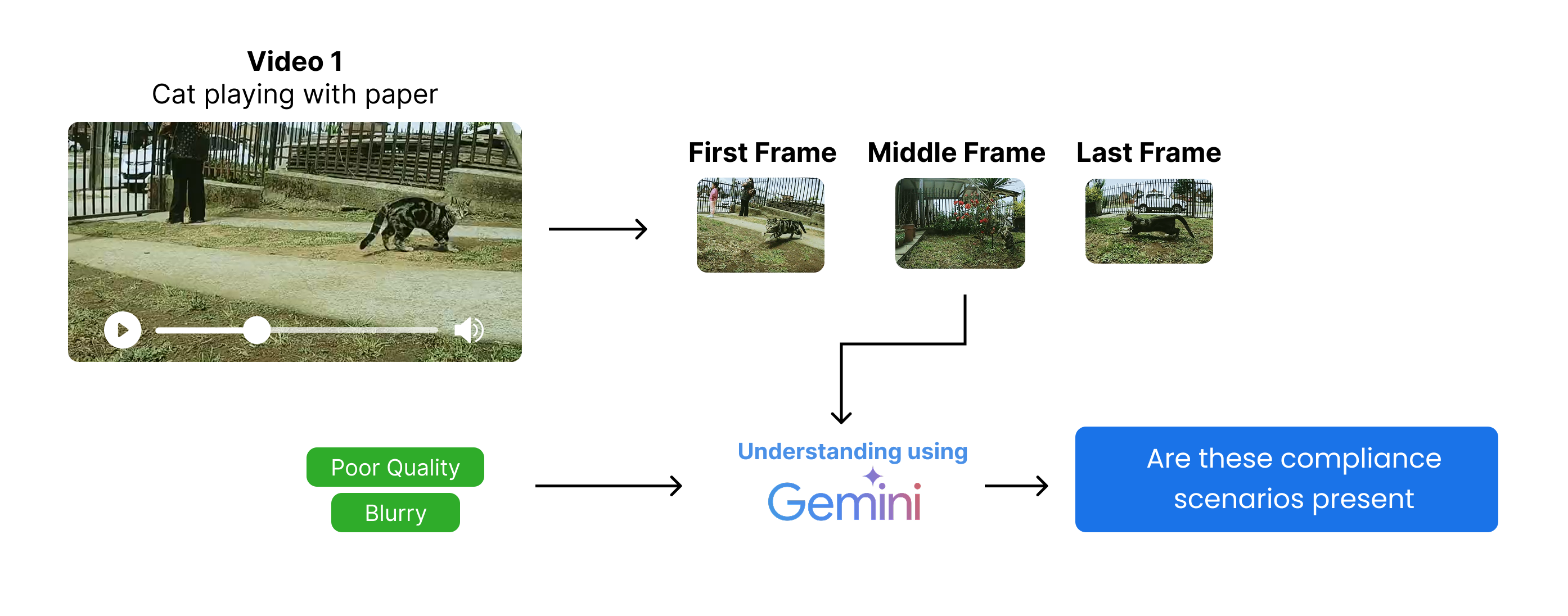
The process starts with ...
- Extracting the first, middle, and last frames from each video (which we already did).
- Define the specific quality and compliance criteria based on our requirements (e.g., containing car license plates, famous people, blurry videos, etc.).
- Identify predefined quality and compliance criteria based on scene descriptions and check if the scene descriptions contain any of these pre-defined criteria.
Similar to the unsafe filtering step, we can focus on multiple key frames to determine the quality, but we will stick to the first, middle, and last frames for simplicity. Let's define our simple quality criteria, but in a real-world scenario like Veo 3, you would want to use a more comprehensive list.
# We are focusing on Blurry, and Poor lighting as quality compliance issues
quality_compliance = [
    "Blurry: The video is so out of focus that the primary objects or subjects cannot be clearly seen or identified.",
    "Poor lighting: The video is too dark, too bright, or has uneven lighting, making it difficult to see or recognize key objects or actions."
]
We need to define a function, check_frame_quality, that uses a multimodal LLM to classify the quality of each frame. We are going to use the Mistral 24B model for this purpose.
def check_frame_quality(image_b64):
    issues = ", ".join(quality_compliance)
    response = client.chat.completions.create(
        model="mistralai/Mistral-Small-3.1-24B-Instruct-2503",
        messages=[
            {"role": "system", "content": (
                f"You are an expert in video quality assessment. "
                f"If the frame has {issues}, reply 'Non-compliant'. Else reply 'Compliant'."
            )},
            {"role": "user", "content": [
                {"type": "text", "text": (
                    f"Does this frame have {issues}? Reply 'Compliant' or 'Non-compliant'."
                )},
                {"type": "image_url", "image_url": {"url": f"data:image/png;base64,{image_b64}"}}
            ]}
        ],
        max_tokens=10,
        temperature=0
    )
    return response.choices[0].message.content.strip()
We are focusing on only middle frames for quality compliance checks, so let's create a function to extract the middle frame from each video.
def classify_middle_frame(video_path, frames):
    # Try to check the quality of the middle frame (frame 2)
    try:
        # Ensure frames list is not empty and has at least 2 elements (index 1)
        if frames and len(frames) > 1:
            image_b64 = encode_image_to_base64(frames[1])  # Encode middle frame to base64
            # Return video path if frame is non-compliant
            return video_path if check_frame_quality(image_b64) == "Non-compliant" else None
        else:
            # If frames list is empty or too short, mark as non-compliant
            return video_path
    except Exception as e:
        print(f"Error processing {video_path}: {e}")
        # On error, mark as non-compliant for safety
        return video_path
To avoid a long processing time, we will be using multithreading here also.
# Non compliant videos list
non_compliant_videos = []

# Use ThreadPoolExecutor to classify middle frames in parallel
with ThreadPoolExecutor(max_workers=10) as executor:
    # Create a dictionary to map futures to video paths for easier error tracking if needed
    future_to_video = {executor.submit(classify_middle_frame, v, f): v for v, f in all_frame_paths.items() if v not in harmful_videos_llm}

    # Use tqdm for progress bar
    for future in tqdm(as_completed(future_to_video), total=len(future_to_video), desc="Checking frame quality"):
        result = future.result()
        if result:
            non_compliant_videos.append(result)

print(f"Total non-compliant videos found: {len(non_compliant_videos)}")
Checking frame quality: 100%|██████████| 37/37 [01:41<00:00, 2.75s/it]
Total non-compliant videos found: 8So, we got total 8 videos that are non-compliant based on the middle frame quality check. let's visualize the middle frame of one of them to see the issue.
# Pick the random non-compliant video
video_path = non_compliant_videos[6]
middle_frame_path = all_frame_paths[video_path][1]  # Middle frame is at index 1

img = mpimg.imread(middle_frame_path)
plt.imshow(img)
plt.title(f"Middle Frame: {video_path}")
plt.axis('off')
plt.show()
This is indeed a blurry frame, and our approach has classified it correctly as non-compliant. Now let's remove these videos from our dataset.
for video in non_compliant_videos:
    try:
        os.remove(video)  # Remove the video file
        print(f"Removed non-compliant video: {video}")
    except Exception as e:
        print(f"Error removing {video}: {e}")  # Handle any errors during removal
Removed non-compliant video: pexels_videos\cars_6.mp4
Removed non-compliant video: pexels_videos\cats_10.mp4
Removed non-compliant video: pexels_videos\cars_1.mp4
Removed non-compliant video: pexels_videos\cars_8.mp4
Removed non-compliant video: pexels_videos\people_walking_1.mp4
Removed non-compliant video: pexels_videos\hunting_2.mp4
Removed non-compliant video: pexels_videos\people_walking_4.mp4
Removed non-compliant video: pexels_videos\people_walking_7.mp4
Removed non-compliant video: pexels_videos\hunting_5.mp4So, we have removed all the harmful and non-compliant videos from the dataset. Let's count the remaining videos.
# Count the number of videos remaining after filtering
video_paths = [os.path.join('pexels_videos', f) for f in os.listdir('pexels_videos') if f.endswith('.mp4')]
print(f"Total remaining videos after filtering: {len(video_paths)}")
Total remaining videos after filtering: 28Our training videos are of different lengths. We need to trim our training videos to a fixed length. Veo 3 can generate videos up to 8 seconds long. For simplicity, we will trim all videos to 5 seconds.
This will help reduce the size of the dataset and also fix the issue of videos being too long for training, which would consume more time and resources.
Let's trim the videos to 5 seconds.
# Function to trim videos to a specified duration (in seconds)
def trim_video(input_path, output_path, duration=5):
    # Open the input video file
    cap = cv2.VideoCapture(input_path)
    fps = cap.get(cv2.CAP_PROP_FPS)  # Get frames per second
    total_frames = int(cap.get(cv2.CAP_PROP_FRAME_COUNT))  # Total number of frames in the video
    target_frames = int(fps * duration)  # Number of frames to keep for the specified duration

    # If the video is shorter than the target duration, skip trimming
    if total_frames < target_frames:
        print(f"Video {input_path} is shorter than {duration} seconds. Skipping.")
        cap.release()
        return

    # Set up the video writer for the output trimmed video
    fourcc = cv2.VideoWriter_fourcc(*'mp4v')
    out = cv2.VideoWriter(output_path, fourcc, fps, (int(cap.get(3)), int(cap.get(4))))

    # Write frames up to the target duration
    for _ in range(target_frames):
        ret, frame = cap.read()
        if not ret:
            break
        out.write(frame)

    # Release resources
    cap.release()
    out.release()
Let's run this function on all videos.
os.makedirs('trimmed_videos', exist_ok=True)

def process_video(input_path):
    output_path = os.path.join('trimmed_videos', os.path.basename(input_path))
    trim_video(input_path, output_path, duration=5)

with ThreadPoolExecutor(max_workers=8) as executor:
    list(tqdm(executor.map(process_video, video_paths), total=len(video_paths), desc="Trimming videos"))
Trimming videos: 100%|██████████| 28/28 [01:15<00:00, 2.71s/it]Now that we have trimmed the videos to 5 seconds and stored them in the trimmed_videos directory, we can perform an additional step: for example, we want to select only videos that are less than 20 MB in size. This can help us ensure that the videos are lightweight and suitable for further processing or sharing.
# get all trimmed video paths
trimmed_video_paths = [os.path.join('trimmed_videos', f) for f in os.listdir('trimmed_videos') if f.endswith('.mp4')]
print(f"Total trimmed videos: {len(trimmed_video_paths)}")
Total trimmed videos: 28Let's perform this step to remove the bigger size videos and keep only the smaller ones.
# Remove videos that are more than 20MB in size with progress bar
def remove_large_videos(video_paths, max_size_mb=20):
    for video in tqdm(video_paths, desc="Checking video sizes"):
        if os.path.getsize(video) > max_size_mb * 1024 * 1024:  # Convert MB to bytes
            try:
                os.remove(video)
                print(f"Removed large video: {video}")
            except Exception as e:
                print(f"Error removing {video}: {e}")

# Call the function to remove large videos
remove_large_videos(trimmed_video_paths, max_size_mb=20)
Checking video sizes: 100%|██████████| 28/28 [00:00<00:00, 587.12it/s]
Removed large video: trimmed_videos\cars_2.mp4
Removed large video: trimmed_videos\cars_3.mp4
Removed large video: trimmed_videos\cars_5.mp4
Removed large video: trimmed_videos\cats_7.mp4
Removed large video: trimmed_videos\hunting_7.mp4
Removed large video: trimmed_videos\people_walking_6.mp4# get all trimmed video paths
trimmed_video_paths = [os.path.join('trimmed_videos', f) for f in os.listdir('trimmed_videos') if f.endswith('.mp4')]
print(f"Total trimmed videos: {len(trimmed_video_paths)}")Total trimmed videos: 22So, we have total 22 videos remaining after filtering out harmful and non-compliant videos. Now we are moving on to last step of the pipeline, which is to annotate the pre-processed videos.
Data Annotation
In Veo 3 creation, previous steps such as unsafe filtering and more were done multiple times, and after that, the last stage of data preprocessing was performed. We tried to reduce costs in previous steps by using open-source models, but annotation strictly needs to be done by Gemini or other models which can understand videos.
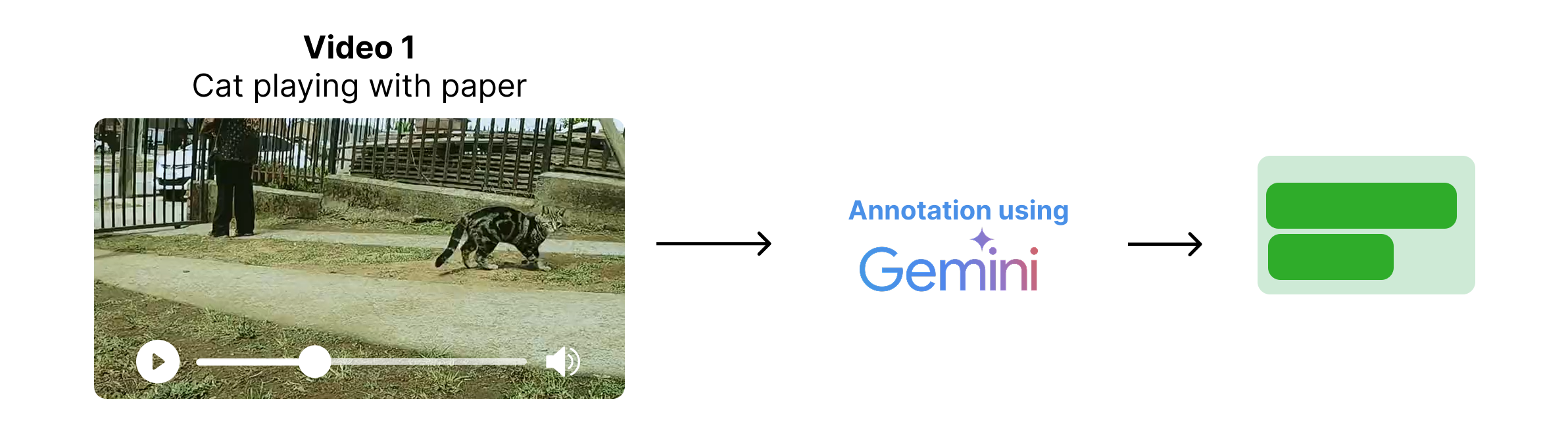
Veo 3 training data preprocessing was also done multiple times, including annotation, which was performed using Gemini models. We are going to do the same. You can get your own free API key (commercial use allowed) from Gemini and set it in the GEMINI_API_KEY variable.
genai.configure(api_key="YOUR_GEMINI_API_KEY")  # Replace with your Gemini API key

model = genai.GenerativeModel("gemini-2.0-flash") # We are using Gemini 2.0 Flash model
Let's annotate the trimmed videos.
video_annotations = []

# Iterate through each trimmed video and generate a summary annotation
for video_file_name in tqdm(trimmed_video_paths, desc="Annotating videos"):
    with open(video_file_name, 'rb') as f:
        video_bytes = f.read()
    try:
        # Use Gemini model to generate a 3-sentence summary for the video
        response = model.generate_content([
            {
                "mime_type": "video/mp4",
                "data": video_bytes
            },
            "Summarize the video in 3 sentences. Provide only the summary and nothing else."
        ])
        # Extract summary text from the response
        summary = response.text if hasattr(response, "text") else str(response)
    except Exception as e:
        # Handle errors and store the error message as summary
        summary = f"Error: {e}"
    # Append the annotation result to the list
    video_annotations.append({"video_path": video_file_name, "summary": summary})
Annotating videos: 100%|██████████| 22/22 [03:15<00:00, 8.90s/it]video_annotations[0]{'video_path': 'trimmed_videos\\cars_10.mp4',
'summary': 'The video shows two cars drifting in a parking lot track marked with tires, with a crowd watching from a building in the background. The yellow car takes the initial lead but is overtaken by the dark colored car, which then drifts around the tires leaving smoke. The cars continue to drift around the track marked with tires.\n'}We need to do some cleaning here like removing the "The video shows" prefix and ensuring the summary is concise.
# Removing 'The video shows' prefix from summaries
for annotation in video_annotations:
    if annotation['summary'].startswith("The video shows"):
        annotation['summary'] = annotation['summary'][len("The video shows"):].strip()

# Display the first video annotation
video_annotations[0]
{'video_path': 'trimmed_videos\\cars_10.mp4',
'summary': 'two cars drifting in a parking lot track marked with tires, with a crowd watching from a building in the background. The yellow car takes the initial lead but is overtaken by the dark colored car, which then drifts around the tires leaving smoke. The cars continue to drift around the track marked with tires.'}Great, so far we have pre-processed the data according to Veo 3 specifications, including deduplication, quality compliance checks, and generating concise annotations. However, we need to further restructure the data to match the expected format for Veo 3.
This step is part of training the Veo 3 model, which we will cover in the upcoming sections.
Veo 3 Model Architecture
Phase 2 is our Coding Veo 3 Architecture. This is the most complex part of the Veo 3 project, where the architecture of the Veo 3 model is designed and implemented.
Veo 3 can generate high-quality videos using two types of inputs:
Text prompts: These are natural language descriptions of the desired video content, such as "A timelapse of a sunflower blooming."Image prompts + Text prompts: These are a combination of an image and a text description, such as "A timelapse of a sunflower blooming" with an image of a sunflower.
Let's visualize it first.
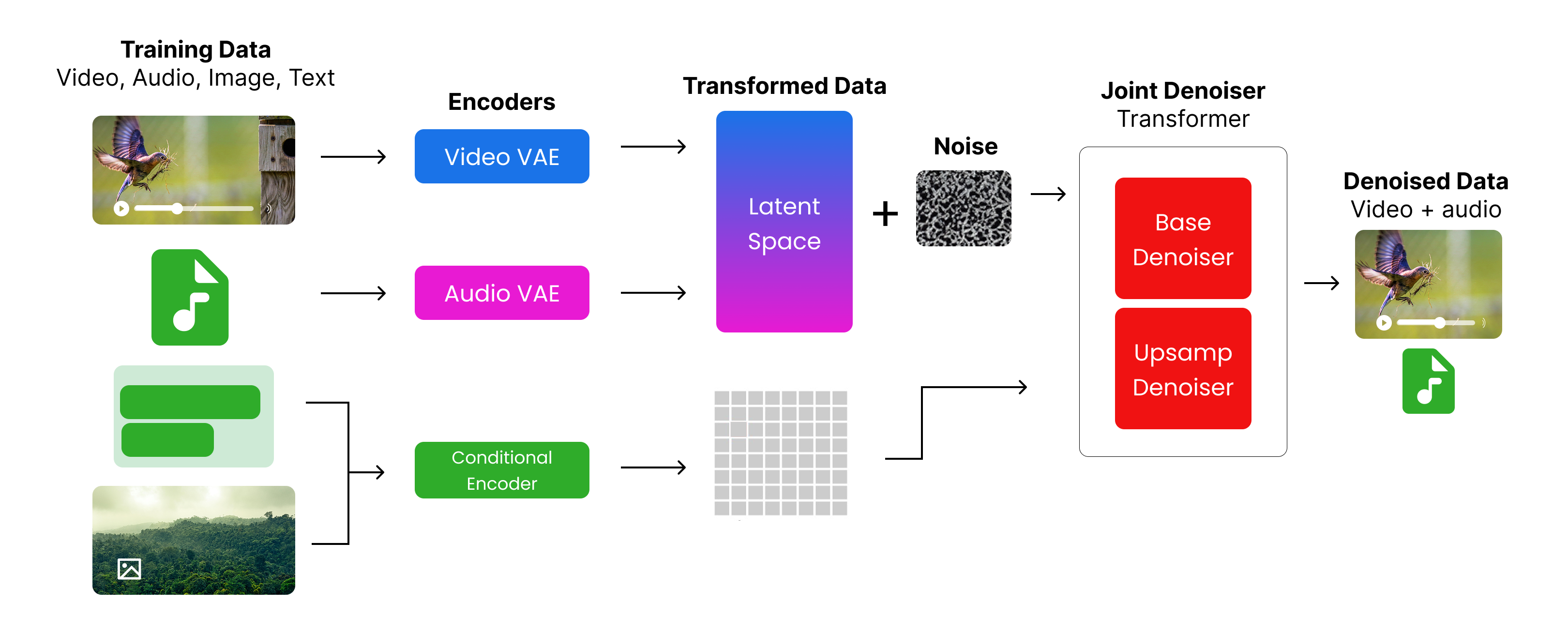
The process starts with:
- Videos and audio are encoded using the
Video EncoderandAudio Encoder, respectively. - Images and text are encoded using the UL2 encoder provided by Google.
- The encoded video and audio, along with some noise, and the embedded images and text are passed to a joint denoiser backed by a transformer architecture.
- The joint denoiser processes the inputs and generates a joint representation of the video and audio.
Let's implement these components step by step. But first we need to import the necessary libraries that will be used through this phase.
import imageio  # For reading/writing images
from PIL import Image  # For image manipulation

import torch  # Core PyTorch library
import torch.nn as nn  # For neural network modules
import torch.nn.functional as F  # Functional API (e.g., activation functions)
import torch.optim as optim  # Optimizers (e.g., Adam, SGD)
from torch.optim.lr_scheduler import CosineAnnealingLR  # Learning rate scheduler
from torch.utils.data import Dataset, DataLoader  # For creating datasets and loading data
import torchaudio  # For audio processing

from torchvision import transforms  # For common image transformations

from diffusers import DDPMScheduler  # For diffusion models scheduling
from transformers import CLIPProcessor, CLIPModel  # For CLIP model and processor

from einops import rearrange  # For tensor reshaping and repetition

import numpy as np  # For numerical operations

import skimage.transform # For image transformations (e.g., resizing, cropping)

# Set computation device to GPU if available, otherwise CPU
DEVICE = torch.device("cuda" if torch.cuda.is_available() else "cpu")
Restructuring Data
In our data preprocessing step, you can see that our finalized dataset consists only of videos. However, for Veo 3, images can also be passed with text to generate videos. Additionally, audio is processed separately.
Therefore, we first need to separate everything properly. In short, we need to restructure our dataset to have a proper structure for each data type.
This is our target structure:
📁 dataset/
 ├── 📁 t2v_pairs/            # dir containing text to videos pairs training data
 │    ├── 📄 video_1.mp4      # video file
 │    ├── 📄 video_1.wav      # audio file (extracted from video_1.mp4)
 │    ├── 📄 video_1.txt      # text prompt or annotation for video_1.mp4
 │    └── ...
 └── 📁 i2v_pairs/            # dir containing image to videos pairs training data
      ├── 📄 image_1.jpg      # input image
      ├── 📄 video_1.mp4      # generated video file
      ├── 📄 video_1.wav      # audio file (extracted from video_1.mp4)
      └── ...
This step simply requires average Python coding skills. It is not necessary to display it here since it would take time to understand. I have combined the code in transform_data.py, which you can use to transform our trimmed videos data into the required dataset/ directory as discussed above.
Now that we have dataset/ dir ready, we further need to create a structure dataset variables based on paths of audios, images and videos. This will help us to easily access the data during training and inference.
we need to define directories which contains our pairs dataset
# Paths
i2v_dir = 'dataset/i2v_pairs'
t2v_dir = 'dataset/t2v_pairs'

# Collect files
i2v_files = os.listdir(i2v_dir)
t2v_files = os.listdir(t2v_dir)
Let's first create our text to video pairs.
# Build T2V_INFO
t2v_info = []
t2v_videos = [f for f in t2v_files if f.endswith('.mp4')]

for idx, video_file in enumerate(t2v_videos, start=1):
    base_name = os.path.splitext(video_file)[0]
    audio_file = f"{base_name}.wav"

    # Find matching annotation
    annotation = next((a for a in video_annotations if a['video_path'].split('\\')[-1] == video_file), None)
    caption = annotation['summary'] if annotation else ''

    t2v_info.append({
        'id': f"t2v_{idx:03d}",
        'video_path': video_file,
        'audio_path': audio_file,
        'initial_caption': caption
    })
Similarly, we can create (image + text) to video pairs dataset
# Build I2V_INFO
i2v_info = []
i2v_images = [f for f in i2v_files if f.endswith('.jpg')]

for idx, image_file in enumerate(i2v_images, start=1):
    base_name = os.path.splitext(image_file)[0]
    video_file = f"{base_name}.mp4"
    audio_file = f"{base_name}.wav"

    # Find matching annotation
    annotation = next((a for a in video_annotations if a['video_path'].split('\\')[-1] == video_file), None)
    prompt = annotation['summary'] if annotation else ''

    i2v_info.append({
        'id': f"i2v_{idx:03d}",
        'image_path': image_file,
        'target_video_path': video_file,
        'target_audio_path': audio_file,
        'prompt': prompt
    })
Checking the total number of pairs
len(i2v_info), len(t2v_info) # Check the lengths of the info lists(5, 17)Take a look at a sample pair of I2V and T2V pairs
i2v_info[0], t2v_info[0] # Display the first entries of each info list({'id': 'i2v_001',
'image_path': 'cats_2.jpg',
'target_video_path': 'cats_2.mp4',
'target_audio_path': 'cats_2.wav',
'prompt': 'An orange, fluffy kitten is playing with a small toy on a couch. It pounces and bats at the toy with its paws, appearing very playful and energetic. The couch has a patterned cover and is surrounded by pillows.\n'},
{'id': 't2v_001',
'video_path': 'cars_10.mp4',
'audio_path': 'cars_10.wav',
'initial_caption': 'two cars drifting in a parking lot track marked with tires, with a crowd watching from a building in the background. The yellow car takes the initial lead but is overtaken by the dark colored car, which then drifts around the tires leaving smoke. The cars continue to drift around the track marked with tires.'})We need to transform our training data (videos + audios + images) into tensors which will be used for training the model, in simple terms, tensors are multi-dimensional arrays that can be processed and get improved during training. We will use the torch library to convert our data into tensors.
We need to create two functions: one for converting the video data into tensors and another for converting the audio data into tensors. While we are at it, we will also be declaring some variables that will be used later throughout the process.
# Base video frames (meaning the number of frames to extract from each video)
BASE_VIDEO_FRAMES = 16

# Function to preprocess video files into tensors
def preprocess_video(path, target_height, target_width):
    # Read video frames using imageio
    reader = imageio.get_reader(path, 'ffmpeg')
    frames = []
    for i, f in enumerate(reader):
        if i >= BASE_VIDEO_FRAMES:
            break
        # Resize each frame to (target_height, target_width) and convert to tensor (C, H, W)
        resized = skimage.transform.resize(f, (target_height, target_width), anti_aliasing=True)
        tensor = torch.from_numpy(resized).permute(2, 0, 1).float()
        frames.append(tensor)
    # Pad with black frames if not enough frames are present
    if len(frames) < BASE_VIDEO_FRAMES and frames:
        pad_frame = torch.zeros_like(frames[0])
        frames.extend([pad_frame] * (BASE_VIDEO_FRAMES - len(frames)))
    # Stack frames into a tensor of shape (C, T, H, W)
    return torch.stack(frames, dim=1) if frames else None
Now that we have defined the preprocessing for video with one key parameter, we can now define the preprocessing for audio files. with certain parameters that are specific to audio files.
# Audio parameters
AUDIO_SAMPLE_RATE = 16000 # Standard sample rate for audio processing (meaning the number of samples per second)
AUDIO_DURATION_SEC = 2 # Duration of audio clips in seconds (meaning how long each audio clip should be)
AUDIO_SAMPLES = AUDIO_SAMPLE_RATE * AUDIO_DURATION_SEC # Total number of audio samples (meaning the total number of audio samples in the clip)

# This function preprocesses audio files to ensure they are in the correct format and length
def preprocess_audio(path):
    w, sr = torchaudio.load(path)
    # Keep only the first channel if multi-channel
    if w.shape[0] > 1:
        w = w[:1, :]
    # Resample if needed
    if sr != AUDIO_SAMPLE_RATE:
        w = torchaudio.transforms.Resample(sr, AUDIO_SAMPLE_RATE)(w)
    # Pad or trim to fixed length
    if w.shape[1] < AUDIO_SAMPLES:
        w = F.pad(w, (0, AUDIO_SAMPLES - w.shape[1]))
    else:
        w = w[:, :AUDIO_SAMPLES]
    # Normalize
    max_val = torch.max(torch.abs(w))
    if max_val > 0:
        w = w / max_val
    return w
So, our focus is onto two things, base video and upsampled video tensors for training. The base video tensor is the original video frames, while the upsampled video tensor is created by repeating the frames to match a target number of frames.
We also need to create two new functions that will be built on top of the previous existing functions, since we are handling images, videos, and audios at the same time. So let's do that now.
# Define constants for video dimensions
UPSAMPLED_VIDEO_HEIGHT = 64 # Height of the upsampled video frames (meaning the height of the video frames after upsampling)
UPSAMPLED_VIDEO_WIDTH = 64 # Width of the upsampled video frames (meaning the width of the video frames after upsampling)
BASE_VIDEO_HEIGHT = 32 # Height of the base video frames (meaning the height of the original video frames before upsampling)
BASE_VIDEO_WIDTH = 32 # Width of the base video frames (meaning the width of the original video frames before upsampling)

T2V_DATA_DIR = 'dataset/t2v_pairs' # Directory for T2V pairs (meaning the directory where the text-to-video pairs are stored)
I2V_DATA_DIR = 'dataset/i2v_pairs' # Directory for I2V pairs (meaning the directory where the image-to-video pairs are stored)
Now that we define parameters, let's code both the T2V and I2V datasets.
def load_i2v_item(info):
    # Load a base and upsampled version of the input image
    img_pil = Image.open(
        os.path.join(I2V_DATA_DIR, info['image_path'])
    ).convert('RGB')
    img_base = transforms.ToTensor()(
        img_pil.resize((BASE_VIDEO_WIDTH, BASE_VIDEO_HEIGHT))
    )
    img_upsampled = transforms.ToTensor()(
        img_pil.resize((UPSAMPLED_VIDEO_WIDTH, UPSAMPLED_VIDEO_HEIGHT))
    )

    # Preprocess target video at base and upsampled resolutions
    vid_base = preprocess_video(
        os.path.join(I2V_DATA_DIR, info['target_video_path']),
        BASE_VIDEO_HEIGHT, BASE_VIDEO_WIDTH
    )
    vid_upsampled = preprocess_video(
        os.path.join(I2V_DATA_DIR, info['target_video_path']),
        UPSAMPLED_VIDEO_HEIGHT, UPSAMPLED_VIDEO_WIDTH
    )

    # Preprocess target audio
    aud = preprocess_audio(
        os.path.join(I2V_DATA_DIR, info['target_audio_path'])
    )

    # Return a dictionary containing all modalities and metadata
    return {
        'modality': 'i2v',
        'input_image_base': img_base,
        'input_image_upsampled': img_upsampled,
        'target_video_base': vid_base,
        'target_video_upsampled': vid_upsampled,
        'target_audio': aud,
        'caption': info['prompt'],
        'id': info['id']
    }
And for T2V items ...
def load_t2v_item(info):
    base_vid = preprocess_video(
        os.path.join(T2V_DATA_DIR, info['video_path']),
        BASE_VIDEO_HEIGHT, BASE_VIDEO_WIDTH
    )
    upsampled_vid = preprocess_video(
        os.path.join(T2V_DATA_DIR, info['video_path']),
        UPSAMPLED_VIDEO_HEIGHT, UPSAMPLED_VIDEO_WIDTH
    )
    audio = preprocess_audio(
        os.path.join(T2V_DATA_DIR, info['audio_path'])
    )
    if base_vid is not None and upsampled_vid is not None and audio is not None:
        return {
            'modality': 't2v',
            'video_base': base_vid,
            'video_upsampled': upsampled_vid,
            'audio': audio,
            'caption': info['initial_caption'],
            'id': info['id']
        }
    return None
Finally, we are now ready to run the restructuring final step as we transform the data into a format suitable for training (tensors).
# Load Text-to-Video (T2V) data:
# - For each entry in t2v_info, call load_t2v_item to preprocess video, audio, and caption.
# - Only keep non-None results.
t2v_data = [
    d for d in [
        load_t2v_item(i) for i in tqdm(t2v_info, desc="Loading T2V data")
    ] if d
]

# Load Image-to-Video (I2V) data:
# - For each entry in i2v_info, call load_i2v_item to preprocess image, video, audio, and prompt.
# - Only keep non-None results.
i2v_data = [
    d for d in [
        load_i2v_item(i) for i in tqdm(i2v_info, desc="Loading I2V data")
    ] if d
]
Loading T2V data: 100%|██████████| 2/2 [01:20<00:00, 40.13s/it]
Loading I2V data: 100%|██████████| 2/2 [00:27<00:00, 13.93s/it]Let's merge the updated tensors data into a single data variable
raw_data = t2v_data + i2v_data # Combine both datasetsSo, we have finally transformed our raw data into a format suitable for training. Before we proceed to the Video or Audio encoder, we need to create a MultiModalDataset class that will handle the data loading and batching for us. That class will contain all the transformed data in a structured way, allowing us to easily access the different modalities (video, audio, image, text) and their corresponding captions.
Creating a Multi Modal Dataset
Object-Oriented Programming (OOP) is the correct and suitable way to structure your training data, and this is exactly what we are doing here. We are going to create a class that will handle the data loading and processing for both T2V and I2V datasets.
BATCH_SIZE = 1  # Batch size for DataLoader (how many samples to process in one batch)

class MultiModalDataset(Dataset):
    def __init__(self, data_list):
        # Store the list of data samples (each sample is a dict for t2v or i2v)
        self.data = data_list

    def __len__(self):
        # Return the number of samples in the dataset
        return len(self.data)

    def __getitem__(self, idx):
        # Get the sample at the given index
        item = self.data[idx]
        # Use the caption (should be set in your data)
        caption_string = item['caption']

        if item['modality'] == 't2v':
            # For text-to-video: return video, audio, and a dummy image tensor
            return {
                'modality': 't2v',
                'video_base': item['video_base'],
                'video_upsampled': item['video_upsampled'],
                'audio': item['audio'],
                'raw_caption': caption_string,
                # Dummy image tensor (all zeros) for t2v, shape matches a single video frame
                'input_image_base': torch.zeros_like(item['video_base'][:, 0]),
            }
        else:  # For image-to-video
            return {
                'modality': 'i2v',
                'video_base': item['target_video_base'],
                'video_upsampled': item['target_video_upsampled'],
                'audio': item['target_audio'],
                'raw_caption': caption_string,
                # Use the actual input image tensor for i2v
                'input_image_base': item['input_image_base'],
            }
We can simple call this class MultiModalDataset on top of our raw data. This class will inherit from torch.utils.data.Dataset, which is a PyTorch class that provides a way to load and process data in batches.
# Create the dataset and dataloader for training
# - train_dataset: wraps the raw_data list using the MultiModalDataset class
# - train_dataloader: DataLoader for batching and shuffling during training
train_dataset = MultiModalDataset(raw_data)
train_dataloader = DataLoader(train_dataset, batch_size=BATCH_SIZE, shuffle=True)
print(f"MultiModalDataset created with {len(train_dataset)} samples.")
MultiModalDataset created with 4 samples.Great we can now proceed to code the actual architecture of the veo 3 model which consists of multiple components, including the video encoder, audio encoder, conditional encoder, and the joint denoiser and more.
Video VAE (Video Variational Autoencoder)
Great, so now that we have preprocessed our raw data and restructured it into a PyTorch Dataset which is essential for training a video generation model, we can move on to create the first model component: the Video Encoder.
A VAE (Variational Autoencoder) is a type of neural network architecture used for unsupervised learning tasks, particularly in generative models. It consists of two main components:
- Encoder: Maps input data (such as images or videos) to a latent space representation.
- Decoder: Maps the latent space representation back to the original data space, allowing for reconstruction of the input data.
Let's visualize this architecture (Source Wikipedia):
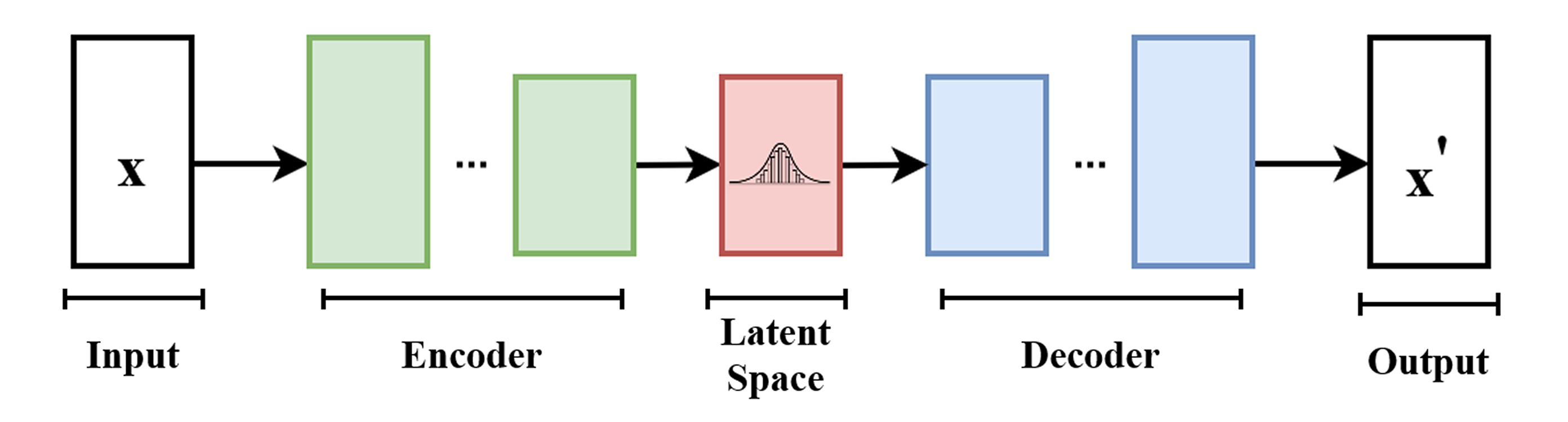
It works like this ....
- The encoder takes an input tensor and encodes it into a latent representation a latent vector which captures the important features of the input data (for example, the shape, color, and texture of an image or video frame). The encoder typically consists of convolutional layers that progressively downsample the input tensor while extracting features.
- The decoder then takes this latent vector and reconstructs the original input data, typically using transposed convolutional layers to upsample the latent representation back to the original dimensions.
Let' code this VideoVAE along with some configurations for training.
VIDEO_LATENT_CHANNELS = 4 # Number of channels in the latent space for video (meaning the number of feature maps in the latent representation)

class VideoVAE(nn.Module):
    def __init__(self):
        super().__init__()
        # Encoder: Input shape (B, 3, F, H, W) -> Latent (B, C_lat, F/2, H/8, W/8)
        self.e = nn.Sequential(
            # First 3D conv: downsample F, H, W by 2, output channels 32
            nn.Conv3d(3, 32, kernel_size=3, stride=(2, 2, 2), padding=1), nn.SiLU(),
            # Second 3D conv: downsample H, W by 2, output channels 64
            nn.Conv3d(32, 64, kernel_size=3, stride=(1, 2, 2), padding=1), nn.SiLU(),
            # Third 3D conv: downsample H, W by 2, output channels 128
            nn.Conv3d(64, 128, kernel_size=3, stride=(1, 2, 2), padding=1), nn.SiLU(),
            # Final 3D conv: output latent channels, no downsampling
            nn.Conv3d(128, VIDEO_LATENT_CHANNELS, kernel_size=3, stride=1, padding=1)
        )
        # Decoder: Latent -> Output (reverse of encoder)
        self.d = nn.Sequential(
            # First transpose conv: keep shape, output channels 128
            nn.ConvTranspose3d(VIDEO_LATENT_CHANNELS, 128, kernel_size=3, stride=1, padding=1), nn.SiLU(),
            # Second transpos