

Repository
Building-llama3-from-scratch
LLaMA 3 is one of the most promising open-source model after Mistral, we will recreate it's architecture in a simpler manner.
- Topic
- Link
- Transformer Theory
- Video Link
- Neural Networks Theory
- Video Link
- Python basics
- Video Link
Specs
- TopicLink
- Transformer TheoryVideo Link
- Neural Networks TheoryVideo Link
- Python basicsVideo Link
- FEATURELlama 3
- TokenizerTiktoken (developed by OpenAI)
- Number of Parameters8B, 70B
- Training Data15T tokens
- Context Length8192 tokens
- Attention MechanismGrouped-query attention
- Fine-Tuned ModelsYes
- PerformanceBetter than Llama 2 on all benchmarks
- Computational RequirementsVery high (70B model)
- AvailabilityOpen source
- Reinforcement learning from human feedbackYes
- Number of languages supported30 languages
- Suitable forBest for more demanding tasks, such as reasoning, coding, and proficiency tests
README
Building LLaMA 3 LLM From Scratch using Python
LLaMA 3 is one of the most promising open-source model after Mistral, solving a wide range of tasks. I previously wrote a blog on Medium about creating an LLM with over 2.3 million parameters from scratch using the LLaMA architecture. Now that LLaMA-3 is released, we will recreate it in a simpler manner.
We won't be using a GPU for this blog, but you'll need at least 17 GB of RAM because we are going to load some files that are more than 15 GB in size. If this is an issue for you, you can use Kaggle as a solution. Since we don't need a GPU, Kaggle offers 30 GB of RAM while using only CPU cores as an accelerator.
Here is the blog link which guides you on how to create a 2.3+ million parameter LLM from scratch:
2.3+ Million Parameter LLM From Scratch
Table of Contents
- Prerequisites
- Difference between LLaMA 2 and LLaMA 3
- Understanding the Transformer Architecture of LLaMA 3
- Setting the Stage
- Understanding the File Structure
- Tokenizing our input data
- Creating Embedding for each Token
- Normalization Using RMSNorm
- Attention Heads (Query, Key, Values)
- Implementing RoPE
- Implementing Self Attention
- Implementing Multi-Head Attention
- Implementing SwiGLU Activation Function
- Merging everything
- Generating the Output
Prerequisites
The good part is we won't be using object-oriented programming (OOP) coding, just plain Python programming. However, you should have a basic understanding of neural networks and Transformer architecture. These are the only two prerequisites needed to follow along with the blog.
| Topic | Link |
|---|---|
| Transformer Theory | Video Link |
| Neural Networks Theory | Video Link |
| Python basics | Video Link |
Difference between LLaMA 2 and LLaMA 3
Before looking into the technical details, the first thing you must know is that the entire architecture of LLaMA 3 is the same as LLaMA 2. So, if you haven't gone through the technical details of LLaMA 3 yet, it won't be a problem for you to follow this blog. Even if you don't have an understanding of LLaMA 2 architecture, don't worry, we will also look at a high-level overview of its technical details. This blog is designed for you either way.
Here are some key points about LLaMA 2 and LLaMA 3. If you are already familiar with their architecture:
| FEATURE | Llama 3 | Llama 2 |
|---|---|---|
| Tokenizer | Tiktoken (developed by OpenAI) | SentencePiece |
| Number of Parameters | 8B, 70B | 70B, 13B, 7B |
| Training Data | 15T tokens | 2.2T tokens |
| Context Length | 8192 tokens | 4096 tokens |
| Attention Mechanism | Grouped-query attention | Grouped-query attention |
| Fine-Tuned Models | Yes | Yes |
| Performance | Better than Llama 2 on all benchmarks | Better than Llama 1 on most benchmarks |
| Computational Requirements | Very high (70B model) | Very high (70B model) |
| Availability | Open source | Open source |
| Reinforcement learning from human feedback | Yes | Yes |
| Number of languages supported | 30 languages | 20 languages |
| Suitable for | Best for more demanding tasks, such as reasoning, coding, and proficiency tests | Good for more demanding tasks, such as reasoning, coding, and proficiency tests |
Understanding the Transformer Architecture of LLaMA 3
Understanding the architecture of LLaMA 3 is important before diving into coding it. For a better visual understanding, here's a comparison diagram between the vanilla Transformer, LLaMA 2/3, and Mistral.

Let's look into the most important components of LLaMA 3 with a bit more detail:
1. Pre-normalization Using RMSNorm:
In the LLaMA 3 approach which is the same as LLaMA 2, a technique called RMSNorm is used for normalizing the input of each transformer sub-layer.
Imagine you're studying for a big exam, and you have a massive textbook full of chapters. Each chapter represents a different topic, but some chapters are more crucial for understanding the subject than others.
Now, before diving into the entire textbook, you decide to evaluate the importance of each chapter. You don't want to spend the same amount of time on every chapter; you want to focus more on the critical ones.
This is where Pre-normalization using RMSNorm comes into play for large language models (LLMs) like ChatGPT. It's like assigning a weight to each chapter based on its significance. Chapters that are fundamental to the subject get higher weights, while less important ones get lower weights.
So, before going deeply into studying, you adjust your study plan based on the weighted importance of each chapter. You allocate more time and effort to the chapters with higher weights, ensuring you grasp the core concepts thoroughly.

Similarly, Pre-normalization using RMSNorm helps LLMs prioritize which parts of the text are more critical for understanding the context and meaning. It assigns higher weights to essential elements and lower weights to less crucial ones, ensuring the model focuses its attention where it's most needed for accurate comprehension. Interested readers can explore the detailed implementation of RMSNorm here.
2. SwiGLU Activation Function:
LLaMA introduces the SwiGLU activation function, drawing inspiration from PaLM.
Imagine you're a teacher trying to explain a complex topic to your students. You have a big whiteboard where you write down key points and draw diagrams to make things clearer. But sometimes, your handwriting might not be very neat, or your diagrams might not be perfectly drawn. This can make it harder for your students to understand the material.
Now, imagine if you had a magic pen that automatically adjusted the size and style of your handwriting based on how important each point is. If something is really crucial, the pen writes it bigger and clearer, making it stand out. If it's less important, the pen writes it smaller, but still legible.
SwiGLU is like that magic pen for large language models (LLMs) like ChatGPT. Before generating text, SwiGLU adjusts the importance of each word or phrase based on its relevance to the context. Just like the magic pen adjusts the size and style of your writing, SwiGLU adjusts the emphasis of each word or phrase.
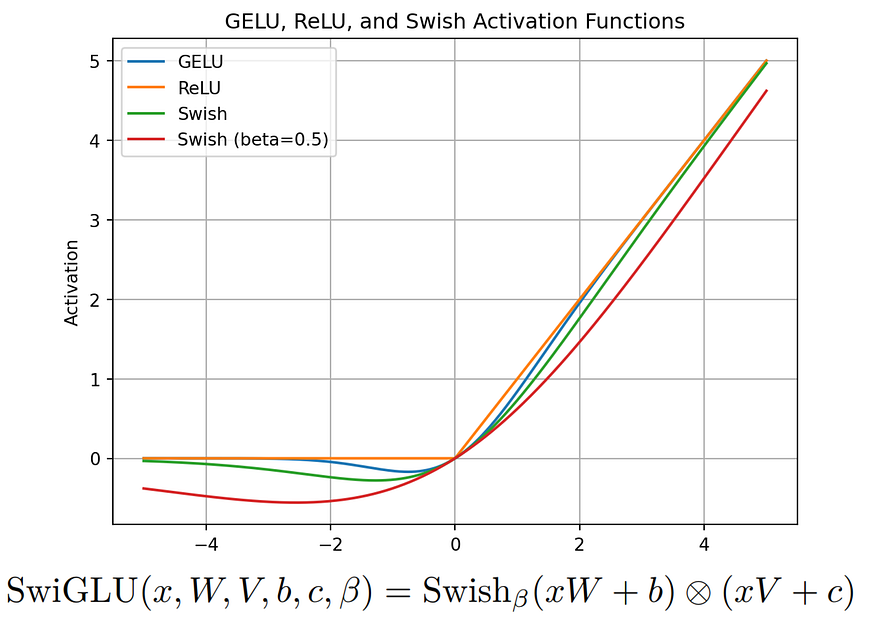
So, when the LLM generates text, it can give more prominence to the important parts, making them more noticeable and ensuring they contribute more to the overall understanding of the text. This way, SwiGLU helps LLMs produce text that's clearer and easier to understand, much like how the magic pen helps you create clearer explanations for your students on the whiteboard. Further details on SwiGLU can be found in the associated paper.
3. Rotary Embeddings (RoPE):
Rotary Embeddings, or RoPE, is a type of position embedding used in LLaMA 3.
Imagine you're in a classroom, and you want to assign seats to students for group discussions. Typically, you might arrange the seats in rows and columns, with each student having a fixed position. However, in some cases, you want to create a more dynamic seating arrangement where students can move around and interact more freely.
ROPE is like a special seating arrangement that allows students to rotate and change positions while still maintaining their relative positions to each other. Instead of being fixed in one place, students can now move around in a circular motion, allowing for more fluid interactions.
In this scenario, each student represents a word or token in a text sequence, and their position corresponds to their position in the sequence. Just like how ROPE allows students to rotate and change positions, ROPE allows the positional embeddings of words in a text sequence to dynamically change based on their relative positions to each other.
So, when processing text, instead of treating positional embeddings as fixed and static, ROPE introduces a rotational aspect, allowing for more flexible representations that capture the dynamic relationships between words in the sequence. This flexibility helps models like ChatGPT better understand and generate text that flows naturally and maintains coherence, similar to how a dynamic seating arrangement fosters more interactive discussions in a classroom. Those interested in the mathematical details can refer to the RoPE paper.
4. Byte Pair Encoding (BPE) Algorithm
LLaMA 3 uses Byte Pair Encoding (BPE) from the tiktoken library introduced by OpenAI, whereas the LLaMA 2 tokenizer BPE is based on the sentencepiece library. There is a slight difference between them, but
first, let's learn what BPE actually is.
Let's start with a simple example. Suppose we have a text corpus with the words: "ab", "bc", "bcd", and "cde". We begin by initializing our vocabulary with all the individual characters in the text corpus, so our initial vocabulary is {"a", "b", "c", "d", "e"}.
Next, we calculate the frequency of each character in the text corpus. For our example, the frequencies are: {"a": 1, "b": 3, "c": 3, "d": 2, "e": 1}.
Now, we start the merging process. We repeat the following steps until our vocabulary reaches the desired size:
-
First, we find the most frequent pair of consecutive characters. In this case, the most frequent pair is "bc" with a frequency of 2. We then merge this pair to create a new subword unit "bc". After merging, we update the frequency counts to reflect the new subword unit. The updated frequency is {"a": 1, "b": 2, "c": 2, "d": 2, "e": 1, "bc": 2}. We add the new subword unit "bc" to our vocabulary, which now becomes {"a", "b", "c", "d", "e", "bc"}.
-
We repeat the process. The next most frequent pair is "cd". We merge "cd" to form a new subword unit "cd" and update the frequency counts. The updated frequency is {"a": 1, "b": 2, "c": 1, "d": 1, "e": 1, "bc": 2, "cd": 2}. We add "cd" to the vocabulary, resulting in {"a", "b", "c", "d", "e", "bc", "cd"}.
-
Continuing the process, the next frequent pair is "de". We merge "de" to form the subword unit "de" and update the frequency counts to {"a": 1, "b": 2, "c": 1, "d": 1, "e": 0, "bc": 2, "cd": 1, "de": 1}. We add "de" to the vocabulary, making it {"a", "b", "c", "d", "e", "bc", "cd", "de"}.
-
Next, we find "ab" as the most frequent pair. We merge "ab" to form the subword unit "ab" and update the frequency counts to {"a": 0, "b": 1, "c": 1, "d": 1, "e": 0, "bc": 2, "cd": 1, "de": 1, "ab": 1}.
-
We add "ab" to the vocabulary, which becomes {"a", "b", "c", "d", "e", "bc", "cd", "de", "ab"}.
-
Then, the next frequent pair is "bcd". We merge "bcd" to form the subword unit "bcd" and update the frequency counts to {"a": 0, "b": 0, "c": 0, "d": 0, "e": 0, "bc": 1, "cd": 0, "de": 1, "ab": 1, "bcd": 1}. We add "bcd" to the vocabulary, resulting in {"a", "b", "c", "d", "e", "bc", "cd", "de", "ab", "bcd"}.
-
Finally, the most frequent pair is "cde". We merge "cde" to form the subword unit "cde" and update the frequency counts to {"a": 0, "b": 0, "c": 0, "d": 0, "e": 0, "bc": 1, "cd": 0, "de": 0, "ab": 1, "bcd": 1, "cde": 1}. We add "cde" to the vocabulary, making it {"a", "b", "c", "d", "e", "bc", "cd", "de", "ab", "bcd", "cde"}.
This technique can improve the performance of LLMs and handle rare and out-of-vocabulary words. The big difference between TikToken BPE and sentencepiece BPE is that TikToken BPE doesn't always split words into smaller parts if the whole word is already known. For example, if "hugging" is in the vocabulary, it stays as one token instead of splitting into ["hug","ging"].
Setting the Stage
We will be working with a small range of Python libraries, but it's better to install them to avoid encountering "no module found" errors.
!pip install sentencepiece tiktoken torch blobfile matplotlib huggingface_hubRequirement already satisfied: sentencepiece in /opt/conda/lib/python3.10/site-packages (0.2.0)
Requirement already satisfied: tiktoken in /opt/conda/lib/python3.10/site-packages (0.7.0)
Requirement already satisfied: torch in /opt/conda/lib/python3.10/site-packages (2.1.2+cpu)
Requirement already satisfied: blobfile in /opt/conda/lib/python3.10/site-packages (2.1.1)
Requirement already satisfied: matplotlib in /opt/conda/lib/python3.10/site-packages (3.7.5)
Requirement already satisfied: huggingface_hub in /opt/conda/lib/python3.10/site-packages (0.22.2)
Requirement already satisfied: regex>=2022.1.18 in /opt/conda/lib/python3.10/site-packages (from tiktoken) (2023.12.25)
Requirement already satisfied: requests>=2.26.0 in /opt/conda/lib/python3.10/site-packages (from tiktoken) (2.31.0)
Requirement already satisfied: filelock in /opt/conda/lib/python3.10/site-packages (from torch) (3.13.1)
Requirement already satisfied: typing-extensions in /opt/conda/lib/python3.10/site-packages (from torch) (4.9.0)
Requirement already satisfied: sympy in /opt/conda/lib/python3.10/site-packages (from torch) (1.12)
Requirement already satisfied: networkx in /opt/conda/lib/python3.10/site-packages (from torch) (3.2.1)
Requirement already satisfied: jinja2 in /opt/conda/lib/python3.10/site-packages (from torch) (3.1.2)
Requirement already satisfied: fsspec in /opt/conda/lib/python3.10/site-packages (from torch) (2024.2.0)
Requirement already satisfied: pycryptodomex~=3.8 in /opt/conda/lib/python3.10/site-packages (from blobfile) (3.20.0)
Requirement already satisfied: urllib3=1.25.3 in /opt/conda/lib/python3.10/site-packages (from blobfile) (1.26.18)
Requirement already satisfied: lxml~=4.9 in /opt/conda/lib/python3.10/site-packages (from blobfile) (4.9.4)
Requirement already satisfied: contourpy>=1.0.1 in /opt/conda/lib/python3.10/site-packages (from matplotlib) (1.2.0)
Requirement already satisfied: cycler>=0.10 in /opt/conda/lib/python3.10/site-packages (from matplotlib) (0.12.1)
Requirement already satisfied: fonttools>=4.22.0 in /opt/conda/lib/python3.10/site-packages (from matplotlib) (4.47.0)
Requirement already satisfied: kiwisolver>=1.0.1 in /opt/conda/lib/python3.10/site-packages (from matplotlib) (1.4.5)
Requirement already satisfied: numpy=1.20 in /opt/conda/lib/python3.10/site-packages (from matplotlib) (1.26.4)
Requirement already satisfied: packaging>=20.0 in /opt/conda/lib/python3.10/site-packages (from matplotlib) (21.3)
Requirement already satisfied: pillow>=6.2.0 in /opt/conda/lib/python3.10/site-packages (from matplotlib) (9.5.0)
Requirement already satisfied: pyparsing>=2.3.1 in /opt/conda/lib/python3.10/site-packages (from matplotlib) (3.1.1)
Requirement already satisfied: python-dateutil>=2.7 in /opt/conda/lib/python3.10/site-packages (from matplotlib) (2.9.0.post0)
Requirement already satisfied: pyyaml>=5.1 in /opt/conda/lib/python3.10/site-packages (from huggingface_hub) (6.0.1)
Requirement already satisfied: tqdm>=4.42.1 in /opt/conda/lib/python3.10/site-packages (from huggingface_hub) (4.66.1)
Requirement already satisfied: six>=1.5 in /opt/conda/lib/python3.10/site-packages (from python-dateutil>=2.7->matplotlib) (1.16.0)
Requirement already satisfied: charset-normalizer=2 in /opt/conda/lib/python3.10/site-packages (from requests>=2.26.0->tiktoken) (3.3.2)
Requirement already satisfied: idna=2.5 in /opt/conda/lib/python3.10/site-packages (from requests>=2.26.0->tiktoken) (3.6)
Requirement already satisfied: certifi>=2017.4.17 in /opt/conda/lib/python3.10/site-packages (from requests>=2.26.0->tiktoken) (2024.2.2)
Requirement already satisfied: MarkupSafe>=2.0 in /opt/conda/lib/python3.10/site-packages (from jinja2->torch) (2.1.3)
Requirement already satisfied: mpmath>=0.19 in /opt/conda/lib/python3.10/site-packages (from sympy->torch) (1.3.0)After installing the required libraries, we need to download some files. Since we're going to replicate the architecture of llama-3–8B, you must have an account on HuggingFace. Additionally, since llama-3 is a gated model, you have to accept their terms and conditions to access model content.
Here are the steps:
- Create an HuggingFace account from this link
- Accept the terms and conditions of llama-3–8B from this link
Once you've completed both of these steps, Now we have to download some files. There are two options to do that:
(Option 1: Manual) Go to the llama-3–8B HF directory from this link and manually download each of these three files.
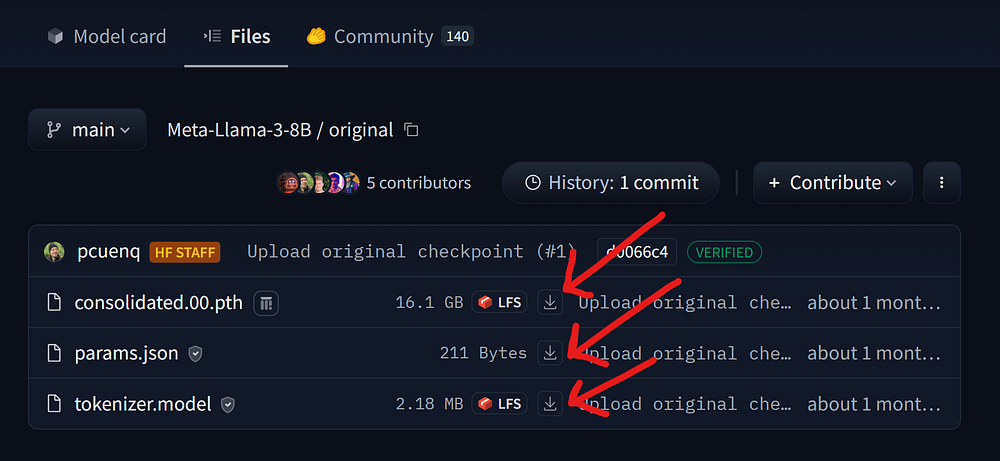
(options 2: Coding) We can use the hugging_face library, which we installed earlier, to download all of these files. However, first, we need to log in to HuggingFace Hub within our working notebook using our HF Token. You can create a new token or access it from this link.
# Import the `notebook_login` function from the `huggingface_hub` module.
from huggingface_hub import notebook_login

# Execute the `notebook_login` function to log in to the Hugging Face Hub.
notebook_login()
VBox(children=(HTML(value='