

Repository
ai4animationpy
AI4Animation Python Framework - Neural network-based character animation
- Task
- AI4AnimationPy/Python
- Training data generation (20h mocap)
- generation time < 5min
- Visualize inputs/outputs during training
- Directly In-Built
- Total time to setup training experiment/prototype
- 10min
Specs
- TaskAI4AnimationPy/Python
- Training data generation (20h mocap)generation time < 5min
- Visualize inputs/outputs during trainingDirectly In-Built
- Total time to setup training experiment/prototype10min
- Backpropagating gradients through inference codeSupported
- Inference speedFull torch quantization support
- In-built visualizationSupported
README
AI4AnimationPy
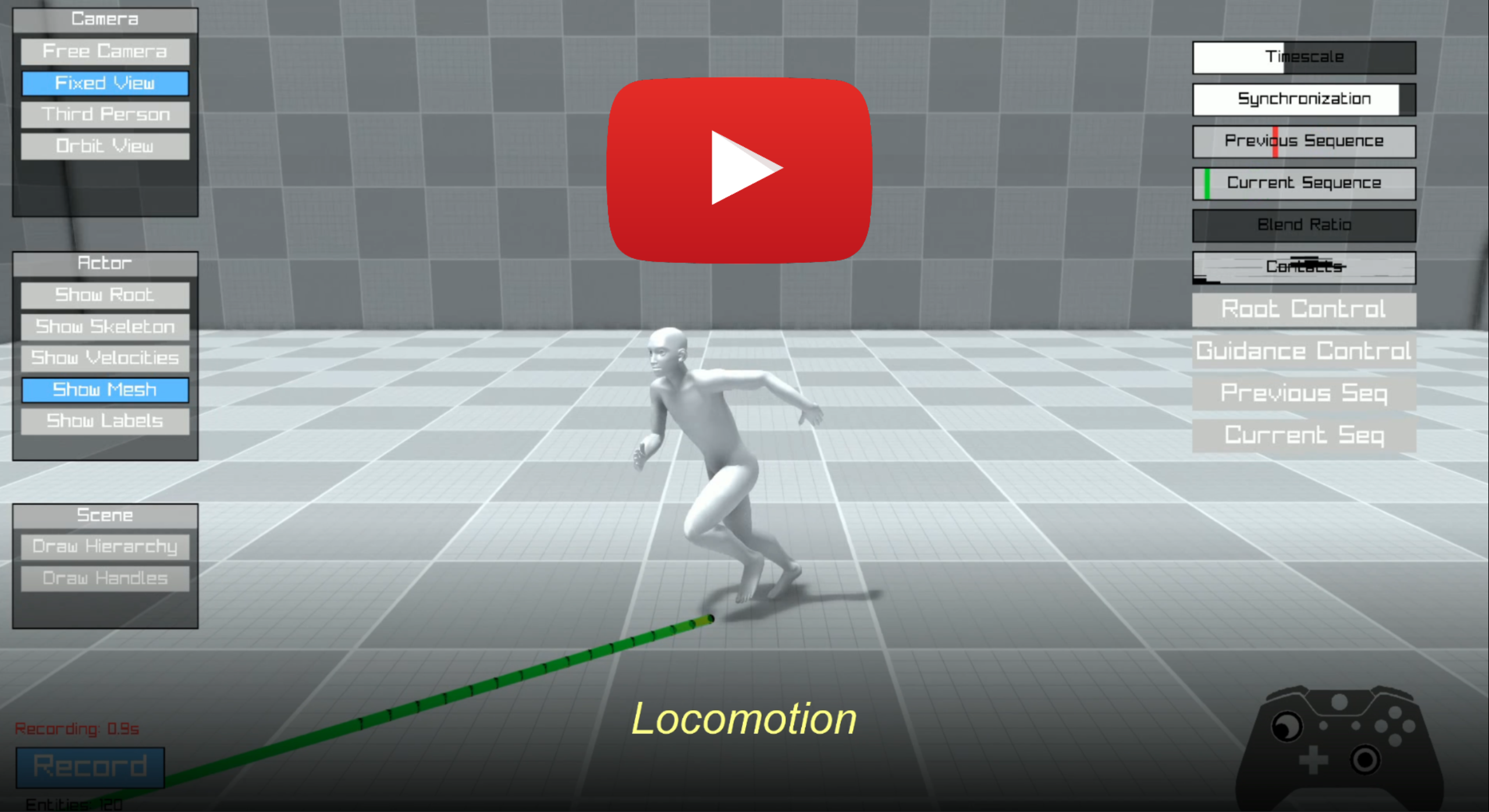
AI4AnimationPy is a Python framework developed by <a href="https://github.com/paulstarke">Paul Starke </a> and <a href="https://github.com/sebastianstarke">Sebastian Starke</a>, that enables character animation using neural networks and provides useful tools for motion capture processing, training & inference, and animation engineering. The codebase functions similar to the Unity version of <a href="https://github.com/sebastianstarke/AI4Animation">AI4Animation</a> in terms of game-engine behavior (i.e. ECS / update loop / behaviors / rendering pipeline) but is entirely written in Python, hence removing the Unity dependency for data-processing, feature-extraction, inference, and post-processing while providing the same math functionalities via NumPy or PyTorch.
Architecture
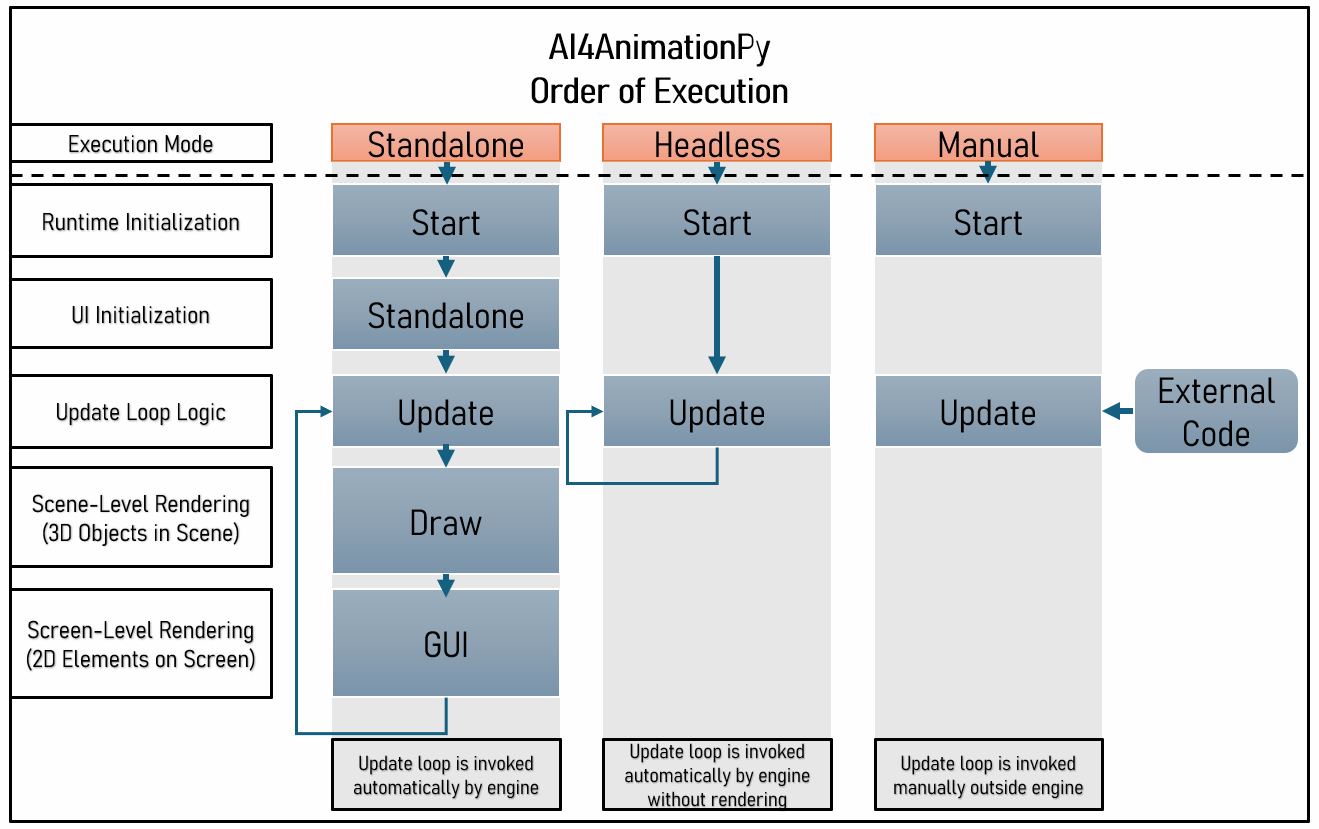
The framework can be executed via 1) using in-built rendering pipeline ("Standalone"), 2) headless mode ("Headless") or 3) manual execution ("Manual") which enables running code locally or remotely on server-side.
While both Standalone and Headless mode invoke automatic update callbacks, the Manual mode allows to manually control how often and at which time intervals the update loop is invoked.
Usage
To setup an environment, run the conda setup for your platform below. You may need to adjust the pytorch/cuda version based on your GPU.
Windows
conda create -n AI4AnimationPY python=3.12
conda activate AI4AnimationPY
pip install msvc-runtime==14.40.33807
pip install torch torchvision torchaudio --index-url https://download.pytorch.org/whl/cu124
pip install nvidia-cudnn-cu12==9.3.0.75 nvidia-cuda-runtime-cu12==12.5.82 nvidia-cufft-cu12==11.2.3.61
pip install onnxruntime-gpu==1.19.0
pip install -e . --use-pep517
Linux
conda create -y -n AI4AnimationPY python=3.12 pip
conda activate AI4AnimationPY
pip install torch torchvision torchaudio onnx raylib numpy scipy matplotlib scikit-learn einops pygltflib pyscreenrec tqdm pyyaml ipython
pip install onnxruntime-gpu
pip install -e . --no-dependencies
OSX
conda create -y -n AI4AnimationPY python=3.12 pip
conda activate AI4AnimationPY
pip install torch torchvision torchaudio onnx raylib numpy scipy matplotlib scikit-learn einops pygltflib pyscreenrec tqdm pyyaml ipython
pip install onnxruntime
pip install -e . --no-dependencies
Mocap Import
The internal motion data format is .npz which stores 7 dimensions (3d position, 4d quaternion) for each skeleton joint per frame. Currently, the framework only provides a <a href="ai4animation/Import/GLBImporter.py">.glb importer </a> to convert to this format. For example:
- Download the <a href="https://starke-consult.de/AI4Animation/SIGGRAPH_2024/Cranberry_Dataset.zip">Cranberry Dataset</a>
- Run batch converter with
convert --input_dir <local_path_to_glb_files> - Use the <a href="Demos/MotionEditor//Program.py">MotionEditor</a> for visualizing the .npz data
Why are we building this framework?
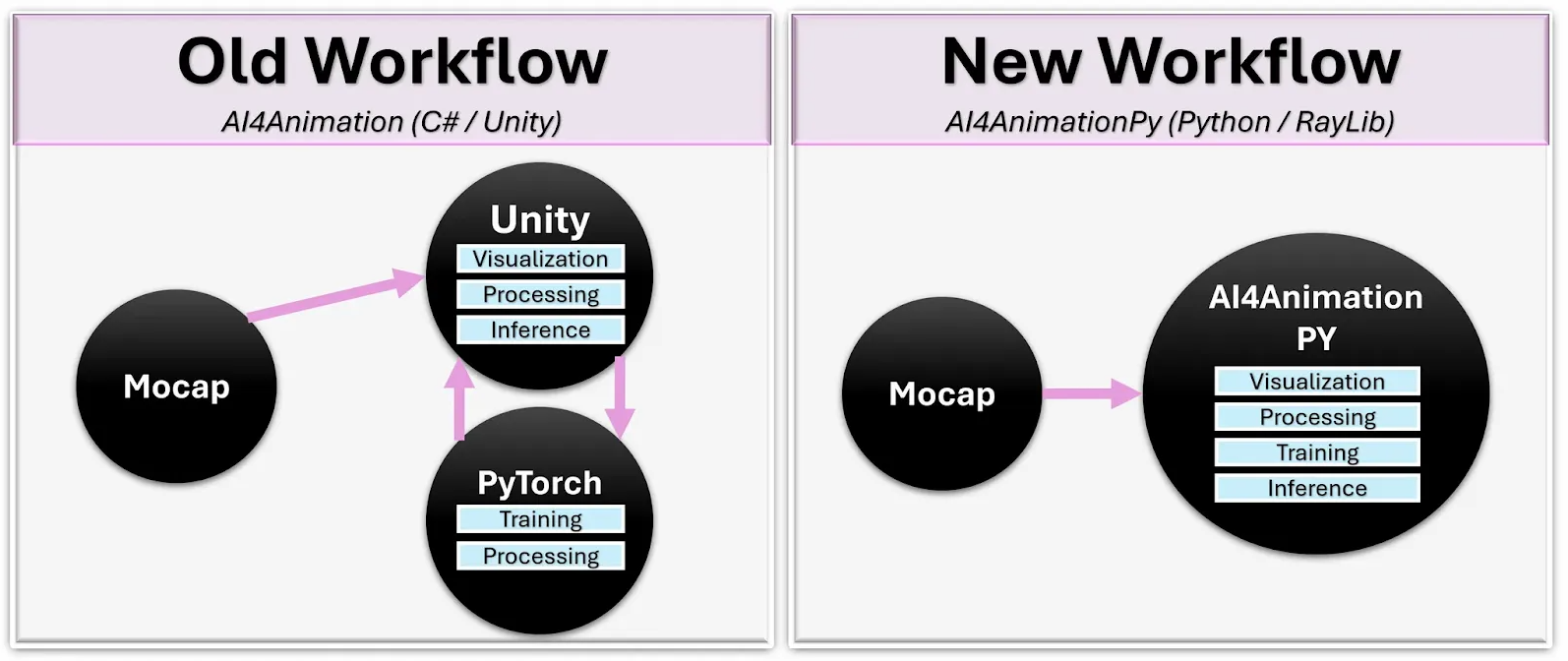
Working on AI-driven character animation has required juggling multiple disconnected tools: model research happens in python while visualization requires game engines or specialized software, and bridging the two involves specialized communication pipelines. This creates friction that slows down iteration time and can make it difficult to validate results on-the-fly.
For example, the training pipeline in <a href="https://github.com/sebastianstarke/AI4Animation">AI4Animation</a> for motion models has been heavily dependent on Unity. While using that engine has proven incredibly useful for data visualization, processing and runtime inference, communication with PyTorch had to be handled separately via ONNX network format or streaming data back-and-forth, which created a disconnect within the overall pipeline. In addition, people trying to use our code were required to install the Unity editor. AI4AnimationPy attempts to solve these issues by fusing everything within one unified framework environment running only on numpy/torch where you can:
-
<b>Train neural networks</b> on motion capture data (.glb)
-
<b>Visualize everything instantly </b> without switching tools (training/inference/visualization are using the same numpy/pytorch backend)
-
<b>Turn off visualization</b> to work on servers (optional standalone, headless or manual mode)
-
<b>Easily add new features</b> such as geometry / audio / vision / physics (modular ECS design)
We believe having one framework for animation tooling in the community can provide great benefits for various developers:
| Task | AI4AnimationPy/Python | AI4Animation/Unity |
|---|---|---|
| Training data generation (20h mocap) | generation time < 5min | generation time > 4h<br>data import: ~2h<br>data processing: ~30min<br>data export: ~1.5h |
| Visualize inputs/outputs during training | Directly In-Built | Requires Streaming |
| Total time to setup training experiment/prototype | 10min | >4h |
| Backpropagating gradients through inference code | Supported | Not possible |
| Inference speed | Full torch quantization support | Reliance on .onnx features |
| In-built visualization | Supported | Supported |
What features exist?
- [x] Modular animation tooling and research following an ECS pattern
- [x] Game-engine like lifecycle management with different update calls (Update/Draw/GUI)
- [x] Vectorized forward kinematics operations and math library with various transformation calculations and conversions relevant for animation (i.e. quaternion, axis-angle, matrices, Euler, mirroring, …)
- [x] Neural Network Architectures such as MLP, AE, and Flow Matching.
- [x] Optional Real-time Rendering through a deferred rendering pipeline with shadow mapping, SSAO, bloom and FXAA.
- [x] Skinned mesh rendering directly running on the GPU
- [x] FABRIK solver for a fast real-time IK solution
- [x] Module system for motion feature analysis such as joint contacts as well as root and joint trajectories
- [x] 4-mode camera system (Free, Fixed, Third-person, Orbit) with smooth blending
- [x] .glb Importer and Motion Asset pipeline
- [x] Standalone, Headless, Manual mode for flexible runtime usage
- [ ] Physics simulation (adding rigid bodies and/or collision checking)
- [ ] Path planning and spline tooling in 3D environments
- [ ] IO: FBX / geometry import
- [ ] Audio support
Copyright Information
AI4AnimationPy is licensed under the CC BY-NC 4.0 License. A copy of the license can be found
here.