

Repository
GPT-Image-2-Seedance2-Workflow
GPT Image 2 to Seedance 2 workflow examples for AI image-to-video production on EvoLink.
- Video length
- Panels
- 15 seconds
- 4–5
- 30 seconds
- 8–10
- 60 seconds
- 15–18
Specs
- Video lengthPanels
- 15 seconds4–5
- 30 seconds8–10
- 60 seconds15–18
README
 [](LICENSE)
[](https://github.com/Evolink-AI/awesome-seedance-2.0-prompts)
[](https://github.com/Evolink-AI/Seedance-2.0-Gateway-Service)
[](https://github.com/Evolink-AI/awesome-seedance-2.5-guide)
[](https://github.com/Evolink-AI/GPT-Image-2-Seedance2-Workflow)
[](README.md)
[](README_es.md)
[](README_pt.md)
[](README_ja.md)
[](README_ko.md)
[](README_de.md)
[](README_fr.md)
[](README_tr.md)
[](README_zh-TW.md)
[](README_zh-CN.md)
[](README_ru.md)
[](LICENSE)
[](https://github.com/Evolink-AI/awesome-seedance-2.0-prompts)
[](https://github.com/Evolink-AI/Seedance-2.0-Gateway-Service)
[](https://github.com/Evolink-AI/awesome-seedance-2.5-guide)
[](https://github.com/Evolink-AI/GPT-Image-2-Seedance2-Workflow)
[](README.md)
[](README_es.md)
[](README_pt.md)
[](README_ja.md)
[](README_ko.md)
[](README_de.md)
[](README_fr.md)
[](README_tr.md)
[](README_zh-TW.md)
[](README_zh-CN.md)
[](README_ru.md)
EvoLink Quick Start
Use this workflow as the bridge from GPT Image 2 image generation to Seedance 2.0 video generation:
R2-hosted local video assets: VIDEO_ASSETS.md
GPT Image 2 · Seedance 2.5 Early Access · Docs · API Key · GPT Image Skill · Seedance Skill
[!NOTE]
Get Seedance 2.5 Early Access: Build images with GPT Image 2, then bring them into the Seedance 2.5 early access workflow for cinematic video generation. Join the rollout.
export EVOLINK_API_KEY="your_key_here"

curl --request POST \
  --url https://api.evolink.ai/v1/videos/generations \
  --header "Authorization: Bearer ${EVOLINK_API_KEY}" \
  --header 'Content-Type: application/json' \
  --data '{
    "model": "seedance-2.0-image-to-video",
    "prompt": "Animate this GPT Image 2 product storyboard with a slow dolly-in, realistic reflections, and smooth commercial camera motion",
    "image": "https://example.com/gpt-image-2-storyboard.png",
    "duration": 5,
    "quality": "720p",
    "aspect_ratio": "16:9"
  }'
🎬 Introduction
We collect proven workflows, prompt templates, and real creator examples for combining GPT Image 2 and Seedance 2.5 to produce high-quality AI videos.
GPT Image 2 handles the "what to draw" and visual consistency. Seedance 2.0 handles the "how to move" — animating those images into video. Together they form one of the most capable AI video pipelines available today.
Most cases in this repository are curated from X/Twitter creators, community experiments, and real production workflows.
Try it: GPT Image 2 + Seedance 2.5
Use the Two-Skill Workflow
- GPT Image 2 Gen Skill adds GPT Image 2 image generation and editing to your agent
- Seedance 2 Video Gen Skill adds Seedance 2 video generation to your agent
- Open GPT Image 2 prompts on EvoLink
- Get Seedance 2.5 Early Access
- Get your EvoLink API key
- Go to Seedance 2.0 API examples
Install the Skills
Run Directly in Terminal
npx evolink-gpt-image@latest
npx evolink-seedance@latest
These installers can run directly in your terminal. They will auto-detect a known skills directory when possible and otherwise prompt you where to install.
Claude Code
npx evolink-gpt-image@latest -y --path ~/.claude/skills
npx evolink-seedance@latest -y --path ~/.claude/skills
OpenCode
npx evolink-gpt-image@latest -y --path ~/.opencode/skills
npx evolink-seedance@latest -y --path ~/.opencode/skills
Cursor
npx evolink-gpt-image@latest -y --path .cursor/skills
npx evolink-seedance@latest -y --path .cursor/skills
OpenClaw
npx evolink-gpt-image@latest -y
npx evolink-seedance@latest -y
Use the terminal version above when you are installing manually yourself. Use the host-specific commands below when you want an AI agent to install the skills without follow-up questions.
If you find this useful, consider giving it a star. ⭐
📑 Menu
- 🎬 Introduction
- 📑 Menu
- 🎥 Storyboard Techniques
- 📱 Commercial & Product
- 🎨 Animation & Character
- Case 3: Character Sheet → Animation (by @YaReYaRu30Life)
- Case 4: Anime OP Style Video (by @Toshi_nyaruo_AI)
- Case 12: Claude Code × Character Sheet → Animation (by @old_pgmrs_will)
- Case 13: Dance Sequence Grid → Dance Video (by @Ciri_ai)
- Case 14: Comic Page → Animated Video (by @nimentrix)
- Case 25: K-Pop Choreography — Detailed Control (by @Kashberg_0)
- Case 27: Character Intro Animation (by @0xbisc)
- 🎵 Music Video & Short Film
- 🎮 Game Concept
- 🛠 Production Tools
- 🌟 Community Showcase
- 💡 Tips & Techniques
- 🚀 Try It on Evolink
- 🙏 Acknowledge
🎥 Storyboard Techniques
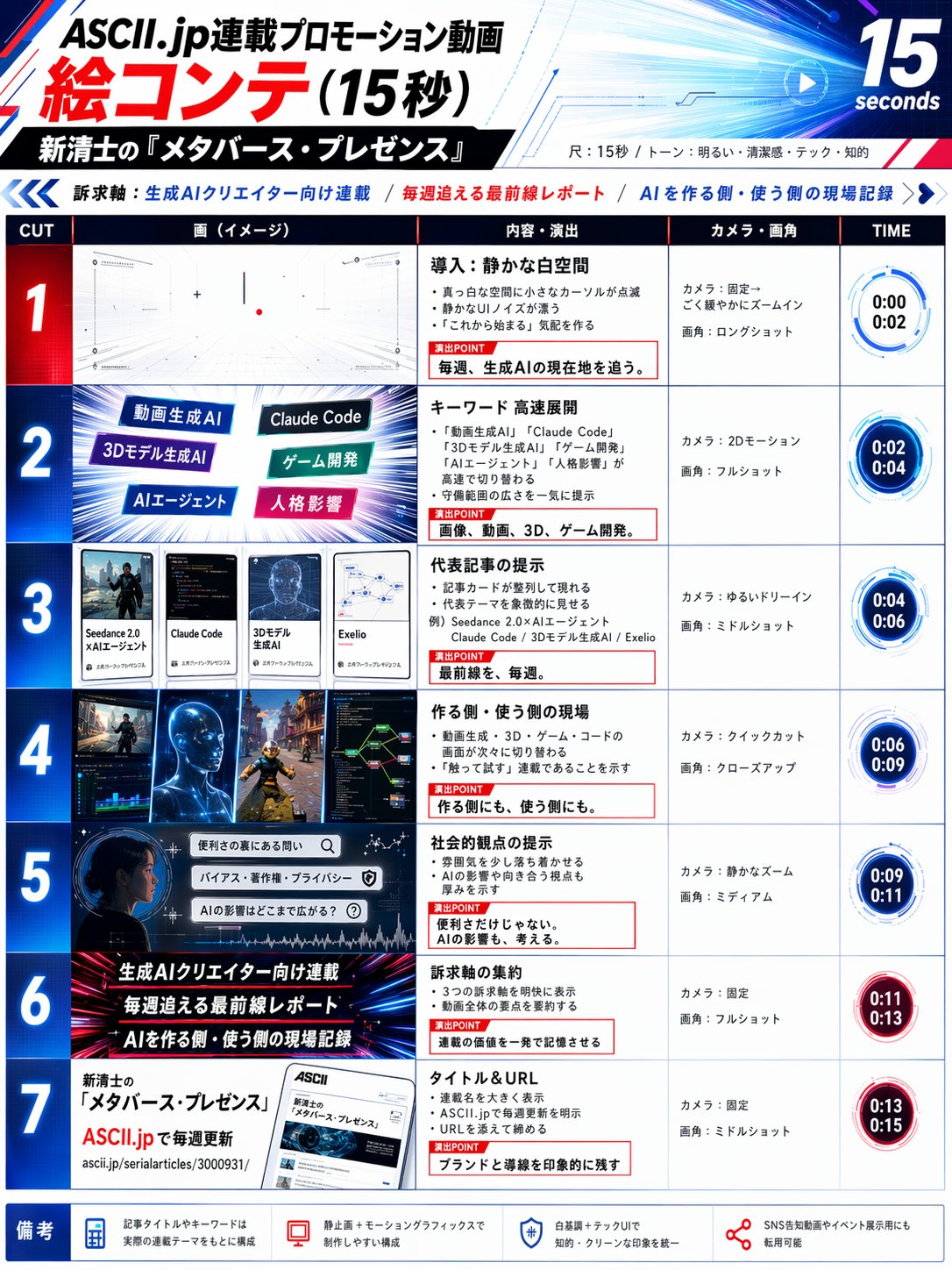
Case 1: Standard Storyboard → Video (by @kiyoshi_shin)
The most common workflow. Use GPT Image 2 to generate a storyboard panel, then animate it with Seedance 2.0. Best for promotional videos, short dramas, and animation OPs.
<table><tr>
<td align="center"><a href="https://evolink.ai/gpt-image-2-prompts?utm_source=github&utm_medium=picture&utm_campaign=gptimage2-x-seedance2">
</a></td>
<td align="center"><video src="https://github.com/user-attachments/assets/ac25fc3d-b6cb-4149-a8ba-e7e10c5b1faa" width="280" controls></video></td>
</tr></table>
Steps:
- Describe your scene to GPT Image 2 and generate a storyboard image
- Import the storyboard into Seedance 2.0 using Image-to-Video mode
- Export each clip and assemble in your editing software
GPT Image 2 Prompt:
Create a 6-panel storyboard for a 15-second brand promotional video. Label each panel with a shot description.
Style: cinematic, cool color tone, widescreen 16:9.
Content: the journey of a product from factory to the customer's hands.
Seedance 2.0 Prompt:
Cinematic brand advertisement, slow camera push-in, product centered in frame, warm side lighting, soft background blur, no people, 3 seconds.[!NOTE]
Output storyboard images in 16:9 to avoid Seedance auto-cropping. Set frame rate to 24fps to match film standards. Keep each storyboard panel simple — the simpler the content, the more accurate the motion output.
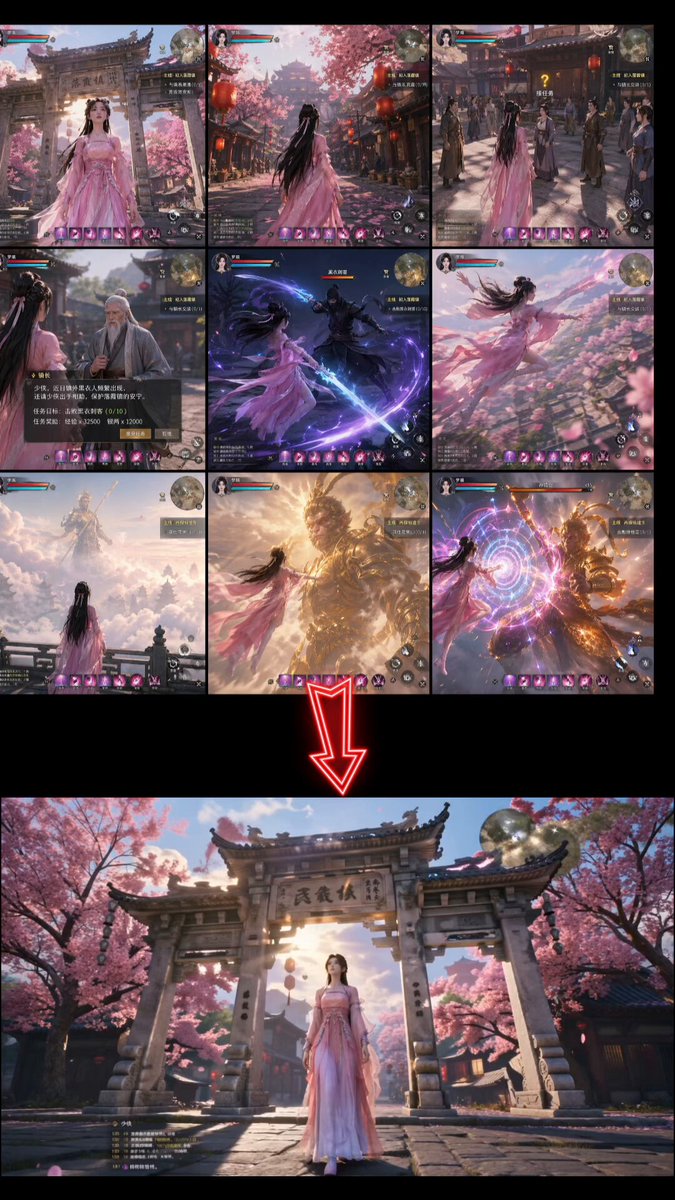
Case 2: 3×3 Grid Storyboard Method (by @servasyy_ai)
A key technique discovered by the community: composing all storyboard panels into a single 3×3 grid image before importing to Seedance significantly reduces failure rate compared to importing frames one by one.
<table><tr>
<td align="center"><a href="https://evolink.ai/gpt-image-2-prompts?utm_source=github&utm_medium=picture&utm_campaign=gptimage2-x-seedance2">
</a></td>
<td align="center"><video src="https://github.com/user-attachments/assets/00f32388-a17b-4b9c-8da3-1956436ce91b" width="400" controls></video></td>
</tr></table>
Steps:
1️⃣ Input the content you want to create + the ✅ prompt “Create a storyboard in a 3×3 grid format”
2️⃣ Create a prompt from the image in 1 with ChatGPT
3️⃣ Reference the image from 1 in seedance
4️⃣ Input the prompt created in 2.
GPT Image 2 Prompt:
[describe your scene] and Create a storyboard in a 3×3 grid formatSeedance 2.0 Prompt:
turn this image into video
[Describe the motion and style. Example: Japanese full-color animation, fast cuts, high frame count, 24fps, dark fantasy anime OP style, intense battle scenes.][!NOTE]
Replace the content inside brackets before use. This method works because Seedance analyzes motion intent from a single image. A grid provides directional reference and produces more coherent motion than separate images.
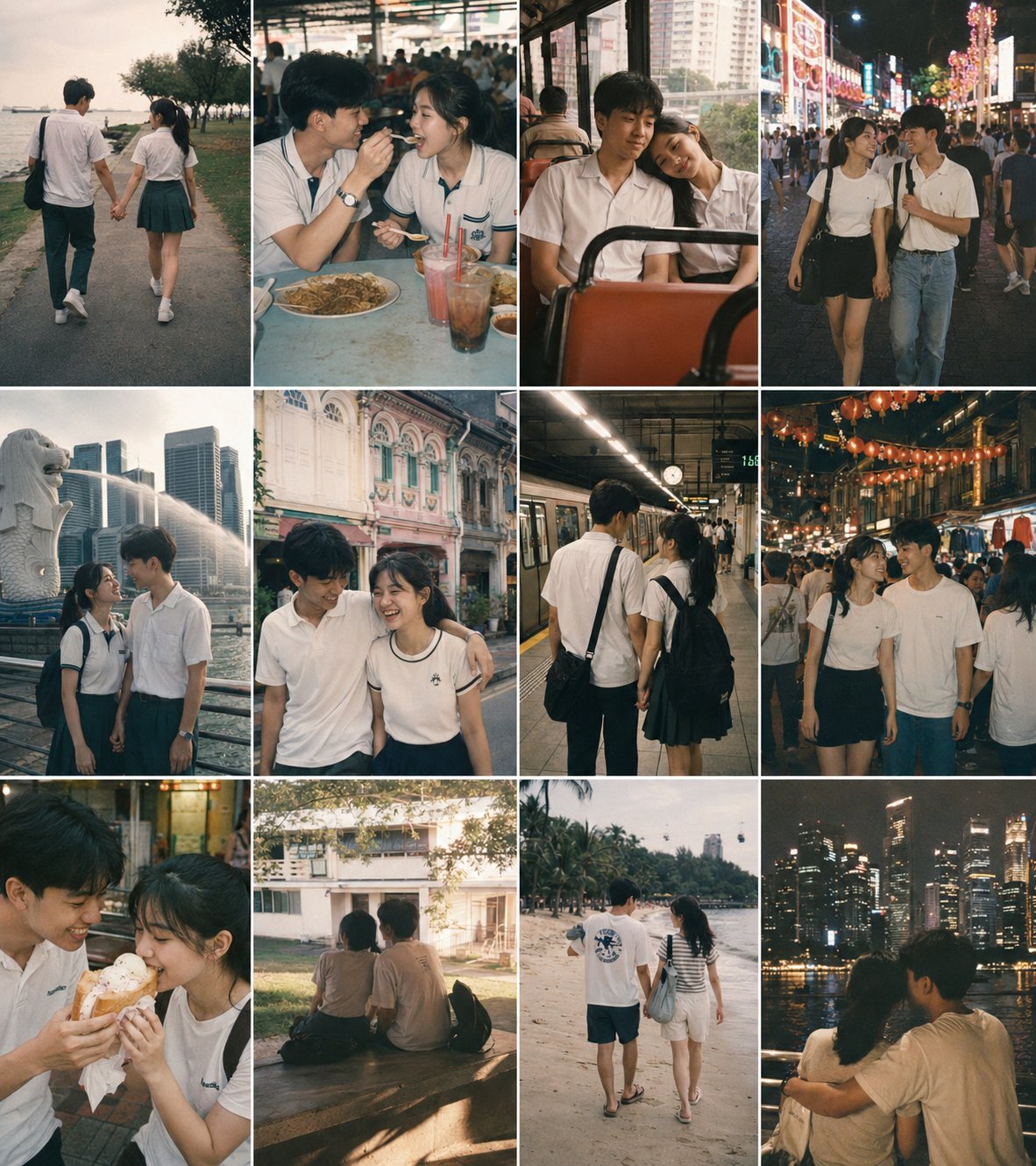
Case 10: Multi-Frame Reference → Fast-Cut Video (by @heygentlewhale)
Feed Seedance 2.0 a storyboard image with multiple reference frames and instruct it to follow the sequence order. The model reads frame positions as scene cues and outputs a coherent fast-cut edit — without manual clip assembly.
<table><tr>
<td align="center"><a href="https://evolink.ai/gpt-image-2-prompts?utm_source=github&utm_medium=picture&utm_campaign=gptimage2-x-seedance2">
</a></td>
<td align="center"><em>Preview unavailable: original GitHub attachment is no longer publicly accessible.</em></td>
<td align="center"><em>Preview unavailable: original GitHub attachment is no longer publicly accessible.</em></td>
</tr></table>
Steps:
- Generate a multi-panel storyboard image in GPT Image 2 (12 frames, 3×4 or 4×3 grid)
- Upload the storyboard as the reference image in Seedance 2.0
- Write a sequencing prompt that names the frame count and edit style
GPT Image 2 Prompt:
Create a 12-panel storyboard grid for a [N]-second [genre] film:
- 4 columns × 3 rows, left-to-right, top-to-bottom reading order
- Each panel: [shot type] + [action description]
- Location: [setting], Time: [day/night], Mood: [atmosphere]
- Consistent character design and scene across all panels
- No text labels, no panel borders
Output as a single image.
Seedance 2.0 Prompt:
Follow the storyboard sequence of the 12 reference frames in image1, edited as a fast-cut memory montage.
[Describe visual style — example below:]
A nostalgic romance film set in 1990s Singapore, shot on 35mm film in Kodak Portra 800 style.
Soft grain, dreamy blur, warm highlights, and slight color shifts create a vintage cinematic atmosphere.
Universal sequencing prompt (via @ai_gezgini):
Use this storyboard to generate a video, follow the scene order, keep transitions smooth,
and preserve cinematic lighting and pacing.
[Add any extra visual details you want.]
[!NOTE]
This prompt works across genres — swap the style description for sci-fi, horror, documentary, or any other look. The key phrase isfollow the storyboard sequence of the [N] reference frames— it tells Seedance to treat frame positions as a timeline rather than a single composition.
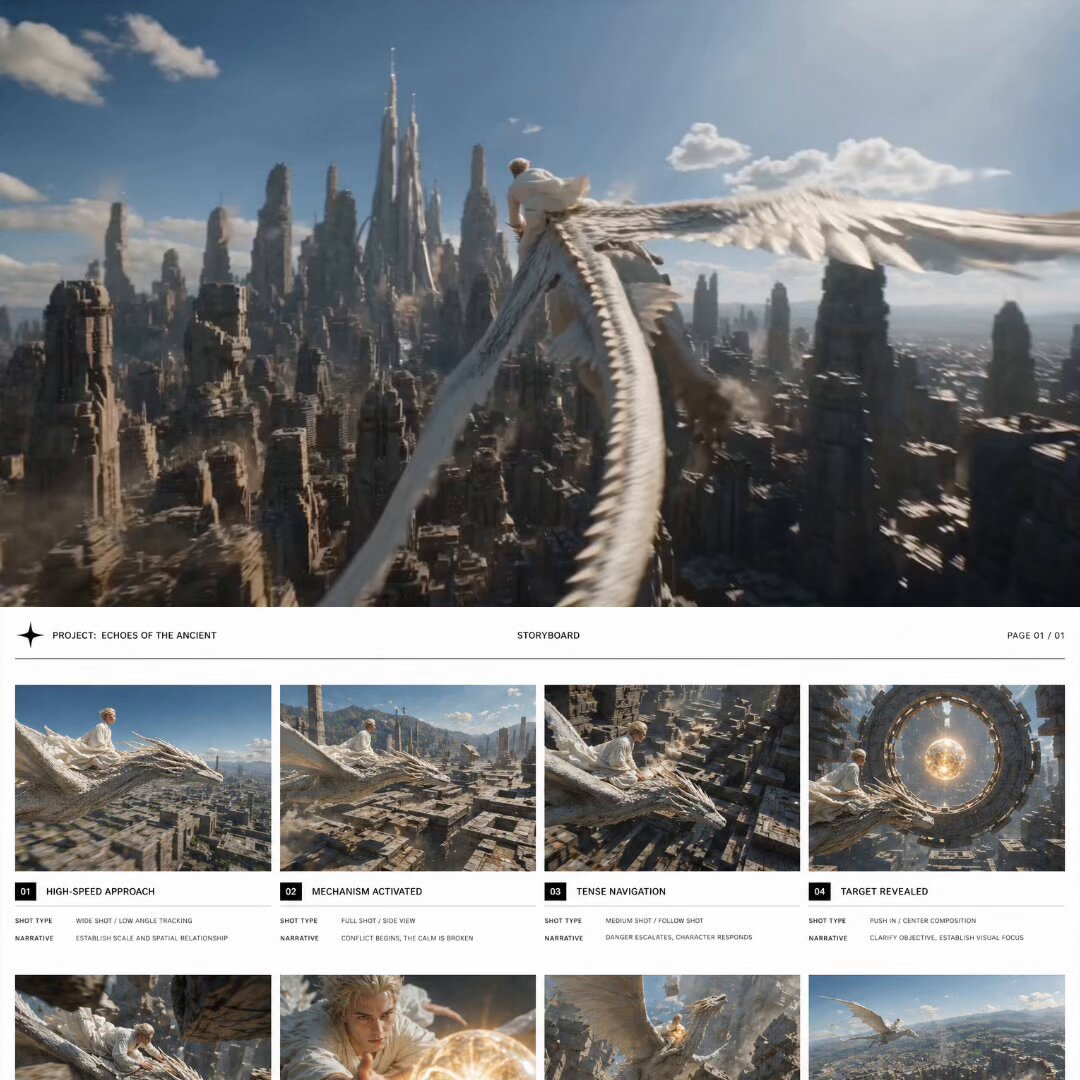
Case 19: Storyboard-First Cost Control (by @0xbisc)
A production-minded approach: iterate on the storyboard in GPT Image 2 first (cheap), then generate video only when the composition is locked (expensive). This saves significant credits because video iterations burn 10–50× more than image iterations. 298 likes / 13K views / 291 bookmarks.
<table><tr>
<td align="center"><a href="https://evolink.ai/gpt-image-2-prompts?utm_source=github&utm_medium=picture&utm_campaign=gptimage2-x-seedance2">
</a></td>
<td align="center"><em>Preview unavailable: original GitHub attachment is no longer publicly accessible.</em></td>
</tr></table>
Steps:
- Generate an 8-panel storyboard grid with GPT Image 2
- Review each panel — regenerate or edit individual panels until satisfied
- Only when the full storyboard is locked, import into Seedance 2.0
- Generate the video in one shot from the finalized storyboard
GPT Image 2 Prompt:
Create a single cinematic storyboard image containing 8 panels, arranged in a 4-column horizontal grid layout across the canvas.
Panels are evenly distributed in 4 columns, forming a balanced multi-row composition.
Use generous white space between panels and around the entire layout, creating a calm, refined editorial presentation.
Minimalist editorial design, white background, precise alignment, consistent spacing, strong grid system.
Subtle divider lines, ultra-thin, low-contrast, neutral tone, strictly aligned to the grid.
Each panel is presented as a clean modular card with a clear hierarchy: image frame on top, minimal text block below.
Refined modern sans-serif typography, light to regular weight, tight typographic control, consistent scale rhythm.
Visual consistency across all panels: a white flying dragon and a short blond-haired young male wearing a loose flowing white robe riding on its back. A glowing spherical object remains consistent in appearance.
Style: live-action cinematic realism, human actor proportions, natural skin detail, physically accurate lighting, real-world materials, high-end film still quality, ultra high resolution, sharp focus.
Cinematic sequence:
Scene 01
Shot type
Wide shot, low-angle tracking
Narrative
Dragon skims rapidly above ground toward vast geometric ruins, rider standing steadily, bright daylight
Scene 02
Shot type
Wide shot, side view
Narrative
Dragon enters ruin airspace, stone structures begin sinking and shifting, geometry reconfigures
Scene 03
Shot type
Medium shot, tracking
Narrative
Dragon navigates through moving structures forming a spatial maze, rider leans forward, focused
Scene 04
Shot type
Push-in shot, centered composition
Narrative
Massive floating ring appears at center, glowing sphere suspended inside, focal point established
Scene 05
Shot type
Wide-angle, low-angle tracking, high speed
Narrative
Dragon dives through narrow moving gaps, massive structures pass extremely close, intense speed and compression
Scene 06
Shot type
Close-up, centered composition
Narrative
Rider reaches forward to grasp glowing sphere, golden light illuminating face and arm
Scene 07
Shot type
Wide shot, upward motion
Narrative
Dragon ascends sharply as ruins collapse below, structures sinking and closing, dust fills air
Scene 08
Shot type
Wide shot, high-angle view
Narrative
Dragon exits above collapsed ruins, open sky, clear silhouette of rider and dragon, resolution moment
Seedance 2.0 Prompt:
Generate video based strictly on storyboard @ image1. Follow the storyboard exactly as shown, matching each panel’s composition, framing, and action. Keep perfect visual continuity with no errors or inconsistencies.[!NOTE]
Why storyboard-first wins on cost: Video iterations burn credits fast. With a storyboard, you can tweak things shot by shot and catch issues early. The video step becomes a single final render rather than an expensive trial-and-error loop. Community feedback confirms this is the most budget-efficient workflow for longer sequences.
📱 Commercial & Product
Case 5: App MVP Demo Video (by @Shin_Engineer)
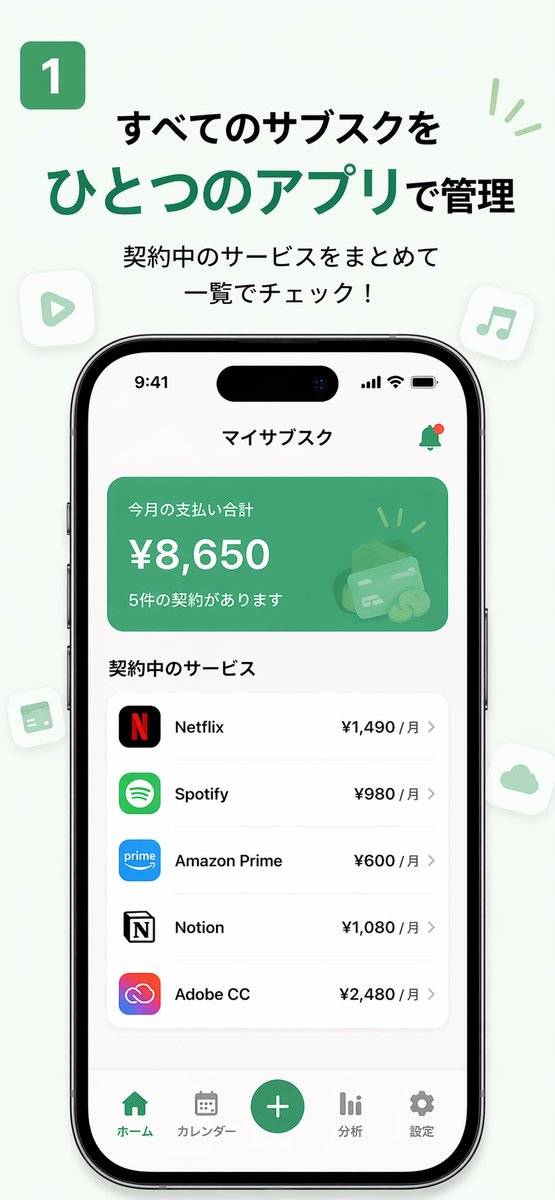
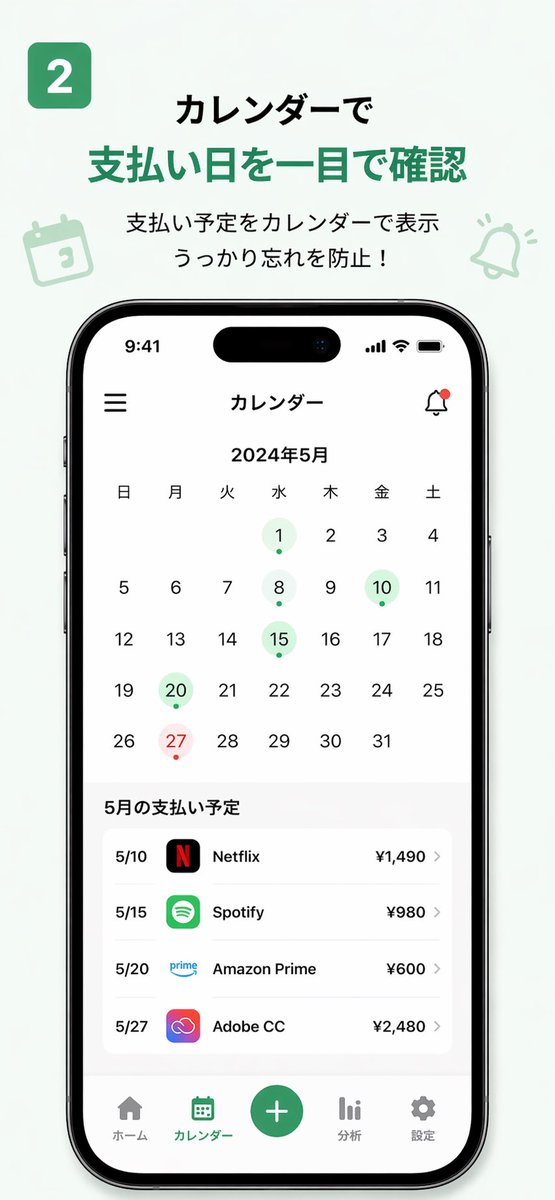
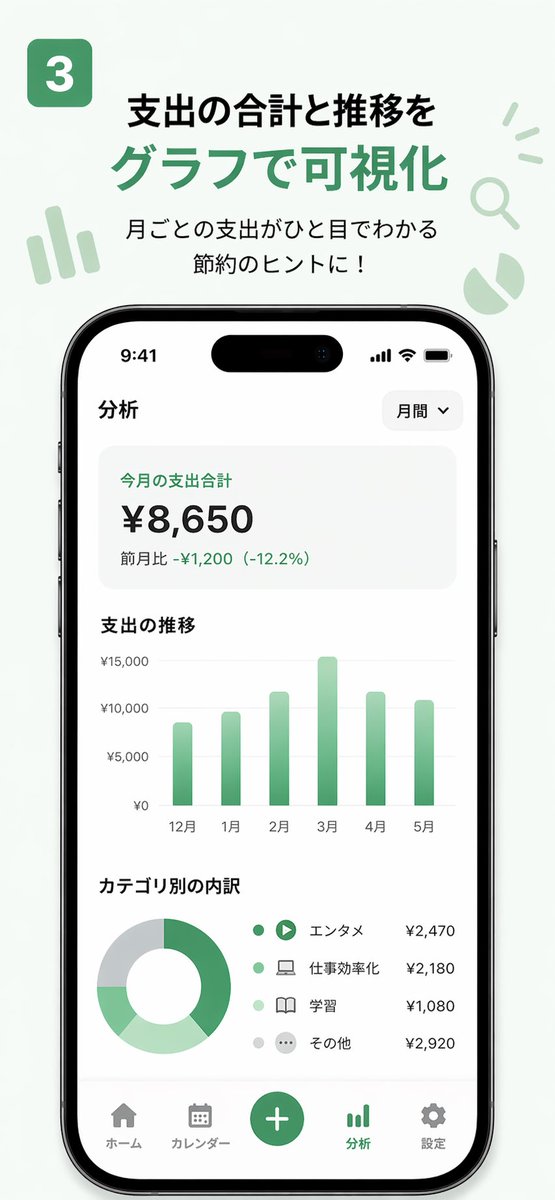
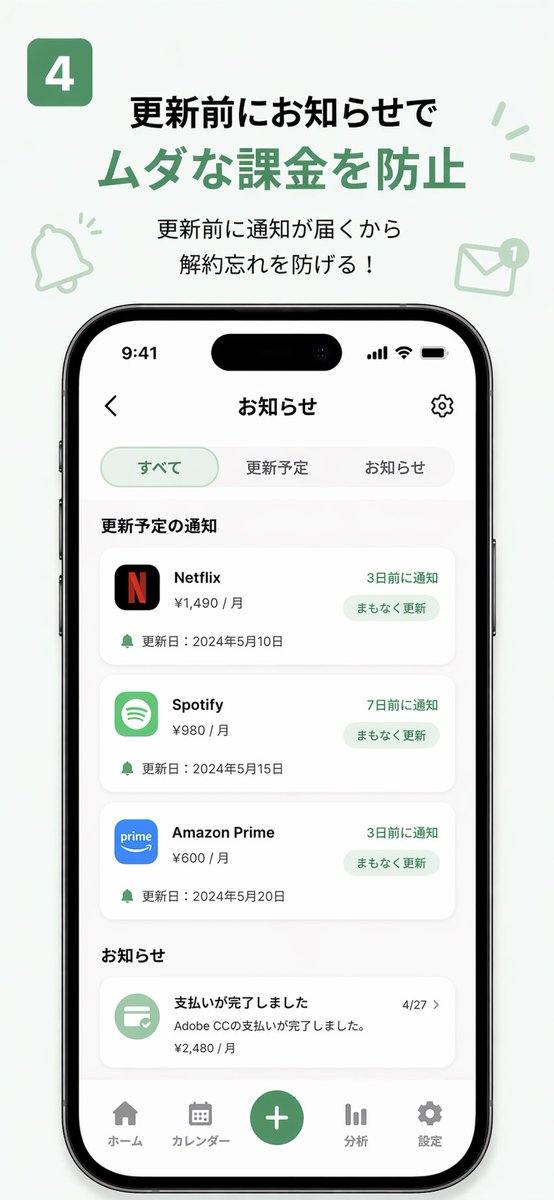
Use GPT Image 2 to generate finished-looking UI screenshots of an app that doesn't exist yet, then animate them with Seedance 2.0 into a product demo. Post to TikTok or social media to test market interest before building.
| Output |
|---|
| <a href="https://evolink.ai/gpt-image-2-prompts?utm_source=github&utm_medium=picture&utm_campaign=gptimage2-x-seedance2"> |
</a> |
<table><tr>
<td align="center"><a href="https://evolink.ai/gpt-image-2-prompts?utm_source=github&utm_medium=picture&utm_campaign=gptimage2-x-seedance2">
</a></td>
<td align="center"><a href="https://evolink.ai/gpt-image-2-prompts?utm_source=github&utm_medium=picture&utm_campaign=gptimage2-x-seedance2">
</a></td>
<td align="center"><a href="https://evolink.ai/gpt-image-2-prompts?utm_source=github&utm_medium=picture&utm_campaign=gptimage2-x-seedance2">
</a></td>
</tr></table>
Steps:
- Describe your app concept and design language to GPT Image 2
- Generate 3–5 key UI screenshots (home, feature, profile pages)
- Sort screenshots in user-flow order and import into Seedance 2.0
- Export the demo video and post it to test market reaction
GPT Image 2 Prompt:
Design [N] UI screenshots for a "[app concept]" app:
1. [Page 1 name and description]
2. [Page 2 name and description]
3. [Page 3 name and description]
Style: [iOS/Android] native design language, [primary color] accent, [light/dark] mode.
Output as realistic app screenshots, not wireframes or mockups.
Seedance 2.0 Prompt:
Smooth app UI transition animation, screen tap interaction, natural interface motion, clean and modern feel, 3 seconds.[!NOTE]
Customize the bracketed fields before use. In your video caption, do not label it as AI-generated — post it as a product demo and observe real audience feedback in the comments.
Case 6: 15-Second Commercial (by @ai_mitosan)
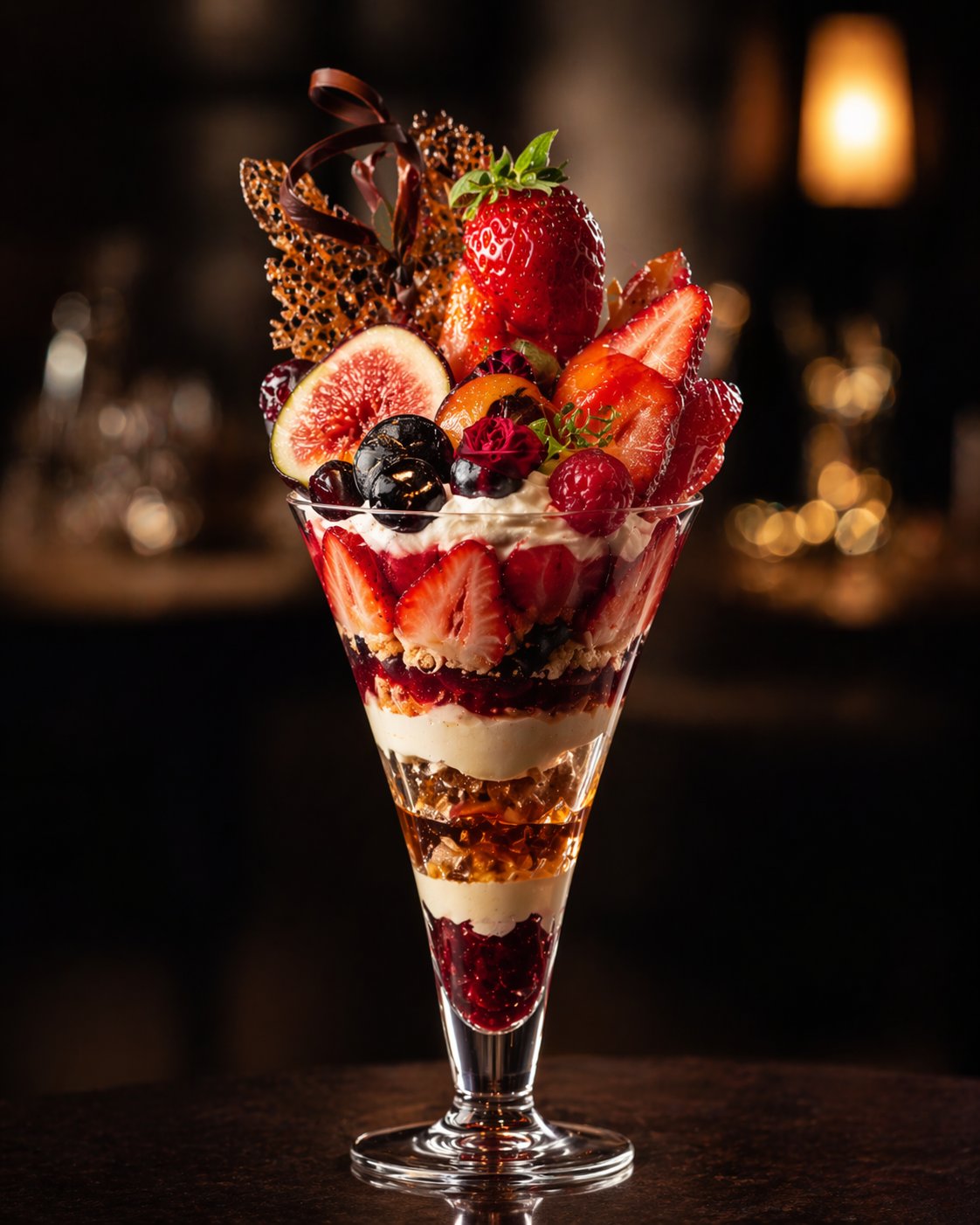
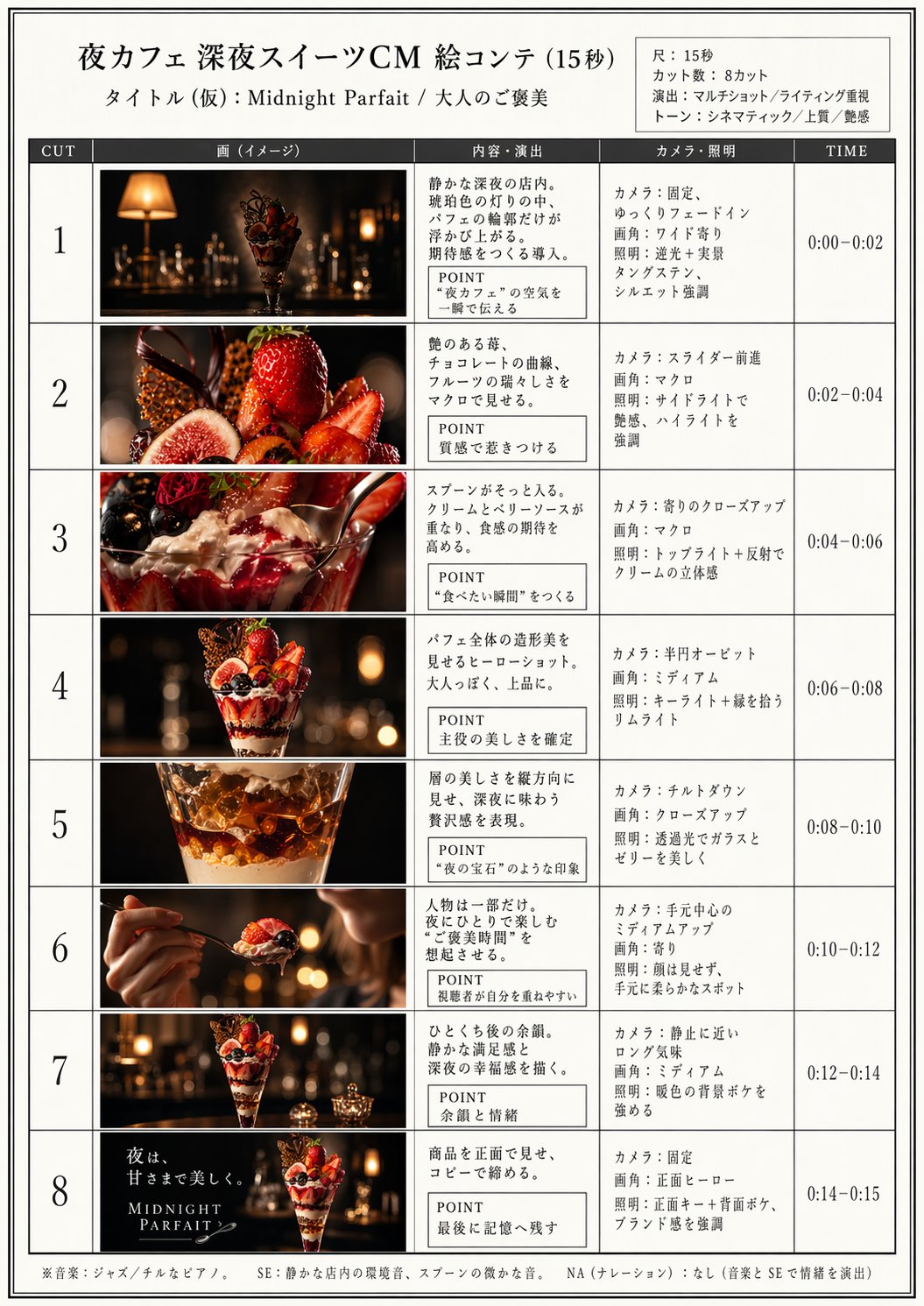
Two-step workflow: GPT Image 2 generates the hero image and matching storyboard, then Seedance 2.0 animates each clip. Assemble with captions and music for a complete 15-second spot.
<table><tr>
<td align="center"><a href="https://evolink.ai/gpt-image-2-prompts?utm_source=github&utm_medium=picture&utm_campaign=gptimage2-x-seedance2">
</a></td>
<td align="center"><a href="https://evolink.ai/gpt-image-2-prompts?utm_source=github&utm_medium=picture&utm_campaign=gptimage2-x-seedance2">
</a></td>
<td align="center"><video src="https://github.com/user-attachments/assets/09ae3c57-b8fb-4323-ba76-7777541fe4a3" width="280" controls></video></td>
</tr></table>
Steps:
- Generate the main image + storyboard with image2
- Feed that into Seedance2.0 to turn it into a video
Storyboard count guide:
| Video length | Panels | Duration per clip |
|---|---|---|
| 15 seconds | 4–5 | 3–4 seconds |
| 30 seconds | 8–10 | 3 seconds |
| 60 seconds | 15–18 | 3–4 seconds |
GPT Image 2 Prompt:
夜カフェ 深夜スイーツをテーマにした15秒CMを作るので、絵コンテを作って。
プロの映像クリエイターによる15秒、8カット、マルチショット、ライティング重視。
Seedance 2.0 Prompt:
15秒、8カット、マルチショット、ライティング重視Case 15: Luxury Commercial — Storyboard to Film (by @insmind_com)
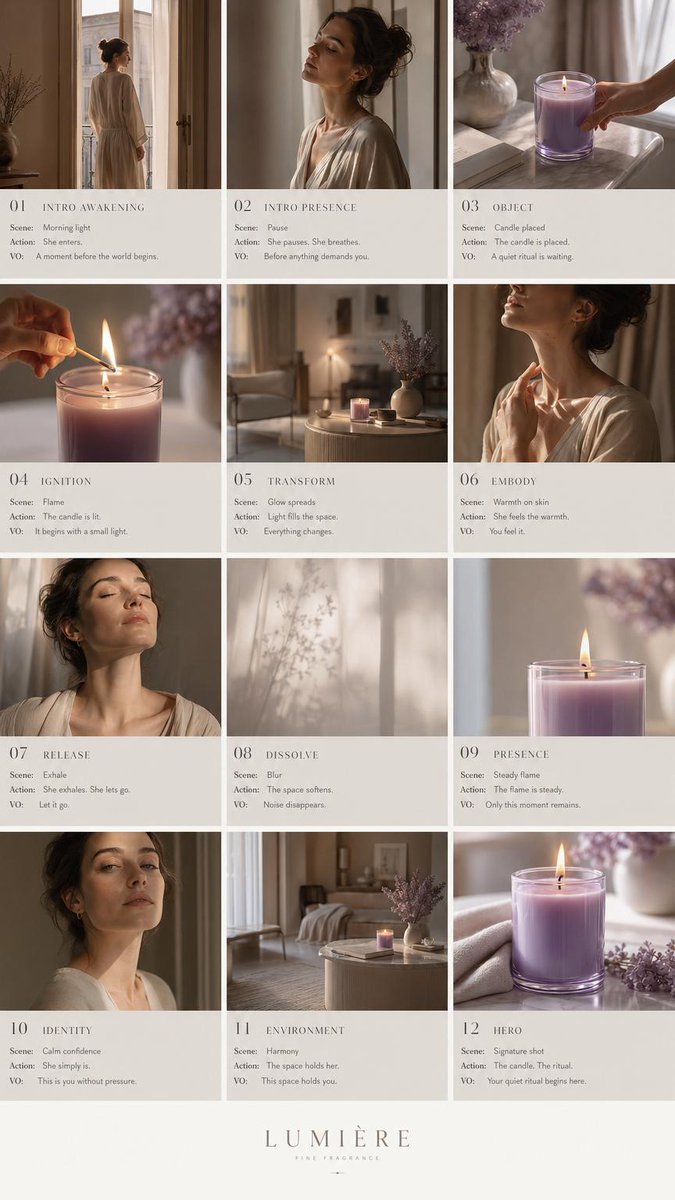
Generate a 3×4 storyboard grid (12 frames) for a luxury fragrance ad with GPT Image 2, then animate into a cinematic brand-level film with Seedance 2.0. The structured flow — intro → ritual → transformation → resolution → brand closure — produces a complete narrative arc in one generation. 371 likes / 84K views / 255 bookmarks.
<table><tr>
<td align="center"><a href="https://evolink.ai/gpt-image-2-prompts?utm_source=github&utm_medium=picture&utm_campaign=gptimage2-x-seedance2">
</a></td>
<td align="center"><em>Preview unavailable: original GitHub attachment is no longer publicly accessible.</em></td>
</tr></table>
Steps:
- Generate a 12-frame storyboard grid (3×4) with GPT Image 2, using editorial layout and luxury brand aesthetics
- Import the storyboard grid into Seedance 2.0 as a single reference image
- Prompt Seedance to animate the sequence as a cinematic luxury commercial
- Add music and final color grade in your editing software
GPT Image 2 Prompt:
Create a high-end 9:16 luxury fragrance pitch deck storyboard in 3x4 grid (12 frames), editorial layout, Aesop/Byredo style, beige + lavender palette. Structured flow: intro → ritual → transformation → resolution → brand closure. Each frame split: top cinematic image (no text) + bottom storyboard notes. Luxury minimal European aesthetic, calm femininity, slow living mood. Candle is the emotional center throughoutSeedance 2.0 Prompt:
Animate the provided 3x4 storyboard into a smooth cinematic video. Preserve exact shot order and continuity. Use slow push-in, gentle pan, subtle orbit, and rack focus. Lighting transitions from soft morning glow to warm golden ambient light. Fragrance brand editorial aesthetic, minimal luxury, soft film grain. No new shots, no reordering, candle remains emotional focus in all scenes[!NOTE]
The editorial pitch-deck layout (with visual direction notes in each frame) gives Seedance stronger narrative cues than a plain grid. This workflow scales to any luxury product category — skincare, watches, fashion — by swapping the palette and product references.
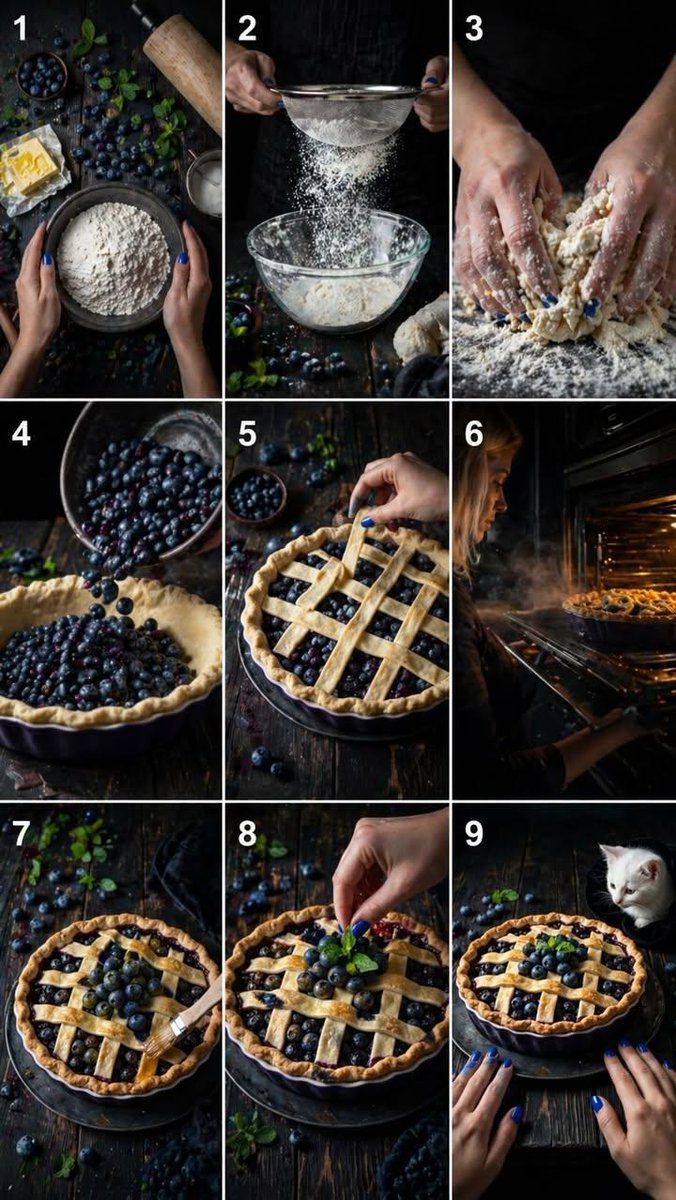
Case 16: Cinematic Food Video (by @kingofdairyque)
Use GPT Image 2 + Seedance 2.5 to create ultra-realistic food preparation videos with timestamped shot descriptions. Each timestamp segment (0–2s, 2–4s, etc.) defines a specific camera angle and action, giving Seedance precise control over the 15-second sequence. 55 likes / 1K views.
<table><tr>
<td align="center"><a href="https://evolink.ai/gpt-image-2-prompts?utm_source=github&utm_medium=picture&utm_campaign=gptimage2-x-seedance2">
</a></td>
<td align="center"><em>Preview unavailable: original GitHub attachment is no longer publicly accessible.</em></td>
</tr></table>
Steps:
- Write a detailed timestamped shot list describing each 2-second segment
- Generate the storyboard image with GPT Image 2 based on the shot list
- Feed the image + full timestamped prompt into Seedance 2.0
- The model follows the timestamp structure to produce a coherent cooking sequence
Seedance 2.0 Prompt:
Ultra-realistic cinematic 15-second vertical video (9:16), 4K, dark rustic wooden table,
soft dramatic lighting, shallow depth of field, natural textures, no text, no subtitles, no music.
[0-2s] Top-down shot: hands gently touch a bowl of [ingredient]. Subtle ambient movement.
[2-4s] Side close shot: [preparation action] in slow motion, catching warm light.
[4-6s] Macro shot: hands [action]. Texture detail visible.
[6-8s] 45-degree angle: [ingredient] pours into [vessel]. Natural bounce and movement.
[8-10s] Top angled close-up: hands carefully [assembly action]. Precise controlled motion.
[10-12s] Side shot: oven door opens. Warm golden light spills out with gentle steam.
[12-14s] Close-up: [finishing touch]. Surface becomes glossy, light reflecting softly.
[14-15s] Final frontal shot: finished [dish] on rustic table. Hands enter frame softly.
[!NOTE]
The timestamped prompt technique gives Seedance a precise shot-by-shot timeline. This works for any product or process video — unboxing, crafting, cocktail making. Keep each segment to 2 seconds and describe both the camera angle and the action for best results.
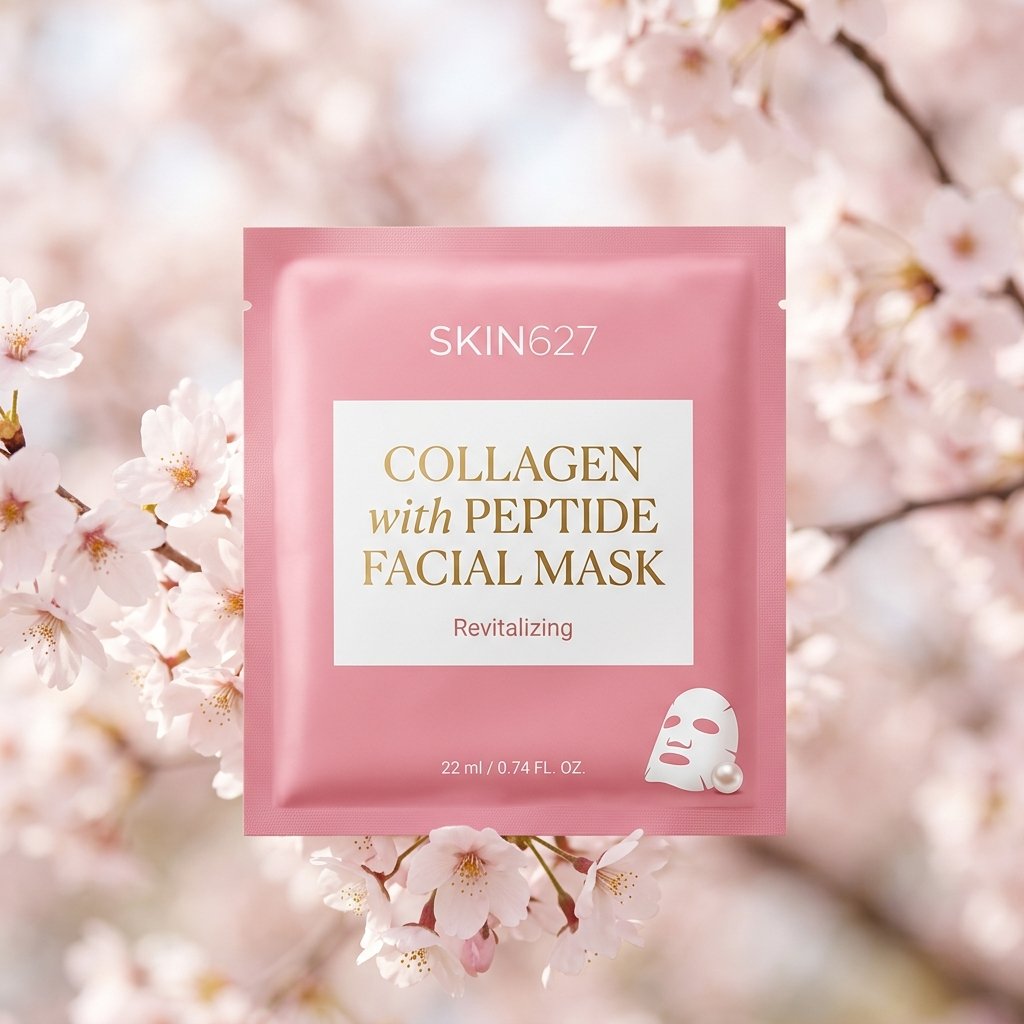
Case 26: Product Image → Short Video Ad (by @insmind_com)
Turn static product images into scroll-stopping social media videos. Upload your existing product photos as references to GPT Image 2, generate a scene composition, then animate with Seedance 2.0. Designed for e-commerce and social media marketing — produce TikTok/Reels-ready content from product photos you already have.
<table><tr>
<td align="center"><a href="https://evolink.ai/gpt-image-2-prompts?utm_source=github&utm_medium=picture&utm_campaign=gptimage2-x-seedance2">
</a></td>
<td align="center"><em>Preview unavailable: original GitHub attachment is no longer publicly accessible.</em></td>
</tr></table>
Steps:
- Input product images.
- Generate the core scene.
- Define motion and structure.
- Style and constraints
[!NOTE]
This differs from Case 15 (luxury commercial) in that it starts from existing product photos rather than generating everything from scratch. Best for e-commerce sellers who already have product images and want to convert them into video ads quickly.
🎨 Animation & Character
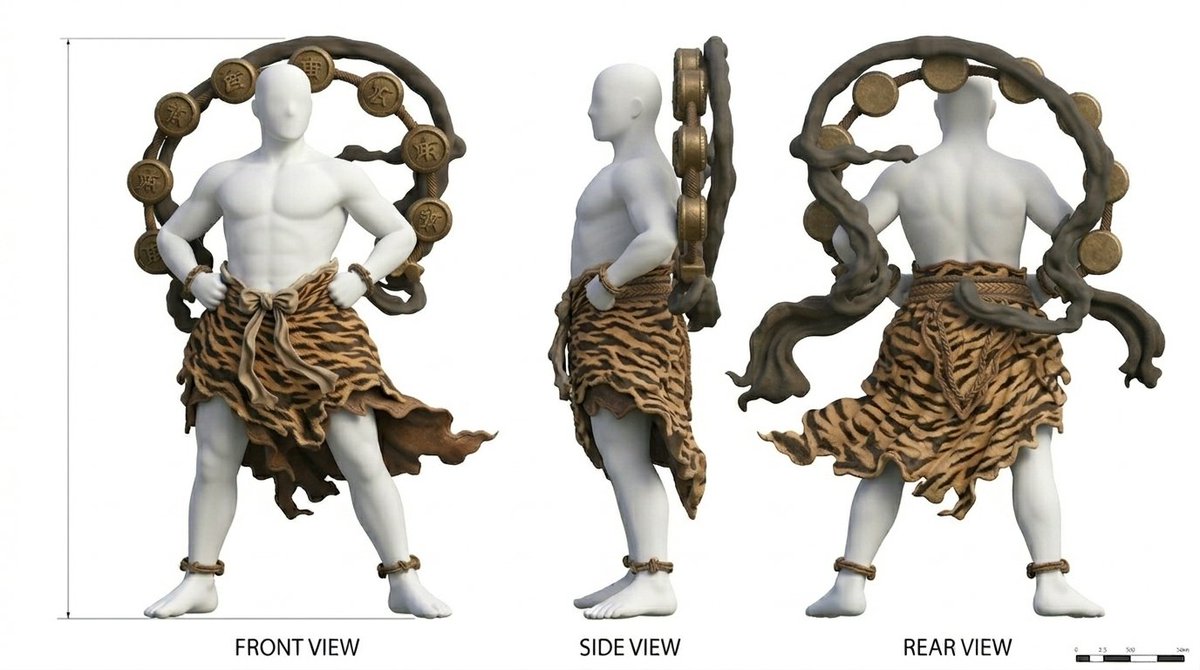
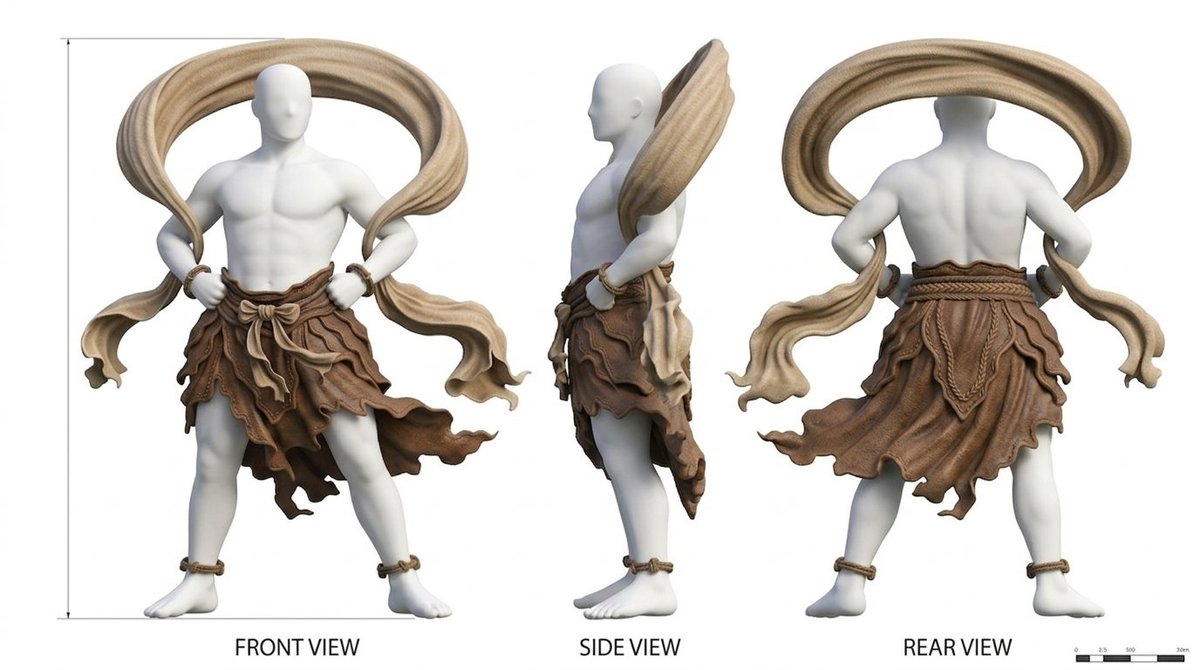
Case 3: Character Sheet → Animation (by @YaReYaRu30Life)
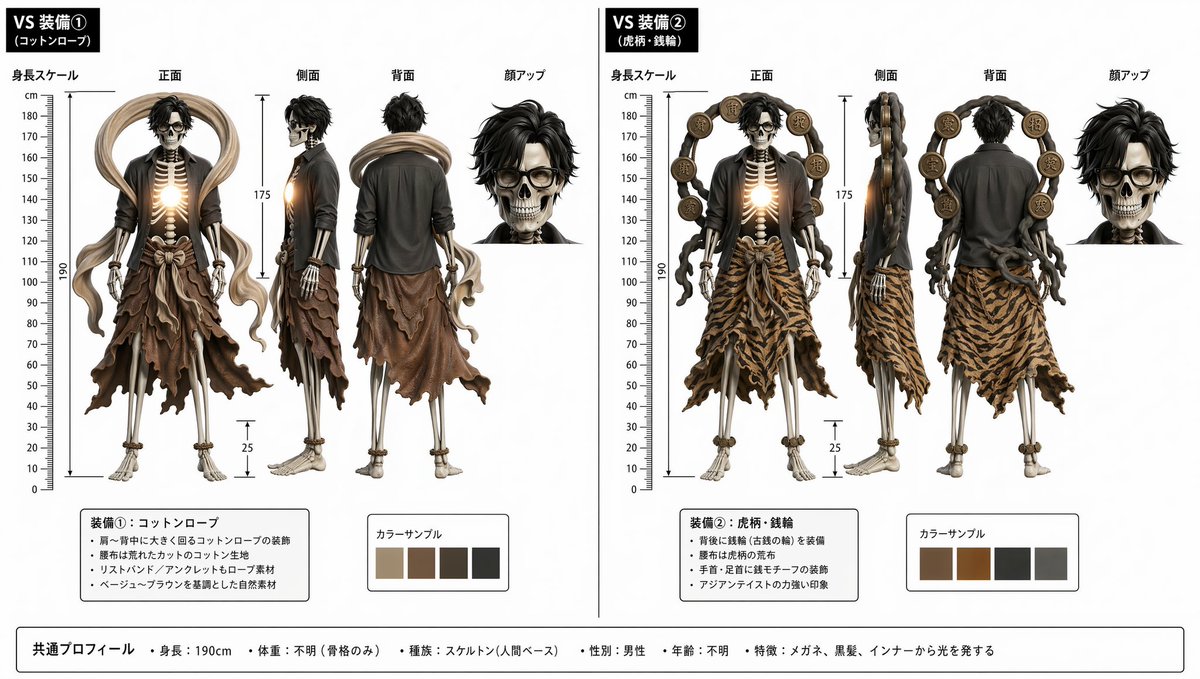
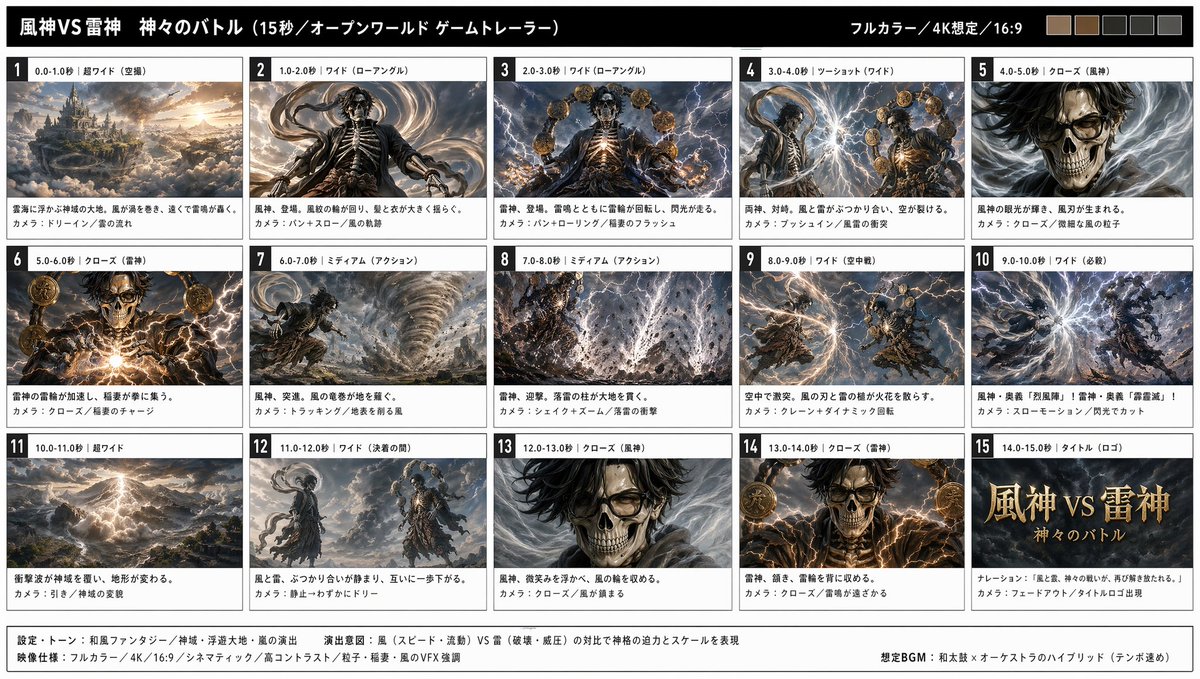
Generate a character three-view sheet (front, side, back) with GPT Image 2, then use it as an anchor for animation in Seedance 2.0. Ideal for anime characters, game characters, and figure reveals.
<table><tr>
<td align="center"><a href="https://evolink.ai/gpt-image-2-prompts?utm_source=github&utm_medium=picture&utm_campaign=gptimage2-x-seedance2">
</a></td>
<td align="center"><a href="https://evolink.ai/gpt-image-2-prompts?utm_source=github&utm_medium=picture&utm_campaign=gptimage2-x-seedance2">
</a></td>
<td align="center"><a href="https://evolink.ai/gpt-image-2-prompts?utm_source=github&utm_medium=picture&utm_campaign=gptimage2-x-seedance2">
</a></td>
</tr></table>
<table><tr>
<td align="center"><a href="https://evolink.ai/gpt-image-2-prompts?utm_source=github&utm_medium=picture&utm_campaign=gptimage2-x-seedance2">
</a></td>
<td align="center"><video src="https://github.com/user-attachments/assets/92a0aa56-441f-40db-b9c9-13410254cb3f" width="400" controls></video></td>
</tr></table>
Steps:
- Three-view drawing (character) + two equipment three-view drawings.Based on this,Prepare three-view drawings with each piece of equipment equipped in a single image. For image posting count reasons, the character attachment is omitted
- Create a storyboard based on this three-view drawing
- Turn the storyboard into video using Seedance2.0
GPT Image 2 Prompt:
Create a storyboard based on this three-view drawing Seedance 2.0 Prompt:
Turn the storyboard into video using Seedance2.0Case 4: Anime OP Style Video (by @Toshi_nyaruo_AI)
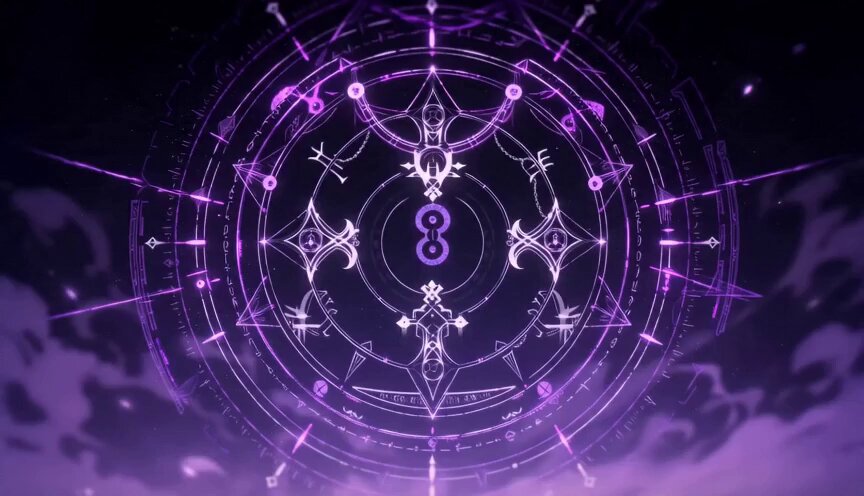
Use GPT Image 2 to build a scene setting image, then let Seedance 2.0 animate freely. Comparing constrained (storyboard-guided) and free-form (prompt-only) outputs helps decide the right approach per shot.
<table><tr>
<td align="center"><a href="https://evolink.ai/gpt-image-2-prompts?utm_source=github&utm_medium=picture&utm_campaign=gptimage2-x-seedance2">
</a></td>
<td align="center"><video src="https://github.com/user-attachments/assets/f08a2fee-89a7-4c7c-a58a-f1306f87419a" width="280" controls></video></td>
<td align="center"><video src="https://github.com/user-attachments/assets/09d81a41-b5c5-47f3-8c67-442b7a93b019" width="280" controls></video></td>
</tr></table>
Steps:
- Grok come up with lyrics for a fictional anime openin
- used GPT-image2 to turn the lyrics into a storyboard
- use seedance2 to generate videos
GPT Image 2 Prompt:
turn the lyrics into a storyboardSeedance 2.0 Prompt:
Japanese full-color anime, fast cuts, high frame count, 24fps. Dark fantasy anime OP style. Epic battle between protagonist and massive supernatural creatures. High-impact sequence of scenes. Only [character name] appears.[!NOTE]
When Seedance animates freely (without a storyboard reference), results can be more dynamic but less consistent with your source image. Use storyboard control for key character shots and free animation for action sequences.
Case 12: Claude Code × Character Sheet → Animation (by @old_pgmrs_will)
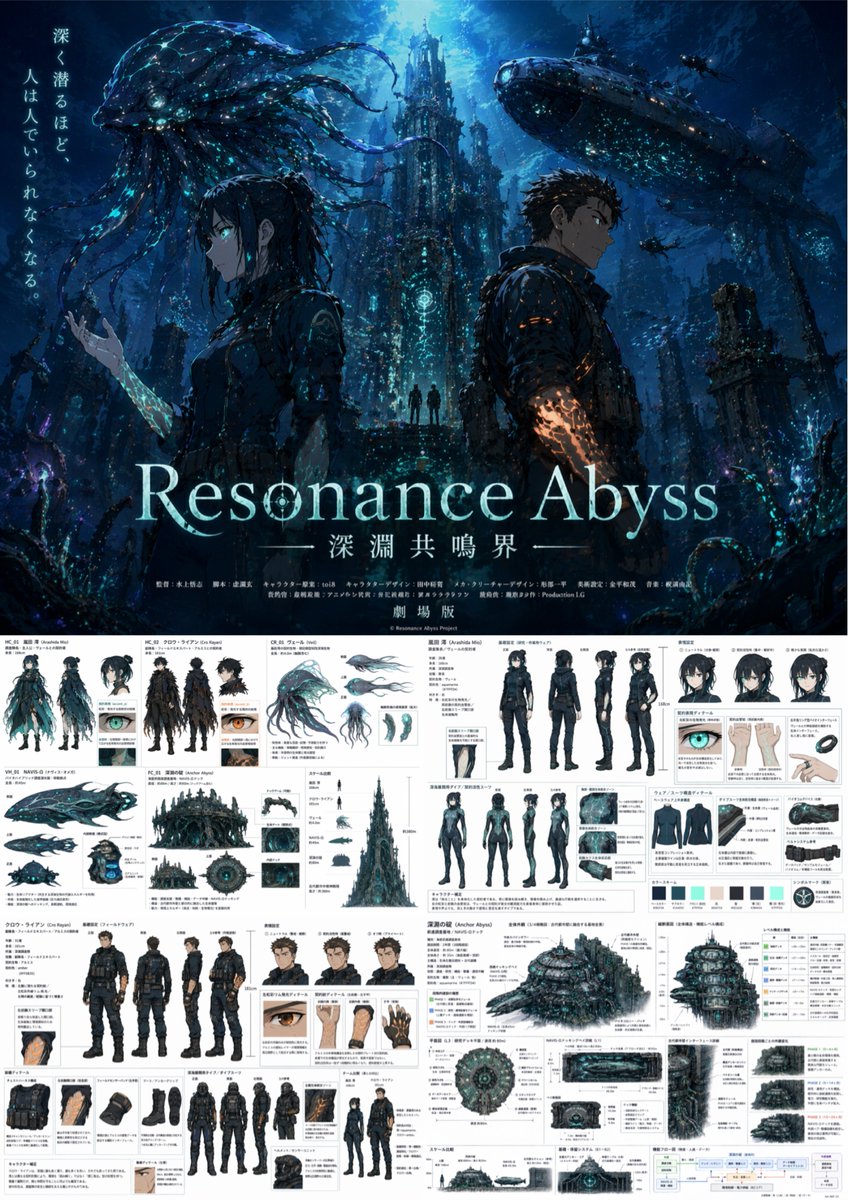
Use Claude Code to write the world-building and character lore, then pass structured descriptions to GPT Image 2 to generate the character key visual, then animate with Seedance 2.0. Developer-friendly workflow for original IP creation. 191 likes / 7K views.
<table><tr>
<td align="center"><a href="https://evolink.ai/launch/seedance-2-5?utm_source=github&utm_medium=picture&utm_campaign=gptimage2-x-seedance2">
</a></td>
</tr></table>
Steps:
- Use Claude Code to draft world-building notes and a structured character spec (name, appearance, personality, setting)
- Feed the character spec directly into GPT Image 2 to generate a key visual or character sheet
- Use the key visual as the reference image in Seedance 2.0 and animate
[!NOTE]
Claude Code outputs structured text — character specs, scene descriptions, dialogue outlines — which GPT Image 2 handles well as detailed prompts. This pipeline is particularly effective for original story IP: build the lore in code, visualize it in GPT Image 2, animate it in Seedance.
Case 13: Dance Sequence Grid → Dance Video (by @Ciri_ai)
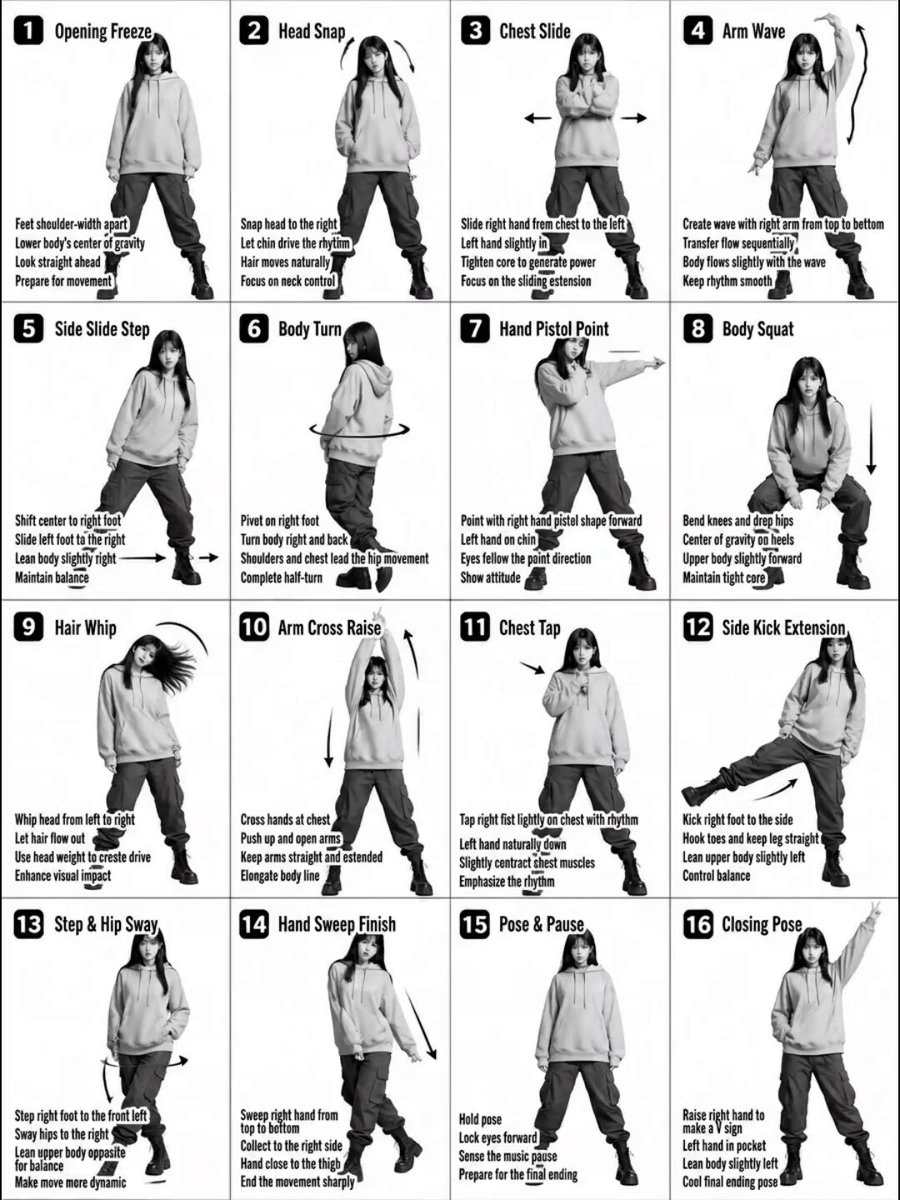
Generate a 4×4 grid of dance poses with GPT Image 2, then feed it to Seedance 2.0 as a motion reference. The model reads the grid as a choreography sequence and outputs a continuous dance video. Advanced variant: upload multiple character references for beat-synced outfit transitions. 161 likes / 9K views.
<table><tr>
<td align="center"><a href="https://evolink.ai/gpt-image-2-prompts?utm_source=github&utm_medium=picture&utm_campaign=gptimage2-x-seedance2">
</a></td>
<td align="center"><em>Preview unavailable: original GitHub attachment is no longer publicly accessible.</em></td>
</tr></table>
Steps:
- Generate a 4×4 grid image showing a character in sequential dance poses with GPT Image 2
- Upload the grid as the reference image in Seedance 2.0
- Prompt Seedance to follow the dance sequence from the reference image
- (Advanced) Upload character in Outfit A, character in Outfit B, and the dance grid as three references for mid-dance outfit transitions
GPT Image 2 Prompt:
Transform the input image into a stylized K-pop dance tutorial poster with a fashion-forward streetwear aesthetic, keeping the exact 4x4 grid layout (16 panels) and choreography structure.
Core Composition
Maintain a 16-panel grid (4 columns × 4 rows) with clean spacing

Each panel shows the same female dancer performing sequential choreography

Preserve panel numbering (1–16) in bold, modern UI-style labels

Keep step titles and instructional captions, but redesign typography to feel like K-pop album graphics / dance practice overlays

Subject Styling (K-pop Idol Inspired)

Young female dancer with soft glam K-pop makeup (dewy skin, subtle shimmer, defined eyes)

Hair: long, sleek, slightly dynamic (motion-friendly, flowing during moves)

Expression: confident, charismatic stage presence

Outfit (streetwear-inspired):

Cropped hoodie or oversized zip-up jacket

Cargo pants or parachute pants with straps

Chunky sneakers or platform boots

Optional accessories: chain necklace, ear cuffs, fingerless gloves

Visual Style

Switch from plain grayscale → high-contrast + soft neon accents

Base palette: black, white, gray

Accent colors: neon pink, electric blue, or violet glow (subtle, not overpowering)

Lighting:

Studio lighting with a soft glow + rim light effect

Slight stage-light vibe, like a K-pop dance practice video

Graphics & Effects

Add dynamic motion trails and glow accents on arms, legs, and hair movement

Replace basic arrows with stylized motion graphics (neon strokes, swooshes)

Subtle light streaks or particle effects for energy

Optional faint floor reflection or glossy surface

Typography

Titles: bold, modern, slightly condensed sans-serif (K-pop album style)

Add subtle glow or gradient to titles

Instruction text: clean, minimal, slightly futuristic UI style

Panel numbers: inside rounded squares or pill shapes with neon outline

Camera & Framing

Full-body framing in each panel (consistent scale)

Straight-on angle, but with slight dynamic tilt or perspective energy

Maintain clarity of movement for instructional purpose

Mood & Energy

Feels like a K-pop dance practice meets fashion editorial

Clean but energetic

Stylish, rhythmic, performance-driven

Important Constraints

Keep choreography readable and sequential

Do NOT merge panels or change layout

Maintain consistency of dancer identity across all panels
Seedance 2.0 Prompt:
Character from Image 1 performs the dance based on the breakdown in Image 3. Midway through the performance, they switch outfits on beat into the character from Image 2. Then, the character from Image 2 continues and completes the remaining dance steps from Image 3. Emphasize precise beat synchronization with the music[!NOTE]
This technique works for any movement sequence — dance, martial arts, sports. The 4×4 grid gives Seedance 16 reference frames to interpolate between, producing smoother motion than fewer panels.Community variants: @airina_xyz demonstrated the basic workflow with an urban street dancer. @Kashberg_0 used character boards + motion reference frames for K-Pop choreography (52 likes / 2K views).
Case 14: Comic Page → Animated Video (by @nimentrix)
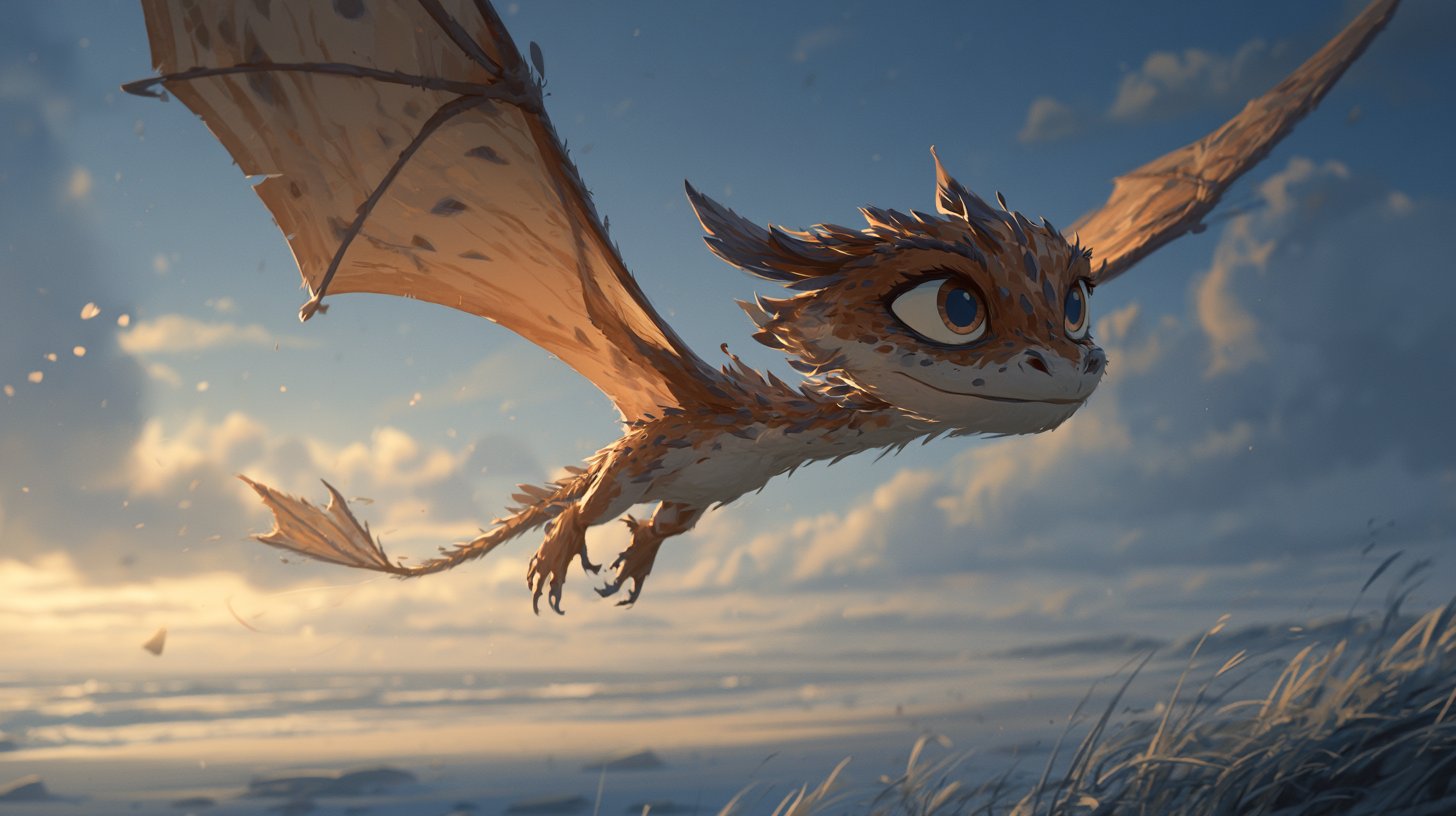
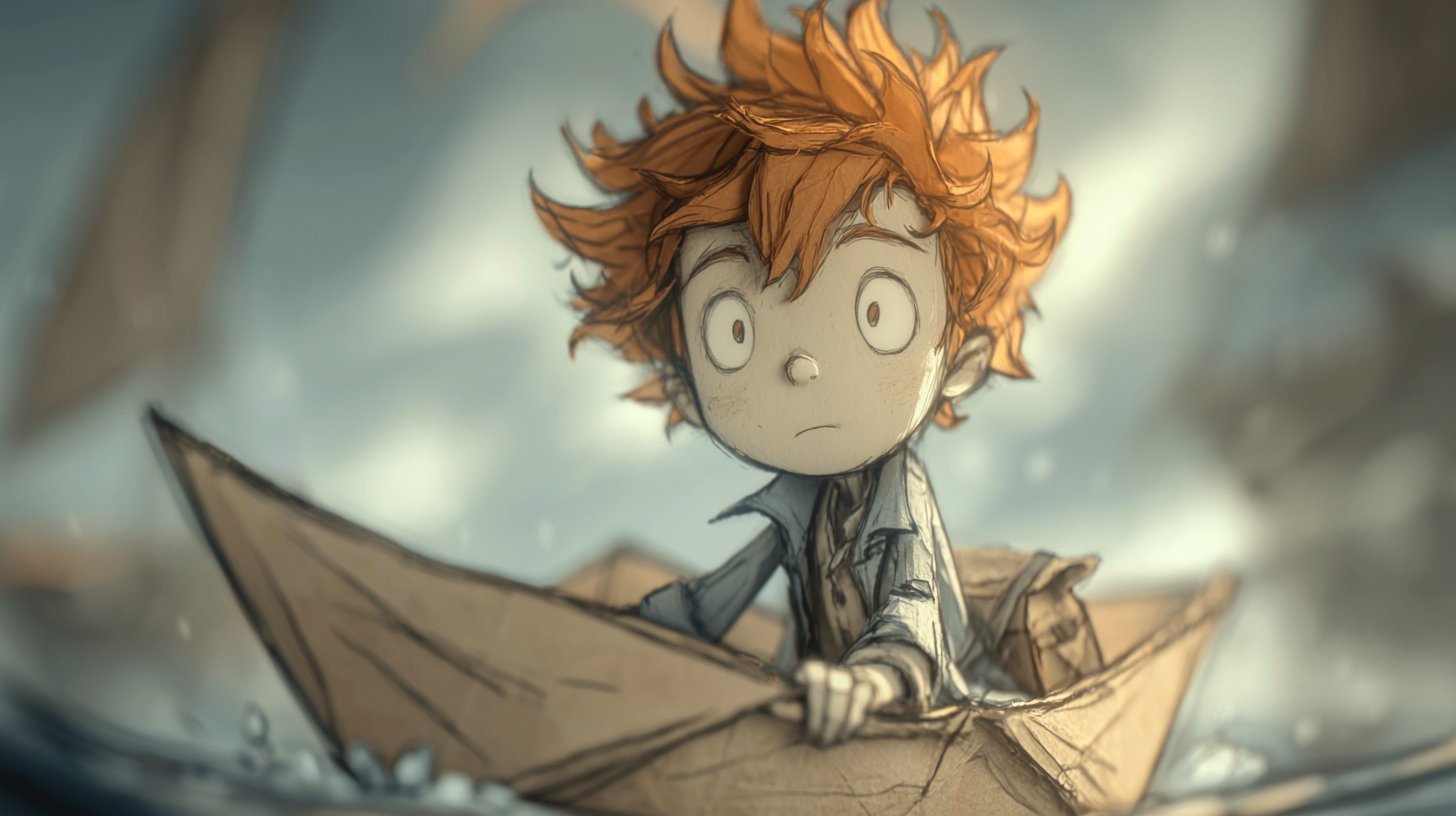
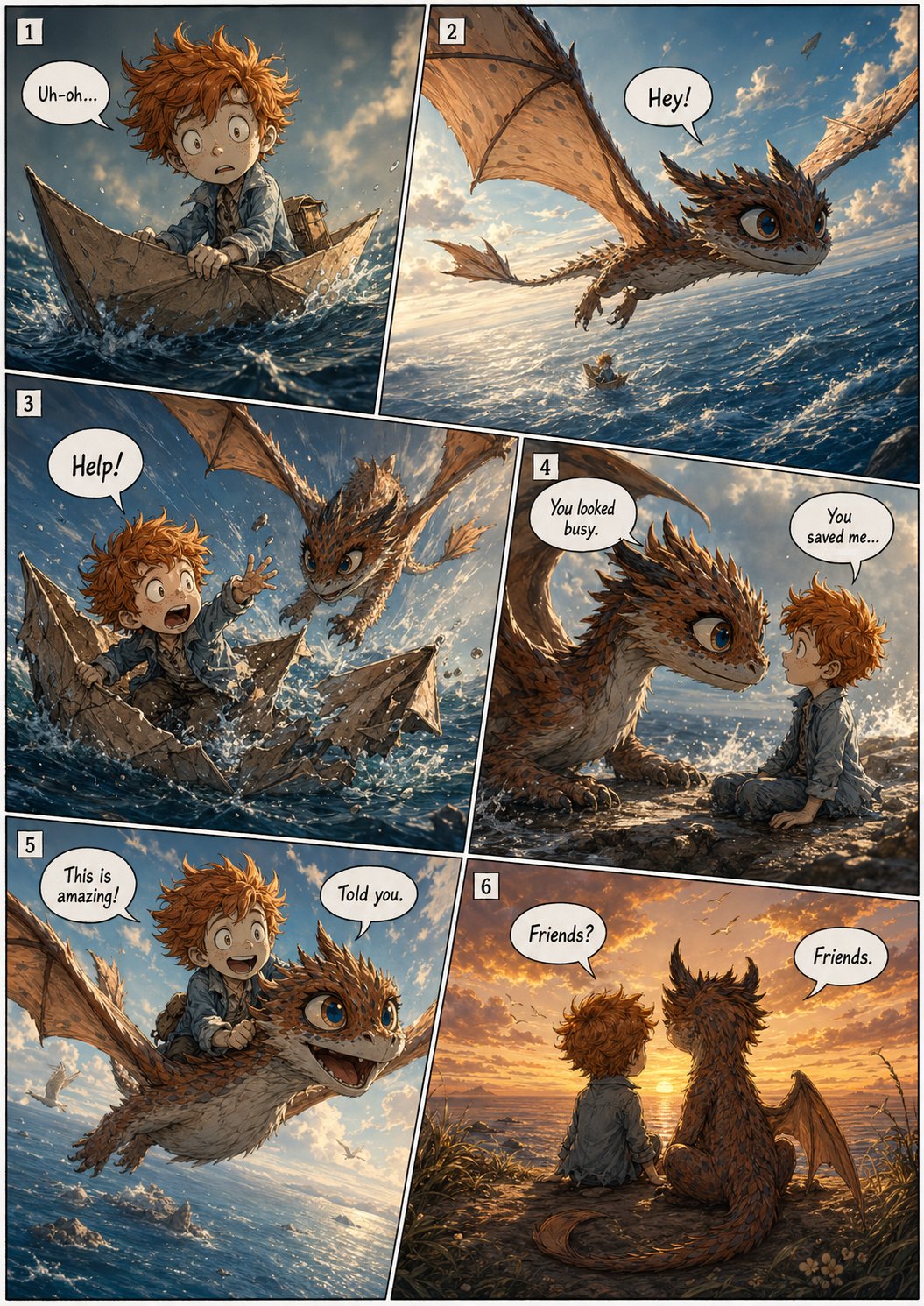
Create a multi-panel comic page with GPT Image 2 — diagonal layout, speech bubbles, cinematic storytelling — then animate the entire page into a video with Seedance 2.0. The model reads the comic panels as a narrative sequence and produces a continuous animated short. 330 likes / 21K views / 360 bookmarks.
<table><tr>
<td align="center"><strong>GPT Image 2 Inputs</strong><br><a href="https://evolink.ai/gpt-image-2-prompts?utm_source=github&utm_medium=picture&utm_campaign=gptimage2-x-seedance2">
</a></td>
<td align="center"><br><a href="https://evolink.ai/gpt-image-2-prompts?utm_source=github&utm_medium=picture&utm_campaign=gptimage2-x-seedance2">
</a></td>
<td align="center"><strong>Seedance 2.0 Input</strong><br><a href="https://evolink.ai/gpt-image-2-prompts?utm_source=github&utm_medium=picture&utm_campaign=gptimage2-x-seedance2">
</a></td>
</tr></table>
<table><tr>
<td align="center"><em>Preview unavailable: original GitHub attachment is no longer publicly accessible.</em></td>
</tr></table>
Steps:
- Create a character design sheet (front, side, back views) with GPT Image 2 to lock the character look
- Generate a multi-panel comic page using the character as reference
- Import the comic page into Seedance 2.0 and animate
GPT Image 2 Prompt — Character sheet:
Create a character design style sheet for [describe your character]:
front view, side view, back view on white background.
Make the aspect ratio 4:3.
GPT Image 2 Prompt — Comic page:
[Character description] and [companion], american comic multi-panel illustration,
diagonal layout, six panels, cinematic storytelling, clear reading flow, with speech bubbles.
[Describe the story sequence across panels.]
Seedance 2.0 Prompt:
Animate this comic page as a cinematic sequence. Follow the panel order from top-left to bottom-right.
Smooth transitions between panels, maintain character consistency, cinematic camera movement.
[!NOTE]
The diagonal layout and speech bubbles give Seedance clear visual cues for panel boundaries and reading order. For best results, keep each panel's action simple and distinct. This workflow also pairs well with Suno for adding a soundtrack to the final video.
Case 25: K-Pop Choreography — Detailed Control (by @Kashberg_0)
Maximum control over dance animation: write a 16-step choreography breakdown with precise movement descriptions, generate the reference grid with GPT Image 2, then animate with Seedance 2.0. Each step gets 2–3 seconds, producing a 35–50 second continuous dance video with authentic K-pop movement quality.
<table><tr>
<td align="center"><em>Preview unavailable: original GitHub attachment is no longer publicly accessible.</em></td>
</tr></table>
Steps:
- Write a detailed choreography sequence (16 steps with specific dance moves)
- Generate a reference grid showing each step with GPT Image 2
- Feed the grid + full choreography description into Seedance 2.0
- The model follows the step sequence with smooth transitions
Seedance 2.0 Prompt:
K-Pop Dance Sequence (16 Steps, Korean Street)
[PROJECT TYPE]
Cinematic K-pop dance video (instruction-to-performance translation)
[CORE REQUIREMENT — STRICT]
The video must faithfully follow the exact 16-step choreography shown in the reference sheet, in the same order, with accurate poses and transitions.
No steps added, removed, or rearranged.
🧍♀️ [CHARACTER]
Korean female dancer (K-pop idol aesthetic)
Slim, athletic build
Same consistent face and proportions throughout
Expressive, confident stage presence
Natural, fluid but sharp K-pop movement quality
👕 [WARDROBE — K-POP STYLE]
Fitted crop top
Loose high-waisted jeans
Sneakers
Modern idol styling (clean, trendy)
Fabric reacts naturally to movement (denim weight, subtle folds)
📍 [LOCATION / ENVIRONMENT]
Empty aesthetic Korean street (Seoul-inspired)
Clean urban design: narrow street, minimal signage, soft architecture
No people, no vehicles
Slight cinematic depth (buildings, street lights, textures)
Lighting:
Soft daylight or golden hour (ideal for K-pop vibe)
Balanced highlights + gentle shadows
🔢 [16-STEP CHOREOGRAPHY — LOCKED SEQUENCE]
Starting Pose
Step Touch Right
Step Touch Left
Hip Sway Combo
Body Roll Down
Back Step Sweep
Quarter Turn Pivot
Hair Flip & Pose
Side Step Drag
Cross Behind Unwind
Body Wave Up
Hip Circle
Step Lock Step
Arm Sweep Pose
Chest Pop & Hit
Final Pose (hold 2–3 sec)
🎥 [CAMERA DIRECTION]
Full-body framing at all times
Start: centered wide shot
Smooth tracking + subtle dolly movement
Slight angle variation (front → 3/4 → side for spins)
No fast cuts — continuous flow
Camera movement complements choreography, not distracts
💃 [MOVEMENT STYLE — IMPORTANT]
Authentic K-pop choreography feel
Mix of:
Sharp hits (chest pop, accents)
Smooth transitions (body waves, turns)
Clean isolations (hips, chest, arms)
Controlled spins, balanced footwork
No jitter, no unnatural speed
⏱️ [TIMING]
Each step: ~2–3 seconds
Total duration: ~35–50 seconds
Seamless transitions between steps
🎵 [MUSIC DIRECTION — VERY IMPORTANT]
Genre: K-pop / K-pop instrumental / dance-pop
Tempo: 100–115 BPM
Style:
Clean beat drops
Punchy percussion
Light synth melodies
Modern idol choreography vibe
Sync Notes:
Step transitions hit beats
Step 8 (Hair Flip) hits a musical accent
Step 15 (Chest Pop) synced with a strong beat hit
Final pose lands on a clean musical ending
🎨 [VISUAL STYLE]
Photorealistic
Slightly stylized K-pop MV tone
Soft cinematic grading
Clean, polished, high-end look
⚙️ [OUTPUT SETTINGS]
4K resolution
24–30 FPS
High motion clarity
No distortion, no artifacts
🚫 [RESTRICTIONS]
No extra dancers
No background crowd
No outfit changes
No deviation from choreography
No camera cuts that break continuity[!NOTE]
The more specific your step descriptions, the better Seedance follows the choreography. Name actual dance moves (body roll, hair flip, chest pop) rather than vague descriptions. This technique also works for martial arts kata, yoga flows, or any sequential movement.
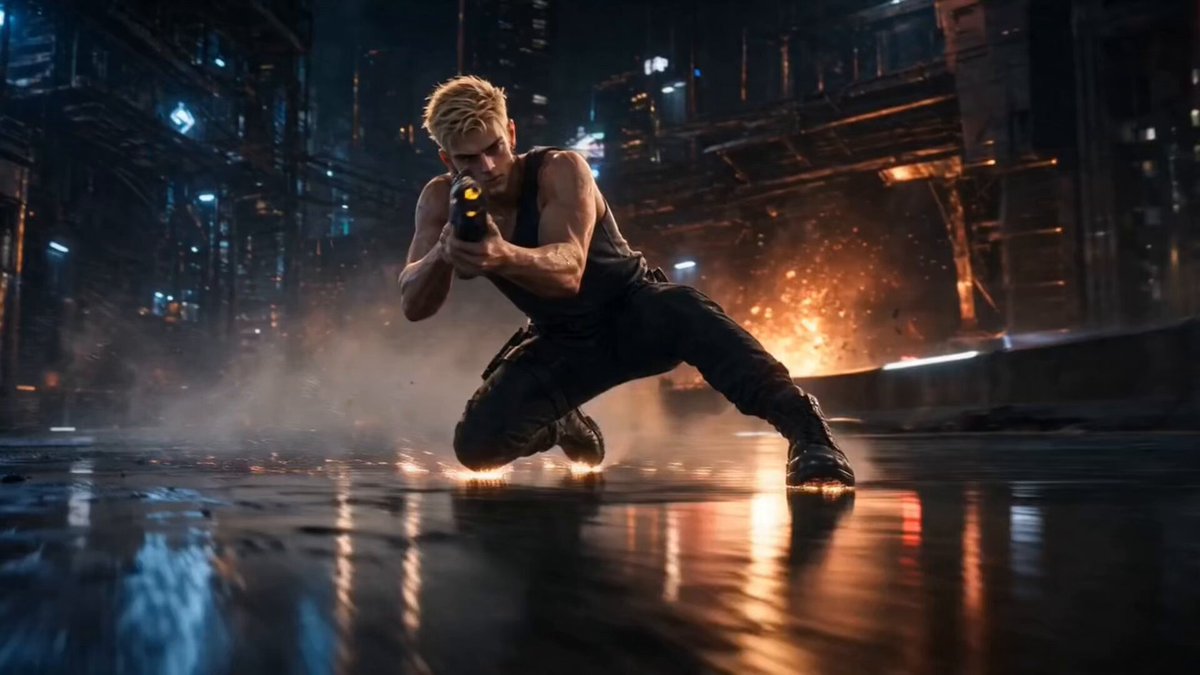
Case 27: Character Intro Animation (by @0xbisc)
Create a cyberpunk AAA game-style character introduction animation. Take any character image, redesign it as a game character with GPT Image 2, generate a cinematic intro screen, then animate the reveal with Seedance 2.0. Swap in any character — the workflow is character-agnostic. 55 likes / 3K views.
<table><tr>
<td align="center"><a href="https://evolink.ai/gpt-image-2-prompts?utm_source=github&utm_medium=picture&utm_campaign=gptimage2-x-seedance2">
</a></td>
<td align="center"><em>Preview unavailable: original GitHub attachment is no longer publicly accessible.</em></td>
</tr></table>
Steps:
- Start with a character image (your own art, photo, or AI-generated)
- Use GPT Image 2 to redesign as a cyberpunk AAA game character — keep face identity, upgrade the style
- Generate a cinematic intro screen with the character (dark background, dramatic lighting, title card layout)
- Animate the intro reveal in Seedance 2.0
GPT Image 2 Prompt — Character redesign:
based on the provided image, redesign as a cyberpunk AAA game character, keep face identity, keep original outfit, hyper-realistic game character, near-photoreal but still game-rendered, cinematic realism, in-game cutscene quality, cinematic lighting, strong contrast, realistic materials, depth of field, subject in sharp focus, background slightly blurred, strong foreground-background separation, Night City inspired environment, dense futuristic megacity, neon signage, wet streets, reflections, industrial details, fully human appearance, clean natural skin, no mechanical lines, no implants, no cyber patterns, character holding a highly designed futuristic weapon, dynamic action-ready pose, confident and intense expression, 16:9 AAA key visual, strong composition, character dominant, no logo, generate a unique character name fitting the character personality, character name in graffiti-style typography, medium-to-small size, integrated into layout, not dominant, refined character info module, editorial layout style, minimal, no background panel, only 1–2 short traits, extremely concise labels, grid-aligned typography-driven layout, Cyberpunk style UI, neon yellow text only, flat geometric layout, strict alignment, only one info module, no additional graphics, clean image, no heavy grain, no film grain, smooth surfaces, high polish, no anime, illustration, raw photography, metallic UI, gold color, cluttered layout, dense UI, boxes, background panels, color blocks, arrows, mechanical skin lines, cyber patterns
Seedance 2.0 Prompt:
industrial cyberpunk city at night, wet reflective ground, neon lights, distant explosions, floating sparks, cinematic atmosphere
camera always follows the character closely, no cuts, smooth tracking
motion continuity, no pose popping, no animation snapping, physically coherent transitions
0–2s:
character transitions into a low sliding movement
one hand brushing the ground for balance
sparks and debris react dynamically
weapon rotates forward in a smooth, deliberate motion
brief partial slow motion to emphasize control and flow
2–5s:
character raises weapon and fires while still moving forward
stylized compressed slow motion:
muzzle flash expands in layered light
face and muscles illuminated
subtle controlled recoil
shell casings eject in short slow-motion beats
particles and light distort around the shot
eyes focused strictly on target direction
final precise shot lands near the end of this phase
strong forward impact implied (sparks / explosion burst)
5–7s:
character motion fully stops, body settles naturally into final stance
character remains still, only subtle breathing motion
character lifts head and turns toward camera for the first time, then holds eye contact steadily
camera performs a subtle push-in
UI takes full visual focus:
UI builds progressively over the entire duration:
light glitch and scan effects
elements align into a clean layout
character name appears in graffiti handwritten animation, stroke-by-stroke reveal
secondary UI fades and slides in smoothly
[!NOTE]
This workflow is character-agnostic — swap in any character (anime, realistic, stylized) and the pipeline adapts. The key is the two-step GPT Image 2 process: first redesign the character for the target style, then compose the intro screen layout.
🎵 Music Video & Short Film
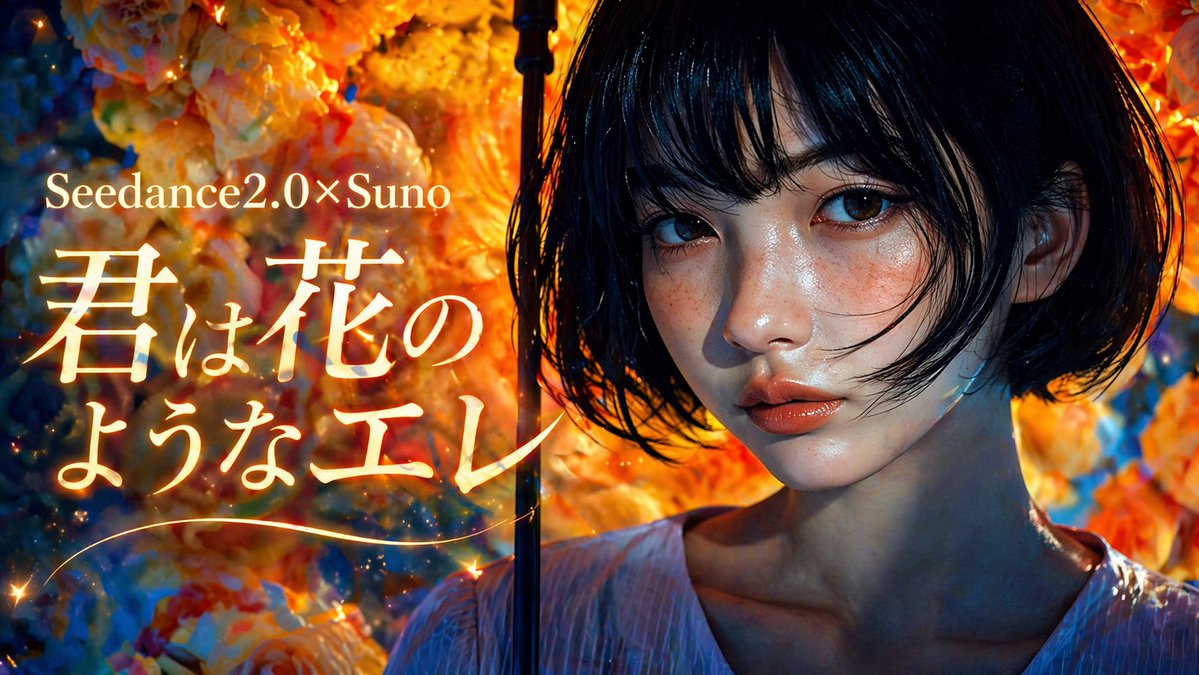
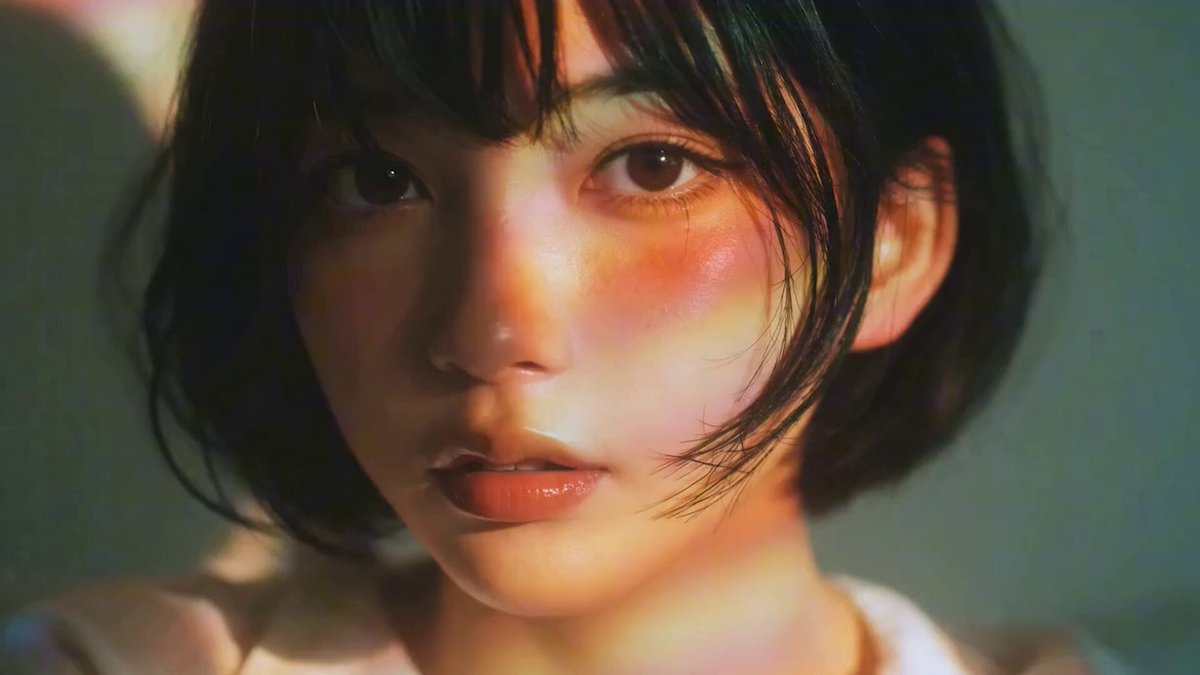
Case 7: Music Video with Suno (by @fukaborichannel)
Three-tool combination: GPT Image 2 for visuals, Seedance 2.0 for motion, Suno for music. Produce music first to lock the tempo and structure, then design storyboards that align to the beat.
<table><tr>
<td align="center"><a href="https://evolink.ai/gpt-image-2-prompts?utm_source=github&utm_medium=picture&utm_campaign=gptimage2-x-seedance2">
</a></td>
<td align="center"><a href="https://evolink.ai/gpt-image-2-prompts?utm_source=github&utm_medium=picture&utm_campaign=gptimage2-x-seedance2">
</a></td>
<td align="center"><video src="https://github.com/user-attachments/assets/fd4be5c7-cd02-4a77-ae07-6b80efeff201" width="280" controls></video></td>
</tr></table>
Steps:
- Generate the target-style music in Suno — confirm song structure (intro / verse / chorus)
- Design storyboard panels per song section in GPT Image 2
- Animate each panel in Seedance 2.0 — match clip duration to the beat
- Sync clips to the music track in your editing software
[!NOTE]
Produce music first. Knowing the tempo and length before designing the storyboard lets you precisely match panel timing to beat cuts.
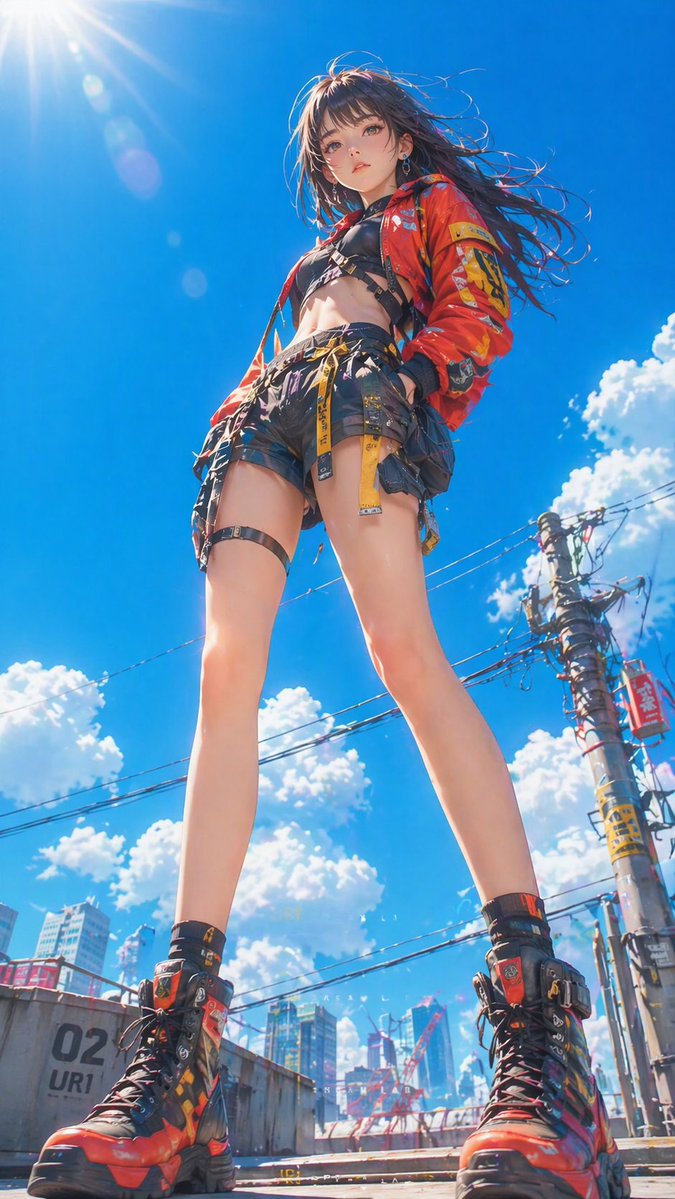
Case 8: Cyberpunk Style Short Film (by @ponyodong)
Use GPT Image 2 to establish a consistent visual style (cyberpunk, neon, lanterns, feminine aesthetic), then animate each image with Seedance 2.0 to produce a short stylized film that lands between wallpaper, poster, and story opening.
<table><tr>
<td align="center"><a href="https://evolink.ai/gpt-image-2-prompts?utm_source=github&utm_medium=picture&utm_campaign=gptimage2-x-seedance2">
</a></td>
<td align="center"><video src="https://github.com/user-attachments/assets/db6ebb63-90dc-47c5-96c5-ab2fa53ed56d" width="280" controls></video></td>
</tr></table>
Steps:
- Define the visual style system in GPT Image 2 — fix colors, lighting, and character look
- Generate 4–6 images that each carry the same mood
- Animate each image in Seedance 2.0 with slow, atmospheric motion prompts
- Sequence the clips to build a short visual narrative
Case 11: Japanese MV — Full AI Toolchain (by @Tz_2022)
Four-tool pipeline producing a complete Japanese-style music video: GPT Image 2 for visuals → Seedance 2.0 for motion → Suno 5.5 for music → CapCut for final edit. 742 likes / 107K views.
<table><tr>
<td align="center"><em>Preview unavailable: original GitHub attachment is no longer publicly accessible.</em></td>
</tr></table>
Steps:
- Generate the music in Suno 5.5 first — lock song length, tempo, and mood
- Design storyboard panels in GPT Image 2 timed to the song sections
- Animate each panel in Seedance 2.0, matching clip duration to beat
- Import video clips and the Suno track into CapCut — sync and export
[!NOTE]
Produce music first — knowing the beat structure before designing storyboards lets you precisely match panel timing to song cuts. This extends Case 7 (City Pop MV) by adding Suno into the loop and treating the whole pipeline as a synchronized production rather than post-assembly.
Case 20: Claude Shotlist → Music Video (by @CoffeeVectors)
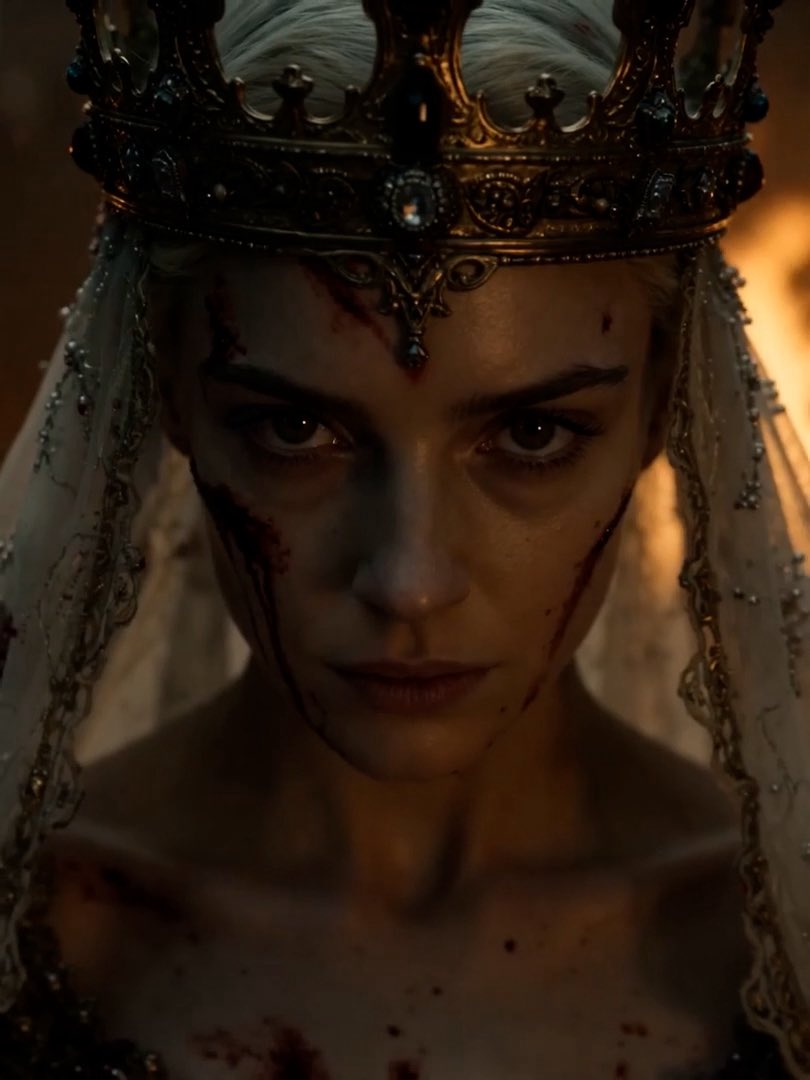
Use Claude to generate a detailed shotlist (15 one-second clips with different camera angles and actions), generate a single portrait with GPT Image 2, then produce each shot with Seedance 2.0. Edit the clips together with your own Suno music for a complete MV. The AI writes the creative direction — you just execute.
<table><tr>
<td align="center"><a href="https://evolink.ai/gpt-image-2-prompts?utm_source=github&utm_medium=picture&utm_campaign=gptimage2-x-seedance2">
</a></td>
<td align="center"><em>Preview unavailable: original GitHub attachment is no longer publicly accessible.</em></td>
</tr></table>
Steps:
- Generate a single character portrait with GPT Image 2 as the visual anchor
- Ask Claude to write a 15-shot shotlist (one shot per second) with varied angles and actions
- Feed the portrait + each shot description into Seedance 2.0 separately
- Edit all clips together and sync to your music track
Seedance 2.0 Prompt (per shot):
A 15-second prestige-TV sequence, one shot per second, scored to an apocalyptic sacred crescendo — low organ and dissonant brass through roaring choir, hammered bells, and earth-shaking timpani to a final shattering harmonic strike. Throughout: a pale young queen with white hair, a tall ornate gold filigree crown, a translucent gauze veil, and a heavily jeweled pale gown — channeler of divine fire from above. Shot entirely handheld — visible micro-shake, breath-rhythm sway, reactive whip-corrections to action, documentary-tense framing.
1 (0–1s) Sky Opens. Handheld wide low-angle, camera tilted up. Black clouds spiral and split in a tear of white-gold light. She stands small below. Organ slams.
2 (1–2s) Eyes To Heaven. Handheld tight close-up, slight float. Her eyes lifted, gold light on her face, a tear of fire tracking down her cheek. Choir enters.
3 (2–3s) Hand Raised. Handheld medium, slight push-in. She raises one palm to the sky. Clouds above twist toward her gesture. Strings climb.
4 (3–4s) First Bolt. Handheld wide. A colossal pillar of holy fire descends and splits a distant black tower. Camera jolts on impact. Hammer beat.
5 (4–5s) The Pointing. Handheld tight medium. She extends one ringed finger slowly toward the horizon. Camera barely breathing. Bells ring.
6 (5–6s) Bolts Rain. Handheld wide, panning to track strikes. Dozens of pillars of holy fire descend across a battlefield. Camera whips reactively to each impact. Drums hammer.
7 (6–7s) Cloaked In Light. Handheld low-angle medium. A shaft of holy fire engulfs her without burning. Camera trembles in the pressure wave. Choir doubles.
8 (7–8s) The Wicked Burn. Handheld tight medium. A robed figure raises a blade — consumed in white-gold fire from above, ash silhouette collapsing. Camera flinches with the strike. Bass hit.
9 (8–9s) Walking Forward. Handheld tracking wide, operator moving with her. She advances across cracked scorched earth, pillars of fire descending in her wake. Strings shriek.
10 (9–10s) Crown Of Lightning. Handheld tight on the crown, slight float. White-gold lightning arcs continuously between the spires. Hair lifts in charged air. Bells climb.
11 (10–11s) Closed Fist. Handheld tight close-up. Her hand closes slowly into a fist. Vast clap of thunder. Camera shakes hard. Sustained held chord.
12 (11–12s) The Cleansing. Handheld wide, operator on a high vantage with visible sway. A fortified city struck by a grid of descending holy fire pillars. She stands small below, untouched. Choir at full roar.
13 (12–13s) The Quiet After. Handheld medium, breathing slowly. She lowers her hand. The storm stills. Ash falls like snow around her. Music drops to near-silence.
14 (13–14s) Eyes Return. Handheld extreme close-up, slight float. Eyes still warm gold blink once slowly. Faintest exhale. Single sustained tone.
15 (14–15s) The Smiting. Handheld frontal wide at dusk, settling into stillness on the final hold. She stands at the center of a vast scorched circle, horizon reduced to smoking ruin. Torn sky still glowing above her. Final shattering harmonic strike sustains.

Style: Photorealistic dark holy fantasy, prestige-TV aesthetic. Anamorphic 35mm, shallow DoF, heavy volumetric atmosphere — smoke, ash, ember haze, heat distortion, charged air shimmer. Palette of scorched bone-white, ivory, ash-gray, storm-slate, and incandescent white-gold. Painterly compositions, fine detail against destruction, organic film grain, heavy highlight bloom on the divine fire. Handheld throughout — visible micro-shake, reactive whip-corrections, breath-rhythm sway, camera flinching with every impact. No tripod stillness until the final hold. Operatic, terrifying, sovereign. The sky itself as her instrument.
[!NOTE]
This workflow separates creative direction (Claude) from visual execution (GPT Image 2 + Seedance). It's particularly effective for music videos where you need many varied shots of the same character. The single portrait as anchor maintains consistency across all 15 clips.
🎮 Game Concept
Case 9: Game & Interactive Content (by @op7418)
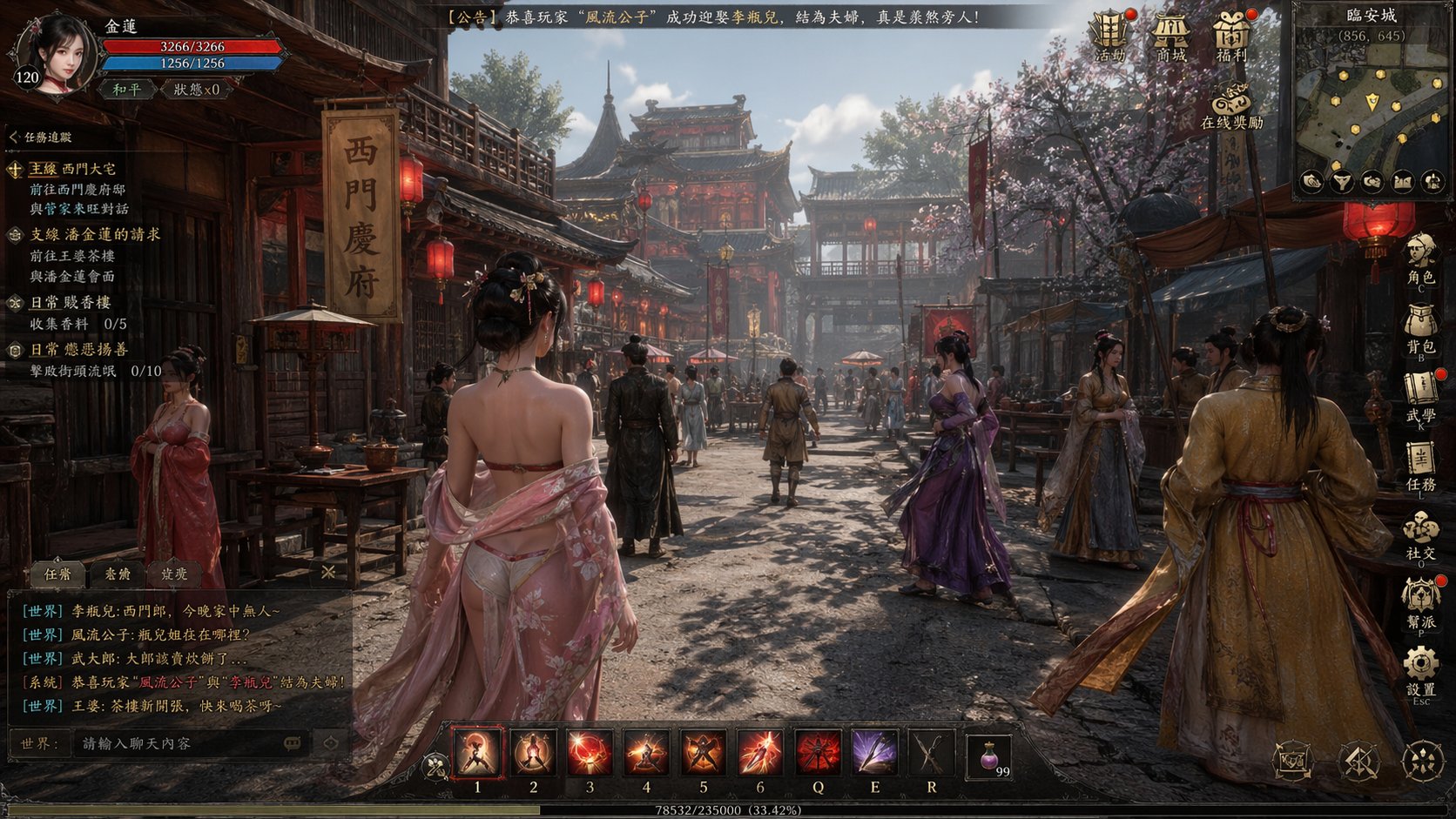
Use GPT Image 2 to generate game-style UI images (with HUD elements, skill bars, choice overlays), then animate them in Seedance 2.0 to simulate interactive game sequences. Game and illustration styles face fewer content restrictions in Seedance than realistic human footage.
<table><tr>
<td align="center"><a href="https://evolink.ai/gpt-image-2-prompts?utm_source=github&utm_medium=picture&utm_campaign=gptimage2-x-seedance2">
</a></td>
<td align="center"><em>Preview unavailable: original GitHub attachment is no longer publicly accessible.</em></td>
</tr></table>
Steps:
- Generate ARPG or game-UI-style images with GPT Image 2, including HUD elements
- Import into Seedance 2.0 and describe the interaction or combat sequence
- Add post-production effects (particles, glow) for polish
GPT Image 2 Prompt-2:
帮我生成一个以《金瓶梅》为主题的古代 ARPG MMO 开放世界游戏的截图GPT Image 2 Prompt-2:
出现 UI 选择 UI 之后变成第二张图的场景图Seedance 2.0 Prompt:
选择 UI 之后变成第二张图右边的场景Variant — ARPG Game Simulation (by @0xbisc):
One Piece, Stranger Things, any IP — generate a game screenshot of a world that doesn't exist, then expand it into live gameplay with Seedance 2.0. 934 likes / 125K views.
<table><tr>
<td align="center"><em>Preview unavailable: original GitHub attachment is no longer publicly accessible.</em></td>
</tr></table>
GPT Image 2 Prompt:
Generate an ARPG dialogue game screenshot inspired by [film/series name]Seedance 2.0: Use Image-to-Video mode. No prompt needed — Seedance reads the HUD layout and extends it into a gameplay sequence automatically.
[!NOTE]
Seedance 2.0 has restrictions on realistic human content. Game, anime, and illustration styles bypass most of these limitations and offer more creative range.
Case 17: Game Interface Animation — Full Pipeline (by @0xInk_)
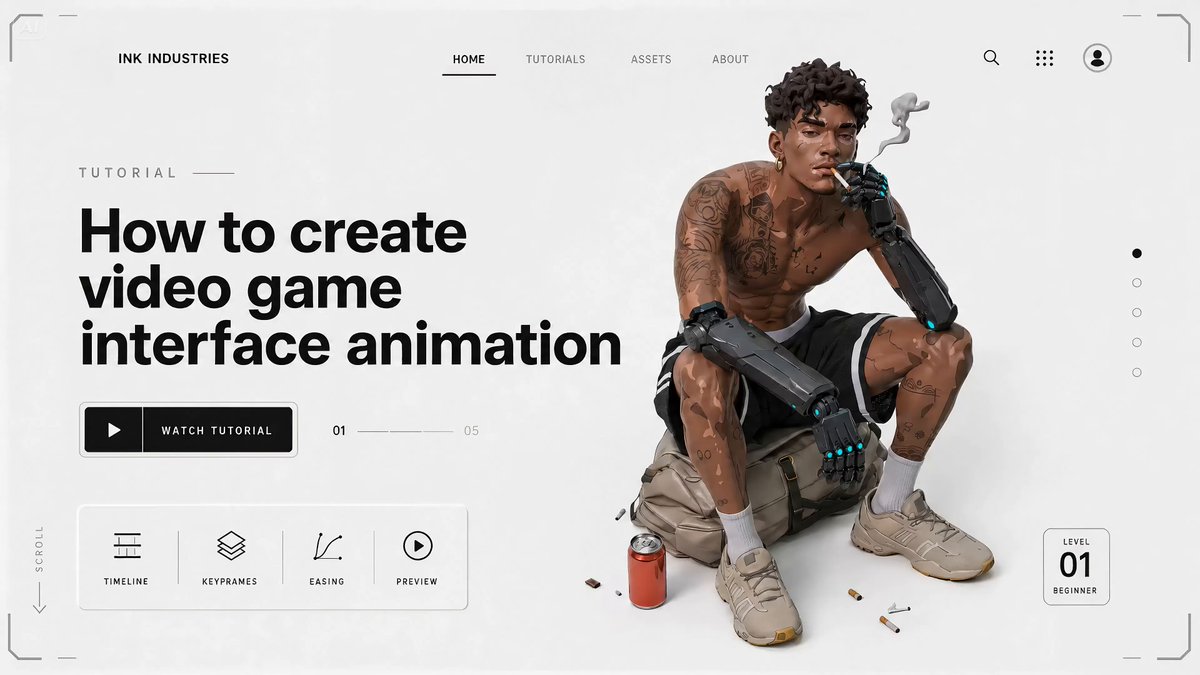
The most viral workflow in this collection: create a complete video game interface animation from scratch. Start with a 2D character in Midjourney, convert to 3D game-ready look with GPT Image 2, design the full game UI (HUD, loading screens, menus), then animate everything with Seedance 2.0. GPT Image 2 excels here because it handles UI detail and allows iterative rework without quality loss. 2280 likes / 208K views / 2793 bookmarks.
<table><tr>
<td align="center"><a href="https://evolink.ai/gpt-image-2-prompts?utm_source=github&utm_medium=picture&utm_campaign=gptimage2-x-seedance2">
</a></td>
<td align="center"><em>Preview unavailable: original GitHub attachment is no longer publicly accessible.</em></td>
</tr></table>
[!NOTE]
The key insight: GPT Image 2 lets you rework an image multiple times without quality degradation — perfect for iterating on UI layouts. Build the full game interface as a series of static screens, then let Seedance connect them into a seamless a
Case 1: Standard Storyboard → Video (by @kiyoshi_shin )
1
-
The most common workflow. Use GPT Image 2 to generate a storyboard panel, then animate it with Seedance 2.0. Best for promotional videos, short dramas, and animation OPs.
Case 2: 3×3 Grid Storyboard Method (by @servasyy_ai )
1
-
A key technique discovered by the community: composing all storyboard panels into a single 3×3 grid image before importing to Seedance significantly reduces failure rate compared to importing frames one by one.
Case 10: Multi-Frame Reference → Fast-Cut Video (by @heygentlewhale )
1
-
Feed Seedance 2.0 a storyboard image with multiple reference frames and instruct it to follow the sequence order. The model reads frame positions as scene cues and outputs a coherent fast-cut edit — without manual clip assembly.
Case 19: Storyboard-First Cost Control (by @0xbisc )
1
-
A production-minded approach: iterate on the storyboard in GPT Image 2 first (cheap), then generate video only when the composition is locked (expensive). This saves significant credits because video iterations burn 10–50× more than image iterations. 298 likes / 13K views / 291 bookmarks.
Case 5: App MVP Demo Video (by @Shin_Engineer )
1
-
Use GPT Image 2 to generate finished-looking UI screenshots of an app that doesn't exist yet, then animate them with Seedance 2.0 into a product demo. Post to TikTok or social media to test market interest before building.
Case 6: 15-Second Commercial (by @ai_mitosan )
1
-
Two-step workflow: GPT Image 2 generates the hero image and matching storyboard, then Seedance 2.0 animates each clip. Assemble with captions and music for a complete 15-second spot.
Case 15: Luxury Commercial — Storyboard to Film (by @insmind_com )
1
-
Generate a 3×4 storyboard grid (12 frames) for a luxury fragrance ad with GPT Image 2, then animate into a cinematic brand-level film with Seedance 2.0. The structured flow — intro → ritual → transformation → resolution → brand closure — produces a complete narrative arc in one generation. 371 likes / 84K views / 255 bookmarks.
Case 16: Cinematic Food Video (by @kingofdairyque )
1
-
Use GPT Image 2 + Seedance 2.5 to create ultra-realistic food preparation videos with timestamped shot descriptions. Each timestamp segment (0–2s, 2–4s, etc.) defines a specific camera angle and action, giving Seedance precise control over the 15-second sequence. 55 likes / 1K views.
Case 26: Product Image → Short Video Ad (by @insmind_com )
1
-
Turn static product images into scroll-stopping social media videos. Upload your existing product photos as references to GPT Image 2, generate a scene composition, then animate with Seedance 2.0. Designed for e-commerce and social media marketing — produce TikTok/Reels-ready content from product photos you already have.
Case 3: Character Sheet → Animation (by @YaReYaRu30Life )
1
-
Generate a character three-view sheet (front, side, back) with GPT Image 2, then use it as an anchor for animation in Seedance 2.0. Ideal for anime characters, game characters, and figure reveals.
Case 4: Anime OP Style Video (by @Toshi_nyaruo_AI )
1
-
Use GPT Image 2 to build a scene setting image, then let Seedance 2.0 animate freely. Comparing constrained (storyboard-guided) and free-form (prompt-only) outputs helps decide the right approach per shot.
Case 12: Claude Code × Character Sheet → Animation (by @old_pgmrs_will )
1
-
Use Claude Code to write the world-building and character lore, then pass structured descriptions to GPT Image 2 to generate the character key visual, then animate with Seedance 2.0. Developer-friendly workflow for original IP creation. 191 likes / 7K views.
Case 13: Dance Sequence Grid → Dance Video (by @Ciri_ai )
1
-
Generate a 4×4 grid of dance poses with GPT Image 2, then feed it to Seedance 2.0 as a motion reference. The model reads the grid as a choreography sequence and outputs a continuous dance video. Advanced variant: upload multiple character references for beat-synced outfit transitions. 161 likes / 9K views.
Case 14: Comic Page → Animated Video (by @nimentrix )
1
-
Create a multi-panel comic page with GPT Image 2 — diagonal layout, speech bubbles, cinematic storytelling — then animate the entire page into a video with Seedance 2.0. The model reads the comic panels as a narrative sequence and produces a continuous animated short. 330 likes / 21K views / 360 bookmarks.
Case 25: K-Pop Choreography — Detailed Control (by @Kashberg_0 )
1
-
Maximum control over dance animation: write a 16-step choreography breakdown with precise movement descriptions, generate the reference grid with GPT Image 2, then animate with Seedance 2.0. Each step gets 2–3 seconds, producing a 35–50 second continuous dance video with authentic K-pop movement quality.
Case 27: Character Intro Animation (by @0xbisc )
1
-
Create a cyberpunk AAA game-style character introduction animation. Take any character image, redesign it as a game character with GPT Image 2, generate a cinematic intro screen, then animate the reveal with Seedance 2.0. Swap in any character — the workflow is character-agnostic. 55 likes / 3K views.
Case 7: Music Video with Suno (by @fukaborichannel )
1
-
Three-tool combination: GPT Image 2 for visuals, Seedance 2.0 for motion, Suno for music. Produce music first to lock the tempo and structure, then design storyboards that align to the beat.
Case 8: Cyberpunk Style Short Film (by @ponyodong )
1
-
Use GPT Image 2 to establish a consistent visual style (cyberpunk, neon, lanterns, feminine aesthetic), then animate each image with Seedance 2.0 to produce a short stylized film that lands between wallpaper, poster, and story opening.
Case 11: Japanese MV — Full AI Toolchain (by @Tz_2022 )
1
-
Four-tool pipeline producing a complete Japanese-style music video: GPT Image 2 for visuals → Seedance 2.0 for motion → Suno 5.5 for music → CapCut for final edit. 742 likes / 107K views.
Case 20: Claude Shotlist → Music Video (by @CoffeeVectors )
1
-
Use Claude to generate a detailed shotlist (15 one-second clips with different camera angles and actions), generate a single portrait with GPT Image 2, then produce each shot with Seedance 2.0. Edit the clips together with your own Suno music for a complete MV. The AI writes the creative direction — you just execute.
Case 9: Game & Interactive Content (by @op7418 )
1
-
Use GPT Image 2 to generate game-style UI images (with HUD elements, skill bars, choice overlays), then animate them in Seedance 2.0 to simulate interactive game sequences. Game and illustration styles face fewer content restrictions in Seedance than realistic human footage.
Case 17: Game Interface Animation — Full Pipeline (by @0xInk_ )
1
-
The most viral workflow in this collection: create a complete video game interface animation from scratch. Start with a 2D character in Midjourney, convert to 3D game-ready look with GPT Image 2, design the full game UI (HUD, loading screens, menus), then animate everything with Seedance 2.0. GPT Image 2 excels here because it handles UI detail and allows iterative rework without quality loss. 2280 likes / 208K views / 2793 bookmarks.