

Repository
open-p2p
Official Repo for paper: Scaling Behavior Cloning Improves Causal Reasoning: An Open Model for Real-Time Video Game Playing
- Platform
- Games
- Steam
- DOOM
- Action
- Key
- Start capturing with inference
- Shift + ] (you'll hear a beep)
Specs
- PlatformGames
- SteamDOOM
- SteamQuake
- ActionKey
- Start capturing with inferenceShift + ] (you'll hear a beep)
- Interrupt model controlMove mouse or press any key
- Resume model control[
- Stop sessionShift + ]
README
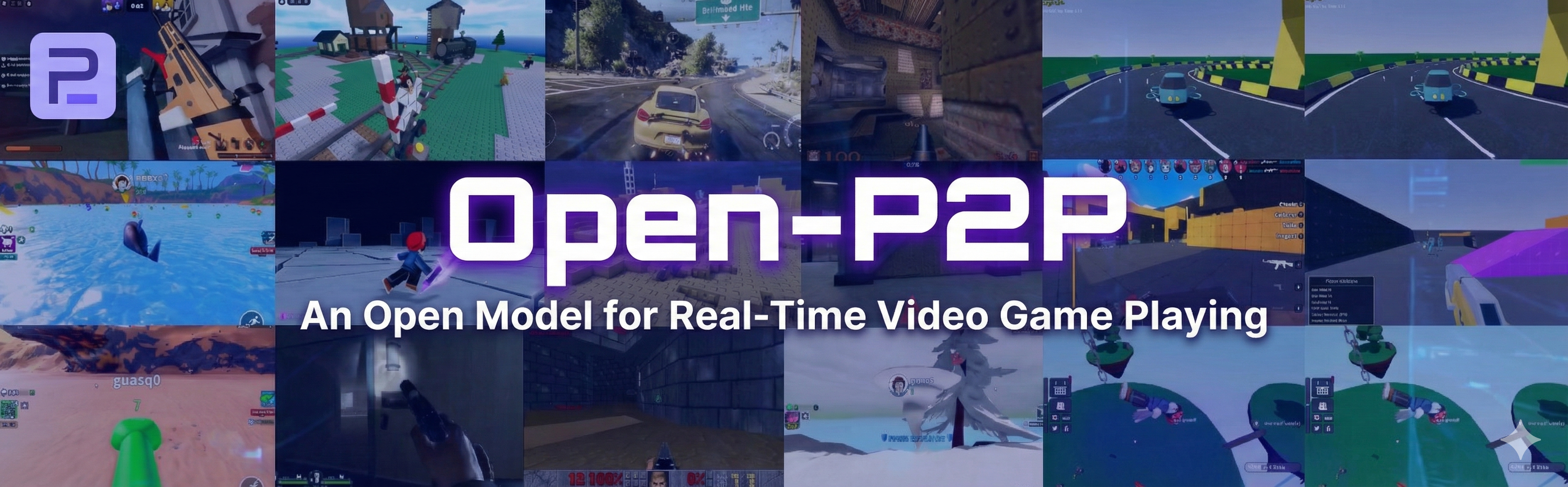
Open Pixel2Play (P2P)
Open Pixel2Play (P2P) is an open foundation model trained to play video games in real time. The model takes visual input (images) and text instructions and outputs keyboard and mouse actions, enabling direct interaction with real game environments. This is the official repo for paper Scaling Behavior Cloning Improves Causal Reasoning: An Open Model for Real-Time Video Game Playing.
P2P is trained on 8,000+ hours of human-annotated gameplay videos. We open-sourced our full training dataset on HuggingFace. In the meantime, a toy sample dataset is available for inspection too.
Our smallest model (150M parameters) can be trained on 8× H100 GPUs in ~70 hours. The largest model (1.2B parameters) is trained on 8× H100 GPUs for ~140 hours
This repository contains:
- The full training pipeline for P2P models
- Inference code for running trained models
- Integration with Recap for real-time interaction with commercial games on Windows
Installation
git clone https://github.com/open-p2p
cd open-p2p
Training and Offline Inference (Linux)
Prerequisites
# Install uv package manager
curl -LsSf https://astral.sh/uv/install.sh | sh

# System dependencies
sudo apt update
sudo apt install build-essential git nvtop htop

# FFmpeg 7
sudo add-apt-repository ppa:ubuntuhandbook1/ffmpeg7
sudo apt install ffmpeg
sudo apt install -y libavcodec-dev libavformat-dev libavutil-dev libswscale-dev libavdevice-dev libavfilter-dev

# Clang
sudo apt install -y clang libclang-dev

# Rust
curl --proto '=https' --tlsv1.2 -sSf https://sh.rustup.rs | sh

# Socat (for inference server communication)
sudo apt install socat

# increase the maximum number of open file descriptors
ulimit -n 65535
Download Model Checkpoints
uv run python scripts/download_checkpoints.py <150M|300M|600M|1200M>Download Sample Dataset
There are bunch of args you can set for downloading toy dataset/part of the dataset or the output folder.
To download the toy dataset you can run
uv run python scripts/download_data.py --toyTo download the full dataset you can run
uv run python scripts/download_data.pyTo download specific batches of the full dataset, use the --start and --end arguments to specify a range (inclusive):
uv run python scripts/download_data.py --start 1 --end 5You can also specify a custom output directory with --output:
uv run python scripts/download_data.py --output my_dataset[Optional] Resize Videos for Training
This step is not required if you plan to train the model at a resolution of 192×192 using the P2P dataset. However, it can be useful if you want to (1) resize videos to a different resolution, or (2) include additional videos in the dataset.
To resize videos, edit the configuration file at config/rescale/resize_192x192.yaml. Set the prefix field to point to your local dataset, and update frame_height and frame_width to the desired resolution. Then run:
uv run elefant/data/rescale/main.py --config=config/rescale/resize_192x192.yamlTraining
All dependencies are handled by uv.
The full training jobs were completed with 8× H100 GPUs, but the configs should also work with a single H100 or A100 GPU.
To reproduce the models from the paper, use one of the provided configs:
config/policy_model/150M.yamlconfig/policy_model/300M.yamlconfig/policy_model/600M.yamlconfig/policy_model/1200M.yaml
Note: You may need to adjust dataloader-related parameters according to your environment for memory-optimized runs.
uv run elefant/policy_model/train.py --config config/policy_model/150M.yaml
Validation
Training and validation are deliberately separated for stability. You can merge them by lowering validation_step_interval in the config, but this may cause instability or crashes.
To run validation on all checkpoints in a directory:
uv run elefant/policy_model/validation.py --checkpoint_dir=<PATH_TO_CHECKPOINT_DIR> --config_path=config/policy_model/<150M|300M|600M|1200M>.yaml[!IMPORTANT] Configuration Matching: The config must match the model size of your checkpoint. Do not use the config file bundled with the checkpoint download, as it is deprecated. Always use the updated versions found in config/policy_model/.
Validation results (perplexity) are reported to Weights & Biases.
Inference
Note: Inference can run on Linux without a display, but real-time game interaction requires a Windows machine with Recap.
First, log in to Hugging Face (required for Gemma tokenizer authentication):
uv run huggingface-cli loginTo validate inference with a downloaded checkpoint:
uv run elefant/policy_model/inference.py \
  --config checkpoints/150M/model_config.yaml \
  --checkpoint_path checkpoints/150M/checkpoint-step=00500000.ckpt
To verify the code works without downloading weights:
uv run elefant/policy_model/inference.py \
  --config config/policy_model/150M.yaml \
  --use_random_weights
Real-Time Game Inference (Windows)
Note: Game environments are not provided.
Tested Games
| Platform | Games | Settings |
|---|---|---|
| Roblox | Rivals, Hypershot, Be a Shark, etc. | Camera sensitivity: 0.52 |
| Steam | DOOM | Smoothing: 2×, Look sensitivity: 22%, Move sensitivity: 22% |
| Steam | Quake | Mouse sensitivity: 3.5, Smoothing: disabled |
Tested Hardware
- Windows 11 with 2 GPUs
- RTX 5090 (model inference)
- RTX 5080 (game rendering)
Technically any hardware that can achieve end-to-end inference latency of < 50 ms should be sufficient. A detailed latency breakdown is provided by Recap after each inference session:
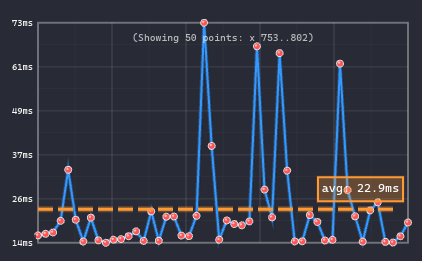
Note: @euminds experimented with Moonlight Streaming setup as an alternative to dual GPU setup, please checkout Alternative section.
Prerequisites
1. Install NVIDIA GPU Driver
Ensure your GPU drivers are up to date.
2. Install Recap
Follow the instructions at Recap.
3. Install WSL with Ubuntu 24.04
wsl --install -d Ubuntu-24.04Reboot if prompted.
4. Increase WSL Memory Limit (Recommended)
Create or edit the file C:\Users\<username>\.wslconfig:
[wsl2]
memory=52GB
Set this to a large fraction of your system RAM. Restart WSL (or reboot) for changes to take effect.
5. Install Core Dependencies (Inside WSL)
Clone the repo and follow the Prerequisites section above.
Getting Started
Step 1: Start the Inference Server (WSL)
Ensure model_config.yaml and the checkpoint are downloaded from Hugging Face.
Without Text Input (Default)
This runs the model without textual instructions. The majority of experiments in our paper use this setting.
uv run elefant/policy_model/inference.py \
  --config checkpoints/150M/model_config.yaml \
  --checkpoint_path checkpoints/150M/checkpoint-step=00500000.ckpt
With Text Input
This runs the model with text instructions enabled.
uv run elefant/policy_model/inference.py \
  --config checkpoints/150M/model_config.yaml \
  --checkpoint_path checkpoints/150M/checkpoint-step=00500000.ckpt \
  --input_text
Note: Due to compilation constraints, text input mode must be chosen at launch and cannot be toggled at runtime.
The inference server listens on /tmp/uds.recap, which is automatically detected by Recap.
Step 2: Start Recap (Windows Command Prompt)
- Navigate to the Recap repo and run:
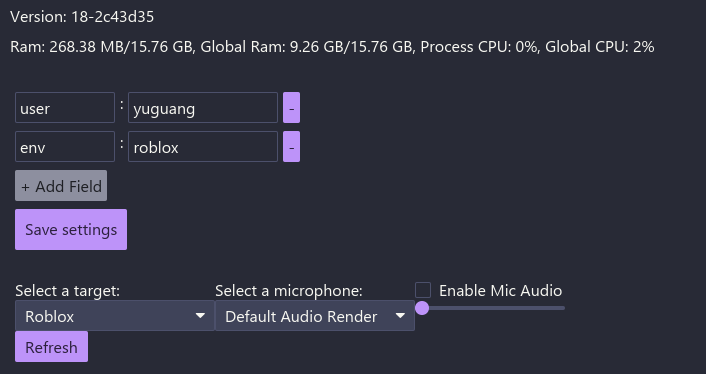
just trace - Fill in the metadata fields, feel free to remove the box (click on
-icon) if you don't need them - Select the window to capture (e.g., Roblox)
Step 3: Control the Session
| Action | Key |
|---|---|
| Start capturing with inference | Shift + ] (you'll hear a beep) |
| Interrupt model control | Move mouse or press any key |
| Resume model control | [ |
| Stop session | Shift + ] |
After stopping, a folder will open containing:
- An
.mp4gameplay recording - An
annotation.protofile with recorded keyboard and mouse actions
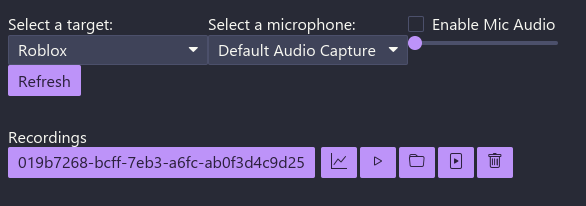
How it works: Recap captures screenshots from the selected window, sends frames to the inference server, receives predicted actions, and executes keyboard/mouse inputs in real time.
<a id="moonlight"></a>
Alternative Setup for Windows Inference: Streaming with Moonlight (Thanks to @euminds!)
If you don't have two GPUs available, you can use Moonlight streaming to separate game rendering and model inference across two machines:
Architecture:
- Game Machine: Runs the game and streams via Sunshine (Moonlight server)
- Inference Machine: Runs Recap (captures Moonlight window) + WSL (model inference)
Quick Setup:
- On Game Machine: Install Sunshine and configure it to stream your game
- On Inference Machine: Install Moonlight client and connect to the game machine
- Important: Run Moonlight in windowed mode (not fullscreen) so Recap can capture it
- In Recap: Select the Moonlight window as the capture target
Requirements:
- Both machines must be on the same local network (LAN)
- Use wired network connection for best results (lower latency)
Note: Streaming adds network latency (typically 10-50ms). Wired connection is recommended to meet the < 50ms end-to-end latency requirement.
Paper & Citation
If you use the data or model in your research, please cite our paper:
@misc{yue2026scaling,
      title={Scaling Behavior Cloning Improves Causal Reasoning: An Open Model for Real-Time Video Game Playing},
      author={Yuguang Yue and Irakli Salia and Samuel Hunt and Chris Green and Wenzhe Shi and Jonathan J. Hunt},
      year={2026},
      eprint={2601.04575},
      archivePrefix={arXiv},
      primaryClass={cs.LG}
}