

README

<hr>




📥 Model Download | 📄 Paper Link | 📄 Arxiv Paper Link |
<h2>
DeepSeek-OCR 2: Visual Causal Flow
</h2>
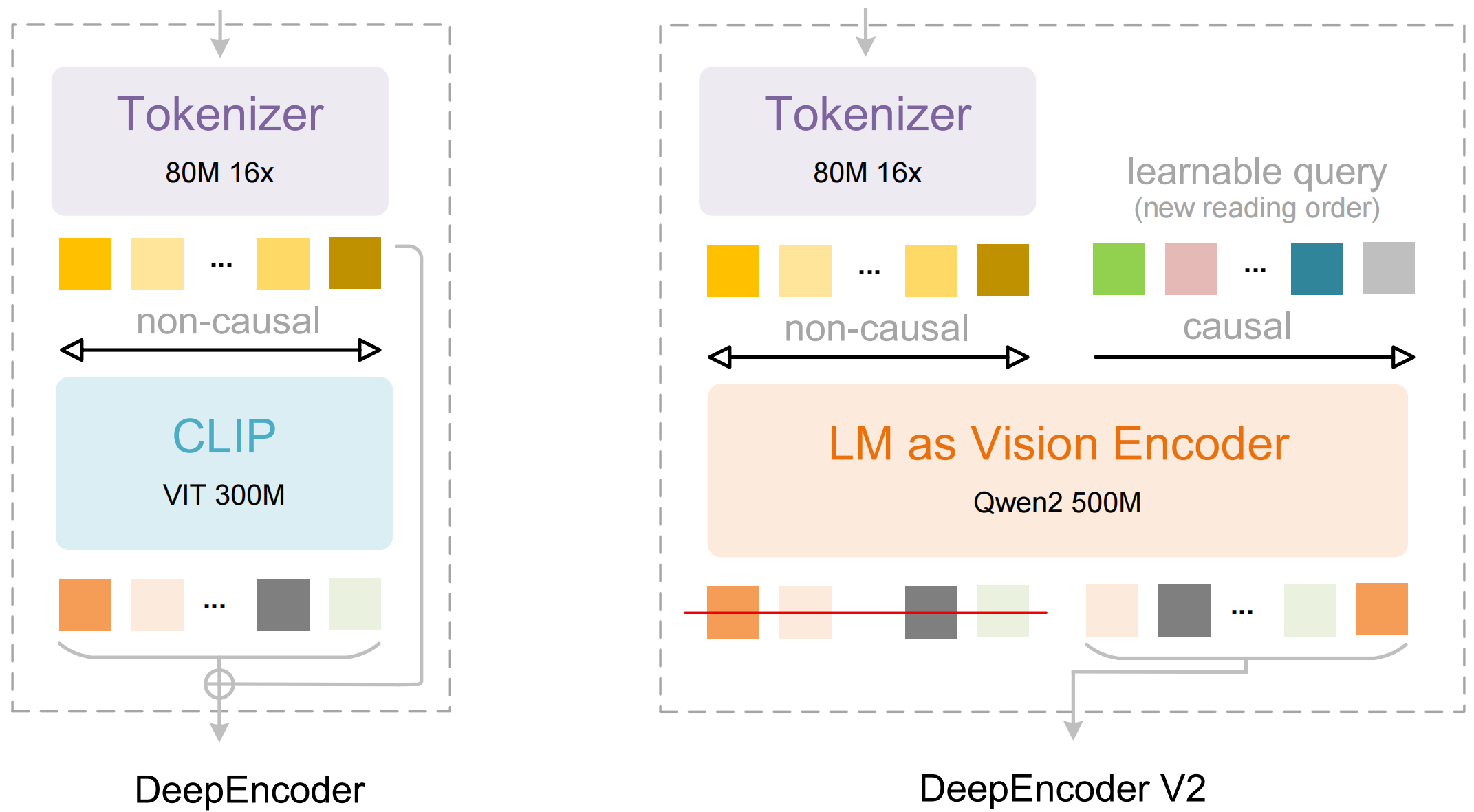
Explore more human-like visual encoding.
Contents
Install
Our environment is cuda11.8+torch2.6.0.
- Clone this repository and navigate to the DeepSeek-OCR-2 folder
git clone https://github.com/deepseek-ai/DeepSeek-OCR-2.git- Conda
conda create -n deepseek-ocr2 python=3.12.9 -y conda activate deepseek-ocr2- Packages
- download the vllm-0.8.5 whl
pip install torch==2.6.0 torchvision==0.21.0 torchaudio==2.6.0 --index-url https://download.pytorch.org/whl/cu118
pip install vllm-0.8.5+cu118-cp38-abi3-manylinux1_x86_64.whl
pip install -r requirements.txt
pip install flash-attn==2.7.3 --no-build-isolation
Note: if you want vLLM and transformers codes to run in the same environment, you don't need to worry about this installation error like: vllm 0.8.5+cu118 requires transformers>=4.51.1
vLLM-Inference
- VLLM:
Note: change the INPUT_PATH/OUTPUT_PATH and other settings in the DeepSeek-OCR2-master/DeepSeek-OCR2-vllm/config.py
cd DeepSeek-OCR2-master/DeepSeek-OCR2-vllm
- image: streaming output
python run_dpsk_ocr2_image.py - pdf: concurrency (on-par speed with DeepSeek-OCR)
python run_dpsk_ocr2_pdf.py - batch eval for benchmarks (i.e., OmniDocBench v1.5)
python run_dpsk_ocr2_eval_batch.py
Transformers-Inference
- Transformers
from transformers import AutoModel, AutoTokenizer
import torch
import os
os.environ["CUDA_VISIBLE_DEVICES"] = '0'
model_name = 'deepseek-ai/DeepSeek-OCR-2'
tokenizer = AutoTokenizer.from_pretrained(model_name, trust_remote_code=True)
model = AutoModel.from_pretrained(model_name, _attn_implementation='flash_attention_2', trust_remote_code=True, use_safetensors=True)
model = model.eval().cuda().to(torch.bfloat16)
prompt = "<image>\nFree OCR. "
prompt = "<image>\n<|grounding|>Convert the document to markdown. "
image_file = 'your_image.jpg'
output_path = 'your/output/dir'
res = model.infer(tokenizer, prompt=prompt, image_file=image_file, output_path = output_path, base_size = 1024, image_size = 768, crop_mode=True, save_results = True)
or you can
```Shell
cd DeepSeek-OCR2-master/DeepSeek-OCR2-hf
python run_dpsk_ocr2.py
Support-Modes
- Dynamic resolution
- Default: (0-6)×768×768 + 1×1024×1024 — (0-6)×144 + 256 visual tokens ✅
Main Prompts
# document: <image>\n<|grounding|>Convert the document to markdown.
# without layouts: <image>\nFree OCR.
Acknowledgement
We would like to thank DeepSeek-OCR, Vary, GOT-OCR2.0, MinerU, PaddleOCR for their valuable models.
We also appreciate the benchmark OmniDocBench.
Citation
@article{wei2025deepseek,
  title={DeepSeek-OCR: Contexts Optical Compression},
  author={Wei, Haoran and Sun, Yaofeng and Li, Yukun},
  journal={arXiv preprint arXiv:2510.18234},
  year={2025}
}
@article{wei2026deepseek,
  title={DeepSeek-OCR 2: Visual Causal Flow},
  author={Wei, Haoran and Sun, Yaofeng and Li, Yukun},
  journal={arXiv preprint arXiv:2601.20552},
  year={2026}
}