

Repository
agent2world
🪐 Agent2World: Learning to Generate Symbolic World Models via Adaptive Multi-Agent Feedback
README
<h1 align="center">
🌍 <b>Agent2World: Learning to Generate Symbolic World Models via Adaptive Multi-Agent Feedback</b> 🌍
</h1>
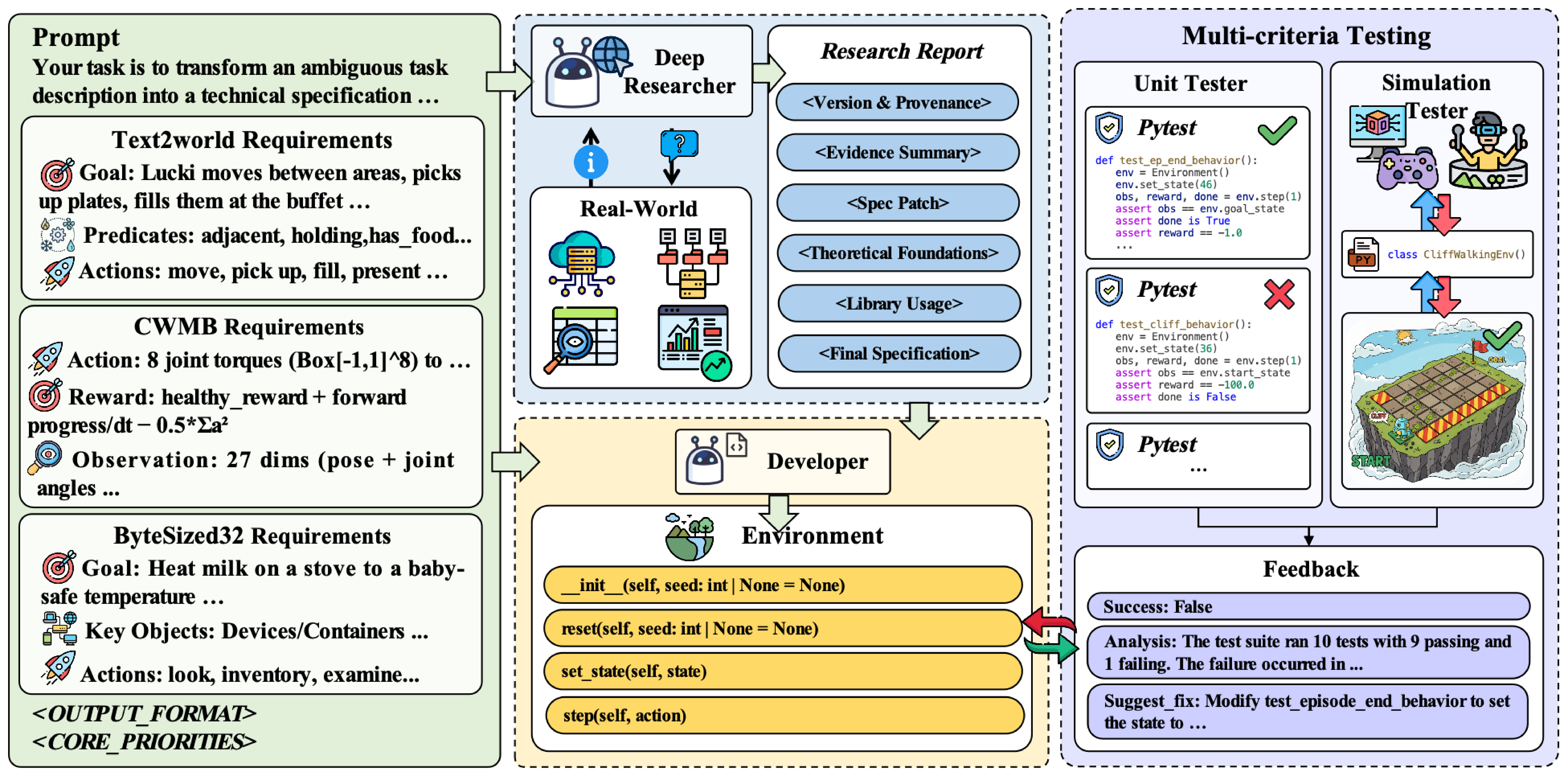
Agent2World is a tool-augmented multi-agent framework for generating executable symbolic world models (e.g., PDDL domains and runnable simulators) from natural language specs. It grounds generation in execution-based feedback to catch behavior-level errors missed by static validation.
Key points: Inference-time achieves consistent SOTA on PDDL & executable-code benchmarks • Training-time repair trajectories enable SFT, yielding +30.95% average relative gain after fine-tuning
🧩 Overall Pipeline
📋 Table of Contents
- 📋 Table of Contents
- Project Structure
- 🛠️ Installation
Project Structure
🤖 src/
├─ 🌐 agentic_world_model/ – Core Agentic World Model logic
├─ 🧰 toolkits/            – Toolkits for environment execution, evaluation, web search, and adapters
└─ 🧠 models/              – Model backends (OpenAI / OpenRouter / DeepSeek / vLLM, etc.)

📈 results/
└─ Auto-generated CWMs, run logs, and analysis artifacts
🛠️ Installation
Note: Regardless of the installation method, clone the benchmark repos first (used in generation/evaluation workflows).
git clone https://github.com/cognitiveailab/BYTESIZED32.git ByteSized32
git clone https://github.com/nicoladainese96/code-world-models.git code-world-models
git clone https://github.com/Aaron617/text2world.git text2world
Option 1: Use uv (recommended)
# 1) Create a virtual environment
uv venv .venv --python 3.10

# 2) Activate
# macOS / Linux
source .venv/bin/activate
# Windows (PowerShell)
# .venv\Scripts\Activate.ps1

# 3) Install project deps
uv pip install -r requirements.txt

# 4) Install benchmark repos (editable)
uv pip install -e ByteSized32
uv pip install -e code-world-models/RTFM
Tip: You can also run without activating
.venvvia uv:uv run pytest -q --tb=short --capture=no
Option 2: Use venv + pip
# 1) Create a virtual environment
python3.10 -m venv .venv

# 2) Activate
# macOS / Linux
source .venv/bin/activate
# Windows (PowerShell)
# .venv\Scripts\Activate.ps1

# 3) Install project deps
pip install -r requirements.txt

# 4) Install benchmark repos (editable)
pip install -e ByteSized32
pip install -e code-world-models/RTFM
Option 3: Use conda
# 1) Create environment
conda create -n agent2world python=3.10 -y
conda activate agent2world

# 2) Install project deps
pip install -r requirements.txt

# 3) Install benchmark repos (editable)
pip install -e ByteSized32
pip install -e code-world-models/RTFM
🔐 Environment Variables
This project reads model backends and API keys from environment variables. Using a .env file is recommended for reproducibility and easy management.
Option 1: Use a .env file (recommended)
-
Copy the template to create
.envin the project root:cp .env_example .env -
Edit
.envand fill in the backends and keys you use (minimum run typically only needsOPENAI_API_KEY):# --- Minimal (required for most examples) --- OPENAI_API_KEY=... # --- Optional: custom OpenAI-compatible base url --- OPENAI_API_BASE_URL=https://api.openai.com/v1 # --- Optional: other backends --- OPENROUTER_API_KEY=... DEEPSEEK_API_KEY=... VLLM_BASE_URL=http://localhost:8000/v1 # --- Optional: runtime --- MODEL_TIMEOUT=180
Tip: For minimal examples or a single backend, only keep the relevant keys; others can be left empty or removed.
Option 2: Set environment variables in terminal
-
macOS/Linux (Bash/Zsh):
export OPENAI_API_KEY="your-openai-api-key" export OPENAI_API_BASE_URL="https://api.openai.com/v1" # optional -
Windows (CMD):
set OPENAI_API_KEY=your-openai-api-key -
Windows (PowerShell):
$env:OPENAI_API_KEY="your-openai-api-key"
$env:OPENAI_API_BASE_URL="https://api.openai.com/v1"    # optional
🚀 Quick Start
Minimal reproduction flows for three benchmarks (CWMB / ByteSized32 / Text2World): generate → evaluate → summarize/visualize.
1) CWMB (Code World Models Benchmark)
1.1 Generate CWM environments
# Generate CWM for idx = 0,1,2
python scripts/run_agentic_world_model_cwm.py \
  --idx 0,1,2 \
  --model "deep research" \
  --save_dir "results/cwm/agentic_world_model"
Default: Omitting
--idx(and related--envargs in the script) will process all 18 tasks.
1.2 Evaluate planning performance
python code-world-models/src/experiments/eval_planning.py \
  --save_dir results/cwm \
  --experiment_name "agentic_world_model" \
  --n_episodes 10
Parameters:
--save_dir: evaluation output directory (logs/results)--experiment_name: method/experiment name (to distinguish strategies)--n_episodes: number of episodes per environment (higher = more stable, but slower)
1.3 Analyze results
python code-world-models/analyze_results.py \
  code-world-models/results/cwm/results.json
2) ByteSized32 (Reasoning-heavy Text Games)
2.1 Code generation
python scripts/run_code_generate_agentic_world_model.py ByteSized32/data/experiment_action.csv \
  --output-folder results/bytes32/agentic_world_model \
  --model gpt-4.1

python scripts/run_code_generate_agentic_world_model.py ByteSized32/data/experiment_distractor.csv \
  --output-folder results/bytes32/agentic_world_model \
  --model gpt-4.1

python scripts/run_code_generate_agentic_world_model.py ByteSized32/data/experiment_object.csv \
  --output-folder results/bytes32/agentic_world_model \
  --model gpt-4.1
2.2 Evaluation
python ByteSized32/scripts/run_code_evaluation.py \
  --game-folder results/bytes32/agentic_world_model \
  --results-file results/bytes32/eval_agentic_results.json
2.3 Tables & Figures (visualization)
python scripts/make_table2.py  --results results/bytes32/eval_agentic_results.json
python scripts/make_table3.py  --results results/bytes32/eval_agentic_results.json
python scripts/make_figure4.py --results results/bytes32/eval_agentic_results.json
3) Text2World (PDDL World Models)
3.1 Generation (multiprocess / parallel)
python scripts/run_text2world_multi_agent_parallel.py \
  --benchmark_type text2world \
  --dataset text2world/pddl_benchmark/our_benchmark.json \
  --output results/text2world \
  --num_workers 1
Notes:
- Configure Text2World API/model in
text2world/utils/.envpertext2world/README.md - More model options and parameters are documented in
text2world/README.md
3.2 Evaluation
- Please refer to
text2world/README.mdfor evaluation instructions (aligned with official workflow)
🧩 Model & Backends Support (Unified)
- Supports OpenAI / OpenRouter / DeepSeek / vLLM backends, configured via
.envin the project root - Dynamically constructs and switches backends with
ModelFactory - For complex planning/long-chain tasks, models with tool-use and long context are recommended
Contributing
Contributions are welcome via Pull Requests or Issues: code improvements, toolkit extensions, documentation updates.
Citation
If this project helps your research or engineering, please cite:
License
See LICENSE for details.