

Repository
9remote
📱 Terminal in Your Pocket — Control Claude Code, Codex, Gemini CLI & your Mac/Linux/Windows from any phone or browser. Vibe coding from anywhere. Alternative to MobileCLI, Claude Remote, vibe-remote, MuxAgent.
- Feature
- What It Does
- 🖥️ Remote Terminal
- Remote Terminal
- 🖱️ Remote Desktop
- Remote Desktop
- 📁 File Explorer
- File Explorer
Specs
- FeatureWhat It Does
- 🖥️ Remote TerminalRemote Terminal
- 🖱️ Remote DesktopRemote Desktop
- 📁 File ExplorerFile Explorer
- 💻 Code EditorCode Editor
- 🔗 Git IntegrationGit Integration
- 📱 Mobile OptimizedMobile Optimized
- 🔑 QR LoginQR Login
- 🔒 Auto TunnelAuto Tunnel
- 🔄 Persistent SessionsPersistent Sessions
- 🌍 Multi-Device SyncMulti-Device Sync
- 🔔 Push NotificationsPush Notifications
- 🤖 AI IntegrationAI Integration
- 🌐 Local Sites ProxyLocal Sites Proxy
- ⚡ Low LatencyLow Latency
- 🔐 Pair DevicePair Device
- 🆓 No Account RequiredNo Account Required
- CommandDescription
- 9remoteTUI mode — interactive menu with QR code
- 9remote uiWeb UI mode — opens browser dashboard at localhost:2208
README
 # 9Remote — Terminal in Your Pocket
**Want to code from bed? Fix bugs while having coffee? Deploy while on vacation?**
**Your Mac/Linux/Windows terminal, remote desktop, and file explorer — accessible from any phone or browser, anywhere, instantly.**
[](https://www.npmjs.com/package/9remote)
[](https://www.npmjs.com/package/9remote)
[](#-license)
[🚀 Quick Start](#-quick-start) • [📊 Comparison](#-9remote-vs-other-remote-solutions) • [💡 Features](#-key-features) • [🌐 Website](https://9remote.cc) • [📖 Docs](https://docs.9remote.cc) • [💬 Facebook](https://www.facebook.com/groups/9teamvn)
[🇺🇸 English](./README.md) • [🇻🇳 Tiếng Việt](./i18n/README.vi.md)
# 9Remote — Terminal in Your Pocket
**Want to code from bed? Fix bugs while having coffee? Deploy while on vacation?**
**Your Mac/Linux/Windows terminal, remote desktop, and file explorer — accessible from any phone or browser, anywhere, instantly.**
[](https://www.npmjs.com/package/9remote)
[](https://www.npmjs.com/package/9remote)
[](#-license)
[🚀 Quick Start](#-quick-start) • [📊 Comparison](#-9remote-vs-other-remote-solutions) • [💡 Features](#-key-features) • [🌐 Website](https://9remote.cc) • [📖 Docs](https://docs.9remote.cc) • [💬 Facebook](https://www.facebook.com/groups/9teamvn)
[🇺🇸 English](./README.md) • [🇻🇳 Tiếng Việt](./i18n/README.vi.md)
🚧 Development Status
9Remote is currently in active development.
The source code is not open-source yet. If this project gets enough ⭐ support from the community, we will fully open-source it so everyone can contribute and self-host.
⭐ Star this repo to help us reach the open-source milestone!
🤔 Why 9Remote?
Remote access today is painful:
- ❌ SSH is a hassle — firewall rules, port forwarding, SSH keys, IP whitelisting
- ❌ VPN is overkill — complex setup just to check a terminal
- ❌ ngrok / tunnels expire — lose connection, restart everything
- ❌ TeamViewer is slow — high latency, desktop-only, paid for commercial use
- ❌ Chrome Remote Desktop — no terminal, no file explorer, no mobile
- ❌ Termius — SSH-only, no remote desktop, no browser access
9Remote solves all of it:
- ✅ One command — install, scan QR, done in 30 seconds
- ✅ Auto tunnel — Cloudflare tunnel starts automatically, no port forwarding
- ✅ All-in-one — terminal + remote desktop + file explorer + code editor in one app
- ✅ Works on phone — full workspace from your browser, under 50ms latency
- ✅ Persistent sessions — PTY daemon survives server restarts
- ✅ Pair Device security — only approved devices can connect, zero signup friction
⚡ Quick Start
Install globally:
npm install -g 9remote
9remote
🎉 Scan the QR code on your phone → pair your device → you're in.
That's it! No config, no firewall rules, no signup.
Ready in 30 seconds. Works on macOS, Linux, and Windows.
📊 9Remote vs Other Remote Solutions
| Feature | 9Remote | Claude Remote | TeamViewer | Chrome Remote | Termius |
|---|---|---|---|---|---|
| Zero Config | ✅ | ✅ | ✅ | ✅ | ❌ |
| Terminal Access | ✅ | ✅ | ❌ | ❌ | ✅ |
| Remote Desktop | ✅ | ❌ | ✅ | ✅ | ❌ |
| File Explorer | ✅ | ❌ | ✅ | ❌ | ✅ |
| Code Editor | ✅ | ❌ | ❌ | ❌ | ❌ |
| Git Integration | ✅ | ❌ | ❌ | ❌ | ❌ |
| Mobile Optimized | ✅ | ✅ | ❌ | ❌ | ✅ |
| Browser-Based | ✅ | ✅ | ❌ | ✅ | ❌ |
| QR Login | ✅ | ✅ | ❌ | ❌ | ❌ |
| Auto Tunnel | ✅ | ✅ | ✅ | ✅ | ❌ |
| Persistent Sessions | ✅ | ✅ | ❌ | ❌ | ✅ |
| Multi-Device Sync | ✅ | ✅ | ✅ | ❌ | ✅ |
| Push Notifications | ✅ | ✅ | ❌ | ❌ | ❌ |
| AI Integration | ✅ | ✅ | ❌ | ❌ | ❌ |
| No Port Forwarding | ✅ | ✅ | ✅ | ✅ | ❌ |
| No Account Required | ✅ | ❌ | ❌ | ❌ | ❌ |
| TOTAL | 16 / 16 | 11 / 16 | 7 / 16 | 5 / 16 | 7 / 16 |
🏆 9Remote: All-in-one solution with 16/16 features.
✨ Key Features
| Feature | What It Does | Why It Matters |
|---|---|---|
| 🖥️ Remote Terminal | Full PTY shell via WebSocket | Code like you're sitting at your Mac |
| 🖱️ Remote Desktop | Live screen streaming via WebRTC | View & control your machine from phone |
| 📁 File Explorer | Browse, upload, download files | Manage files without SSH/SFTP |
| 💻 Code Editor | Built-in editor with syntax highlighting | Quick edits without opening IDE |
| 🔗 Git Integration | Run git commands with visual status | Commit/push from your phone |
| 📱 Mobile Optimized | Touch-friendly UI, gesture controls | Full workspace on a 6" screen |
| 🔑 QR Login | One-time 30-min key, scan to connect | Zero-friction mobile access |
| 🔒 Auto Tunnel | Cloudflare tunnel, no port forwarding | Works behind any NAT/firewall |
| 🔄 Persistent Sessions | PTY daemon survives restarts | Long-running commands stay alive |
| 🌍 Multi-Device Sync | Same session across phone/tablet/laptop | Switch devices without losing context |
| 🔔 Push Notifications | Build finished? Get notified | Never miss a critical event |
| 🤖 AI Integration | Works with Claude Code, Codex, OpenClaw | Code with AI from anywhere |
| 🌐 Local Sites Proxy | Expose localhost:3000 to phone |
Test dev servers on mobile instantly |
| ⚡ Low Latency | <50ms typical, WebRTC for desktop | Feels like local |
| 🔐 Pair Device | Approve each device before it connects | No unauthorized access, full control |
| 🆓 No Account Required | Machine ID + QR key, zero signup | Privacy-first design |
📱 Available Platforms
🎯 Use Cases
Case 1: "Code from bed"
Problem: It's 11 PM, you remember a bug but laptop is in another room.
Solution:
1. Open 9remote app on phone
2. Scan QR (or use saved session)
3. Open terminal → fix bug → git push
4. Sleep well 😴
Case 2: "Fix bugs at a cafe"
Problem: Production is down. You only have your phone and a bad café Wi-Fi.
Solution:
1. Connect to your home/office Mac via 9remote
2. Tail logs in terminal
3. Edit config in built-in editor
4. Deploy → crisis averted
Case 3: "Deploy while on vacation"
Problem: Client needs a hotfix. You're on the beach.
Solution:
1. Phone → 9remote → your dev machine
2. git pull → build → deploy
3. Back to the beach in 5 minutes 🏖️
Case 4: "On-call engineer"
Problem: PagerDuty alert at 3 AM. Don't want to power on laptop.
Solution:
1. Push notification → tap → 9remote opens
2. Terminal + remote desktop ready
3. Diagnose + restart service from bed
4. Resolve incident without getting up
📖 Setup Guide
<details>
<summary><b>🚀 Installation Options</b></summary>
Option 1 — NPM (recommended)
npm install -g 9remote
9remote
Option 2 — Desktop App
Download from 9remote.cc/download — native app with system tray integration, auto-start on boot, and background mode.
Option 3 — Mobile App
- iOS: App Store → "9Remote"
- Android: Google Play → "9Remote"
</details>
<details>
<summary><b>🔑 First Run & QR Login</b></summary>
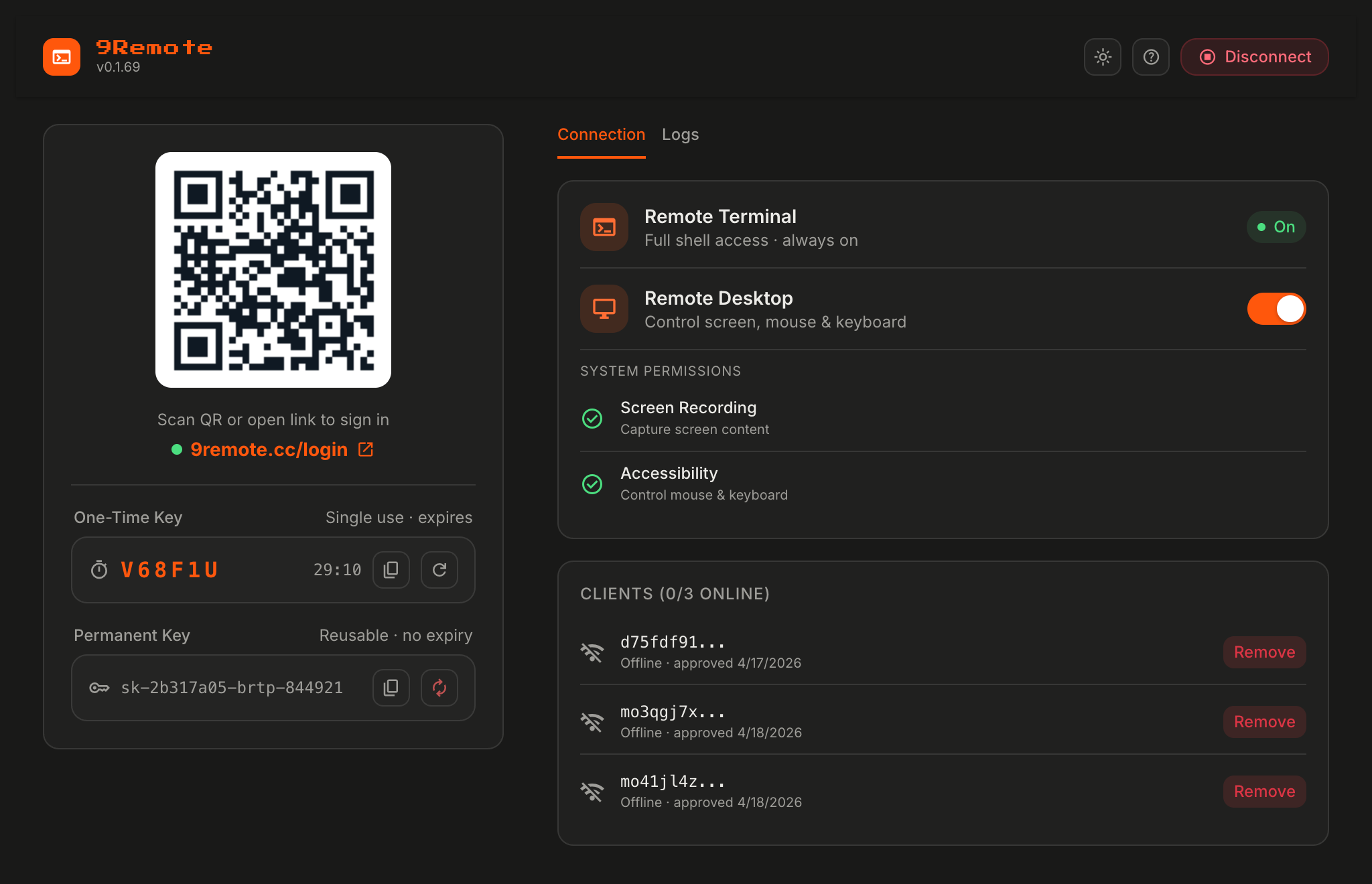
On first run, 9Remote generates two keys:
- Permanent Key — stored locally, tied to your machine ID, used for trusted devices
- One-Time Key — 30-minute temporary key, used for the QR code shown in terminal
Connect from phone:
- Run
9remoteon your Mac/Linux/Windows machine - A QR code appears in the terminal
- Open 9Remote app (or 9remote.cc) on your phone
- Scan the QR → connected instantly
Keys are never stored on our servers after the session ends.
</details>
<details>
<summary><b>🖱️ Remote Desktop Setup (macOS)</b></summary>
Remote Desktop requires two system permissions on macOS:
- Screen Recording —
System Settings → Privacy & Security → Screen Recording → enable Terminal (or 9Remote Desktop app) - Accessibility —
System Settings → Privacy & Security → Accessibility → enable Terminal (or 9Remote Desktop app)
Then enable in 9Remote:
TUI menu → Remote Desktop → Toggle ONPerformance:
- Adaptive framerate: 60ms active / 400ms idle
- Tile-based diff rendering (only changed regions sent)
- WebRTC DataChannel for minimal latency
</details>
<details>
<summary><b>🌐 Local Sites Proxy</b></summary>
Expose your local dev servers (e.g. localhost:3000, localhost:5173) to your phone automatically.
9Remote auto-detects running ports and proxies them:
  http://localhost:3000  →  https://<tunnel>/proxy/3000/
  http://localhost:5173  →  https://<tunnel>/proxy/5173/
Perfect for:
- Testing responsive design on real devices
- Sharing WIP builds with clients
- Mobile debugging without USB cable
</details>
<details>
<summary><b>⌨️ CLI Commands</b></summary>
| Command | Description |
|---|---|
9remote |
TUI mode — interactive menu with QR code |
9remote ui |
Web UI mode — opens browser dashboard at localhost:2208 |
</details>
❓ Frequently Asked Questions
<details>
<summary><b>🔒 Is 9Remote secure?</b></summary>
Yes. 9Remote uses a Pair Device approval system — every new device must be explicitly approved by you before it can access the host. Plus:
- No open ports on your machine (Cloudflare tunnel, outbound-only)
- Keys are never stored on our servers after the session ends
- No terminal output, files, or screen data is collected
- One-time QR keys expire in 30 minutes
- Pending/rejected devices can be managed anytime from the TUI menu
</details>
<details>
<summary><b>💰 Is it free?</b></summary>
Yes, during the development phase. 9Remote is free to use. No signup, no credit card.
Once we open-source, it will remain free forever (MIT license planned).
</details>
<details>
<summary><b>📦 When will it be open-source?</b></summary>
When the project reaches enough ⭐ GitHub stars to prove community interest.
We want to make sure there's a real community before committing to open-source maintenance. Star this repo to help us hit the milestone faster!
</details>
<details>
<summary><b>🌐 Do I need to open any ports?</b></summary>
No. 9Remote uses Cloudflare Quick Tunnel — outbound connection only. Works behind:
- Home NAT routers
- Corporate firewalls
- Mobile hotspots
- VPNs
</details>
<details>
<summary><b>📴 Does it work offline / on LAN only?</b></summary>
Yes. 9Remote includes a LocalFirstAdapter that races LAN vs tunnel connection and uses whichever is faster. If phone and host are on the same Wi-Fi, traffic stays local.
</details>
<details>
<summary><b>🤖 Can I use AI coding tools through 9Remote?</b></summary>
Yes! 9Remote works seamlessly with:
- Claude Code
- OpenAI Codex CLI
- Cursor
- OpenClaw
- Any CLI tool that runs in a terminal
Run them on your host machine, access them from your phone. Combined with 9Router, you get free AI coding from anywhere.
</details>
<details>
<summary><b>🖥️ What platforms are supported?</b></summary>
Host (where 9Remote agent runs):
- ✅ macOS (Intel + Apple Silicon)
- ✅ Linux (x64, arm64)
- ✅ Windows (x64)
Client (where you connect from):
- ✅ Any modern browser (Chrome, Safari, Firefox, Edge)
- ✅ iOS 14+
- ✅ Android 8+
- ✅ Tauri desktop app (macOS, Windows, Linux)
</details>
🛠️ Tech Stack
- Runtime: Node.js 20+
- Tunnel: Cloudflare Quick Tunnel — zero-config secure tunnel
- Terminal: node-pty — persistent PTY sessions
- Remote Desktop: node-datachannel (WebRTC) + robotjs (input control)
- Real-time: Socket.IO — terminal streaming + WebRTC signaling
- Agent UI: Preact — lightweight embedded dashboard
- Web Client: Next.js 16 + React 19 + Tailwind CSS 4
- Desktop App: Tauri 2 — native shell with auto-updater
- Mobile App: Expo — React Native with WebView shell
- Edge API: Cloudflare Workers — session management + TURN credentials
🐛 Troubleshooting
"Port 2208 already in use"
- Another 9Remote instance is running →
pkill -f 9remotethen retry - Or run on a different port:
PORT=3308 9remote
"Cloudflare tunnel failed to start"
- Check internet connection
cloudflaredauto-installed on first run — if it fails, install manually: cloudflared docs
"Screen Recording / Accessibility permission denied" (macOS)
- Grant permissions in
System Settings → Privacy & Security - Restart 9Remote after granting
"QR code expired"
- One-time keys expire in 30 minutes → regenerate from TUI menu:
Key → Regenerate
"Can't connect from phone"
- Check both devices have internet
- Try forcing tunnel mode (skip LAN): Settings → Connection → Tunnel only
"Remote desktop laggy"
- Reduce resolution in settings
- Switch to terminal-only if desktop not needed
- Use LAN mode if on same Wi-Fi for lowest latency
⭐ Show Your Support
9Remote is in active development and we need your support to reach the open-source milestone!
- ⭐ Star this repo — every star brings us closer to going open-source
- 🐦 Share on Twitter / X — tell other devs about 9Remote
- 💬 Join our Facebook community — facebook.com/groups/9teamvn
- 🐛 Report issues — found a bug? Let us know!
- 💡 Request features — what would make your remote workflow better?
📧 Support & Links
- Website: 9remote.cc
- Documentation: docs.9remote.cc
- NPM Package: npmjs.com/package/9remote
- GitHub: github.com/decolua/9remote
- Issues: github.com/decolua/9remote/issues
- Facebook Community: facebook.com/groups/9teamvn
📄 License
Proprietary — All Rights Reserved.
9Remote is currently in active development and is not open-source yet. The published npm package is free to use, but the source code is not publicly available.
🎯 Open-source milestone: once this repo reaches enough ⭐ support, the full source code will be released under the MIT license.