

README
Evaluation Code of Img2Prompt
From Images to Textual Prompts: Zero-shot VQA with Frozen Large Language Models
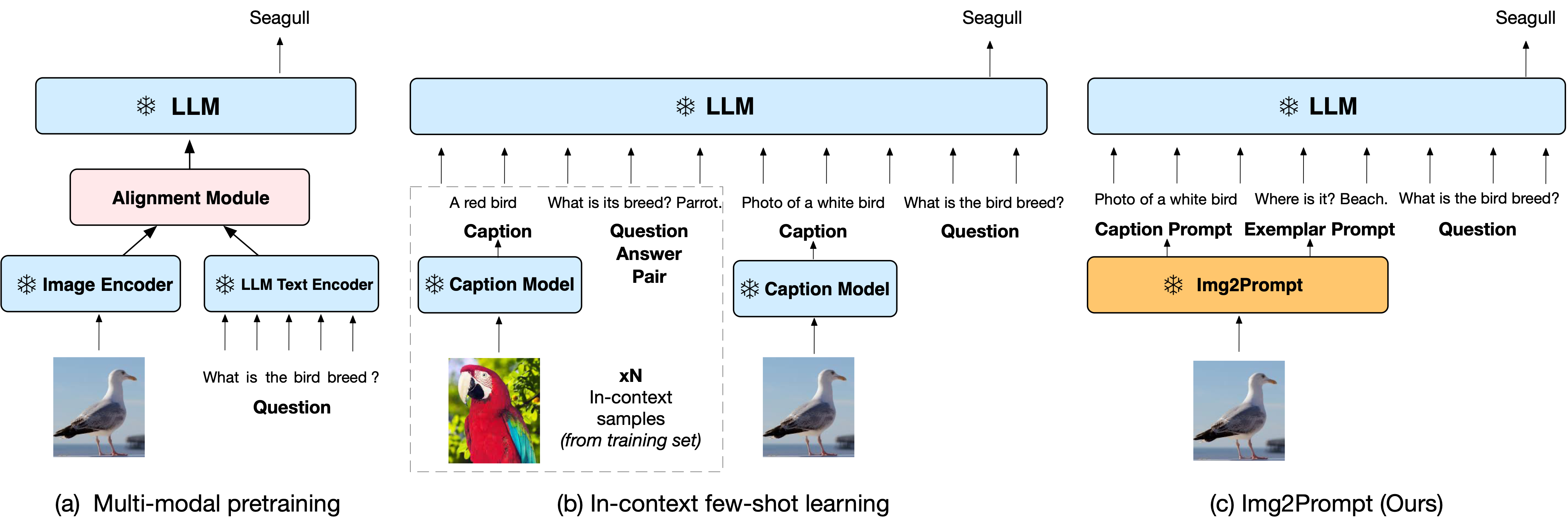

This is the eveluation code for <a href="https://arxiv.org/abs/2212.10846">Img2Prompt-VQA paper</a>. We public it evaluation codes.
Demo
We include an interactive demo Colab notebook
to show Img2Prompt-VQA inference workflow:
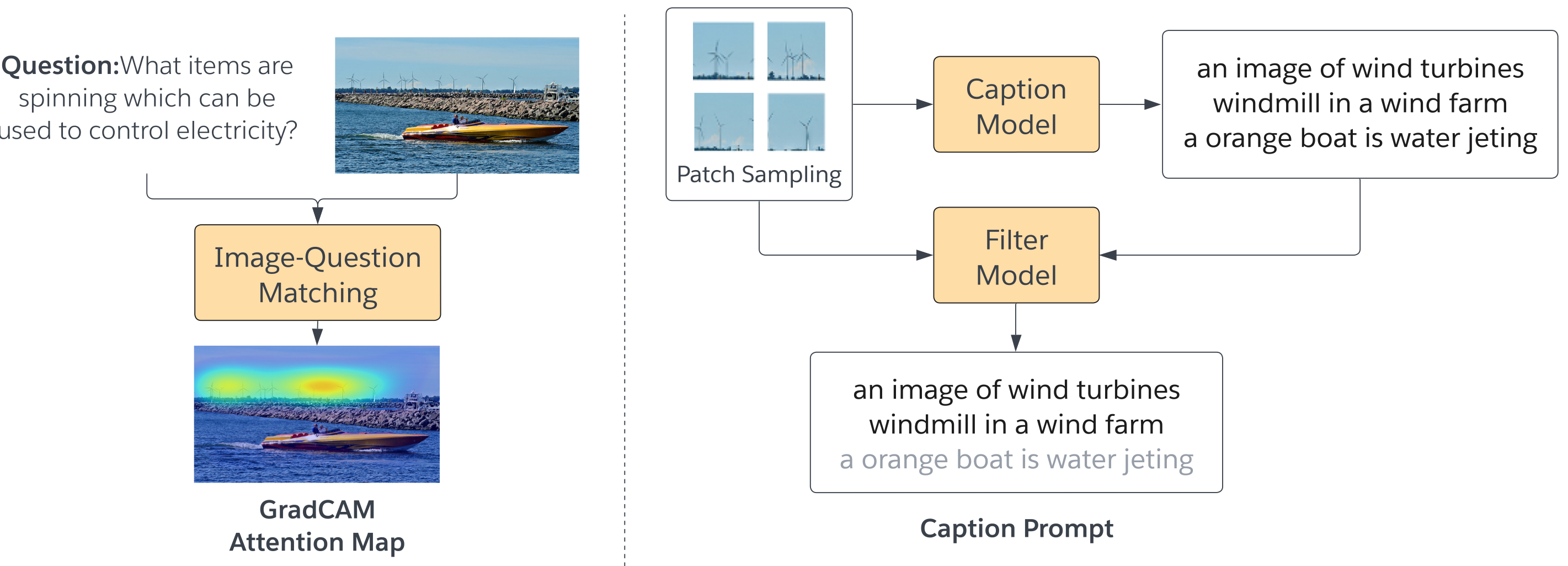
- Image-question matching: compute the relevancy score of the image patches wrt the question, and remove the generated noisy captions with low relevancy score.
- Image captioning: generate question-guided captions based on the relevancy score.
- Question Generation: generate questions based on the synthetic answers and captions.
- Large Language Model: Pre-trained lagre language models, e.g. OPT/GPT-3
Zero-Shot Evaluation
<table>
<thead>
<tr>
<th rowspan="2">Model</th>
<th rowspan="2">End-to-End Training?</th>
<th colspan="1">VQAv2 val</th>
<th colspan="1">VQAv2 test</th>
<th colspan="1">OK-VQA test</th>
<th colspan="1">AOK-VQA val</th>
<th colspan="1">AOK-VQA test</th>
</tr>
</thead>
<tbody>
<tr>
<td> Frozen-7B</td>
<td> ✓ </td>
<td>29.5</td>
<td>-</td>
<td>5.9</td>
<td>-</td>
<td>-</td>
</tr>
<tr>
<td> Flamingo-9B </td>
<td> ✓</td>
<td>-</td>
<td>51.8</td>
<td>44.7</td>
<td>-</td>
<td>-</td>
</tr>
<tr>
<td> Flamingo-80B</td>
<td>✓</td>
<td>-</td>
<td>56.3</td>
<td>50.6</td>
<td>-</td>
<td>-</td>
</tr>
<tr>
<td> Img2Prompt-VQA-OPT<sub>13B</sub> </td>
<td> x</td>
<td>57.1</td>
<td>57.3 </td>
<td>39.9</td>
<td>33.3</td>
<td>33.0</td>
</tr>
<tr>
<td> Img2Prompt-VQA-OPT<sub>30B</td>
<td> x</td>
<td>59.5</td>
<td>60.4 </td>
<td>41.8 </td>
<td>36.9</td>
<td>36.0 </td>
</tr>
<tr>
<td> Img2Prompt-VQA-OPT<sub>66B</td>
<td> x</td>
<td>59.9</td>
<td>60.3 </td>
<td>43.2</td>
<td>38.7</td>
<td>38.2</td>
</tr>
<tr>
<td> Img2Prompt-VQA-OPT<sub>175B</td>
<td> x</td>
<td>60.6</td>
<td>61.9</td>
<td>45.6</td>
<td>42.9</td>
<td>40.7</td>
</tr>
</tbody>
</table>
To reproduce these evaluation results of Img2LLM-VQA with different LLMs, you can follow the next steps:
Firstly, you should download the generated caption question files from this link, and put them in the caption_question_files folder. For example, you can download 'okvqa_question.json', 'okvqa_caption.json' and 'okvqa_ans_to_cap_dict.json' for reproducing results of okvqa results.
Then download the 2014_coco val anotation file in link, and put it in annotation_new folder
Then you can run the shell in folder VL_captioning to reproduce results, e.g.
$ ./run_okvqa.shCitation
If you find this code to be useful for your research, please consider citing.
@article{guo2022images,
  title={From Images to Textual Prompts: Zero-shot VQA with Frozen Large Language Models},
  author={Guo, Jiaxian and Li, Junnan and Li, Dongxu and Tiong, Anthony Meng Huat and Li, Boyang and Tao, Dacheng and Hoi, Steven CH},
  journal={arXiv preprint arXiv:2212.10846},
  year={2022}
}