

- Variable
- Required
- S3_VECTOR_BUCKET_NAME
- ✅
- S3_VECTOR_INDEX_NAME
- ❌
- S3_VECTOR_DIMENSION
- ❌
Specs
- VariableRequired
- S3_VECTOR_BUCKET_NAME✅
- S3_VECTOR_INDEX_NAME❌
- S3_VECTOR_DIMENSION❌
- S3_VECTOR_DISTANCE_METRIC❌
- AWS_REGION❌
- BEDROCK_EMBED_MODEL_ID❌
- BEDROCK_LLM_MODEL_ID❌
- CHUNK_SIZE❌
- CHUNK_OVERLAP❌
- TOP_K❌
- SIMILARITY_THRESHOLD❌
README
AWS S3 Vectors RAG Application
A production-ready Retrieval-Augmented Generation (RAG) pipeline using AWS S3 Vectors and Amazon Bedrock. This application demonstrates how to build an intelligent document query system with AWS's new purpose-built vector storage service, complete with OpenTelemetry observability.



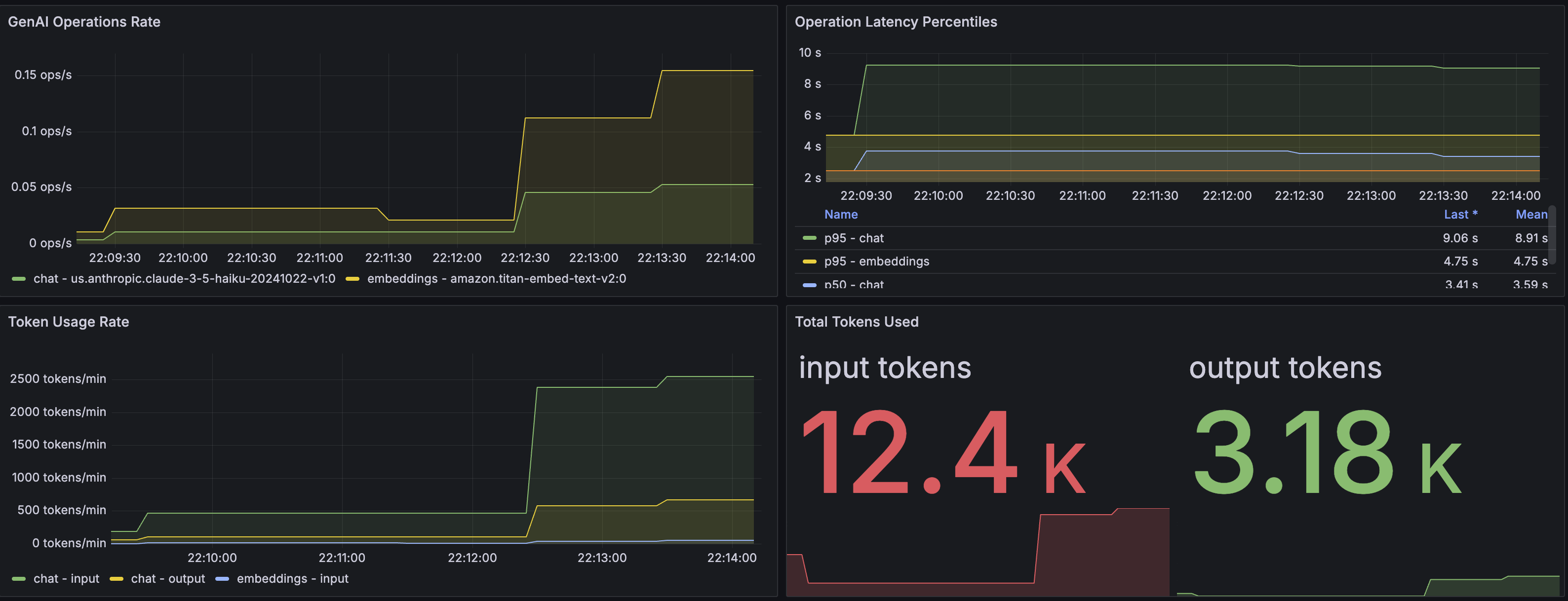
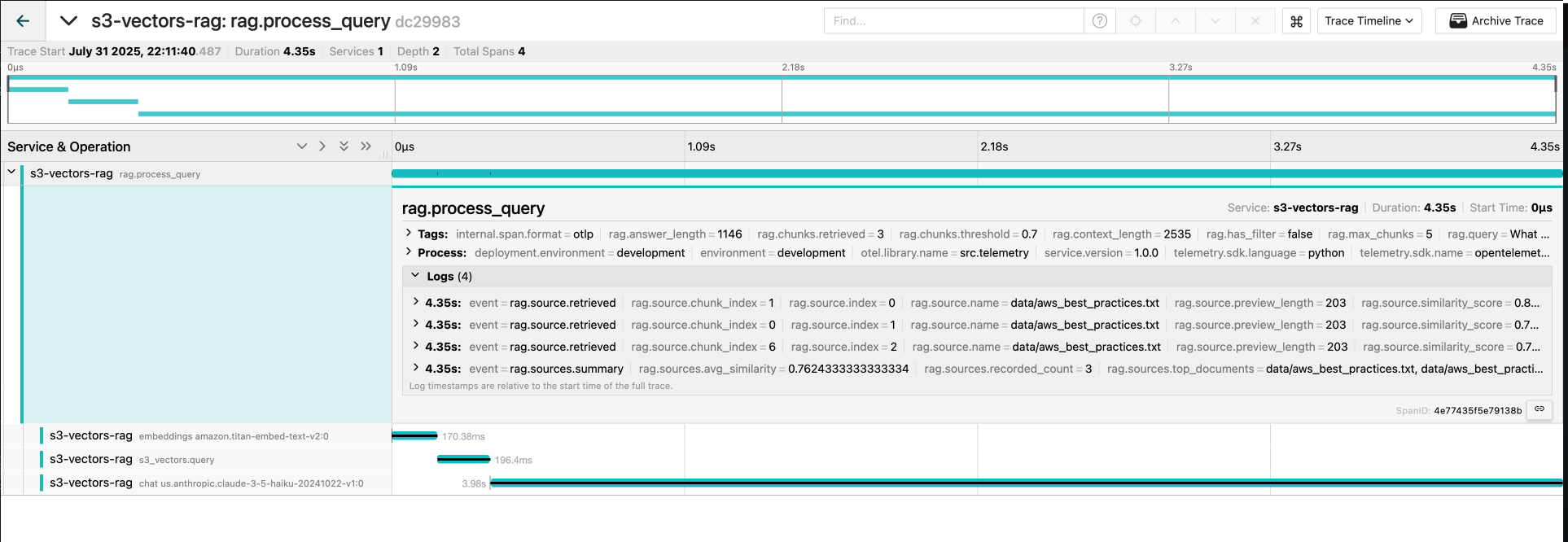
✨ Features
- 🚀 AWS S3 Vectors - Purpose-built vector storage with S3-level durability
- 🤖 Amazon Bedrock - State-of-the-art embeddings and LLMs
- 📊 OpenTelemetry - Full observability with distributed tracing and metrics
- 🔍 Semantic Search - Find relevant documents using vector similarity
- ⚡ High Performance - Optimized for low latency and high throughput
- 🛡️ Production Ready - Error handling, retries, and monitoring
- 🔐 Secure - IAM-based access control and encryption support
🏗️ Project Structure
aws-rag-s3-vectors/
├── README.md                    # This file - setup and usage guide
├── requirements.txt             # Python dependencies
├── requirements.in              # Source dependencies for pip-compile
├── .env.example                 # Environment configuration template
├── docker-compose.yml           # Docker Compose configuration
├── Dockerfile                   # Docker image definition
├── otel-collector-config.yaml   # OpenTelemetry collector config
├── prometheus.yml               # Prometheus configuration
├── src/                         # Core application code
│   ├── __init__.py             # Package initialization
│   ├── app.py                  # FastAPI application (REST API)
│   ├── config.py               # Configuration management
│   ├── s3_vector_client.py     # S3 Vectors client wrapper
│   ├── ingest_service.py       # Document ingestion service
│   ├── rag_service.py          # RAG query processing service
│   └── telemetry.py            # OpenTelemetry instrumentation
│
├── scripts/                     # Utility scripts
│   ├── ingest.py               # Document ingestion CLI
│   ├── test_api.py             # API testing suite
│   └── quickstart.py           # Quick start script
│
├── data/                        # Sample documents
│   ├── aws_best_practices.txt  # AWS best practices document
│   └── sample_company_policy.txt # Sample company policy
│
├── docs/                        # Documentation
│   ├── dashboard.png           # Grafana dashboard screenshot
│   ├── traces.png              # Jaeger traces screenshot
│   ├── GRAFANA_SETUP.md        # Grafana setup guide
│   ├── JAEGER_VIEWING_GUIDE.md # Jaeger viewing guide
│   └── SOURCE_TRACKING_TELEMETRY.md # Telemetry documentation
│
├── grafana/                     # Grafana provisioning
│   └── provisioning/
│       ├── dashboards/         # Dashboard configurations
│       └── datasources/        # Datasource configurations
│
├── logs/                        # Application logs directory
🚀 Quick Start
Prerequisites
- AWS Account with S3 Vectors preview access
- Python 3.10+
- AWS CLI configured or IAM credentials
1. Install Dependencies
# Clone the repository
git clone https://github.com/ColeMurray/aws-rag-s3-vectors.git
cd aws-rag-s3-vectors

# Install dependencies
pip install -r requirements.txt

# Or regenerate requirements.txt from requirements.in
pip install pip-tools
pip-compile requirements.in
pip install -r requirements.txt
2. Configure Environment
Create a .env file based on .env.example:
cp .env.example .envEdit .env with your settings:
# S3 Vectors Configuration
S3_VECTOR_BUCKET_NAME=my-vector-bucket
S3_VECTOR_INDEX_NAME=rag-index

# AWS Configuration
AWS_REGION=us-east-1

# Model Configuration (optional - defaults are fine)
BEDROCK_EMBED_MODEL_ID=amazon.titan-embed-text-v2:0
BEDROCK_LLM_MODEL_ID=us.anthropic.claude-3-5-haiku-20241022-v1:0
3. Ingest Documents
Place your text documents in the data/ directory, then run:
python scripts/ingest.py data/4. Start the API Server
# Using uvicorn directly
uvicorn src.app:app --reload --port 8000

# Or run the app module
python -m src.app
5. Test the API
# Run the test suite
python scripts/test_api.py

# Or test manually
curl -X POST "http://localhost:8000/query" \
  -H "Content-Type: application/json" \
  -d '{"query": "What is the remote work policy?"}'
📋 AWS Setup
Enable S3 Vectors
S3 Vectors is currently in preview. Ensure you have access in your AWS region.
Enable Bedrock Models
Enable these models in your AWS Bedrock console:
- Titan Text Embeddings V2 (for embeddings)
- Claude 3.5 Haiku (for text generation)
IAM Permissions
Your AWS credentials need these permissions:
{
  "Version": "2012-10-17",
  "Statement": [
    {
      "Effect": "Allow",
      "Action": [
        "s3vectors:CreateVectorBucket",
        "s3vectors:CreateVectorIndex",
        "s3vectors:PutVectors",
        "s3vectors:QueryVectors",
        "s3vectors:GetVectors",
        "s3vectors:DeleteVectors",
        "s3vectors:ListVectors",
        "s3vectors:DescribeVectorBucket",
        "s3vectors:DescribeVectorIndex",
        "s3vectors:DescribeVectorIndexStats"
      ],
      "Resource": "*"
    },
    {
      "Effect": "Allow",
      "Action": [
        "bedrock:InvokeModel"
      ],
      "Resource": [
        "arn:aws:bedrock:*::foundation-model/amazon.titan-*",
        "arn:aws:bedrock:*::foundation-model/anthropic.claude-*"
      ]
    }
  ]
}
🔗 API Endpoints
Query Documents
POST /query
{
  "query": "What is the remote work policy?",
  "max_chunks": 5,
  "similarity_threshold": 0.7,
  "metadata_filter": {
    "file_name": "company_policy.txt"
  }
}
Response:
{
  "answer": "Based on the documents...",
  "query": "What is the remote work policy?",
  "sources": [
    {
      "source": "./data/company_policy.txt",
      "chunk_index": 2,
      "similarity_score": 0.89,
      "text_preview": "Remote work is permitted..."
    }
  ],
  "processing_time_ms": 1250.5,
  "chunks_found": 3,
  "timestamp": "2024-01-15T10:30:00.000Z"
}
Health Check
GET /health
{
  "status": "healthy",
  "timestamp": "2024-01-15T10:30:00.000Z",
  "services": {
    "bedrock": "healthy",
    "s3_vectors": "healthy"
  }
}
Index Statistics
GET /stats
{
  "index_stats": {
    "total_vectors": 156,
    "dimension": 1024,
    "index_size": 524288
  },
  "timestamp": "2024-01-15T10:30:00.000Z"
}
API Documentation
- Swagger UI: http://localhost:8000/docs
- ReDoc: http://localhost:8000/redoc
🚢 Deployment
Docker
Quick Start:
# Local development with full observability stack
docker-compose up

# Production deployment
docker-compose up -d
Features:
- ✅ Auto-configured Grafana dashboard
- ✅ Pre-configured Prometheus datasource
- ✅ Full observability stack included
- ✅ No manual setup required
💰 Cost Estimation
S3 Vectors Pricing
- Storage: ~$0.02 per GB per month
- Requests: ~$0.001 per 1,000 requests
- No infrastructure management costs
Bedrock Pricing
- Titan Embeddings: ~$0.00001 per 1K input tokens
- Claude 3.5 Haiku: $0.001 per 1K input tokens, $0.005 per 1K output tokens
Example Monthly Costs (Development)
- 100K documents ingested: ~$1
- 1000 queries/day: ~$3
- Storage (10GB vectors): ~$0.20
- Total: ~$5/month
🔧 Configuration Reference
Environment Variables
| Variable | Required | Default | Description |
|---|---|---|---|
S3_VECTOR_BUCKET_NAME |
✅ | - | S3 Vectors bucket name |
S3_VECTOR_INDEX_NAME |
❌ | "rag-index" | Vector index name |
S3_VECTOR_DIMENSION |
❌ | 1024 | Vector dimension (must match embedding model) |
S3_VECTOR_DISTANCE_METRIC |
❌ | "cosine" | Distance metric (cosine or euclidean) |
AWS_REGION |
❌ | "us-east-1" | AWS region |
BEDROCK_EMBED_MODEL_ID |
❌ | "amazon.titan-embed-text-v2:0" | Embedding model |
BEDROCK_LLM_MODEL_ID |
❌ | "us.anthropic.claude-3-5-haiku-20241022-v1:0" | LLM model |
CHUNK_SIZE |
❌ | 800 | Characters per text chunk |
CHUNK_OVERLAP |
❌ | 100 | Overlap between chunks |
TOP_K |
❌ | 6 | Number of chunks to retrieve |
SIMILARITY_THRESHOLD |
❌ | 0.5 | Minimum similarity score |
🔍 Usage Examples
Python Client
import requests

# Query the API
response = requests.post("http://localhost:8000/query", json={
    "query": "What are the AWS security best practices?",
    "max_chunks": 3
})

result = response.json()
print(f"Answer: {result['answer']}")
print(f"Sources: {len(result['sources'])}")
cURL Examples
# Basic query
curl -X POST "http://localhost:8000/query" \
  -H "Content-Type: application/json" \
  -d '{"query": "What is the expense reporting process?"}'

# Query with metadata filter
curl -X POST "http://localhost:8000/query" \
  -H "Content-Type: application/json" \
  -d '{
    "query": "AWS monitoring recommendations",
    "metadata_filter": {"file_name": "aws_best_practices.txt"}
  }'
🛠️ Troubleshooting
Common Issues
OTEL Exporter Connection Errors in Docker
If you see errors like "Failed to export traces to localhost:4317":
- Ensure OTEL_EXPORTER_OTLP_ENDPOINT is NOT set in your
.envfile (comment it out) - The Docker Compose automatically sets it to
http://otel-collector:4317 - If issues persist, create a
docker-compose.override.ymlfrom the example file
"No module named 's3vectors'"
Ensure boto3 is updated to version 1.39.16 or later:
pip install -U boto3Rate Limiting Errors
The client implements exponential backoff. If you still see errors:
- Reduce batch size in ingestion
- Add delays between requests
- Check S3 Vectors rate limits (5 writes/sec)
Empty Query Results
- Check similarity threshold (default 0.7)
- Verify vectors were ingested:
curl http://localhost:8000/stats - Try a lower threshold or broader query
Dimension Mismatch
Ensure all embeddings match the index dimension (1024 for Titan V2).
🔒 Security Best Practices
- Use IAM Roles instead of access keys in production
- Enable encryption on S3 Vectors bucket (SSE-S3 or SSE-KMS)
- Implement API authentication for production
- Use HTTPS for all API communications
- Sanitize inputs to prevent injection attacks
- Store secrets in AWS Secrets Manager or similar
📊 Observability with OpenTelemetry
This application includes comprehensive OpenTelemetry instrumentation following the GenAI semantic conventions.
Features
- Distributed Tracing: Track requests across all components (Bedrock, S3 Vectors, RAG pipeline)
- GenAI Semantic Conventions: Standardized attributes for LLM operations
- Metrics Collection: Token usage, operation latencies, vector search performance
- Privacy Controls: Optional content capture for prompts/completions
Configuration
Configure OpenTelemetry via environment variables:
# Enable/disable OpenTelemetry
OTEL_ENABLED=true

# Service identification
OTEL_SERVICE_NAME=s3-vectors-rag
OTEL_ENVIRONMENT=development

# OTLP exporter endpoint
OTEL_EXPORTER_OTLP_ENDPOINT=http://localhost:4317
OTEL_EXPORTER_OTLP_INSECURE=true

# Privacy settings
OTEL_CAPTURE_CONTENT=false  # Set to true to capture prompts/completions
OTEL_MAX_EVENT_CONTENT_LENGTH=1000
Running with Observability Stack
The local development Docker Compose includes a full observability stack:
# Start everything including observability tools
docker-compose up -d
Access the tools:
- Jaeger UI: http://localhost:16686 - View distributed traces
- Prometheus: http://localhost:9090 - Query metrics
- Grafana: http://localhost:3000 - Visualize metrics (admin/admin)
- Dashboard and datasource are automatically configured!
- No manual setup required - just open Grafana and view the dashboard
Key Metrics
gen_ai.client.token.usage- Token consumption by operationgen_ai.client.operation.duration- GenAI operation latenciesrag.vector.search.duration- Vector search performancerag.chunks.retrieved.count- Retrieved chunks per query
Trace Attributes
Following OpenTelemetry GenAI semantic conventions:
gen_ai.system- AI system (e.g., "aws.bedrock")gen_ai.operation.name- Operation type ("embeddings", "chat")gen_ai.request.model- Model identifiergen_ai.usage.input_tokens/output_tokens- Token countss3.vector.bucket/index- S3 Vectors identifiers
Example Traces
-
RAG Query Processing
rag.process_query ├── embeddings amazon.titan-embed-text-v2:0 ├── s3_vectors.query └── chat anthropic.claude-3-sonnet -
Document Ingestion
document.ingest
├── embeddings amazon.titan-embed-text-v2:0 (multiple)
└── s3_vectors.upsert
📚 Additional Resources
🤝 Contributing
- Fork the repository
- Create a feature branch
- Make your changes
- Add tests for new functionality
- Submit a pull request
📄 License
This project is provided as-is for educational and reference purposes.
🎯 Ready to get started? Follow the Quick Start guide above!