

Repository
Pref-GRPO
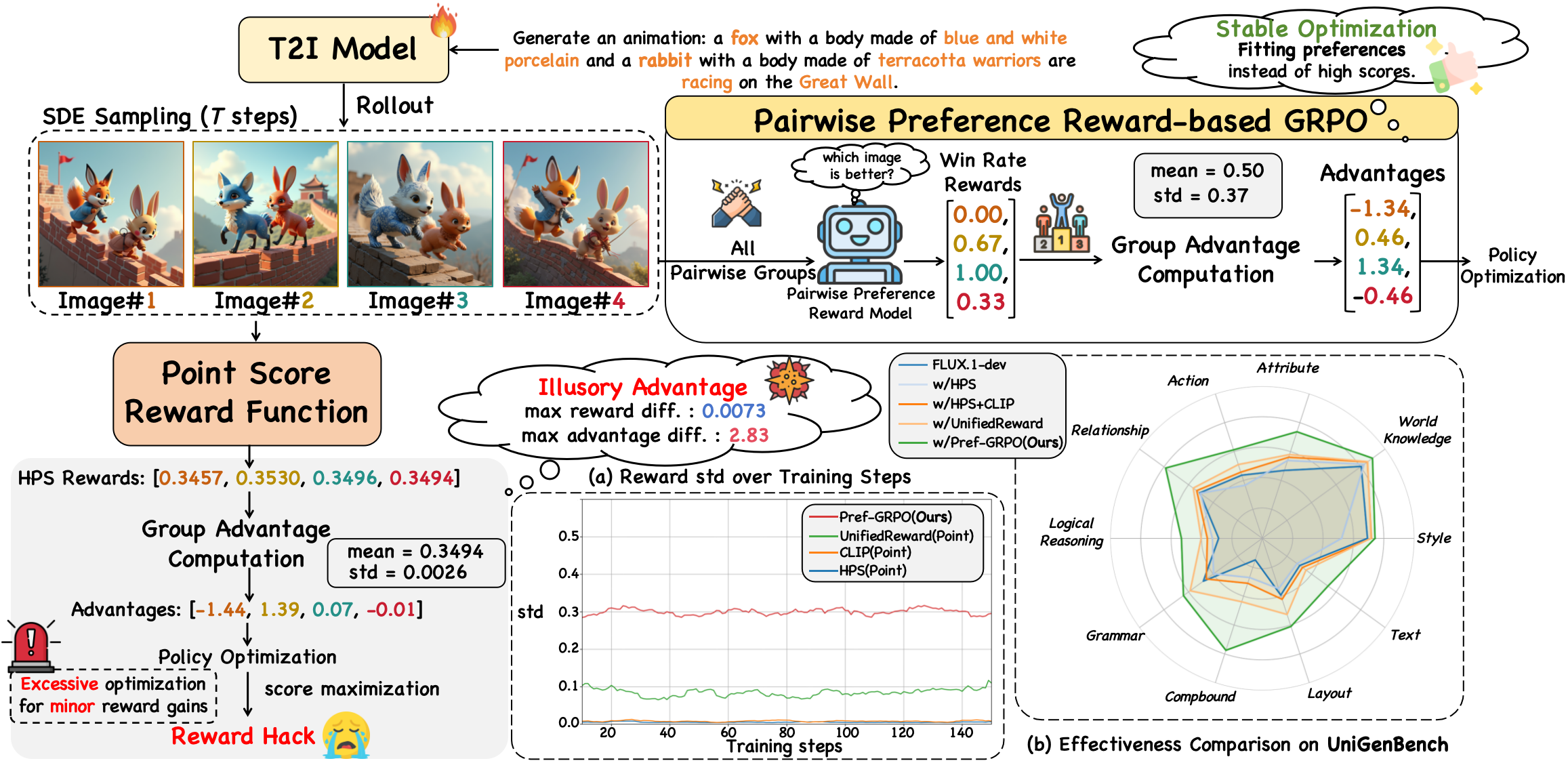
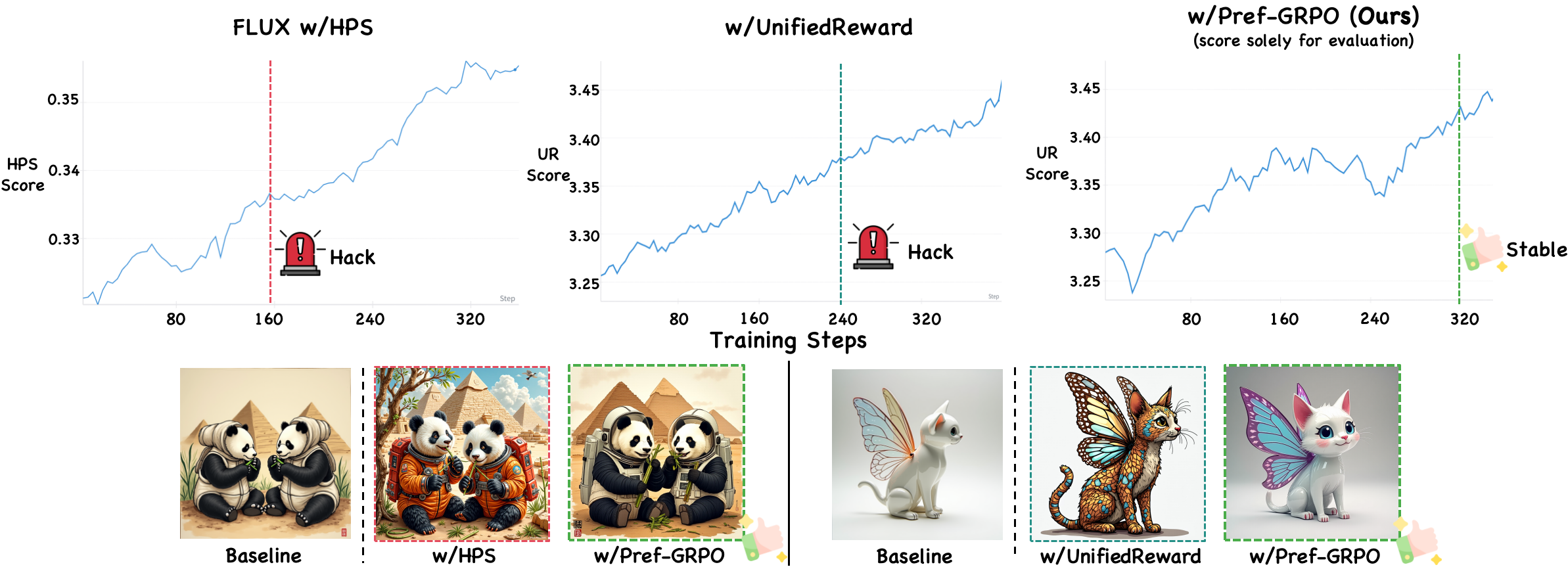
Official implementation of Pref-GRPO: Pairwise Preference Reward-based GRPO for Stable Text-to-Image Reinforcement Learning
README
<div align="center">
<h1 align="center"> Pref-GRPO: Pairwise Preference Reward-based GRPO for Stable Text-to-Image Reinforcement Learning
</h1>
UnifiedReward Team
<a href="https://arxiv.org/pdf/2508.20751">

</a>
<a href="https://codegoat24.github.io/UnifiedReward/Pref-GRPO">

</a>
<a href="https://huggingface.co/collections/CodeGoat24/unifiedreward-flex">

</a>
<a href="https://huggingface.co/collections/CodeGoat24/pref-grpo-and-unigenbench">

</a>
<a href="https://github.com/CodeGoat24/UniGenBench">

</a>
</div>
-brown)
-red)
-orange)
-pink)
🔥 News
Please leave us a star if you find this work helpful.
-
[2026/02] Support Z-Image, FLUX.1-Kontext-dev, FLUX.2-Klein (T2I/I2I), Qwen-Image-Edit and Wan2.2.
-
[2026/02] Support UnifiedReward-Flex-based Pref-GRPO for both image and video generation.
-
[2026/01] Tongyi Lab improves Pref-GRPO on open-ended agents in ArenaRL: Scaling RL for Open-Ended Agents via Tournament-based Relative Ranking. Thanks to all contributors!
<details>
<summary><strong>More News</strong></summary> -
[2025/11] Support Qwen-Image, Wan2.1 and FLUX.1-dev.
-
[2025/11] Nano Banana Pro, FLUX.2-dev and Z-Image are added to all Leaderboards.
-
[2025/10] Alibaba Group proves the effectiveness of Pref-GRPO on aligning LLMs in Taming the Judge: Deconflicting AI Feedback for Stable Reinforcement Learning. Thanks to all contributors!
-
[2025/9] Seedream-4.0, GPT-4o, Imagen-4-Ultra, Nano Banana, Lumina-DiMOO, OneCAT, Echo-4o, OmniGen2, and Infinity are added to all Leaderboards.
-
[2025/8] Release Leaderboard (English), Leaderboard (English Long), Leaderboard (Chinese Long) and Leaderboard (Chinese).
</details>
🔧 Environment Setup
-
Clone this repository and navigate to the folder:
git clone https://github.com/CodeGoat24/Pref-GRPO.git cd Pref-GRPO -
Install the training package:
conda create -n PrefGRPO python=3.12
conda activate PrefGRPO
bash env_setup.sh fastvideo
git clone https://github.com/mlfoundations/open_clip
cd open_clip
pip install -e .
cd ..
3. Install vLLM (for UnifiedReward-based rewards)
```bash
conda create -n vllm
conda activate vllm
pip install "vllm>=0.11.0"
pip install qwen-vl-utils==0.0.14- Download Models
huggingface-cli download CodeGoat24/UnifiedReward-2.0-qwen3vl-8b
huggingface-cli download CodeGoat24/UnifiedReward-Think-qwen3vl-8b
huggingface-cli download CodeGoat24/UnifiedReward-Flex-qwen3vl-8b
huggingface-cli download CodeGoat24/UnifiedReward-Edit-qwen3vl-8b
💻 Training
1. Model-specific workflows (click to expand)
We use training prompts in UniGenBench, as shown in "./data/unigenbench_train_data.txt".
<details>
<summary><strong>Image edit dataset format</strong></summary>
Put jsonl files under data/{Image_Edit_Dataset_Name}/ (default examples use data/Image_Edit_data).
Each line is a JSON object. Recommended fields:
instruction: edit instructioninstruction_cn: optional Chinese instruction (used whenUSE_CN=1)source_imageorimage: source image path (required)target_image: optional target/reference edited image path
Instruction fallback order:
instruction->prompt->caption->text
Path rules:
- absolute path: used directly
- relative path: resolved against dataset root (
input_pathdir) - fallback:
<dataset_root>/images/<relative_path>
Minimal jsonl example:
{"instruction":"replace the red car with a blue one","source_image":"images/0001_source.png","target_image":"images/0001_target.png"}
{"instruction_cn":"把天空改成晚霞","source_image":"images/0002_source.jpg"}
</details>
<details>
<summary><strong>FLUX.1-dev</strong></summary>
Preprocess training Data
bash fastvideo/data_preprocess/preprocess_flux_rl_embeddings.shTrain (examples)
# Pref-GRPO
## UnifiedReward-Flex
bash scripts/full_train/ur_flex_prefgrpo_flux.sh
## UnifiedReward-Think
bash scripts/full_train/ur_think_prefgrpo_flux.sh


# UnifiedReward for Point Score-based GRPO
bash scripts/full_train/unifiedreward_flux.sh
</details>
<details>
<summary><strong>FLUX.2-Klein(T2I,I2I)</strong></summary>
Preprocess training Data (T2I)
bash fastvideo/data_preprocess/preprocess_flux2_klein_rl_embeddings.shPreprocess training Data (I2I)
# default: INPUT_PATH=data/Image_Edit_data, OUTPUT_DIR=data/flux2_klein_edit_embeddings
bash fastvideo/data_preprocess/preprocess_flux2_klein_edit.sh

# optional: use Chinese instruction when available
USE_CN=1 bash fastvideo/data_preprocess/preprocess_flux2_klein_edit.sh
Train (examples)
# Pref-GRPO (UnifiedReward-Flex as example)
bash scripts/lora/lora_ur_flex_prefgrpo_flux2_klein.sh

# Edit GRPO (UnifiedReward-Edit pointwise/prefgrpo reward example)
bash scripts/lora/lora_ur_edit_point_flux2_klein_edit.sh
bash scripts/lora/lora_ur_edit_prefgrpo_flux2_klein_edit.sh
</details>
<details>
<summary><strong>FLUX.1-Kontext-dev</strong></summary>
Preprocess training Data (edit embeddings)
# default output: data/flux1_kontext_edit_embeddings
bash fastvideo/data_preprocess/preprocess_flux1_kontext_edit.sh

# optional: use Chinese instruction when available
USE_CN=1 bash fastvideo/data_preprocess/preprocess_flux1_kontext_edit.sh
Train (examples)
# start UnifiedReward-Edit server first
bash vllm_utils/vllm_server_UnifiedReward_Edit.sh

# Pref-GRPO with edit pairwise reward
bash scripts/lora/lora_ur_edit_prefgrpo_flux1_kontext_edit.sh
</details>
<details>
<summary><strong>Qwen-Image</strong></summary>
Preprocess training Data
pip install diffusers==0.35.0 peft==0.17.0 transformers==4.56.0

bash fastvideo/data_preprocess/preprocess_qwen_image_rl_embeddings.sh
Train (examples)
## UnifiedReward-Think for Pref-GRPO
bash scripts/full_train/ur_think_prefgrpo_qwenimage.sh

## UnifiedReward for Point Score-based GRPO
bash scripts/full_train/unifiedreward_qwenimage.sh
</details>
<details>
<summary><strong>Z-Image</strong></summary>
Preprocess training Data
bash fastvideo/data_preprocess/preprocess_z_image_rl_embeddings.shTrain (examples)
## UnifiedReward-Flex for Pref-GRPO (full training)
bash scripts/full_train/ur_flex_prefgrpo_zimage.sh

## UnifiedReward-Flex for Pref-GRPO (LoRA)
bash scripts/lora/lora_ur_flex_prefgrpo_zimage.sh
</details>
<details>
<summary><strong>Qwen-Image-Edit</strong></summary>
Preprocess training Data (edit embeddings)
# default output: data/qwen_image_edit_embeddings
bash fastvideo/data_preprocess/preprocess_qwen_image_edit.sh

# optional: use Chinese instruction when available
USE_CN=1 bash fastvideo/data_preprocess/preprocess_qwen_image_edit.sh
Train (examples)
# start UnifiedReward-Edit server first
bash vllm_utils/vllm_server_UnifiedReward_Edit.sh

# Pref-GRPO with edit pairwise reward
bash scripts/full_train/ur_edit_prefgrpo_qwen_image_edit.sh
</details>
<details>
<summary><strong>Wan2.1</strong></summary>
Preprocess training Data
bash fastvideo/data_preprocess/preprocess_wan21_rl_embeddings.shTrain (examples)
# Pref-GRPO
## UnifiedReward-Flex
bash scripts/lora/lora_ur_flex_prefgrpo_wan21.sh

## UnifiedReward-Think
bash scripts/lora/lora_ur_think_prefgrpo_wan21.sh
</details>
<details>
<summary><strong>Wan2.2</strong></summary>
Preprocess training Data
bash fastvideo/data_preprocess/preprocess_wan22_rl_embeddings.shTrain (examples)
# Pref-GRPO
## UnifiedReward-Flex
bash scripts/lora/lora_ur_flex_prefgrpo_wan22.sh
</details>
🧩 Reward Models & Usage
We support multiple reward models via the dispatcher in fastvideo/rewards/dispatcher.py.
Reward model checkpoint paths are configured in fastvideo/rewards/reward_paths.py.
Supported reward models (click to expand for setup details):
<details>
<summary><strong><span style="font-size:1.05em">aesthetic</span></strong></summary>
<strong>Set in fastvideo/rewards/reward_paths.py</strong><br>
aesthetic_ckpt: path to the Aesthetic MLP checkpoint (assets/sac+logos+ava1-l14-linearMSE.pth)<br>
aesthetic_clip: HuggingFace CLIP model id (openai/clip-vit-large-patch14)
</details>
<details>
<summary><strong><span style="font-size:1.05em">clip</span></strong></summary>
<strong>Download weights</strong>
wget https://huggingface.co/apple/DFN5B-CLIP-ViT-H-14-378/resolve/main/open_clip_pytorch_model.bin<strong>Set in fastvideo/rewards/reward_paths.py</strong><br>
clip_pretrained: path to OpenCLIP weights (used by CLIP reward)
</details>
<details>
<summary><strong><span style="font-size:1.05em">hpsv2</span></strong></summary>
<strong>Set in fastvideo/rewards/reward_paths.py</strong><br>
hpsv2_ckpt: path to HPS_v2.1_compressed.pt<br>
clip_pretrained: path to OpenCLIP weights (required by HPSv2)
</details>
<details>
<summary><strong><span style="font-size:1.05em">hpsv3</span></strong></summary>
<strong>Set in fastvideo/rewards/reward_paths.py</strong><br>
hpsv3_ckpt: path to HPSv3 checkpoint
</details>
<details>
<summary><strong><span style="font-size:1.05em">pickscore</span></strong></summary>
<strong>Set in fastvideo/rewards/reward_paths.py</strong><br>
pickscore_processor: HuggingFace processor id (CLIP-ViT-H-14-laion2B-s32B-b79K)<br>
pickscore_model: HuggingFace model id (Pickscore_v1)
</details>
<details>
<summary><strong><span style="font-size:1.05em">unifiedreward (alignment / style / coherence)</span></strong></summary>
<strong>Start server</strong><br>
Targets: unifiedreward_alignment, unifiedreward_style, unifiedreward_coherence
bash vllm_utils/vllm_server_UnifiedReward.sh </details>
<details>
<summary><strong><span style="font-size:1.05em">unifiedreward_think</span></strong></summary>
<strong>Start server</strong><br>
Target: unifiedreward_think
bash vllm_utils/vllm_server_UnifiedReward_Think.sh </details>
<details>
<summary><strong><span style="font-size:1.05em">unifiedreward_flex</span></strong></summary>
<strong>Start server</strong><br>
Target: unifiedreward_flex
bash vllm_utils/vllm_server_UnifiedReward_Flex.sh </details>
<details>
<summary><strong><span style="font-size:1.05em">unifiedreward_edit</span></strong></summary>
<strong>Start server (UnifiedReward-Edit)</strong><br>
Targets:
unifiedreward_edit_pairwiseunifiedreward_edit_pointwise_image_qualityunifiedreward_edit_pointwise_instruction_followingbash vllm_utils/vllm_server_UnifiedReward_Edit.sh
<strong>Scope</strong><br>
Edit rewards are image-only (modality=image) and expect edit-specific inputs:
- pairwise: source image + two edited candidates + instruction
- pointwise image quality: edited image only
- pointwise instruction following: source image + edited image + instruction
<strong>Optional weighting via env vars</strong><br>
For unifiedreward_edit_pointwise_image_quality:
EDIT_QUALITY_WEIGHT_NATURALNESS(default1.0)EDIT_QUALITY_WEIGHT_ARTIFACTS(default1.0)
For unifiedreward_edit_pointwise_instruction_following:
EDIT_IF_WEIGHT_SUCCESS(default1.0)EDIT_IF_WEIGHT_OVEREDIT(default1.0)
</details>
<details>
<summary><strong><span style="font-size:1.05em">videoalign</span></strong></summary>
<strong>Set in fastvideo/rewards/reward_paths.py</strong><br>
videoalign_ckpt: path to VideoAlign checkpoint directory
</details>
Set rewards in your training/eval scripts
Use --reward_spec to choose which rewards to compute and (optionally) their weights.
Examples:
# Use a list of rewards (all weights = 1.0)
--reward_spec "unifiedreward_think,clip,hpsv3"

# Weighted mix
--reward_spec "unifiedreward_alignment:0.5,unifiedreward_style:1.0,unifiedreward_coherence:0.5"

# Edit reward examples
--reward_spec '{"unifiedreward_edit_pointwise_image_quality":0.5,"unifiedreward_edit_pointwise_instruction_following":0.5}'
--reward_spec '{"unifiedreward_edit_pairwise":1.0}'

# JSON formats are also supported
--reward_spec '{"clip":0.5,"aesthetic":1.0,"hpsv2":0.5}'
--reward_spec '["clip","aesthetic","hpsv2"]'
🚀 Inference and Evaluation
we use test prompts in UniGenBench, as shown in "./data/unigenbench_test_data.csv".
<details>
<summary><strong>FLUX.1-dev</strong></summary>
bash inference/flux_dist_infer.sh</details>
<details>
<summary><strong>Qwen-Image</strong></summary>
bash inference/qwen_image_dist_infer.sh</details>
<details>
<summary><strong>FLUX.2-Klein</strong></summary>
bash inference/flux2_klein_dist_infer.sh</details>
<details>
<summary><strong>Wan2.1</strong></summary>
bash inference/wan21_dist_infer.sh
bash inference/wan21_eval_vbench.sh
</details>
<details>
<summary><strong>Wan2.2</strong></summary>
bash inference/wan22_dist_infer.sh
bash inference/wan22_eval_vbench.sh
</details>
Then, evaluate the outputs following UniGenBench.
📊 Reward-based Image Scoring (UniGenBench)
We provide a script to score a folder of generated images on UniGenBench using supported reward models.
GPU_NUM=8 bash tools/eval_quality.shEdit tools/eval_quality.sh to set:
--image_dir: path to your UniGenBench generated images--prompt_csv: prompt file (default:data/unigenbench_test_data.csv)--reward_spec: the reward models (and weights) to use--api_url: UnifiedReward server endpoint (if using UnifiedReward-based rewards)--output_json: output file for scores
📧 Contact
If you have any comments or questions, please open a new issue or feel free to contact Yibin Wang.
🤗 Acknowledgments
Our training code is based on DanceGRPO, Flow-GRPO, and FastVideo.
We also use UniGenBench for T2I model semantic consistency evaluation.
Thanks to all the contributors!
⭐ Citation
@article{Pref-GRPO&UniGenBench,
  title={Pref-GRPO: Pairwise Preference Reward-based GRPO for Stable Text-to-Image Reinforcement Learning},
  author={Wang, Yibin and Li, Zhimin and Zang, Yuhang and Zhou, Yujie and Bu, Jiazi and Wang, Chunyu and Lu, Qinglin and Jin, Cheng and Wang, Jiaqi},
  journal={arXiv preprint arXiv:2508.20751},
  year={2025}
}