README
esp8266_dmx_explorer
This project uses esp82xx.
Instructions:
- Flash in accordance with esp82xx, or flash using binaries. Note web/page.mpfs needs to be at 524288.
- Connect to the ESP8266 with it's new AP. Visit http://192.168.4.1.
- Reconfigure it to be on your wifi network using the wifi configuration.
- Reconnect to your own wifi. visit http://esp8266dmx.local
- Start Colorchord's "netlight-dmx.conf"
General notes:
- You can output arbitrary DMX-512 frames with this.
- Send a UDP packet to esp8266dmx.local on port 7777. It will skip the first 3 bytes, then dump the rest of the frame out to the DMX channel.
Note: You can manually send DMX values using the webpage, or by flinging a UDP packet at the ESP on port 7777.
Note: If you are using something like the ipixelled DMX-512 LED Light tubes http://ipixel-leds.com/index.php?id=489 You can use 500kbit/s, which will easily let you update at 60 FPS. You can change it in user.cfg
#OPTS += -DDMX_BAUDRATE=500000
OPTS += -DDMX_BAUDRATE=250000
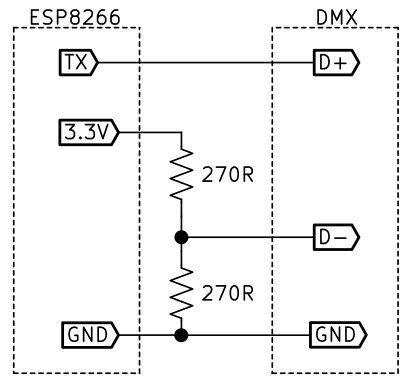
DMX Will now be spewed out your "TX" pin. You may need to either put on a line driver, or connect TX to D+ on DMX, and put two resistors in series across 3.3v, and center-tap for 1.65v, and connect to D- on DMX.