

Repository
ForzaHorizon6-VisionAI
Camera-only closed-loop driving agent for Forza Horizon 6, with geometry as the control interface.
- Tap
- Head
- Late ( fc1 + state)
- wpspeed
- Setting
- Value
- Resolution
- 1280 × 720
Specs
- TapHead
- Late ( fc1 + state)wpspeed
- Late ( fc1 + state)slip
- SettingValue
- Resolution1280 × 720
- V-Sync / frame cap~60 fps
- FieldValue
- Data OutON
- IP address127.0.0.1
- Port5606
- SettingValue
- Drivatar difficultyHighly Skilled
- Driving assists presetCustom
- BrakingABS on
- SteeringStandard
- Traction control (TCS)On
- Stability control (STM)On
- ShiftingAutomatic
- Driving lineDriving line
- Damage & tyre wearCosmetic
- RewindOn
- Launch controlOn
- AxisInside dead zone
- Steering0
- Acceleration0
- Deceleration0
- Clutch10
- Handbrake15
- KeyAction
- F9F9
- F2 / F3Overlay camera pitch −0.5° / +0.5°
- F4 / F5Overlay camera height −0.3 m / +0.3 m
- F6 / F7Overlay camera FOV −2° / +2°
- F8Save overlay camera pose to data/overlay_cam.json
- Ctrl+CQuit
- FlagDefault
- --window-nameForza Horizon
- --model-dir../data/models
- --model-file(highest N)
- --telemetry-ip / --telemetry-port0.0.0.0 / 5606
README
Seeing Is Not Driving:Geometry as a Control Interface in a High-Speed Racing Game








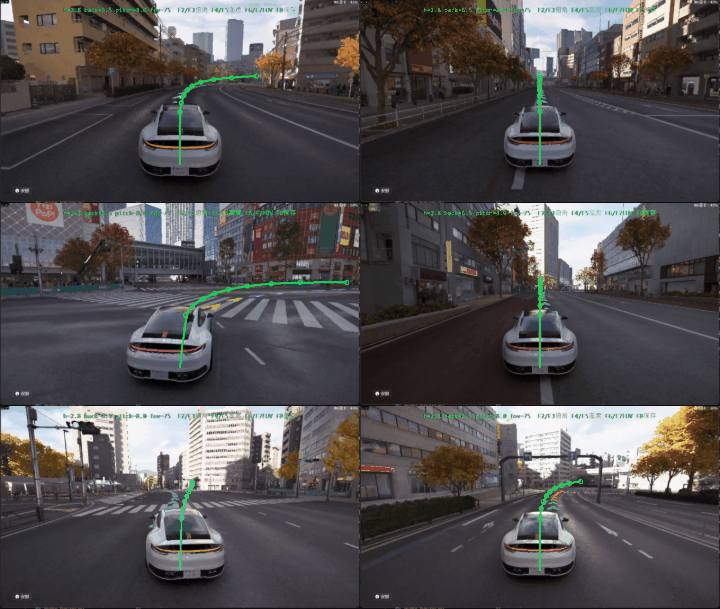
Closed-loop driving. The green/blue chain is the network's own predicted path, drawn back onto the game window in real time.
[!IMPORTANT]
Unofficial fan research project. Forza Horizon 6 is developed by Playground Games and published by Xbox Game Studios; the game and all in-game imagery in this repository are © Microsoft Corporation and its licensors. This project is not affiliated with, endorsed by or connected to any of them. See License and attribution.
📰 News
- 2026/07/26 — Initial public release:
drive.pyclosed-loop driver, released weights (model_30.pt, v18.3), the technical report and all figures.
📑 Contents
Abstract · The geometry interface · Results · Repository layout · Requirements · Game setup · Running the agent · Training · Limitations · Cite as · License
<a id="abstract"></a>
🎯 Abstract
The network maps a single forward camera to physical intermediate quantities — lane offset, arc-length waypoints, a speed profile, and tyre slip — and a control head consumes only those, detached from the visual features, plus the current speed. Training mixes game-AI ("Anna") and human gamepad recordings, whose steering units are aligned with a speed-conditioned mapping fitted independently on each side.
With one set of weights and no per-car adaptation, the agent drives three cars spanning Performance Index 344–829 and all three drivetrains — including unseen all-wheel drive — at 84–92 % of the game AI's mean speed over matched 29 km courses.
The ablations support a narrow, specific mechanism, which is where the report's title comes from:
The geometry interface matters less for acquiring road understanding than for forcing the controller to act through it.
Switching off the racing-line HUD costs the geometry-fed policy 9 % of its pace and the feature-fed variants 82–89 % — while their predicted road geometry is unchanged. Seeing the road and driving on it come apart, and what separates them is whether the controller is obliged to act through what it sees.
This is a reproducible game-internal study, not a proposal for general autonomous driving. See Limitations.
<a id="interface"></a>
🧭 The geometry interface
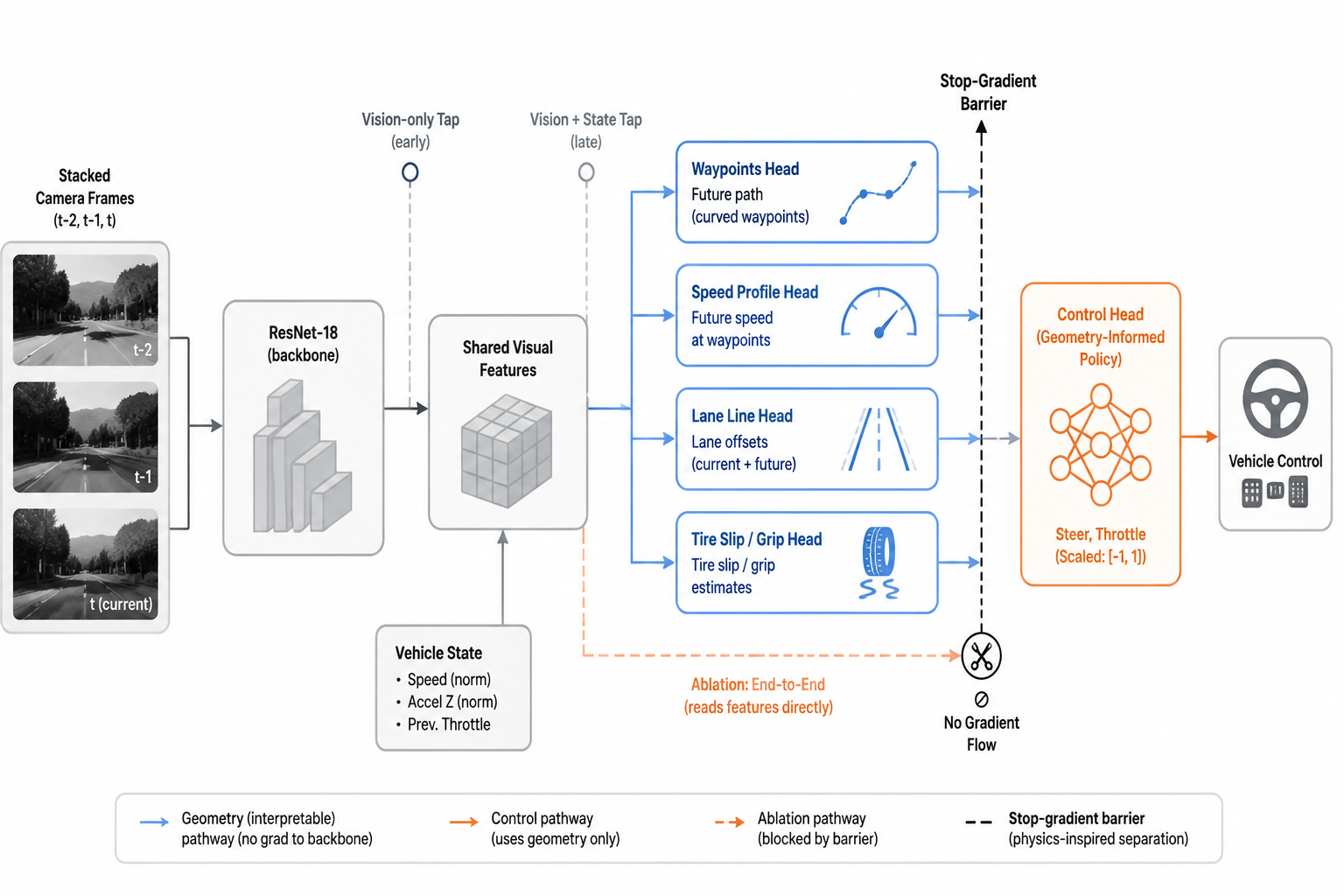
An ImageNet-pretrained ResNet-18 over a stack of 3 frames (320×180, spaced 0.1 s, so the observation spans 0.2 s of history) feeds a shared 256-d layer fc1. Heads read the backbone at two points, and the distinction is what the whole argument rests on.
| Tap | Head | Output | Sees ego speed? |
|---|---|---|---|
Early (fc1 alone) |
line |
lane offset vs. the racing line (3 outputs: now, +0.5 s, +1.0 s) | ✗ |
Early (fc1 alone) |
wp |
9 waypoints at arc lengths 8, 12, 17, 23, 30, 40, 52, 66, 85 m | ✗ |
Late (fc1 + state) |
wpspeed |
speed at each arc length, as a residual anchored at current speed | ✓ (by design) |
Late (fc1 + state) |
slip |
tyre slip, front/rear × {0, 0.25, 0.5} s, action-conditioned | ✓ |
Late (fc1 + state) |
steer, throttle |
direct BC heads — never used to drive | ✓ |
| — | ctrl |
the deployed steering + throttle | ✓ (speed only) |
Because line and wp branch before the state join, the path cannot implement the shortcut "low speed ⇒ tight bend": path shape is predicted without ever seeing speed.
At drive time ctrl receives only [line, waypoints, wpspeed, slip] — detached — plus the current speed. It never sees the raw visual features. Steering and throttle are produced by separate MLPs. The direct steer/throttle heads exist only to shape the representation.
Three further measures target visual shortcuts: arc-length (not time) waypoint parameterisation, randomisation of prev_throttle and accel_z during training, and a geometry-driven speed target so braking is a function of the predicted profile rather than of HUD appearance.
👁️ What the geometry heads look at
<table>
<tr>
<td width="50%">
</td>
<td width="50%">
</td>
</tr>
<tr>
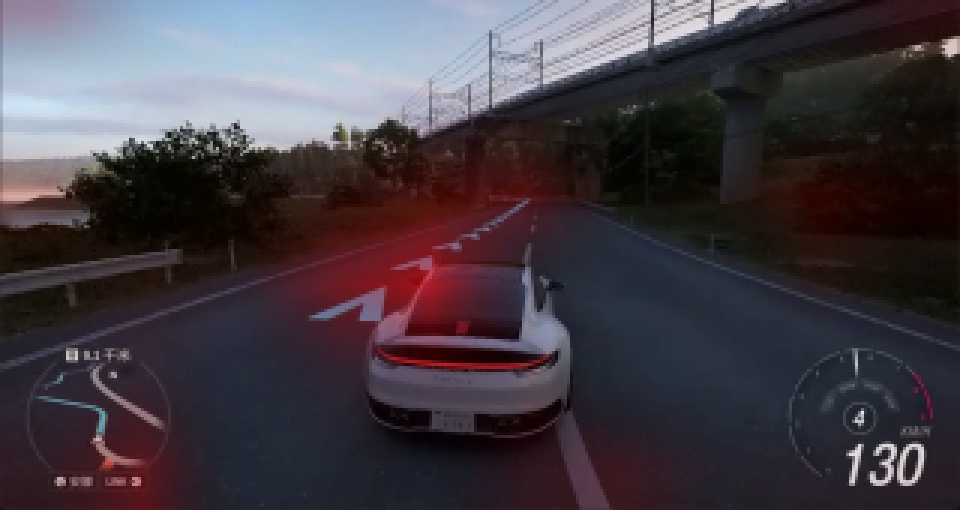
<td><em>Lateral waypoint head: attention on the road ahead and the racing-line marker — not on sky, bridge or vegetation.</em></td>
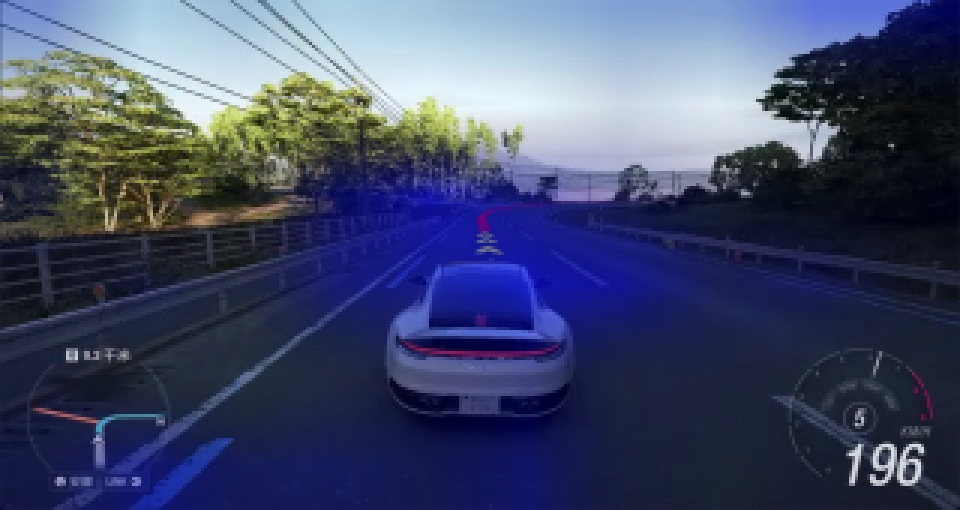
<td><em>Waypoint speed head on a fast straight: attention reaches further down the road and spreads along the corridor, consistent with a target that depends on conditions further ahead.</em></td>
</tr>
</table>
Gradient-based attention, red positive / blue negative, on the deployed model.
[!NOTE]
Qualitative illustration only. Saliency of this family is known to pass visual inspection while failing randomisation sanity checks, so no claim in the report rests on these maps.
🛣️ Zero-shot on a real photograph
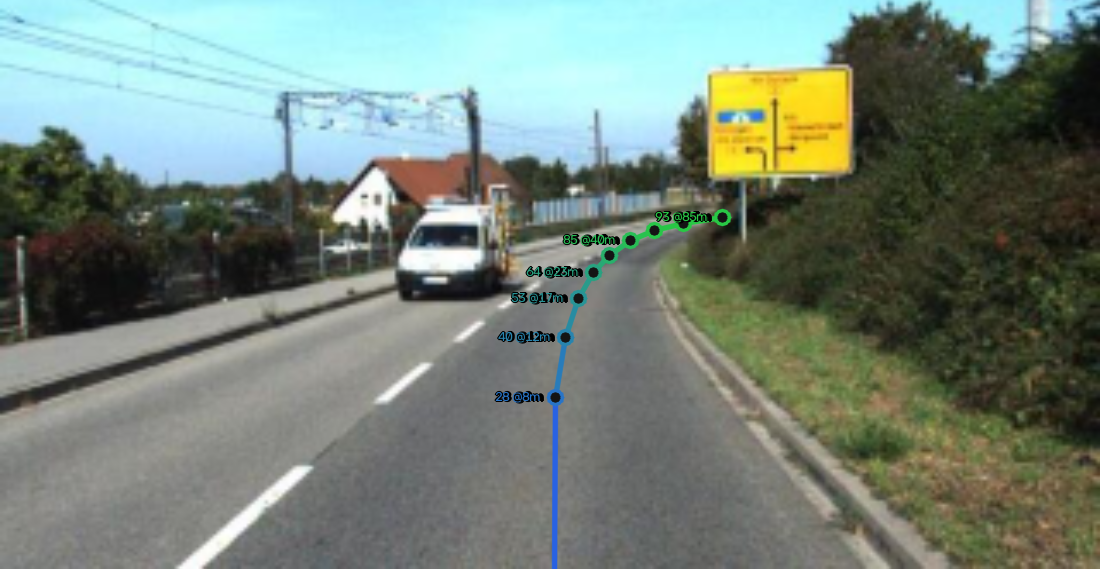
Trained entirely on game frames, applied without fine-tuning to a KITTI photograph, the waypoint head still lays a path along the road, following the right-hand bend and staying inside the carriageway out to 85 m. Camera height/pitch/FOV were set by hand to approximate the in-game viewpoint and the result is sensitive to them; this is a single illustrative frame with no ground truth. It suggests the learned road geometry is not purely an artefact of the game's rendering — it is not evidence of real-world driving capability.
<a id="results"></a>
📊 Results
Zero-shot cross-vehicle transfer
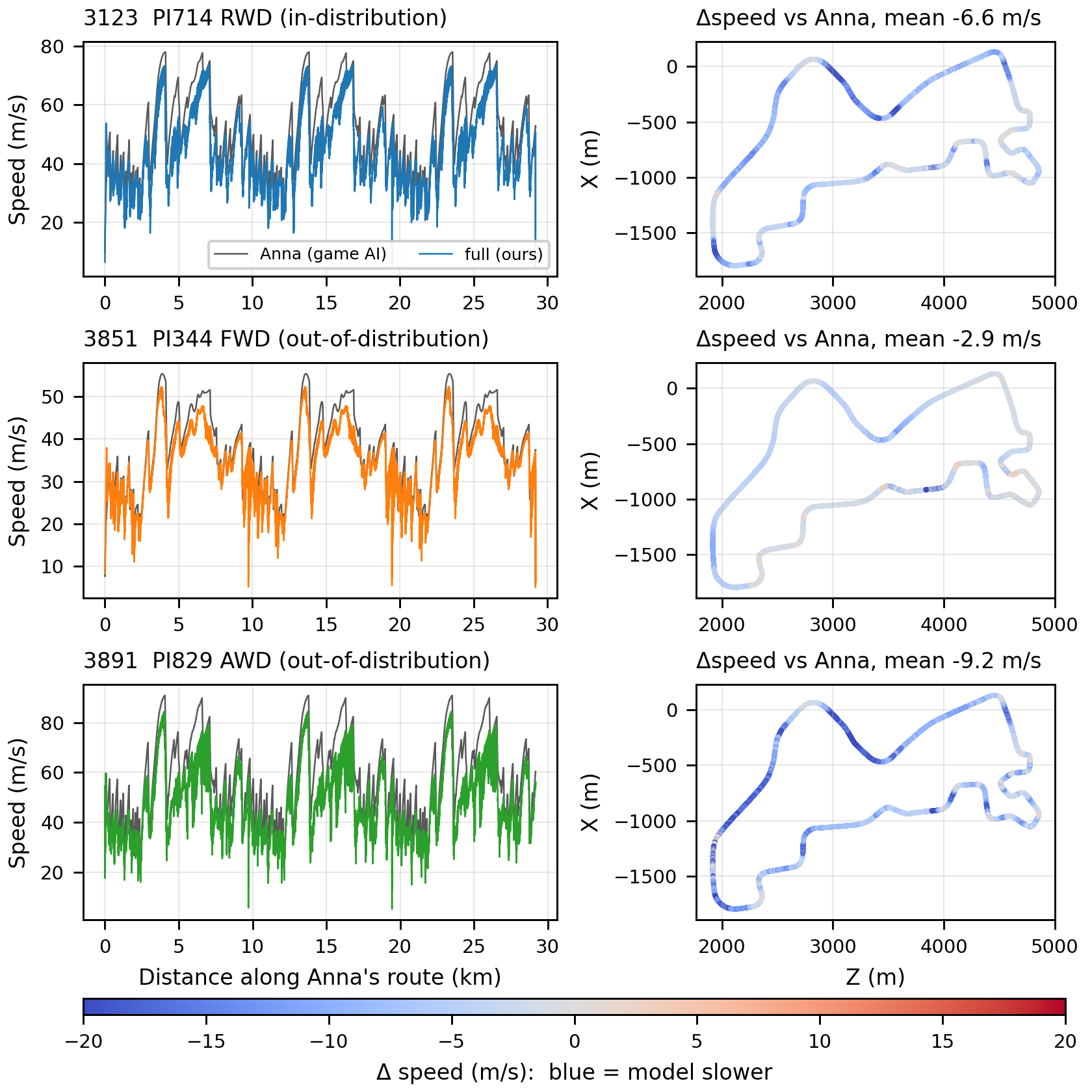
Same weights, same actuator calibration, matched ~29 km full courses, cropped to mutually covered segments.
| Car | PI | Drivetrain | Anna (m/s) | Model (m/s) | Speed ratio |
|---|---|---|---|---|---|
| 3123 (in training) | 714 | RWD | 47.2 | 41.1 | 87 % |
| 3851 (OOD) | 344 | FWD | 35.3 | 32.6 | 92 % |
| 3891 (OOD) | 829 | AWD (unseen) | 52.2 | 43.6 | 84 % |
Binned by forward curvature, the weakest regime is straights (83–89 %), not corners (94–103 % at R ≈ 100 m). This is existence evidence for transfer, not a scaling trend: n = 3 cars, one paired run each, no error bars.
Ablations: what the interface buys
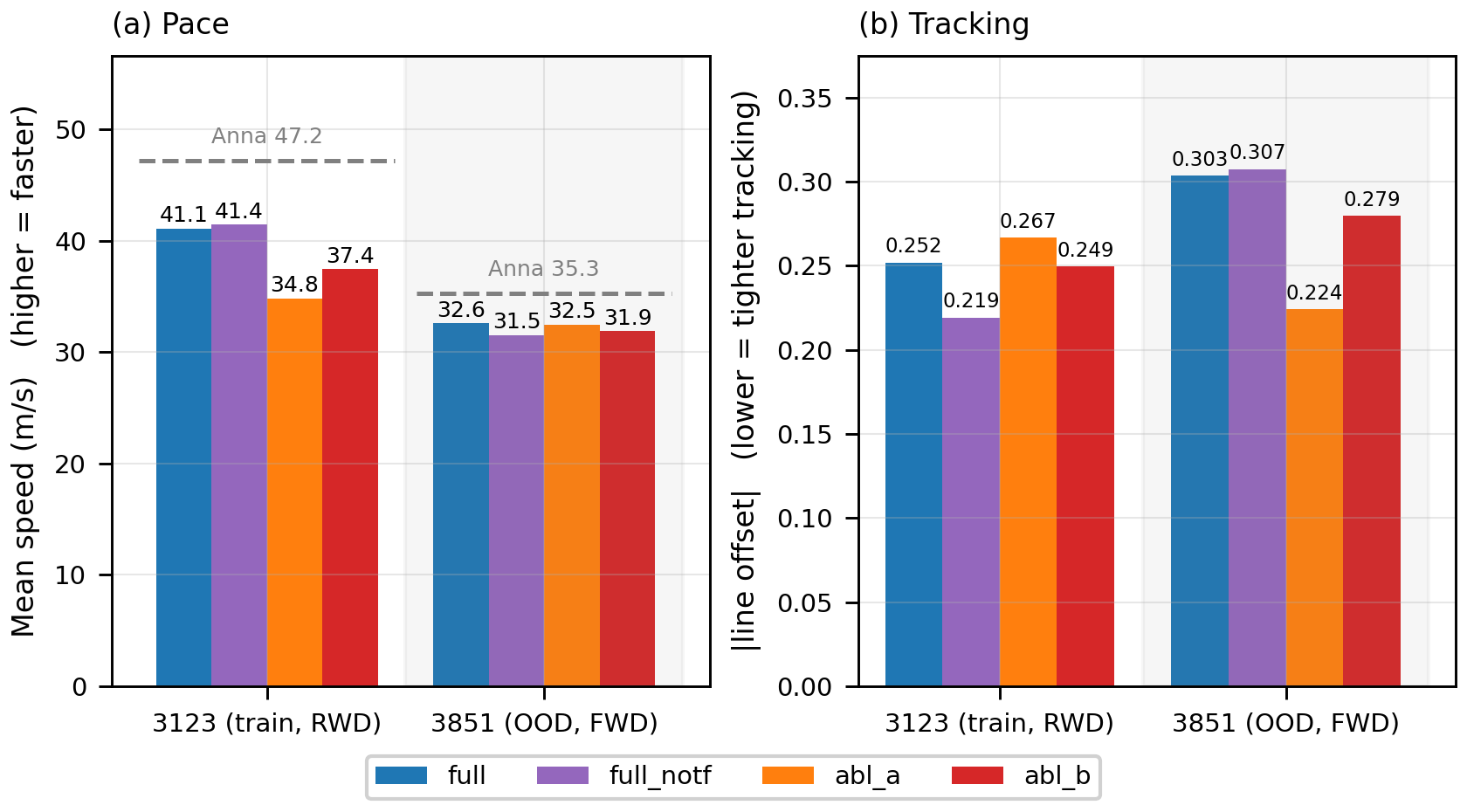
Four variants share seed, code and data; only the control interface differs. full = geometry-fed (deployed), abl_a/abl_b = feature-fed (ctrl reads fc1 features instead).
Completion — judged by a human observer:
| Car | full |
full_notf |
abl_a |
abl_b |
|---|---|---|---|---|
| 3123 PI 714 RWD (training) | ✓ | ✓ | ✓ | ✓ |
| 3851 PI 344 FWD | ✓ | needs intervention | needs intervention | needs intervention |
| 3891 PI 829 AWD | ✓ | ✓ | ✘ fails at first corner | ✘ fails at first corner |
Removing the racing-line HUD — each variant is its own control, common 12.8 s window:
| Variant | HUD on | HUD off | Loss | Predicted road reach |
|---|---|---|---|---|
full |
29.7 m/s | 27.1 m/s | −9 % | 77.1 → 69.7 m |
abl_a |
30.2 m/s | 5.4 m/s | −82 % | 79.5 → 75.1 m |
abl_b |
31.3 m/s | 3.3 m/s | −89 % | 20.5 → 13.1 m |
abl_a's perception of the road ahead survives intact while its driving collapses by 82 %. It is not drifting to a halt for lack of input — it brakes on 27 % of frames against 16 % for full. Removing the HUD does not leave that controller without a signal; it leaves it with a signal it reads as a reason to slow down.
[!WARNING]
Counter-evidence, stated plainly. The interface does not win on tracking: out of distributionabl_atracks the racing line more tightly (|line| 0.224 vs. 0.303) and still fails; in distributionabl_bstays closer to Anna's driven path (0.57 m vs. 0.94 m) and still drives 3.7 m/s slower. Every axis on which the interface wins is a closed-loop failure or a pace axis; every axis on which it loses is an in-distribution path metric.
Is the learned control head load-bearing? Replacing ctrl with a parameter-free controller on the same predictions splits cleanly: profile-tracking throttle drives the full 29 km (at 29.6 m/s vs. 41.1 — so ctrl's throttle is a pace refinement over an already-drivable profile), but fixed-gain pure pursuit steers off the road at corner 3 with steering headroom it never used. ctrl's steering does something a fixed-parameter geometric tracker cannot.
Full derivations, the steering-unit alignment (steer_map), the rejected hypotheses, and the offline calibration appendices are in the technical report.
<a id="layout"></a>
📁 Repository layout
scripts/
  drive.py        real-time closed loop: capture + telemetry -> ctrl head -> virtual gamepad
  model.py        DrivingNet: ResNet-18 backbone, geometry heads, detached ctrl head
  train.py        training script (reference; needs the recording dataset, not shipped)
  ui/
    dashboard.html  live browser dashboard (steering, pedals, slip, waypoint profile)
data/
  models/
    model_30.pt      released checkpoint (v18.3, "full")
    meta.json        input sizes, head layout, arc lengths, normalisation divisors
  steer_calibration.json  inverts the game's dead zone and steering response curve
  steer_map.json          Anna <-> human gamepad steering-unit conversion rho(v)
  overlay_cam.json        overlay camera pose (height/back/pitch/FOV)
docs/
  *.pdf           technical report
  figures/        figures used above
<a id="requirements"></a>
🪜 Requirements
Hardware / OS
- Windows 10/11.
drive.pyuses the Windows Graphics Capture API and Win32 window handles; it is Windows-only. - A CUDA GPU is strongly recommended. The loop runs at 30 Hz and falls back to CPU automatically, which is usually too slow to drive.
- Forza Horizon 6 installed and running on the same machine.
1. ViGEmBus driver (required)
The agent acts through a virtual Xbox 360 gamepad. Without the driver, drive.py exits with 虚拟手柄失败 / 请安装 ViGEmBus.
- Download the latest
ViGEmBus_Setup_x64.msifrom the ViGEmBus releases page. - Run the installer and reboot.
2. Clone and install Python packages
git clone https://github.com/Ayin1412/ForzaHorizon6-VisionAI.gitPython 3.10+ is fine (developed on 3.12). Install PyTorch with the CUDA build matching your driver:
pip install torch torchvision --index-url https://download.pytorch.org/whl/cu124Then the rest:
pip install -r requirements.txtOrder matters — install PyTorch from the CUDA index first, or pip resolves torch to the CPU-only wheel and the 30 Hz loop will not keep up.
3. Run the terminal as Administrator
keyboard installs a global low-level hook (the F9 hotkey) and the virtual pad must reach a foreground game window. If the game is elevated and your shell is not, F9 will appear to do nothing.
<a id="game-setup"></a>
🎮 Game setup
Video settings
The capture path resizes whatever it grabs to 320×180, but the window must stay grabbable and the aspect ratio must match training.
| Setting | Value | Why |
|---|---|---|
| Resolution | 1280 × 720 | 16:9, matches the training capture; low enough to keep 30 Hz capture cheap |
| Display mode | Windowed (or borderless windowed) — fullscreen off | Exclusive fullscreen breaks per-window capture and steals focus from the overlay |
| V-Sync / frame cap | ~60 fps | The control loop samples a 3-frame stack 0.1 s apart; wildly variable frame times distort the motion cue |
The window title must contain the string passed to --window-name (default Forza Horizon).
Telemetry — "Data Out"
Settings → HUD and Gameplay → Data Out:
| Field | Value |
|---|---|
| Data Out | ON |
| IP address | 127.0.0.1 |
| Port | 5606 |
drive.py binds UDP 0.0.0.0:5606 and expects the Forza Horizon "Sled + Dash" packet layout. It reads speed, longitudinal acceleration, tyre slip, RPM/gear, the expert's own inputs, and NormalizedDrivingLine. If the packet size does not match, packets are silently dropped and the car will not move — check the port first.
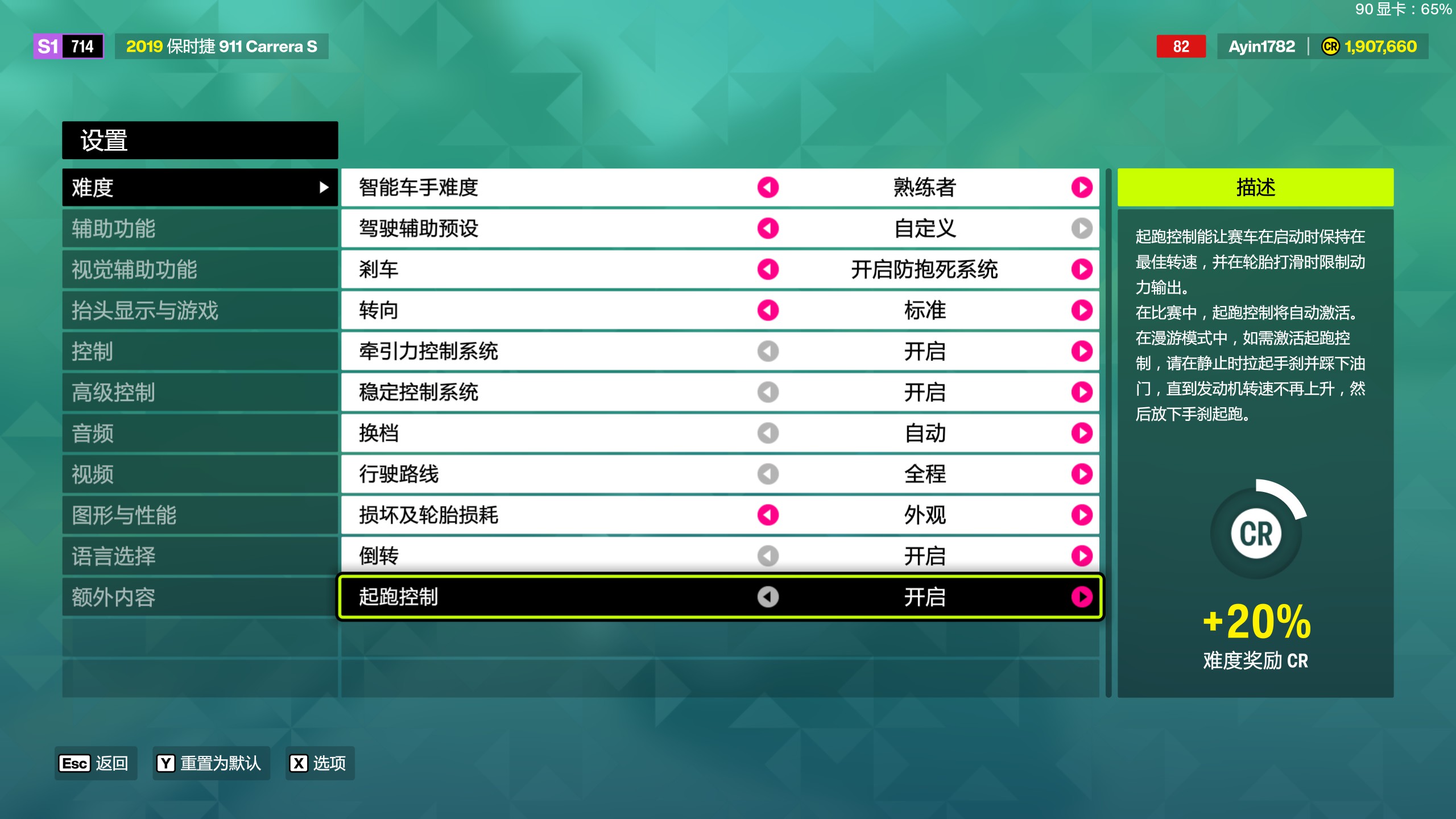
Difficulty and assists
| Setting | Value |
|---|---|
| Drivatar difficulty | Highly Skilled |
| Driving assists preset | Custom |
| Braking | ABS on |
| Steering | Standard |
| Traction control (TCS) | On |
| Stability control (STM) | On |
| Shifting | Automatic |
| Driving line | Full |
| Damage & tyre wear | Cosmetic |
| Rewind | On |
| Launch control | On |
[!IMPORTANT]
Two of these are not cosmetic. Shifting must be Automatic — the agent commands steering and throttle/brake only, and has no gear output. Driving line = Full is the condition the released model was trained and evaluated under; you can switch it off, andfullkeeps driving (that is §5.4 of the report), but it costs ~9 % of pace.
Advanced controls — deadzones
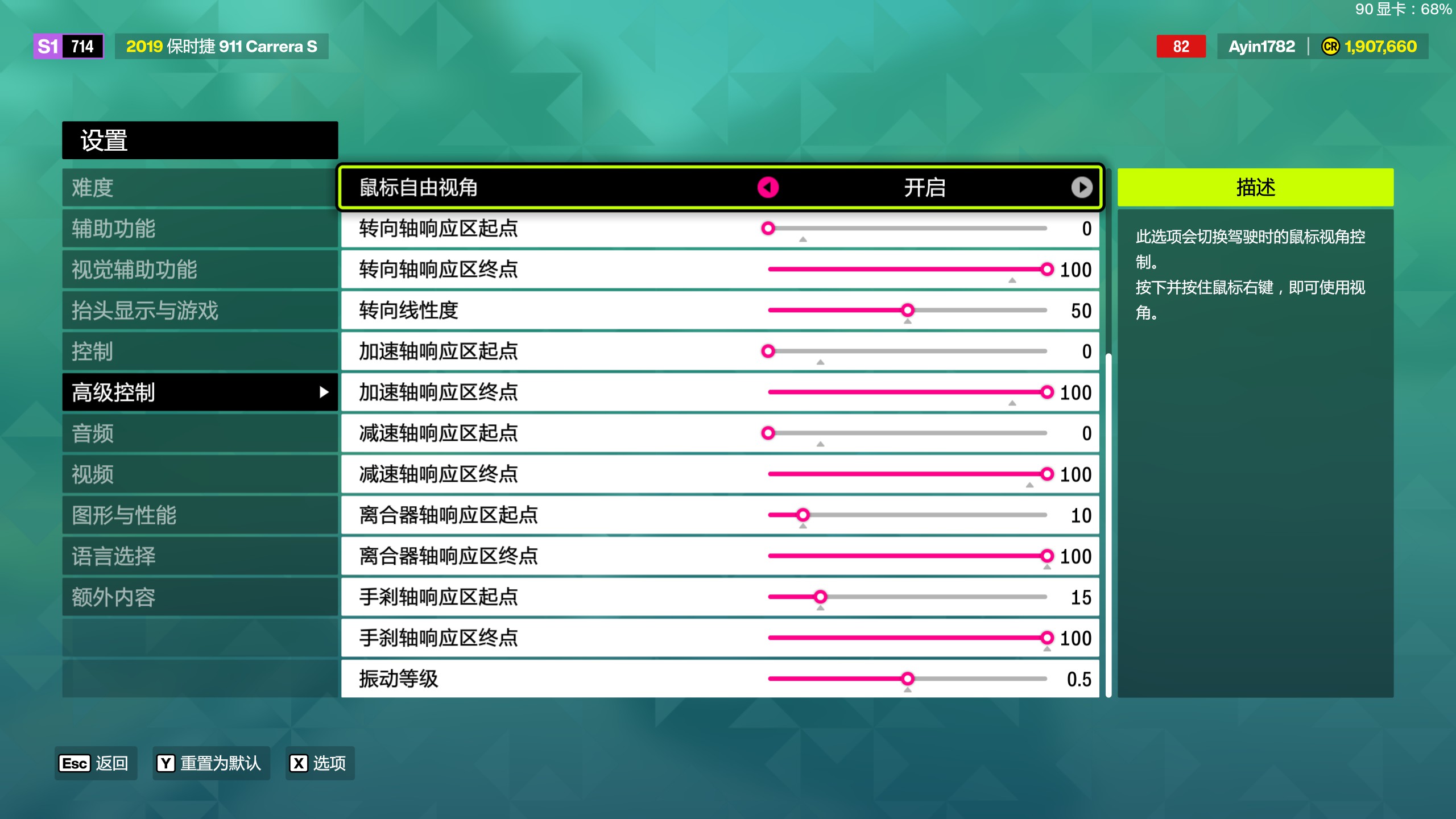
data/steer_calibration.json inverts the game's steering response curve, so it is only valid for the axis settings it was measured under. Match these exactly:
| Axis | Inside dead zone | Outside dead zone |
|---|---|---|
| Steering | 0 | 100 |
| Acceleration | 0 | 100 |
| Deceleration | 0 | 100 |
| Clutch | 10 | 100 |
| Handbrake | 15 | 100 |
Steering linearity 50, vibration scale 0.5.
If you change these, the calibration no longer describes the game and steering will be systematically under- or over-commanded; delete --steer-calib (the model then drives on raw ctrl output) or re-measure.
<a id="running"></a>
🚀 Running the agent
Start the game, load into free roam or a race, then from scripts/:
python drive.py --model-dir ../data/models --broadcast --overlayExpected startup output: the checkpoint path, 设备: cuda, the steering calibration path, the dashboard URL, and 遥测: UDP 0.0.0.0:5606.
Then:
- Get in a car and make sure the race/drive is live (
IsRaceOn; the model does not act while paused or in a menu). - Focus the game window.
- Press F9 to hand over control. Press F9 again to take it back — the pad is reset to neutral on release.
- Ctrl+C in the terminal to exit; the pad is always reset on the way out.
[!TIP]
Before F9, the loop still runs in[观察](observation) mode: it infers, prints, and drives the overlay and dashboard, but sends nothing to the pad. This is the right way to sanity-check a setup.
⌨️ Hotkeys
| Key | Action |
|---|---|
| F9 | Toggle AI control on/off (--toggle-key) |
| F2 / F3 | Overlay camera pitch −0.5° / +0.5° |
| F4 / F5 | Overlay camera height −0.3 m / +0.3 m |
| F6 / F7 | Overlay camera FOV −2° / +2° |
| F8 | Save overlay camera pose to data/overlay_cam.json |
| Ctrl+C | Quit |
The F2–F8 keys only apply with --overlay. The overlay draws the predicted waypoint chain onto the game window — it is a projection of the model's own output using a hand-set camera pose, so align it once with F2–F7 and save with F8.
📈 Live dashboard
With --broadcast, open http://127.0.0.1:8777/. It streams over SSE at the control rate and shows commanded vs. actual steering, throttle/brake command against the game's own pedal channels, per-wheel slip (predicted vs. telemetry), and the predicted waypoint chain with its speed profile.
⚙️ Command-line options
| Flag | Default | Meaning |
|---|---|---|
--window-name |
Forza Horizon |
Substring of the game window title |
--model-dir |
../data/models |
Directory holding meta.json and model_*.pt |
--model-file |
(highest N) | Pick a specific checkpoint |
--telemetry-ip / --telemetry-port |
0.0.0.0 / 5606 |
UDP bind for Data Out |
--control-hz |
30 |
Control loop rate |
--toggle-key |
f9 |
Takeover hotkey |
--steer-calib |
../data/steer_calibration.json |
Response-curve inversion; skipped if missing |
--overlay |
off | Draw the predicted trajectory on the game window |
--broadcast / --broadcast-port |
off / 8777 |
Serve the live dashboard |
--min-brake-speed |
3.0 |
Below this speed, suppress braking (prevents stalling at rest) |
--slow-brake-speed |
25.0 |
Below this speed, apply the low-speed throttle/brake shaping |
--slow-accel-scale / --slow-brake-gain |
0.9 / 1.1 |
Low-speed accel damping / brake boost |
🔧 Troubleshooting
| Symptom | Cause |
|---|---|
虚拟手柄失败 on startup |
ViGEmBus not installed, or no reboot after install |
| F9 prints nothing | Terminal not running as Administrator |
Speed stays 0, no [观察] lines |
Data Out off, wrong port, or a non-matching packet layout |
| Car twitches or under-steers constantly | Deadzone/linearity settings do not match steer_calibration.json |
| Capture never starts | Game in exclusive fullscreen, or window title does not contain --window-name |
| Overlay path floats above/below the road | Camera pose off — adjust with F2–F7, save with F8 |
<a id="training"></a>
🔬 Training
Dataset
The training pool — 842,592 cleaned frames from 33 recording sessions, 69.4 % Anna and 30.6 % human — is hosted on ModelScope and available on request:
modelscope.cn/datasets/yuyuggg/ForzaHorizon6
Apply through ModelScope; access is granted per requester. The dataset is subject to the same terms as the rest of the non-code artifacts in this repository (CC BY-NC 4.0) and depicts copyrighted game imagery — see License and attribution before using it.
Running the training script
python train.py --dataset-dir ../data/dataset --out-dir ../data/models/run --epochs 30 --batch-size 32train.py expects index.csv + images/ laid out as in the ModelScope release, plus the session registry at the top of the script, which tags each recording with its driver (Anna vs. human) and a path-quality flag. Sessions not present in that registry are rejected rather than silently mixed in, so if you add your own recordings you must register them first.
The recorder used to produce the sessions is not part of this release.
Released checkpoint
data/models/model_30.pt (v18.3, variant full): Adam at 1e-4 with ReduceLROnPlateau (factor 0.5, patience 3), batch 128, 30 epochs, seed 42, per-head weighted L1, teacher forcing 0.5, frames resampled to over-weight cornering, braking, low-speed and off-line frames. The validation split is the final 15 % of each recording with a 2 % temporal gap before it.
<a id="limitations"></a>
⚠️ Limitations
The report states twelve; these are the ones that should shape expectations before you run anything.
- The agent is below expert pace throughout — training is pure behavioural cloning, with no DAgger and no RL fine-tuning.
- Every variant is a single run of a single seed. No repeats, no error bars, no seed sweep. The safe claims are the ones where the difference is a completion failure or a several-m/s pace gap, not a third decimal place of |line|.
- Cross-vehicle evidence rests on n = 3 cars, one paired run each; about three quarters of each evaluation course is road that appears in the training sessions, so these runs test transfer across vehicles, not across routes.
- No literal PilotNet variant was trained — the feature-fed ablations isolate the interface while holding the representation's training signal fixed, so classical end-to-end BC is not measured head-on.
- Completion is a human observer's judgement, not an automatic criterion.
- The far-horizon speed profile under-expresses both braking and acceleration (47–70 % of labelled deceleration), which is consistent with the pace loss observed on straights.
- Results are specific to this game and these tracks. There is no real vehicle and no standard driving benchmark.
<a id="cite"></a>
📖 Cite as
If you use this work, please cite the technical report. A machine-readable CITATION.cff is included, so GitHub's "Cite this repository" button will also produce these entries.
Plain text
Li, W. (2026). Seeing Is Not Driving: Geometry as a Control Interface in a High-Speed Racing Game [Technical report]. https://github.com/Ayin1412/ForzaHorizon6-VisionAI
BibTeX — the report
@techreport{li2026seeing,
  author      = {Li, Wenhao},
  title       = {Seeing Is Not Driving: Geometry as a Control Interface
                 in a High-Speed Racing Game},
  institution = {Independent research},
  year        = {2026},
  month       = {7},
  url         = {https://github.com/Ayin1412/ForzaHorizon6-VisionAI}
}
BibTeX — the software and released weights
@software{li2026fh6visionai,
  author  = {Li, Wenhao},
  title   = {{FH6 VisionAI}: Geometry as a Control Interface
             in a High-Speed Racing Game},
  version = {v18.3},
  year    = {2026},
  url     = {https://github.com/Ayin1412/ForzaHorizon6-VisionAI},
  license = {Apache-2.0}
}
Related work the design leans on: PilotNet (Bojarski et al., 2016), DeepDriving (Chen et al., 2015), Learning by Cheating (Chen et al., 2019), Causal Confusion in Imitation Learning (de Haan et al., 2019), GT Sophy (Wurman et al., 2022). Full references are in the report.
<a id="license"></a>
📜 License and attribution
| What | License |
|---|---|
Source code — scripts/, including scripts/ui/ |
Apache License 2.0 |
Model weights, calibration data, report and figures — data/models/, data/*.json, docs/ |
CC BY-NC 4.0 |
| Everything the game itself renders | © Microsoft Corporation and its licensors — not licensed by this repository |
The split is deliberate. The code is permissive so the architecture and the closed-loop driver can be reused freely. The weights, calibration files and figures are derived from recordings of a commercial game, so they are released for research, education and personal use only; commercial use is not granted here and would require permission from the rights holders below. Full terms are in NOTICE.
Forza Horizon 6 copyright and trademarks
Forza Horizon 6 is the exclusive property of its developer and publisher. The game was developed by Playground Games and published by Xbox Game Studios; Forza, Forza Horizon and Xbox are trademarks of the Microsoft group of companies. The game engine, telemetry protocol, user interface, physics, vehicle models — and the marks and designs of the vehicle manufacturers licensed into it — are owned by Microsoft Corporation and its licensors.
Every screenshot, captured frame and recorded clip in this repository — including all game imagery in docs/figures/, the demonstration GIF, and every frame the released model was trained on — depicts that copyrighted material. It appears here solely for academic illustration, commentary and identification, and its inclusion transfers no rights. The CC BY-NC 4.0 grant above covers only the author's own contribution — the annotations, overlays, analysis and layout — never the underlying game imagery.
This project is unofficial and independent. It is not affiliated with, authorised by, endorsed by, sponsored by or connected to Microsoft Corporation, Xbox Game Studios or Playground Games. No trademark rights are granted by the Apache License or by anything in this repository. No game code, assets, save data or reverse-engineered binaries are distributed here — drive.py reads only the game's own user-enabled "Data Out" telemetry broadcast and pixels from a window you are already allowed to see.
Your responsibility
Use this with a legally obtained copy of the game, and comply with its EULA and Terms of Service. Automated input may not be permitted in online or competitive modes; every result reported above was produced in single-player. The software is provided as is, without warranty of any kind.