

README
<h4 align="center">
Amazon Q CLI brings IDE-style autocomplete and agentic capabilities to your terminal.
</h4>


😍 Features
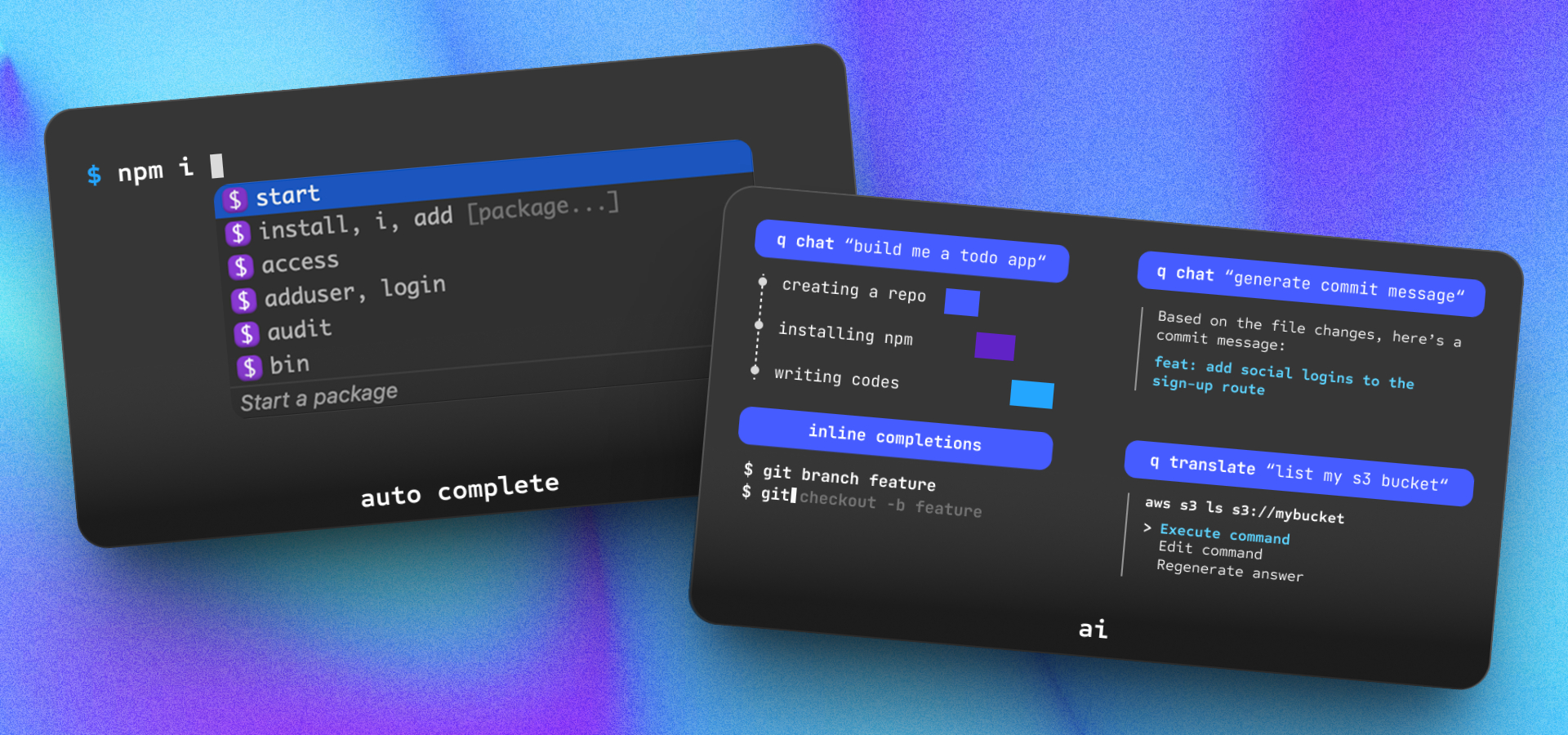
- 🔮 Auto Completion: IDE-style completions to hundreds of popular CLIs like
git,npm,docker, andaws. - 💬 Natural Language Chat: Interact with your terminal using natural language to ask questions, debug issues, or explore the codebase.
- 🧠 Contextual Awareness: Integrates context from your local development environment, so answers are tailored to your specific code and setup.
- 🤖 Agentic Execution: Let Amazon Q take action: generate code, edit files, automate Git workflows, resolve merge conflicts, and more — with your permission.
⚡️ Installation
- macOS:
- DMG: Download now
- Homebrew:
brew install amazon-q
- Linux:
- Windows:
- Follow the discussions for
Windows - Or use it on Windows with WSL
- Follow the discussions for
- Remote machines
🚀 Start Contributing
Prerequisites
- MacOS
- Xcode 13 or later
- Brew
1. Clone repo
git clone https://github.com/aws/amazon-q-developer-cli-autocomplete.git2. Setup
Hassle-free setup:
npm run setupOr if you'd like to DIY:
<details>
<summary>Manual Setup</summary>
</details>
3. Start Local Development
To compile and view changes made to q chat:
cargo run --bin q_cliIf you are working on other q commands, just append
-- <command name>. For example, to runq login, you can runcargo run --bin q_cli -- login
To run tests for the Q CLI crate:
cargo test -p q_cliTo format Rust files:
cargo +nightly fmtTo run clippy:
cargo clippy --locked --workspace --color always -- -D warnings💡 Quick Tip for Onboarding
Use Q CLI to help you onboard Q CLI!
Start a q chat session:
q chatOnce inside q chat, you can supply project context by adding the codebase-summary.md file:
/context add codebase-summary.mdThis enables Q to answer onboarding questions like:
-
“What does this crate do?”
-
“Where is X implemented?”
-
“How do these components interact?”
Great for speeding up your ramp-up and navigating the repo more effectively.
🏗️ Project Layout
Several projects live here:
autocomplete- The autocomplete react appdashboard- The dashboard react appfigterm- figterm, our headless terminal/pseudoterminal that
intercepts the user’s terminal edit buffer.q_cli- theqCLI, allows users to interface with Amazon Q Developer from
the command linefig_desktop- the Rust desktop app, uses
tao/wry
for windowing/webviewsfig_input_method- The input method used to get cursor
position on macOSvscode- Contains the VSCode plugin needed
for the Amazon Q Developer for command line to work in VSCodejetbrains- Contains the VSCode plugin
needed for the Amazon Q Developer for command line to work in Jetbrains IDEs
Other folder to be aware of
build-scripts/- Contains all python scripts to build,
sign, and test the project on macOS and Linuxcrates/- Contains all internal rust cratespackages/- Contains all internal npm packagesproto/-
protocol buffer message
specification for inter-process communicationtests/- Contain integration tests for the projects
Below is a high level architecture of how the different components of the app and
their IPC:

🛡️ Security
See CONTRIBUTING for more information.
📜 Licensing
This repo is dual licensed under MIT and Apache 2.0 licenses.
“Amazon Web Services” and all related marks, including logos, graphic designs, and service names, are trademarks or trade dress of AWS in the U.S. and other countries. AWS’s trademarks and trade dress may not be used in connection with any product or service that is not AWS’s, in any manner that is likely to cause confusion among customers, or in any manner that disparages or discredits AWS.
😍 Features
4
⚡️ Installation
7
Prerequisites
1
-
MacOS Xcode 13 or later Brew
1. Clone repo
1
-
git clone https://github.com/aws/amazon-q-developer-cli-autocomplete.git
2. Setup
1
-
Hassle-free setup:
3. Start Local Development
1
-
To compile and view changes made to q chat :
💡 Quick Tip for Onboarding
1
-
Use Q CLI to help you onboard Q CLI!
🏗️ Project Layout
11
-
Several projects live here:
🛡️ Security
1
📜 Licensing
1
-
This repo is dual licensed under MIT and Apache 2.0 licenses.