

Repository
FrankSherlock
Intelligent File Searcher that can search for descriptions in media files like photos, for example
README
Frank Sherlock
Local-only, AI-powered image cataloging and search for your NAS. Point it at a directory, and it classifies every image using a local vision LLM, extracts text via OCR, generates thumbnails, and indexes everything into a searchable SQLite database. Nothing leaves your machine.
What it does
- Scans image, PDF, and video directories read-only (JPEG, PNG, GIF, BMP, WebP, TIFF, PDF, MP4, MKV, AVI, MOV, WebM, and more)
- Classifies each image with a local Ollama vision model selected for your hardware (media type, description, anime/manga identification, document detection)
- Extracts text via Surya OCR (with vision LLM fallback) for documents, receipts, screenshots
- Generates 300px JPEG thumbnails for fast browsing (PDF 2-page montage)
- Full-text search with SQLite FTS5
- Finds duplicate files -- exact matches by content fingerprint, near-duplicates by perceptual hash (dHash) + description similarity
- Detects and recognizes faces using native ONNX models (SCRFD + ArcFace) -- clusters faces into people, lets you name and merge them, and search by
face:name - Detects renamed/moved files by fingerprint, so they don't get re-classified
- Resumes interrupted scans from the last checkpoint
- Live discovery progress during file walks on large directories
- Browse subdirectories via a collapsible tree in the sidebar
- "Refresh Metadata" rescans without Ollama (thumbnails only, no LLM)
Screenshot
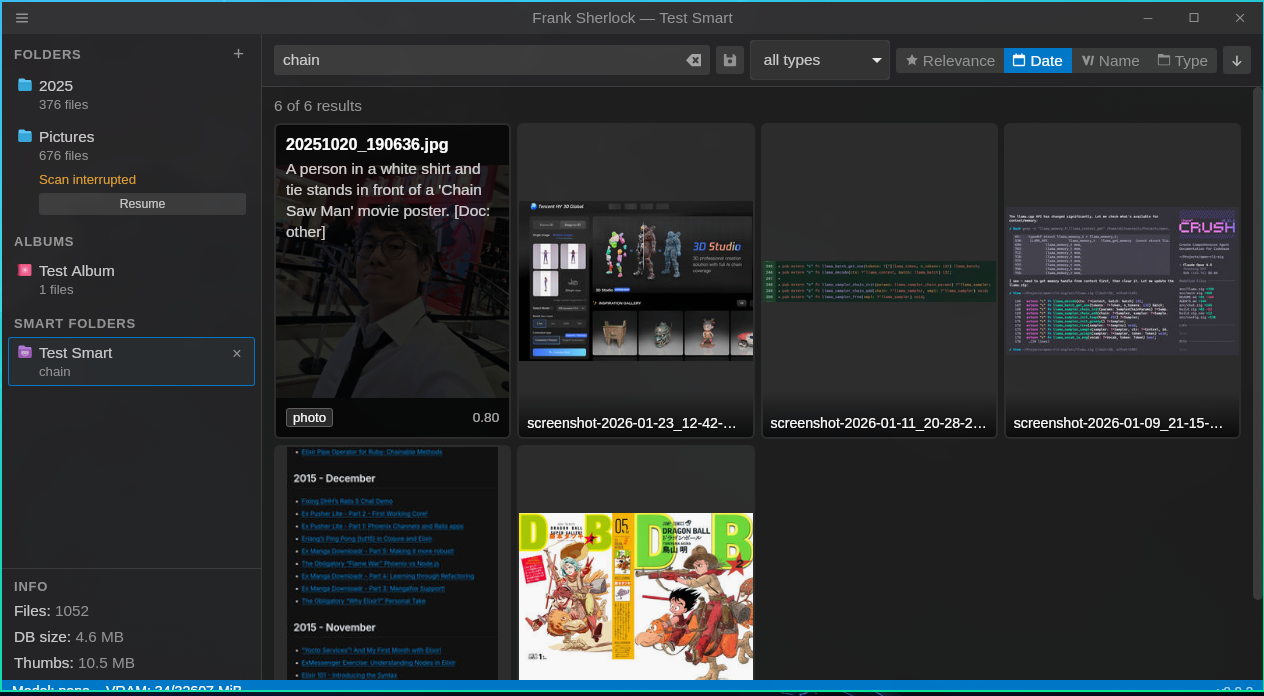
The UI is loosely inspired by VSCode: custom titlebar, collapsible sidebar, thumbnail grid, media type filters, confidence slider, preview overlay, duplicate finder, and automatic light/dark theme.
Installing from pre-built binaries
Download the latest release from the Releases page: AppImage for Linux, DMG for macOS (Apple Silicon), MSI for Windows.
You also need Ollama installed and running (ollama serve). On first launch, the app prompts you to download the vision model if it isn't installed yet.
Windows: SmartScreen warning
The MSI installer is not signed with a code-signing certificate. Windows SmartScreen may block it with a "Windows protected your PC" warning. Click "More info" and then "Run anyway" to proceed with installation.
Requirements (for building from source)
- Linux, macOS, or Windows
- Ollama installed and running (
ollama serve) - NVIDIA GPU recommended on Linux/Windows (RTX series works well with qwen2.5vl:7b); Apple Silicon works natively on macOS
- Node.js 20+
- Rust 1.77+
Ollama model override
Frank Sherlock creates this commented runtime settings file on first startup:
- Linux:
~/.config/frank_sherlock/settings.toml - macOS:
~/Library/Application Support/frank_sherlock/settings.toml - Windows:
%APPDATA%\frank_sherlock\settings.toml
By default the app chooses a vision model from detected hardware. To force a smaller or alternate model, edit the file and restart the app:
model_override = "qwen2.5vl:3b"When model_override is set, setup requires that exact Ollama model. If it is missing, the first-run setup dialog offers to download it with Ollama before scans can start. The first classification request loads the model on demand, and the app unloads Ollama models after scans finish.
Recommended override values:
qwen2.5vl:3b: faster and safer for low VRAM, Windows NVIDIA <= 8GB, or CPU fallback.qwen2.5vl:7b: better quality when Ollama can load it fully on GPU.qwen2.5vl:32b: heavy; only realistic for large unified-memory systems.
Experimental alternatives such as minicpm-v:8b or moondream may work if installed in Ollama, but the prompts are tuned for qwen2.5vl.
Building from source
# 1. Download native libraries for your platform
cd sherlock/desktop/src-tauri
bash scripts/download-pdfium.sh
bash scripts/download-onnxruntime.sh

# 2. Install frontend dependencies
cd sherlock/desktop
npm install

# 3. Start Ollama (in a separate terminal)
ollama serve

# 4. Run in dev mode
npm run tauri:dev
To produce a release binary (AppImage/DMG/MSI):
cd sherlock/desktop
npm run tauri:build
Output will be in sherlock/desktop/src-tauri/target/release/bundle/.
Wayland/NVIDIA workaround
If the WebKit window is blank on Wayland with NVIDIA drivers:
WEBKIT_DISABLE_DMABUF_RENDERER=1 GDK_BACKEND=wayland,x11 npm run tauri:devTests
# Rust (322 tests)
cd sherlock/desktop/src-tauri
cargo test

# Frontend (299 tests)
cd sherlock/desktop
npm run test
Covers classification JSON parsing, thumbnail generation, incremental scanning, database operations, scan cancellation, query parsing, duplicate detection, similarity scoring, video metadata, face detection/clustering, platform abstraction, and UI components.
How it works
Incremental scanning
Built for large NAS directories with 100k+ files:
- Discovery -- walks the directory tree using only filesystem metadata (mtime, size) with zero file reads. WalkDir metadata is reused to skip redundant stat syscalls. Child root subtrees are skipped early via
filter_entry(). Progress is reported live to the UI every 500 files. - Thumbnailing -- new and modified files are fingerprinted, thumbnailed, and inserted into the DB with minimal records (confidence=0). Moved files are detected by fingerprint and just update their path reference. Unchanged file markers are flushed in batch before thumbnailing starts. Files appear in the grid immediately.
- Classifying -- unclassified files are sent to Ollama for LLM classification and their records are updated with rich metadata. This phase can be skipped entirely via "Refresh Metadata" for fast, Ollama-free rescans.
- Cleanup -- files no longer on disk are soft-deleted, and their cached thumbnails are removed.
Each phase supports cancel and resume independently, with progress checkpointed after every file.
Rescanning an unchanged 10k-image directory takes seconds.
Duplicate detection
Find and remove redundant copies to reclaim disk space:
- Exact duplicates -- groups files with identical SHA-256 fingerprints. A keeper heuristic picks the oldest file with the shortest path.
- Near-duplicates -- perceptual similarity using dHash (difference hash) computed during thumbnail generation, combined with Jaccard word overlap on LLM descriptions (85% visual + 15% textual). Uses Union-Find for transitive grouping.
- Group comparison -- side-by-side preview of all files in a duplicate group with per-file metadata.
- 3-tier confidence coloring -- green (exact, safe to delete), yellow (near >= 85%), red (lower, needs visual check).
Face detection and recognition
Find and organize people across your photo library:
- Detection -- SCRFD (ONNX) finds faces with bounding boxes and 5-point keypoints. Models are downloaded automatically on first use from the InsightFace buffalo_l pack.
- Recognition -- ArcFace produces 512-dimensional embeddings for each detected face, enabling identity-aware comparison.
- Clustering -- cosine similarity (threshold 0.45) groups faces into people. New faces are assigned to existing clusters or start new ones.
- Management -- name people, merge duplicates, remove false detections. FacesView shows all people with representative face crops.
- Search --
face:alice,face:"Full Name", orface:42(by person ID) to find all photos of someone.
Face detection runs per-folder from the context menu and shows progress in the status bar.
Classification pipeline
Each new image goes through several stages:
- Primary classification -- 3-attempt strategy with progressive fallback prompts and regex salvage for malformed JSON
- Anime enrichment -- conditional on media type; identifies series, characters, and canonical names
- OCR -- Surya OCR (isolated Python venv) with vision LLM fallback; runs for documents, screenshots, and text-containing images
- Document extraction -- regex + LLM extraction of dates, amounts, transaction IDs from OCR text
Search
Full-text search across filenames, paths, descriptions, OCR text, and character/series names. Example queries:
anime ranmabank transfer 2024receipt santanderscreenshot confidence >= 0.8face:aliceorface:"Full Name"
Project structure
sherlock/                  <- Main application
  desktop/
    src-tauri/src/         <- Rust backend
      classify.rs          <- Ollama vision + Surya OCR pipeline
      thumbnail.rs         <- Thumbnail generation + dHash computation
      scan.rs              <- Incremental scanner (4-phase) with cancellation + resume
      db.rs                <- SQLite + FTS5 + duplicate queries
      similarity.rs        <- dHash + description similarity + Union-Find grouping
      face.rs              <- Native ONNX face detection (SCRFD) + recognition (ArcFace)
      pdf.rs               <- PDFium text extraction + page rendering
      video.rs             <- ffmpeg metadata, keyframe extraction, subtitle parsing
      video_server.rs      <- Localhost HTTP Range streaming for video preview
      config.rs            <- App paths
      lib.rs               <- Tauri commands, auto-cleanup
      query_parser.rs      <- NL query parsing
      runtime.rs           <- Ollama/GPU status
      platform/            <- OS abstraction (clipboard, GPU, Python paths)
    scripts/
      surya_ocr.py         <- Isolated OCR script (bundled as Tauri resource)
    src/                   <- React frontend
      utils.ts             <- Shared utilities (basename, errorMessage)
      __tests__/fixtures.ts <- Shared test mock objects
_classification/           <- Python PoC of the classification pipeline
Research and prototyping (historical)
These directories contain the A/B testing research that informed model selection and pipeline design. They aren't part of the main application.
_research_ab_test/
  scripts/                 <- A/B benchmark scripts
  docs/                    <- Research notes (IDEA.md, RESULTS.md, etc.)
  lib/                     <- Shared Python helpers
  results/                 <- Generated benchmark outputs (gitignored)
  test_files/              <- Test corpus (gitignored, see note below)
Note: The test files (images, audio, video, documents) used for benchmarking are not included. They contained copyrighted media and personal documents. To re-run the benchmarks:
- Add your own media files in
_research_ab_test/test_files/with subdirectories likeimages/,old_audio/,old_docs/,old_tvseries/- Update the ground truth JSON files in
_research_ab_test/docs/to match your corpus- Adjust the benchmark scripts as needed
The benchmark results (_research_ab_test/docs/RESULTS.md) show why qwen2.5vl:7b was chosen over llava:13b and minicpm-v:8b (80% type accuracy vs 33-50%), and why Surya was picked as primary OCR (95% reference similarity, better coverage than vision LLM alone).
Data storage
All application data lives under ~/.local/share/frank_sherlock/:
db/index.sqlite            <- SQLite database with FTS5
cache/thumbnails/          <- Generated thumbnails (mirrored path structure)
cache/classifications/     <- Classification cache
cache/tmp/                 <- Temporary files (GIF frames, etc.)
surya_venv/                <- Isolated Python venv for Surya OCR
Source directories are never modified. Frank Sherlock is strictly read-only.
CI
GitHub Actions runs on every push and PR against main:
- Platforms: Ubuntu 22.04, macOS (latest), Windows (latest)
- Checks:
cargo test,cargo clippy,cargo fmt --check,npm run build,npm run test,cargo audit(Linux only)
Releases are built on v* tags for Linux (AppImage), macOS (Apple Silicon DMG), and Windows (MSI).
License
This project is licensed under the GNU General Public License v3.0.