

README
Purpose
The purpose of this project is to provide a dev-ready starting point for developers to implement the search popover. A user of this library should have a Commerce store instance.
This repo is provided as a reference implementation only. While you’re expected to create your own customizations based on these assets, those customizations can’t be supported by Adobe.
Available Scripts
In the project directory, you can run:
npm start
Runs the app in the development mode.
Open http://localhost:1234 to view it in the browser.
npm run build
Builds the app for production to the build folder.
It correctly bundles React in production mode and optimizes the build for the best performance.
The build is minified and the filenames include the hashes.
Your app is ready to be deployed!
See the section about deployment for
more information.
Example Setup
import the script:
Setup the Store Details:
These will be passed with the extension if you have your storefront setup
Store Variables needed:
      ENVIRONMENT_ID
      WEBSITE_CODE
      STORE_CODE
      STORE_VIEW_CODE
      CUSTOMER_GROUP_CODE
insert into store details config
const storeDetails = {
      environmentId: 'ENVIRONMENT_ID',
      websiteCode: 'WEBSITE_CODE',
      storeCode: 'STORE_CODE',
      storeViewCode: 'STORE_VIEW_CODE',
      config: {
        minQueryLength: 2,
        pageSize: 8,
        currencySymbol: '$',
        currencyRate: '1',
        displayOutOfStock: 'false',
      },
      context: {
        customerGroup: 'CUSTOMER_GROUP_CODE',
      },
    };
Append LiveSearchAutocomplete to the storefront window:
const root = document.querySelector('div.search-plp-root');

setTimeout(async () => {
      new window.LiveSearchAutocomplete({ storeDetails, root });
}, 1000);
You can see the example in index.html
NPM Library
This was build with our npm library: https://www.npmjs.com/package/@magento/storefront-search-as-you-type
Styling 🎨
-
Ideally use Spectrum components for layouts if that's not possible, use flex or grid for layout.
-
Styled-Components is included in this repo, ideal for minor component customizations.
-
Avoid deep customization on default Spectrum styling as this can potentially break the built-in accessibility features each component has. If you find yourself customizing the components too much, it might be worth to revisit your design.
Hosting with CDN
Follow the below instructions on how to host with CDN and update your Commerce store to include your search-as-you-type page.
- In the root of this repository, install dependencies:
npm install - Create a production build of the application:
npm run build - After the previous step succeeds, it will output a
LiveSearchAutocomplete.jsfile in thedist/directory. This is the production-ready search-as-you-type page. - Follow the instructions from your favorite frontend hosting with CDN (we use AWS S3 + Cloudfront, but there are many options to choose from) to upload the
LiveSearchAutocomplete.jsfile. - The hosting platform with CDN will provide you a url where the
LiveSearchAutocomplete.jsfile will be publicly hosted for your consumption. - Take the url where the
LiveSearchAutocomplete.jsfile is hosted and validate in your browser that it is working correctly by loading the url in your browser and seeing theLiveSearchAutocomplete.jsfile returned to you.
NOTE: the below steps need to be updated to refer to the extension updates needed for this component:
- Now the Live Search extension needs to be updated to include your new url. Find the
magento-live-searchextension code in your adobe commerce code base. Locate the directoryLiveSearchStorefrontPopover. - We will be updating two files under
magento-live-search > LiveSearchStorefrontPopover:etc/config.xml&etc/csp_whitelist.xml - Changes for
etc/config.xml: change the live search autocomplete url in ``to match the one you created with your hosting/CDN solution url above. See below. 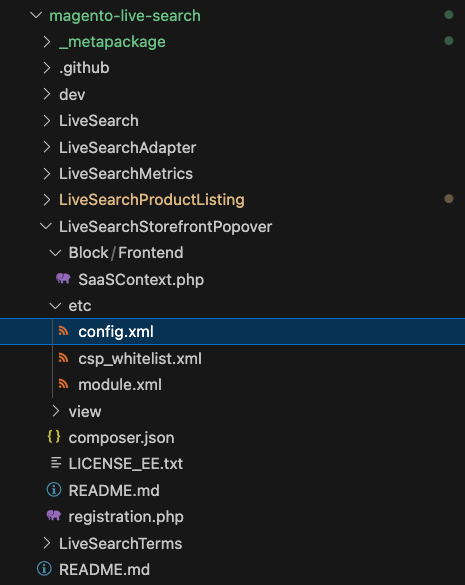
- Changes for
etc/csp_whitelist.xml: find all references to the live search autocomplete (livesearch-autocomplete.magento-ds.com) and replace with your hosting/CDN solution url. See below. 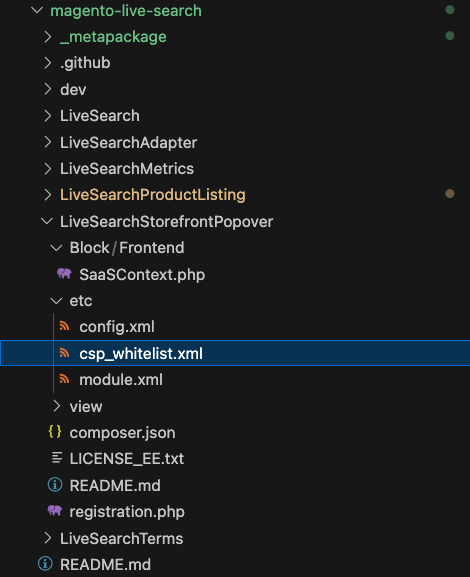
NOTE: the above steps need to be updated to refer to the extension updated needed for this component. ^^
- Those are all the required changes. Now redeploy your adobe commerce store code and see your new custom product listing page in your storefront.
The purpose of this project is to provide a dev-ready starting point for developers to implement the search popover. The project, repo, and any accompanying assets included herein (“Assets”) are provided “as-is” for your use solely at your sole discretion, risk, and responsibility. By using these Assets, you agree Adobe will in no event be responsible for any use of the Assets, including but not limited to any customizations made thereto, by you or any third party. Adobe will not provide any support of any kind for any customizations made to the Assets by anyone.
Compatibility with Live Search PHP extension
- version 1.1.0 is compatible with Live Search PHP extension v4.1.0+