

Repository
GitVizz
Visualize and analyze GitHub or local repositories using LLM-friendly summaries, file structure, and interactive dependency graphs. · ★ 460 · License unknown · TypeScript · Updated 2026-02-12
- Stars
- 460
- License
- Unknown
- Language
- TypeScript
- Updated
- 2026-02-12
README
 # GitVizz
**Understand Any Codebase in Minutes, Not Hours**
*AI-powered repository analysis that turns complex codebases into interactive documentation, dependency graphs, and intelligent conversations.*
[](https://opensource.org/licenses/MIT)
[](https://github.com/adithya-s-k/gitvizz/stargazers)
[](https://github.com/adithya-s-k/gitvizz/network/members)
[](https://github.com/adithya-s-k/gitvizz/issues)
[](http://makeapullrequest.com)
[Live Demo](https://gitvizz.com) | [Documentation](./docs) | [Report Bug](https://github.com/adithya-s-k/gitvizz/issues) | [Request Feature](https://github.com/adithya-s-k/gitvizz/issues)
# GitVizz
**Understand Any Codebase in Minutes, Not Hours**
*AI-powered repository analysis that turns complex codebases into interactive documentation, dependency graphs, and intelligent conversations.*
[](https://opensource.org/licenses/MIT)
[](https://github.com/adithya-s-k/gitvizz/stargazers)
[](https://github.com/adithya-s-k/gitvizz/network/members)
[](https://github.com/adithya-s-k/gitvizz/issues)
[](http://makeapullrequest.com)
[Live Demo](https://gitvizz.com) | [Documentation](./docs) | [Report Bug](https://github.com/adithya-s-k/gitvizz/issues) | [Request Feature](https://github.com/adithya-s-k/gitvizz/issues)
What is GitVizz?
GitVizz revolutionizes how developers understand and navigate codebases. Whether you're onboarding to a new project, reviewing code, or exploring open source repositories, GitVizz transforms complex code structures into intuitive, interactive experiences.
https://github.com/user-attachments/assets/52eeb2c1-598b-4173-b0e8-8d4b986dbf64
Features Showcase
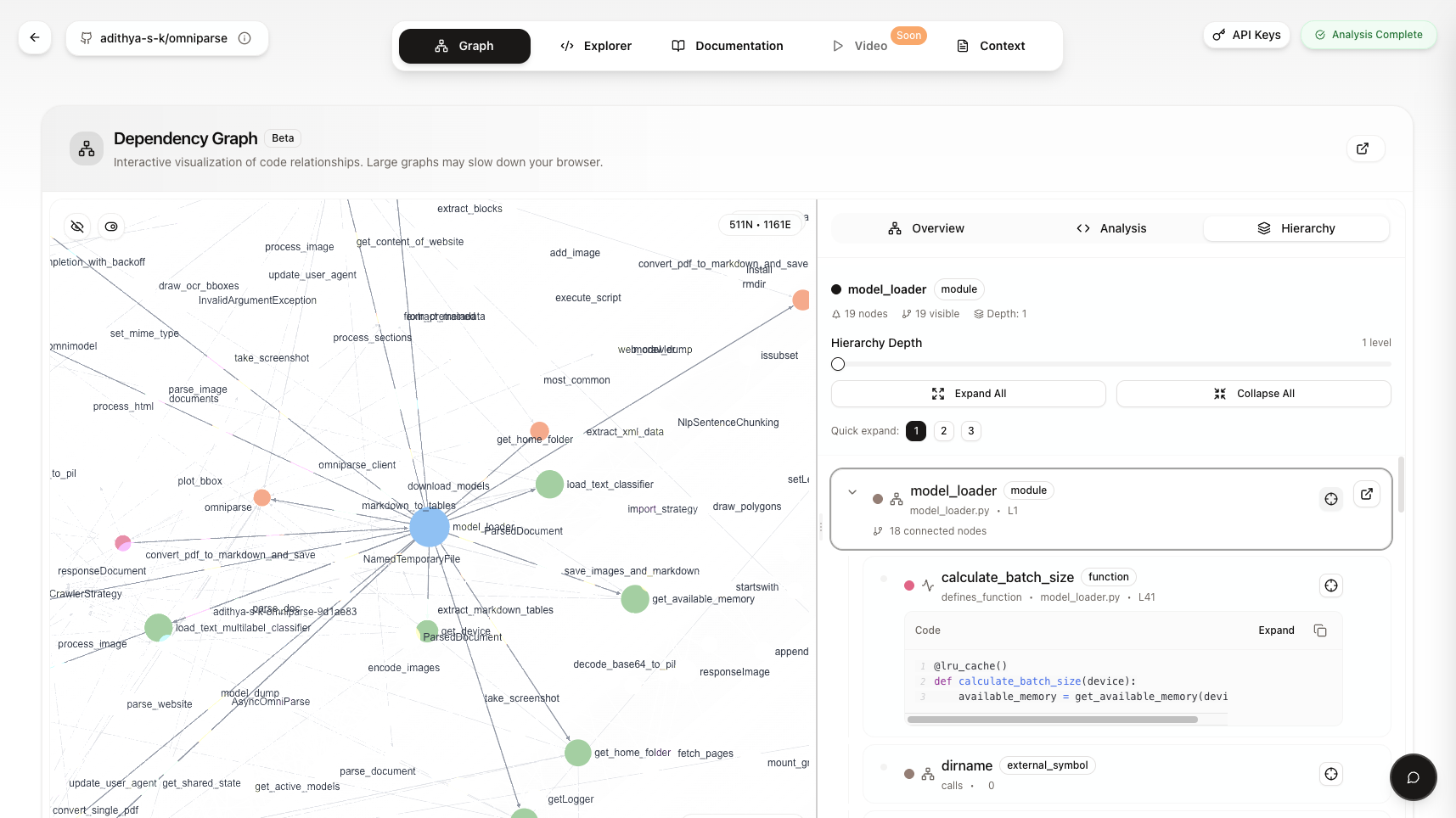 ### Graph Dependency View
**Visual code navigation with smart highlighting and dependency connections**
### Graph Dependency View
**Visual code navigation with smart highlighting and dependency connections**
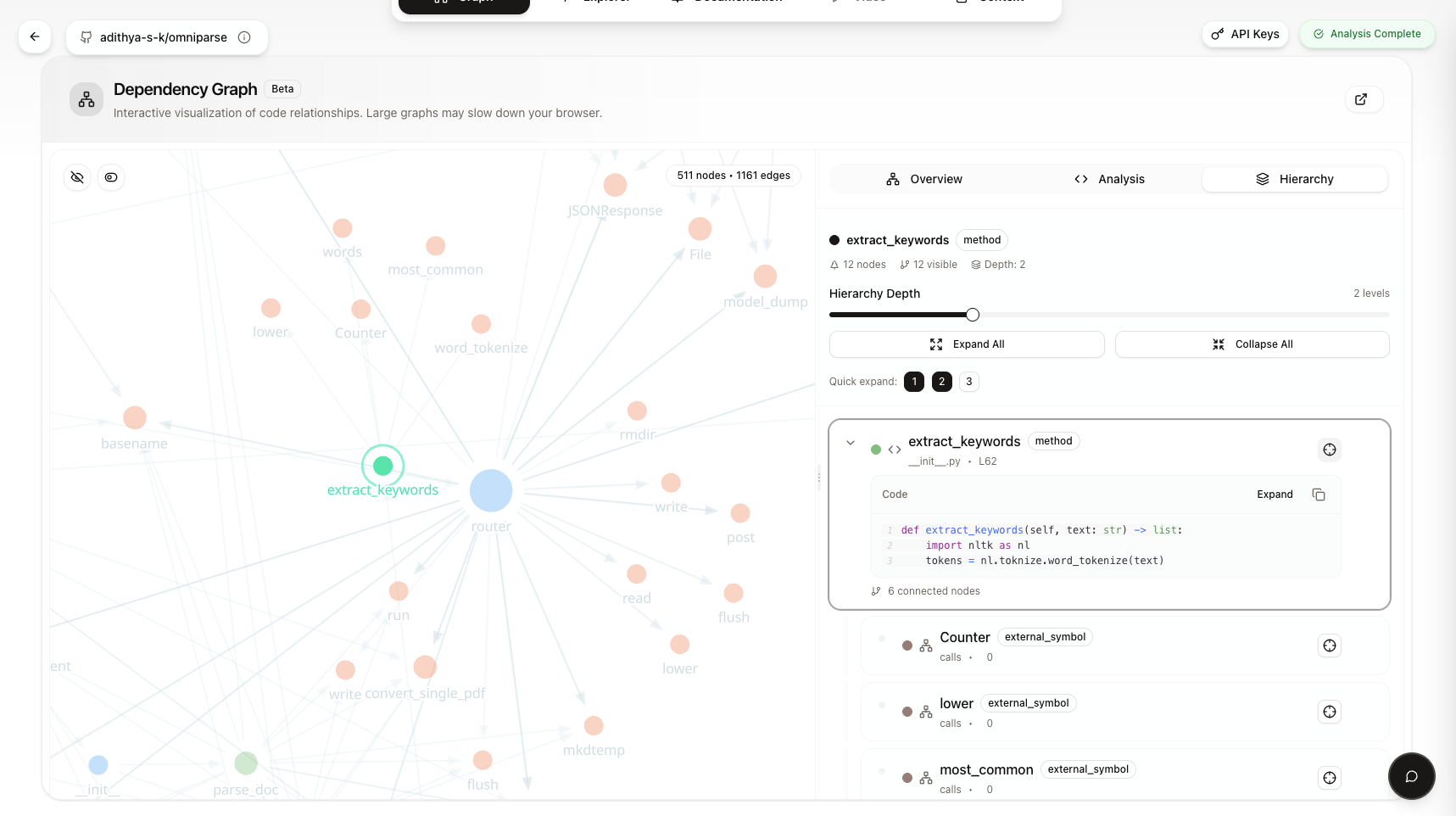 ### Chat with Repository
**AI-powered conversations about your codebase with context-aware responses**
### Chat with Repository
**AI-powered conversations about your codebase with context-aware responses**
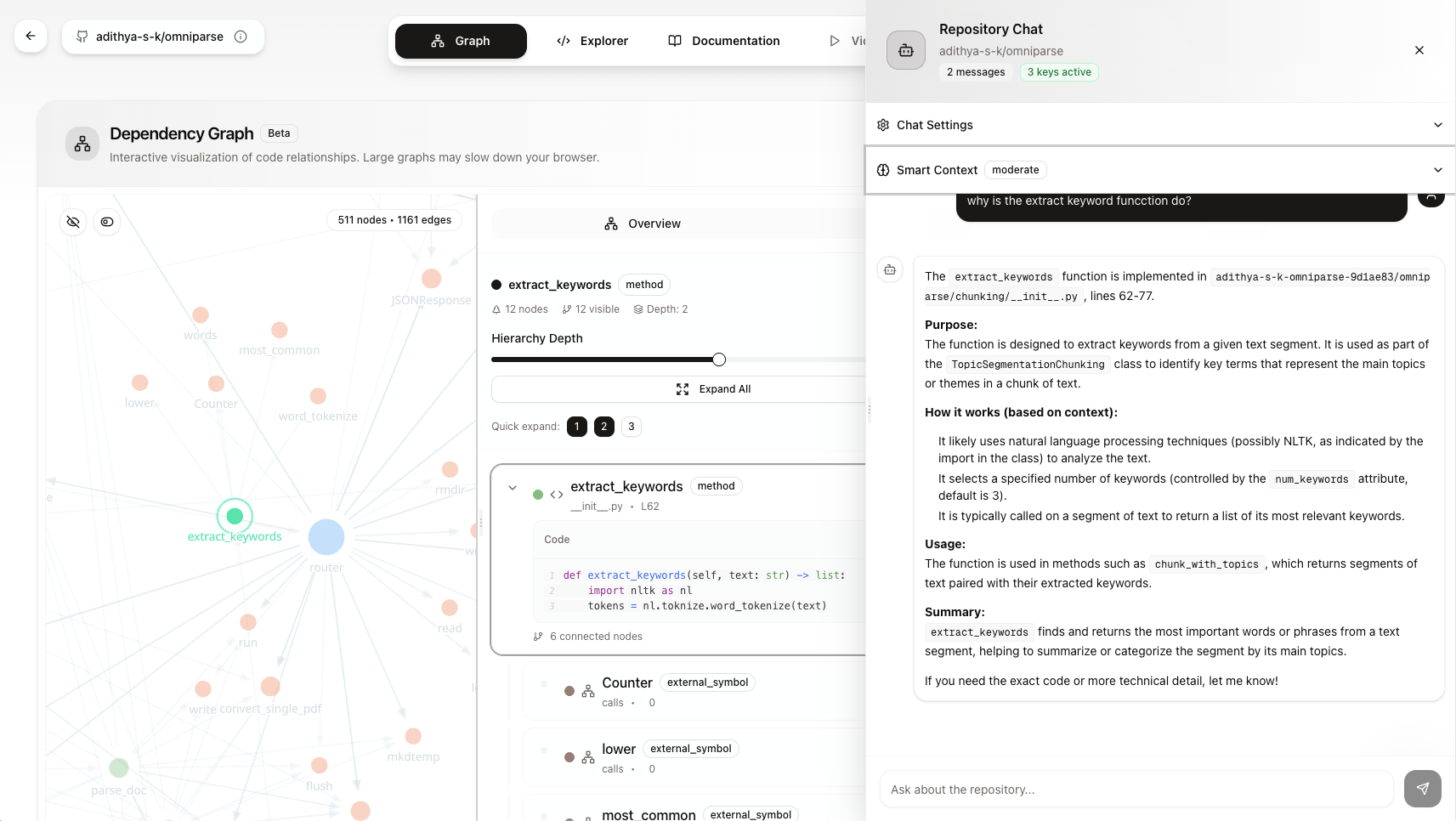 ### Code Viewer
**Advanced code visualization with syntax highlighting and navigation**
### Code Viewer
**Advanced code visualization with syntax highlighting and navigation**
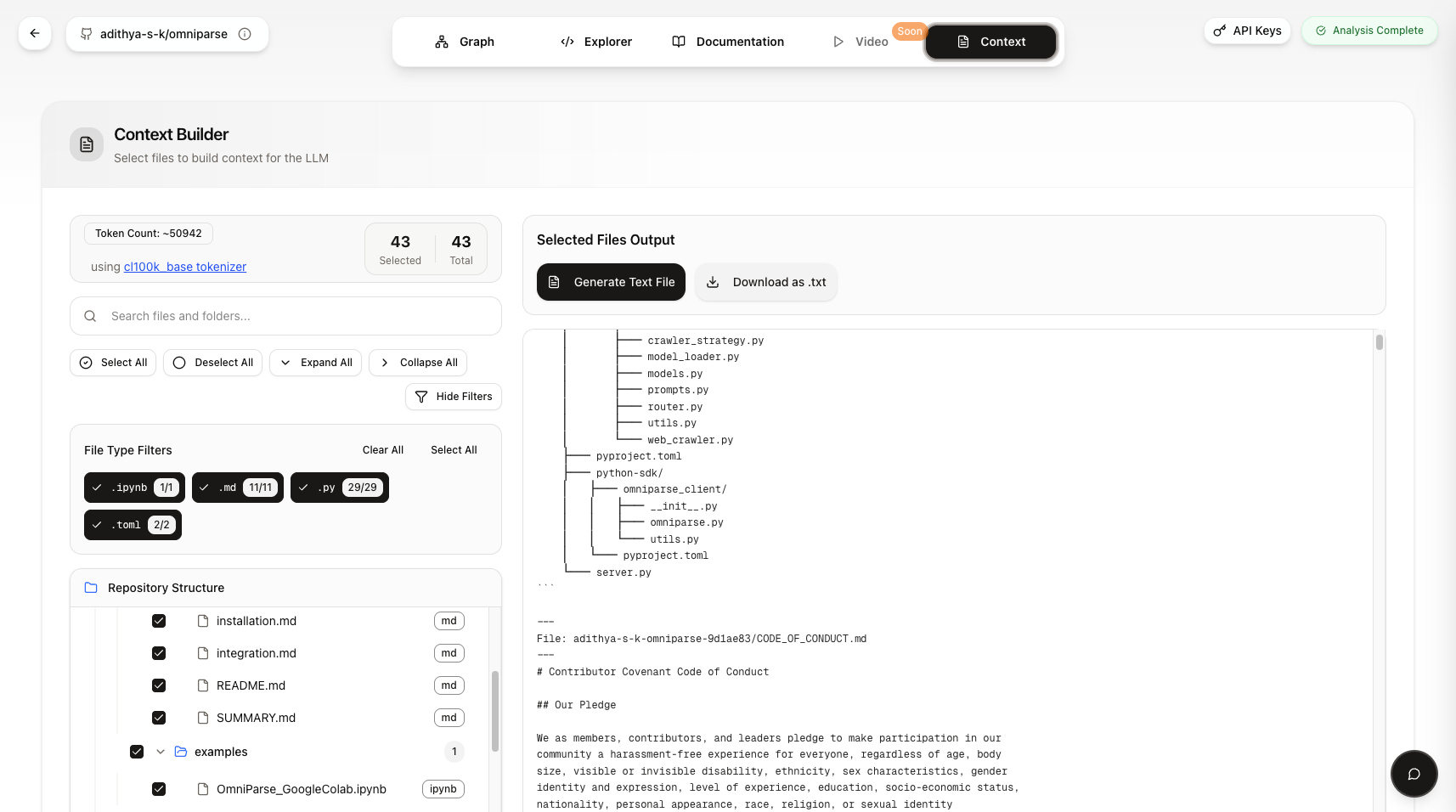
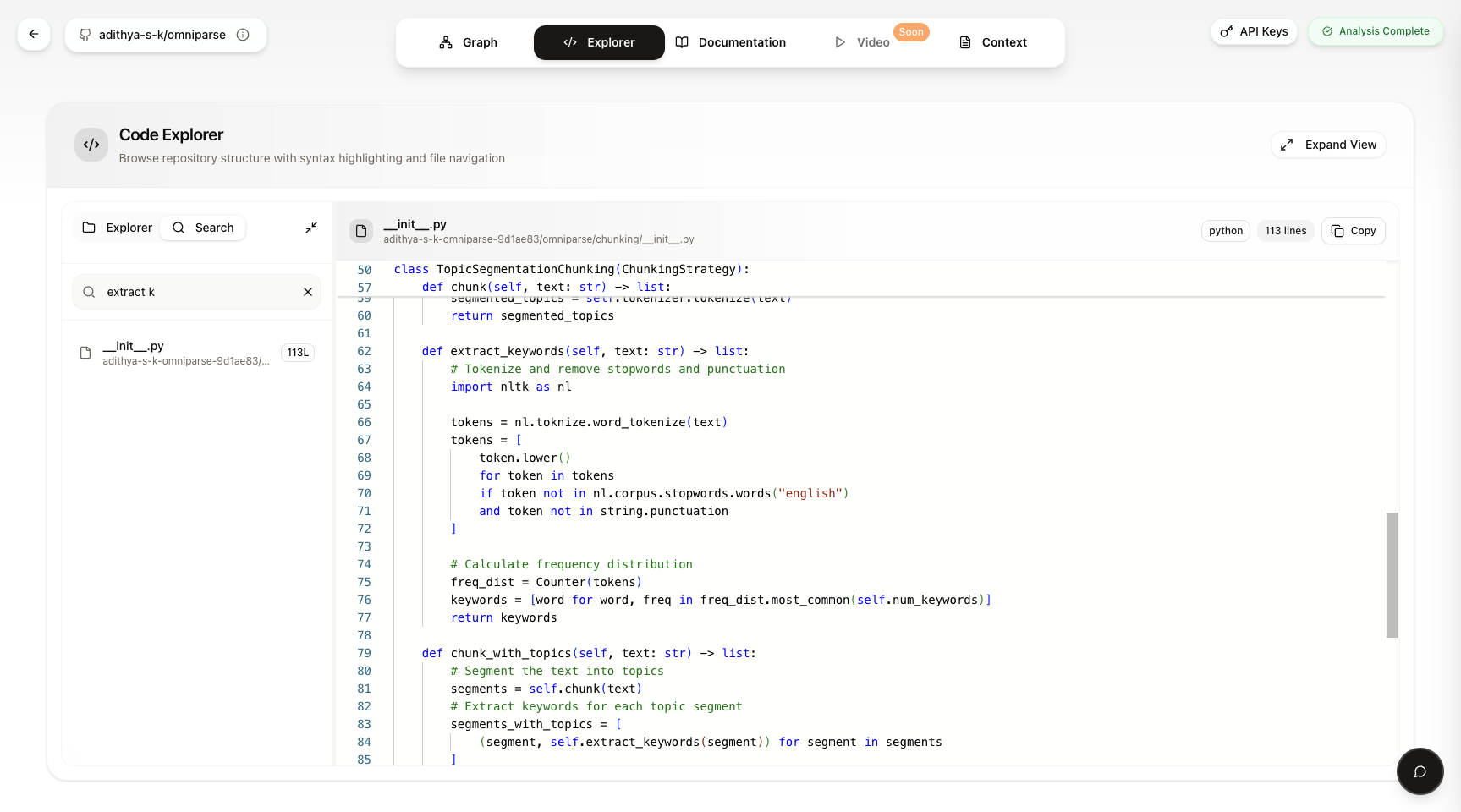 ### LLM Context Builder
**Build comprehensive context for Large Language Models automatically**
### LLM Context Builder
**Build comprehensive context for Large Language Models automatically**
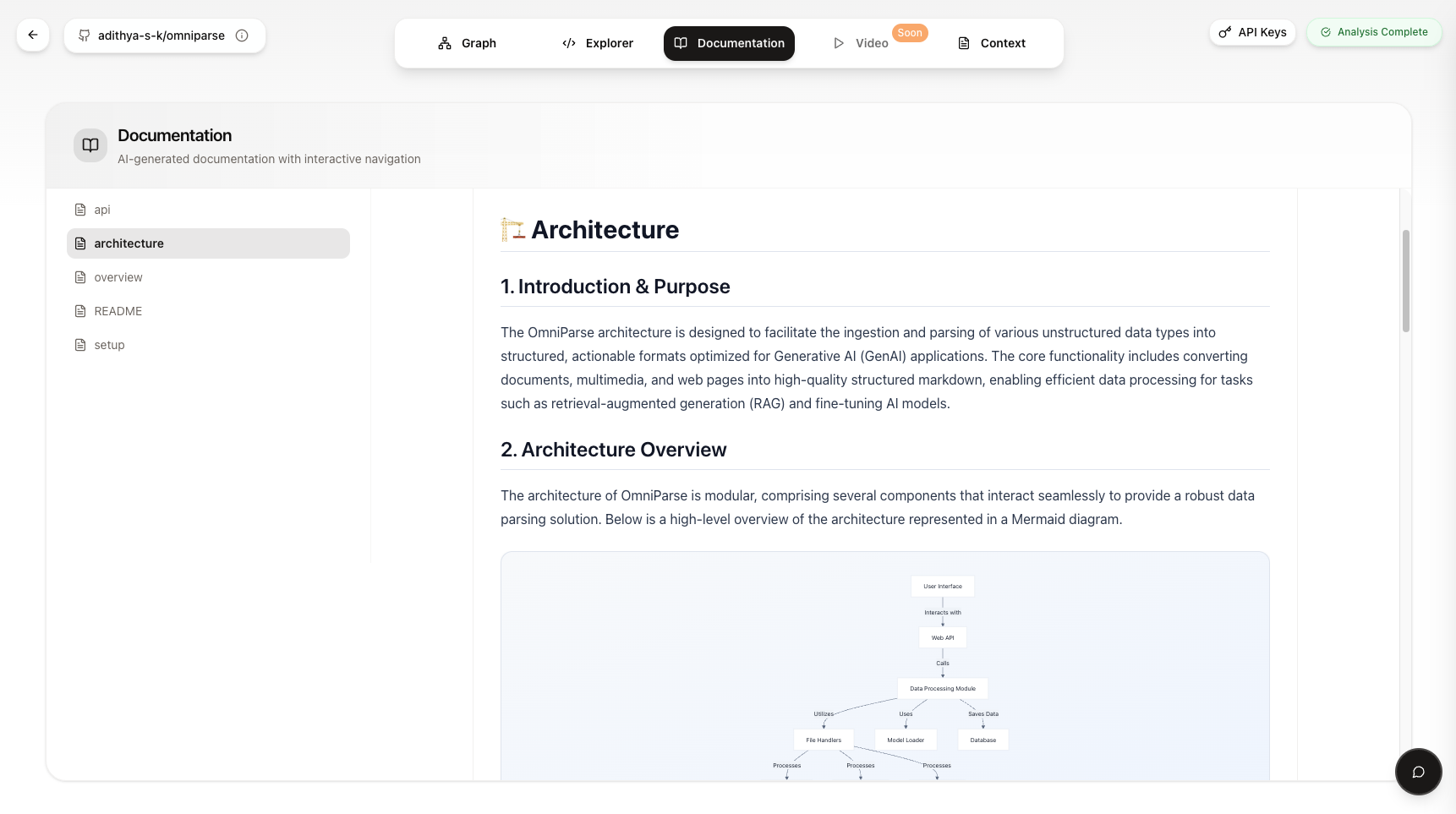
 ### Documentation Generator
**Automatically generate comprehensive documentation from your repository**
### Documentation Generator
**Automatically generate comprehensive documentation from your repository**
Why GitVizz?
- Instant Understanding: Analyze any repository in seconds, not hours
- AI-Powered Insights: Get intelligent summaries and explanations
- Visual Code Maps: Interactive dependency graphs and code relationships
- Chat with Code: Ask questions about any codebase and get instant answers
- Auto Documentation: Generate comprehensive docs automatically
- Smart Search: Find functions, classes, and patterns across entire repositories
Quick Start
Option 1: Try Online (Fastest)
Visit gitvizz.com and paste any GitHub repository URL to get started instantly!
Option 2: Docker Compose (Recommended for Local Development)
# Clone the repository
git clone https://github.com/adithya-s-k/gitvizz.git
cd gitvizz

# Copy environment files
cp backend/.env.example backend/.env
cp frontend/.env.example frontend/.env.local

# Start all services
docker-compose up --build
Access Points:
- Frontend: http://localhost:3000
- Backend API: http://localhost:8003
- Phoenix UI: http://localhost:6006 (LLM observability dashboard)
📊 Phoenix Observability: GitVizz includes Arize Phoenix for comprehensive LLM monitoring and tracing. See Phoenix Setup Guide for detailed configuration options.
Option 3: Manual Setup
<details>
<summary>Click to expand manual setup instructions</summary>
Backend Setup
# Create virtual environment
python3 -m venv .venv
source .venv/bin/activate

# Install dependencies
pip install -r backend/requirements.txt

# Configure environment
cp backend/.env.example backend/.env
# Edit backend/.env with your settings

# Start backend server
uvicorn backend.server:app --host 0.0.0.0 --port 8003 --reload
Frontend Setup
# Install dependencies
cd frontend
pnpm install

# Configure environment
cp .env.example .env.local
# Edit .env.local with your settings

# Start development server
pnpm dev
</details>
Architecture
GitVizz is built with modern, scalable technologies:
┌─────────────────┐    ┌─────────────────┐    ┌─────────────────┐
│   Frontend      │    │    Backend      │    │   AI Services   │
│                 │    │                 │    │                 │
│ • Next.js 14    │◄──►│ • FastAPI       │◄──►│ • OpenAI        │
│ • TypeScript    │    │ • Python 3.9+  │    │ • Anthropic     │
│ • Tailwind CSS  │    │ • Async/Await   │    │ • Local LLMs    │
│ • ShadCN UI     │    │ • Pydantic      │    │                 │
└─────────────────┘    └─────────────────┘    └─────────────────┘
Tech Stack
Frontend:
- Next.js 14 - React framework with App Router
- Tailwind CSS - Utility-first CSS framework
- ShadCN UI - Beautiful, accessible components
- Responsive Design - Works on all devices
Backend:
- FastAPI - High-performance Python API framework
- AST Parsing - Advanced code analysis
- Graph Generation - Dynamic dependency mapping
- LLM Integration - Multiple AI provider support
Prerequisites
Required
- Node.js 18+ and pnpm
- Python 3.9+ and pip
- Docker & Docker Compose (for containerized setup)
Optional (for enhanced features)
- MongoDB - For user data and repository metadata storage
- GitHub Personal Access Token - For private repo access
- GitHub App - For advanced GitHub integration
- OpenAI API Key - For AI-powered features
- Anthropic API Key - Alternative AI provider
- Gemini API Key - Google's AI model support
- Groq API Key - Fast inference API
- Phoenix - LLM observability and tracing platform
Configuration & Setup
Environment Variables
<details>
<summary>Backend (.env)</summary>
# GitHub Integration
GITHUB_USER_AGENT=gitvizz-cognitivelab

# JWT Authentication
JWT_SECRET=your-jwt-secret-here-use-openssl-rand-base64-32
JWT_ALGORITHM=HS256
JWT_EXPIRE_MINUTES=10080  # 7 days
REFRESH_TOKEN_EXPIRE_DAYS=30  # 30 days

# Database Configuration
MONGO_URI=mongodb://localhost:27017
MONGODB_DB_NAME=gitvizz

# Server Configuration
HOST=0.0.0.0
PORT=8003

# File Storage
FILE_STORAGE_BASEPATH="storage"

# Data Encryption
ENCRYPTION_KEY=your-32-byte-base64-encryption-key-here
FERNET_KEY=your-32-byte-base64-encryption-key-here

# GitHub OAuth App Credentials
GITHUB_CLIENT_ID=your-github-oauth-client-id
GITHUB_CLIENT_SECRET=your-github-oauth-client-secret

# GitHub App Credentials (if using GitHub App instead of OAuth)
GITHUB_APP_ID=your-github-app-id
GITHUB_PRIVATE_KEY="-----BEGIN RSA PRIVATE KEY-----
your-github-app-private-key-here
-----END RSA PRIVATE KEY-----"

# Phoenix Observability (Optional)
PHOENIX_API_KEY=your-phoenix-api-key
PHOENIX_COLLECTOR_ENDPOINT=https://app.phoenix.arize.com

# LLM API Keys (at least one required)
OPENAI_API_KEY=your-openai-api-key-here
ANTHROPIC_API_KEY=your-anthropic-api-key-here
GEMINI_API_KEY=your-gemini-api-key-here
GROQ_API_KEY=your-groq-api-key-here
</details>
<details>
<summary>Frontend (.env.local)</summary>
# API base URL for the frontend application
NEXT_PUBLIC_BACKEND_URL=http://localhost:8003

# NextAuth Configuration
NEXTAUTH_URL=http://localhost:3000
AUTH_SECRET="your-auth-secret-here"

# GitHub App Integration
NEXT_PUBLIC_GITHUB_APP_NAME=your-github-app-name
AUTH_GITHUB_ID=your-github-app-client-id
AUTH_GITHUB_SECRET=your-github-app-client-secret
</details>
GitHub Integration Setup
Creating a GitHub Personal Access Token
<details>
<summary>Step-by-step guide to create a GitHub Personal Access Token</summary>
- Navigate to GitHub: Go to github.com and sign in
- Access Profile Settings: Click your profile picture → Settings
- Developer Settings: Scroll down and click "Developer settings"
- Personal Access Tokens: Click "Personal access tokens" → "Tokens (classic)"
- Generate New Token: Click "Generate new token" → "Generate new token (classic)"
- Authenticate: Use your password to confirm
- Configure Token:
- Note: Give your token a descriptive name
- Expiration: Set appropriate expiration date
- Scopes: Select required permissions
- Repository Access: Choose "All repositories" for full access
- Generate: Click "Generate token"
Important: Copy and save the token immediately - you won't be able to see it again!
For detailed instructions with screenshots, see docs/github_personal_token.md
</details>
Creating a GitHub App
<details>
<summary>Step-by-step guide to create a GitHub App</summary>
-
Navigate to GitHub Apps: Go to GitHub Apps settings
-
Create New App: Click "New GitHub App"
-
App Details:
- GitHub App name: Enter your application name
- Homepage URL:
http://localhost:3000/ - Callback URL:
http://localhost:3000/api/auth/callback/github - Expire user authorization tokens: Deselect this
- Setup URL:
http://localhost:3000/ - Webhook: Deselect "Active" to disable webhooks
-
Set Permissions:
- Repository Permissions → Contents: Read-only
- Account Permissions → Email addresses: Read-only
-
Create App: Click "Create GitHub App"
-
Get Credentials:
- Copy App ID and Client ID
- Generate and copy Client Secret
-
Generate Private Key:
- Click "Generate a private key"
- Download the
.pemfile - Copy entire contents including BEGIN/END lines
- Wrap in double quotes for
.envfile
For detailed instructions with screenshots, see docs/create_github_app.md
</details>
Contributing
We love contributions! GitVizz is open source and community-driven.
Ways to Contribute
- Report Bugs - Found an issue? Let us know!
- Suggest Features - Have ideas? We'd love to hear them!
- Improve Documentation - Help others understand GitVizz better
- Submit Pull Requests - Code contributions are always welcome!
- Star the Repository - Show your support!
Development Workflow
- Fork the repository
- Create a feature branch (
git checkout -b feature/amazing-feature) - Commit your changes (
git commit -m 'Add amazing feature') - Push to the branch (
git push origin feature/amazing-feature) - Open a Pull Request
Commit Convention
We follow Conventional Commits:
feat:New featuresfix:Bug fixesdocs:Documentation changesstyle:Code style changesrefactor:Code refactoringtest:Adding testschore:Maintenance tasks
Project Structure
gitvizz/
├── frontend/                 # Next.js frontend application
│   ├── app/                     # App router pages
│   ├── components/              # Reusable UI components
│   ├── api-client/              # Generated API client
│   └── public/                  # Static assets
├── backend/                  # FastAPI backend application
│   ├── controllers/             # API route handlers
│   ├── documentation_generator/ # AI-powered analysis
│   ├── models/                  # Data models
│   ├── routes/                  # API routes
│   ├── schemas/                 # Request/response schemas
│   ├── services/                # Business logic
│   └── utils/                   # Utility functions
├── gitvizz/                  # 📦 GitVizz Core Library
│   ├── gitvizz/                 # Python package
│   │   ├── graph_generator.py      # Main graph generation engine
│   │   ├── custom_ast_parser.py    # AST parsing with Tree-sitter
│   │   └── modal_app.py            # Optional Modal integration
│   ├── pyproject.toml           # Package configuration
│   └── README.md                # Library documentation
├── docs/                     # Documentation
├── docker-compose.yaml       # Container orchestration
└── README.md                 # You are here!
GitVizz Core Library
GitVizz includes a standalone Python library (gitvizz/) that provides the core code analysis and dependency graph generation functionality. This library can be used independently in your own projects:
Features
- 🐍 Multi-language Parsing: Python, JavaScript, TypeScript, React, Next.js
- 🌳 AST Analysis: Advanced Abstract Syntax Tree parsing with Tree-sitter
- 🕸️ Dependency Graphs: Generate detailed code relationship maps
- 📊 Interactive Visualizations: HTML graph outputs with Pyvis
- ⚡ Fast & Efficient: Optimized for large codebases
- 🔧 Extensible: Plugin architecture for new languages
Quick Start
# Install the library
pip install git+https://github.com/adithya-s-k/GitVizz.git#subdirectory=gitvizz

# Use in your Python code
from gitvizz import GraphGenerator

files_data = [{"path": "main.py", "content": "# your code"}]
generator = GraphGenerator(files=files_data)
result = generator.generate()
Use Cases
- Code Analysis Tools: Build custom code analysis applications
- Documentation Generation: Auto-generate dependency documentation
- IDE Plugins: Integrate code visualization into development environments
- CI/CD Pipelines: Automated code structure analysis
- Research: Academic research on software architecture
For detailed documentation, see gitvizz/README.md.
Roadmap
🚀 Current Focus (Q4 2025)
AI-Powered Features
-
[ ] Agentic Chat System - Advanced multi-agent conversation system with tool usage and autonomous reasoning
- Context-aware code navigation agents
- Automated refactoring suggestions
- Intelligent bug detection and fix proposals
- Self-healing code recommendations
-
[ ] Enhanced Documentation Generation - Next-generation AI-powered documentation
- Multi-format output (Markdown, HTML, PDF, Confluence)
- Interactive API documentation
- Auto-generated code examples and tutorials
- Version-aware documentation diffing
- Architecture decision records (ADRs) generation
-
[ ] Video Generation from Code - Transform code into visual explanations
- Animated code walkthroughs
- Function execution flow visualizations
- Architecture diagram animations
- Tutorial video generation from codebases
- Code review video summaries
Core Improvements
-
[ ] Enhanced AI Models - Support for more LLM providers
- OpenRouter integration for unified model access
- Local LLM support (Ollama, LM Studio)
- Custom model fine-tuning capabilities
- Cost optimization with model routing
-
[ ] PyPI Release - Publish GitVizz core library to PyPI
- Stable v1.0 release
- Comprehensive API documentation
- Usage examples and cookbook
🔮 Near Future (Q1-Q2 2026)
Advanced Analysis Features
-
[ ] Smart Context Builder - AI-powered retrieval for relevant code
- Semantic code search with embeddings
- Intelligent context pruning for LLM queries
- Multi-hop reasoning across dependencies
- Automated code snippet selection
-
[ ] Code Quality & Security Analysis
- Security vulnerability detection
- Performance bottleneck identification
- Code smell detection and refactoring suggestions
- Test coverage analysis and recommendations
- Technical debt tracking
-
[ ] Advanced Analytics - Comprehensive code quality metrics
- Complexity metrics and visualization
- Code churn analysis
- Developer contribution insights
- Codebase health scoring
Collaboration Features
-
[ ] Real-time Collaboration - Multi-user code exploration
- Shared analysis sessions
- Collaborative annotations
- Team knowledge bases
- Code review workflow integration
-
[ ] Plugin System - Extensible architecture
- Custom language parsers
- Third-party tool integrations
- Custom visualization plugins
- Export format extensions
🌟 Future Vision (2026+)
Platform Expansion
-
[ ] VS Code Extension - Native IDE integration
- Inline documentation preview
- Graph visualization in editor
- AI chat sidebar
- Quick analysis commands
-
[ ] JetBrains IDE Plugin - IntelliJ IDEA, PyCharm, WebStorm support
- Native IDE integration
- Context-aware suggestions
- Code navigation enhancements
-
[ ] Mobile App - Code exploration on the go
- iOS and Android native apps
- Offline repository access
- Push notifications for analysis completion
- Mobile-optimized graph visualization
Enterprise Features
-
[ ] Self-Hosted Enterprise Edition
- On-premise deployment
- LDAP/SAML/SSO authentication
- Advanced security controls
- Audit logging and compliance
-
[ ] Team Collaboration Suite
- Organization-wide knowledge bases
- Team analytics and insights
- Project management integration
- Custom workflows and automations
Advanced Capabilities
-
[ ] Multi-Repository Analysis - Cross-project insights
- Microservices dependency mapping
- Shared library usage tracking
- Organization-wide code patterns
-
[ ] Time-Travel Code Analysis - Historical codebase exploration
- Repository evolution visualization
- Regression analysis
- Contributor timeline analysis
- Code archaeology tools
-
[ ] AI Code Generation & Migration
- Automated migration between frameworks
- Legacy code modernization
- Cross-language code translation
- Architecture transformation assistance
-
[ ] Extended Language Support
- Rust, Swift, Kotlin support
- SQL and database schema analysis
- Infrastructure-as-Code (Terraform, CloudFormation)
- Configuration file analysis (YAML, TOML, JSON)
💡 Community Wishlist
Have an idea? Submit a feature request and help shape the future of GitVizz!
License
This repository contains multiple components with different licenses:
- Backend & Frontend Applications: Licensed under the GNU Affero General Public License v3.0
- GitVizz Core Library: Licensed under the Apache License 2.0
Please refer to the respective LICENSE files in each component directory for detailed terms and conditions.
Acknowledgments
- Contributors - Thank you to all our amazing contributors!
- Community - Special thanks to our supportive community
- Open Source - Built on the shoulders of incredible open source projects
- Feedback - Grateful for all user feedback and suggestions
Support & Community
<div align="center">
Get Help


Found a Bug?
Have an Idea?
Made with ❤️ by CognitiveLab | Powered by Omniparse
Star us on GitHub — it motivates us a lot!