Verdict

A quick read before you dig into the full page.

Best if
You are graphic designers and need: Correct dates, names, and other errors in receipts or documents
Pick this when
AI tool for editing, adding, and removing text in images

Overview

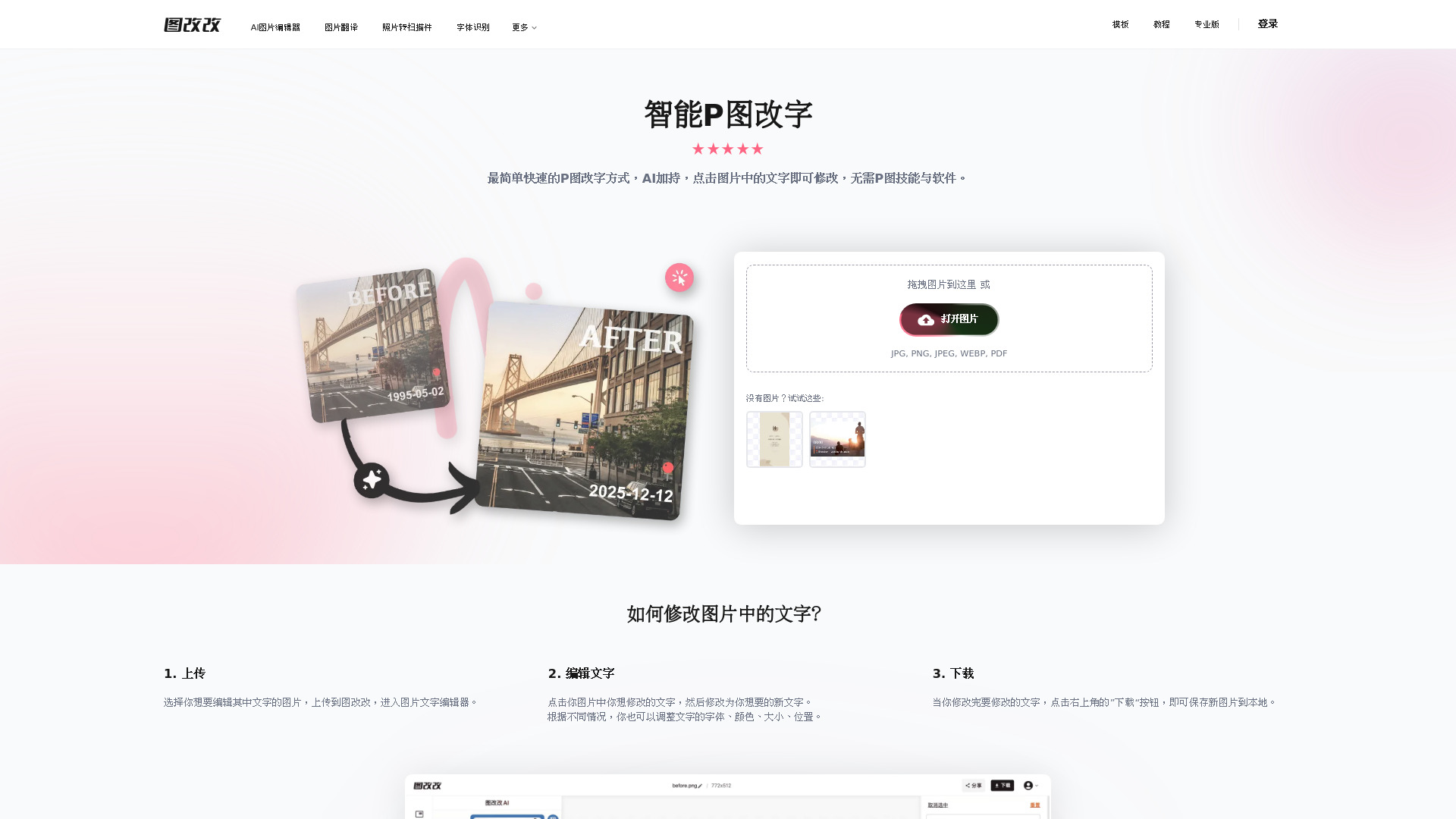
图改改, also known as PhoText, is an AI-powered online image text editing tool. It automatically recognizes text in uploaded images, allowing users to click and edit words without Photoshop or advanced design skills. Users can replace, add, or remove text while adjusting fonts, colors, sizes, and positions. The AI matches the original font style, restores complex backgrounds naturally, and supports image editing, watermark removal, watermark addition, font recognition, image translation, PDF conversion, and other related tools.

图改改 screenshot

Best for

Short scenarios where 图改改 tends to shine.

  • Correct dates, names, and other errors in receipts or documents

    Best for Graphic designers

  • Edit text inside chat bubbles and social media screenshots

    Best for Marketing professionals

  • Correct numbers and labels in tables and reports

    Best for Social media managers

  • Update names, titles, and other text on certificates

    Best for E-commerce operators

  • Replace or remove watermarks from images

    Best for Content creators

  • Add text, stamps, or watermarks to photos

    Best for Document administrators

  • Edit posters and e-commerce product images

    Best for Photographers

  • Correct text in payment, travel, examination, and messaging screenshots

    Best for Small business owners

Example outputs 1

Sample generations and before/after results for 图改改.

Access & connections

Where you can use 图改改.

Platforms

Web

Capabilities

What this tool accepts, produces, and is strongest at.

Highlights

  • AI-powered image text replacement, addition, and removal
  • Automatic OCR text recognition for multiple languages
  • AI font matching and style recreation
  • Seamless background restoration for complex textures
  • Conversational AI image editing
  • Editing of tilted, curved, small, and mixed-language text
  • Watermark and stamp addition or removal
  • Image filters, materials, and artistic text tools
Show 5 more
  • High-resolution image processing and export
  • Font recognition
  • Image translation
  • Photo-to-scan conversion
  • Image and PDF conversion tools

People also view

Tools that often show up alongside 图改改 in collections and comparisons.

FAQ 10

What is 图改改 (PhoText)?
图改改, also known as PhoText, is an AI-powered online image text editing tool. It automatically recognizes text in uploaded images, allowing users to click and edit words without Photoshop or advanced design skills. Users can replace, add, or remove text while adjusting fonts, colors, sizes, and positions. The AI matches the original font style, restores complex backgrounds naturally, and supports image editing, watermark removal, watermark addition, font recognition, image translation, PDF conversion, and other related tools.
How to use 图改改 (PhoText)?
Upload or drag an image into the editor. The system automatically identifies text areas. Click the text you want to change, enter the new content, and adjust the font, color, size, or position as needed. You can also use conversational AI instructions to modify the image automatically. When finished, click the download button to save the edited image.
How do I edit text in an image?
Upload an image, click the recognized text you want to change, enter the replacement text, adjust its styling if needed, and download the result.
Can the tool match the original font?
Yes. Select the text and use the font recognition feature to identify and match a similar font. The AI can also analyze the original font style automatically.
Can I remove text or watermarks from an image?
Yes. The platform supports removing image text and watermarks while using AI-assisted background restoration to reduce visible editing marks.
Does it support complex image backgrounds?
Yes. The background restoration feature is designed to handle textures such as wood grain, fabric, lighting, and other complex surfaces.
Can I edit only one character or part of a line?
Yes. You can select a specific text area or manually remove the target character and add replacement text. Conversational AI editing is also available for simpler modifications.
What file formats are supported?
The editor supports JPG, PNG, JPEG, WEBP, and PDF uploads. Related tools also support image and PDF conversion.
Is the tool free?
Basic functions are free, while advanced features include a free usage allowance and may require a paid plan after that allowance is used.
How long are uploaded images stored?
Images are automatically deleted after three days for non-logged-in users and after 30 days for logged-in users.
图改改
