Agents 2026 Rank: #3034

pondas ✓

Run AI agents like a game, ship real software.

187 views 1 saves Free Trial
More categories (4)

Verdict

A quick read before you dig into the full page.

Best if
Run AI agents like a game, ship real software
Skip if
Credit-based operation system
Pick this when
Game-like management interface

Considering Younet instead? Compare side by side

Overview

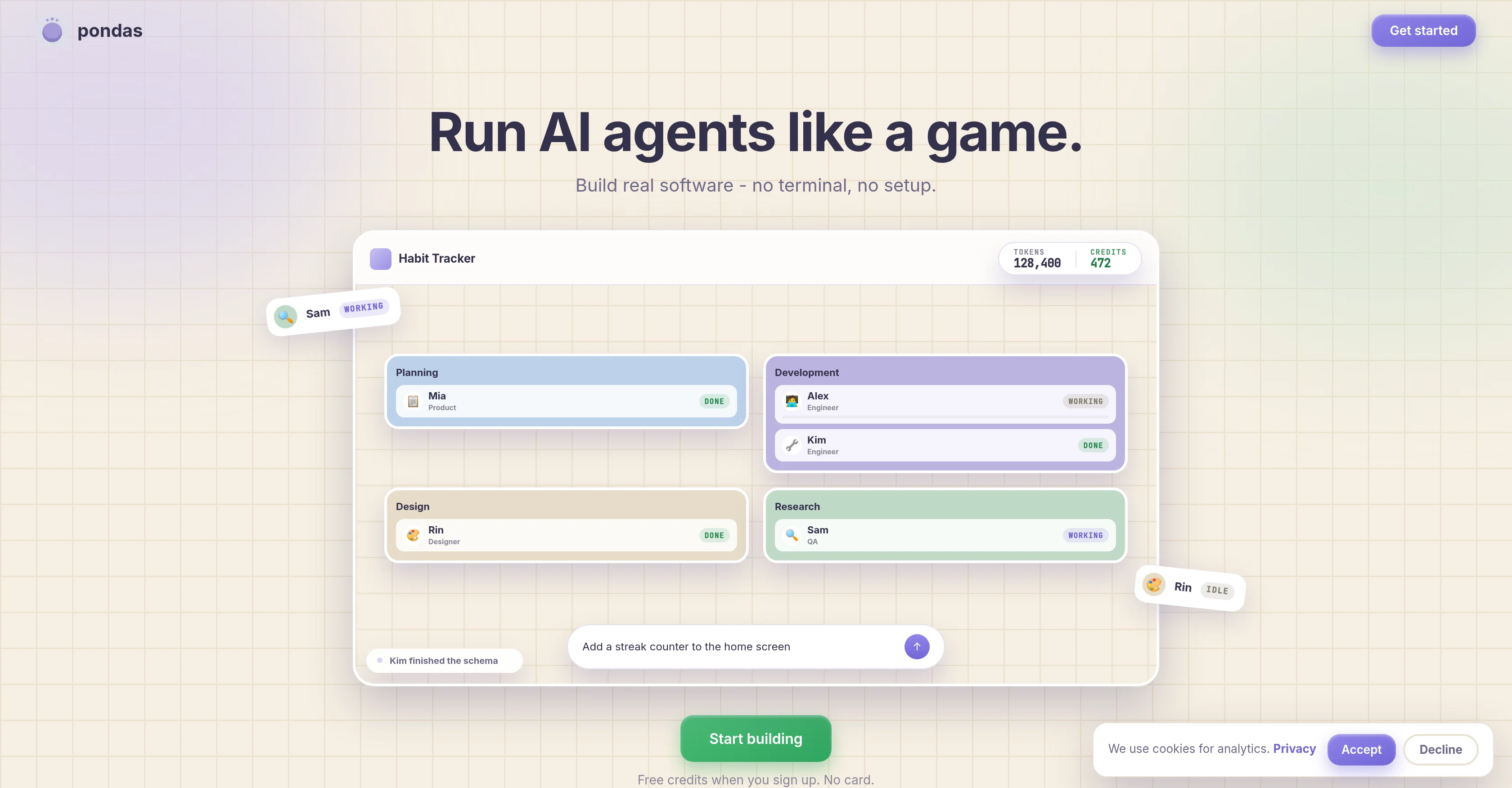
Most AI tools hand you a chat box and hope you know what to do with it. pondas hands you a team of AI agents you run like a game.

You tell the team what you want. A product manager plans it, a designer designs it, an engineer builds it, and a QA agent tests it to make sure it actually works. You watch it happen and steer it, the way you would direct a team in a game. You do not write code, open a terminal, or need any technical background - you describe what you want, and the agents do the work.

When it is done, it goes online at a link you can share, and the code is yours in your own GitHub repo.

Why it is different:
- You run a team of agents, not one chatbot. Each one has a job and works the way a real team does.
- Anyone can do it. If you can describe what you want, you can build it - no coding, no setup, no technical background.
- It is tested before you see it. A QA agent runs it and catches problems, so what you get actually works.
- You own what you build. The code lands in your own repo, yours to keep.

pondas is for anyone with an idea who does not want to learn to code to make it real.
pondas website

Access & connections

Where you can use pondas, and what it plugs into.

Platforms

Web

Integrations

Capabilities

What this tool accepts, produces, and is strongest at.

Input

  • Text
  • Code
  • Game

Output

  • Text
  • Image
  • Code

Highlights

  • Agents

Supported features

  • Agents

Pros & cons

Pros

  • Game-like management interface
  • Simultaneous multi-agent operation
  • Real-time application build viewing
  • No-terminal, no-setup approach
  • Complete software production cycle
  • One-screen agent activity control
  • Live application launch ability
  • Parallel task execution
Show 13 more
  • Simplicity and accessibility
  • Free sign-up credits
  • Credit card not required
  • Seamless transition from development to deployment
  • Adapts to varying user roles
  • Constant progress tracking
  • Applications ready for immediate use
  • Agent-specific task allocation
  • Turns software development into an interactive experience
  • Visual representation of application build
  • Hands-off coding and testing
  • Encapsulates all development aspects
  • Eliminates direct terminal interaction

Cons

  • No direct terminal interaction
  • Requires constant user supervision
  • No standalone functionality
  • No detailed agent customization
  • Reliance on live online connection
  • Limited to Pondas ecosystem
  • Locked agent progression
  • Credit-based operation system
Show 2 more
  • No offline mode
  • No roll-back option

Compare alternatives

Similar tools in the catalog — with a clear reason to open each one.

Releases 1

Initial release September 1, 2026 Current
Initial release of pondas.

FAQ 12

What is Pondas?
Pondas is a platform that allows users to manage and run a team of AI agents in a game-like interaction to build and deploy software applications. It encapsulates all aspects of software development, including code writing, testing, and deployment.
How does Pondas work?
Pondas works by allowing users to view and control the activities of each AI agent in one screen. Users can monitor what each AI agent is working on and their progress. Pondas offers live hosting of all application development activities, allowing users to launch the application even as it's being developed. It also allows simultaneous execution of tasks with different AI agents working on different parts of the job at the same time.
How does Pondas differ from traditional software development tools?
Pondas differs from traditional software development tools in several ways. It eliminates the need for direct terminal interaction and setup, instead using AI agents to conduct various development tasks. It offers real-time interaction and the ability to launch applications even as they're being developed. Pondas also allows tasks to be executed simultaneously, where different AI agents can work on different parts of the project.
What does it mean to run AI agents like a game in Pondas?
Running AI agents like a game in Pondas means you can monitor and control each agent just as you might control a character in a video game. You have real-time visibility of each agent's activities, allowing for live interaction and tracking of their progress.
How does Pondas manage simultaneous execution of tasks?
Pondas handles simultaneous execution of tasks by allowing different AI agents to work on different parts of the job at the same time. This means tasks can run in parallel rather than sequentially, speeding up the software development process.
What is the sign-up process for Pondas?
The sign-up process for Pondas is simple and user-friendly. It offers free credits upon sign-up and does not require a credit card, which makes it easily accessible to get started.
How do I monitor the work of each AI agent in Pondas?
In Pondas, the work of each AI agent can be monitored from a single screen. You can see what each agent is currently working on and track their progress.
Does Pondas require a terminal or setup?
No, Pondas does not require a terminal or setup. It has been designed to eliminate these traditional requirements of software development and instead provides an accessible and intuitive platform managed via AI agents.
What is the function of the live interaction feature in Pondas?
The live interaction feature in Pondas allows for more immersion and interaction. It allows users to launch applications even while they are still in development. It also provides real-time visibility of each AI agent's activities, enabling users to monitor and control the ongoing workflow.
Can I interact and control the AI agents on Pondas?
Yes, users can interact and control the AI agents on Pondas. They can view and manage the actions of each AI agent from a single screen, allowing for real-time monitoring and control of software development tasks.
How can I view the progress of each AI agent on Pondas?
In Pondas, progress of each AI agent can be seen from a unified screen. This screen shows what each agent is currently doing and the progress they're making, providing a real-time overview of the application's development.
What does it mean to execute tasks in parallel in Pondas?
Executing tasks in parallel in Pondas refers to the ability of the platform to have several AI agents work on different parts of the job simultaneously. This means that different development tasks can be carried out at the same time, streamlining and accelerating the software development process.
pondas Trial; then from $9/mo