
Workflows 2026 Rank: #3076
Figma Weave ✓
All AI models and creative tools, one workflow.
Free + from $19/mo
Verdict
A quick read before you dig into the full page.
- Best if
- All AI models and creative tools, one workflow
- Skip if
- Potentially steep learning curve
- Pick this when
- Integrated platform
Considering PixieBrix instead? Compare side by side
Overview
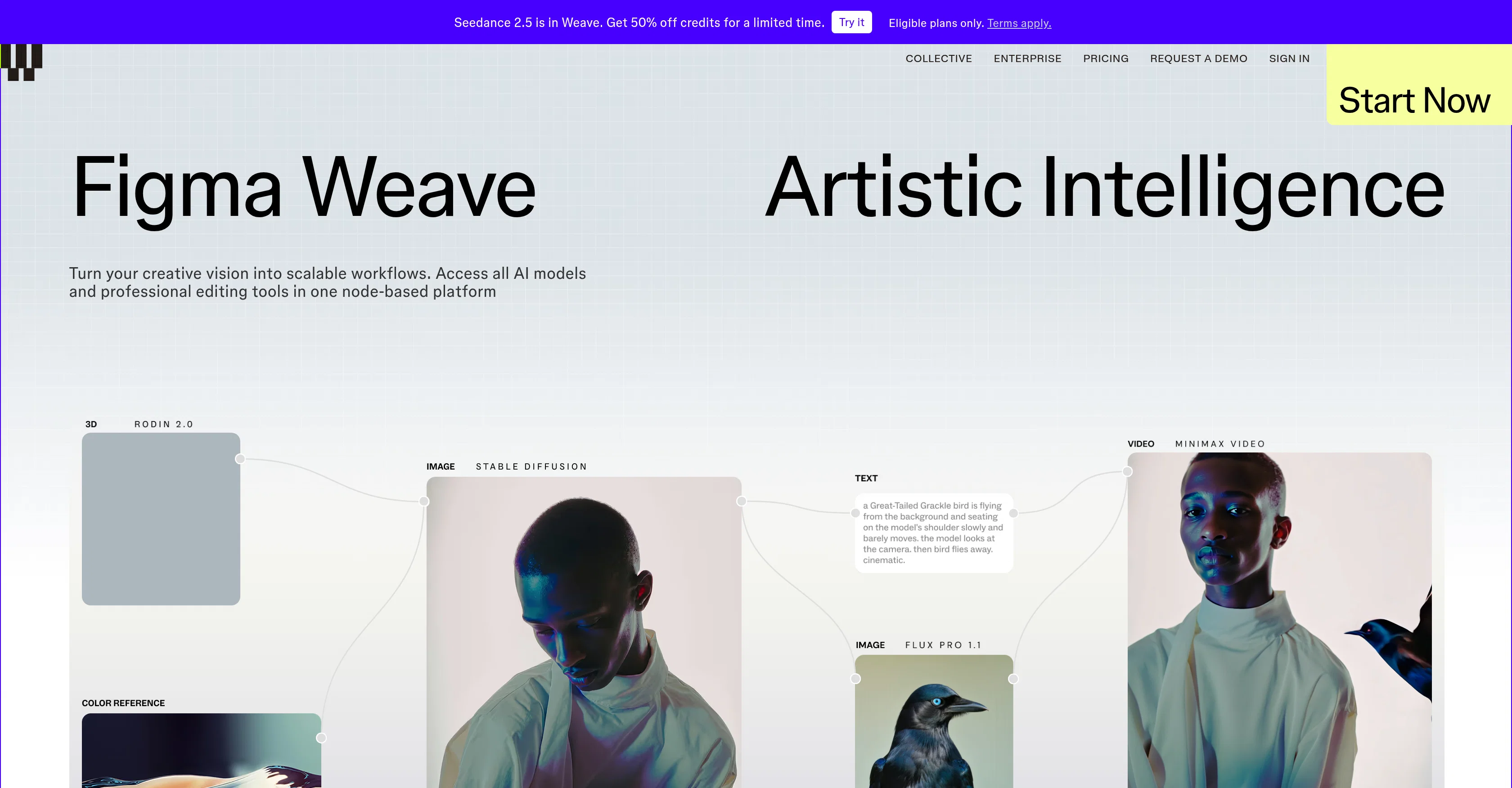
Figma Weave is an integrated platform designed to facilitate AI-powered design workflows. This tool is structured to help transform creative vision into scalable workflows.
It achieves this by integrating various AI models and professional-grade editing tools into a single, node-based platform. The key feature of Figma Weave is the seamless interface that brings together numerous AI models, allowing users to leverage different AI capabilities without compromising on quality.
The platform offers a multitude of professional editing tools, including cropping, in-painting, masking, and upscaling, among others. It also provides a feature for controlling the outcome with layers, types, and blends, empowering the users to bring their creative imagination to life.
Figma Weave is also designed to maximize team efficiency by automatically generating a simplified User Interface (UI). This AI-assisted platform supports tasks from multi-layer compositing to matte manipulation.
Lastly, Figma Weave places a strong emphasis on data security, integrating industry-standard security controls to protect user data.
Access & connections
Where you can use Figma Weave, and what it plugs into.
Platforms
Integrations
Capabilities
What this tool accepts, produces, and is strongest at.
Input
- Text
Output
- Image
Pros & cons
Pros
- Integrated platform
- Node-based platform
- Professional editing tools
- Promotes scalable workflows
- Multi-layer compositing support
- Outcome control features
- Team efficiency maximisation
- Automatic UI generation
Show 34 more
- Supports matte manipulation
- Strong data security
- Quality maintenance
- Cropping functionality
- In-painting functionality
- Masking functionality
- Upscaling functionality
- Layers control
- Types and blends feature
- Supports artistic intelligence
- Supports scalable workflows
- Concept-to-execution tool
- One workflow system
- Artistic expression support
- Creativity-focused workflow
- Comprehensive editing tools
- Seamless operation
- Simplified interface
- Automated workflow capabilities
- Data protection priority
- Industry-standard security controls
- Requirement-based tool selection
- Professional grade tools
- Empowering user creativity
- Enterprise-level scalability
- Supports complex editing tasks
- Customisable workflow design
- Advanced compositing power
- Brief and easy on-boarding
- Request a Demo available
- Enabled for creative vision
- Matte manipulation support
- Efficient project management
- Automated team ability maximization
Cons
- Node-based platform complexity
- No mobile app mentioned
- Potentially steep learning curve
- Auto-generated UI inflexibility
- Limited data integration options
- Complex for beginners
- Unclear pricing structure
- Multi-layer compositing difficulties
Show 1 more
- Lack of customer support details
Compare alternatives
Similar tools in the catalog — with a clear reason to open each one.




Unframe AI ✓
UnknownThe Managed AI Delivery Platform
Why look Higher community rating
Full comparison

WebFill ✓
FreemiumFilling forms and emails, solving MCQs, for students and professionals.
Why look Typically cheaper
Full comparisonReleases 1
FAQ 12
What is Figma Weave?
How does Figma Weave utilize AI?
What are the key features of Figma Weave?
How can Figma Weave create scalable workflows?
What professional editing tools does Figma Weave offer?
Can I control the outcome with layers, types, and blends in Figma Weave?
How does Figma Weave maximize team efficiency?
What is the role of the node-based platform in Figma Weave?
Does Figma Weave support multi-layer compositing tasks?
Can I do matte manipulation with Figma Weave?
How does Figma Weave ensure data security?
What are the AI models integrated into Figma Weave?
Related tools
Recommended

MagicSlides.app AI PPT Maker ✓
FreemiumCreate Stunning PPTs in Seconds with the AI PPT Maker

GetLogit ✓
FreemiumArtificial intelligence, available for everyone.

ChatGPT ✓
FreemiumAsk anything, create anything, and move from idea to action.

Automateed ✓
Free TrialCreate eBooks effortlessly with Automateed, the AI-powered writing tool.

Kin - Personal AI Advisors ✓
FreePrivacy-first & designed your for mind, and life at work

Aiter.io | Paste a URL. Ship a Campaign That Sounds L... ✓
FreemiumAI marketing that sounds like you, not everyone else.