

DB Pilot ✓
Beautiful database GUI with AI-powered assistance
from $20/mo
Verdict
A quick read before you dig into the full page.
- Best if
- You are data analysts and need: Generate and refine SQL queries with natural language
- Skip if
- Limited ORM libraries support
- Pick this when
- Natural language SQL operations
Considering Text2SQL.ai instead? Compare side by side
Overview
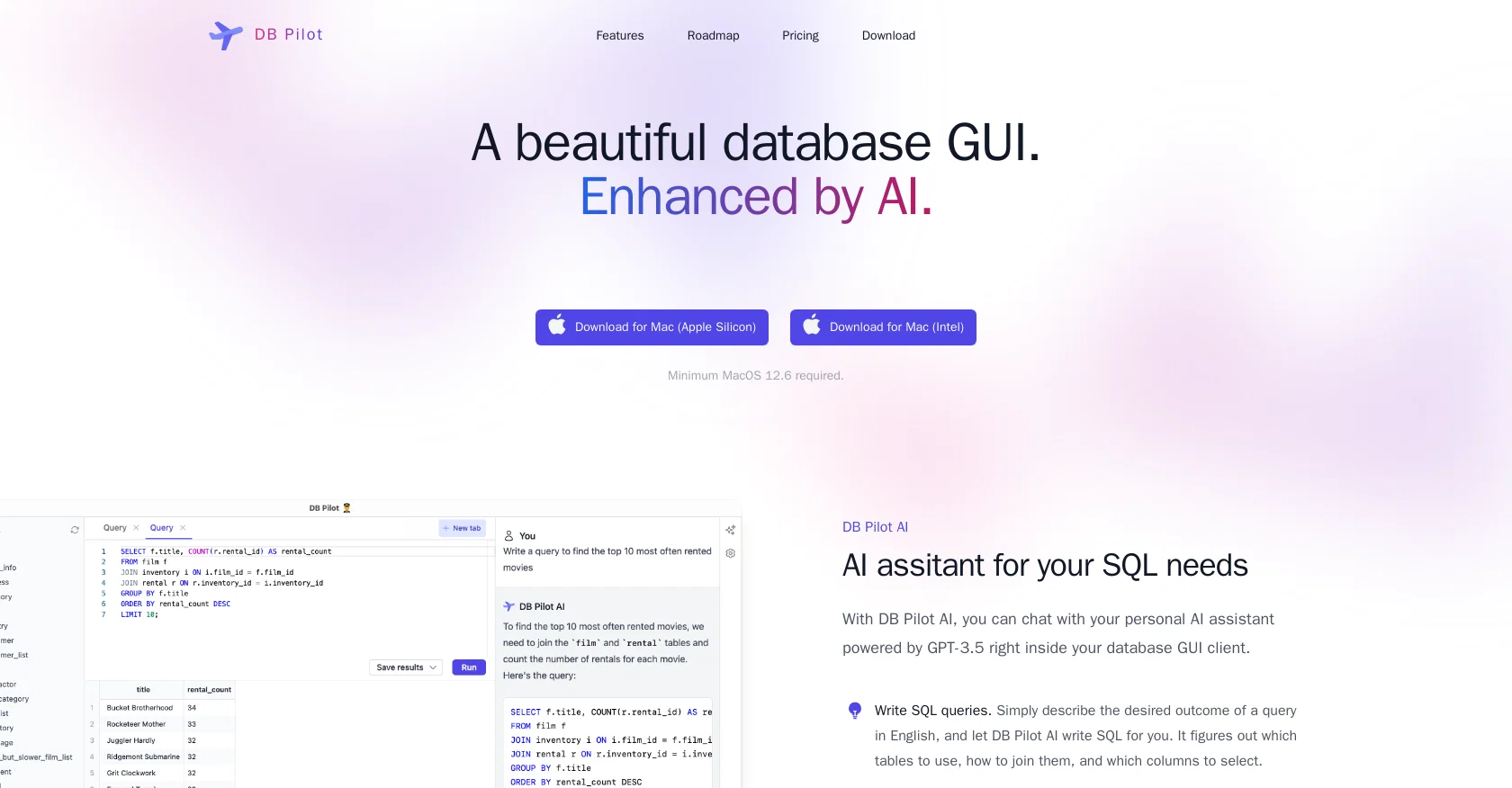
DB Pilot is a modern database GUI enhanced by AI, offering a range of features to simplify and streamline SQL operations. With the help of an AI assistant powered by GPT-3.5, users can write SQL queries using natural language, convert between code and SQL, and explain complex queries.
The tool also includes an embedded DuckDB instance acting as a local hub, making it easy to query different file formats such as CSV, JSON, and Parquet files and store query results without polluting the production database.
DB Pilot supports PostgreSQL databases and plans to support MySQL and SQLite soon. Users can filter tables easily, join different data formats, save query results in different file formats such as CSV, JSON, and Parquet files, and query remote files.
Pricing is straightforward, with a one-time purchase of a lifetime license that includes one year of access to the AI assistant and app updates. DB Pilot's roadmap includes future features such as spreadsheet-like editors, smart code completion that knows about your database schema, and additional database support.
The tool is available for free download, and users can avail of a five-day free trial before purchasing a license. DB Pilot's AI assistant does not have access to any actual data stored in the user's database, thereby ensuring privacy.
Best for
Short scenarios where DB Pilot tends to shine.
-
Generate and refine SQL queries with natural language.
Best for Data analysts
-
Build interactive dashboards with input fields, date filters, charts, and tables.
Best for Database engineers
-
Explore and transform data with SQL and Python in a Jupyter-like notebook environment.
Best for Business owners
-
Edit database records as easily as updating a spreadsheet.
Best for Software developers
Example outputs 1
Sample generations and before/after results for DB Pilot.
Access & connections
Where you can use DB Pilot, and what it plugs into.
Platforms
Integrations
Capabilities
What this tool accepts, produces, and is strongest at.
Input
- Tabular
- Text
Output
- Geo
- Code
- Tabular
- Text
Supported features
- SQL
Pros & cons
Pros
- Natural language SQL operations
- Queries through database GUI
- Converts between code and SQL
- Explains complex queries
- Embedded DuckDB instance
- Queries different file formats
- Stores query results locally
- Supports PostgreSQL databases
Show 21 more
- Plans to support MySQL and SQLite
- Easy table filtration
- Joins different data formats
- Saves queries in different formats
- Queries remote files
- Straightforward pricing
- One-time lifetime license purchase
- Free download available
- Five-day free trial
- Privacy ensured
- Planned features: spreadsheet-like editors
- Planned features: smart code completion
- Planned features: additional database support
- Translates between code and SQL
- Queries local and remote files
- Local storage of query results
- Can join data from different formats
- Can write query results as CSV, JSON, or Parquet
- Allows connecting data from different sources
- Mac compatible
- Continually adding support for databases
Cons
- Limited database support
- API not mentioned
- Limited ORM libraries support
- Support mainly for SQL
- No query/chat history yet
- No cross-platform support mentioned
- Advanced features in roadmap
- Lacks smart code completion
Show 1 more
- Minimal spreadsheet-like features
Compare alternatives
Similar tools in the catalog — with a clear reason to open each one.

Text2SQL.ai ✓
Free TrialGenerate SQL queries from natural language with AI
Why look Typically cheaper
Full comparison
AI2SQL ✓
Free TrialBuild SQL queries effortlessly with AI assistance.
Free + from $19/mo
Full comparison
SQLAI.ai ✓
Free TrialBuild SQL queries instantly with AI
Why look Typically cheaper
Full comparison
AI Query ✓
FreemiumGenerate error-free SQL queries from English prompts.
Why look Freemium alternative
Full comparison
BlazeSQL ✓
Free TrialAI-powered SQL query generator for effortless database queries.
Why look Higher community rating
Full comparisonPeople also view
Tools that often show up alongside DB Pilot in collections and comparisons.
Text2SQL.ai ✓
Free TrialGenerate SQL queries from natural language with AI
BlazeSQL ✓
Free TrialAI-powered SQL query generator for effortless database queries.

AskYourDatabase ✓
Free TrialChat with SQL databases
AI2SQL ✓
Free TrialBuild SQL queries effortlessly with AI assistance.
SQLAI.ai ✓
Free TrialBuild SQL queries instantly with AI
AI Query ✓
FreemiumGenerate error-free SQL queries from English prompts.

Sequel ✓
FreemiumAI SQL Generator: Chat with your database

Releem ✓
FreemiumSupercharge MySQL performance with one-click tuning.
Releases 1
FAQ 12
What is DB Pilot?
How does the AI assistant in DB Pilot work?
Can DB Pilot convert between code and SQL?
How does DB Pilot ensure privacy with AI assistance?
What databases does DB Pilot support?
Is MySQL and SQLite support planned for DB Pilot?
What file formats can DB Pilot query?
What is the pricing structure for DB Pilot?
What does the DB Pilot lifetime license offer include?
Can DB Pilot store query results locally, and how?
What are the future features on the roadmap for DB Pilot?
Can you filter tables easily in DB Pilot?
Related tools
Recommended

LearningStudioAI ✓
Free TrialAI-powered authoring tool for effortless online course creation.

VenturusAI ✓
FreemiumBusiness idea analysis and reporting.

MagicSlides.app AI PPT Maker ✓
FreemiumCreate Stunning PPTs in Seconds with the AI PPT Maker

GPTExcel ✓
FreemiumGenerate spreadsheet formulas with AI

TutorAI ✓
FreemiumInstant knowledge on any topic

Scisummary ✓
Free TrialCutting-edge scientific articles summarization.